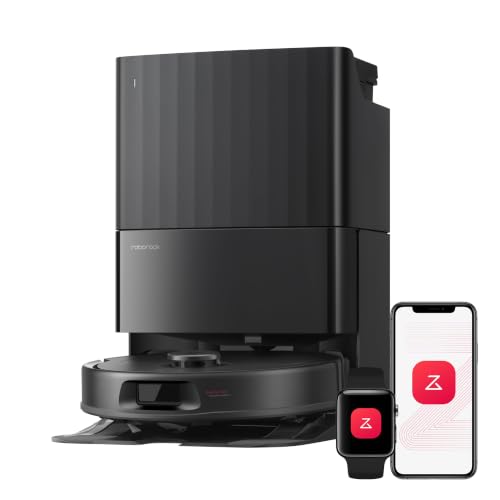
Disclosure: As an Amazon Associate, UMT Smart Tool earns from qualifying purchases. Links to Amazon on this page are affiliate links; they cost you nothing extra.
Robot vacuums keep floors clean on a schedule.
This guide is built from Amazon product listings and maker specs, not our own testing, so confirm size, contents and current price on each product page.
Check price on Amazon for the current listing price.
Last updated: November 2, 2026.
In this guide
Quick Picks
| Product | Type | Best for |
|---|---|---|
| Robot Vacuum and Mop Combo 6000Pa Powerful Suction LiDAR | Robot vacuum | automatic floor cleaning |
| ROPVACNIC Robot Vacuum and Mop Combo 5200Pa Suction Robotic | Robot vacuum | automatic floor cleaning |
| Shark AV2501S AI Ultra Robot Vacuum with Matrix Clean Home | Robot vacuum | automatic floor cleaning |
| DREAME L60 Ultra FE Robot Vacuum and Mop 212°F (100°C) Mop | Robot vacuum | automatic floor cleaning |
| dreame X50 Ultra Complete Robot Vacuum with Self-Cleaning | Robot vacuum | automatic floor cleaning |
| DREAME L60 Pro Ultra Robot Vacuum and Mop 3.47in (8.8cm) Obstacle | Robot vacuum | automatic floor cleaning |
| Uninell Zenith10 Robot Vacuum and Mop with Auto Wash Dock 20 | Robot vacuum | automatic floor cleaning |
| Robot Vacuum and Mop Combo 12 000 Pa Strong Suction dToF Laser | Robot vacuum | automatic floor cleaning |
Our Picks
Top pickBest for automatic floor cleaning
1. Robot Vacuum and Mop Combo 6000Pa Powerful Suction LiDAR
A Robot Vacuum and Mop Combo 6000Pa Powerful Suction LiDAR (robot vacuum), per the listing. Check price on Amazon.
Good for: automatic floor cleaning. Watch out: Check dock and map features.

Best for automatic floor cleaning
2. ROPVACNIC Robot Vacuum and Mop Combo 5200Pa Suction Robotic
A ROPVACNIC Robot Vacuum and Mop Combo 5200Pa Suction Robotic (robot vacuum), per the listing. Check price on Amazon.
Good for: automatic floor cleaning. Watch out: Check dock and map features.


Best for automatic floor cleaning
3. Shark AV2501S AI Ultra Robot Vacuum with Matrix Clean Home
A Shark AV2501S AI Ultra Robot Vacuum with Matrix Clean Home (robot vacuum), per the listing. Check price on Amazon.
Good for: automatic floor cleaning. Watch out: Check dock and map features.


Best for automatic floor cleaning
4. DREAME L60 Ultra FE Robot Vacuum and Mop 212°F (100°C) Mop
A DREAME L60 Ultra FE Robot Vacuum and Mop 212°F (100°C) Mop (robot vacuum), per the listing. Check price on Amazon.
Good for: automatic floor cleaning. Watch out: Check dock and map features.

Best for automatic floor cleaning
5. dreame X50 Ultra Complete Robot Vacuum with Self-Cleaning
A dreame X50 Ultra Complete Robot Vacuum with Self-Cleaning (robot vacuum), per the listing. Check price on Amazon.
Good for: automatic floor cleaning. Watch out: Check dock and map features.


Best for automatic floor cleaning
6. DREAME L60 Pro Ultra Robot Vacuum and Mop 3.47in (8.8cm) Obstacle
A DREAME L60 Pro Ultra Robot Vacuum and Mop 3.47in (8.8cm) Obstacle (robot vacuum), per the listing. Check price on Amazon.
Good for: automatic floor cleaning. Watch out: Check dock and map features.


Best for automatic floor cleaning
7. Uninell Zenith10 Robot Vacuum and Mop with Auto Wash Dock 20
An Uninell Zenith10 Robot Vacuum and Mop with Auto Wash Dock 20 (robot vacuum), per the listing. Check price on Amazon.
Good for: automatic floor cleaning. Watch out: Check dock and map features.

Best for automatic floor cleaning
8. Robot Vacuum and Mop Combo 12 000 Pa Strong Suction dToF Laser
A Robot Vacuum and Mop Combo 12 000 Pa Strong Suction dToF Laser (robot vacuum), per the listing. Check price on Amazon.
Good for: automatic floor cleaning. Watch out: Check dock and map features.
Best Picks by Category
These labels summarize listing data and are not hands-on test results.
- Highest listed rating (limited feedback): Robot Vacuum and Mop Combo 6000Pa Powerful Suction LiDAR. This is not an independent product-quality award.
- Most reviewed: Shark AV2501S AI Ultra Robot Vacuum with Matrix Clean Home.
- Best value: ROPVACNIC Robot Vacuum and Mop Combo 5200Pa Suction Robotic — a budget-tier pick; check price on Amazon.
- Lowest price: ROPVACNIC Robot Vacuum and Mop Combo 5200Pa Suction Robotic — a budget-tier pick; check price on Amazon.
- Premium option: DREAME L60 Pro Ultra Robot Vacuum and Mop 3.47in (8.8cm) Obstacle — a premium-tier pick; check price on Amazon.
Price, Rating and Review Comparison
The table lists the picks with their price tier. Prices change often, so confirm the current price on Amazon.
| Product | Price | Rating | Ratings | Price tier |
|---|---|---|---|---|
| ROPVACNIC Robot Vacuum and Mop Combo 5200Pa Suction Robotic | Check price on Amazon | — | — | Budget |
| Robot Vacuum and Mop Combo 6000Pa Powerful Suction LiDAR | Check price on Amazon | — | — | Budget |
| Robot Vacuum and Mop Combo 12 000 Pa Strong Suction dToF Laser | Check price on Amazon | — | — | Budget |
| Shark AV2501S AI Ultra Robot Vacuum with Matrix Clean Home | Check price on Amazon | — | — | Budget |
| Uninell Zenith10 Robot Vacuum and Mop with Auto Wash Dock 20 | Check price on Amazon | — | — | Mid-range |
| DREAME L60 Ultra FE Robot Vacuum and Mop 212°F (100°C) Mop | Check price on Amazon | — | — | Mid-range |
| dreame X50 Ultra Complete Robot Vacuum with Self-Cleaning | Check price on Amazon | — | — | Premium |
| DREAME L60 Pro Ultra Robot Vacuum and Mop 3.47in (8.8cm) Obstacle | Check price on Amazon | — | — | Premium |
How Much Feedback Backs Each Rating
A high average from a handful of ratings is weaker evidence than a slightly lower average from thousands. Here is how the sample size looks for each pick.
Navigation, Sensors and Mapping
How a robot vacuum finds its way around has a large effect on how well it cleans. Basic models bump along walls and furniture and use simple sensors, so coverage can be uneven. Models with LiDAR or dToF laser sensors, terms that appear in several listings here, spin or scan to measure distances and build a map of the room. A map lets the robot clean in orderly rows, return to its dock and remember the layout between runs. Camera-based systems use images to recognize the room, and some also try to identify obstacles.
Mapping features are worth checking in the app description. Useful options include room divisions, no-go zones and virtual walls, which keep the robot out of a pet bowl area or away from a cable tangle. The ability to save multiple floor maps matters if you have more than one level. Some robots can clean specific rooms on demand, and some can be scheduled by room.
Laser sensors work in the dark, while camera systems can need light. Dark or glossy furniture can confuse some sensors, and glass or mirrors can cause odd readings. Obstacle avoidance varies, so do not assume that any robot will dodge cables, socks or pet waste. Look at what the listing says about avoidance and read customer questions for hints. Advanced navigation usually adds to the price, so ask yourself how complicated your floor plan is.
Suction, Brushes and Floor Types
Listings highlight suction in pascals, such as 5200Pa, 6000Pa and 12,000Pa. These are maker claims and are measured in ways that differ between brands, so they cannot be compared like for like. A higher number does not guarantee better cleaning, because brush design, airflow, the seal around the nozzle and software also matter. Treat the figure as one data point among many.
The brush system matters for hair. A main roller with rubber fins or a combined bristle design may resist tangles better than plain bristles, but hair still wraps around brushes over time. A side brush sweeps debris from edges into the path of the main brush. Check whether the brushes are easy to remove and clean, since you will be doing this regularly. Some models offer carpet detection, which raises the suction on rugs.
Consider your floors. Hard floors, low pile rugs and thick carpet all place different demands on a robot. Very thick or shaggy rugs can trap a robot, and tassels can tangle. Look for the maximum threshold height the robot can climb, which the listing may state. If you have dark floors or black rugs, check whether cliff sensors work reliably, since some robots mistake dark patterns for drops. Robots clean light dust and debris well, but they do not replace occasional deeper vacuuming.
Mopping Systems and Their Limits
Mop combos come in several forms. Some simply drag a damp pad behind the vacuum. Others use spinning pads or rollers that press against the floor. Hot-water or heated-pad features, such as the 212 degree Fahrenheit mop described in one listing, are meant to help loosen stuck dirt, and higher-end models may lift the mop when they detect carpet. What a particular system achieves depends on the design and the floor.
Think about your flooring. Sealed hard floors, tile and vinyl are typically suited to damp mopping. Unsealed wood, some laminate and certain stone surfaces can be damaged by moisture, so check the floor maker’s guidance and the robot’s manual. Some owners keep the mop function for tile and use vacuum-only on wood. Rugs and carpets must be kept away from the mop, either through detection or through no-go zones.
A robot mop is best for light, regular upkeep, not for dried-on spills. Expect to treat heavy stains by hand. Check the water tank size, the pad type and whether the pads are washable. Use only the cleaning solution the maker permits, if any, because the wrong liquid can harm the pump or leave residue. After a mopping run, wash or replace the pads and empty the tank to avoid odors.
Docks, Dust Handling and Upkeep
Docks range from a simple charging base to a multi-function station. A self-emptying dock moves dust from the robot into a bag or bin so you empty it less often. A self-washing dock cleans mop pads and refills the water tank. The listings here include models with auto-wash docks and self-cleaning systems. These features reduce chores but make the unit larger and more expensive, and they add parts to maintain.
Check the running costs. Dock bags, filters, pads, brushes and cleaning solutions are consumables, and some are brand-specific. Find out what the maker sells and what a replacement costs before you commit. Dock stations need space on the floor, a nearby outlet and clearance around them so the robot can approach and leave. Water-based docks need a spot where leaks would be harmless.
Keep up with maintenance. Empty dustbins, clean filters, trim hair from brushes and wipe sensors and cliff detectors with a dry cloth. Wash the water tank and mop pads, and keep the charging contacts clean. Replace brushes and filters according to the maker’s guidance. A poorly maintained robot loses suction, gets stuck more often and can develop odors. Check the warranty, and see if parts like batteries are available as a replacement.
Home Preparation, Apps and Privacy
A few minutes of preparation prevents most problems. Pick up cables, loose clothes, small toys and pet items before a run. Tuck in curtain tassels and rug fringes. Close doors to rooms you do not want cleaned, or set no-go areas. Place the dock against a wall in an open spot with room on both sides. Make sure your stairs have a firm edge or barrier, and test the robot near drops with supervision at first.
Most robots rely on an app for maps, scheduling and settings. Check which Wi-Fi bands the robot supports, as many connect only to 2.4 GHz networks. Look at what the app offers and whether you need an account. Voice assistant support varies. Robots that use cameras or microphones raise privacy questions, so read the privacy settings, understand what data is stored and where, and consider disabling features you do not need.
Think about noise and timing. Robots can be loud, especially at high suction, and a schedule while you are out is considered convenient. Pets may be curious or nervous, so introduce the robot gradually. If you have a small home or a modest budget, a simpler model may fit well, while a larger, more complex layout may justify mapping and a self-emptying dock. Decide which features you will really use.
Which Robot Fits Which Household
The eight picks cover a wide range, so it helps to match them to a home rather than to a feature list. If you want the lowest entry point and a large pool of owner feedback, the ROPVACNIC combo is the budget choice in the comparison above, with thousands of ratings behind its average. If you want the pick with by far the most feedback overall, the Shark AV2501S is the one, which tells you many households have lived with it, though a listing average is not a quality guarantee.
Homes that want fewer chores should look at the models whose listings mention a self-cleaning system or an auto wash dock, namely the dreame X50 Ultra Complete and the Uninell Zenith10. The DREAME L60 Ultra FE highlights a hot mop, while the L60 Pro Ultra highlights an obstacle height figure in its title, so read both listings to see what each feature means for your floors.
The two unbranded combos with LiDAR or dToF laser in their titles suit buyers who want laser mapping at a modest price. Both have few ratings, so read recent questions and check the return terms. Small flats rarely need a large dock, while multi-room homes gain more from mapping and room-by-room control.
What to Check on the Listing First
Titles on shopping pages are crowded with big numbers, and the details that decide daily use are often further down. Before you buy any of these robots, scroll through the listing and the product description and look for the items below. If something is missing, check the maker’s manual or ask in the questions section.
- Dock contents: does the box include a dock, and does that dock empty dust, wash pads, or only charge?
- Mop type: pad, roller or spinning pad, and whether it lifts on carpet.
- Tank sizes: dust bin and water tank capacity, which vary by model.
- Mapping features: multi-floor maps, no-go zones, room selection and scheduling.
- App and Wi-Fi: supported bands, account requirements and voice assistant support.
- Replacement parts: whether brushes, filters, pads and batteries are sold separately.
- Warranty and returns: length, who handles claims and what the seller allows.
Pay attention to whether the seller is the maker or a third party. Support is easier to reach when the maker stands behind the product, and some of the smaller brands here may offer less detailed manuals, so read what is shown.
Sizing, Height and Clearance Checks
A robot that does not fit under or around your furniture will skip the places where dust gathers. Measure the gap beneath sofas, beds and cabinets and compare it with the robot’s height in the listing. Models with a raised laser turret can be taller than flat camera-based ones, which means they may stop short of low furniture. The listing or manual normally states the height; confirm it rather than guessing from photos.
Check doorway thresholds and the edges of rugs. Each robot has a stated climbing limit, and a ridge higher than that can trap it. The L60 Pro Ultra title mentions an obstacle figure, which is the kind of number to look for on any robot you are considering. Also measure the width of narrow passages, such as the gap between a table leg and the wall.
Next, measure the dock. Self-emptying and self-washing stations are bulky, and they need open floor on both sides and in front. Allow space for the bag or water containers to be removed without moving the whole unit. Finally, consider the size of your home. A small flat may be covered in one run, while a big home might need the robot to return to the dock mid-job to recharge, so battery and resume behavior matter more.
Battery, Runtime and Resume Cleaning
Battery information appears in several forms, such as minutes of runtime or capacity figures, and the numbers depend on suction level and floor type. Higher suction and carpet shorten runtime, so a listed maximum is rarely what you get on a full clean. Treat the figure as a ceiling and check what the maker says about typical use.
The feature to look for is recharge and resume. A robot with a map can return to its dock when the battery runs low, charge, and then finish the rooms it missed. Without that, a large home may end up partly cleaned. Check the listing wording closely, since not every model with a map offers resume cleaning.
Batteries wear out over time, and a robot that once cleaned the whole floor may eventually stop early. Ask whether the battery can be replaced and whether the maker or seller supplies one. Storing the robot on its dock keeps it ready, but if you plan to be away for a long time, check the manual for advice on battery storage. Keep the charging contacts and dock sensors clean, because poor contact is a common reason a robot appears not to charge.
Noise, Filters and Everyday Problems
Noise depends on the suction setting, the floor, and whether a self-emptying dock is involved. Docks tend to make a loud burst when they pull dust from the robot, so consider where the dock sits relative to bedrooms and where you work. Most robots offer quieter modes that trade suction for lower sound, and a schedule while you are out sidesteps the issue.
Filters affect both performance and the air you breathe near the machine. Check what kind of filter the listing mentions and how often the maker advises washing or replacing it. A clogged filter reduces airflow and can make the robot sound strained.
The most common problems are avoidable. Robots get stuck on cables, socks and fringe, so tidy the floor first. Hair wraps around brushes, so cut it away on a regular basis. Maps can become confused after furniture is moved, and re-mapping may be needed. Cliff sensors can misread dark rugs. A robot that keeps stopping in the same place is signaling a specific obstacle, so look at that spot. For any error code, the manual and the maker’s support pages are the best reference.
Budget Tiers and When to Replace
Think of the market in three rough tiers. Entry-level robots handle basic vacuuming and often basic mopping, with simpler docks and fewer extras. Mid-range models usually add better navigation, stronger app control and sometimes a dock that handles part of the work. Top-tier robots tend to add self-washing docks, heated mopping, advanced obstacle handling and more automation, and they also add parts that can wear or need servicing. The extra cost buys convenience, so decide which chores you most want to avoid.
Be careful with limited feedback. Several lower-priced and newer listings carry only a small number of ratings, so the safest approach is to read the return window and warranty before relying on them.
Signs it is time to replace a robot include a battery that no longer finishes a normal run, repeated navigation errors after cleaning the sensors, a pump or dock that fails and cannot be serviced, and parts that are no longer sold. If repairs cost close to a new unit, replacement is usually the more sensible path.
A Closer Look at Each Pick: Who It Suits and Where It Falls Short
The comparison table sorts these robots by tier, but robot vacuums are really bought on navigation, dock behaviour and upkeep. This section reads each pick for the household it fits, the claim in its name that matters, and the limit to accept before choosing it.
Robot Vacuum and Mop Combo 6000Pa with LiDAR
The budget-tier opener pairs a strong stated suction figure with LiDAR navigation, and the category notes associate it with the highest listed rating on limited feedback, so read it as a promising but lightly documented listing. LiDAR is the important word: laser mapping is what separates orderly, whole-room cleaning from random bumping, and finding it in the budget tier is the appeal. It suits a first-time robot buyer who wants real mapping without paying mid-range prices, in a home with mostly hard floors and low-pile rugs. Its limits are the budget class limits: a basic dock rather than a self-emptying station, mop function that maintains rather than scrubs, and a listing you should research carefully because the feedback pool is small. Choose it for mapped cleaning at an entry tier; verify the app, the dock contents and the return terms on the listing before ordering.
ROPVACNIC Robot Vacuum and Mop Combo 5200Pa
The value pick of the roundup, flagged as both best value and lowest price in the category notes, is a suction-led combo unit for buyers who want the robot-and-mop format at the gentlest tier. It suits smaller homes and flats, lighter daily debris, and households testing whether a robot fits their life before committing to a premium dock system. The honest limits follow its tier: navigation and obstacle handling will be simpler than the laser-led models, the mop is for maintenance wiping, and parts and app support deserve a careful listing check. Choose it as the low-risk introduction to the category; skip it if your home is large, cluttered or carpet-heavy, where its simpler systems will work hard for modest results.
Shark AV2501S AI Ultra Robot Vacuum with Matrix Clean
The Shark is the mainstream brand anchor of the list and, per the category notes, the most reviewed pick, which gives researchers the deepest pool of owner experience available here. Its identity is methodical cleaning from a major floor-care brand, with the support and parts ecosystem that usually follows a big name. It suits households that value documented behaviour and brand support over headline suction numbers, and homes that want a robot whose quirks are well described by other owners. Its tier placement in the table is budget, which makes its brand positioning notable, but confirm the exact configuration and dock contents on the listing, because model families often span several bundles. Choose it for researched, brand-backed cleaning; compare its navigation approach with the LiDAR models if orderly mapping is your first priority.
DREAME L60 Ultra FE with Hot Mop Washing
This mid-range Dreame model leads with its mop story: the listing highlights very hot mop washing at the dock, which addresses the dirtiest secret of robot mops, namely that a mop pad carrying yesterday’s grime just moves dirt around. A dock that washes pads properly makes the mop function worth using daily rather than occasionally. It suits hard-floor homes where mopping is a real weekly need, not a bonus, and households that want the robot to maintain floors between their own deeper cleans. Its limits are the dock system’s own: a larger dock footprint, water tanks to fill and empty, and more upkeep steps than a vacuum-only robot asks. Choose it if mopping quality is your deciding factor; skip it if your floors are mostly carpet, where the mop investment sits idle.
dreame X50 Ultra Complete with Self-Cleaning
The premium Dreame flagship in this list is the maximalist option: a complete, self-cleaning dock system from the brand’s top line, for buyers who want the robot to handle vacuuming, mopping and its own maintenance with as little human involvement as the category currently allows. It suits busy households, larger homes and anyone who has owned a basic robot and knows exactly which chores they want to hand over. Its honest limits are tier, footprint and complexity: a full dock station needs a proper home with water access in mind, and more systems mean more parts to keep clean and more consumables to track. Choose it as the hands-off flagship; skip it if a simple vacuum-only routine covers your floors, because most of its engineering would go unused.
DREAME L60 Pro Ultra with Low Obstacle Clearance
The second premium Dreame emphasises access: its listing highlights an unusually low obstacle-crossing figure, which is about thresholds, rug edges and the transitions where lesser robots get stuck or give up. It suits homes with mixed flooring, raised thresholds between rooms, and furniture layouts that defeat robots with weaker climbing and sensing. The category notes flag it as the premium option of the roundup. Its limits mirror the flagship’s: premium tier, a substantial dock, and capability you only benefit from if your home actually presents those obstacles. Choose it for a complicated floor plan; choose the L60 Ultra FE instead if hot mop washing matters more than threshold heroics, and choose neither if your home is one simple, flat, open space.
Uninell Zenith10 with Auto Wash Dock
The mid-range Uninell brings an auto wash dock to a lower tier than the Dreame systems, which is its whole argument: mop-pad washing without the flagship spend. It suits hard-floor households that want the mop function kept honest by a washing dock, at a mid-range commitment. Because it is a less familiar name than the big brands here, the listing homework matters more: check the dock’s water handling, the availability of replacement pads, brushes and filters, and the app and support story before ordering. Its limit is that research burden, plus the usual dock footprint. Choose it if its dock features check out on the listing and the tier fits; fall back to the Shark or a Dreame if parts availability looks uncertain.
Robot Vacuum and Mop Combo 12000 Pa with dToF Laser
The closing budget pick leads with the biggest suction headline in the list and dToF laser navigation, a combination aimed at buyers who compare numbers first. Read both claims the way this guide has taught: suction figures are measured differently between makers and matter most on carpet, while the laser navigation is the claim with everyday consequences, because mapping decides coverage. It suits value-focused buyers in homes with mixed floors who want laser mapping at a budget tier. Its limits are the familiar budget ones: a simpler dock, a maintenance-grade mop and a listing to verify carefully, including what the dock does and does not do. Choose it if the navigation and listing details survive your checks; treat the suction headline as a starting point for questions, not as the answer.
Head-to-Head: The Closest Calls in This List
The budget laser pair: 6000Pa LiDAR versus 12000 Pa dToF
Both promise laser-guided cleaning at a budget tier, so decide on the paperwork: dock contents, app quality as described by owners, replacement parts, and the seller’s terms. Suction headlines should not break this tie, because the figures are not measured on a shared standard and both are ample for hard floors. The robot whose ecosystem you can verify is the safer buy, since a budget robot with unavailable brushes and filters becomes expensive quickly.
ROPVACNIC versus Shark AV2501S
The value challenger against the documented mainstream brand. The ROPVACNIC asks the least and covers the basics for smaller, simpler homes. The Shark brings the deepest owner feedback in the list and a major brand’s support structure. If your home is small and your expectations are maintenance cleaning, the value pick is defensible. If the robot will be your main vacuum across a family home, the Shark’s documented behaviour is worth its step, and its owner pool will tell you more truth than any specification table.
DREAME L60 Ultra FE versus L60 Pro Ultra
Sibling flagships split on their hero feature. The FE leads with hot mop washing, for homes where mopping quality is the point. The Pro Ultra leads with obstacle clearance, for homes where thresholds and transitions are the point. List your home’s actual obstacle: dirty mop water or impassable doorways. The answer picks the model, and picking the other one means paying a premium for engineering aimed at a problem your floors do not have.
Uninell Zenith10 versus the Dreame dock systems
This is the dock question at two budgets. The Uninell promises auto washing in the mid-range; the Dreame systems promise the fullest dock automation in the premium tier. Compare what each dock actually does on its listing: washing, drying, self-emptying and water handling are separate features that marketing language loves to blur. Buy the dock whose verified feature list matches the chores you want to surrender, and no further.
The Upkeep Rhythm That Decides Whether a Robot Lasts
Robots fail socially before they fail mechanically: owners stop maintaining them, performance fades, and the machine ends up parked. A light rhythm prevents that story. Empty the bin or check the dock bag on the maker’s schedule, and sooner in pet homes. Pull hair from the brush roll and side brush regularly, because wrapped hair is the top cause of weak cleaning and strange noises. Wipe the sensors and charging contacts with a dry cloth so navigation and docking stay reliable. Wash or replace mop pads as directed, and never let a dirty pad dry on the dock for days. Check filters on schedule and replace them when they stay grey after tapping clean.
Prepare the home the same way each run: lift cables, move small obstacles, open the doors of rooms you want cleaned and close the ones you do not. The first full mapping run deserves supervision, not because the robot needs help, but because you need to learn where your home traps robots: chair leg forests, thick rug edges, low furniture the robot can enter but not leave. Fix those spots once, with cable management, a moved chair or a no-go zone in the app, and every later run benefits. Owners who do this setup work in week one describe their robots as reliable; owners who skip it describe the same models as hopeless, which tells you where the difference really lives.
Troubleshooting: Stuck, Lost, Loud or Leaving Dirt Behind
A robot that keeps getting stuck is usually meeting the same obstacle repeatedly, so watch one run and fix the spot rather than rescuing the robot daily. A robot that seems lost may have dirty sensors, a moved dock or a map confused by rearranged furniture; clean the sensors, keep the dock in one place with clear space around it, and remap if the layout changed. A robot leaving dirt behind points to a full bin, a hair-bound brush, a worn filter or suction spent fighting a clogged path, in roughly that order of likelihood. A robot that will not charge usually has dirty contacts or a dock that lost power; check both before assuming battery failure. Mop complaints, streaks and smells, trace to pad condition and dock water hygiene, which the upkeep rhythm above is designed to prevent.
Stop-and-seek-help signals are different: a battery that swells or overheats, burning smells, a robot that has taken a serious fall or water into a vacuum-only body, and error codes that survive the manual’s reset steps. At that point the warranty and support route on the listing is the right tool, and it is another reason the parts and support checks mattered at purchase time.
Decision Scenarios: Match the Pick to Your Situation
First robot, small flat, mostly hard floors: the ROPVACNIC or the budget LiDAR model, decided on listing checks. Family home wanting a researched mainstream machine: the Shark AV2501S. Hard floors with real mopping needs: the DREAME L60 Ultra FE, or the Uninell Zenith10 if its dock checks out at the lower tier. Complicated floor plan with thresholds: the DREAME L60 Pro Ultra. Busy household wanting maximum hands-off operation: the dreame X50 Ultra Complete. Number-led value buyer with mixed floors: the 12000 Pa dToF model, after verifying its dock and parts. In every case, measure the dock’s intended spot, confirm replacement parts exist for the model, and read the listing for exactly what the dock does, because in this category the dock, not the robot, is where satisfaction is decided.
Living With a Robot: Pets, Children and Privacy
Three household realities deserve a direct word. Pets first: robots and pet hair are natural partners, but the partnership works only with the upkeep rhythm kept, because hair loads brushes and bins faster than any other debris. Schedule runs when pets are calm if your animals chase or fear the machine, and treat any accident risk honestly: a robot that meets pet mess will spread it, so a quick floor check before an unattended run is wisdom, not paranoia. Children second: a robot is not a toy, however much it looks like one, so teach small children to let it work, keep fingers away from brushes and wheels, and store the dock where it will not be unplugged as a game. Privacy third: mapping robots build a floor plan of your home, and camera-equipped models see more than laser-only ones, so read the listing and app permissions with that in mind and choose the sensing style you are comfortable living with. None of these points disqualifies any pick here; they simply reward the buyer who thinks about the household, not just the floor.
Common Questions
Do robot vacuums replace regular vacuuming?
They handle light, regular upkeep well, but most owners still use a regular vacuum now and then for corners, stairs and deep cleaning.
What does LiDAR do on a robot vacuum?
It uses a laser to measure distances and build a map, which helps the robot plan its route and return to its dock. Performance varies by model.
Is higher suction always better?
Not always. The pascal figure is a maker claim measured in different ways, and brush design and airflow also matter.
Can a robot mop clean hardwood?
It depends on the floor finish and the robot. Check the floor maker's guidance and the robot manual, and avoid mopping unsealed wood.
Will a robot vacuum work on carpet?
Many can on low-pile carpet, and some boost suction on rugs. Thick, shaggy or tasseled rugs can cause trouble.
How often should I empty and clean it?
Empty the bin regularly according to use, and clean brushes, filters and sensors on the schedule in the manual. Pet hair may need more frequent attention.
Do I need Wi-Fi to use one?
Basic operation often works from buttons, but maps, scheduling and many settings require the app and a Wi-Fi connection. Check which bands are supported.
Are robot vacuums safe around pets?
Many homes use them with pets, but accidents with pet waste or cables can occur. Supervise the first runs and clear hazards.
How long should I let a robot vacuum learn my home before trusting its map?
Many mapping robots build a first map in an initial run, and you then review it in the app. Check that rooms are split correctly and set no-go zones before relying on scheduled cleaning. If the layout changes, a fresh map run may be needed.
Can a robot vacuum go over cords and charger cables?
Not reliably. Cables can tangle in brushes or pull items off a surface, and obstacle avoidance varies by model. Pick up cords before each run or block those areas with a no-go zone.
Is it worth buying a model with a self-emptying dock?
It depends on how much you dislike emptying a small dustbin. Docks cut that chore but need floor space, an outlet and replacement bags or bins, so check the ongoing supply costs and the dock size first.
How do I stop the mop from wetting my carpet?
Look for carpet detection that lifts the mop, and set no-go or no-mop zones on rugs in the app. If a model lacks these, use vacuum-only mode on carpeted rooms or remove the mop pad.
What should I do with a robot vacuum that keeps getting lost?
Clean the sensors with a dry cloth, make sure the room has enough light if the model uses a camera, and move the dock to an open spot. Restarting the map or checking for a software update from the maker may also help.
Can I run a robot vacuum while I am away from home?
Many people schedule runs while out, which works well when the floor is tidy and the robot has a clear route. Check the app for remote controls and keep pets, cables and open stairs in mind before leaving.
Do robot vacuums work well with long pet hair?
Long hair tends to wrap around brushes on any robot, so check the brush design in the listing and plan to cut hair away regularly. Pet owners may also need to empty the bin and clean filters more often.
What happens to the map when I move the robot to another floor?
Some models store several floor maps and recognize the level when placed, while others need you to select it in the app. Check the listing for multi-floor map support before buying for a home with stairs.
Bottom Line
Mop combos with docks cost more but need less work.
More Home & Garden Guides
- Best Memory Foam Pillows for Sleeping
- Best Weighted Blankets for Adults
- Best Electric Standing Desks
- Best Bedroom Humidifiers
- Best Dehumidifiers for Basements and Damp Rooms
- Best HEPA Air Purifiers for Bedrooms and Large Rooms
- Best Space Heaters for Indoor Use
Related Guides
- 6 Best Vacuums for Stairs (2026)
- 6 Best Vacuums for Allergies (2026)
- 6 Best Vacuums for Apartments (2026)
- 7 Best Bagless Upright Vacuums: Eureka, Bissell, Shark (2026)
- 4 Best Backpack Vacuum Cleaners (2026)