A premium camera drone aims to give you better image quality, longer flight time and more refined controls than an entry model. Larger sensors, three-axis gimbals and stronger video links are the usual differences. For photographers and filmmakers, those features can mean cleaner footage in low light and more flexibility in editing.
This guide covers how to weigh those differences. We have not used these products ourselves, so the comparisons rely on listing information and general knowledge. Use it to narrow your list, then check each listing and your local drone rules before you order.
As an Amazon Associate we earn from qualifying purchases. Links on this site are affiliate links, and they do not change the information we give.

In this guide
Quick Picks
| Pick | Product | Best For |
|---|---|---|
| Best Overall | DJI Mavic 4 Pro Fly More Combo (DJI RC 2) | Maximum image quality from a folding drone |
| Best for Telephoto Reach | DJI Mavic 3 Pro Fly More Combo (DJI RC) | Three native focal lengths in one aircraft |
| Best for Low-Light and Night Flying | DJI Air 3S Fly More Combo (DJI RC 2) | LiDAR-assisted sensing after dark |
| Best DJI Alternative | Autel Robotics EVO II Pro V3 | 6K video and a 1-inch sensor outside the DJI ecosystem |
| Best Lightweight Premium | DJI Mini 5 Pro Fly More Combo (DJI RC 2) | A 1-inch sensor in a 249 g airframe |
Our Picks
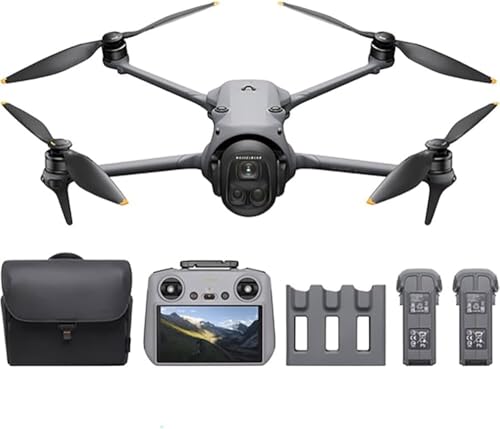
1. DJI Mavic 4 Pro Fly More Combo (DJI RC 2) — Best Overall
The Mavic 4 Pro is DJI’s current flagship folding drone, built around a 100MP 4/3 CMOS Hasselblad main camera in a triple-camera system that also covers medium-tele and telephoto focal lengths. That large sensor is the main reason to step up to this class: it holds detail in dim light and leaves more room for cropping and color work in editing. DJI rates flight time at up to 51 minutes per battery, and the video transmission system is rated to 30 km (18.6 mi), which keeps the live view stable at long distances where local rules allow.
The Fly More Combo pairs the aircraft with the screen-equipped DJI RC 2 controller, three Intelligent Flight Batteries and a charging hub, matching the multi-battery kit this guide recommends for a full day on location. Omnidirectional obstacle sensing helps when flying near trees and structures, though it supports rather than replaces careful piloting. Choose this one if image quality is the priority and you want the most capable camera DJI puts in a folding body.

2. DJI Mavic 3 Pro Fly More Combo (DJI RC) — Best for Telephoto Reach
The Mavic 3 Pro pairs its 4/3 CMOS Hasselblad wide camera with two telephoto cameras, giving three native focal lengths — wide, medium tele and a long tele — without landing to change anything. That makes it a strong pick for subjects you cannot approach closely, such as wildlife, architectural details and coastal scenes. DJI rates flight time at up to 43 minutes, with 15 km HD video transmission and omnidirectional obstacle sensing.
The Fly More Combo adds two extra Intelligent Flight Batteries (three in total), a 100W charging hub, an ND filter set and a shoulder bag, so the kit is ready for longer shoots straight from the box. The included DJI RC has a built-in screen, so you do not need to mount a phone. Because the aircraft sits well above 250 g, registration rules apply in many regions — check yours before flying. Pick the Mavic 3 Pro if triple-camera flexibility matters more to you than the newer model’s higher-resolution sensor.
View DJI Mavic 3 Pro Fly More Combo (DJI RC) on Amazon
3. DJI Air 3S Fly More Combo (DJI RC 2) — Best for Low-Light and Night Flying
The Air 3S is the step-up model in DJI’s mid-size line, with dual cameras: a 1-inch CMOS wide-angle camera and a medium tele camera, both recording 4K/60fps HDR video with up to 14 stops of dynamic range. What sets it apart in this group is the forward-facing LiDAR sensor, which supports the Nightscape omnidirectional obstacle sensing — designed to keep the sensing working after dark, where camera-based systems struggle. DJI rates flight time at up to 45 minutes and transmission at up to 20 km.
This Fly More Combo includes the RC 2 controller with its own screen, three batteries, a charging hub, an ND filter set (ND8/32/128) and a shoulder bag. The folding body is smaller than the Mavic flagships, which suits travel, while the 1-inch sensor still covers the low-light work this guide highlights. It fits photographers and video creators who want one drone for day and evening shoots without moving up to the size and cost of the Mavic line.
View DJI Air 3S Fly More Combo (DJI RC 2) on Amazon
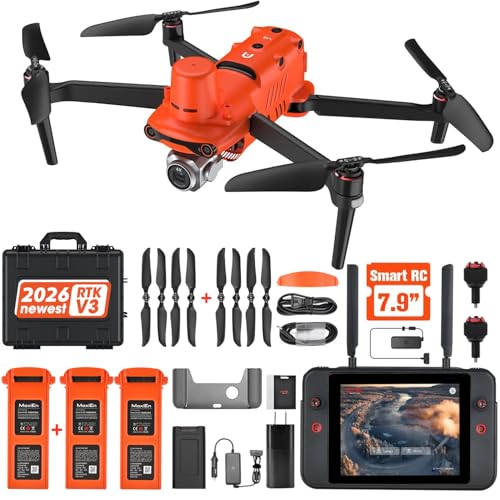
4. Autel Robotics EVO II Pro V3 — Best DJI Alternative
The EVO II Pro V3 is the main alternative to DJI in this class. Its Sony 1-inch CMOS sensor records 6K HDR video and 20MP stills, with 12-bit DNG raw files for editors who push their grades. Autel’s Moonlight Algorithm 2.0 and a maximum ISO of 44000 target the low-light shooting this guide treats as a key premium feature. Flight time is rated at up to 40 minutes, transmission at up to 15 km, and the airframe carries 360-degree obstacle avoidance.
The bundled 6.4-inch Smart Controller SE has a built-in display, so no phone is required, and the folding design travels in a small case. Bear in mind the weight class: this is a substantially heavier aircraft than the sub-250 g models, so it falls into registration categories in many regions — check your local rules. Choose the EVO II Pro V3 if you want a 1-inch-sensor premium drone outside the DJI ecosystem, or if its 6K video and smart controller package suit your workflow better.

5. DJI Mini 5 Pro Fly More Combo (DJI RC 2) — Best Lightweight Premium
The Mini 5 Pro squeezes a 1-inch CMOS camera into an airframe that weighs 249 g, which in many regions keeps it in the lightest regulatory class — check the rules where you live, since they vary. The gimbal offers 225 degrees of rotation for more creative framing, and omnidirectional obstacle sensing plus ActiveTrack 360-degree subject tracking are features previously reserved for larger DJI models. Video is 4K, and the large sensor gives this mini drone low-light ability that earlier sub-250 g models could not match.
The Fly More Combo adds the RC 2 screen controller, three Intelligent Flight Batteries, a two-way charging hub, an ND filter set and a shoulder bag — the full travel kit this guide suggests for frequent flyers. The trade-offs versus the Mavics are a single fixed wide camera and a small body that asks more of the pilot in strong wind. Pick it if portability and simpler registration matter most, but you still want a genuinely large sensor.
View DJI Mini 5 Pro Fly More Combo (DJI RC 2) on Amazon
What to Look For
| Factor | Why it matters | What to check |
|---|---|---|
| Sensor size | A larger sensor generally handles dim light better. | Read the stated sensor format and video modes. |
| Gimbal | A stable mount keeps footage smooth in wind and motion. | Look for a three-axis design and tilt range. |
| Flight time | Longer flights mean fewer battery swaps on location. | Compare the maker figure and the number of batteries in the kit. |
| Video link range | A strong link keeps the live view clear. | Check the transmission system and any regional limits. |
| Obstacle sensing | Sensors can assist the pilot near trees and buildings. | Note which directions are covered, as described by the maker. |
| Weight class | Weight can affect registration and where you may fly. | Check the stated weight against rules in your area. |
| Portability | Folding arms make travel easier. | Check folded dimensions and the included case. |
Setup and Care Tips
- Update the firmware and controller app at home before you travel to a location.
- Calibrate the compass and check the propellers for chips before each flight.
- Carry spare propellers and a memory card in your kit.
- Keep batteries at moderate charge during storage, following the maker guidance.
- Wipe the gimbal area and lens with a soft cloth and use the supplied gimbal cover.
Mistakes to Avoid
- Skipping local drone rules and registration requirements before your first flight.
- Buying on sensor size alone and ignoring the controller and app experience.
- Counting on a single battery for a full shoot.
- Assuming obstacle sensors replace careful flying and line of sight.
- Forgetting that filters and cases are often sold separately.
Which premium camera drone should you buy?
The best premium camera drone is the one whose camera, size and kit match the kind of footage you shoot and how far you travel. The five picks above split along those lines.
- If image quality is your top priority, go for the DJI Mavic 4 Pro Fly More Combo (DJI RC 2). It is the flagship in this group, with a large-sensor main camera and a triple-camera system.
- If you shoot subjects you cannot approach, such as wildlife, architecture or coastal scenes, choose the DJI Mavic 3 Pro Fly More Combo (DJI RC), which carries three native focal lengths.
- If you fly in the evening or after dark and want a smaller body, pick the DJI Air 3S Fly More Combo (DJI RC 2), which is built around LiDAR-assisted sensing for low light.
- If you prefer to stay outside the DJI ecosystem, look at the Autel Robotics EVO II Pro V3, which pairs a 1-inch sensor with a bundled smart controller.
- If you travel often and want the simplest weight class, the DJI Mini 5 Pro Fly More Combo (DJI RC 2) packs a 1-inch sensor into a lightweight airframe.
A simple way to decide is to ask what limits you today. If it is detail and editing room, step up in sensor and camera count. If it is carrying weight and rules, choose the lighter body. Confirm kit contents on the listing, because each entry here is a bundle with specific controllers and batteries.
Is a premium camera drone worth it over an entry model?
A premium camera drone is worth it if you will use the larger sensor, longer flight time and stronger controls for photography, video work or demanding conditions. For casual flying in good light, an entry model may be all you need.
The differences show up where entry drones struggle. Larger sensors tend to cope better in dim light and give more room for color grading and cropping. Better gimbals keep footage smooth in wind, and stronger video links keep the live view steady at distance.
- Worth it for: paid or semi-professional work, travel photography, real estate, scouting and anyone who edits footage heavily.
- Probably not needed for: occasional hobby flights, short clips for social media in bright light, or learning the basics.
Be honest about the downsides. Premium kits cost more, the batteries and accessories add up, and a bigger drone means more registration paperwork in many places. A premium drone also raises the stakes of a crash, so practice matters.
If you are new to flying, consider whether you would rather learn on something simpler first. Skills like smooth stick control, planning shots and checking the weather carry over to any drone, and they matter more than any single spec.
How does sensor size and lens choice change drone footage?
A larger sensor generally gives cleaner footage in low light and more flexibility in editing, while extra lenses give you different framings without moving the drone. Which matters more depends on what you shoot.
Sensor size is the headline difference between premium and entry drones. A bigger sensor collects more light, which helps at dawn, dusk and indoors-adjacent scenes. It does not fix a bad shot, and it usually adds weight and cost.
- Single wide camera: simple and light, good for landscapes and general footage. The Mini 5 Pro takes this approach with a large sensor.
- Dual camera: a wide and a medium tele view, as on the Air 3S, which lets you change composition quickly.
- Triple camera: wide plus two telephoto views, as on the Mavic 3 Pro and Mavic 4 Pro, useful when you cannot get closer.
Beyond the sensor, look at the video formats. Higher bit depth and flat color profiles give colorists more to work with, but the files are larger and need faster memory cards and a stronger computer.
Check the stated video modes, frame rates and any limits on the listing rather than assuming. A drone that records excellent footage but strains your editing computer may not suit your workflow. Think about storage too, since high-quality video fills cards quickly.
Do you need to register a premium camera drone?
Often yes, but the rules depend on your country, the drone’s weight and how you fly, so check your national aviation authority before you buy. A heavier drone usually faces more requirements than a lightweight one.
Weight class is one reason people choose the lighter pick in this guide. Many regions treat the lightest aircraft more simply, while larger drones may need registration, identification or a pilot certificate. The post’s picks vary in weight, and the Autel and Mavic models sit in a heavier class than the Mini 5 Pro.
- Look up the rules for your location before the drone arrives.
- Check whether registration, labeling or remote identification applies.
- Learn about no-fly zones near airports, stadiums and sensitive sites.
- Keep the drone in line of sight unless your local rules clearly allow otherwise.
- Respect privacy and property when you film.
Rules change, and commercial use can bring extra requirements. If you plan to sell footage or fly for clients, read the guidance for professional operators in your area.
Many controller apps show airspace warnings, but they are an aid and not a legal guarantee. You remain responsible for where and how you fly, and obstacle sensors do not replace careful piloting.
What to check before you buy a premium camera drone
Before you buy a premium camera drone, confirm what the bundle includes, the weight class, battery count, controller type and the rules where you fly. This checklist keeps surprises to a minimum.
- Kit contents: check the controller, number of batteries, charging hub, filters and carry bag. Names like Fly More Combo mean different things on different models.
- Controller: see whether it has a built-in screen or needs a phone.
- Weight class: compare the stated weight with the rules in your area.
- Memory cards: check which card type and speed the maker recommends, and whether one is included.
- Spare parts: look at the price and availability of propellers and batteries for later.
- Software and updates: check app support for your phone or tablet.
- Warranty and crash coverage: read the warranty terms and any optional protection plan on the listing.
- Returns: confirm the return window, since terms differ by seller.
Also think about your computer. High-resolution video and raw photo files need a capable editing setup. If your computer is older, test how it handles large files before you commit.
Think about weather and conditions as well. Strong wind, rain and very cold air can shorten flights and make a light drone harder to hold steady. Read the maker’s stated operating limits in the manual, and treat them as limits rather than targets.
Check how you will carry the kit, too. A shoulder bag or hard case that holds the drone, controller, batteries and filters makes travel easier, and some bundles include one while others do not.
Finally, plan a safe place to learn. An open area away from people, roads and trees is better for your first flights, and a calm day with light wind helps.
What are the downsides, and who should skip a premium drone?
The main downsides are cost, size, rules and the learning curve, and some buyers are better served by a simpler or lighter drone. A premium model only pays off if you will use what it offers.
Who should skip a premium camera drone:
- First-time flyers who only want to try the hobby; an entry model is a gentler start.
- People who rarely shoot in low light, where a large sensor matters less.
- Buyers who cannot meet registration or flying rules in their area.
- Anyone who dislikes managing batteries, firmware and accessories.
Is it worth paying more for the Mavic 4 Pro over the Air 3S or the Mini 5 Pro? Only if you will use the extra camera capability. The smaller models cover many shooting needs with less weight to carry, and they are easier to bring on trips. Choosing a model outside the DJI line, like the Autel pick, is reasonable if you prefer its controller and video options, though you should check accessory and app support.
No drone is risk free. Crashes, signal loss and weather happen, so fly cautiously and keep spare propellers handy.
Compare the picks above, check the current listing for the kit contents and your local rules, then choose the drone that fits the way you will shoot.
Going Deeper: What Premium and Professional Drones Are Like to Live With
A premium drone is bought on its camera, but it is kept or sold on everything around the camera: how the batteries charge, how the case packs into a car, how the app behaves on a cold morning, and how much attention the aircraft demands before it ever leaves the ground. This section covers that ownership layer, because the difference between two capable models in this guide often shows up in the workflow around the flight rather than in the flight itself.
Think first about your sortie pattern. Some pilots fly one long session at a single location; others fly many short hops across a day of locations. Battery count, charging speed and whether the kit includes a charging hub matter more to the second pilot than any camera difference. Count your realistic flying windows in a typical week of use, then judge each pick by whether its kit supports that rhythm without a pile of extra purchases and cables.
Reading image quality claims like a pilot, not a brochure
Drone cameras are small systems working in hard conditions: vibration, wind, fast temperature changes and light that shifts as the aircraft turns. In that environment, consistency matters more than peak performance. A model that holds exposure smoothly through a turn, keeps the horizon stable in a gusty crosswind and produces files that grade predictably will deliver better finished work than a model with a stronger headline specification that fights you in the air. When you compare samples, look at turning shots and mixed-light scenes, not just hovering stills at golden hour.
Dynamic range deserves a pilot’s interpretation too. From altitude, scenes routinely contain bright sky, reflective water or rooftops and deep shadow in the same frame. Files that hold highlight detail while keeping shadows clean give you room to grade; files that clip the sky force you to choose between the sky and the ground. Bracketed exposures and RAW capture help, but only if the aircraft is stable enough in wind to align the frames, which is one more reason airframe steadiness is an image-quality feature, not just a flying feature.
Flight behaviour, wind and honest range
Manufacturer range figures describe ideal conditions that working pilots rarely meet. Buildings, trees, interference and legal line-of-sight requirements all shorten the practical distance, and wind shortens it further because the return leg flies into the headwind that helped you on the way out. Build your habits around the return trip: watch the battery estimate for the flight home, treat a strengthening headwind as a reason to come back early, and never plan a shot that needs the last portion of a battery to succeed.
Wind handling also decides which locations are usable. A heavier, more powerful aircraft shrugs off gusts that ground a lighter one, which is why professional picks earn their keep on coastal, mountain and rooftop work. But weight cuts both ways: it can move a model into a stricter regulatory class and make it a heavier carry to a remote launch point. Match the airframe to the wind you actually fly in, not the wind in the brochure photograph.
Use Cases, Worked Through Honestly
For real-estate and property work, the winning traits are speed and repeatability. You need to launch quickly, fly a consistent set of angles, and deliver files that need little editing. A model with reliable automated flight modes, a lens that covers both the establishing wide shot and a tighter detail view, and batteries that recharge between appointments will serve you better than a marginally larger sensor that slows the routine down. Build a written shot list and fly it the same way at every property until it is muscle memory.
Landscape and travel flying reward the opposite virtues: patience and portability. The best aerial landscape light lasts minutes, so the aircraft that is already in your pack, with a battery already charged, beats the superior aircraft left at the hotel. Pilots who travel far tend to standardise on one kit, learn its exposure behaviour in every kind of light, and plan flights around sunrise and the last hour of the day rather than around the aircraft’s maximum capability.
Inspection, mapping and commercial work add a documentation duty. Repeatable flight paths, consistent overlap between frames and dependable positioning matter more than cinematic rendering. If your work involves delivering measurements or evidence, prioritise positioning accuracy, flight logging and the discipline of a pre-flight checklist over camera flair, and confirm that your intended use fits the rules and insurance requirements that apply to commercial flying where you operate.
For weddings and events, discretion is a feature. A quieter, smaller aircraft flown briefly and considerately, with the couple’s and venue’s clear permission, produces a few tasteful establishing shots without becoming the story of the day. Agree the flight plan with the venue in advance, keep well clear of guests, and be ready to skip the flight entirely if wind, crowds or timing make it unwelcome. The professional judgement to not fly is part of the service.
Setup, Maintenance and Care in Daily Use
Adopt a fixed pre-flight routine and never improvise it away: inspect propellers for nicks and stress marks, check that arms and gimbal move freely, confirm firmware and app versions match, format cards in the aircraft, and verify the return-to-home settings suit the location, especially the return altitude relative to nearby obstacles. Most avoidable incidents trace back to a skipped item on a list like this rather than to a mechanical failure in the air.
Batteries are consumables with a memory for how they were treated. Avoid storing them fully charged for long periods or leaving them flat in a case; use the storage charge your system recommends, keep them out of hot vehicles, and retire a battery that swells, runs noticeably shorter than its siblings or reports cell errors. Label batteries and rotate them evenly so the whole set ages together and your flight-time expectations stay honest.
After flights in coastal or dusty places, wipe the airframe down, blow grit away from motors and gimbal joints with a hand blower rather than compressed air, and check the lens for salt film before it dries into a haze. Store the kit with the gimbal lock or cover fitted, because the gimbal is the most delicate part of the aircraft and the one most often damaged in a bag rather than in the sky.
Troubleshooting: The Problems Pilots Actually Meet
If footage shows a fine vibration or jello effect, work through the mechanical chain first: a propeller with a hairline crack, a gimbal that is not fully seated, or a missing or perished damper can all introduce it. Replace propellers in matched sets, reseat the gimbal, and test in a calm hover before changing camera settings. Only once the airframe is proven clean should you suspect shutter-related effects, which change with light and can be managed with exposure choices.
A compass or positioning warning at a new location is usually environmental. Reinforced concrete, steel structures, vehicles and buried services can all disturb the sensors at take-off. Move the launch point a few metres, keep the aircraft away from your car and any generators, and recalibrate only when the system asks and you are in a clean area. Repeated warnings at many unrelated locations, by contrast, deserve a service check rather than another recalibration.
Sudden short flight times almost always have a mundane cause: a cold battery, a headwind that built during the flight, or an ageing pack that no longer delivers its labelled capacity. Warm batteries to room temperature before winter flights, watch how the estimated remaining time changes when you turn for home, and compare packs against each other on the same route. If one pack consistently lands much earlier than the others, retire it from demanding flights first and from all flights soon after.
How the Picks in This Guide Compare in Daily Use
Comparison tables arrange these picks by specification, but ownership arranges them by fit. The notes below revisit each pick already reviewed in this guide through the lens of daily use, so you can weigh them against each other and against your own routine. Nothing new is introduced here; this is the same shortlist, considered from the direction of the person who has to live with the decision.
DJI Mavic 4 Pro Fly More Combo (DJI RC 2)
In this guide the DJI Mavic 4 Pro Fly More Combo (DJI RC 2) is presented as best Overall. That positioning is the right starting point for judging it against the other picks here, because it names the job the product was chosen to do. Live with that job description for a moment and test it against your own week: if the work described is the work you do most often, the pick deserves your closest attention; if it describes an occasional need, one of the broader picks in this guide may serve you better even if it looks less specialised on paper. Strength in the right place beats strength in the abstract, every time.
DJI Mavic 3 Pro Fly More Combo (DJI RC)
The DJI Mavic 3 Pro Fly More Combo (DJI RC) appears in this guide as best for Telephoto Reach. The useful comparison is not whether it beats the neighbouring picks overall, but where its strengths sit relative to theirs. Every pick in this list trades something away: size against capability, simplicity against control, specialisation against flexibility. With this one, be clear about what you are gaining and what you are consciously giving up, and check that the exchange matches your priorities rather than a reviewer’s. A trade you choose deliberately rarely disappoints; a trade you discover later often does.
DJI Air 3S Fly More Combo (DJI RC 2)
Consider the DJI Air 3S Fly More Combo (DJI RC 2), described above as best for Low-Light and Night Flying, as the specialist answer to a particular question. Specialists earn their place when that question comes up constantly in your work. If it does, the focused design will feel like it was made for you, and the narrower fit elsewhere will barely matter. If the question is rare in your practice, the same focus becomes a limitation you carry daily. The honest self-knowledge this guide keeps asking for, about your real subjects, your real rooms and your real routine, is what turns this pick from interesting to obviously right or obviously wrong for you.
Autel Robotics EVO II Pro V3
What the Autel Robotics EVO II Pro V3 offers, as best DJI Alternative, is a clear point of view about what matters most. Compare that point of view with the picks either side of it in this guide and you will usually find the list is really a map of priorities rather than a league table. There is no shame in choosing the pick whose priorities match your budget of money, weight and attention, and there is real cost in choosing one whose priorities you admire but do not share. Let your calendar and your past year of work arbitrate between them.
DJI Mini 5 Pro Fly More Combo (DJI RC 2)
The DJI Mini 5 Pro Fly More Combo (DJI RC 2) is included as best Lightweight Premium, and it rewards a particular kind of buyer: the one who knows their use case well enough to value focus over breadth. If you are still exploring what your work needs, a more general pick in this guide will teach you what you value with fewer regrets along the way, and specialists like this one will still be there when your needs have sharpened. If you already know, because your current equipment fails you in exactly the way this pick addresses, then the decision is simpler than the comparison tables suggest.
Before You Decide: A Final Checklist
Before committing to any drone in this guide, run through a short, honest audit. First, name the job: the subjects, rooms and conditions that make up most of your work, written down rather than vaguely felt. Second, name the constraint that actually binds you, whether that is weight, space, an existing system you are invested in, or the people who will share the equipment. Third, check the pick you favour against the two names above it and below it in this guide, and be able to say in one sentence why it wins for your job specifically. If you cannot write that sentence yet, the research is not finished.
Then verify the unglamorous details while they are still free to change: compatibility with what you already own, the accessories the purchase quietly requires, return terms if you are buying unseen, and how the item will be carried, stored and maintained in your real routine. Most buyer’s remorse in this category comes from one of those details, not from the headline qualities that reviews argue about. Finally, decide what good looks like after a month of ownership: the habit you expect to have formed, the problem you expect to have solved. A drone chosen against a clear picture of success is a purchase you can evaluate honestly later, and adjust from experience rather than from disappointment.
Practical Notes From the Field
Log your flights, even briefly. A simple record of location, conditions, batteries used and anything unusual teaches you your real consumption, your real range in your real weather, and the maintenance rhythm your aircraft needs. When something eventually behaves oddly, that log turns a vague worry into evidence, and service conversations become shorter and more productive. Many apps keep logs automatically; the discipline is reviewing them rather than merely having them.
Scout locations from the ground before you fly them. A short walk reveals the obstacles, people, animals and sight lines that a map cannot, and it lets you plan the shots so your air time is spent photographing rather than searching. Pilots who scout look calm and unhurried in the air, because the decisions were made at walking pace. Pilots who scout from the air spend their best light and their best battery on orientation.
Carry a small field kit and keep it with the drone: spare propellers, a hand blower, a lens cloth, spare cards, and the cables your charging setup needs. Most field problems are small problems, and the kit that solves them weighs little. Check the kit when you check the aircraft, because a spares pouch that was raided for another purpose and never restocked is the same as no kit at all on the day it matters.
Weather judgement is a skill to train deliberately. Learn what your aircraft feels like as wind builds, in a safe place, so the sensations are familiar before they are urgent. Note the conditions at which footage stops being usable for your purposes, which is usually well before the aircraft reaches its limits, and treat that personal threshold as your working limit. Conservative pilots fly for decades; the aircraft rarely gets a vote.
Finally, respect the editing half of aerial work. Review footage soon after flying, while the location and your intentions are fresh, and note the clips that worked and why. Aerial footage is expensive to reshoot, because the light and the day cannot be recalled, so the lessons from each flight are the cheapest improvement available. Pilots who review honestly need fewer flights to get the shot next time.
More Questions, Answered
How many batteries do I realistically need?
Most working pilots settle on enough packs for about an hour and a half to two hours of total air time, shared across a session with charging in between. That usually means several batteries rather than one or two, plus a way to charge in the field or vehicle. Buy for your longest realistic session, not your longest imaginable one, because batteries age whether they fly or not.
Should I learn manual camera settings or trust automatic exposure?
Learn the manual controls, then let automation help within limits you set. Automatic exposure on a drone can pump brightness as the aircraft turns between bright sky and dark ground, which is hard to fix in editing. Locking exposure for a shot, or at least limiting how far the automation can wander, produces calmer footage. Stills shooters can lean on bracketing; video shooters benefit most from a locked, deliberate exposure.
What should I check before flying in a new area?
Confirm the airspace rules and any local restrictions for that exact spot, check for temporary flight restrictions, look for obstacles and people at the launch site, and review the weather with attention to wind at altitude rather than at ground level. Rules and restricted zones change, so check current official sources for the area on the day rather than relying on memory or old forum posts.
Is a heavier drone always better in wind?
Generally it copes better, because more mass and stronger motors resist gusts, but it is not the whole story. Propeller design, tuning and how the flight controller handles turbulence all matter, and a heavier model can also fall into a different regulatory category and be more tiring to carry. Judge wind performance by tests in realistic gusts, and judge the whole package by whether you will actually take it to the places you fly.
How do I keep aerial footage looking smooth rather than frantic?
Fly slower than you think you need to, make one movement at a time, and start and end each move gently so the clip has clean edit points. Plan the shot on the ground: where it begins, what it reveals, and where it ends. Most choppy aerial footage is a planning problem rather than a piloting problem, and it improves quickly once every movement has a purpose.
When is it right to decide not to fly?
When wind is building beyond the aircraft’s comfortable margin, when people or animals cannot be kept clear, when light is failing faster than expected, or when anything about the aircraft behaves unusually on the ground. A postponed flight costs an hour; a forced landing or an incident costs far more. Experienced pilots treat the decision to stay grounded as a normal professional outcome, not a failure.
FAQ
Is a bigger sensor always worth it?
It depends on your work. Larger sensors help with dim scenes and editing room, but they usually add size and weight. If you fly mostly in bright light, a smaller sensor may be plenty. Also look at the video formats on offer, since higher bit depth and flat color profiles give colorists more room to work.
Do I need a license to fly?
Rules differ by country and by weight class. Check your national aviation authority guidance before you buy, since some models fall into stricter categories than others.
What is the best premium camera drone for beginners?
A lighter model such as the DJI Mini 5 Pro is easier to travel with and often simpler under local rules, but premium drones still ask for practice. Start in open space and learn the controls. Check the listing for what the kit includes.
How long do premium drone batteries last?
Flight time is stated by the maker per battery, but real flights are often shorter in wind, cold or when flying hard. Plan with multiple batteries for a full shoot. Store them at moderate charge as the manual advises.
Is a 1-inch sensor good enough for a camera drone?
A 1-inch sensor is a strong choice for most photo and video work and handles low light better than smaller sensors. Step up to a larger sensor only if you need the extra editing room. Weigh size and weight as well.
Do I need a Fly More Combo for a premium drone?
A combo is usually worth considering if you fly often, because it adds batteries and a charging hub. A bare aircraft may suit someone who flies occasionally. Compare what each listing includes.
Can I fly a premium drone at night?
Night flying is allowed in some places and restricted in others, so check your local rules first. Some drones have sensing features designed for low light, but you still need good visibility and care. Follow lighting and line-of-sight requirements.
What accessories do I need for a camera drone?
Useful extras include spare propellers, a fast memory card, ND filters for video and a sturdy carry case. Some of these come in combo kits. Check what is included before you buy more.
Are obstacle sensors enough to prevent crashes?
No, sensors assist but do not replace careful flying. They may miss thin branches, wires or glass and can be limited in some conditions. Keep the drone in sight and fly with room to spare.
Is it safe to buy a drone made outside the DJI range?
Yes, other makers sell capable drones, such as the Autel pick in this guide. Check app support, accessories, firmware updates and service before you decide. Compare the features that matter to you.
The Short Version
Decide whether image quality, flight time or portability matters most, then compare sensor, gimbal and battery kit. Confirm local rules before you order and plan for spare batteries. A bundle with extra batteries, a charging hub and a carry case often suits frequent travelers better than the bare aircraft, so compare what each listing actually includes.