Sub-250g drones are compact aircraft built to stay under a low weight line, which makes them easy to carry and popular with travellers and hobbyists. We have not used these products ourselves, so this guide relies on general knowledge and the maker’s own descriptions rather than personal experience. It focuses on features and construction so you can compare models sensibly.
Light weight always involves trade-offs. A smaller airframe usually means a smaller battery and a lighter build, which affects flight time and how the drone copes with breezy conditions. Rules about drones differ between regions and change over time, so check your local aviation authority for current requirements before you fly anything, whatever its weight.
As an Amazon Associate we earn from qualifying purchases. Links on this site are affiliate links, and they do not change the information we give.
In this guide
Quick Picks
| Pick | Product | Best For |
|---|---|---|
| 1 | DJI Mini 4 Pro Fly More Combo (DJI RC 2) | Best Overall |
| 2 | DJI Mini 5 Pro Fly More Combo (DJI RC 2) | Best Camera |
| 3 | DJI Mini 4K | Best Budget |
| 4 | Potensic ATOM 2 Standard Kit | Best DJI Alternative |
| 5 | DJI Flip (RC-N3) | Best for Vlogging and Palm Takeoff |
Our Picks

1. DJI Mini 4 Pro Fly More Combo (DJI RC 2) — Best Overall
The Mini 4 Pro is the most complete sub-250g package in this list. Takeoff weight is 249 g with the standard battery, yet it carries a 1/1.3-inch CMOS sensor that shoots 48MP photos and 4K/60fps HDR video, mounted on a 3-axis mechanical gimbal for smooth footage. It is also the only DJI Mini here with omnidirectional obstacle sensing, which matters on a light airframe that drifts more in gusts. DJI rates flight time at up to 34 minutes per standard battery and wind resistance at level 5, and the O4 video link reaches up to 20 km in ideal conditions. The Fly More Combo adds two extra batteries, a charging hub, spare propellers and a shoulder bag, which answers the guide’s advice to plan around spares. Choose this one if you want the fewest compromises and travel with a proper kit.

2. DJI Mini 5 Pro Fly More Combo (DJI RC 2) — Best Camera
If image quality is the priority, the Mini 5 Pro squeezes a 1-inch CMOS sensor with 50MP stills into a 249 g folding frame — a sensor size the guide notes usually means better detail in dim light. It records 4K/60fps HDR video, and the gimbal adds a 225-degree rotation range for vertical and angled shots. Forward sensing combines binocular vision with an infrared LiDAR, backed by omnidirectional night-capable obstacle detection, and DJI rates flight time at up to 36 minutes with the standard battery. The Fly More Combo includes three batteries and a charging hub, so the extra cells the guide recommends are already in the box. It folds down to jacket-pocket size, which suits travellers who carry everything in one small bag. Pick this model when camera performance matters more than keeping the budget low.
View DJI Mini 5 Pro Fly More Combo (DJI RC 2) on Amazon
3. DJI Mini 4K — Best Budget
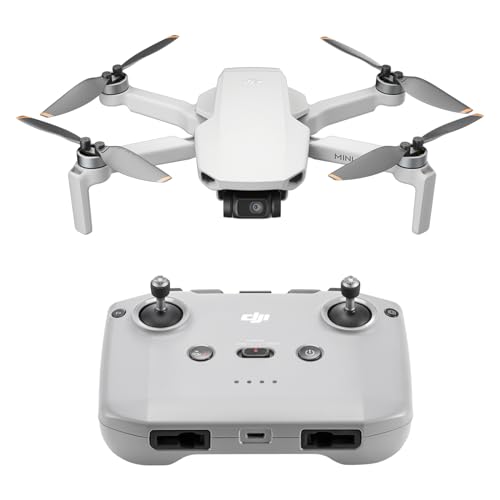
The Mini 4K is the entry point of DJI’s sub-250g line and keeps the essentials the guide asks you to check. It weighs 246 g, folds into a palm-sized package, and uses a 1/2.3-inch CMOS sensor with a 3-axis gimbal to record 4K/30fps video and 12MP photos. DJI rates flight time at up to 31 minutes per battery and wind resistance at level 5, respectable figures for such a light airframe. What you give up is obstacle sensing — there is none — so this drone rewards pilots who fly in open areas and keep it in sight, exactly the caution the guide gives about relying on sensors. The standard package includes one battery, so budget for spares if you plan longer outings. It suits first-time buyers and travellers who want simple, steady 4K footage without paying for sensing hardware they may not need.


4. Potensic ATOM 2 Standard Kit — Best DJI Alternative
The ATOM 2 shows that sub-250g does not have to mean DJI. It weighs under 249 g, folds flat for a jacket pocket, and carries a 1/2-inch Sony CMOS sensor that records 4K/30fps HDR video and 8K-resolution photos on a 3-axis gimbal. Potensic rates flight time at up to 32 minutes per battery and the PixSync 4.0 link at up to 10 km. Its AI Track modes can follow a subject automatically, and downward vision positioning helps it hold place indoors or at low altitude, though it has no forward obstacle sensing, so open flying areas are still the sensible choice. The Standard Kit includes one battery, the controller and spare propellers. Choose the ATOM 2 if you want tracking features and strong quoted specs at this weight while stepping outside the DJI ecosystem.


5. DJI Flip (RC-N3) — Best for Vlogging and Palm Takeoff
The Flip takes a different approach to the sub-250g class: it weighs 249 g, folds with full-coverage propeller guards, and can launch from your palm with a button press, no controller needed for basic shots. Its 1/1.3-inch CMOS sensor records 4K/60fps HDR video and 48MP photos on a 3-axis gimbal, and DJI rates flight time at up to 31 minutes. A 3D infrared sensing system faces forward and vision sensors face down, which helps with positioning, though it lacks the full omnidirectional sensing of the Mini 4 Pro. Subject-tracking modes are built around filming people, which fits its vlogging brief. The guards add protection when flying near yourself or indoors, at the cost of a slightly bulkier folded shape than the Mini line. Pick the Flip if hands-free, quick-launch clips matter more to you than maximum sensing or range.

What to Look For
| Factor | Why it matters | What to check |
|---|---|---|
| Takeoff weight | The stated figure decides which weight class the maker claims. | Weight with battery, and whether extras add to it |
| Flight time | Longer flights mean fewer battery swaps in the field. | Maker’s figure, treated as a best-case estimate |
| Camera sensor | Sensor size and video modes shape image detail in dim light. | Sensor type, resolution options and frame rates |
| Gimbal | Stabilisation keeps footage smooth while the drone moves. | Number of axes and mechanical or digital stabilising |
| Wind handling | Light aircraft move more in gusts. | Maker’s wind resistance figure and motor power |
| Obstacle sensing | Sensors help avoid collisions but have limits. | Sensor directions and the conditions where they work |
| Folding design | A folding frame fits in a small bag. | Folded size, arm hinges and included case |
Setup and Care Tips
- Update the firmware and calibrate the compass before your first flight.
- Check propellers for chips and cracks before each outing.
- Take off from a flat, open area away from people and buildings.
- Let batteries cool before charging and store them partly charged.
- Carry spare propellers and a protective case for travel.
Mistakes to Avoid
- Assuming a low weight means no rules apply to you.
- Choosing on flight time alone and ignoring camera features.
- Flying in strong wind with a very light airframe.
- Forgetting to count spare batteries and a charger in your plan.
- Relying only on obstacle sensors instead of watching the drone.
Why 250 Grams Became the Magic Number
The 250-gram line is not a technical milestone. It is a regulatory threshold, and manufacturers design aircraft to land just beneath it, which is why so many models in this guide list takeoff weights of 246 g or 249 g. In several countries, aircraft under this weight face lighter obligations than heavier ones, such as simpler registration, fewer operating restrictions in some categories or looser requirements for flying near people. That is the appeal.
Light does not mean exempt, though. Rules differ by country, by whether you fly for fun or for work, and they change over time. Some places still ask for registration, remote identification or a pilot test even for small aircraft, particularly when the drone carries a camera or is used commercially. Airspace limits near airports, crowds, emergency scenes and protected areas apply to every weight class. Before your first flight, read the current guidance from your national aviation authority and any local park or city rules.
Watch the weight when you add accessories
The advertised weight is for the aircraft in a specific configuration, usually with the standard battery and propellers. Adding a larger battery, propeller guards, filters or stickers can push the actual weight above the line. If staying under the threshold matters to you, weigh the aircraft in the configuration you plan to fly, and check what the maker says about accessories. Some makers sell a heavier extended battery as an option and state clearly that it changes the weight class.
Reading Camera Specs Without Getting Lost
Spec sheets for compact drones cram in numbers. A few matter far more than the rest.
- Sensor size: Larger sensors gather more light, which tends to help in dusk and indoor-lit scenes, and usually show less noise. The guide notes sensors ranging from 1/2.3-inch up to 1-inch among its picks. Bigger usually costs more and often adds weight.
- Frame rates: 4K at 30 frames per second is smooth for general footage. 60 frames per second gives you more room for slow motion. Higher rates may be unavailable at the highest resolution on some models.
- HDR and color profiles: HDR video helps keep sky detail in bright scenes. Flatter color profiles, when offered, give you more room for color correction but require editing work.
- Photo resolution: 12 megapixels is enough for sharing online. Higher counts, such as 48 or 50 megapixels, allow cropping and larger prints, though small sensors do not always produce more detail just because the number is bigger.
- Gimbal: A three-axis mechanical gimbal is the standard for smooth footage. Electronic stabilization alone cannot match it in rough air.
- Storage: Check whether the drone has internal memory, uses a memory card, or both. Cards must meet the speed rating the maker recommends for high-resolution video.
Filters are an inexpensive way to improve results. Neutral density filters darken the image so you can keep a slower shutter speed in bright light, which makes motion look more natural in video. If you shoot a lot in sunshine, they are worth a look.
Battery Life in the Real World
Quoted flight times, such as the 31 to 36 minutes in this guide, come from controlled conditions: calm air, a steady cruising speed and no extra features running. Real flights usually come in shorter. Wind, cold weather, aggressive maneuvers, hovering with heavy camera use and the need to keep a reserve for the return flight all reduce usable time. As a practical rule, plan for noticeably less than the headline number and land with a comfortable margin.
Why spare batteries matter
Because the aircraft is light, its battery is small. A bundle that includes extra batteries and a charging hub, like the Fly More Combo versions listed, can double or triple your time in the air for a modest extra cost. Charging in sequence takes time, so carry charged spares if you travel for a day of shooting.
Care for lithium batteries
- Let a hot battery cool before you charge it, and charge on a hard, non-flammable surface.
- Store batteries partly charged rather than full or empty if you will not fly for a few weeks.
- Do not use or charge a swollen, dented or damaged battery.
- For air travel, batteries generally belong in carry-on baggage, with their capacity within airline limits and the terminals protected. Check your airline’s rules before you fly.
Safety Features and How Far to Trust Them
Features such as return to home, geofencing, obstacle sensing and subject tracking make flying friendlier. They have limits. Return to home depends on a good GPS fix and a set return altitude that clears trees and buildings. Obstacle sensors struggle with thin branches, glass, water and low light. Tracking modes can lose a subject when the background is cluttered.
The guide mentions that some models in this list have no forward sensing, while others offer omnidirectional detection. More sensors can help beginners avoid mistakes, but they do not remove the pilot’s duty to watch the aircraft and stay clear of people and property. Practice in an open field first, learn what each warning means and rehearse a manual return before you ever need it.
Matching a Compact Drone to How You Fly
The traveler who wants a carry-on companion
If the drone shares a bag with a camera or clothing, folded size and an included case are what count. Look for a folding frame and a modest controller. A bundle with several batteries lets you shoot a whole day without recharging.
The first-time flyer
A beginner benefits from stable hovering, simple apps and a forgiving price. A model without obstacle sensing, such as the Mini 4K described earlier, is cheaper but demands open space and careful attention. Spending more for sensors may be worthwhile if you plan to fly near trees.
The content creator
If quality matters most, favor a larger sensor, higher frame rates and good subject tracking. Be ready for editing time and storage space for bigger files.
The vlogger
A palm-launch drone with guards, as in the Flip entry, can be easier to use when you are alone in front of the camera. Think about whether you need long range or a simple, close-in shot.
The hobbyist who likes to tinker
Brands outside the market leader may offer more options in software or price. Check how long the maker provides firmware updates and how simple it is to get replacement parts.
Questions to Ask Before You Order
- What is the exact takeoff weight in the configuration I will use?
- Does the package include a controller, or does the aircraft need a phone or a separate screen?
- How many batteries come in the box, and what do spares cost?
- What does the warranty cover, and is there a crash replacement program?
- Does the app work on my phone, and how often does the maker update it?
- Is the feature I want, such as tracking, available at the video quality I need?
Answering these before checkout is far cheaper than discovering a gap on your first flight day.
Learning to Fly Safely
A small drone is forgiving but not harmless. Spend your first sessions in a large open area with no people, power lines or tall trees. Practice slow turns, gentle altitude changes and holding a steady hover before you try any automated modes. Learn the controller’s emergency functions, such as how to stop propellers, cancel an automatic return or switch to manual control. Know how the aircraft behaves when it loses signal, and test return to home at a low altitude in a safe place.
Keep the aircraft within sight, fly in daylight unless your local rules and experience say otherwise, and avoid flying over crowds, roads and private property without permission. Before every flight, check the weather, the wind forecast, your battery level and the propellers. If the wind feels stronger at altitude than on the ground, which is common, land early. A light airframe can be pushed sideways surprisingly fast.
Storage, Transport and Upkeep
A drone that survives its first year usually does so because of simple habits. Fold arms carefully rather than forcing them, keep the gimbal cover on when it is not in use, and carry the aircraft in a padded case rather than loose in a bag. Wipe dust from the lens with a soft cloth and a blower, and never touch a gimbal while the drone is powered on. Check the screws on the arms and the condition of the propellers regularly, and replace any that show chips, bends or cracks. After flying near sand, salt or damp grass, wipe the aircraft down and let it dry before storing it.
Using the Picks in Real Life: Sub-250G Drones
Specifications are useful, but they rarely tell the whole story with sub-250g drones. Two models can look almost identical on paper and still feel very different once they are set up, used under time pressure, or shared with other people. The notes below add the practical layer that sits between a comparison table and a confident decision: fit, workflow, upkeep, and the small frustrations that are easy to avoid when you know to look for them in advance.
Start with the situation you will face most often, for example a traveller filming a coastal walk. Picture the whole sequence from beginning to end: getting the equipment ready, doing the main task, and putting everything away afterwards. A choice that feels slightly less impressive in a headline feature can easily be the better one if it makes that full sequence calmer and more repeatable. With sub-250g drones, consistency across many ordinary sessions is worth more than one standout moment, because you will live with the routine far longer than you will admire the purchase.
Next, be honest about the environment. In the case of a family recording a garden gathering, the room, the light, the available surface, or the people nearby will shape the result as much as the product itself. Walk through that setting before you order and note anything fixed that you cannot change: a narrow surface, a shared space, limited storage, or a tight schedule. Matching sub-250g drones to those fixed facts first prevents the most common disappointment, which is buying a capable product that simply does not suit the place where it will actually be used.
One of the most useful checks concerns flight time in real wind. Do not treat this as a box to tick and move on. Ask how it affects the first use, how it affects a busy day when you have no time to adjust things, and how it will feel after months of use. If the guide above flags a pick as stronger or weaker on this point, weigh that note against your own priorities rather than assuming the overall winner is automatically the right winner for you. Personal fit beats a general ranking every time the two disagree.
It also helps to think about camera quality and gimbal stability in plain language. Write down what good enough looks like for you before you compare models, because it is easy to keep moving the goalposts as you read. For many buyers of sub-250g drones, the sensible target is a product that handles the main job reliably, is easy to live with, and leaves some budget for the accessories, supplies, or setup help that make the whole system work better. Spending everything on the headline item and nothing on the supporting details usually leads to a weaker result overall.
A Deeper Checklist Before You Choose
Consider who else will be involved. For a creator shooting property exteriors, another person may need to use, move, clean, or simply live alongside your choice. Controls that seem obvious to the person who did the research can confuse a guest, a colleague, a student, or a family member. The best sub-250g drones tend to be forgiving in shared hands: they behave predictably, they recover gracefully from a wrong setting, and they do not demand that everyone read a manual before getting a decent result.
Think, too, about the learning curve. Nobody masters sub-250g drones on the first day, and a fair comparison allows for that. During the first few sessions, keep notes on what you adjusted, what surprised you, and what you would do differently next time. Those notes quickly reveal whether a difficulty is a one-off beginner problem that practice will solve, or a lasting mismatch between the product and your habits. That distinction matters, because returning or replacing gear is far easier when you can describe the problem clearly and early.
Budget thinking deserves a wider lens than the purchase itself. With sub-250g drones, the total cost of ownership can include cases, mounts, media, refills, replacement parts, protective storage, or simply the time spent on upkeep. None of that argues against buying; it argues for buying with your eyes open. A slightly simpler model that you can afford to support properly will usually serve you better than a flagship model that leaves nothing in reserve for the things it needs to do its job well.
Finally, plan for the day something goes wrong, because with regular use something eventually will: a setting is changed by accident, a part is misplaced, a session runs longer than expected, or conditions are worse than usual. Ask yourself how you would recover in the middle of a hiker documenting a trail. Products that make recovery simple, with clear controls, sensible defaults, and widely available support, earn their place over time. Reliability in this ordinary, unglamorous sense is one of the strongest reasons a pick stays recommended year after year.
Turn that thinking into a short written checklist before you order. Include the setting, the main task, the people involved, the supporting items you already own, and the one feature you refuse to compromise on. Then read the detailed reviews above once more with that checklist beside you. You will find that most picks eliminate themselves quickly and honestly, and the remaining choice feels obvious rather than forced. That is the sign of a good buying process: not more information, but the right information applied to your own situation.
Setup, Care and Troubleshooting for Sub-250G Drones
Good setup is not about fussiness; it is about removing variables so that the result depends on your decisions rather than on luck. Before the first real session, set aside enough unhurried time to unpack, inspect, and configure everything in daylight and without an audience. Check that every part moves, fits, or connects as described, and keep the packaging until you are confident nothing needs to go back. That calm first hour prevents most of the frantic troubleshooting that otherwise happens at the worst possible moment.
Work through the basics in a deliberate order. Start with placement and stability, then connections, then settings, and only then judge performance. Changing several things at once makes it impossible to know which change helped. If the guide above gives a recommended starting point for sub-250g drones, use it exactly for the first session, even if you suspect you will prefer something else later. A known baseline gives you something trustworthy to compare against, and it makes advice from manuals, support teams, and other owners much easier to apply.
Keep a simple record of your starting setup: a photo of the arrangement, a note of the settings you chose, and a line about the result. This sounds like extra work, but it pays for itself the first time a session goes unusually well or unusually badly, because you can recreate the success or avoid repeating the problem. Over a few weeks that record becomes a personal quick reference that is more useful than any general guide, since it reflects your space, your subjects, and your taste.
Cleaning and storage deserve the same calm attention. Decide where the product will live when it is not in use, how it will be protected from dust, knocks, heat, or curious hands, and what you will wipe, empty, charge, or check after each session. Small habits done every time are far more effective than an occasional deep clean. They also extend working life in a way that is easy to underestimate: most wear comes from grit, strain, damp, and hurried handling rather than from honest regular use.
When a result disappoints, troubleshoot in a fixed order before blaming the product. Confirm the basics first, such as power, connections, placement, and the settings most likely to have been changed. Then change one thing, test again, and note the outcome. If the problem follows a particular accessory, location, or subject, that pattern is valuable evidence. And if you contact support or a retailer, describe the steps you have already tried; a clear description usually leads to a faster, more useful answer than a general complaint.
Matching a Pick to the Person Using It
Comparing the picks against each other is most helpful when you compare them on the job you actually have, not on every feature they offer. Take the strongest overall pick in the guide and ask a blunt question: what would make you choose a different model instead? Sometimes the answer is a smaller size for a tight space, sometimes it is a simpler control layout, and sometimes it is a specialist strength that only matters for one kind of work. Naming that reason out loud turns a long shortlist into a short, honest decision.
Pay attention to trade-offs that the guide states plainly. A model praised for power or range may ask more of you in weight, setup time, or upkeep. A model praised for simplicity may give up fine control that an experienced user would miss. Neither pattern is a flaw; they are different answers to the question of who the product is for. The mistake is buying the trade-off that suits somebody else’s priorities and then spending months working around it.
Experience level should influence the choice more than it usually does. A beginner benefits from forgiving behaviour, clear feedback, and a setup that produces a decent result without expert technique. An experienced user can exploit finer controls and will notice small limitations sooner. If you expect your skills to grow quickly, look for a pick that leaves some headroom, but do not buy so far beyond your current needs that the first months feel like hard work. Enjoyment is a practical feature, because gear that is enjoyable gets used, and used gear is what improves results.
Think about how the choice fits what you already own. Compatibility is not only a question of whether two things connect; it is also about whether sizes match, whether your storage can hold the result, whether your existing accessories still serve a purpose, and whether your usual workflow stays smooth. A pick that forces you to replace several perfectly good supporting items may be poorer value than it first appears, while a pick that slots into your current setup can feel like an upgrade across the whole system.
A useful final test is the ordinary-week test. Imagine the product in your life on a tired weekday, not on an exciting first weekend. Will you still bother to set it up properly? Will the upkeep still feel reasonable? Will other people in the house or team still cope with it? If the answer is yes, you have probably found the right level of ambition. If the answer is no, choosing the simpler or more forgiving pick is not settling; it is buying the result you will actually get.
Revisit that matching exercise whenever your circumstances change. A new room, a new hobby, a growing family, a different job, or simply more experience can all move the right answer from one pick to another, and that does not mean the first purchase was wrong. It means the product served one chapter well. Keeping your notes, your checklist, and a clear head about what changed makes the next decision faster, cheaper, and far more likely to satisfy, whether you stay with sub-250g drones for years or move on to something quite different.
One more practical habit is worth adopting with sub-250g drones: review your results after a handful of sessions rather than after the first one. Early impressions are dominated by novelty and by the small awkwardness of anything new. By the fifth or sixth session, patterns emerge that you can trust, such as which settings you always change, which accessories you never reach for, and which frustrations have quietly disappeared with practice. Judging at that point leads to calmer decisions about keeping, adjusting, or upgrading, and it stops a single difficult day from colouring your view of an otherwise sound purchase.
Seasonal and occasional changes are easy to forget when choosing sub-250g drones. Light changes through the year, rooms get rearranged, guests arrive, workloads rise and fall, and storage that seemed generous in a quiet month can feel tight in a busy one. A pick that copes gracefully with that kind of change, by being easy to move, easy to store, or easy to reconfigure, has a quiet advantage that rarely appears in a comparison table. If your life is fairly settled, this matters less; if your space or schedule shifts often, let flexibility carry real weight in the decision.
It is also worth deciding in advance how you will judge success. For sub-250g drones, success might be a result that needs less correction, a routine that takes less time, fewer complaints from the people sharing the space, or simply reaching for the product more often because it is pleasant to use. Pick one or two measures that matter to you and check them after a month. Clear measures protect you from two opposite mistakes: replacing a good product because a newer one appeared, and keeping a poor fit for years out of habit.
Where you buy can matter almost as much as what you buy. A seller with a clear returns process, honest descriptions, and responsive support reduces the risk of any choice, especially when you are deciding between two close picks. Keep the order confirmation and warranty details somewhere you can find them without searching old messages, and register the product if the maker offers a simple way to do so. These small administrative habits take minutes, yet they are the difference between a minor hiccup and a long, frustrating detour if anything needs attention later.
Finally, remember that advice, including this guide, works best as a starting point rather than a verdict. Reviewers and writers can compare features, flag trade-offs, and describe who a pick suits, but only you know the exact shape of your room, your schedule, your budget, and your patience. Use the comparisons above to narrow the field, use the checklists to test the finalists against your own facts, and then trust the result of that process. A choice made that way rarely needs second-guessing, and it leaves you free to enjoy the purchase instead of relitigating it.
More Questions About Sub-250G Drones
How long should I spend deciding between two close picks?
Once you have confirmed that both picks meet your basic requirements, extra days of comparison rarely change the outcome. List the two or three differences that will affect your weekly use, decide which of those matters most, and choose on that basis. If the difference is still unclear, favour the option that is easier to live with, easier to support, and easier to resell or pass on if your needs change. A decision you can act on confidently is worth more than a theoretically perfect decision made too late.
What is the most common reason people are disappointed with a purchase like this?
The most common reason is a mismatch between the product and the real setting, not a defect in the product itself. Buyers imagine their best day, with plenty of time and ideal conditions, and then use the product on ordinary days with less time and more distractions. Reading the sections above with your ordinary routine in mind, and being honest about space, storage, and who else will be involved, prevents most of that disappointment before any money is spent.
Should I buy accessories at the same time?
Buy only the accessories that the first sessions genuinely require, such as protection, mounting, storage, or the consumables the product needs to work at all. Everything else can wait until your own notes show a real need. This keeps the initial setup simple, makes troubleshooting easier because there are fewer new variables, and avoids spending on extras chosen for a workflow you may not end up following. Good accessories bought later, for a proven reason, almost always serve better than a bundle bought on day one.
How can I tell whether a problem is my technique or the product?
Change the setting before you change the product. Use the same pick in an easier situation, follow the guide’s recommended starting setup exactly, and simplify the task until you get a clean result. If the problem disappears when conditions are easier, technique and practice are usually the answer. If the same fault appears in simple conditions, with a careful setup and after a reset to sensible defaults, then the product, or that particular unit, deserves a closer look and a conversation with support.
Is it worth paying more for a model aimed at experienced users?
It is worth it when the extra control solves a problem you already have, or one you can describe clearly from your recent work. It is rarely worth it for a problem you only imagine having one day. Experienced-user models often assume better supporting gear, more setup time, and a willingness to learn a deeper control layout. If those assumptions fit your life, the step up can be satisfying and long lasting. If they do not, a mid-level pick used confidently will produce better results than an advanced pick used hesitantly.
What should I check in the first week so a return is still easy?
Use the product for its main job at least twice, in the setting where it will normally live, and keep all packaging, inserts, and receipts together. Note any fault, missing part, or mismatch with the description while the details are fresh, and photograph anything that looks damaged or wrong. Testing promptly and gently is fair to everyone: you learn whether the pick suits you while the retailer’s process is still simple, and the product stays in the condition a return requires.
FAQ
Do light drones have worse cameras?
Often the sensors are smaller, but image quality depends on the sensor, lens and processing together. Compare the stated sensor and video modes rather than assuming.
Can I fly them in windy weather?
Light aircraft are more affected by gusts. Check the maker’s wind guidance, and choose calm conditions whenever you are unsure.
Do I need to register a drone under 250 grams?
It depends on your country and how you fly. Some regions exempt sub-250g aircraft for recreational use, while others still require registration or remote ID, especially for camera drones or commercial work. Check your national aviation authority’s current rules before flying, because they change.
Can a sub-250g drone fly anywhere?
No. Weight does not remove airspace restrictions. Areas near airports, crowds, emergency operations and protected sites can still be off limits, and parks may have their own bans. Use the maker’s app and official maps to check restrictions, and follow local rules.
How long should I expect a small drone battery to last?
Expect less than the headline figure. Maker times come from calm, ideal conditions. Wind, cold, fast flying and keeping a reserve for landing all cut usable time. Plan around a noticeably shorter flight, and carry spare batteries if you want a full session.
Can I take a drone on a plane?
Usually yes, but batteries generally must go in carry-on baggage, within the airline’s capacity limits and with terminals protected. Rules differ by airline and country, so check before you travel. A folding drone with a small case is easier to pack.
Are neutral density filters worth buying for a small drone?
They help if you shoot video in bright light. An ND filter lets you use a slower shutter speed, so motion looks smoother and less choppy. They are cheap and light, but make sure the filter is designed for your drone and does not push it over the weight limit.
The Short Version
The right light drone balances weight, battery life and camera needs while fitting your bag. Check your local rules, compare the specs, and choose a model whose controls and folding design suit the way you travel and fly. Before buying, picture a typical outing: how far you will carry it, how long you want to fly and what footage you hope to bring home. Weigh the extra batteries, spare propellers and a small case into your plan, since these accessories shape the experience as much as the drone itself does.