A 4K drone carries a camera that records high-resolution video and stills from the air, which makes it popular for travel clips, real estate showcases, outdoor hobbies and simple creative projects. Models range from small foldable units to larger prosumer designs, and the right choice depends on where you fly, how steady you want your footage and how much you want to carry.
This guide explains the factors that separate one drone from another. We have not used these products ourselves; the comparisons come from listing information and general knowledge, so read the listing and local rules carefully before you buy or fly.
As an Amazon Associate we earn from qualifying purchases. Links on this site are affiliate links, and they do not change the information we give.
In this guide
Quick Picks
| Pick | Product | Best For |
|---|---|---|
| 1 | DJI Mini 4 Pro (DJI RC 2) | Best overall for most flyers |
| 2 | DJI Air 3 Fly More Combo (DJI RC-N2) | Best dual-camera zoom range |
| 3 | Potensic ATOM 2 Fly More Combo | Best non-DJI value |
| 4 | Holy Stone HS900 | Best budget pick with two batteries |
| 5 | DJI Avata 2 Fly More Combo (3 Batteries) | Best for FPV flying |
Our Picks

1. DJI Mini 4 Pro (DJI RC 2) — Best overall for most flyers
The Mini 4 Pro covers nearly every factor in the guide below in one small package. It weighs under 249 g, which keeps it in the lightest weight class in many regions, yet it carries a 1/1.3-inch CMOS sensor that records 4K/60fps HDR video and 48MP stills on a 3-axis mechanical gimbal, so footage stays smooth without leaning on electronic correction. DJI rates flight time at up to 34 minutes per battery, and omnidirectional obstacle sensing watches in every direction, which helps new pilots in tight spots. The bundled RC 2 controller has a built-in screen, so you do not need to clamp in a phone, and the O4 link is rated for up to 20 km of transmission range. ActiveTrack 360° and true vertical shooting suit solo creators who film themselves. If you want one foldable drone for travel clips and everyday projects, this is the balanced starting point.

2. DJI Air 3 Fly More Combo (DJI RC-N2) — Best dual-camera zoom range
The Air 3 is the pick for creators who find a single fixed lens limiting. It pairs two 1/1.3-inch CMOS cameras on one gimbal: a wide-angle camera for establishing shots and a 70mm-equivalent medium tele camera that compresses distance and keeps subjects large without flying closer. Both record 4K/60fps HDR video and 48MP photos. DJI rates maximum flight time at 46 minutes, the longest figure in this list, and omnidirectional obstacle sensing is standard. This Fly More Combo bundles the drone with the RC-N2 controller, three Intelligent Flight Batteries and a charging hub, which answers the guide’s advice about planning for spare batteries from day one. At roughly 720 g it sits in a heavier class than the sub-249 g models, so check your local registration rules, but for travel and real estate work the two focal lengths cover far more scenes per outing.
View DJI Air 3 Fly More Combo (DJI RC-N2) on Amazon
3. Potensic ATOM 2 Fly More Combo — Best non-DJI value
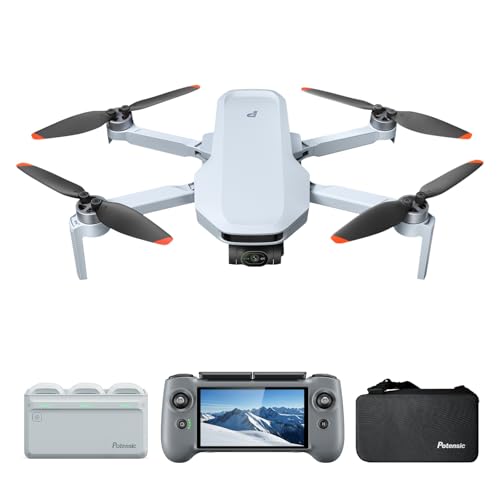
The ATOM 2 is the strongest alternative here for buyers who want a sub-249 g camera drone without buying into the DJI line. Its 1/2-inch Sony CMOS sensor captures 48MP photos and 4K/30fps HDR video through a 3-axis gimbal, and Potensic’s PixSync 4.0 link is rated for up to 10 km of transmission with a 1080p live feed. The Fly More Combo stacks three batteries for up to 96 minutes of total flight time, which stretches a single outing much further than one pack allows. AI tracking, AI night shooting and vertical shooting modes cover the follow-me and social-format needs the guide raises, and the folding body drops into a small carry case. There is no omnidirectional obstacle sensing at this level, so open spaces and careful route planning matter more, but as a travel and hobby drone it matches the checklist closely for the money.

4. Holy Stone HS900 — Best budget pick with two batteries
The HS900 suits first-time flyers who want GPS features and a stabilized camera without stepping up to the premium brands. It records 4K/30fps video and 8K-resolution photos from its camera on a 3-axis gimbal, and at 249 g it stays in the FAA-compliant light class described in the listing. GPS positioning brings automatic return-to-home when the signal drops or the battery runs low, which is exactly the guided-return behavior the guide recommends for beginners. Holy Stone rates transmission at up to 20,000 feet over its 5.8GHz link. This package includes two batteries and a charging hub for up to 60 minutes of combined flight time, so you are not grounded after a single pack. The trade-offs are a smaller brand ecosystem and fewer intelligent modes than the DJI picks, but the core checklist of gimbal, GPS and spare batteries is all here.


5. DJI Avata 2 Fly More Combo (3 Batteries) — Best for FPV flying
The Avata 2 takes a different approach from the camera drones above: it is a cinewhoop built for first-person flying through the included DJI Goggles 3 and RC Motion 3 controller. Its 1/1.3-inch CMOS camera records 4K/60fps HDR video with a 155° field of view, and the built-in propeller guards let it thread through tighter indoor and wooded spaces with more confidence than an exposed-prop design. One-push acrobatics add flips, rolls and drifts without manual stick choreography, which lowers the FPV learning curve. DJI rates flight time at up to 23 minutes per battery, and this combo includes three batteries plus a two-way charging hub and sling bag. It is the heaviest style of flying here in terms of focus — you watch through goggles rather than a screen — so it fits pilots who want immersive POV footage more than long, high scenic shots.

What to Look For
| Factor | Why it matters | What to check |
|---|---|---|
| Camera and gimbal | A stabilized gimbal keeps footage smooth. | Check video modes, sensor size and whether the gimbal is mechanical or electronic. |
| Flight time | Short batteries limit how much you can film. | Look at the maker’s stated flight time and the cost of spare batteries. |
| Weight class | Lighter drones may face fewer rules in some places. | Check the weight on the listing and your local regulations. |
| Obstacle sensing | Sensors can help avoid collisions in tight spots. | See which directions are covered and what the maker says it does. |
| Controller and app | A good controller makes flying more comfortable. | Check whether a phone clamp, built-in screen or app is needed. |
| Range and signal | Longer range gives more freedom but needs responsible use. | Read the stated transmission range and keep the drone in sight. |
| Portability | Foldable drones are easier to carry. | Check folded size, case and included accessories. |
Setup and Care Tips
- Charge the drone, controller and phone before every outing.
- Check propellers for chips or cracks before each flight.
- Calibrate the compass if the app asks for it and fly away from metal structures.
- Wait for a good satellite lock before taking off.
- Keep a spare battery, a microSD card and a small cleaning cloth in the case.
Mistakes to Avoid
- Flying without reading the local rules on where drones are allowed.
- Ignoring wind and weather conditions on the day.
- Skipping the firmware update the app requests.
- Not registering the drone where registration is required.
- Flying with a low battery to capture one more shot.
How do 4K drone cameras and gimbals differ from one another?
Most 4K drones differ far more in sensor size, frame rate and gimbal design than in the 4K label itself. Two drones can both record 4K video and still produce very different footage in dim light or on a windy day.
A larger sensor generally gathers more light, which helps at dusk and in shaded areas. Smaller sensors can look fine in bright sun but tend to show more noise as light falls. The listings above state sensor sizes, so compare them rather than assuming every 4K camera behaves alike.
Frame rate matters for how you plan to edit. A higher frame rate gives you the option of slowing a clip down for a smoother, more cinematic feel, while a lower one is perfectly good for casual sharing. Also check whether the camera records high dynamic range, since that helps bright skies and dark foregrounds sit in the same frame.
The gimbal is the part that keeps the picture steady while the drone tilts and moves. A 3-axis mechanical gimbal physically stabilizes the camera, while electronic stabilization crops into the image and corrects it in software. Mechanical stabilization is usually preferred for smooth video, though electronic methods can add a useful extra layer.
- Sensor size: bigger is generally better for low light, but the drone usually costs more and weighs more.
- Frame rate options: check which rates are available at full 4K, since some drop at the highest resolution.
- Stabilization type: look for a mechanical gimbal first, then any electronic extras.
- Photo resolution: useful if you also want large stills or room to crop.
When you read a listing, treat sensor, frame rate and gimbal as a package. A strong sensor on a weak gimbal can still give shaky clips, and the reverse is also true.
How much do battery life, range and flight rules matter for a 4K drone?
They matter a lot, because a drone you cannot fly for long, or cannot legally fly where you want, will not get used. Battery life, signal range and local rules shape your real experience more than most camera specs.
Flight time on a listing is the maker’s best-case figure. Wind, cold air, aggressive flying and carrying extra weight usually shorten it, so plan on less than the headline number. This is why a bundle with several batteries is often more useful than a single pack with a slightly longer rating.
Transmission range is another figure to read with care. A long rated range does not mean you may fly that far. In most places you are expected to keep the drone in sight, so a very long range mainly adds signal stability at moderate distances rather than permission to wander.
Rules depend on where you live and on the weight class of the drone. Lighter drones may face fewer requirements in some regions, but you may still need to register, avoid certain airspace and stay away from crowds. Check the aviation authority in your area before the first flight.
- Count how many batteries come in the box and whether a charging hub is included.
- Check how long a full charge takes, since waiting between flights adds up on a trip.
- Read the maker’s guidance on cold weather and storage charge levels.
- Confirm registration and no-fly zone rules before you travel with the drone.
Good habits matter too. Land with some battery left, keep the drone in view, and treat the return-to-home feature as a backup rather than a plan.
Which 4K drone should you buy for your needs?
The right pick depends on what you film and how much you want to carry, so match your main use to the models named above. Here is a plain way to decide.
- If you want one balanced drone for travel and everyday clips, go for the DJI Mini 4 Pro (DJI RC 2). It is light, folds small and has a controller with a built-in screen.
- If you want a wide view and a closer zoomed view from one aircraft, choose the DJI Air 3 Fly More Combo (DJI RC-N2). The two cameras and the three-battery bundle suit real estate and travel work, though it is heavier.
- If you prefer a non-DJI option in the lightest class, look at the Potensic ATOM 2 Fly More Combo. The post notes it lacks omnidirectional obstacle sensing, so it suits open spaces.
- If you are a first-time flyer on a tighter budget, the Holy Stone HS900 gives you GPS, a gimbal and two batteries in one package.
- If you want immersive, first-person flying, pick the DJI Avata 2 Fly More Combo (3 Batteries). It is built for goggles and tight spaces rather than long scenic shots.
Two quick filters can narrow things further. First, decide whether a lighter weight class matters to you, because that affects carrying and, in some places, the rules. Second, decide whether you want a screen on the controller or are happy to use your phone.
If you are still torn between two models, ask which compromise you can live with. A drone with fewer smart features but more batteries may suit a long day out better than a feature-rich one that runs out of power early.
What to check before you buy a 4K drone
Before you click buy, confirm that the package, the weight class and the controller match how you plan to fly. A short checklist on the listing page saves most return headaches.
- What is included: look for the number of batteries, charger or hub, propellers, controller, carry bag and any memory card. Bundles vary, so read the contents list.
- Controller type: check whether the controller has its own screen or needs your phone, and whether your phone model is supported by the app.
- Weight and registration: compare the listed weight with your local rules, and plan to register if required.
- Memory card: confirm which card types and speeds the maker lists, since a slow card can interrupt 4K recording.
- Obstacle sensing: see which directions are covered and which flight modes it works in.
- Spare parts: check that propellers and batteries are sold separately and are easy to find.
- Warranty and returns: read the terms on the listing, including what is covered after a crash and the return window.
- Software and updates: make sure the app works on your phone and tablet before the drone arrives.
- Storage and travel: check the folded size and whether airlines allow the battery type in carry-on bags.
Also think about where you will practice. A park or open field with few people is a better first location than a crowded beach or a street lined with wires.
Finally, set aside time to read the manual before your first flight. It explains the return-to-home settings, the meaning of the controller lights and how to calibrate the compass, all of which are easier to learn on the ground than in the air.
Is a 4K drone worth the cost, and who should skip it?
A 4K drone is worth it if you will fly it regularly and enjoy the extra effort, and it is a poor fit if you only want a few photos a year. Being honest about that early saves money and frustration.
Paying more usually buys a better sensor, longer flight time, stronger obstacle sensing and a more refined controller. Those gains are real, but they matter most to people who film often or for clients. For casual weekend clips, a simpler model can be a sensible choice.
There are downsides worth stating plainly:
- Drones need batteries, charging and care before every outing.
- Rules and no-fly areas can limit where you can use it.
- Wind and rain can cancel a trip, and a crash can mean repair costs.
- Editing 4K video takes storage space and a reasonably capable computer or phone.
- Lighter models can struggle in strong wind.
You may want to skip a drone, or at least wait, if you have no open space nearby, if you do not want to learn the local rules, or if a phone camera already covers what you film. Renting or borrowing a drone for a weekend is a low-risk way to find out whether you enjoy it.
Compare the picks above, check the current listing for the weight, the batteries and what is included, then choose the drone that fits how and where you will actually fly.
Your First Flights: A Practice Plan That Builds Skill in Order
The fastest way to become a confident pilot is to practise manoeuvres in a deliberate order instead of wandering the sky. Use a large open space, keep the drone close and low, and start with a simple square pattern flown with the drone facing away from you, so the controls match the direction of travel. Then fly the same square with the drone facing toward you, which reverses the left and right controls and is the point where most beginners get confused. Practise until the reversed controls feel ordinary, because that orientation is the one you will face whenever the drone returns to you.
Next, add figure-of-eight patterns, which combine turning with forward motion and teach smooth, coordinated stick inputs. Follow that with slow orbits around a fixed object, keeping the subject centred first by hand and only later with automated tracking modes; learning the manual version builds the judgement that automated modes cannot replace. Finish each session with landing practice: descend slowly, pause to let the drone settle, and touch down gently rather than dropping the last stretch. Accurate, calm landings protect the gimbal and propellers more than any other habit.
Set a small goal for every flight, such as one smooth reveal shot or one clean orbit, and review the footage afterwards with the goal in mind. Short, reviewed sessions teach faster than long unexamined ones, and they keep batteries cycling evenly instead of draining one pack repeatedly.
Getting Cleaner 4K Footage: Shutter, Frame Rates and Filters
Most soft or jittery drone footage is a settings problem rather than a camera problem. The classic starting point for natural motion blur is a shutter speed roughly twice the frame rate: shoot at a common frame rate for your region and set the shutter to match that relationship. In bright daylight the camera cannot reach that slow a shutter on its own, so neutral density filters are the drone accessory that matters most; they reduce the light reaching the sensor so the shutter can stay slow without overexposing the scene. A small set of strengths covers most conditions from overcast to full sun over water.
Frame rate choice shapes the feel of the footage. Standard rates suit real-time playback and match most delivery platforms, while higher rates exist for slowing motion down in editing: water, traffic and athletes all look smoother slowed, and a high frame rate gives you that option. Remember that some drones reduce their obstacle sensing or tracking features at the highest frame rates, so check what changes when you select them. Sharpness settings also deserve restraint. Heavy in-camera sharpening looks crunchy on detailed landscapes; a moderate setting, with final sharpening added in editing, usually grades better.
Finally, fly the shot the way you intend to edit it. Slow, steady movements with a gentle start and stop cut together cleanly, while abrupt stick inputs create frames no stabilisation can rescue. Count a few seconds of stable footage before and after the movement you want, which gives the edit room to breathe and hides the moments when the drone accelerates.
How the Five Picks in This Guide Differ in Practice
The DJI Mini 4 Pro is the balanced default: the lightest regulatory class in many regions, a capable sensor, obstacle sensing in every direction and a controller with its own screen. It suits travellers and solo creators who want the least friction between arriving somewhere and flying. The DJI Air 3 answers a different need. Its second, medium-tele camera changes the kind of shots you can get, compressing distance and isolating subjects without approaching them, and its longer rated flight time and three-battery combo suit planned shoots such as property work. The trade-off is weight class, with the registration and rule implications the guide describes.
The Potensic ATOM 2 is the value alternative for buyers who want a light, folding camera drone outside the DJI line, with a combo that stacks several batteries for a long total flying window. The Holy Stone HS900 is the budget route into stable 4K filming, bundled with two batteries; it asks you to accept a simpler feature set in exchange for a gentler entry cost. The DJI Avata 2 is not really a camera drone in the same sense at all: it is an FPV aircraft flown with goggles and a motion controller, built for immersive, acrobatic lines through spaces rather than calm scenic shots. Choose it for the experience of flying itself, and choose one of the camera drones for composed footage.
The practical split is therefore threefold: light camera drones for travel and everyday clips, the dual-camera model for creators who plan shots, and the FPV model for pilots who fly for the sensation. Matching the aircraft to the kind of flying you will actually do matters more than any single specification.
Battery Care and Flight Planning Across a Season
Drone batteries are consumables with a memory for how they are treated. Avoid leaving them fully charged for weeks or storing them completely empty; makers’ storage guidance generally aims for a partial charge when the drone will sit unused, and intelligent batteries often discharge themselves toward that level over a few days. Charge on the day you plan to fly where possible, and let a hot battery cool before charging it, since charging a warm pack shortens its life. In cold weather, warm batteries in a pocket before takeoff and hover briefly after launch so the pack reaches a comfortable working temperature before you demand full power.
Plan flights around the battery rather than the other way round. Rated flight times assume ideal conditions; wind, cold and aggressive flying all reduce them, so treat the rating as a ceiling and land with a comfortable reserve. A useful habit is to decide your return point before takeoff: a battery level at which you turn for home regardless of the shot. Combos with several batteries reward a rotation habit too: number your packs, use them in rotation, and note any pack that consistently returns shorter flights, which is an early sign of ageing.
Before each outing, run a short planning pass: check the airspace map for your location, confirm the weather and wind at flying height rather than at ground level, update firmware at home rather than at the flying site, and format memory cards after their contents are safely copied. Five minutes of planning prevents most ruined sessions.
Troubleshooting: Gimbal Shake, Soft Video and Signal Problems
Gimbal shake or a tilted horizon usually has a mechanical cause. Check that the gimbal cover or transport lock was removed before powering on, inspect the rubber damping mounts for tears, and run the gimbal calibration on a level surface. Vibration that appears only at speed often traces to a chipped or unbalanced propeller; replace props in matched sets rather than singly, and never fly on a prop that has struck something, even if the damage looks cosmetic.
Soft video is most often a shutter or focus issue. In low light the camera raises ISO and applies noise reduction, which smears detail; adding light by flying earlier, or accepting a slower, smoother shot, helps more than any setting. If only the edges are soft, suspect a smeared lens: the small front element collects fingerprints easily, and a microfibre wipe before flight fixes a surprising share of complaints. Check also that you are recording at the resolution you think you are; some drones drop resolution in certain tracking or vertical modes.
Signal breakup at distance is governed by interference and line of sight more than by the rated range. Buildings, trees and even your own body between the controller and the drone weaken the link, and urban areas add competing signals. Fly with clear line of sight, keep the controller antennas oriented as the maker directs, and treat the return-to-home settings as part of your pre-flight check: confirm the return altitude is set above the tallest obstacle on your route before you need it.
Flying in Different Environments: Coast, Mountains and City Edges
Each environment taxes a small drone differently. At the coast, wind is the constant: it strengthens over water, gusts around headlands and cliffs, and always blows your mistakes toward the sea. Fly out against the wind so the return leg rides with it, keep the battery reserve generous, and remember that salt spray coats the lens and the motors, so a wipe-down and a lens check after each flight keep footage clean and bearings healthy. Seabirds are a genuine hazard in nesting season; if birds begin circling or calling at the drone, leave the area rather than finishing the shot.
Mountains add altitude and weather speed. Air is thinner, so the drone works harder and batteries deliver less than their sea-level manners suggest, while valleys funnel wind unpredictably and cloud can arrive faster than a flight plan. Launch from a clear, flat spot, keep flights shorter than the rating implies, and treat the return-to-home altitude setting as critical: it must clear the terrain between the drone and you, not merely the trees at the launch point.
At city edges the constraints are legal and electromagnetic as much as physical. Airspace rules tighten near airports and over crowds, interference from dense networks shortens practical control range, and uninvolved people are part of the safety calculation. Fly from parks and open ground at quiet times, keep the drone where you can see it without straining, and accept that some urban shots are simply not available to a responsible pilot.
A Simple Colour and Delivery Workflow for Travel Videos
Travel footage improves most from consistency. Pick one colour approach for a trip, either the camera’s standard profile corrected lightly, or a flatter profile you grade with a single saved look, and apply it to every clip so a day’s flying cuts together without jarring shifts. Mixed profiles from different days and different drones are the most common reason amateur travel edits feel disjointed, and the fix is procedural rather than creative.
Shoot with the edit’s destination in mind. If the finished video is for a platform that favours vertical formats, compose with the centre of the frame carrying the subject so a vertical crop survives, or use the drone’s dedicated vertical mode where offered. Capture a few seconds more at the head and tail of every move than you think you need; transitions are built from those margins, and a clip that begins the instant the drone moves gives the editor nothing to work with.
Back up each evening, without exception, and keep the day’s cards unformatted until two copies exist. Travel is when cards are lost, bags are stolen and laptops fail, and the footage is the one part of the trip that cannot be re-bought. A small card wallet, a portable drive and ten disciplined minutes are the entire system.
Flying With Others: Spotters, Companions and Bystanders
A second person changes a flight for the better when their role is agreed before takeoff. A spotter watches the drone and the surrounding airspace while the pilot watches the screen, calls out obstacles and approaching people or aircraft, and keeps an eye on the landing area. For new pilots this division of attention prevents the classic accident pattern, where the pilot stares at the screen while the drone drifts toward the one tree in the field.
Companions who are not flying need a simple brief: where to stand so they are not under the flight path, what the drone will do, and that the pilot should not be chatted with during takeoff and landing. Children find drones magnetic, so agree who supervises them before the props start. These thirty seconds of organisation prevent most of the awkward moments that give recreational flying a bad name.
Bystanders deserve the same courtesy extended proactively. A brief word before launching near others, explaining what you are filming and for how long, defuses most concern, and choosing a launch point away from paths, picnic areas and dog walkers avoids the question entirely. Where someone objects, landing and moving on costs little; the sky is large, and goodwill is a resource every pilot shares.
Packing and Travel Logistics for a Camera Drone
A drone kit travels well when it is packed as a system. The aircraft folded with its gimbal cover fitted, propellers inspected and spares included, batteries in a protective case with terminals covered, and the controller, cables and filters in the same bag means one grab at security and one check at the flying site. Scattering components across luggage guarantees a forgotten cable eventually ruins a session.
Weight and bulk decide which pick in this guide suits a traveller. The folding camera drones disappear into a daypack alongside a camera and a jacket, which is why they dominate travel use; the FPV kit adds goggles and different batteries and becomes a deliberate packing decision. Match the kit to the trip honestly: a drone carried every day and flown twice beats a larger kit left in the room.
Finally, research the destination’s rules before the kit is packed, not after landing. Registration, permitted areas and insurance requirements differ enough between countries that a drone legal at home may be grounded abroad, and some destinations restrict import entirely. Five minutes with the official aviation authority’s guidance is the cheapest accessory in the whole kit.
Learning to See Aerially: Composition From Above
Aerial composition differs from ground photography in one fundamental way: you are composing a map as much as a picture. Looking straight down, subjects become shapes, textures and patterns, a river’s bend, a field’s geometry, the shadow of a structure at low sun, and the strongest top-down images are usually found by hunting for those graphics rather than for objects. Fly a slow grid over an area that interests you, watch the screen for pattern rather than landmarks, and mark the spots where colour or line changes create a natural frame.
At an angle, the drone becomes a very tall tripod, and normal composition rules return with one addition: altitude is a creative control. Lower passes feel intimate and fast, with foreground sweeping through the frame; higher passes feel calm and cartographic. For a reveal shot, begin behind an obstruction, a treeline, a rooftop edge, a dune, and rise or advance to uncover the subject, because the moment of revelation is what aerial video does that no ground camera can imitate. Practise the move slowly at first; smoothness at the reveal is the entire effect.
Light from above behaves differently too. Water and wet ground mirror the sky and can blow out a frame that looked balanced from the launch point, while low sun rakes across terrain and turns modest texture into drama. Polarising filters help with surface glare on water for some models, but position relative to the sun is the stronger tool: a quarter-turn of the drone often changes a washed frame into a rich one. Review your first flights with these ideas in mind and the second flight at the same location will be visibly better, which is the real learning curve of aerial work.
FAQ
Do I need a license to fly a 4K drone?
Rules depend on your country and the weight of the drone. Check the aviation authority in your area for registration or certification requirements before you fly.
Is 4K video worth it on a small drone?
Often yes, since it gives more detail and room to crop. Look beyond resolution, though, because sensor quality and stabilization shape how footage looks.
What is the best 4K drone for beginners?
A light, foldable drone with GPS, a stabilized gimbal and guided return is a good beginner choice. The Holy Stone HS900 and the DJI Mini 4 Pro in the picks above both fit that profile in different ways. Start in an open field and read the manual first.
How long do 4K drone batteries last?
Each battery gives a limited flight time, and the maker's rated figure is a best-case number. Wind, cold and fast flying usually shorten it. Bundles with several batteries let you fly longer without waiting to recharge.
Do I need to register a 4K drone?
It depends on your country and on the weight of the drone. Many regions require registration above a certain weight, and some require it for all camera drones. Check your local aviation authority before flying.
What memory card does a 4K drone need?
Use a card type and speed that the maker lists as compatible. Recording 4K video needs a card that can write data quickly and steadily. A slow card can cause dropped frames or stopped recordings.
Is a 4K drone better than a phone for travel video?
A drone offers viewpoints a phone cannot reach, such as high angles and smooth tracking shots. A phone is simpler, faster to use and not subject to flight rules. Many travelers carry both and use the drone only where flying is allowed.
Can I fly a 4K drone in the rain or strong wind?
It is best not to. Most consumer drones are not designed for rain, and strong wind can push a light drone off course or drain the battery quickly. Check the maker's wind guidance in the manual.
What is the difference between an FPV drone and a camera drone?
A camera drone is flown by watching a screen and is built for stable, scenic footage. An FPV drone is flown through goggles for an immersive, fast view. The DJI Avata 2 in the picks above leans toward FPV, while the others are camera-first.
Is it worth buying a Fly More Combo?
A combo is often worth it if you want to fly longer, because it adds batteries and a charging hub. Check the contents list to see exactly what is included. If you only fly short sessions, a single battery may be enough.
Questions to Ask Before You Buy
Four thousand lines of video is common now, so the real differences lie elsewhere. These questions bring them out.
- Do you plan to share clips on phones, or edit longer projects on a computer?
- How long do you want each outing to last, and how many batteries will that need?
- Does the drone fold small enough to travel with you?
- Is a gimbal included, or is the camera fixed to the body?
- Do you need follow modes for sports or hiking?
- What are the local rules on registration and where you can fly?
Matching It to Your Use
First time flyers
Look for gentle speed modes and guided returns. A small body is also easier to practice with in an open field.
Family trips
Weight and carry case size matter most. A kit with spare batteries in one bag keeps things simple.
Content creators
Clean video settings, a reliable gimbal and good app support help with steady results. Check which formats the drone records.
Feature Trade-offs
| Feature | Helps with | Worth weighing |
|---|---|---|
| Fold design | Travel | Hinges to inspect |
| Three axis gimbal | Smooth footage | Gimbal cover to remove each time |
| Follow modes | Solo filming | Needs open space |
Read the maker’s manual and instructions to learn about sensors, return behavior and battery care. Follow official aviation guidance for your area before each flight.
Who Should Skip It
If you only want occasional still photos, your phone may already cover the job. A drone adds rules, batteries and care. Think about whether you will actually fly it every month.
Accessories to Plan For
Spare batteries, a charging hub, extra propellers and a memory card are common. Ask whether the maker includes a carry bag and which storage cards it lists as compatible.
Flight Day Checklist
- Charge batteries and the controller the night before.
- Confirm card space and update the app at home.
- Check local airspace notices and the weather forecast.
- Walk the take off area for trees, wires and crowds.
The maker’s manual and instructions describe pre flight checks for your model, so keep a copy on your phone.
Can I fly a 4K drone at night?
Rules vary by country and often treat night flying as a separate category with its own lighting and training requirements, so check your local aviation authority before trying it. Practically, small sensors struggle in the dark and obstacle sensing may be reduced or unavailable, so even where it is legal, keep flights close, slow and over familiar ground.
Can I take a drone on a plane when travelling?
Generally yes for the drone itself, with the batteries in your cabin baggage rather than checked luggage, terminals protected against short circuits. Airlines set their own limits on battery size and quantity, and your destination country sets the flying rules, so check both before you pack. A fire-resistant battery bag is a sensible precaution many travelling pilots use.
Do I need a landing pad?
Not strictly, but a pad or a hand launch keeps dust, sand and grass out of the motors and gimbal, and gives the drone a clean, visible home point. On beaches and dusty ground it makes a real difference to the state of the lens and the cooling vents. Choose a weighted pad that will not blow into the propellers in a gust.
How do I update drone firmware safely?
Update at home, on a full battery, with a stable connection, and never on the way to a flight. Update the aircraft, controller and each battery if the maker prompts for it, then do a short test flight in an open area before relying on the drone for an important shoot, since updates occasionally change flight behaviour or reset settings.
What wind is too much for a small drone?
Follow the wind resistance guidance for your model and treat it as a limit, not a target. Wind strengthens with altitude, so conditions that feel mild at ground level can be strong at flying height. If the drone struggles to hold position, drifts noticeably or warns about wind, descend and land; footage from a fighting drone is rarely usable anyway.
The Short Version
Choose a 4K drone by camera quality, battery life, weight class and controls. Learn the rules where you fly, practice in open space, and keep spare batteries handy.
Related Guides
- How to Choose the Best 8K Drones: Buyer's Guide (2026)
- How to Choose the Best Autel Drones: Buyer's Guide (2026)
- How to Choose the Best Dji Drones: Buyer's Guide (2026)
- How to Choose the Best Fpv Drones: Buyer's Guide (2026)
- How to Choose the Best Indoor Drones: Buyer's Guide (2026)