Indoor drones are small flyers built for living rooms, garages and gyms rather than open sky. We have not used these products ourselves, so this guide describes features to look for rather than ranking models.
Think about the room you will fly in, who will fly and whether you want a toy, a trainer or a camera platform. Use the factors below and follow the maker’s guidance and local rules. Check the age guidance printed by the maker, along with the controller type and whether a phone is needed. Consider where you will store the drone, how you will transport spare batteries and whether replacement parts are easy to find. If you plan to record video, look at the camera details closely, as many small drones focus on fun flying rather than image quality. Space matters too, since even a small drone needs a clear area around it. Weigh how often you will fly, because frequent flyers benefit from spare packs and a charging hub. Read the maker’s manual before the first flight, and practice in a large empty room before moving to tighter spaces.
As an Amazon Associate we earn from qualifying purchases. Links on this site are affiliate links, and they do not change the information we give.
In this guide
Quick Picks
| Pick | Product | Best For |
|---|---|---|
| Best Overall | DJI Neo Three-Battery Combo | Indoor video with the least fuss |
| Best for Immersive FPV | DJI Avata 2 Fly More Combo (3 Batteries) | Threading rooms and gaps wearing goggles |
| Best First FPV Kit | BETAFPV Cetus Pro FPV Kit | Learning FPV indoors with everything in the box |
| Best for Kids and Beginners | Holy Stone HS210 | Safe, simple first flights |
| Best Hands-Free | HOVERAir X1 | Automatic short clips without a controller |
Our Picks
1. DJI Neo Three-Battery Combo — Best for indoor video
The DJI Neo is the easiest way to get real camera footage inside a home or hall. It weighs just 135 g and wraps its propellers in built-in guards, so brushing a wall or door frame is far less likely to end the flight or damage furniture. There is no controller to learn first: the Neo takes off from your palm, follows you with subject tracking, and flies DJI QuickShots on its own, while the camera records stabilized 4K UHD video that looks far better than toy-drone footage. This combo adds three batteries, which matters more indoors than raw flight time on one pack, because short practice sessions and retakes add up quickly. Spare propellers and batteries are widely sold, matching the guide’s advice on replacement parts. Choose the Neo if you want an indoor camera platform that beginners can fly on day one, and step up to a controller later only if you want one.
View DJI Neo Three-Battery Combo on Amazon

2. DJI Avata 2 Fly More Combo (3 Batteries) — Best for immersive FPV
The Avata 2 is a ducted cinewhoop built for flying through spaces rather than above them. Its propellers sit inside a built-in guard ring, so it can bump through doorways, along hallways and under tables with far less risk than an open-prop drone, which is exactly the kind of flying this guide is about. The camera records 4K video with a very wide 155° field of view, and one-push acrobatics let new pilots try flips and rolls without mastering manual control first. This Fly More Combo includes the Goggles 3 headset, the RC Motion 3 controller, three flight batteries and a two-way charging hub, so everything needed for immersive FPV arrives in one box. It is a bigger commitment than a toy drone and needs a decent amount of clear room, and it is registered for FAA Remote ID when flown outdoors. Pick it if flying through your home or gym, rather than hovering in one spot, is the goal.


3. BETAFPV Cetus Pro FPV Kit — Best first FPV kit
The Cetus Pro kit is the classic starting point for indoor FPV because everything arrives together: a brushless whoop quadcopter with fully ducted propellers, a LiteRadio 2 SE transmitter and VR02 goggles. The whoop frame means the blades are enclosed, so the bumps and wall taps that are part of learning indoors rarely break anything, and the quad is light enough for living-room circuits. Three flight modes let you begin with altitude hold doing the hard work, then move toward manual control as your thumbs improve, and an emergency landing function plus turtle mode help when a crash does happen — turtle mode flips the quad back upright so you can take off again instead of walking over to it. It runs on small 1S BT2.0 450mAh batteries that swap in seconds, and BETAFPV sells spare props, frames and batteries separately. Choose this kit if you want to learn real FPV skills indoors on a budget.
4. Holy Stone HS210 — Best for kids and beginners
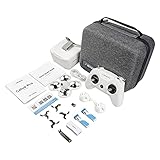
The HS210 is a true indoor toy drone, sized for palms and playrooms at about 3.15 inches across and roughly 24.8 g by the maker’s specification. A full propeller protection guard surrounds the blades, which is the single most useful safety feature for children and first-time pilots flying near furniture. Auto hovering holds the drone at a steady height so a new pilot only has to manage direction, while headless mode removes the confusion of which way the nose points, and one-key takeoff and landing keep starts and finishes calm. There is no camera, which keeps the focus on learning to fly rather than on footage. Three 250mAh batteries come in the box for up to about 21 minutes of total flying, roughly seven minutes per pack, and spare propellers are included as well. The remote reaches about 160 feet, far more than any room needs. Pick the HS210 for family fun and gentle indoor practice.
View Holy Stone HS210 on Amazon
5. HOVERAir X1 — Best hands-free
The HOVERAir X1 takes a different approach to indoor flying: it is a self-flying camera that needs no controller at all. Launch it from your palm and it follows pre-set intelligent flight paths, recording 2.7K HDR video while you stay in the scene instead of behind a screen, which suits family gatherings, parties and small events where a pilot would rather take part than fly. The maker rates its intelligent flight time at about 11 minutes per battery, and the body folds down small enough to slip into a pocket or bag between uses, so it is easy to keep charged and ready. Because it flies itself at close range, it fits the guide’s advice about checking your space first: clear the room, keep it away from ceiling fans, and let it work in the open part of the room. Choose the X1 if you want short, shareable indoor clips with almost no learning curve and nothing extra to carry.
What to Look For
| Factor | Why it matters | What to check |
|---|---|---|
| Size and weight | Smaller frames fit tighter rooms | Check the maker’s dimensions and weight figures |
| Propeller guards | Shield blades from walls and furniture | Look for full enclosures or ducted designs |
| Sensors | Help with hovering and obstacle detection | Check for optical flow, downward and forward sensors |
| Flight modes | Make learning easier | Look for altitude hold, beginner speeds and one-key takeoff |
| Battery and charging | Decide how long you fly | Compare flight time figures, spare packs and charge time |
| Camera and control | Shape how you use it | Check video quality, app control and remote options |
| Replacement parts | Small drones take knocks | Check that propellers and guards are sold separately by the maker |
Setup and Care Tips
- Clear the room of fragile items and loose cables before flying.
- Charge batteries on a hard surface, away from flammable things, as the maker directs.
- Calibrate the drone on a flat floor when the manual says to.
- Begin on the slowest speed setting and increase gradually.
- Inspect propellers for chips or bends and replace them when needed.
Mistakes to Avoid
- Flying near ceiling fans or air vents that disturb the aircraft.
- Skipping the manual and any calibration steps.
- Choosing a large drone for a small room.
- Ignoring spare batteries and propellers.
- Forgetting local rules about flying near other people.
What is the best indoor drone for a beginner?
The best indoor drone for a beginner is a small, fully guarded model with altitude hold and simple controls. Those three features let you focus on learning direction rather than fighting the aircraft.
Prop guards protect the blades, the furniture and your hands. Altitude hold keeps the drone at a steady height, so you do not have to manage the throttle constantly. Simple controls, such as one-key takeoff and landing, keep the start and the finish calm.
Beginners tend to fall into three groups:
- Kids and families who want light, guarded toys with no camera.
- Future FPV pilots who want a small whoop with a transmitter and goggles to build real skills.
- Video-first users who want footage without learning a controller.
Start slowly whichever group you are in. Use the lowest speed setting, practice in a large empty room, and increase difficulty gradually. A few bumps are normal, so keep spare propellers close.
It also helps to be realistic about the room. A small drone in a crowded space will be frustrating, while the same drone in an open living room can be a pleasure. Clear the floor, move fragile items out of reach and turn off ceiling fans before you fly.
Camera drone, FPV whoop or toy drone: which indoor type fits?
A camera drone suits indoor video, an FPV whoop suits skill-building and immersive flying, and a toy drone suits simple fun. Pick the type by what you want to do after takeoff.
A camera drone like the DJI Neo is built around footage and easy control. It is the least demanding path to indoor video, though you rely on its tracking and automatic modes more than on your own stick skills.
An FPV whoop such as the BETAFPV Cetus Pro kit is about learning. You wear goggles, fly with a transmitter and develop real pilot skills. The DJI Avata 2 follows a similar immersive idea at a bigger scale, which means it needs more clear space.
A toy drone like the Holy Stone HS210 is about simplicity. It has no camera, a full guard and easy modes, which keeps the focus on flying and on safety around children.
A self-flying camera such as the HOVERAir X1 is a fourth path. It records short clips without a controller, so it suits people who want to be in the scene.
When comparing these types, consider:
- Learning curve: FPV takes the most practice, while toys and hands-free cameras take the least.
- Space needed: larger drones want more room than small whoops and toys.
- Video quality: only the camera models are built for footage you will want to keep.
- Extras: goggles and controllers add to what you have to charge and carry.
Which indoor drone should you buy?
Buy the DJI Neo Three-Battery Combo for easy indoor video, the BETAFPV Cetus Pro FPV Kit to learn FPV, or the Holy Stone HS210 for simple first flights. The other two picks suit more specific goals.
- If you want indoor video with the least fuss, go for the DJI Neo Three-Battery Combo. It launches from your palm and has built-in propeller guards.
- If you want immersive flying through rooms and gaps, choose the DJI Avata 2 Fly More Combo (3 Batteries), which includes goggles, a controller and batteries.
- If you want to learn FPV indoors with everything in the box, pick the BETAFPV Cetus Pro FPV Kit.
- If you are buying for a child or want gentle first flights, the Holy Stone HS210 has a full guard and easy flight aids.
- If you want short clips without holding a controller, the HOVERAir X1 flies itself.
If you are unsure, begin with the simplest option that matches your goal. You can always move up to a more demanding drone once you have the habits of checking the room, the batteries and the propellers.
Remember that the bigger the drone, the more space and care it needs. The Avata 2, for example, is described as a bigger commitment than a toy and needs a decent amount of clear room. Match the aircraft to the space you really have.
What to check before you buy an indoor drone
Before buying an indoor drone, check the guard design, the battery plan, the controller type and the replacement parts. Small details decide whether the drone is fun or frustrating.
- Size and weight: confirm the dimensions fit your room and your comfort level.
- Propeller guards: look for full enclosures or ducted designs, and note whether guards can be removed.
- Batteries: check how many come in the box, how long a pack lasts and whether spares are sold.
- Charging: confirm the cable type and whether a charging hub is included.
- Controller: find out whether you need a phone, a remote, goggles or a combination.
- Phone app support: check that your phone and system version are supported.
- Camera details: if you want video, check what the camera records and how it is stabilized.
- Replacement parts: make sure propellers and guards are sold separately.
- Age guidance and rules: read the maker’s age notes and local rules about flying near other people.
- Warranty and returns: confirm the terms on the listing.
Also think about the charging routine. Charge batteries on a hard surface away from flammable items, as the maker directs, and store them away from heat. Keep spare propellers in the same container as the drone so you can fix a chipped blade quickly.
A quick pre-flight check helps: propellers seated, battery clicked in, and the room clear of people and pets.
Is an indoor drone worth it, and who should skip one?
An indoor drone is worth it if you have a reasonably clear space and want a hobby, a skill or short videos, and it is not worth it in a cramped room full of fragile items. The downsides are modest but real.
Consider the honest trade-offs:
- Short flight times: small drones fly for minutes per battery, so spare packs matter.
- Limited video quality in small toys: models without a proper camera are about fun, not footage.
- Learning takes patience: FPV in particular rewards practice and forgives few mistakes.
- Noise and airflow: propellers can be loud in a small apartment and can disturb light objects.
- Extra gear: goggles, controllers and batteries all need charging and storage.
Who should skip it? People with low ceilings, ceiling fans, many fragile items or very little floor space may find indoor flying annoying. Those who want long flights, outdoor range or large cameras should look at larger drones and check local rules first.
Paying more can be worth it if you want a camera, goggles or a complete kit, because the extras are included. Paying less is fine if you only want to learn the basics or entertain a child.
Compare the picks above, check the current listing for what is included and how the drone is controlled, then choose the one that fits your room and how you will use it.
Reading This Guide More Deeply: Indoor Drone Ownership in Everyday Life
The headline specifications of a indoor drone only tell part of the story. Two models can look almost identical on a listing page and still feel completely different once they are part of your daily routine, because the differences that matter most tend to show up in small repeated moments: how quickly the indoor drone is ready to use, how forgiving it is when you are tired or in a hurry, and how well it keeps doing its job month after month without demanding attention. The picks in this guide were chosen to cover distinct roles rather than to repeat the same idea at slightly different sizes, so the most useful way to read the reviews above is to start from the role you need filled, not from the longest feature list.
That is also why this extra section exists. The sections below slow the decision down and look at the indoor drone from the owner’s side of the table: the details that separate a satisfying purchase from a frustrating one, the situations where one pick clearly suits better than another, the habits that keep the equipment working well, and the simple checks that catch problems while a return is still easy. None of this replaces the individual reviews above. It gives you a framework for weighing them against your own space, habits and expectations, which is where good buying decisions are actually made.
The Details That Separate a Good Indoor Drone From a Frustrating One
Most disappointment with a indoor drone does not come from one dramatic flaw. It comes from a handful of small mismatches between what the buyer imagined and what the product does every day. The three areas below are where those mismatches usually hide, and each one is worth a few minutes of honest thought before you order, because each is much easier to judge on paper now than to live with later.
Propeller protection and household forgiveness
Indoors, contact with the world is guaranteed: walls, curtains, lampshades and people all enter the flight path. Fully guarded propellers protect the room, the drone and your confidence simultaneously, and they change how beginners fly, because a gentle bump becomes a lesson instead of a breakage. Judge the guard design and how easily a damaged guard or propeller can be replaced, because indoors, replacement is a when, not an if. Judge this against your worst typical day, not your best one: the busy evening, the rushed job, the session where patience is short. A indoor drone that still works smoothly under those conditions is the one that earns its place, while one that only shines when everything is calm tends to be quietly abandoned.
How the drone flies itself, and how much is you
Indoor models range from drones you fly every second to camera drones that hover, follow and film almost autonomously. Decide which experience you are buying: the skill and play of piloting, or smooth footage of family life with minimal effort. Both are legitimate joys, and the models in this guide divide along exactly this line, so choosing the experience first makes the shortlist obvious. A practical way to test your thinking is to picture the second month of ownership rather than the first day. Novelty hides friction at first, but by the second month the indoor drone has to justify itself through routine alone, and this is exactly the quality that decides whether it still does.
Camera quality at household distances
Indoor video is shot close, in mixed and often warm artificial light, so judge stabilisation, low-light behaviour and how the camera handles the contrast between a bright window and a dim hallway. Specifications written for outdoor landscapes translate poorly to a living room. The footage that matters is of your people in your rooms, so reviews filmed in real homes are the evidence to trust. If you are torn between two picks in this guide, this is often the deciding ground. Headline features tend to be similar across close rivals, while the everyday behaviour described here is where one option quietly pulls ahead of the other for a particular owner.
Matching a Indoor Drone to the Way You Will Actually Use It
Buyers rarely use a indoor drone in just one way, but most have one dominant situation that should drive the choice. Reading your own routine honestly, and then checking which pick in this guide was positioned for that routine, prevents the common mistake of buying for an imaginary use case while the real one goes unserved. The three situations below cover the patterns that come up most often.
Filming family life and social clips
Hands-free and camera-first drones shine here, capturing gatherings, children playing and the dog’s opinion of all of it, without anyone holding a controller. Short, charming clips are the goal, so quick launch, automatic framing and painless sharing matter more than range or speed. Keep flights considerate: not everyone loves a drone at a party, and a host’s permission is part of the kit. If this sounds like your routine, weight the picks positioned for this role more heavily than the general all-rounders, even when an all-rounder looks more impressive on paper. A narrower tool that fits the main job usually beats a broader one that fits it only adequately.
Learning to fly in a small space
A small guarded drone and a hallway or living room make an honest flight school: throttle control, orientation and gentle landings, all at walking pace with soft consequences. Pilots who master a tiny drone indoors graduate outdoors with skills that transfer completely, and the winter months stop being the off-season. Notice, too, how often this situation really happens. A indoor drone bought for a weekly routine needs different strengths from one bought for an occasional task, and confusing the two is how capable equipment ends up feeling disappointing despite doing nothing wrong.
Children flying with supervision
For younger pilots, the priorities are guards, gentle modes, light weight and a drone cheap enough that its loss is a lesson rather than a tragedy. Short flight times suit short attention spans, and spare batteries extend the fun more than any accessory. Adults handle charging and batteries, always, and flying stays away from faces, pets and the television. It also helps to think about who else is affected by the choice in this situation: family members, housemates, bandmates, clients or colleagues. A indoor drone that works for you but creates friction for everyone around the task rarely stays satisfying for long.
How the Picks in This Guide Compare With Each Other
Readers often ask which single pick is best, but the more useful question is which pick is best for a particular pattern of use, because the models above were selected to be different from one another rather than to compete head-on. The notes below restate each pick’s role in plain terms and explain how to choose between neighbours, using only the positioning already given in the reviews above.
DJI Neo Three-Battery Combo. In this guide it is presented as best for indoor video. Treat that positioning as a promise about priorities: this pick spends its design effort on the job named in its label, and accepts compromises elsewhere to do it. Choose it when that job is your main one, and look at the neighbouring picks when your routine spreads more evenly across several jobs.
DJI Avata 2 Fly More Combo (3 Batteries). In this guide it is presented as best for immersive FPV. The honest question with this pick is not whether it is good, but whether its strengths line up with the hours you will actually spend. If its labelled role matches your dominant use, it is a strong candidate; if your routine is quite different, the same qualities can feel like compromises rather than virtues.
BETAFPV Cetus Pro FPV Kit. In this guide it is presented as best first FPV kit. Buyers who choose this pick and stay happy with it usually share one thing: the role in its label describes their ordinary week, not their aspirational one. If that is true for you, it deserves a place on your shortlist ahead of more fashionable alternatives.
Holy Stone HS210. In this guide it is presented as best for kids and beginners. Compare this pick directly with the option reviewed just before or after it, because close neighbours in this guide are usually the real contest. The differences between them are about emphasis and fit rather than quality, so let your routine, your space and your existing equipment cast the deciding vote.
HOVERAir X1. In this guide it is presented as best hands-free. This is also the pick to measure your budget against most carefully. When a guide positions a model for a specific role, paying for that role only makes sense if you will use it often; occasional users are usually better served by the simpler or more versatile neighbour in the list.
When two picks still feel tied after this comparison, choose the one whose compromises bother you less. Every indoor drone gives something up, and long-term satisfaction usually belongs to the buyer who picked the set of trade-offs that fits their habits, rather than the buyer who chased the longest list of strengths.
First Setup and the First Week With Your Indoor Drone
Charge everything, update and calibrate in a clear, well-lit room, and make the first flights short and low over a soft floor with furniture pushed back. Learn the return, landing and emergency stop controls before exploring, and test the camera’s view on your phone or screen so framing indoors becomes familiar before you film anything that matters.
During the first week, resist the urge to judge the indoor drone on a single session. Early impressions are distorted by unfamiliarity: controls sit in unexpected places, routines are not yet automatic, and small setup issues masquerade as product flaws. Keep a short note of anything that bothers you, then check whether it is still bothering you after several ordinary uses. Genuine problems repeat themselves in the same way each time, while unfamiliarity quietly fades, and telling the two apart saves both returns of good equipment and tolerance of bad equipment.
It is also worth setting one simple baseline during that first week: a normal, repeatable version of the task you bought the indoor drone for, done under ordinary conditions. Repeating that same baseline later is the easiest way to notice drift, wear or a setting that has wandered, long before a small change grows into a real problem.
Care, Storage and Troubleshooting for Indoor drones
Inspect propellers and guards after bumps, keep spare propellers with the drone, and store batteries partly charged, cool and dry. Keep the sensors and camera lens clean with a soft cloth, since indoor dust and fingerprints are the quiet enemies of both positioning and picture quality. Most faults that owners blame on build quality turn out, on inspection, to be maintenance or setup issues with simple fixes, so the sensible order is always the same: check the simple and reversible things first, change one thing at a time, and only conclude that the indoor drone itself is faulty when the same symptom survives careful basic checks.
The drone drifts or will not hover steadily
Check the basics: a level surface for takeoff and calibration, no breeze from heating or fans, and propellers and guards undamaged and correctly fitted. Optical positioning needs light and a floor with visible texture, so a drone that hovers beautifully in a lit kitchen may wander in a dim room over a plain carpet, which is the sensors being honest rather than faulty. Work through the checks in order and stop as soon as the symptom changes, because changing several things at once leaves you unsure which one mattered, and the problem then returns with no lesson attached to it.
Short flight times
Indoor drones are small, and small batteries are physics, not stinginess. Cold batteries, aggressive flying and ageing packs shorten flights further. The practical answers are spare batteries, gentle flying and a charging rhythm between flights. A pack that swells, runs hot or loses minutes suddenly should be retired, not coaxed. If the symptom appeared suddenly after a period of good behaviour, think about what changed just before it started: a new accessory, a moved piece of furniture, a different cable, a software setting, a change in the room. Sudden faults almost always have a recent cause.
The drone will not connect or update
Work through the order: drone and controller or phone charged, the app updated, and the connection made in the sequence the maker specifies. Indoor Wi-Fi congestion can interfere with setup in busy households, so try again away from the router’s busiest hour. Keep firmware updates for a calm moment with full batteries, never as the doorbell rings. Keep a note of what you tried and what happened. If you do end up contacting the maker or a repairer, that short history turns a vague complaint into a quick diagnosis, and it often reveals the answer to you while you are writing it.
A Calm Decision Workflow Before You Order
When the reviews above leave you with two or three candidates, a short written workflow beats another hour of scrolling. Start by naming the main job in one sentence, in plain words, without brand names in it. Then check each candidate against that sentence and delete any pick that only serves a secondary job well. Next, list the equipment, space and connections the indoor drone must work with in your home, and confirm each surviving candidate against that list, because incompatibility discovered after delivery is the most avoidable disappointment of all.
Confirm your phone suits the drone’s app if it uses one, that your home’s rooms give the positioning sensors the light and texture they need, and that spare batteries and propellers for the exact model are available where you live. If others in the household will fly it, check the controls suit the least experienced pilot, not just you.
Finally, decide in advance what would make you return the indoor drone: a specific fault, a specific discomfort, a specific result that fails to appear in the first sessions. Writing that down before the box arrives protects you from both directions of bias, the urge to keep something unsuitable because returning feels like failure, and the urge to send back something good over a problem that one adjustment would have solved. A purchase decided this way rarely needs revisiting, and the indoor drone that survives the process tends to stay in use for years.
Living With Your Choice: The First Few Months
Ownership of a good indoor drone settles into a rhythm. The first month is about learning: where things live, which settings you actually use, and which advertised possibilities turn out to be irrelevant to your life. The second month is about refinement, when small adjustments to position, routine or accessories quietly remove the last points of friction. By the third month, the equipment should have become almost invisible, noticed only when it is missing. If it still demands regular attention at that stage, the problem is usually a mismatch worth addressing rather than a habit worth forming.
One habit separates satisfied long-term owners from frustrated ones: they revisit their setup occasionally instead of treating the first arrangement as permanent. Rooms change, skills grow, routines shift with the seasons, and a indoor drone that was well matched in spring can be slightly wrong by winter for reasons that have nothing to do with its quality. A short review every few months, checking position, condition and whether your main use has drifted, keeps the original purchase working as your life changes around it.
Accessories and the Wider Kit Around a Indoor Drone
Spare batteries and propellers, a charging hub that keeps the rotation organised, and a case that holds the drone and its small pieces together cover the real needs. A landing pad is unnecessary indoors, but a clear storage box that keeps the kit in one place prevents the classic loss of the one cable that matters.
The safest order is to buy the indoor drone first, live with it briefly, and let real gaps announce themselves before spending on extras. Accessories bought in advance often solve imagined problems, while the one small item that would genuinely help only becomes obvious in use. When you do add pieces, add them one at a time and notice the effect of each, so the kit grows by evidence rather than by enthusiasm. A small kit that is fully understood serves better than a large one that is half familiar, and it is far easier to keep in good order.
FAQ
Do indoor drones need a license?
Rules vary by country and by weight. Check your local aviation guidance and the maker’s notes before flying.
Can I fly an indoor drone outside?
Most are too light for wind. Use them indoors unless the maker states that outdoor use is supported.
Are indoor drones safe to fly around kids?
Drones with full propeller guards are the safer choice, but adult supervision still matters. Check the maker's age guidance and keep the flying area clear. Never fly near faces or pets.
How long do indoor drone batteries last?
Small indoor drones typically fly for a short time per battery, so spare packs make a big difference. The listing and the manual give the maker's figures for each model. Plan for several short sessions.
Do I need a smartphone to fly an indoor drone?
It depends on the model. Some use a dedicated remote, some use goggles and a controller, and some work from the palm with an app. Check the listing for the control method and your phone's compatibility.
What is an FPV drone?
An FPV drone is flown using a live video feed, usually through goggles, so you see what the drone sees. Small whoop models with enclosed propellers are popular for learning indoors. Expect a learning curve.
Can I fly a drone in a small apartment?
Yes, if you pick a small, guarded model and clear the area first. Avoid ceiling fans and keep fragile items out of reach. Practice slowly and choose the lowest speed setting.
What should I do if a propeller gets bent?
Replace it before the next flight. A bent or chipped propeller can make the drone unstable. Keep spare propellers of the correct size in the same container as the drone.
How do I store batteries for an indoor drone?
Store them away from heat, and remove them from the drone if it will sit unused for weeks. Follow the maker's charging and storage instructions. Charge on a hard surface away from flammable items.
Questions to Ask Before You Buy
- Do the propellers have guards, and can the guards be removed?
- How long does a battery last, and are spare batteries sold?
- Does it have altitude hold, or do you control height by hand?
- Is the controller a phone app, a remote or both?
- How noisy is it in a small room or apartment?
- Are replacement propellers and parts easy to find?
Read the maker’s manual and instructions before the first flight, and check local rules for flying near other people.
Matching It to Your Use
First-time pilots
Look for a drone with a one-key takeoff and landing function, plus a beginner speed mode. Expect a few bumps along the way.
Kids and family fun
Lightweight bodies and full guards are common here. Adult supervision and clear space matter more than any feature.
Indoor video
Small cameras exist on some models, but lighting is the limit in a dim room. Open a window blind or add a lamp.
Compatibility Checks
| Item | What to confirm |
|---|---|
| Phone app | Works with your system version |
| Charging | USB cable type and charge time |
| Space | Room size against turning ability |
| Spare parts | Same size propellers sold separately |
Clear the floor of cords and light objects, and keep the drone away from ceiling fans.
Who Should Skip It
If your living space is crowded with fragile items, low ceilings or ceiling fans, flying indoors may be annoying. People who expect steady video from a very small toy-class drone may be disappointed, since these models focus on fun and practice.
Those who want long flights, large cameras or outdoor range should look at larger models and check local rules first.
Storage Notes
Store the drone with propellers clear of other objects, ideally in its box or a small case. Remove batteries if it will sit unused for weeks, and keep them away from heat. Check the maker manual and instructions for charging care. Replace bent propellers before the next flight, and keep spares in the same container so you can find them quickly.
Make a habit of a quick check before each flight: propellers seated, battery clicked in, and the room clear of people and pets.
Are indoor drones safe around children and pets?
Small, light drones with fully guarded propellers are the safest form of the hobby, and with adult supervision they are a reasonable family toy and tool. Safe is a practice, not just a product: fly away from faces, land when a pet becomes excited or distressed, and keep batteries and charging under adult control. Choose the lightest, gentlest model that does the job you want, and the margin takes care of itself. When in doubt, test the question against your own routine rather than against an idealised one, because most honest answers in this area depend on how the equipment is actually used.
Can I fly an indoor drone outdoors?
On a calm day, many indoor models fly happily in a garden, but wind is their natural enemy: a breeze an outdoor drone ignores can carry a light indoor model across the street. Treat outdoor flights as a bonus in still air, keep the drone close and low, and respect the same rules and courtesy as any drone flight. If outdoor flying becomes the ambition, that is the sign to add an outdoor model rather than push this one. If two answers seem to conflict in advice you read elsewhere, the difference is usually the situation being assumed, so identify your own situation first and the right answer normally follows.
Do I need to register an indoor drone?
Rules vary by country and usually turn on weight and where you fly, and genuinely indoor flight inside your own home sits outside most regimes. The moment the drone goes outdoors, the normal rules for its weight class apply. Check your national authority’s current guidance once, before the first garden flight, and you will know where you stand for the life of the drone. This is also a question worth revisiting after a few months of ownership, because the answer that fits a beginner often changes as habits and confidence develop.
How do I get smoother indoor video?
Fly slower than feels necessary, plan the line before takeoff, and let the drone’s stabilisation and intelligent modes do their work rather than correcting constantly. Light the room evenly where you can, since harsh contrast makes any small camera look nervous. Short, deliberate clips edited together look far more professional than one long wandering flight, however smooth.
The Short Version
Match the drone to your room with a compact frame, guards and helpful sensors. Look at battery options and control style, and follow the manual and local rules. Treat each flight as practice, keep batteries charged and organized, and increase difficulty gradually.