A printed photo book turns a folder of digital files into something you can hold, share and keep on a shelf for decades. The catch is that services differ a great deal in paper, binding, layout software and how they handle color. We have not used these products ourselves, so this guide focuses on how to choose rather than on claims about any single service.
Begin with how the book will be used. A travel album that gets passed around needs sturdy pages and a cover that resists scuffs. A wedding or family heirloom book may call for lay-flat binding and thicker stock. Once you know the purpose, the factors below make it much easier to compare options and avoid disappointment when the box arrives.
As an Amazon Associate we earn from qualifying purchases. Links on this site are affiliate links, and they do not change the information we give.
In this guide
Quick Picks
| Pick | Product | Best For |
|---|---|---|
| Best for Larger Collections | PicPrint Personalized Photo Album 8.5×11″ Hard Cover (40 Photos) | Big photo sets in a larger format |
| Best Compact Square Book | PicPrint Personalized PhotoBook 8×8″ Hard Cover (20 Photos) | Small gift books and short trips |
| Best for Hard-Wearing Pages | Goodenough Custom Photo Book 8.5×11″ (24 Pages, Holds 90 Photos) | Books that get passed around often |
| Best for Hundreds of Prints | Paige McRae Family Photo Album 4×6 with Custom Year (400 Pockets) | Slipping loose 4×6 prints into a linen album |
| Best Small Keepsake | Promot Personalized Photo Album with Pockets, Stone Gray (Holds 40 Photos) | A compact wedding or gift album |
Our Picks
1. PicPrint Personalized Photo Album 8.5×11″ Hard Cover (40 Photos) — Best for Larger Collections
PicPrint is an actual print-on-demand option sold through Amazon: you supply 40 of your own images and receive a bound 8.5×11 inch hardcover book printed from them. The listing states the book is crafted with Fujifilm Crystal Archive paper, which speaks directly to the paper and color points in the guide below, because the paper is made for photo reproduction rather than ordinary document stock. The larger 8.5×11 format gives full-page images more room than a small square book, which suits wedding, travel and family collections where you want fewer, bigger pictures per spread. PicPrint also lists flexible page options of 10, 20, 30 or 40 pages and an 8×8 alternative, so you can match the page count to the size of your set before ordering. Because the photos are printed into the book itself, there are no loose prints to arrange afterwards. It fits readers who want a printed book ordered in one step, with a named photo paper and a choice of sizes, instead of a separate printing service plus a blank album.
View PicPrint Personalized Photo Album 8.5×11 on Amazon
2. PicPrint Personalized PhotoBook 8×8″ Hard Cover (20 Photos) — Best Compact Square Book
This is PicPrint’s smaller square option: an 8×8 inch hardcover book printed with 20 of your own photos. The product description says it uses high-quality binding and glossy photo paper, and that the books are made in the USA, which shortens the chain between ordering and delivery compared with overseas printing. A square 20-photo format is a deliberate constraint. It works well for a single trip, a birthday or a short family story where you would rather pick a tight set of strong images than fill dozens of pages. The guide below warns against crowding every page, and a 20-image book forces exactly the editing discipline that advice calls for. The hard cover protects the book when it is handed around, and the classic white cover keeps the focus on the photos inside. Choose this one when the project is small and gift-like, and use the larger PicPrint format above when your photo set runs longer. Either way, you are ordering a finished printed book through Amazon rather than managing a separate print order.
View PicPrint Personalized PhotoBook 8×8 on Amazon
3. Goodenough Custom Photo Book 8.5×11″ (24 Pages, Holds 90 Photos) — Best for Hard-Wearing Pages
Goodenough’s custom book takes a different approach to durability. It is an 8.5×11 inch hardcover book with 24 hard pages that the maker describes as laminated and waterproof, so the pages wipe clean if sticky fingers or a spilled drink reach them. That matters for the family and baby books the guide talks about, which tend to be handled by children and passed around kitchens rather than kept on a shelf. The book is sized for 4×6 pictures and holds up to 90 photos, and the listing’s description walks through a checking step in which your photos are reviewed before the book is bound, which echoes the guide’s advice about resolution warnings and checking files before you commit. The listing also includes a case among its components, giving the finished book some protection in storage. The maker positions it for weddings, travel and baby keepsakes. Pick it when the finished book will be handled often and you value wipe-clean, rigid pages over a high page count.
View Goodenough Custom Photo Book 8.5×11 on Amazon
4. Paige McRae Family Photo Album 4×6 with Custom Year (400 Pockets) — Best for Hundreds of Prints
Not every reader wants a service to print the pages. If you already order loose prints, or prefer to choose a print lab yourself using the criteria below, this Paige McRae album is the slip-in route: a beige linen hardcover album with pocket sleeves that hold 400 standard 4×6 prints. The layout is planned rather than uniform, with 240 horizontal and 160 vertical pockets across 80 pages, each page taking three horizontal and two vertical photos, so mixed-orientation sets fit without cropping. The personalization is on the outside: you can add a custom year, shown embossed on the cover and spine, or choose a no-year version. That makes it a sensible home for a year of family photos printed elsewhere. The sturdy hardcover and thick sleeves are aimed at books that live on a coffee table and get flipped through often. Choose this option when your collection runs to hundreds of prints and you want the freedom to pick any printing service for the photos themselves.
View Paige McRae Family Photo Album on Amazon
5. Promot Personalized Photo Album with Pockets, Stone Gray (Holds 40 Photos) — Best Small Keepsake
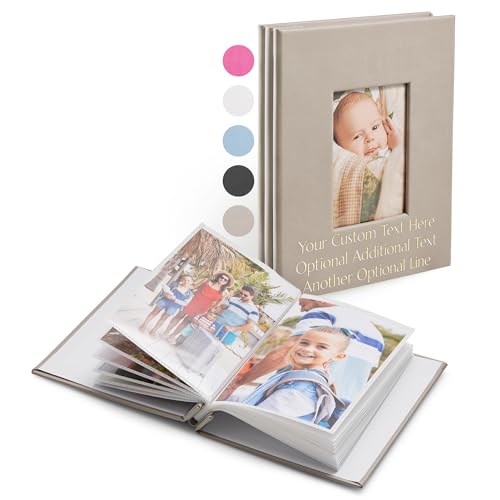
At the small end of the range, Promot’s personalized album is a vintage-style hardcover in stone gray with slip-in pockets for 40 photos in the 4×6 size, across 40 pages. It is the kind of book you assemble in an evening from a small stack of prints, which makes it a practical wedding, guest or gift album where a large service-printed book would be more than the occasion needs. The compact capacity is the point: forty frames push you to choose the strongest images, in line with the guide’s advice about sorting photos into a story before you start. Because the prints are standard 4×6, you can use any photo printing service you like for the pictures and replace or reorder them later, something a permanently printed page does not allow. The maker is The Rubber Stamp Factory, selling under the Promot name. Pick this one for a small, personal keepsake, and look at the larger options above when the photo set is bigger.

What to Look For
| Factor | Why it matters | What to check |
|---|---|---|
| Paper type | Stock changes how photos look and how pages feel | Matte, semi-gloss and glossy options, plus paper weight |
| Binding style | Decides how well spreads open and how long the book lasts | Lay-flat, hardcover wrap, softcover or stitched signatures |
| Layout tools | Good software saves hours of fiddling | Auto-fill, drag and drop, caption fields, template variety |
| Color handling | Screens and paper rarely match perfectly | Color profile support, soft-proof guidance, reprint terms |
| Size and page count | Limits how many images fit and how the book sits | Available formats, minimum and maximum pages, extra page cost model |
| Image resolution warnings | Low-resolution files print soft or blocky | In-editor alerts for small files and recommended dimensions |
| Turnaround and shipping | Matters for gifts and events with fixed dates | Production time, tracking, packaging protection |
Setup and Care Tips
- Sort your images into chapters before opening the editor, so the layout follows a story instead of a pile.
- Export photos at full size rather than shrinking them for sharing online, which keeps detail intact.
- Leave a little margin around key faces and text so nothing disappears into the gutter or trim edge.
- Order a small sample or proof copy first if the book is large or will be given as a gift.
- Store the finished book flat or upright in a dry, shaded spot away from direct sunlight and damp.
Mistakes to Avoid
- Placing an important image across the center fold of a standard binding, where part of it is lost.
- Trusting a bright, backlit screen to judge color without checking any proof or guidance.
- Filling every page edge to edge, which leaves the layout crowded and hard to read.
- Skipping the spelling check on captions and titles before approving the order.
- Ordering close to an event date with no allowance for production and delivery time.
How do you pick a photo book printing service for your project?
Pick the photo book printing service that matches how the book will be used, then check paper, binding and proofing support. A book for a shelf has different needs from one that children will carry around.
Start by writing down three things: how many photos you have, how large you want them on the page, and when you need the book in hand. Those answers narrow the field faster than any feature list.
- Photo count: a short trip story fits a small book, while a whole year of family life needs more pages or a pocket album.
- Page size: larger pages show full-page images well, while a square format suits a tight selection of strong shots.
- Handling: a book that is passed around benefits from rigid, wipe-clean pages or a protective case.
- Timing: gifts and events need production and delivery time built in, so check the listing for how long the maker says it takes.
It also helps to decide early whether you want a service to print the pages or whether you prefer to print loose photos yourself and slide them into an album. Both routes are covered by the picks above, and each has trade-offs in cost, effort and flexibility.
Finally, think about who will look at the book. A keepsake for grandparents may be opened often and handled gently. A guest album at a wedding may be filled by many hands. Matching the build to the real use is the single most reliable way to avoid disappointment.
Printed photo book vs slip-in photo album: which is better?
A printed photo book gives a finished, designed result, while a slip-in photo album gives flexibility and lets you swap prints later. Neither is better in every case, so the right choice depends on how much control and effort you want.
A printed book such as the PicPrint options is made from your files in one order. You choose the images, and they arrive bound into the pages. That removes the step of ordering prints and arranging them, but the pages are fixed once printed.
A pocket album such as the Paige McRae or Promot albums works the other way. You buy or already own standard prints and slide them into sleeves. You can swap a photo, add new ones next year or use a different print lab each time.
- Choose a printed book when you want full-page images, a designed story and no loose prints to handle.
- Choose a pocket album when you have many prints, want to add to it over time or like assembling it by hand.
- Consider a laminated-page book, like the Goodenough one, when durability around kids matters more than page count.
One more difference is editing discipline. A smaller printed book forces you to select only your strongest images, while a large pocket album tempts you to include everything. Neither approach is wrong, but it helps to know which habit you have before you buy.
Which photo book should you buy?
Buy the book that fits the size of your photo set and how the book will be handled. Here is a simple way to map your needs to the products already covered above.
- If you have a big set and want large images, go for the PicPrint Personalized Photo Album 8.5×11″ Hard Cover, which gives full-page pictures more room.
- If the project is small and gift-like, choose the PicPrint Personalized PhotoBook 8×8″ Hard Cover, which pushes you toward a tight selection.
- If the book will be handled by children or passed around, choose the Goodenough Custom Photo Book 8.5×11″, whose pages the maker describes as laminated and waterproof.
- If you have hundreds of loose prints, go for the Paige McRae Family Photo Album, which is built to hold a large number of 4×6 prints.
- If you want a compact keepsake or guest album, choose the Promot Personalized Photo Album with Pockets in Stone Gray.
If you cannot decide between two, ask which matters more: a finished designed look or the freedom to change photos later. The first points to a printed book, and the second points to a pocket album.
Also consider the recipient. Gifts for older relatives often work best with large, uncluttered pages, while a casual family album can be more relaxed. Use the listing details for each pick to confirm that the format matches what you imagined.
What to check before you buy a photo book
Before you order, confirm the size, page or pocket count, what is included, and the return and reprint terms on the listing. A few minutes of checking prevents most disappointments.
- Size and format: check the exact dimensions and whether the book is square or rectangular, so your photos suit the shape.
- Capacity: look at how many photos or pockets the book holds and whether extra pages are offered.
- What is included: check whether a case, gift box or protective sleeve comes with the book.
- Photo requirements: read the listing for recommended image sizes and any file-checking step before printing.
- Personalization limits: confirm what can be customized, such as a cover year or text, and how it is applied.
- Timing: find the stated production and delivery window, especially for dated events.
- Returns and reprints: custom items may have different return rules, so read the terms before you commit.
- Care needs: check whether the pages can be wiped clean or need to be kept away from moisture.
Take a moment to review your photos too. Look for blurry shots, faces near the edges and images that were saved at small sizes for sharing online. Replacing them with originals gives the printed result its best chance.
If the book is a gift, double check names, dates and spellings before you approve anything. Typos on a printed page cannot be fixed afterwards.
What problems can a photo book have, and how do you avoid them?
The most common photo book problems are soft images, lost edges and mismatched colors, and most can be avoided with careful preparation. Knowing them in advance makes your photo book printing order smoother.
- Soft or blocky images: usually caused by small files. Use the original full-size photo and heed any in-editor warning.
- Faces cut off at the edge: keep a safe margin around people and text, since trimming can remove a sliver of the page.
- Dark or washed-out prints: screens are backlit, so images can look different on paper. Brighten very dark photos slightly and avoid extreme edits.
- Photos lost in the middle: avoid placing key faces across the center fold of a standard binding.
- Pocket albums that bulge: overfilled sleeves strain the spine, so leave a little room and do not force thick prints into slots.
For pocket albums, one more tip is to sort prints by orientation first. Mixed horizontal and vertical photos fit best when you plan the pages before inserting anything.
If something still looks wrong when the book arrives, contact the seller promptly and keep the packaging and your order details to hand. Policies differ, so the listing is the place to confirm what is covered.
Is a photo book worth it, and who should skip it?
A photo book is worth it when you want a lasting, shareable keepsake and are willing to spend time preparing the photos. It is not the right choice for everyone, so here are the honest trade-offs.
- Is it worth paying more? Higher-end formats usually offer larger pages, better paper or sturdier construction. Pay more only if the book will be handled often or given as a meaningful gift.
- Downside of printed books: pages are fixed once printed, so you cannot swap a photo later.
- Downside of pocket albums: they take effort to fill, and prints must be ordered separately.
- Color caution: printed colors can differ a little from a bright screen, so expect small variations.
Who should skip it: if you only want to look at photos on a phone or share them online, a printed book may be unnecessary. Skip it too if your photos are low resolution and you cannot find better originals, or if you need the finished item by a very tight date with no allowance for delivery.
If you are unsure, start small. A compact book teaches you how your photos print and how much editing you enjoy, and you can order a bigger project later.
Compare the picks above, check the current listing for size and what is included, then choose the one that fits how you will use it and press the button for that product.
Preparing Your Photos Before You Build the Book
The quality of a finished photo book is decided long before you choose a cover, in the unglamorous work of preparing the files. Start by gathering everything into one folder and working from copies, never from your only originals. Cull harder than feels comfortable: a book built from a tight edit reads as a story, while a book that tries to include every frame reads as a storage box. For most projects, choosing the strongest image of each moment and letting near-duplicates go will improve the book more than any upgrade in paper or binding.
Next, check the technical basics image by image. Confirm each file is the full-resolution version rather than a small copy saved from a messaging app or social platform, since those are often heavily compressed and sized for screens. Look at exposure and colour consistency across the set, especially when photos come from several phones and cameras: a page where one image is warm and orange beside another that is cool and blue looks like a mistake even when each photo is fine alone. Simple batch adjustments — straightening horizons, lifting shadows on the darkest frames, matching white balance within each event — make a mixed collection feel like one book.
Finally, think in spreads, not single images. Decide which few photos deserve a full page or a double-page spread, and let the rest support them in smaller frames. Mark your heroes during the cull, because layout tools make it easy to give every photo equal weight, and equal weight is what makes books feel flat. A wedding, a baby’s first year or a long trip each has perhaps a dozen true hero images; building the book around them gives the smaller photos a job to do and gives readers a rhythm of quiet pages and striking ones.
Proofing: The Step That Saves Every Project
Every printing service in this guide will happily print exactly what you submit, including the typo in a caption, the cropped forehead and the page where two photos overlap. Proofing is how you catch those errors while they are still free to fix. Work through the finished layout slowly, in a different sitting from the one where you built it, and check three separate things in three separate passes: once for images (cropping, order, duplicates, a stray screenshot that slipped into the folder), once for words (names, dates, places, caption spelling), and once for design (pages that feel crowded, margins that swallow small photos, text sitting too close to a page edge where trimming can clip it).
Pay special attention to the centre of spreads and the edges of pages. Anything important placed across the middle of a two-page spread can be distorted or partly swallowed by the binding unless the book is a lay-flat design, and anything placed tight to an edge risks the trim. Services differ in how much safety margin they recommend, so follow the guidance in the builder you are using and keep faces, text and key details comfortably inside it. If the service offers a print-ready preview or a PDF proof, treat it as the real product and inspect it at full size rather than glancing at thumbnails.
If your project matters — a memorial book, a wedding album, a gift with a deadline — order or review with time in hand. A single test copy, or at minimum a slow proofing pass a week before you need the book, converts most disasters into mild annoyances. Rushed books are where errors live, and no printing service, however good, can proofread your family’s names for you.
Matching the Book to the Occasion
Different occasions reward different books, and the picks in this guide divide along those lines. Large hardcover formats, like the bigger PicPrint options here, suit milestone collections that will live on a shelf and be opened on a coffee table: weddings, anniversaries, a child’s complete first years, a house build documented from plot to door key. Their presence is the point — they feel like records. Compact square books suit gifts and single events: a holiday, a birthday, a season of a sports team. They are quicker to build, easier to post to relatives, and less intimidating to fill well.
Pocket albums, such as the Paige McRae and Promot picks, solve a different problem entirely: hundreds of loose prints that already exist. If your project starts with a shoebox rather than a phone library, a pocket album protects and orders those prints without any scanning, uploading or layout work at all, and a customised cover keeps it from feeling like a storage product. The honest decision tree is therefore about your source material and your audience: digital files and a milestone point to a printed book; existing prints and a big collection point to pockets; a gift with a deadline points to whichever format you can proof carefully in the time you truly have.
Also consider who will handle the book. Books for grandparents benefit from larger photos, fewer images per page and captions in a readable size. Books for children need hard-wearing pages and the expectation of sticky fingers — the sturdier page options in this line-up exist for exactly that reader. A book that will travel to family overseas should be sized for posting and built in a format you can reorder identically, because the second copy is often requested the moment the first one arrives.
Keeping Photo Books Safe for Decades
A photo book is a print product, and its lifespan depends mostly on light, humidity and handling rather than on which service made it. Store books upright or flat in a dry room, out of direct sunlight, and away from the damp and temperature swings of attics, garages and basements. Sunlight is the fastest enemy: even well-made prints fade when a book lives open on a sunny table, so display copies and archive copies are a sensible split for a truly important book — one to enjoy, one kept in the dark.
Handle pages with clean, dry hands and turn them from the outer edge rather than dragging a thumb across the image surface. Keep books away from food and drink during the enthusiastic first viewing, and shelve them where they will not lean at an angle for years, which slowly warps covers and stresses bindings. For pocket albums, the same rules apply to the prints inside, with one addition: only insert prints that are fully dry and clean, since anything sticky sealed into a pocket stays there.
The digital side deserves the same care. Keep the original photo files, and the finished book project if the service lets you save or export it, in your normal backup routine. A book that can be reprinted identically turns most physical accidents — a flood, a fire, a toddler with a marker — from losses into inconveniences. The families who still have their books in fifty years are rarely the ones who bought the most expensive option; they are the ones who stored it sensibly and kept the files.
Scanning Old Prints for a Book: Doing It Once, Doing It Right
Many book projects begin with photographs that exist only on paper — grandparents’ prints, childhood albums, a box inherited from a relative. If you are scanning them for a book, treat the scan as the new original and give it the care that implies. Clean the scanner glass and the prints themselves with a soft, dry cloth so dust does not become a permanent part of every image. Scan at a resolution generous enough for the largest size you might print in the book, and save a master copy in a lossless format before making any smaller working copies; you can always go down in size later, never back up.
Handle fragile prints by their edges, support curled photos flat rather than forcing them, and never use adhesive or tape to hold a print down. Work through the box in a sensible order and name files as you go — a simple pattern of year, event and sequence turns an anonymous pile of scans into a library you can actually build a book from. Note names and dates on a separate list while the relatives who know them are available to ask; that information is worth more to the finished book than any scanning setting.
Resist heavy restoration at the scanning stage. Correct obvious fading or colour casts lightly if you wish, but keep an untouched master of every scan. Taste in restoration changes, software improves, and the untouched file preserves options — including the option to print the photo exactly as it has always looked, creases and all, which for a family record is often the most honest choice.
Ordering Multiple Copies and Gifting Without Drama
Photo books are rarely ordered once. The moment one copy delights a parent or a grandparent, requests for more appear, so plan for reprints from the start. Build the book in a service and format you can return to, save the project rather than deleting it after ordering, and keep a note of the exact size, cover and paper options you chose — ‘the large hardcover’ is not specific enough a year later when you want an identical twin for another branch of the family.
For gifts, order earlier than feels necessary and have the book delivered to you first, not straight to the recipient. That gives you a chance to check the physical object — binding, print quality, your own proofing — before it represents you. If several relatives are receiving copies, order them together in one run where the service allows it, since a single print run is the best guarantee that all copies match in colour and finish.
Finally, consider the duplicate-for-the-house rule: for any book important enough to give, keep one copy at home. Books lent to relatives have a way of becoming books owned by relatives, and the copy on your own shelf is the one that gets shown when visitors ask. It also serves as the reference copy if a reprint is ever needed and the digital project has been lost — a physical book can be examined, measured and matched in a way a memory cannot.
What Good Layout Looks Like, Page by Page
Readers may never use the word layout, but they feel it on every page. A good page has one clear job: a hero image that carries the moment, or a tidy group of related smaller images that belong together. Pages fail when they try to do everything at once — a large photo competing with five small ones, three different backgrounds, and a paragraph of text squeezed into the remaining corner. If a page feels busy, remove something rather than shrinking everything; white space is not wasted space, it is what makes the photos look deliberate.
Consistency is the second half of the craft. Use one background treatment through a section, align images to a shared grid rather than scattering them at angles, and keep caption style and placement the same from page to page. Variety should come from the photographs — wide scenes, faces, details — not from the furniture of the page changing every spread. Most builder tools offer templates precisely to enforce this discipline, and the strongest amateur books are usually the ones where the maker chose a simple template early and trusted it, instead of redesigning each page from scratch.
End the book deliberately. A strong closing spread — a group photo, a quiet final image, a short line of text with the date — gives readers a sense of arrival that a book which simply stops does not. The same applies at the start: one opening page that establishes who, where and when sets up everything that follows. Between those two anchors, your job is mostly restraint, and restraint is what separates a book that gets re-opened for years from a book that gets politely shelved.
Choosing Photos When Family Members Disagree
Shared projects — a parents’ anniversary book, a family reunion volume — come with a diplomatic problem the printing service cannot solve: everyone has a different favourite photo, and someone is always missing from the frame or blinking in the only group shot. Settle the selection process before it becomes personal. Agree the book’s purpose and length first, because a fixed page count turns arguments about individual photos into calmer trade-offs. Let each contributor nominate a small set of must-include images, protect those, and edit the remainder yourself with the story in mind.
For group photos where someone blinked or looked away, prefer the version where the most people look natural over the one that is technically sharpest; in family books, expressions outrank perfection every time. If a key person is genuinely absent from a whole event, a portrait from another occasion on the same page, honestly captioned, is better than pretending the gap is not there. And keep one person — ideally the book’s maker — as the final editor. Books designed by committee read like it; a single editor with agreed must-haves produces a book that feels like a story instead of a compromise.
FAQ
Is lay-flat binding worth choosing?
It is worth considering when you have panoramic images or full-spread photos, because pages open fully without a visible dip in the middle. The trade-off is that lay-flat books often use thicker pages and can come with a different page limit, so compare the details for each format.
What resolution do my photos need?
Most services publish a recommended minimum for each book size, and their editors usually flag files that are too small. As a general idea, larger prints and full-page images need more pixels than small inset photos. Use the original files whenever you can.
How many photos should go in a photo book?
Choose a count that matches the format, because crowded pages look cluttered. A small book works best with a tight selection of strong images, while larger books or pocket albums suit bigger collections. Check the capacity stated on the listing.
Is a hardcover photo book better than a softcover?
A hardcover usually protects the pages better and looks more like a keepsake. A softcover is lighter and often simpler. If the book will be handled often or given as a gift, hardcover is the safer choice.
Can I reorder a photo book if I find a mistake?
Usually you would need to place a new order, since custom books are printed to your files. Check the returns and reprint terms on the listing before you buy. Proofreading every caption first is the best protection.
What is the difference between a photo book and a photo album?
A photo book has images printed on its pages, while a photo album holds separate prints in sleeves or on pages. Books give a designed look, and albums give flexibility to add or swap prints.
How do I protect a photo book from damage?
Store it flat or upright in a dry, shaded place away from direct sunlight and moisture. Wipe-clean pages help if children handle it, and a case adds protection. Avoid stacking heavy items on top.
What size photo book is best for gifts?
A mid-sized or square book is a popular gift choice because it is easy to hold and display. Larger formats suit wedding or family collections. Think about where the recipient will keep it before choosing.
Should I use original photo files for printing?
Yes, use the original full-size files whenever you can. Images saved for sharing online are often shrunk and can print soft. The editor or listing may warn you about small files, so heed those alerts.
How long does it take to make a photo book?
The building itself can take an evening for a simple book using automatic layouts, or several sessions for a large, carefully sequenced project. Most of the real time goes into choosing and preparing the photos, not into the layout tool. Printing and delivery then add their own time on top, which varies by service and season — allow extra around major holidays, when print volumes peak. If the book is for a fixed date, work backwards from it and finish your proofing with a clear week to spare.
What is the best way to organise photos for a book?
Chronological order suits most family and travel books because it tells the story without captions doing heavy lifting. For themed books — a year of a garden, a child’s artwork, a renovation — grouping by subject or stage works better. Within either structure, alternate wide scenes with close details, and avoid running many similar frames in a row. A simple method is to sort your chosen photos into the order you would tell the story aloud to a friend; that spoken order is usually the right printed order.
Can I include photos from several different phones and cameras?
Yes, and most family books do. The two things to manage are resolution and colour. Use each device’s original files rather than copies passed through messaging apps, and expect older or smaller devices to limit how large their photos can be printed — keep those images in smaller frames on the page. For colour, a light consistency pass, matching warmth and brightness within each event, stops the mix from looking jarring. Layout software will warn you about most files that are too small for the frame you have chosen, so pay attention to those warnings rather than overriding them.
Should I add captions and dates to a photo book?
For books meant to last, yes — sparingly and factually. Names, places and dates are the details future readers will not know and cannot guess, and they are exactly what gets lost as memories fade. Keep captions short, check the spelling of every name, and resist explaining jokes or writing long narratives on the page; the photos carry the story, and the captions are there to anchor it. If you are unsure about a date, it is better to write the season and year you are confident of than a precise date you are guessing.
What should I do if my book arrives with a printing fault?
Photograph the fault clearly and contact the service promptly, keeping the book and its packaging until they respond. Genuine production faults — misaligned pages, binding failures, obvious print defects — are normally reprinted or refunded under the service’s guarantee, and clear photos of the problem make that conversation short. Distinguish a production fault from a file problem: if the book faithfully printed an error that was in your submitted layout, that falls under proofing rather than printing, which is why the slow proof pass described above matters so much.
Is it better to make one large book or several smaller ones?
It depends on how the book will be used. One large book suits a single connected story — a wedding, a year, a long journey — where splitting it would break the narrative. Several smaller books suit collections that grow over time or that different people will keep: one per child, one per trip, one per year of a project. Smaller books are also easier to reprint, post and replace. Many families end up with both: a milestone volume for the big story, and a shelf of slim volumes that accumulate quietly around it.
The Short Version
Decide what the book is for, then compare paper, binding, layout tools and color support. Prepare your files carefully, proof before you commit, and leave time for delivery.