When you buy through links on this page, we may earn an affiliate commission. That commission does not decide which projectors appear in this roundup or the order they appear in. Every model below was selected from published manufacturer specifications and documentation, judged against the buying criteria this site applies to projectors: a brightness figure quoted to a named standard, a light source whose behaviour over time is documented, and placement maths that works in a real room.
Most projector advice quietly assumes a dark room. A blacked-out theatre with matte walls is the environment the whole category was designed around, and it is not the room most people actually watch in. The typical living room has a window the curtains never fully tame, a kitchen spilling light from one side, and a family that wants to watch a match on a Sunday afternoon without living in a cave. In that room, the specification that decides whether the picture looks washed out or watchable is raw light output — and the specification most often abused by marketing is the same one.
This roundup is locked to a single axis: published brightness of 3,000 lumens or more, from manufacturers who state which standard the number was measured to. Five projectors make the cut. Three are lamp-based 4K models built for standard-throw living rooms, one is a Hisense laser machine, and one is a 3LCD design that publishes its brightness in a way the DLP crowd does not. If instead the budget is the axis that matters most, the site’s guide to the best home theater projector under 200 covers the opposite end of the market.
The 3,000-lumen threshold is not arbitrary. Spread across a 100-inch screen in a room with sheers drawn and a lamp or two burning, output much below that level leaves so little margin over the ambient wash that contrast collapses into a grey haze, however good the projector’s other numbers are. Above it, a well-chosen machine keeps a picture that reads as a picture rather than a suggestion of one. The threshold also does quiet filtering work: at this level of the market, the reputable manufacturers all publish to named standards, while the listings built on unlabelled five-digit lumen claims fall away on their own, because their figures cannot survive being stated precisely.
Brightness figures only mean something inside their own standard, so this article never ranks a projector in one standard against a projector in another. Where two models share the ANSI standard, their numbers can be compared directly. Where a model publishes to a different method, its figure is reported in its own terms and treated as a neighbour, not a rival, of the ANSI numbers. That discipline matters more than any single figure in the table below, because a shopper who compares across standards is comparing fiction.
In this guide
Quick picks: best high lumen projectors
| # | Product | Where to buy |
|---|---|---|
| 1 | BenQ TK700 | Check on Amazon |
| 2 | ViewSonic PX701-4K | Check on Amazon |
| 3 | Optoma UHD35x | Check on Amazon |
| 4 | Hisense PX3-PRO | Check on Amazon |
| 5 | Epson Home Cinema 1080 | Check on Amazon |
The five picks at a glance
The table summarises the published facts. Brightness is quoted exactly as each manufacturer publishes it, with the standard named; nothing in the right-hand columns should be read as a cross-standard league table.
| Model | Published brightness | Light source | Resolution | Throw style | Suits |
|---|---|---|---|---|---|
| BenQ TK700 | 3,200 ANSI lumens | Lamp | 4K UHD (pixel-shift) | Standard throw, 1.3x zoom | Films and sport in one room |
| ViewSonic PX701-4K | 3,200 ANSI lumens | Lamp | 4K UHD (pixel-shift) | Standard throw, 1.3x zoom | Gaming-leaning households |
| Optoma UHD35x | 3,600 ANSI lumens | Lamp | 4K UHD (pixel-shift) | Longer throw, 1.1x zoom | The sunniest rooms, bigger spaces |
| Hisense PX3-PRO | 3,000 ANSI lumens | Triple laser | 4K UHD | Ultra short throw | Console-based cinema rooms |
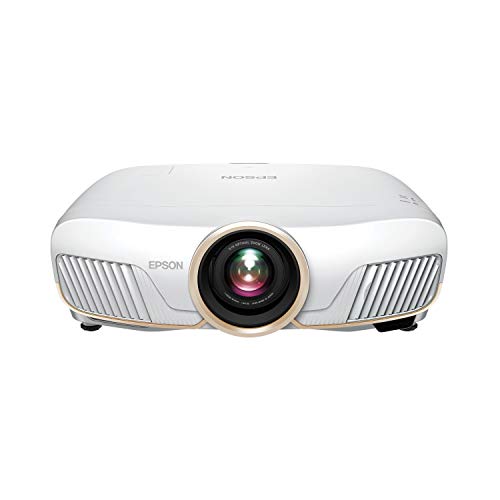
| Epson Home Cinema 1080 | 3,400 lumens color brightness; 3,400 lumens white brightness | Lamp | 1080p native | Standard throw, 1.2x zoom | Colorful content, rainbow-sensitive viewers |
Two patterns stand out even before the detail. First, the lamp models cluster at the top of the ANSI table because a replaceable lamp is still the cheapest way to buy raw lumens; the laser models trade a little headline output for consistency over years. Second, resolution and brightness are separate decisions — the only native-resolution outlier here is the Epson, and it earns its place on color behaviour rather than pixel count.
Read the throw column as a filter before reading anything else. A household that cannot offer three metres of throw, cannot mount to a ceiling, and will not rearrange the room has exactly two candidates on this table regardless of the brightness figures — the ultra short throw and the portable — and its real decision is between those two. A household with a mount point and distance to spare has the opposite luxury: all four standard-throw and console options remain open, and brightness standard, light source, and lag can be weighed in that order. The table is short because the room eliminates most of it.
What to look for in a high lumen projector
ANSI, ISO, and marketing lumens are three different numbers
ANSI lumens come from a defined measurement: brightness sampled at nine points across a white field, averaged, and multiplied by the screen area. ISO 21118 is the international method and produces figures in the same spirit and the same broad range, so ANSI and ISO numbers can be discussed as one family. The third category — the bare “lumens” or “LED lumens” attached to inexpensive listings with no standard named — follows no published method at all, and a five-digit figure in that style can describe a projector that measures in the hundreds under ANSI conditions. Every figure in this roundup is tied to the standard its manufacturer publishes, and the buying rule is simple: compare within a standard, or do not compare at all.
White brightness is only half the story
A single-chip DLP projector produces color sequentially, and its color light output can fall well below its white output; a 3LCD design produces color and white at the same level. In a dark theatre the difference is subtle. In a lit living room showing football, animation, or a bright game, color brightness is what keeps grass green and jerseys saturated instead of grey. Shoppers comparing a DLP figure against the Epson below should remember that the two numbers are built differently — one more reason this article reports each in its own terms rather than declaring a winner across the divide.
Lamp, LED, and laser behave differently as they age
A lamp starts at its published brightness and dims steadily across its life — typically rated in the low thousands of hours at full power, longer in eco modes — and then needs a replacement lamp to restore full output. Laser light sources are typically rated around 20,000 to 25,000 hours and hold a much flatter brightness curve across that span, which is why both Hisense picks below publish 25,000-hour laser life. For a bright-room projector the ageing curve matters doubly, because the whole point of the machine is its margin over ambient light; a lamp model that starts with margin to spare can still be the right buy, as long as the replacement lamp is budgeted as part of ownership rather than discovered as a surprise.
Pixel-shifted 4K is real 4K on screen, from a smaller chip
Four of the five picks are DLP designs that use a 1920×1080 micromirror chip shifted at high speed — Texas Instruments calls the technique XPR — to address all 8.3 million pixels of a UHD image. The picture on the wall is a genuine 4K pixel count, which is why these models carry the 4K UHD label legitimately. What pixel shifting does not give is a native 4K chip’s pixel-for-pixel contrast behaviour, and side-by-side with a native 4K projector the shifted image is a fraction softer at pixel-peeping distance. At normal seating distances on a 100-inch screen, the honest summary is that brightness and contrast will shape the picture far more than the shifting does.
Throw ratio decides where the projector can live
Throw ratio is the distance-to-width relationship: a ratio around 1.1–1.5 fills a 100-inch screen from roughly two and a half to three and a half metres, which suits a coffee table or a rear shelf in most living rooms. A longer-throw design needs the back of a bigger room or a ceiling mount. An ultra short throw model inverts the problem entirely, sitting on a console centimetres from the wall. Before falling for any brightness figure, measure the room: the distance available, the screen size wanted, and whether a zoom range covers the gap. A projector that cannot fill the intended screen from the intended spot is the wrong projector at any lumen count.
Input lag matters for sport less than for games — but it matters
For broadcast sport, lag is nearly irrelevant because nothing on screen is responding to the viewer. For gaming it is the difference between a controller that feels connected and one that feels drunk. The figures that matter are mode-specific: the fast modes on the lamp models below run at 1080p, dropping to as low as a published 4.2 milliseconds at 240Hz on two of them, while 4K gaming typically sits in the mid-teens. Laser lifestyle and cinema models generally publish less aggressive figures. Match the expectation to the use: a household that plays fast online games should shop the lag table as seriously as the lumen table; a household that watches films and football can safely deprioritise it.
The screen spends brightness as fast as the lens produces it
A lumen figure describes light leaving the projector, not light reaching an eye. The same 3,200 lumens spread over a 120-inch screen deliver markedly less brightness per unit of area than they do over a 90-inch screen — double the diagonal and the image area roughly quadruples, quartering the intensity that made the smaller picture punchy. This is why screen size belongs in the same sentence as brightness during shopping, and why a household planning a very large image should buy brightness headroom rather than brightness adequacy. Screen material is the other half of the equation: a gain figure above 1.0 concentrates light back toward the seating, a matte white surface spreads it evenly, and a grey or ambient-light-rejecting surface sacrifices some peak brightness to defend black levels. The projector’s number is fixed at purchase; the screen decides how much of it survives the room.
Contrast, not lumens, is what ambient light actually eats
Ambient light does its damage by lifting the black floor. A projector cannot project darkness; the darkest black on screen is simply the screen reflecting the room, so every lumen of stray light adds itself to the shadows of the image. This is why two projectors with identical output can look different in a lit room — the one with better native contrast and better light control in its optics keeps more separation between its darkest and most luminous tones. It is also why, past a certain level of daylight, no projector in this class can help: once the room’s contribution to the black floor is large enough, the contrast range left for the image is small no matter how bright the highlights climb. Buying brightness buys back the top of the range; only managing the room defends the bottom of it.
Fan noise is the tax on brightness
Light sources that produce 3,000-plus lumens produce heat in proportion, and heat leaves through fans. Every pick here is quieter in its eco or laser-dimmed modes and louder at the full output this roundup is buying, which sets up an honest trade: the afternoon match at full brightness will have fan noise in the room, and the evening film at reduced output will not. Manufacturers publish noise figures for both modes, and those figures deserve a glance before purchase — a projector mounted a metre above the sofa announces itself in a way the same projector across the room does not. Placement distance is a noise control in its own right, and one more reason the placement maths earlier in this section matters.
Ports, platforms, and the streaming stick question
The five divide sharply on what happens after the picture. The Hisense PX3-PRO carries a full smart platform with the major services built in, and adds the strongest onboard audio here. The lamp models largely expect the household to supply sources: a console, a streamer, a stick powered from the projector’s own USB port where one is provided. Neither approach is wrong, but they suit different shelves. A household standardising on one streaming device will not miss a built-in platform; a household that wants the projector to behave like a television — on, app, picture — should weight the platform and speakers heavily, and should confirm that an eARC-capable HDMI port exists wherever a soundbar is part of the plan.
HDR in a bright room needs honest expectations
High dynamic range content is mastered for dark rooms, and its shadow detail is the first casualty of ambient light — no projector can display a near-black tone darker than the room’s own reflection. What brightness headroom does rescue is the top of the HDR image: specular highlights, sunlit scenes, and the mid-tones where most of a film actually lives. Format support divides the picks — the two Hisense models carry Dolby Vision and HDR10+ with scene-by-scene metadata, while the lamp models work with HDR10 and HLG — and in a lit room the practical difference is smaller than the badge war suggests, because tone mapping is compressing the signal into a narrower visible range either way. Buy HDR support as future-proofing and for evening viewing; do not buy it as a daylight feature.
Bright-room projection also crosses into territory the conference world knows well — a projector specified for a lit meeting space faces the same ambient-light maths as one specified for a lit lounge, and the site’s draft guide to the best conference room projectors applies the same standards-first approach to that neighbouring category.
How this shortlist was built
The inclusion bar had three parts. First, a published brightness figure of at least 3,000 lumens tied to a named standard — ANSI, ISO, or the color/white brightness pairing Epson publishes — taken from the manufacturer’s own documentation, never from a retail listing. Second, a current model in the brand’s home lineup, not a discontinued clearance line or a pure commercial installation unit with no home-video tuning. Third, a placement story that works in a dwelling: standard throw for shelves and mounts, ultra short throw for consoles, or a genuinely portable design.
Variant discipline was applied throughout, because this category sells near-identical names with materially different machines underneath. A short-throw sibling is not the standard-throw model with a shorter name; a renewed unit is not the new unit at a friendlier tier; a regional variant with a different tuner or platform is not the same projector. Where a pick has such siblings, the pick section describes the exact model named in its heading, and the variant cautions are listed in the maker’s documents.
What was excluded is as instructive as what survived. Projectors whose brightness is quoted only in unlabelled marketing lumens were excluded regardless of the size of the claim, because an unverifiable figure cannot anchor a buying decision. Short-throw siblings of included models were treated as separate machines rather than interchangeable variants, since their placement maths differ completely. And no projector was promoted or demoted for its price; tiers are described in words, because a figure printed here would be stale before the page was a month old, while the tier structure of the market moves slowly enough to stay useful.
The picks in detail

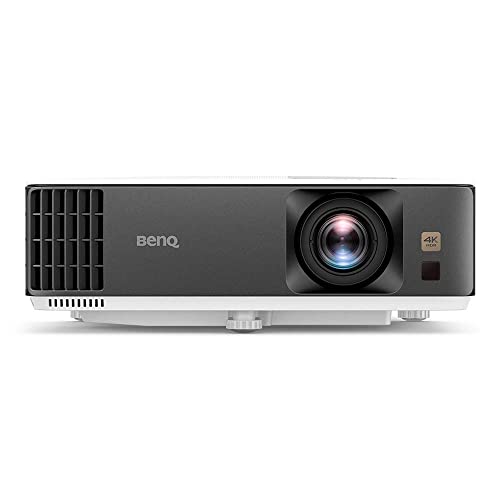
BenQ TK700 — the balanced bright-room 4K pick
The TK700 is the projector this roundup would be built around if only one could stay. BenQ publishes 3,200 ANSI lumens from a lamp-based DLP engine, pairs that output with a pixel-shifted 4K image, and — unusually for a brightness-led model — keeps gaming credentials that stand up on their own. It is a standard-throw machine with a 1.3x zoom on a 1.13–1.47 throw ratio, which translates to a 100-inch image from roughly two and a half to three and a quarter metres: coffee-table distance, rear-shelf distance, or a ceiling mount, all without exotic placement.
The detail that lifts it above a generic bright DLP is how completely the spec sheet serves two different evenings. For film, BenQ publishes 96 percent coverage of Rec.709, HDR10 and HLG support, and dedicated picture modes that trade a little of the headline brightness for color discipline. For games, the published input lag ladder runs 16.7 milliseconds at 4K/60, 8.3 at 1080p/120, and 4.2 at 1080p/240, so the same projector that fills a bright wall with a film on Friday handles fast play on Sunday without asking the household to own two machines. Two HDMI ports, one with eARC, cover a console and a soundbar or receiver without a switcher.
The physical package supports the spec sheet’s ambitions. The chassis is light enough for a standard ceiling mount without structural drama, the 1.3x zoom forgives a mount position that is a few centimetres off the ideal, and two-dimensional keystone correction is published for the setups that cannot be perfectly squared — though keystone always costs a little resolution and brightness, so it is a rescue, not a plan. A single built-in speaker covers commentary and casual viewing, while the eARC port is the grown-up route: picture sources into the projector, audio passed down one cable to a soundbar or receiver that does the room justice. There is no lens shift, which is normal at this tier and simply means the mount position, once calculated from the throw figures, needs to be right rather than approximately right.
Strengths: an honest ANSI figure from a brand that publishes its measurement basis; the most complete lag ladder in this group; a zoom range that fits ordinary rooms; color coverage figures published rather than implied. Trade-offs: the lamp is rated around 4,000 hours at full power — longer in eco and LampSave modes — so heavy users should budget a replacement lamp across the machine’s life; like every DLP here, its black floor in a lit room is a dark grey rather than a true black; there is no built-in smart platform, so a streaming stick or box is part of the setup. Who it suits: households that want one projector to cover films, sport, and games in a room that never fully darkens, and who would rather have placement flexibility than chase the last few hundred lumens.
Nothing about the TK700 is the extreme of any single column, and that is precisely its appeal: brightness with a named standard, lag with published numbers, and a throw that fits real furniture. If that balance matches the room, the TK700 is the first model to check price on Amazon.
Check price on Amazon: BenQ TK700
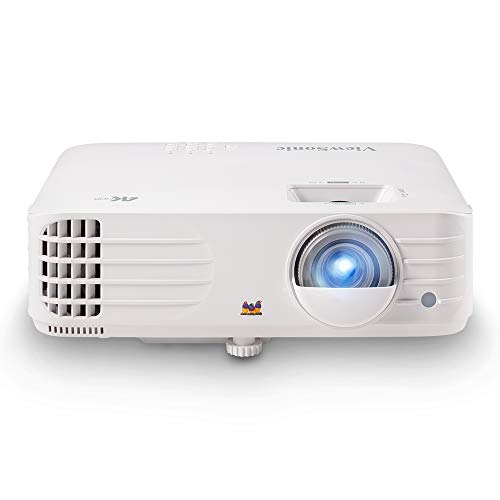
ViewSonic PX701-4K — the gaming-leaning value in the 3,200 class
The PX701-4K publishes the same 3,200 ANSI lumens as the BenQ from a similar lamp-based DLP platform, and then tilts its personality toward play. ViewSonic’s headline figures are a 4.2-millisecond input lag at 1080p and support for a 240Hz refresh rate at that resolution — numbers aimed squarely at PC and console gamers who sit close enough to a very large screen for responsiveness to be felt. The 4K image is produced by pixel shifting, the throw ratio and 1.3x zoom match the BenQ’s placement class, and HDR10 and HLG support are both present.
Ownership maths are the second half of its pitch. ViewSonic rates the lamp at up to 6,000 hours in normal use and up to 20,000 hours in its SuperEco mode — eco modes trade brightness for life, so the honest reading is that the long figure is available to households willing to run dimmer, while full-brightness running consumes the lamp faster. A USB-A port that can power a streaming stick, two HDMI inputs, and auto vertical keystone round out a spec sheet that reads as deliberately practical rather than luxurious. It typically occupies a lower price tier than the TK700, expressed here the way this site expresses all pricing: as a tier, not a number, because the number will have moved by the time anyone reads this.
Two qualifications keep the gaming headline honest. The 240Hz figure applies at 1080p, and reaching it needs a source that outputs it — a gaming PC, principally, since current consoles top out at 120Hz, where the ViewSonic still publishes a responsive figure. And the SuperEco lamp life is earned by dimming, so a household that runs the projector at full brightness for afternoon sport should plan around the normal-mode hours, not the eco headline. Because the throw class matches the BenQ’s, the PX701-4K drops into the same furniture positions — rear shelf, coffee table, ceiling mount — and its automatic vertical keystone handles a shelf that is not perfectly level, with the usual caveat that keystone is a correction, not a placement strategy.
Strengths: published 240Hz and 4.2-millisecond figures that match or beat anything in this roundup; the same ANSI brightness class as the BenQ; flexible zoom; a lamp-life ladder with a genuinely long eco rung. Trade-offs: published color gamut coverage is narrower than the BenQ’s film-first tuning, so color-critical viewers get less headroom; the interface and onboard audio are workmanlike; this model circulates heavily in renewed channels, a caution for buyers rather than the spec sheet. Who it suits: gaming-first households that also need a bright general-purpose projector, and buyers who would rather spend the tier difference on a better screen.
For a room where the console gets as many hours as the film library, the PX701-4K makes the strongest case in its brightness class, and it is the model to check price on Amazon.
Check price on Amazon: ViewSonic PX701-4K

Optoma UHD35x — the highest ANSI figure in the group
Optoma publishes 3,600 ANSI lumens for the UHD35x, the largest ANSI figure among these five, and in a genuinely bright room that margin is not vanity — it is the difference between a picture that holds contrast against daylight and one that merely survives it. The engine is the familiar lamp-based DLP formula with pixel-shifted 4K, HDR10 and HLG support, and an Enhanced Gaming mode that publishes 4.4 milliseconds at 1080p/240Hz and 16.9 milliseconds at 4K/60, so the brightness headline does not come at the cost of playability.
Placement is where the bill arrives. The throw ratio runs 1.50–1.66 with a modest 1.1x zoom, meaning a 100-inch image needs roughly three and a third to three and two-thirds metres of throw — the back wall of a larger room, or a ceiling mount in a smaller one. There is no meaningful lens shift to rescue a compromised position. Lamp life is published at up to 15,000 hours in the dynamic mode that modulates output scene by scene, with shorter spans at constant full brightness; as with the ViewSonic, the longest number assumes the dimmest behaviour. None of this diminishes the machine; it defines the room it wants. Given distance and a fixed mount, it delivers the most ANSI-standardised light in this roundup.
The placement constraint deserves one more layer of honesty, because it decides who should stop reading this pick. With a 1.1x zoom, the screen size is set mostly by where the projector sits rather than by the lens, so the sequence matters: choose the screen size, compute the throw distance from Optoma’s published ratio, and confirm the room offers that distance before money moves. Four-corner geometric correction exists for imperfect alignment, with the same resolution caveat as any keystone system. In return for this planning discipline, the UHD35x offers the roundup’s only meaningful brightness headroom above the 3,200 class within the ANSI standard — headroom that can be spent on a larger screen, a brighter room, or a lamp ageing gracefully rather than desperately.
Strengths: the top ANSI figure here, published to the same standard as its two lamp rivals, so the comparison is legitimate; gaming lag figures that keep fast play credible; a dynamic lamp mode that stretches service life for mixed use. Trade-offs: the long throw and small zoom demand placement planning before purchase, not after; no smart platform built in; at full brightness the fan is part of the soundtrack in quiet scenes, as with most high-output lamp designs. Who it suits: larger living rooms and dedicated media rooms with some ambient light, ceiling-mount planners, and sport-focused households where screen size and daylight are both non-negotiable.
When the room is big, the windows are bigger, and the mount point can be chosen freely, the UHD35x converts its ANSI advantage into the most headroom of any pick here — it is the one to check price on Amazon.
Check price on Amazon: Optoma UHD35x

Hisense PX3-PRO — the ultra short throw cinema console
The PX3-PRO rejects the entire placement problem the three lamp models wrestle with. As an ultra short throw design with a 0.22 throw ratio, it sits on a media console roughly twenty centimetres from the wall and throws an image Hisense sizes from 80 to 150 inches. Its triple-laser engine — separate red, green, and blue lasers — is published at 3,000 ANSI lumens with a 25,000-hour laser life, and Hisense publishes a color gamut figure of 110 percent of BT.2020, the kind of number only a triple-laser design can put on a spec sheet. Nobody walks through the beam, nothing casts a shadow, and there is no mount to install.
The cinema credentials are the deepest here: native 4K resolution on screen, Dolby Vision and HDR10+ dynamic HDR, IMAX Enhanced certification, and a Google TV platform with the major streaming services built in rather than bolted on. Built-in Harman Kardon audio at a published 50 watts is the most serious onboard sound in the group. Two honest qualifiers belong in any bright-room assessment. First, an ultra short throw in a lit room really earns its keep when paired with an ambient-light-rejecting screen, which is a separate purchase and belongs in the budget from day one. Second, its gaming figures are respectable rather than class-leading — it carries ALLM for console switching, but players chasing the lowest published lag should look at the lamp picks above.
The geometry of ultra short throw rewards precision in a different currency. The image’s size is set by centimetres of distance from the wall, and its bottom edge sits at a fixed offset above the console surface, so the furniture, the screen position, and the projector form one interlocking measurement problem that must be solved on paper first. Screen choice splits into two families — lenticular screens that reject light from above, and fresnel screens that reject it more aggressively over a narrower viewing cone — and the right family depends on where the seating sits. None of this is difficult, but all of it is unforgiving of improvisation, which is the true price of the format: the PX3-PRO trades the lamp models’ placement flexibility for a setup that, once solved, never needs solving again and turns on instantly, every time, at full published brightness.
Strengths: placement that eliminates mounts, shadows, and throw calculations; laser consistency across a 25,000-hour published life; the widest published color gamut in the group; the fullest certification and smart-platform list here. Trade-offs: it sits in the premium tier of this roundup before the recommended screen is added; the geometry is fixed once placed, so the console and wall must suit each other; gaming lag trails the dedicated fast modes of the lamp models. Who it suits: households building a proper living-room cinema around a console, film-first viewers who want dynamic HDR formats, and anyone whose ceiling or rental terms rule out a mount.
For a room that wants the cinema to live in the furniture rather than hang from the ceiling, the PX3-PRO is the considered choice — measure the wall, plan the screen, and then check price on Amazon.
Check price on Amazon: Hisense PX3-PRO

Epson Home Cinema 1080 — the 3LCD color-first alternative
The Epson is the deliberate outlier, included because brightness in a lit room is not one number but two. Epson publishes 3,400 lumens of color brightness and 3,400 lumens of white brightness for the Home Cinema 1080, measured under the IDMS and ISO methods Epson uses rather than labelled as ANSI — so, by this article’s own rule, those figures are reported in their own terms and not ranked against the ANSI table. What can be said without crossing standards is why the equality of the two figures matters: a 3LCD engine produces color at full brightness all the time, so saturated content — football pitches, animation, racing liveries, slide-bright streaming shows — keeps its color in ambient light instead of washing toward grey.
The resolution is native 1080p with no pixel shifting, and the honest consequence is a ceiling on fine detail: at 100 inches from a close sofa, UHD sources will look very good rather than pixel-perfect. In exchange, the 3LCD design has no color wheel and therefore none of the rainbow artefacts a minority of viewers see on single-chip DLP — for a household with a rainbow-sensitive viewer, that fact can end the argument on its own. The lamp is rated up to 6,000 hours in normal mode and 12,000 in eco, a 1.2x zoom covers ordinary placement, two HDMI ports and Miracast mirroring handle sources, and the whole machine is tuned for simplicity rather than spec-sheet theatre.
The ownership story is the calmest of the lamp picks. Epson’s replacement lamps are among the most widely stocked in the category, the eco mode stretches the interval between them to a published 12,000 hours for households that watch in the evening, and the 1.2x zoom with a forgiving throw suits the shelf-behind-the-sofa placement that family rooms actually offer. Miracast mirroring covers the casual sources — photos, a laptop screen, a child’s presentation — while subscription streaming is better served by a stick in one of the HDMI ports, since phone mirroring and rights-managed apps are uneasy partners on any projector. Epson publishes a dynamic contrast figure of 16,000:1; read it the way all such figures should be read in a bright room, as a statement about the engine’s range in the dark rather than a promise about a lit afternoon.
Strengths: color brightness equal to white brightness, published openly as a pair; freedom from rainbow artefacts; the longest eco lamp-life figure among the lamp picks; a simple, mature platform with wireless mirroring built in. Trade-offs: native 1080p caps detail on very large screens; brightness figures are not ANSI-labelled, so they cannot be traded blow-for-blow against the DLP numbers; gaming-specific modes are not its focus. Who it suits: sports and streaming households in bright family rooms, viewers sensitive to DLP rainbows, and buyers who value color staying power over a 4K badge.
For colorful content in a room that stays lived-in while the screen is on, the Home Cinema 1080 is the honest workhorse to check price on Amazon.
Check price on Amazon: Epson Home Cinema 1080
Three rooms, three answers
The sport-first family room. Windows on one wall, matches on weekend afternoons, seating scattered rather than arranged. This room spends its life at the worst end of ambient light, so it should buy ANSI-standardised output and color staying power first: the UHD35x if the throw distance exists, the TK700 if it does not, and the Epson wherever the content is relentlessly colorful or a viewer sees rainbows on DLP. A grey screen earns its keep here more than any other single accessory. Seating distance argues the same way as the light does: the closer the front row sits, the more the pixel-shifted 4K of the lamp and laser picks earns over the Epson’s native 1080p, while a room that watches from four metres back can let resolution go and buy color and brightness instead.
The film-first lounge that hosts. Curtains that mostly work, films after dark, friends over for the big match. This room can trade a little headline brightness for refinement: the PX3-PRO with an ambient-light-rejecting screen is the cinema answer, and the TK700 is the lamp answer, run in its accurate mode at night and its bright mode when the room fills. Placement discipline matters more than the last few hundred lumens in this scenario.
The renter’s moving picture. No fixings allowed, rooms that change, a screen that might be a wall this year and a portable screen next. The PX3-PRO exists for this household: a laser ultra-short-throw that sits on a console instead of a mount, with a full smart platform and the strongest onboard audio here. The PX701-4K on a shelf is the lamp-budget expression of the same idea, trading the laser’s flat ageing curve for a lower tier and a replaceable lamp.
Getting the most from a bright projector once it is home
The projector is only half of a bright-room picture; the other half is the surface and the light path. A matte white screen preserves the published brightness most faithfully, a grey screen trades a little output for deeper perceived blacks in ambient light, and an ambient-light-rejecting screen — near-mandatory for the ultra short throw pick — buys the largest real-world contrast gain by refusing light from above and the sides while accepting the projector’s beam. Choosing among them is a room decision, not a brand decision, and it should be made with the same seriousness as the projector itself.
Light control beats light elimination. Heavy blackout curtains help, but repositioning a lamp, closing one blind on the window that faces the screen, or moving a pale rug that bounces light upward often delivers most of the benefit at none of the misery. Picture mode is the other free upgrade: every model here publishes its headline brightness in its most aggressive mode, and its most accurate mode will measure dimmer, so the practical routine is a bright mode for afternoon sport and an accurate mode for evening films — both exist on the same machine, and using each for its purpose is not a compromise but the design working as intended.
Sound deserves a sentence in a bright-room guide because daytime viewing is social viewing. Commentary over crowd noise, dialogue across a kitchen’s clatter, and a room where people talk during the match all push toward real speakers: the PX3-PRO’s front-facing array is built for exactly this, while the lamp models’ single speakers are best treated as a convenience on the way to a soundbar. The eARC ports on the standard-throw picks exist so that upgrade is one cable rather than a rewiring, and in a bright room the soundbar often delivers more perceived quality per unit of money than the next brightness tier would.
Finally, respect the heat. High-output lamp and laser projectors move real air, and a unit suffocated in a closed cabinet will dim itself or shorten its light source’s life to protect its electronics. Clearance around vents, a mount or shelf that does not trap the exhaust, and a filter-cleaning habit for the lamp models keep the published brightness available in year three rather than only in week one.
Brightness over time: what the second year looks like
The published figure describes a new light source, and the ownership question is what remains of it. A lamp dims continuously, and in a bright room the dimming announces itself earlier than in a theatre, because the margin over ambient light is the thing being spent — a lamp that has lost a third of its output has lost the afternoon, even while evening viewing still looks respectable. The practical responses are to run eco modes when the room allows, so the full-output hours are spent only when they are needed, and to treat the replacement lamp as scheduled maintenance rather than a failure. Lamp prices and availability belong in the purchase decision for exactly this reason, and they favour the big brands’ long-running platforms.
Laser ownership inverts the profile. The output curve is far flatter across the published 25,000-hour life of the Hisense engines, so the picture in year three resembles the picture in week one much more closely, and there is no lamp line in the household budget. The corresponding exposure is that the light source is not a user-replaceable part: if it fails outside warranty, the repair is a service event rather than a parcel. Filters and vents still need attention on both technologies — a clogged filter makes any projector run hotter, louder, and dimmer than its specification — and a bright-room machine, which works its light source harder than a theatre machine does, repays that small discipline more than most.
Frequently asked questions
How many lumens does a living-room projector actually need?
For a room with controlled but present ambient light — curtains drawn against direct sun, lamps off near the screen — the 3,000-lumen class these five occupy is the sensible floor at 100 inches, and more screen demands more light in proportion. A room with direct sunlight on the wall is beyond any projector in this class and needs the light dealt with first; no published figure in this roundup, or anywhere near its tiers, defeats the sun. Scale the expectation with the screen: the same output that is generous at 100 inches is merely adequate at 135, so a household set on a very large image should shop at the top of this class or above it.
Are ANSI lumens and ISO lumens the same thing?
They are sibling methods rather than identical ones: both average measured brightness across a standard white field, and figures from the two families can reasonably be discussed together. What neither should ever be compared against is an unlabelled marketing figure with no standard behind it — that is the comparison this article refuses throughout, and the one shoppers should refuse at the listing page. A useful habit at any listing is to look for the standard’s name within a breath of the number: a figure that arrives with ANSI, ISO, or a color/white pairing attached can be filed and compared; a figure that arrives alone, however large, should be filed under advertising.
Is a pixel-shifted 4K picture really 4K?
On screen, yes: the shifting chip addresses all 8.3 million pixels of the UHD standard, which is why the designation is legitimate. What differs from a native 4K chip is pixel-level contrast and a fraction of fine-detail crispness at very close range. At ordinary seating distances, brightness headroom and contrast will shape satisfaction far more than the shifting mechanism.
Lamp or laser for a bright room?
Choose the lamp models for the most ANSI-standardised lumens per tier and a replaceable light source, accepting a dimming curve and an eventual lamp purchase. Choose laser for a flatter brightness curve across a published 20,000-to-25,000-hour life and no lamp changes, accepting a higher tier and a light source that is serviced rather than swapped. Heavy daily users lean laser; occasional big-night users lean lamp.
Can a high-lumen projector replace a television?
For evening and shaded-day viewing, the five here make a credible case, especially the two laser models with real smart platforms and speakers. As a full replacement in a sunlit room used all day, a television still wins on instant-on convenience and raw daylight contrast. The honest framing is that a bright projector replaces the television’s role for events — matches, films, gatherings — before it replaces the television itself.
The bottom line
Five projectors clear the 3,000-lumen bar with their standards named: the TK700 as the balanced default, the PX701-4K for gaming-leaning value, the UHD35x where the room and the throw allow the most ANSI output, the PX3-PRO as the console cinema, and the Home Cinema 1080 as the color-first 3LCD alternative. Choose by the room’s light, the distance available, and the light source’s ageing curve — in that order — and the brightness figure will take care of itself. Spend the money the table cannot show as willingly as the money it can: the screen, the mount or console, and the lamp or service plan behind the light source decide how much of the published performance is still there in the third year. A lumen you can trace to a named standard is worth more than a bigger number you cannot, and that, more than any figure in the table, is the lesson a bright room teaches.