A headphone splitter turns one 3.5mm jack into two, or joins a separate headphone and mic plug into one. Some are short Y cables, some are switch boxes and one of the picks below is a small amplifier with four outputs. The right type depends on whether you need a mic.
The six products below come from their Amazon listing pages, where we read the jack layouts, lengths and notes. We have not used these products ourselves, and sound claims are the makers’ own.
As an Amazon Associate we earn from qualifying purchases. Links below are affiliate links, and they do not change the product information we give.
What to Look For
| Feature | Why it matters |
|---|---|
| Plug layout | TRS (audio only) and TRRS (audio plus mic) cables are not interchangeable |
| Mic support | Some splitters list no mic use; others need a CTIA headset |
| Cable length | Short cables sit at the jack; longer ones reach a desk |
| Output type | A true splitter sends audio to both; a switch sends it to one at a time |
In this guide
Specs at a Glance
| Product | Type | Length or size | Notes |
|---|---|---|---|
| UGREEN 20899 | TRRS jack to two plugs | 20 cm (7.87 in) | Aluminum casing; nylon braid; CTIA headsets needed for mic |
| JSAUX | TRS male to two female | 0.9 ft per bullets | No mic; red; gold-plated plug |
| UGREEN 60287 | TRRS male to two TRS female | 7.87 in | CTIA only; nylon braid; TPE cable |
| Belkin F8V234 | One male to two female | 6.2 x 3.75 x 1.2 in (listed) | White; 1.1 oz; lifetime warranty listed |
| LZSIG amp | 1-in 4-out amplifier | 4.13 x 2.95 x 0.98 in | 12 oz; 3.5mm and 6.35mm; bass boost switch |
| Y.D.F switch | 2-in 1-out passive switch | Metal case; 1.5 oz | Cable included; one mute key |
The 6 Best Headphone Splitters
Top pickBest for a gaming headset on a PC
1. UGREEN Headphone Splitter 20899
A short cable that connects a 4-pole headset to a PC or laptop that has separate audio and mic jacks. The listing mentions an aluminum alloy casing, gold-plated plugs, a nylon braided jacket and a 7.87 inch length. It notes that a CTIA-compliant TRRS cable is required for the mic to work.
Suits: a gaming headset on a PC. Strengths: a braided cable and a listed mic function. Weaknesses: the mic needs a CTIA headset. Skip it if you only want to share audio between two pairs of headphones.
View UGREEN Headphone Splitter for Computer 3.5mm Female to 2 Dual 3.5mm Male on Amazon
Best for sharing music with a friend
2. JSAUX Headphone Splitter
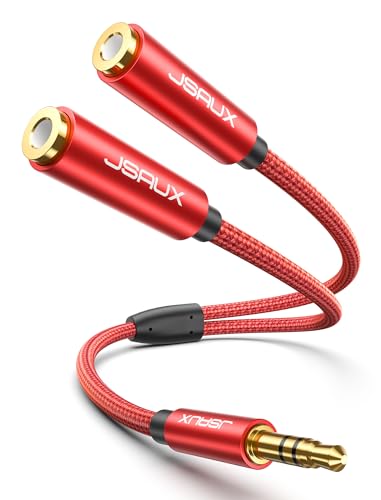
A 3.5mm TRS male to two female splitter in red with a gold-plated connector and a double-braided nylon jacket. The bullets give a length of 0.9 ft and say it cannot be used with microphones, while the dimension field shows 40 inches, so confirm the length on the page.
Suits: sharing music with a friend. Strengths: a 15000-bend claim from the maker. Weaknesses: no mic use and an unclear length. Skip it if you need a mic.

View JSAUX Headphone Splitter for 2 Headphones, 3.5mm Splitter (No Mic), Red on Amazon
Best for a headset that has separate plugs
3. UGREEN Headphone Splitter 60287
A 7.87 inch cable built from soft TPE with a nylon braid, a copper core and gold-plated connectors. The bullets say the headphone port suits CTIA standard headphones only, not iPhone headsets or OMTP types. The title wording and the bullets describe the plug layout in different directions, so read the connector note before you order.
Suits: a headset that has separate plugs. Strengths: a flexible cable. Weaknesses: CTIA only and a mixed description. Skip it if your headset is an OMTP type.
View UGREEN Headphone Splitter 3.5mm 2 Female to 1 Male Mic and Audio Y Splitter on Amazon
Best for a plain two-way share
4. Belkin AUX Audio Cable Splitter
A white splitter with one male 3.5mm plug and two female ports, meant for sharing audio between two headphones or two mini speakers. The listing shows a lifetime warranty, a weight of 1.1 ounces and dimensions of 6.2 x 3.75 x 1.2 inches, which likely describe the packed item.
Suits: a plain two-way share. Strengths: a known brand and a long warranty. Weaknesses: no mic support is stated. Skip it if you want a braided cable.
View Belkin AUX Audio Cable Splitter, 3.5mm, White on Amazon
Best for a group monitoring a session
5. LZSIG 4 Channel Headphone Amplifier
A small 1-in 4-out amplifier meant for home studios, with independent volume per channel. It lists support for four pairs of 32 to 100 ohm headphones, both 3.5mm and 6.35mm plugs, a 12V supply and a bass boost switch. The title says model LHA1 while the bullets say LHA2, so check which unit you get.
Suits: a group monitoring a session. Strengths: four outputs with separate volume. Weaknesses: it needs power and a model label conflict. Skip it if you only need two outputs.
View LZSIG Headphone Amplifier with Bass Boost, 4 Channel, 1-IN 4 OUT, 12V on Amazon

Best for switching between two sources
6. Y.D.F 3.5mm Stereo Audio Switch
A passive 2-in 1-out switch box in a metal CNC case that needs no power. The listing says only one audio path is active at a time, adds a one-key mute and includes a cable. It is a selector rather than a splitter, so it does not feed two headphones together.
Suits: switching between two sources. Strengths: a compact metal case and a mute key. Weaknesses: one output at a time. Skip it if you need to share one source with two listeners.

Setup Notes
- Plug the headset into the adapter before you plug the adapter into the computer, as the UGREEN listing advises.
- Check whether your headset is CTIA or OMTP before you buy a mic splitter.
- Use a short cable at the jack and keep the weight off the port.
- Check the amplifier headphone range against your own headphones.
Mistakes to Avoid
- Buying a TRS splitter and expecting a mic to work.
- Treating a switch box as a splitter.
- Skipping the plug layout line when the title and bullets disagree.
- Assuming every headset follows the CTIA standard.
Passive Versus Amplified Splitting
A basic headphone splitter is a passive device: it divides the signal from one output into two or more, with no power of its own. Because the source has to drive every connected pair of headphones, each listener gets less of the available signal. In practice that can mean lower maximum volume, and the effect is noticeable with higher-impedance headphones or with sources that have weak outputs, such as some older devices. For a quiet movie night with two sets of simple earbuds, a passive splitter is usually enough.
An amplified splitter, sometimes sold as a headphone amplifier with several outputs, has its own circuitry and usually its own power, either from a USB connection or an adapter. This design aims to give each listener their own level and, on some models, individual volume knobs. It suits situations such as classrooms, small studios, group listening or workshops where several people need to hear clearly. The trade-off is extra size, a cable for power and a bit more setup.
When you read a listing, check whether the device is passive or powered and how it is powered. Look at the number of outputs and whether volume is shared or independent. Also consider what your source can do. A laptop or a phone with a reasonable headphone output can drive two pairs of ordinary headphones, while a big studio style headphone with high impedance may need an amplifier. The maker’s specs and the headphone specs are the places to check.
Plug Types, Microphone Lines and Headset Compatibility
The little rings on a 3.5 mm plug are not decoration. A plug with two rings has three contacts: left, right and ground, which carries stereo audio only. A plug with three rings has four contacts and adds a microphone line, which headsets and many phone earbuds use. Splitters are wired for one or the other, and a splitter designed for stereo audio may not pass a microphone signal at all. Some splitters do pass a microphone, but only on one port, and some split a single four-contact jack into separate headphone and microphone plugs.
Know which you need. If you want two people to listen to the same video, a stereo splitter is enough. If you want to plug a gaming headset with a mic into a device that has one combined jack, you might need a splitter that separates headphone and mic connections, or the other way around, when your computer has two separate jacks and your headset has one plug. Listings that say a splitter does not support a mic mean exactly that, and ignoring it leads to a silent microphone.
Check your device’s ports, too. Many phones and tablets no longer have a 3.5 mm jack, so you would need an adapter for USB-C or the phone’s own port, and these adapters differ in whether they carry a microphone. Verify the adapter details in the listing. Also look at the plug length and the case design, because a thick connector may not fit a phone with a bulky case.
Switch Boxes and Multi-Source Setups
A switch box is a different tool from a splitter, and the names are easy to confuse. A splitter sends one source to many headphones. A switch box connects one headphone, or one set of speakers, to more than one source, or sends one source to one of several outputs, depending on how it is built. Read the description carefully to see which direction the signal travels.
A common use is a desk with a computer and a console that share one pair of headphones, or one source that you route to either headphones or speakers. A manual switch lets you toggle with a button or a dial, so you do not need to unplug cables each time. Some switch boxes are bidirectional and work either way, but a device that only works one way will not do the other job, so look at what the maker states.
Also think about sound quality and noise. Cheap switching can add hiss or a click when you change inputs, so lower your volume before switching. Cable length matters, because long or thin cables pick up interference. Keep audio cables away from power cords. If you use multiple sources at once, check whether the box can mix them or only pass one at a time.
Build Quality, Cable Length and Connectors
Because a splitter sits at the end of your headphone cable, the connectors take a lot of handling. Look for strain relief where the cable meets the plug, since sharp bends are a common cause of failure. Metal housings can feel solid, but they can also add weight that pulls on a port. Right-angle plugs help in tight spaces and on laptops. A short pigtail style splitter keeps clutter down, and a longer cable gives more freedom to place the headphones.
Contact material affects reliability. Gold-plated contacts are common, and they resist corrosion. Descriptions can overstate their effect on sound, so view the plating as protection rather than a sound upgrade. Check that the plugs are the correct size for your devices. A loose plug that crackles when moved is a sign of poor fit or wear.
For permanent setups, such as a desk or a classroom, consider a splitter with a small stand or a mounting hole. For travel, a slim cable that coils neatly is more practical. If you use several adapters in a chain, such as a USB-C adapter, a splitter and a headphone extension, signal quality and fit can suffer. Try to keep the chain short, and make sure each piece supports the features you need.
Troubleshooting Common Problems
If sound comes from only one side, check that the plug is fully inserted, and clean lint out of the jack with a soft tool. Try the headphones directly in the device to see whether the problem is the splitter, the headphones or the source. Test each port of the splitter in turn. A mono sound often means a plug is not fully seated or that a mono and stereo plug are mixed up.
If volume is low, check the output setting on the device and raise it. A passive splitter lowers the level to each listener, and high-impedance headphones need more power, so consider an amplified option. If you hear hum or buzz, try moving the cable away from power adapters or chargers. Some laptops add noise when charging, and unplugging the charger can show whether that is the cause.
If a microphone is not working, check that the splitter supports one and that the plug type matches your headset. Check the operating system settings too, since some systems need the correct input selected. Replace the splitter when plugs feel loose, the cable is frayed, sound cuts in and out when touched or one port is dead. Read the warranty in the listing and keep proof of purchase.
Working Out Which Splitter Setup You Need
Splitters look alike, yet they solve quite different problems. The first step is to name your situation, and the second is to match it to the right device. Skipping this step is how people end up with a lovely Y cable that does not do what they wanted.
| Your situation | Device type to look for | Point to check |
|---|---|---|
| Two people sharing one audio source | Basic Y splitter | Volume is shared, so levels may differ by headphone |
| Headset with separate headphone and mic plugs, single jack on the device | Combiner cable | Check that the jack supports a mic input |
| One headset used with a computer that has two sockets | Splitter that separates audio and mic | Look for clear labeling of each plug |
| Several listeners at once | Powered headphone amplifier | Needs a power source and output count |
| Two sources, one pair of headphones | Switch box | Confirm the switch type and connector sizes |
Pin out matters with microphone lines, so confirm the wiring standard the device uses in its manual or on the product page.
Everyday Situations Where a Splitter Helps
Splitters earn their keep in surprisingly ordinary moments. A few examples show how they fit into everyday life.
- Shared film nights: two people can watch on a laptop without disturbing others in the room.
- Study sessions: two students can listen to the same lecture recording at once.
- Travel: a pair of travelers can share an in-flight screen with their own headphones, subject to the airline’s equipment rules.
- Music practice: a teacher and student can listen together to a backing track.
- Gaming setups: splitting a headset into separate audio and mic plugs for a desktop tower.
In each case, the key detail is whether you need the microphone line to keep working. A plain audio splitter often does not carry mic signals, so read the description carefully.
Choosing Cable Length and Connector Style
A splitter that is too short pulls on the jack, while one that is too long tangles. Measure the distance between your device and the listeners before ordering, and think about whether you want a straight plug or an angled one.
Small Details That Add Up
- Angled plugs suit phones used in a pocket or on a table.
- Thicker, braided cables resist fraying but can feel stiffer.
- Metal-shelled connectors may sit better in cases than plastic ones.
- Tight-fitting plugs may not seat fully in phone cases, so check clearance.
Keep the cable loosely coiled when stored, and avoid sharp bends near the plug to help it last longer. Check the maker’s manual for any usage limits, especially for amplified models that need a power supply.
Before you commit, think about the devices on the other end. Laptops, tablets, games consoles and older phones can each wire their jacks differently, so a splitter that works well with one may behave oddly with another. Check the compatibility notes on the product page, and keep the packaging until you are sure the splitter does the job in your setup. A short trial at low volume is a sensible way to confirm that everything works before you settle in.
How Volume Behaves When Two Headphones Share One Output
One of the first surprises for new splitter owners is that the volume control stops behaving the way it did with a single pair of headphones. That is not a fault in the cable. A passive splitter connects both pairs in parallel to the same output, so the source now drives a combined load instead of one load. Two pairs that are easy to drive on their own can together ask more of a small phone or laptop output than either would alone, and the result is a lower ceiling before the sound starts to feel strained, thin or uneven.
The effect also depends on how alike the two pairs are. If one listener uses small, efficient earbuds and the other uses large over-ear headphones that need more drive, the earbuds will usually sound louder at the same setting. There is no separate control to balance them on a plain Y cable like the JSAUX or the Belkin in this guide, so the pair sharing the cable need to compromise on one level that both can live with. That compromise is painless for a film on a train, where both listeners mainly want clear dialogue. It is more frustrating for music practice or editing work, where one person may want to listen closely while the other only wants a rough reference.
A practical way to test this before a long session is to play a short passage you both know, set the level for the quieter pair first, and then check whether the louder pair is still comfortable. If the louder pair is already too loud at that point, swapping which headphones each person uses sometimes helps, because the person who prefers lower levels can take the more efficient pair. If neither arrangement works, that is a sign the job has outgrown a passive cable and belongs to a powered unit with separate controls, such as the four-channel LZSIG amplifier covered above, where each output has its own volume control.
Channel balance can shift in a subtler way too. A loose or partly seated plug can make one side quieter, and because two cables now meet at one small junction, it is easy to blame the splitter for what is really a plug that has not clicked fully home. Before judging the sound, push each plug in firmly, rotate it very slightly to check for crackle, and swap the two pairs between the two ports. If the quiet side follows the headphones, the splitter is fine. If it stays with the port, the port or its wiring is the problem.
Matching a Splitter to the Headphones You Already Own
Buying the splitter is the easy half. The half that decides whether it works is the headphones, headset and source you already have on the desk. Start by laying everything out and naming each plug honestly. Count the dark rings on each jack. Two rings means a stereo plug built for listening only. Three rings means an extra contact that can carry a microphone line, which is the layout most gaming headsets and phone earbuds use. Then look at the device at the other end and count its sockets. A laptop with one combined socket wants a different adapter from a desktop tower with separate green and pink sockets, even though both jobs get described with the same word: splitter.
This is where the two UGREEN cables in this guide earn a closer look, because they solve opposite problems. The UGREEN 20899 takes a headset with one combined plug and separates it so it can feed a computer that expects two plugs. The UGREEN 60287 is described for headsets at the other side of that same puzzle, and its listing stresses that the headphone side suits CTIA-standard sets only. If your headset is an older OMTP type, or a set made for a particular phone brand, the microphone line may land on the wrong contact and stay silent even though the audio sounds perfect. Audio working while the mic fails is the classic symptom of a wiring-standard mismatch, not a broken headset.
Also think about plug size beyond the common small jack. The LZSIG amplifier in this guide accepts both the small plug and the larger quarter-inch style found on many studio headphones, which removes one adapter from the chain. Every extra adapter is another joint that can work loose, another small weight hanging off a socket, and another chance for the left and right channels to be disturbed. Where you can choose between a splitter that fits your plug directly and one that needs a converter in between, the direct fit is almost always the calmer long-term choice.
Finally, consider the headphones’ own cables. A splitter adds its short length to whatever lead your headphones already have. With earbuds that have a short lead, a short splitter can leave both listeners tethered close to the screen. With long studio leads, the same splitter can create a tangle at the desk edge. Picture where each person will actually sit before deciding that a short cable is tidy or that a longer one is generous.
A Practical Setup Walkthrough for Common Jobs
For two people watching a laptop together, keep the setup as plain as possible. Plug the splitter into the laptop first, then plug each pair of headphones into the splitter, and only then start the video and set the volume. Starting playback last means you hear the moment both sides come alive, and you can catch a half-seated plug before you are ten minutes into a film. Sit so that neither cable crosses in front of the keyboard or trackpad, because a cable dragged across a desk edge all evening will eventually pull a plug sideways.
For a gaming headset on a desktop computer, work in the opposite order, as the UGREEN listing for the 20899 advises: connect the headset to the adapter first, then connect the adapter’s two plugs to the matching sockets on the computer. Match the plugs by their labels or colours rather than by guesswork, then open the voice app you actually use and make a short test recording. Speak, play it back, and only then join a game. Testing inside the app matters because an operating system can show a microphone as present while the app has selected a different input, such as a webcam mic across the room.
For a small group monitoring the same recording, the amplifier route needs a little more patience. Connect the source to the amplifier’s input, connect each pair of headphones, and bring every channel’s volume down before you press play. Raise each channel one at a time while its listener confirms the level is comfortable. That slow start protects everyone’s ears from a channel that was left high after a previous session, and it gives you a clean moment to notice hum or crackle on one output before the whole group is listening.
For switching between two sources with a box like the Y.D.F, set both sources to a modest output level before you begin. Flicking between a loud source and a quiet one is unpleasant and can sound like a fault. Lower the headphone volume, switch, listen for a second, and then adjust. Making that pause a habit turns a selector box into a smooth part of a desk routine instead of a source of pops and surprises.
Comparing the Picks in This Guide Side by Side
Readers often ask which of the two plain sharing cables makes more sense, the JSAUX or the Belkin, since both do the same basic job of feeding two pairs from one plug and neither carries a microphone line. The honest answer from their listings is that the differences are about build and ownership rather than sound. The JSAUX listing talks about a braided jacket, a gold-plated plug and a bend test claim from its maker, and it comes in red, which is easy to spot in a bag or a drawer. The Belkin listing leans on a long warranty and a familiar name, in plain white. If the cable will live in a travel bag and be bent daily, the braided build is the more relevant detail. If it will sit behind a television or in a classroom drawer and simply needs to work for years, the warranty matters more.
The two UGREEN cables are not rivals at all, despite the shared brand and similar lengths. They point in opposite directions, as explained above, so choosing between them is really about stating your problem correctly. If your headset has one plug and your computer has two sockets, you are in 20899 territory. If your situation is the reverse, you are looking at the job the 60287 describes, with its CTIA-only warning kept firmly in mind. Buying the wrong one does not give you a slightly worse experience; it gives you a cable that cannot do the job at all, which is why the direction of the plugs deserves more attention than the colour, the braid or the casing.
The LZSIG amplifier stands apart from every cable here because it is the only pick that adds power and separate volume controls. That makes it the natural answer for three or four listeners, for quiet sources, and for headphones that a passive split would leave sounding weak. It also makes it the wrong answer for a pocket, a plane seat or a quick share between friends, because it needs its supply and a surface to sit on. The Y.D.F box is the other outlier: it solves a problem of choice, not of sharing. It earns its place on a desk where one good pair of headphones serves two machines, and it should be skipped by anyone who wants two people listening at once, however neat its metal case looks.
A useful way to decide is to write down, in one sentence, who listens, to what, and whether anyone needs to speak. Two listeners, one film, no speaking points to the plain cables. One speaker with a headset and a two-socket computer points to the separating cable. Several listeners who each need their own level points to the amplifier. One listener moving between two sources points to the switch. If your sentence matches none of those, your problem may not be a splitter problem at all.
Care, Storage and Making a Small Cable Last
Splitters fail at their joints far more often than in the middle of the cable. The point where wire meets plug flexes every time the cable is plugged in, pulled out or knocked on a desk, and that repeated bending slowly works the internal connections loose. You can slow that wear with a few plain habits. Pull a splitter out by gripping the plug body, never by tugging the cable. When you coil it for storage, use loose loops about the width of your hand rather than tight wraps around your fingers, and never fold it sharply at the plug to make it fit a small pocket.
Keep the contacts clean and dry. Pocket lint is a quiet enemy of small audio sockets and plugs alike: a plug that looks clean can still carry a film of dust that makes one channel drop. A dry, soft cloth is enough for the plug itself. If sound crackles when the plug moves, first check for lint in the socket of the device, using a soft non-metal tool and a gentle touch, and never poke anything sharp or wet into a port.
Weight management matters more than most people expect. A metal-cased splitter hanging from a phone or a laptop socket puts a steady sideways load on that socket, and adding two headphone cables increases the pull. Where you can, let the junction rest on the desk or on your lap so the socket carries the plug rather than the whole assembly. On a desk that never moves, routing the splitter so it lies flat, with a little slack on every side, will usually outlast a neater-looking arrangement that hangs in the air.
Store a spare plainly. Because basic splitters are small and easy to lose, many households keep one in a travel pouch and one at the desk. Labelling which one carries a microphone line, with a small tag or a note in the pouch, saves the familiar frustration of grabbing the audio-only cable on the way out the door.
Listening Comfort and Good Habits for Shared Sessions
Sharing one output often means sharing one volume, and that calls for a little courtesy and a little caution. Set the level for the listener who prefers it quieter, not the one who prefers it louder, especially with children or with anyone using earbuds that sit close to the ear. Take breaks during long sessions. Ears tire gradually, and tired listeners tend to keep nudging the volume up without noticing how far it has climbed over an evening.
Hygiene is part of comfort too. Sharing a film does not have to mean sharing earbuds. One of the quiet strengths of a splitter is that each person uses their own pair, with their own fit and their own ear tips. If a pair must be shared during a trip, clean the tips as the headphone maker directs before they change hands, and let them dry fully before use.
Be honest about fit as well. A pair of headphones that seals well will sound full at a modest level, while a loose pair leaks sound and invites the listener to turn things up to compensate. If one listener keeps asking for more volume while the other is comfortable, the cause is often fit or headphone efficiency rather than the splitter. Swapping pairs, adjusting ear tips or moving to a powered unit with separate controls are all better answers than simply pushing the shared level higher.
When a Splitter Is the Wrong Tool
Some jobs sound like splitter jobs and are not. If you want two people to hold a conversation through headsets on the same computer, with both microphones live, a simple Y cable will not do it: the microphone side of these small adapters is built around one headset, not two. That job belongs to conferencing hardware or software arrangements made for multiple speakers. If you want music in two rooms, a splitter is also the wrong answer, because it is a short-range wired device; multi-room listening belongs to network speakers and similar systems.
If you want to record while you listen, think carefully as well. Splitting a headphone output to feed a recorder changes the load on that output and can colour what you capture, and the levels a recorder expects are not the levels headphones expect. A proper line output or an interface is the cleaner route. And if your real problem is that one device is too quiet even with a single pair of headphones, a splitter cannot fix it; splitting only shares what is already there. That problem points toward an amplifier used with one pair, or toward checking the device’s own output settings and any volume limits set in its software.
Knowing these edges saves money and frustration. A splitter is a small, honest tool for sharing a wired output or adapting a headset plug. Asking it to mix, record, power a room or carry two conversations is asking it to be a different product entirely.
Extra Questions Worth Asking Before You Order
Does the order of plugging things in really matter?
Often, yes, in a small way. Connecting the headset to its adapter before the adapter meets the computer, as one listing in this guide advises, helps the device recognise the microphone path cleanly. With sharing cables the order matters less, but plugging everything in before starting playback still gives you the clearest test of whether both sides are working.
Why do both pairs sound different even at the same volume?
Because headphones differ in efficiency and fit. Two pairs fed the same signal can differ noticeably in loudness and fullness, especially when one seals in the ear and the other rests loosely on it. That difference comes from the headphones, not from one port of the splitter being weaker, which you can confirm by swapping the pairs between ports.
Can a splitter damage my phone or laptop?
A correctly wired splitter used as directed is a normal accessory for these sockets. The realistic risks are physical rather than electrical: a heavy assembly levering on a socket, a plug forced in at an angle, or a damaged cable with exposed wire. Stop using any cable that is frayed, loose or hot, and never force a plug that does not slide in smoothly.
What should I check first if the sound suddenly drops on one side?
Work from the simplest cause outward. Reseat every plug, swap the two pairs between ports, try the headphones directly in the source, and try the splitter in a second device if you have one. That short sequence isolates whether the fault sits with the headphones, the splitter or the source, and it takes less time than guessing.
Travel, Classrooms and Shared Desks: Three Setups in Detail
Travel is where a plain sharing cable proves itself most often, and also where its limits show fastest. Two people sharing one small screen need headphones that are comfortable for the length of a film, a cable that does not tangle across a tray table, and a volume both can accept. Pack the splitter where you can reach it without unpacking the whole bag, and test the pairing before the trip with the actual headphones each person will bring. A pair that sounds balanced at home will sound balanced in a seat; a pair that already needed very different levels at home will not improve in a noisy cabin, where background sound pushes both listeners to ask for more. In that setting, the listener with the better-sealing headphones has a real advantage, so let the person who struggles most with outside noise use the pair that blocks more of it.
In a classroom or training room, the needs shift from comfort to repeatability. The same splitter may be set up and packed away many times a week, by different hands, which is why strain relief, clear labelling and a cable that survives being coiled daily matter more here than any small difference in sound. A powered unit with several outputs suits a listening station where a group follows the same material together, because the teacher can set each listener’s level once and leave it. Keep a simple routine: connect everything, start the material at a low level, walk the group through a short test passage, and only then begin the lesson. That routine catches a dead port or a wrong cable before it costs teaching time, and it protects younger listeners from a channel left loud by the previous class.
On a shared desk at home, the splitter usually becomes part of a semi-permanent arrangement, and permanence brings its own risks. Cables left plugged in for months collect dust, get knocked by cleaning, and slowly work loose until one channel fades during a call. A monthly habit of reseating each plug and glancing over the cable for damage keeps that arrangement honest. If the desk is shared by people with different headsets, label the microphone-carrying adapter clearly, because the audio-only cable will always be the one picked up by mistake, and it will always be picked up five minutes before something important.
Across all three settings the pattern is the same: the splitter itself is simple, and success comes from matching it to the headphones, the source and the people involved. Spend your attention on those three things, in that order, and a very small accessory will do its job quietly for a long time.
Headphone Splitters FAQ
Which ones say they do not work with a mic?
The JSAUX listing says it cannot be used with microphones.
Which one gives four headphone outputs?
The LZSIG amplifier lists four channels with independent volume control.
Will a splitter reduce sound quality?
A passive splitter shares the signal, which can lower volume, and cheap cables can add noise. For casual listening it is usually acceptable. For critical listening, a powered splitter or a direct connection is better.
Can I use a splitter with Bluetooth headphones?
A wired splitter only works with wired headphones. Some transmitters send audio to several Bluetooth headphones, but that is a different product. Check the listing of any transmitter for how many it supports.
What is the difference between a splitter and a switch?
A splitter sends one source to several headphones. A switch lets you choose between sources or outputs. Read the description to see which direction the signal travels.
Why does my microphone not work through the splitter?
Some splitters carry stereo audio only. Check that the splitter says it supports a microphone and that your plug type matches. Also check the device's input settings.
Do I need an amplifier for more than two headphones?
For three or more listeners, a powered amplified splitter usually gives better volume for each. Passive splitting weakens the signal. Check the number of outputs and the power requirement.
Can I chain splitters together?
You can, but each split lowers the signal further and adds noise. If you need many outputs, choose a single device made for that. Keep the cable chain short.
Will it work with a phone that has no headphone jack?
You will need an adapter for the phone's port, and the adapter must support the features you want. Check whether it passes a microphone. Make sure the case does not block the connector.
The Short Version
For a headset on a PC, the UGREEN 20899. For a plain two-way share, the JSAUX or the Belkin. For a CTIA mic headset with separate plugs, the UGREEN 60287. For four listeners, the LZSIG amplifier. For switching sources, the Y.D.F box.