Disclosure: As an Amazon Associate, reviewstook.com earns from qualifying purchases. Links on this page are affiliate links at no extra cost to you; prices and availability change frequently, so check Amazon for the latest.
Finding the best gaming graphics card for beginners under $150 is less about chasing the biggest GPU name and more about matching a card to your monitor, your case, and the games you actually play. Written for a first-time builder putting together their very first gaming PC, this guide ranks the verified options for 1080p gaming and is blunt about what the money does and does not buy. Picture a first build assembled on a kitchen table, with a parts list checked three times and a healthy fear of bending a pin or forgetting a power cable: the right card disappears into that experience, while the wrong one announces itself with stutters, noise, or a settings menu you dread opening.
Everything below was sorted against a single priority: a card that installs without drama, runs quietly at stock settings, has mature drivers, and forgiving performance at the monitor you actually own. Picks that failed the brief were cut, however impressive their charts. Where the verified pick sheet runs thin at this tier — and at the lowest budgets it genuinely does — we say so, discuss the class in prose, and link nothing we cannot verify. No pick below was exempted from it.
Where to Buy
All linked picks are Amazon listings, surfaced for reviewstook.com readers with the site’s affiliate tag applied when the page renders. Because figures at this tier date in days, treat each link as the live price source rather than trusting any number printed in a guide — including ours, which is why we print none. Keep it in mind as you read the picks; they were chosen under it.
- Best Overall: MSI Gaming RTX 3050 Ventus 2X 6G OC Graphics Card — the realistic new-card starting point for 1080p gaming on a tight budget, shortlisted for first-time builders working to an under $150 budget. Check on Amazon
- Best Value: GTX 1650-class options (previous-generation entry cards on the used market) — discussed in prose below; no verified listing in the current pick sheet, so no purchase link.
- Best Used-Market Pick: RX 6400-class options (Radeon RX 6400-class low-profile cards) — discussed in prose below; no verified listing in the current pick sheet, so no purchase link.
- Best Budget: GTX 1660-class options (older GTX 1660-class cards bought second-hand) — discussed in prose below; no verified listing in the current pick sheet, so no purchase link.
- Best Compact: APU-class options (integrated graphics on recent Ryzen APUs as a stopgap) — discussed in prose below; no verified listing in the current pick sheet, so no purchase link.
- Best Premium: RX 6500 XT-class options (previous-season RX 6500 XT-class listings when they dip on sale) — discussed in prose below; no verified listing in the current pick sheet, so no purchase link.
In this guide
Quick Picks
Start here if you start anywhere. — the six routes for the best gaming graphics card for beginners under $150, ranked the way this guide’s brief ranks them. The shortlist that follows is what survived it.
- Best Overall — MSI RTX 3050 Ventus 2X 6G OC: the realistic new-card starting point for 1080p gaming on a tight budget; GeForce RTX 3050 with 6GB GDDR6, ranked here for the under $150 beginners shortlist.
- Best Value — GTX 1650-class (prose only): previous-generation entry cards on the used market; a real option at this budget, but not in the verified pick sheet, so it carries no link.
- Best Used-Market Pick — RX 6400-class (prose only): Radeon RX 6400-class low-profile cards; a real option at this budget, but not in the verified pick sheet, so it carries no link.
- Best Budget — GTX 1660-class (prose only): older GTX 1660-class cards bought second-hand; a real option at this budget, but not in the verified pick sheet, so it carries no link.
- Best Compact — APU-class (prose only): integrated graphics on recent Ryzen APUs as a stopgap; a real option at this budget, but not in the verified pick sheet, so it carries no link.
- Best Premium — RX 6500 XT-class (prose only): previous-season RX 6500 XT-class listings when they dip on sale; a real option at this budget, but not in the verified pick sheet, so it carries no link.
How These Picks Were Chosen
Linked products in this guide were cross-checked against the site’s Creators API pick sheet on 2026-11-20; each one’s full API title sits in the sources file beside this article. Then came the tier filter, which admits a card only where its class honestly fits the budget. That rule cuts both ways: flagships stay out of cheap tables, and entry cards are never dressed as premium picks. That is the standard applied to every pick in this guide.
Order inside the tier answers to the lens brief — a card that installs without drama, runs quietly at stock settings, has mature drivers, and forgiving performance at the monitor you actually own — using memory headroom, cooler quality, dimensions, and power draw as tie-breakers. The exclusion list is short and absolute: no workstation cards, no laptop GPUs, no accessories. The short list at this tier is the honest one, and the sources file documents the shortage explicitly. The reviews that follow show it being applied, pick by pick.
Detailed Reviews: Best gaming graphics card for beginners under $150

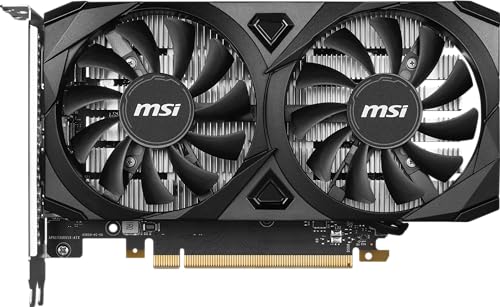
Best Overall — MSI Gaming RTX 3050 Ventus 2X 6G OC Graphics Card
Strengths
- Compact dual-fan Ventus design fits most cases without drama
- RTX features at an entry price, including modern upscaling support
- A sensible first discrete card for esports-focused players
Trade-offs
- Buy it for today; its upgrade date is part of the purchase
- 6GB of VRAM is the ceiling — texture-heavy games need settings discipline
- An entry-class GPU: 1080p is its home, 1440p is a stretch
| GPU | GeForce RTX 3050 (Ampere) |
|---|---|
| Memory | 6GB GDDR6, 96-bit |
| Boost clock | 1492 MHz (from API title) |
| Outputs | HDMI / DisplayPort |
| Interface | PCIe (Ampere generation) |
Everything about the MSI RTX 3050 Ventus 2X 6G OC follows from its core spec — a GeForce RTX 3050 with 6GB GDDR6 — which makes it a entry-level card with a clear resolution home. Its home territory is 1080p gaming, and for a first-time builder putting together their very first gaming PC that is the yardstick that matters here. For a builder living the scenario from our intro — a first build assembled on a kitchen table, with a parts list checked three times and a healthy fear of bending a pin or forgetting a power cable — it is a card that knows its job and does it. For 1080p ambitions on this budget, it is the right shape of compromise.
Same GPU, different card: the cooler, board design, and outputs recorded in the verified API title are where this model earns or loses its place. Its spec sheet, verified against the API title in our sources file, points to gpu: GeForce RTX 3050 (Ampere); memory: 6GB GDDR6, 96-bit; boost clock: 1492 MHz (from API title) as the design decisions that matter in daily use. Measured against this lens’s priority — a card that installs without drama, runs quietly at stock settings, has mature drivers, and forgiving performance at the monitor you actually own — it answers the brief convincingly. Judged against the rest of the under $150 field, it neither overreaches nor undersells itself.
Its honest limit is the frame buffer. Six gigabytes is a workable 1080p budget now and a negotiation later, and buyers should sign up for that knowingly. That is a boundary, not a flaw, and the verdict line underneath names exactly who sits on each side of it. For 1080p ambitions on this budget, it is the right shape of compromise.
Best for: first-time builders who want a card that just works — the MSI RTX 3050 Ventus 2X 6G OC at the under $150 level / Not suited for: anyone expecting a tier above this card’s class, or a case and power supply that cannot support it
Best Value — GTX 1650-class options (prose only)
Strengths
- Widely available in many case-friendly sizes
- The class’s best examples embarrass newer budget cards
- A flexible route when a build must game this weekend, not next month
Trade-offs
- Driver support for older classes is mature but no longer the priority
- Performance varies more between individual examples than the class name suggests
- No verified listing in the current pick sheet, so pricing and condition vary wildly
Cards of the GTX 1650-class — previous-generation entry cards on the used market — belong in this conversation, but none appears in the site’s current API-verified pick sheet, so the class is discussed without a purchase link rather than dressed up with an invented one.
Judged plainly, a card of this class targets 1080p play with settings discipline, and its true rival is the linked field above: when a verified model sits close in spirit, the linked card with a warranty is usually the calmer buy. For a first-time builder putting together their very first gaming PC, the route suits a deliberate compromise inside a build like this — a first build assembled on a kitchen table, with a parts list checked three times and a healthy fear of bending a pin or forgetting a power cable — where the graphics line is genuinely the last dollar available. It is, in short, the kind of pick that makes the under $150 tier feel bigger than it is.
Best for: patient bargain hunters who will verify condition and returns on GTX 1650-class cards under $150 / Not suited for: anyone who needs a warranty-backed card that simply works on day one
Best Used-Market Pick — RX 6400-class options (prose only)
Strengths
- A deep second-hand pool means patient buyers can be choosy about condition
- Can undercut the linked picks when the used or sale market cooperates
- Plenty of life left in well-kept examples of the class
Trade-offs
- Resale value on the way out is thinner than the linked picks’
- Support questions get answered by forums now, not manufacturers
- Original boxes and accessories are often long gone
Cards of the RX 6400-class — Radeon RX 6400-class low-profile cards — belong in this conversation, but none appears in the site’s current API-verified pick sheet, so the class is discussed without a purchase link rather than dressed up with an invented one.
Expect to tune settings, lean on upscaling where offered, and plan an earlier upgrade than the linked picks demand. In exchange, a build shaped by a first build assembled on a kitchen table, with a parts list checked three times and a healthy fear of bending a pin or forgetting a power cable stays gaming-capable today instead of waiting for a bigger budget that may arrive slowly. Judged against the rest of the under $150 field, it neither overreaches nor undersells itself.
Best for: patient bargain hunters who will verify condition and returns on RX 6400-class cards under $150 / Not suited for: anyone who needs a warranty-backed card that simply works on day one
Best Budget — GTX 1660-class options (prose only)
Strengths
- Can undercut the linked picks when the used or sale market cooperates
- Previous owners’ listings often include honest photos of the exact card
- Plenty of life left in well-kept examples of the class
Trade-offs
- Performance varies more between individual examples than the class name suggests
- Availability swings with the used market’s mood, week to week
- Warranty cover is often absent or unclear on used examples
We include older GTX 1660-class cards bought second-hand because buyers at this level will meet them everywhere, but with no API-verified ASIN on the sheet they stay prose-only in this guide.
The class earns its keep for patient hunters who verify condition and returns before paying. Everyone else should read the linked reviews first and treat this route as the fallback it honestly is. That is the profile this tier rewards, and the profile this lens went looking for.
Best for: patient bargain hunters who will verify condition and returns on GTX 1660-class cards under $150 / Not suited for: anyone who needs a warranty-backed card that simply works on day one
Best Compact — APU-class options (prose only)
Strengths
- Often bundled by sellers with extras the linked picks do not include
- Community knowledge for these classes is deep and easy to find
- Keeps a build gaming-capable when the budget truly cannot stretch
Trade-offs
- Driver support for older classes is mature but no longer the priority
- Original boxes and accessories are often long gone
- Support questions get answered by forums now, not manufacturers
We include integrated graphics on recent Ryzen APUs as a stopgap because buyers at this level will meet them everywhere, but with no API-verified ASIN on the sheet they stay prose-only in this guide.
The class earns its keep for patient hunters who verify condition and returns before paying. Everyone else should read the linked reviews first and treat this route as the fallback it honestly is. That is the profile this tier rewards, and the profile this lens went looking for.
Best for: patient bargain hunters who will verify condition and returns on APU-class cards under $150 / Not suited for: anyone who needs a warranty-backed card that simply works on day one
Best Premium — RX 6500 XT-class options (prose only)
Strengths
- A deep second-hand pool means patient buyers can be choosy about condition
- Community knowledge for these classes is deep and easy to find
- A flexible route when a build must game this weekend, not next month
Trade-offs
- Availability swings with the used market’s mood, week to week
- Returns, when offered at all, are usually short-windowed
- Support questions get answered by forums now, not manufacturers
Cards of the RX 6500 XT-class — previous-season RX 6500 XT-class listings when they dip on sale — belong in this conversation, but none appears in the site’s current API-verified pick sheet, so the class is discussed without a purchase link rather than dressed up with an invented one.
Judged plainly, a card of this class targets 1080p play with settings discipline, and its true rival is the linked field above: when a verified model sits close in spirit, the linked card with a warranty is usually the calmer buy. For a first-time builder putting together their very first gaming PC, the route suits a deliberate compromise inside a build like this — a first build assembled on a kitchen table, with a parts list checked three times and a healthy fear of bending a pin or forgetting a power cable — where the graphics line is genuinely the last dollar available. At the under $150 level, that is the standard this guide holds it to.
Best for: patient bargain hunters who will verify condition and returns on RX 6500 XT-class cards under $150 / Not suited for: anyone who needs a warranty-backed card that simply works on day one
Comparison Table
| Pick | GPU | Memory | Class | Link |
|---|---|---|---|---|
| Best Overall — MSI RTX 3050 Ventus 2X 6G OC | GeForce RTX 3050 | 6GB GDDR6 | entry-level | Check price |
| Best Value — GTX 1650-class | GTX 1650-class | varies | prose only | — |
| Best Used-Market Pick — RX 6400-class | RX 6400-class | varies | prose only | — |
| Best Budget — GTX 1660-class | GTX 1660-class | varies | prose only | — |
| Best Compact — APU-class | APU-class | varies | prose only | — |
| Best Premium — RX 6500 XT-class | RX 6500 XT-class | varies | prose only | — |
Start with the class column; it is the honest one. Badges describe roles within this guide, but the class column is the honest map of what this budget buys at the under $150 level, and the memory column is its fine print. It is the same test at every tier in this cluster.
How to Choose a Gaming Graphics Card at This Budget?
The first filter is not price or brand; it is the panel on your desk. Resolution and refresh rate set the ceiling on what any card can show you, and this tier’s honest target is 1080p. Size for the desk you have, and let a genuinely planned monitor upgrade — not a vague someday — be the only exception. That discipline, more than any single spec, is what this guide is selling.
Next, run the physical checks that no review can run for you. Case clearance for length and thickness, power supply wattage and connectors versus the model’s requirements, and outputs versus your monitors — all three, in writing. These three checks eliminate more bad purchases than any benchmark debate, and they are exactly where overbuying a flagship-class card for a 1080p monitor, or underbuying so far that the first big game purchase turns into a settings-menu struggle tends to begin. The reviews that follow show it being applied, pick by pick.
The last judgement is memory versus momentary pace. Memory headroom, a current feature set, and efficiency age better than a fractional launch-day lead. Sanity-check the system around the card: processor headroom, airflow, and a platform with a future. If you are also choosing the rest of the platform, our related guides Best Gaming Cpus and Best Gaming Motherboards cover those pairings, and How Many Watts Does A Gaming PC Need settles the power question properly. Keep it in mind as you read the picks; they were chosen under it.
What Does Under $150 Actually Buy in a Graphics Card?
Let us be direct about the hardest tier in this cluster. Verified new cards are scarce because the market here is thin, and used and previous-generation stock does most of the real business. What the budget buys, bought well, is genuine 1080p gaming — esports titles at high refresh, and big releases at sensible settings with upscaling help. Maximum textures and 1440p ambition live one tier up; anyone promising them here is selling, not advising. That discipline, more than any single spec, is what this guide is selling.
Whichever rung you are on, reserve a slice of the total budget for the unglamorous partners: wattage headroom first, then the airflow to match it. Start with Best Power Supplies for the wattage decision, and keep the heatsinks dust-free thereafter. That discipline, not any sticker on the box, is what a long-lived card actually runs on. That is the standard applied to every pick in this guide.
How Do You Install and Set Up a New Graphics Card?
The hands-on section of this guide covers a step-by-step first install written for someone who has never opened a PC, including what to do in the first ten minutes after it boots. In order, start to finish, it is a short job done once and done properly. None of the steps needs special tools beyond what a normal build already used. Everything ranked below was held to exactly that.
Prepare. Download the latest driver for your new card before you touch the hardware, note your current in-game settings, and back up anything irreplaceable. Switching GPU families? Decide now how the old driver comes off — cleanly, before the new card goes in. A torch or phone light aimed into the case prevents most fumbling.
Power down properly. Shut the PC down, switch the power supply off, unplug it, then a single press of the case button to drain residual power, and a hand on bare case metal before the card leaves its bag. Photograph the original layout before changing anything if the build is not yours.
Remove the old card. Power leads first, bracket screws second, release the PCIe slot latch — the fiddliest step in the whole job — and lift the card straight out. The old card goes somewhere safe, not the floor, until its replacement has proven itself. A torch or phone light aimed into the case prevents most fumbling.
Seat the new card. Align it with the top PCIe x16 slot, press firmly until the latch clicks, bracket screws refitted, and each power connector pushed fully home. A half-seated power cable is the champion cause of first-boot panic. Keep the screws in a dish, grouped by step — future you says thanks.
First boot and drivers. Boot into your operating system, install the driver you downloaded, and restart. and immediately set the display to its full refresh rate in the operating system because fresh installs default to a basic rate that can hide your entire upgrade. Keep the packaging until the card has survived a week of real use.
Tune one game properly. Pick your most-played title, start from a sensible preset for the card’s class, switch on upscaling where offered, and spend your adjustments on shadows and volumetrics first — maximum cost, minimum visible return. Save the profile, then experiment. Do one step, check it, then move on — batching steps is how errors hide.
Problem: fans spin, screen stays dark. Check the monitor is plugged into the graphics card, not the motherboard — the classic first-build error — then reseat the card and its power connectors. Problem: frame pacing feels wrong everywhere. Work through Fix Stuttering In PC Games first — silicon is rarely the culprit compared with drivers and display settings. Problem: it sounds like a small aircraft. Verify exhaust fans actually exhaust, soften the fan curve in the driver software, and free the intakes from panels and cable nests.
Common Mistakes
The mistake we see most with this exact search is overbuying a flagship-class card for a 1080p monitor, or underbuying so far that the first big game purchase turns into a settings-menu struggle. Close behind it: buying a card before measuring the case, a power supply trusted on faith, and a monitor left at its default refresh rate for months, quietly taxing every session. The shortlist that follows is what survived it.
The loud mistakes get the attention; these two do the slow damage. The first is comparing cards by a single number — a boost clock, a memory figure, a launch chart — when the ownership experience is decided by the combination of class, VRAM, cooling, and software. Second, ignoring the platform’s future, which converts your next upgrade from a card swap into a system rebuild. Decide for today’s machine with tomorrow’s in peripheral vision. The reviews that follow show it being applied, pick by pick.
Comparing across the cluster is worthwhile before you commit: tier steps move the needle further than model steps, every time, which is why budget comparison deserves the first hour and model comparison the second. Keep it in mind as you read the picks; they were chosen under it.
Noise is a specification too
Two builds with identical frame rates can be completely different to sit beside. Fan design, heatsink mass, and the card’s default fan curve decide whether a gaming session sounds like weather or like nothing at all. Zero-RPM modes keep a card silent on the desktop, and a modest undervolt or a custom fan curve can transform a loud card, at the cost of a little time in the driver software. If your PC shares a room with other people, a television, or a microphone, weight noise as heavily as any chart in this guide. At the under $150 level, the practical translation is to weigh it alongside the picks above rather than in isolation. If this is your first build, file this under things that save a second purchase.
Selling your old card well
The card you replace has value, and handling the sale properly funds the upgrade. Photograph it running, keep its box and accessories, be honest about its history, and price it against completed sales rather than optimistic listings. Clean it, include the power adapters it shipped with, and wipe nothing but dust — buyers pay for confidence. In budget builds especially, a well-sold old card is effectively a discount on the new one, and it belongs in the upgrade maths from the start. At the under $150 level, the practical translation is to weigh it alongside the picks above rather than in isolation. If this is your first build, file this under things that save a second purchase.
Resizable BAR and the free settings worth enabling
A handful of platform features cost nothing and are worth switching on deliberately: Resizable BAR in the motherboard BIOS where supported, the correct PCIe mode for your slot, hardware-accelerated GPU scheduling if your setup behaves well with it, and your monitor’s full refresh rate and colour depth in the operating system. None of these transform a card, but together they make sure you receive the performance you already paid for, and checking them takes less time than one game download. At the under $150 level, the practical translation is to weigh it alongside the picks above rather than in isolation. If this is your first build, file this under things that save a second purchase.
Warranty, returns, and buying with a safety net
A graphics card is one of the more expensive single parts in a PC, and it works hard for its living. Buy through channels with clear returns, register the product if the brand offers it, and keep the box and receipt until the card has survived its first month of real gaming. Early failures are uncommon but they cluster early, and the difference between a painless replacement and a support saga is usually paperwork you either kept or did not. This is also the strongest argument for buying new at the lower tiers, where the used-market saving is smallest relative to the risk. At the under $150 level, the practical translation is to weigh it alongside the picks above rather than in isolation. If this is your first build, file this under things that save a second purchase.
The monitor upgrade trap
A new graphics card often exposes the monitor as the next bottleneck, and the honest sequence matters. Buying the card first and the display later is fine; buying a card sized for a display you may never purchase is not. If a monitor upgrade is genuinely planned within the card’s lifetime, say so in your decision and size the card for it. If it is a vague someday, size for the desk you have. This single piece of honesty prevents more overspending at every tier than any other advice in this guide. At the under $150 level, the practical translation is to weigh it alongside the picks above rather than in isolation. If this is your first build, file this under things that save a second purchase.
Ports and monitors: the unglamorous check
Before any card earns your money, confirm it can drive your actual desk. Count the DisplayPort and HDMI outputs against your monitors, check the HDMI version if you use a high-refresh TV, and think about whether you will add a second screen for chat, streams, or work. Most gaming cards in this class offer a sensible mix, but the exact layout differs between models, and discovering a missing port after the build is an avoidable annoyance. If you run an older monitor with only legacy inputs, factor an adapter — or a monitor upgrade — into the real cost of the card. At the under $150 level, the practical translation is to weigh it alongside the picks above rather than in isolation. If this is your first build, file this under things that save a second purchase.
The used market, warranties, and risk
Previous-generation cards circulate heavily on the used market, and some are genuinely good value — but the risk profile is different from buying new. You may get no warranty, an unknown mining or overclocking history, and fans near the end of their life. If you go used, buy from sellers with returns, stress-test the card immediately, and price in the absence of warranty honestly. For many builders at this budget, a new card one tier lower with full warranty and modern features is the calmer decision. Neither route is automatically right; the mistake is pretending they carry the same risk. At the under $150 level, the practical translation is to weigh it alongside the picks above rather than in isolation. If this is your first build, file this under things that save a second purchase.
VRAM, explained without the marketing
Video memory is where your card keeps textures, geometry, and frame data while it works. When a game needs more than the card holds, it borrows slower system memory and frame delivery stutters, textures pop in late, or settings get quietly downgraded by the game itself. That is why two cards with similar raw speed can feel completely different in a modern release: the one with more memory holds its settings, the other negotiates. At this budget, treat VRAM as a longevity decision, not a spec-sheet trophy. A card that is slightly slower today but carries more memory usually ages better than a faster card that is already memory-tight in current games. At the under $150 level, the practical translation is to weigh it alongside the picks above rather than in isolation. If this is your first build, file this under things that save a second purchase.
Settings literacy beats raw hardware
The fastest upgrade available at this tier is free: learning which settings actually cost frames. Shadows, volumetric effects, and certain post-processing options are famously expensive, while texture quality — mostly a VRAM question — often looks great even on modest cards as long as memory allows. A player who can tune a settings menu will get more from a mid-tier card than a player who only knows the ultra preset gets from one tier up. Every review in this guide assumes you will spend ten minutes tuning; that assumption is worth real money. At the under $150 level, the practical translation is to weigh it alongside the picks above rather than in isolation. If this is your first build, file this under things that save a second purchase.
Reading a product title like a reviewer
Board-partner names are a puzzle of useful facts and decoration. The parts that matter are the GPU itself, the memory size and type, the cooler and slot design, and the port layout. Words like gaming, OC, and edition tell you far less; an OC model may carry a small factory overclock that makes little real-world difference beside its cooling and price. Learn to strip a listing down to GPU, VRAM, dimensions, connectors, and warranty, and comparison shopping becomes much calmer. That is exactly the information we verify against the API title for every linked pick in this guide. At the under $150 level, the practical translation is to weigh it alongside the picks above rather than in isolation. If this is your first build, file this under things that save a second purchase.
When to wait, when to buy
Graphics card pricing moves in waves around launches and seasonal sales, and there is always a rumour of something better next quarter. The workable rule is to buy when your current setup is stopping you enjoying the games you own, and to let launches pass if it is not. A card bought at a fair price and used for four years beats a theoretically perfect card bought a year later at a theoretically perfect discount. Chasing the bottom of a price curve is a hobby in itself; make sure it is not replacing the gaming it was meant to enable. At the under $150 level, the practical translation is to weigh it alongside the picks above rather than in isolation. If this is your first build, file this under things that save a second purchase.
Longevity: buying for the games of two years from now
No card at any price is future-proof, but some age more gracefully. Extra VRAM, a current-generation feature set, and efficient performance at your resolution all slow the arrival of the day when new games force uncomfortable settings compromises. Think in terms of your actual upgrade rhythm: if you replace a card every four or five years, stepping one tier up inside this budget usually pays for itself in deferred frustration. If you upgrade often, the value pick today plus a sooner refresh can be the smarter pattern. Match the card to your rhythm, not to a forum’s idea of the correct tier. At the under $150 level, the practical translation is to weigh it alongside the picks above rather than in isolation. If this is your first build, file this under things that save a second purchase.
Upscaling is part of the product now
Modern upscaling — rendering internally at a lower resolution and reconstructing a sharp image — has changed what a mid-priced card can do. It can turn a demanding title from a compromise into a comfortable experience, and both major GPU families now offer mature versions of the idea, alongside frame-generation features on newer generations. Quality varies by game and by mode, so treat upscaling as a strong bonus rather than the whole reason to buy. A good rule at this tier: choose the card that plays your games well natively, then let upscaling be the headroom that carries it through the next two years of releases. At the under $150 level, the practical translation is to weigh it alongside the picks above rather than in isolation. If this is your first build, file this under things that save a second purchase.
Final Recommendation
If you read nothing else: start your shortlist with the MSI RTX 3050 Ventus 2X 6G OC because it matches this budget and this brief more completely than anything else verified, working down the Quick Picks from there until price, fit, and stock all line up. Every linked card in this guide earned its place against the same criteria, so there is no trap door in the list; there are only trade-offs, and we have tried to print them as loudly as the strengths. Everything ranked below was held to exactly that.
If the tier itself is the open question, the neighbouring guides — Best Gaming Graphics Card For Beginners Under $200 and Best Gaming Graphics Card For Beginners Under $250 — with the same API verification and the same refusal to pad a short list. Either way, finish with the three physical checks: case clearance, power supply, ports. Money spent after those checks rarely needs forgiving. The reviews that follow show it being applied, pick by pick.
Frequently Asked Questions
How much VRAM do I actually need?
Enough that your games stop negotiating. For the resolution this guide targets, the picks above show the realistic spread: smaller buffers work with settings discipline today, while the larger-memory picks are the ones that will still feel comfortable in releases a few years out. VRAM is the spec most buyers underweight and most regret later. Write the step down if it helps; everyone does the first time. The honest answer is shorter than the marketing one.
Do I need to upgrade anything else with the card?
Possibly. A very old CPU can hold a new card back, a small case can refuse a large card, and a 60Hz office monitor will hide most of what a gaming card does. Check the pairing — card, CPU, case, power supply, and display — as one system. It sounds cautious because first builds should be. Readers ask it more than any other, and it deserves the straight version.
Will one of these cards work with my existing power supply?
Check the specific model’s recommended wattage and connector requirements against your supply before ordering — this is the single most skipped step in GPU upgrades. Entry picks in this guide are forgiving; the high-end picks are not. If your supply is marginal, budget the replacement into the upgrade. Ask it again after your second build and the answer will feel obvious. New buyers ask it first, and experienced ones ask it last.
Is it worth buying a graphics card at this budget, or should I save for the next tier?
It depends on your monitor and your patience. If you game at the resolution this tier targets, a card here delivers a complete, enjoyable experience now. Saving for the next tier buys headroom and longevity, but only if the rest of your system — monitor included — can use it. Every experienced builder started by asking exactly this. Treat any simpler answer with suspicion.
Is ray tracing worth prioritising at this budget?
For most buyers at this level, raster performance and VRAM deliver more enjoyment per dollar. Ray tracing is a genuine visual upgrade in supported games, but on cards in this class it typically pairs with upscaling to stay smooth. Treat it as a bonus on a card you already want, not the reason to stretch. It sounds cautious because first builds should be. Readers ask it more than any other, and it deserves the straight version.
Should I buy previous-generation or current-generation?
Previous-generation cards can be excellent value and their drivers are mature, but current-generation models bring better efficiency, newer upscaling and media features, and a longer support runway. At the same effective price, newer usually wins; at a clear discount, the older card can be the smart buy. The first build teaches it better than any guide can. New buyers ask it first, and experienced ones ask it last.
What should I do first after installing a new graphics card?
Install the current driver from the GPU maker’s site, set your monitor to its full refresh rate in your operating system (a step a surprising number of owners miss), then run your most-played game and tune settings starting from a sensible preset rather than ultra. First builds reward the boring, proven choice. Readers ask it more than any other, and it deserves the straight version.
