Disclosure: As an Amazon Associate, reviewstook.com earns from qualifying purchases. Links on this page are affiliate links at no extra cost to you; prices and availability change frequently, so check Amazon for the latest.
Where to Buy the Best Flatbed Scanner Under $150
Every pick in this guide to the best flatbed scanner under $150 is one click below: the name link and the check link beside it open the same verified Amazon listing, where the current price and bundle can be confirmed before you commit. Purchases made through links on reviewstook.com support our testing and writing at no extra cost to you.
- Best for Small Spaces: Canon CanoScan LiDE 400 — Check on Amazon
- Best for Sharing: Epson Perfection V39 II — Check on Amazon
- Best All-Rounder: Visioneer 7900 — Check on Amazon
- Best A3 Value: VIISAN VF3120 — Check on Amazon
- Best for Schools and Libraries: Plustek OpticScan OS1180 — Check on Amazon
- Best for Speed: Plustek OpticSlim 2700 — Check on Amazon
Finding the Best Flatbed Scanner Under $150 Without Buying the Wrong Shape of Scanner
If you are shopping for the best flatbed scanner under $150, the first decision is not a brand — it is a shape. A flatbed scanner scans on glass, under a lid, which is why it accepts the bound, fragile and awkward originals that define real paperwork. A hundred and fifty dollars is where the flatbed conversation gains a dimension — literally. The first A3 beds enter here beside the strongest A4 entry machines, and the buyer’s question changes from which scanner to which size of world. Stay letter-size and you get refinement: the best sharing, the best photo capture in the entry class. Go A3 and you get admission: drawings, ledgers and spreads that smaller glass refuses outright. This guide refuses to declare a winner between those goods; it lays out both, pick by pick, so your pile can decide.
Not every buyer arrives with a specialism, and this guide respects that: it assumes a pile assembled by life rather than by a profession. The picks are therefore introduced by the slice of ordinary chaos each one handles best, and the detailed reviews keep returning to the same plain question — what happens when this machine meets your actual drawer of unsorted intentions? Machines that answer that question broadly rank ahead of machines that answer a narrower one brilliantly, unless your narrower question is the one being asked. Background reading that genuinely helps here: our explainer at Best Business Card Scanners and the wider buying context at Scanner Resolution Explained.
The six picks underneath were selected to cover the distinct jobs hiding inside this one search phrase, and the detailed reviews argue every job openly. If your calls for sit between tiers, the neighbouring guides at Best Flatbed Scanner Under $50 and Best Flatbed Scanner Under $400 frame what stepping down saves and stepping up buys, in the identical verified-pick format.
In this guide
Quick Picks
- Best for Small Spaces: Canon CanoScan LiDE 400 — stands upright to save desk depth.
- Best for Sharing: Epson Perfection V39 II — scan-to-cloud for easy sharing.
- Best All-Rounder: Visioneer 7900 — tag That Photo software included.
- Best A3 Value: VIISAN VF3120 — adjustable lid for bound volumes.
- Best for Schools and Libraries: Plustek OpticScan OS1180 — a3 graphics and documents.
- Best for Speed: Plustek OpticSlim 2700 — four one-touch quick-scan buttons.
How These Picks Were Chosen
We treated manufacturer language as claims to be located, not facts to be repeated. Where a listing’s own words are quoted — a pace at a stated capture resolution, an automatic feeder capacity, a driver’s name — the review keeps the conditions attached to the claim, since a 3-next scan at document configuration and a 3-next scan at photographic configuration are other animals wearing an identical number. Visitors should hold any guide, counting this one, to that standard: a specification lacking its conditions is an advertisement.
Badges mark the role every pick plays — the general choice, the budget route, the photo or feeder or format specialist — and the detailed reviews argue per case in the open, trade-offs included. Finally, we ordered the six by the job of this article rather than by specification theatre. A pick with a weighty shortcoming says so in its own section, as a guide that hides the compromise has only moved the disappointment to after the buy.
We also policed the near-misses. Two Epson entry models, the V19 II and V39 II, are close siblings, as are Visioneer’s 7800 and 7900; we avoid fielding the pair of them members of a near-identical pair in one article when the pool provides a genuinely distinct alternative, so per slot in the six earns its place with a distinct strength. Specialist machines — the book scanners, the A6 and A5 modest-format units, the flagship film models — were merely fielded where the article’s audience genuinely matches their aim.
One category note protects any reader reading shopping at any tier: diverse famous scanner names are not glass-bed machines. The ScanSnap iX1300 and iX2500, Epson’s ES-400 II and FastFoto FF-680W, Plustek’s ePhoto Z300 and HP’s HPPS100 are sheet-fed designs with no glass; the CZUR Aura Pro is a camera on a stand. All were excluded from these picks. A professionally refurbished VIISAN VF3120 listing was likewise excluded as a duplicate of the source document model, which appears in this series in its standard listing where its tier fits.
Detailed Reviews: Each Pick for Your Desk

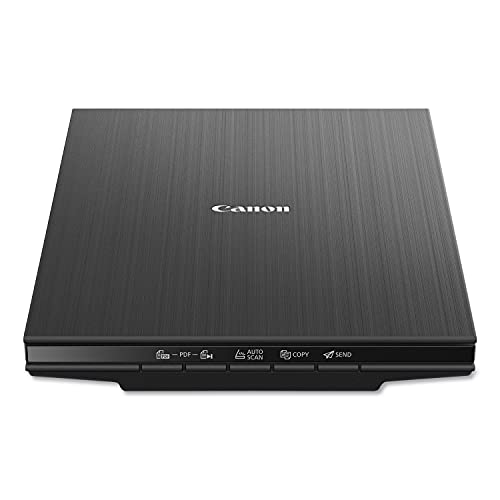
Best for Small Spaces — Canon CanoScan LiDE 400, Letter/A4 flatbed
Strengths
- Barely thicker than a hardback book
- Stands upright to save desk depth
- Refined step up from LiDE 300
Trade-offs
- Still strictly one page at a time
- No feeder for multipage documents
- Premium over basic models buys refinement
| Footprint from listing | 7.7 x 14.5 x 0.4 inches |
|---|---|
| Type | Slim document and photo flatbed |
| Colour | Black |
Weigh the LiDE 400 as an argument that dimensions are a feature. At a listed 0.4 inches thick, it occupies the worktop the way a magazine does, and it can stand in a shelf gap the way a book does — two tricks no routine flatbed performs. The scanning under the styling is Canon’s competent document-and-photo function, unchanged in character from its sibling. Purchasers paying the step-up are ordering the disappearance act, and in the compact rooms where these machines actually live, disappearance is meriting genuine cash.
The generalist’s test for a letter/a4 flatbed is the Tuesday test: an everyday form, an unremarkable photo, an unremarkable certificate, every scanned lacking ceremony. Pass that, and the machine belongs in a headline home.
As the body is so thin, get into the routine of pressing the lid with a light hand at the centre rather than leaning on a corner when scanning a thick book — indeed pressure keeps the page flat versus the glass bed and the text sharp edge to edge.
Obscurity is the only concrete support gamble in technology, and nothing at this floor is obscure. Hold on to the entry scanner’s companion software updated and its installer saved, and the machine will migrate over three computers lacking complaint. Peripheral longevity is chiefly driver longevity, and the mainstream models in this class are supported the way mainstream models are: silently, for calendar years, by manufacturers who sold millions of them.
Best for: commuters, compact flats and tidy shared desks / Not suited for: teams with day-to-day multipage paper files


Best for Sharing — Epson Perfection V39 II, Letter/A4 flatbed
Strengths
- 4800 dpi optical photo resolution
- Scan-to-cloud for easy sharing
- Removable lid handles bound albums
Trade-offs
- No feeder for document stacks
- Cloud features need account setup
- Close sibling of V19 II
| Extras from listing | Scan to Cloud; high-rise removable lid |
|---|---|
| Power | USB powered |
| Optical resolution | 4800 dpi |
The Epson Perfection V39 II builds on the identical 4800 dpi optical foundation as its V19 II sibling, then adds the convenience contemporary homes actually ask for: scan to cloud. That means a grandchild’s drawing or a signed school form can travel from the glass bed to shared storage in one motion, absent the save-attach-send ritual. It keeps the high-rise removable lid for albums and thick books, and it keeps USB power, so the hardware story stays uncomplicated while the companion software story gets smarter. For homes whose scans are meant to be shared rather than simply housed, this is the natural step up in the span of Epson’s entry line.
For a mixed household bundle, a letter/a4 flatbed like this earns its retain via availability: it is the machine before now on the workstation when a form, photo or certificate appears, and its limits — one page at a while — match the rhythm of mixed life admin.
Set up the cloud destination before the initial urgent scan, not during it. Five calm minutes linking the directory you actually use beats a panicked configuration scanning session with a deadline on the table and a queue of pages next to the scanner.
The entry machine’s social life carries weight: in a shared house or household home, the scanner that all users can operate turns into the household’s, while the one with a learning curve turns into one person’s burden. Buttons labelled with jobs, presets that forgive, and a location all users can reach — these unglamorous traits settle whether the electronic digitised archive is a home campaign or a solo sentence.
Best for: homes sharing scans over users and places / Not suited for: archives that must stay wholly offline


Best All-Rounder — Visioneer 7900, Letter/A4 flatbed
Strengths
- 1200 dpi for photos and documents
- Tag That Photo software included
- Office-and-home crossover positioning
Trade-offs
- Listed for PC, not Mac
- No automatic document feeder
- Office label, home pace
| Platform | PC; USB connection |
|---|---|
| Software from listing | Tag That Photo |
| Resolution from listing | 1200 dpi |
With 1200 dpi on its listing and an office nod in its positioning, the 7900 is Visioneer’s bid for the desk that does everything. It scans the invoice and the christening photograph with equal indifference, tags the photos so they can be found again, and runs from a PC over USB without a power brick safari. The ceiling is pace and platform: no feeder, no Mac listing. Inside those lines it is a genuinely versatile home-and-small-office flatbed, and the resolution headroom gives small originals — the wallet photo, the stamp, the clipping — a second life at printable sizes.
The generalist’s test for a letter/a4 flatbed is the Tuesday test: an commonplace form, an commonplace photo, an unremarkable certificate, per scanned lacking ceremony. Pass that, and the machine belongs in a broad home.
Small originals — the wallet-sized print, the newspaper clipping — are where this machine’s resolution earns its keep. Centre them on the glass, where flatbed optics are happiest, rather than at a corner.
An entry flatbed’s next year is about the digitised collection it quietly designed. Files named by practice, filing folders shaped by routine, a shoebox before now half empty — the machine’s output compounds. Owners upgrading from this class rarely regret the buy actually when they outgrow it, since the entry machine taught the home the system that the bigger machine will inherit.
Best for: mixed photo and document desks on PC / Not suited for: batch-heavy little businesses
Best A3 Value — VIISAN VF3120, A3 flatbed
Strengths
- True A3 glass at mid-tier money
- Adjustable lid for bound volumes
- Fast A3 cycle at document settings
Trade-offs
- Big footprint needs a real desk
- Overkill for letter-only scanning
- A3 files grow large at high dpi
- Speed from listing
- 8 sec per A3 colour page at 200 dpi
- Lid
- Adjustable, for bound books
- Scan area
- 304 x 426 mm (A3)
- Optical resolution
- 1200 x 1200 dpi
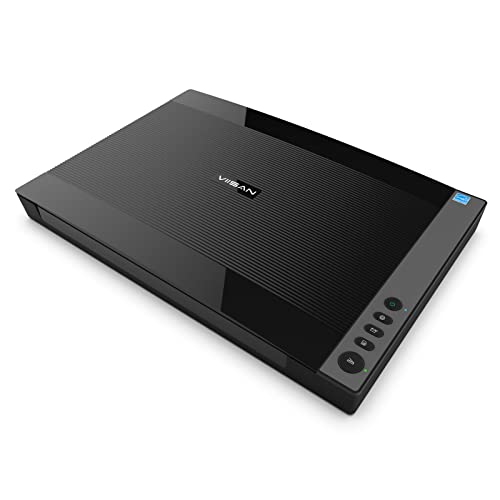
The source document listing is the one linked here; a refurbished twin was by design excluded from this guide’s picks. Any A4 owner sooner or later meets the source piece that does not fit, and the VF3120 is the affordable response to that meeting: A3 glass at 304 by 426 millimetres, 1200 by 1200 optical capture, an 8-following A3 colour cycle at document scan settings, and a lid that adjusts for bound books. It is the tier’s doorway into sizeable-format self-sufficiency — drawings, ledgers, posters and spreads scanned at home in its place of at a bureau.
A a3 flatbed earns generalist respect by making the exceptional commonplace — the one big drawing, the one ledger, the one spread — without demanding specialist devotion the rest of the year.
Calibrate your expectations on file size before a big A3 session: a full-bed colour scan at high resolution is a large file, so decide the archive format and folder first, and scan a single test page to check the pipeline end to end.
An A3 scanner also changes what a home or workplace agrees to preserve. The ledger that was ‘too big to copy’ turns into copyable; the poster’s fate stops depending on a frame’s survival. That change in what is preservable is the format’s real buy, and it is why owners of big beds rarely return to little ones actually when nearly all of their pages are ordinary.
Best for: schools, studios and homes with A3 backlogs / Not suited for: desks where footprint is the scarcest resource

Best for Schools and Libraries — Plustek OpticScan OS1180, A3 flatbed
Strengths
- A3 graphics and documents
- 9-second A3 document cycle
- Institution-friendly design brief
Trade-offs
- Large body needs dedicated space
- No feeder for document stacks
- A3 is wasted on letter-only users
| Speed from listing | A3 document in approximately 9 seconds |
|---|---|
| Aimed at | Libraries, schools, small offices |
| Format | A3 flatbed |
The OS1180’s case rests on throughput at size: an A3 document in roughly 9 seconds keeps a queue of oversized source documents moving in a way stitching programs at no point will. Plustek aims it at graphics along with paper files, which suits the mixed reality of schools and libraries — a watercolour one minute, a spreadsheet the next. The flatbed format keeps frail or bound material protected, and the A3 bed doubles as a generous surface for smaller items laid out in batches. Teams that at no point exceed A4 should save their room and cash; those with a big-format backlog will wonder how they managed absent it.
A a3 flatbed earns generalist respect by making the exceptional commonplace — the one big drawing, the one ledger, the one spread — without demanding specialist devotion the rest of the year.
In a school or library, determine whose job the done files are before the initial scan. A named owner for the output directory prevents the classic institutional outcome: three hundred excellent scans that nobody can find by half-term.
Expect the A3 bed to turn into a layout surface for more than scanning: sorting prints, collating pages, examining artwork. Flat, lit-adjacent, generous — the territory gets used. Owners who accept the bed as furniture rather than fighting its footprint end up organising complete projects around it, which is one more way of saying the format pays rent in usefulness beyond its specification.
Best for: libraries, schools and modest businesses with A3 labour / Not suited for: individual letter-only scanning at home
Best for Speed — Plustek OpticSlim 2700, Letter/A4 flatbed
Strengths
- Fast 3-second scan cycle
- Four one-touch quick-scan buttons
- Works with Windows and Mac
Trade-offs
- No image supplied in listing data
- No feeder for batches
- Compact bed suits standard pages
| Scan speed from listing | 3-second fast scan |
|---|---|
| Controls | 4 quick-scan buttons |
| Compatibility | Windows and Mac |
The OpticSlim 2700’s listed 3-following cycle and four job buttons are calibrated for the scan-and-go rhythm of genuine administration — the form signed at breakfast, the receipt before the handbag swallows it. Pace at the entry level is not about archives; it is about errands. Mac support, yet not universal at this level, widens its home. Nobody should blunder it for a production tool, and Plustek does not; it is a sprinter in a category of marathoners, and for the errands that dominate concrete scanning, sprinting is the correct event.
The generalist’s test for a letter/a4 flatbed is the Tuesday test: an commonplace form, an commonplace photo, an commonplace certificate, per scanned lacking ceremony. Pass that, and the machine belongs in a broad home.
The fastest scanner is the one whose defaults match your errands. Set the routine preset a single time — destination, format, grade — and the 3-following hardware velocity is matched by zero-next determination-making.
Expect to replace nothing and wipe two things: the glass bed, and the area the lid closes versus. That is the entire maintenance liturgy of this class, and owners who retain it find the machines functionally immortal at home volumes. The scanners do not wear out so much as get outgrown, replaced by workloads rather than by failures.
Best for: errand-pace scanning between other jobs / Not the right fit for: albums, books and oversized pages
Comparison Table
| Pick | Format | Verified highlight | Best role |
|---|---|---|---|
| Canon CanoScan LiDE 400 | Letter/A4 flatbed | Slim document and photo flatbed | Best for Small Spaces |
| Epson Perfection V39 II | Letter/A4 flatbed | USB powered | Best for Sharing |
| Visioneer 7900 | Letter/A4 flatbed | 1200 dpi | Best All-Rounder |
| VIISAN VF3120 | A3 flatbed | 1200 x 1200 dpi | Best A3 Value |
| Plustek OpticScan OS1180 | A3 flatbed | A3 flatbed | Best for Schools and Libraries |
| Plustek OpticSlim 2700 | Letter/A4 flatbed | 3-second fast scan | Best for Speed |
Tables flatten; workloads do not. Use this one to check coverage — bed, feeder, specialisation — against your own pile, then return to the reviews for the compromises each row hides. For the specification background behind several rows, Printer Scanner Not Working is the companion read.
How to Choose the Best Flatbed Scanner Under $150 for Your Workload
This budget buys a choice of directions. Stay A4 and you get the majority of refined entry glass-bed machines, with photo capture resolution and sharing features entirely matured. Go A3 and you gain one-pass scanning of drawings, ledgers, scrapbook pages and book spreads, at document-grade rather than photo-grade capture. What $150 all the same does not buy is a document feeder or film specialisation; those endure $300 conversations. The smart buy here is the machine whose strength matches the backlog actually sitting on your table, not the backlog you imagine tackling someday.
A generalist’s shortlist should start from an inventory, not from reviews. Write down the last twenty things you wished you could scan; the list will contain a pattern — for the most part paper, for the most part photos, one awkward bound thing — and that pattern is your specification. Then read the six verdicts here as answers to your list. The scanner that covers eighteen of your twenty items beats the one that covers twelve brilliantly, for the explanation that the uncovered items do not disappear; they return to the phone camera, which is where dissatisfaction started.
Connectivity is a promise about your next computer
Wired USB, the connection nearly all picks here rely on, is unfashionable and nearly immortal: it will function with the next machine and the one after. Driver standards — TWAIN, ICA, ISIS — are the bundled software equivalent of an identical promise. When a listing names them, it is telling you the manufacturer expects the scanner to outlive its initial computer, which is the correct expectation for a glass bed with one moving carriage and a decade of labour in it.
Why duplex matters more than raw feeder speed
Shoppers comparing feeder models should weight duplex as a multiplier on any other figure, since in actual in-trays it is one. Two-sided documents are the business’s default, not its exception, so a document feeder that captures the pair of them sides in one pass removes the complete following care — the flip, the re-feed, the collation confirm. The combination picks throughout this guide that list duplex are making a throughput promise that sole-sided velocity statistics, nevertheless generous, cannot match on concrete paper.
File formats are a promise about the future
A scan is solely as useful as the file it grows into. Files on paper hope for searchable, reasonably sized files that workplace bundled software opens forever; images hope for lossless masters that editing cannot degrade; books hope for text that search and quotation can reach. The picks spanning this guide differ here in ways spec sheets underplay — cloud destinations, tagging programs, eBook conversion — and those differences compound over seasons. Select the machine whose output formats your coming self, your colleagues or your grandchildren can all the same open and all the same search.
Why book-edge and lid design are specifications, not details
Two glass-bed machines with identical capture resolution can treat a bound book wholly differently. A high-rise lid makes room for a spine; a removable lid lets an album lie naturally; an adjustable lid meets a thick volume halfway; a book-edge design reads nearly to the gutter. None of these appears in a dpi figure, and all of them appear in the opening minute of scanning a real book. Purchasers with bound source pages should shop the lid before the sensor — the reviews overhead call out per pick’s arrangement for precisely this explanation.
Two habits protect every buyer in this category. First, decide the destination folder and naming pattern before the scanner arrives, because the archive is the product and the machine is only its supplier. Second, keep the neighbouring tier in view: the guide at Best Flatbed Scanner For Home Office Under $150 shows what the next step changes, and the one at Best Flatbed Scanner For Small Business Under $150 shows the same workload read through a different lens — both useful correctives before money moves.
Scanning Workflows: Three Jobs This Tier Handles Constantly
Digitising a child’s school journey
Report cards, certificates, artwork too big for the fridge and too good for the bin — a childhood in paper turns up at a page a week for eighteen seasons. Scan as it lands, A3 where the artwork demands it, and name by year and term. The digital archive that consequences is the one the eighteen-year-old actually wishes for: finish, findable, and protected from the damp garage that claims the paper pieces of the majority of homes’ best intentions.
Preparing a rental or tenancy file
Scan per item as it is signed or received, name it by property and date, and preserve the directory shareable with any tenant or agent who may call for it. Tenancies run on paper files with deadlines: agreements, inventories, deposit records, inspection images’ paper files, correspondence that must be provable later. When the tenancy ends — the moment these files carry weight — the kept collection answers from a phone in the empty property, which is only where and when paper copies are not.
Clearing an estate’s paperwork with care
Executors and homes face paper at its the majority of emotional and nearly all bureaucratic simultaneously: certificates, policies, letters, images, the contents of a table that meant a life. A flatbed scanner, used softly and in sittings, lets assorted relatives share the function and the consequences — pieces held by one, perfect copies held by all. Scanning here is not efficiency; it is fairness and preservation at one time, and the machines spanning this guide are at their nearly all humane in this function.
How Do You Set Up a Flatbed Scanning Routine That Sticks?
Let the software’s presets carry the decisions
Build three presets and name them by job, not by number: Routine Document, Photo Keeper, Best Grade. Per coming sitting then opens with a choice among three honest options as an alternative of a negotiation with forty scan settings. Presets are how professionals make consistency low-expense, and consistency — the identical capture for the identical class of original, every hours — is what makes an collection feel like one collection rather of forty accidents.
Finish one box completely before opening another
A completed carton is a unit of morale and of route: it proves the system, banks the consequence, and frees the worktop. Interleaved containers borrow trouble from every other — capture settings blur, naming drifts, source pages migrate. Function in entire cartons, declare every one done in writing, and let the electronic collection grow in chapters. Projects organized this way survive interruptions, helpers and house moves; projects organized by enthusiasm rarely survive the initial of those.
Name the destination before the device
The five minutes of deciding are the cheapest in the complete exertion and the most frequently skipped. Determine where scans live — which filing folder, whose drive, what backup — before the scanner’s opening sitting, and write the determination where any reader using the machine can see it. Scanners create files at a rate that punishes improvisation; a destination decided late is a migration campaign, while a destination decided early is only a directory filling up as intended.
Handle originals like a librarian for an hour
Wipe hands, flat support, no food or drink in the scanning zone, and a rule that source pages return to their carton the identical day they leave it. None of this is preciousness: skin oils print, spills end collections, and a page separated from its context is a compact mystery manufactured day-to-day. An hour of librarian manners per scanning session keeps the two archives — the paper one and the digitised one — in better condition than the undertaking found them.
Difficulty: colours appearance wrong next to the source document -> fix: judge under one light, edit a copy. Before blaming the scanner, compare the source document and the screen under the identical lighting, and note the screen itself may be the liar. Scan the master faithfully, preserve it unedited, and adjust a copy for the destination — print, screen or sharing — because per destination seeks a distinct correction. CCD and dual-lens picks spanning this guide capture the most faithful starting point, but no capture survives being judged on an uncalibrated display in a sunlit footprint.
Difficulty: moiré patterns crawl over scanned magazine pages -> fix: recognise the print, change the strategy. Halftone printing and high-capture resolution sampling interfere, producing the shimmering waves called moiré. It is physics, not a fault. Scan at a other sampling resolution, rotate the page a few degrees flat on the glass bed, or use any descreen option the programs provides for printed material. Photographs and plain pages are immune; only previously printed halftones misbehave, and they misbehave predictably a single time you know the cause.
Issue: files are outsized and scans crawl -> fix: match capture settings to output. Unhurried, enormous scans nearly invariably mean the capture resolution is set for an output you will at no point generate. Files on paper read on screen require modest scan settings; solely enlargements and film justify the ceiling figures. Build two presets — day-to-day and best standard — and opt for by design per job. Your storage, your patience and your coming self searching the filing folder will all notice the contrast inside a week.
Difficulty: scans of glossy prints show rainbow sheen patches -> fix: change the angle, not the configuration. Glossy surfaces and flatbed light can interfere into iridescent patches, in particular on resin-coated prints. Rotate the print a few degrees on the glass bed and rescan; the interference pattern rests on angle, and a compact rotation as a rule moves it off the image wholly. Scanning by way of the print’s protective sleeve, if it has one, can also break the effect — test on one print before committing a container to the method.
Going Deeper: Habits That Make Any Flatbed Better
Think of the scanner and the shredder as a pair, at least for business and home documents whose source pages require not survive digitisation. A scan you trust — verified, named, backed up — is what makes the shredder secure to use, and the shredder is what makes the filing cabinet shrink. The machines in these pages earn the trust half of that partnership; the verification routines throughout this guide’s how-to sections earn the rest. Paper reduction done in the wrong order is only loss with good intentions.
Scan clippings sooner rather than later, at commonplace document scan settings with a sheet of plain white paper to the rear of the page to stop the print on the reverse showing via. Newspaper and magazine pages deserve a word of their own, since newsprint is thin, acidic and before now yellowing in the crate. The outcome will not be immortal literature, but it will be legible long after the paper itself has crumbled — and for household announcements, match reports and the front page from the day somebody was born, legible and preserved beats perfect and lost.
Weigh keeping a scanning log, actually a humble one: date, crate or subject, page count, machine configuration used. Archivists preserve logs for the explanation that memory lies about process — six calendar months later, nobody remembers which capture settings made the good batch. A log turns a long undertaking into a repeatable procedure that a further person, or a tireder you, can resume mid-stream. For business archives the log doubles as evidence of diligence; for household archives it grows into, unexpectedly, part of the story the collection tells.
Opt for the digitised collection’s shape before the initial function session: a directory per year for home papers, a directory per client or subject for operate, and a strict rule that nothing lives at the top level. Scanning well is largely a directory habit wearing a hardware costume. Scanners yield files faster than folk generate systems, so the system has to exist opening and the machine simply feeds it. Every pick over this guide will happily fill a hard drive with beautifully captured chaos if the structure is missing.
Do not overlook the humble test chart of ordinary life: one page you scan on any machine, after per move, and retain forever. A page of dense text, a familiar photo, a form with fine print — scanned identically over seasons, it reveals drift, harm and improvement at a glance. Owners who preserve such a reference can prove their collection’s consistency; owners who do not are reduced to hoping, and hope is not a calibre standard any of the machines throughout this guide were made to serve.
There is a social architecture to a good collection: the person who scans, the owners who will search, and the ahead stranger who inherits the pair of them roles. Design for the stranger. Names they would guess, filing folders they would open, notes they would call for. Any pick throughout this guide can yield files at workplace-grade calibre; merely the operator can yield files at workplace-grade findability, and findability is the grade the stranger will judge the complete undertaking by, decades from the buy.
Coming operators — among them ahead you — inherit equipment more gracefully than they inherit mysteries. Lastly, preserve the human context attached to the machine itself: a note in the scanner’s drawer recording when it was ordered, what it replaced, and what the collection’s rules are. The note takes four minutes to write and may be read in a decade by somebody grateful that the person who set all this up thought, briefly and kindly, of them.
Searchability is the feature your ahead self will thank you for. Where a pick supplies searchable output — the book scanners here make it their headline, and document bundled software over the tiers supplies it — use it for whatever textual you may call for to find anew. A searchable electronic archive answers questions; an image-only electronic archive simply stores them. The spare seconds per page at the moment of scanning repay themselves the opening hours a contract clause, a recipe or a quotation is found in seconds in its place of being re-read into existence.
Common Mistakes
Trusting the preview’s thumbnail with your eyesight
A thumbnail that appears fine can hide a clipped line, a reversed page or a signature scanned at postcard legibility. Open files at reading size during verification, especially for pages whose next reader is an institution. The confirm adds up seconds per batch; the alternative — discovering the flaw when the institution does — comes at a price the source document’s retrieval and now and then the deadline it was feeding.
Letting one bad scan poison a batch’s reputation
Faith in an electronic archive is statistical — it rises with verified batches and falls with discovered errors — and it is much cheaper to maintain than to rebuild. A skewed page in a directory of good ones makes reviewers distrust the filing folder. Verify in compact batches so the bad page is caught while its original is in reach, and the batch keeps its good name.
Ignoring the software half of the purchase
Two scanners with alike glass can generate completely distinct archives depending on tagging, searchability and driver support. A photo collection absent names, a book scan lacking searchable text, a business scanner the workplace programs cannot see — every is a hardware success and a routine failure. Read the companion software lines of the spec cartons as seriously as the hardware ones.
Buying for the archive you wish you had
The film scanner for negatives you do not own, the A3 bed for artwork you at no point made, the document feeder for stacks that land two times a year — aspirational purchases strand genuine funds in imaginary workloads. Inventory the real accumulation, with your hands, before ordering. The right scanner for the genuine batch will all the same be a pleasure; the right scanner for the imaginary one grows into furniture with a specification sheet.
Assuming the biggest number wins the comparison
Comparison tables reward the largest figure in per row, but workloads reward fit: the bed that takes your original, the document feeder that matches your batch, the capture that serves your output. A pick can win any row and lose your workstation. Read tables as maps of territory rather than as league standings — the reviews throughout this guide are written in that spirit, and your shortlist should be too.
Scanning at maximum everything, always
Scan settings are a budget to spend per original: files on paper cheaply, prints generously, film lavishly. Maximum sampling resolution, maximum colour, maximum calibre on per page yields minimum patience and a storage bill that ends projects. The any reader reading shopping who wrap up archives are the ones who learned to spend on object — a skill deserving of more than any one specification spanning this guide, and the one the comparison table cannot show you.
Final Recommendation
If a decision must be made in one paragraph, make it this one: the Canon CanoScan LiDE 400 is our headline recommendation for the best flatbed scanner under $150 because it refuses the fewest jobs this audience actually has. Deviate toward the photographic picks if your pile is pictures, toward the feeder models if it is paperwork in stacks, and toward the size and book specialists if it is bound or oversized — each deviation is argued in its review, with the trade named. What no reader should do is leave this guide with a sheet-fed substitute and a hope; the glass was the point of the search.
Whichever model you select, give it a permanent home, a test scan on day one, and a naming routine from the opening file. Those three decisions, none of which outlay cash, distinct the archives that get done from the scanners that grow into furniture — and they are the closest thing this category has to a guaranteed outcome.
Frequently Asked Questions
Can a flatbed scanner scan books without damaging them?
Yes — that is one of its defining advantages. The book rests open on the platen rather than being forced by way of rollers, and models with high-rise or removable lids, adjustable lids, or the object-built book-edge designs spanning this guide go more, reading close to the spine while the binding stays at a natural angle. Function with a light hand, support the volume, and never press a spine flat to satisfy a scanner; the book specialists here exist only so you do not have to.
How do I keep scans organised across a big project?
Verify in modest batches, back the directory up as it grows, and retain a one-line log per crate. Systems before sittings: a filing folder per crate, client or year; a filename pattern with date initial; and a rule that files are named when the scan is made, while the source document is all the same in your hand to be asked. The scanners over this guide will generate files faster than any improvisation can organise them, which is why the organization must exist initial — the machine’s pace then performs for the collection as an alternative of in opposition to it.
What is the difference between a flatbed and a sheet-fed scanner?
Picture two philosophies. The sheet-fed machine is a motorway: loose pages enter, travel, and exit scanned at pace, and whatever that cannot travel — bound, brittle, laminated, torn — cannot enter. The flatbed is a workbench: any item that can lie yet can be scanned, one deliberate placement at a minutes. Teams that live on motorways yet retain a workbench for the exceptions, which is why this guide’s business picks weld the two in tandem, feeder higher up and glass underneath, in a sole footprint.
Can I scan directly to my phone or tablet?
Some ecosystems permit companion-app routines, but the glass-bed machines in these pages are computer-centred machines: the scan is made at the table, then shared onward by directory, cloud or message. The Epson V39 II’s scan-to-cloud listing is the closest thing here to a direct route, landing files where phones before now aspect. Treat the computer as the digital archive’s home and the phone as a window onto it, and the process stays sane — masters in one backed-up place, copies in any pocket that calls for them.
Do I need an automatic document feeder?
Count last month’s pages, not next year’s ambitions. If multipage paper files arrived weekly in stacks, a document feeder changes your life and the combination picks here add one without surrendering the platen. If your scanning was a page here and a picture there, an automatic feeder buys you an costly lid ornament. There is no prestige in the feature one or the other way — merely fit. The honest count takes two minutes and has saved more any reader reading shopping from the wrong tier than any review paragraph ever written.
Is a flatbed scanner still worth buying when phones have cameras?
A phone leans over a page and guesses; a flatbed scanner holds the page flat, lights it evenly and measures it square, which is why scanned paper files are accepted where photographed ones are queried. For records, yes — and the gap is not close. Hold on to the phone for whiteboards and receipts in the field if you must, but let the glass bed treat contracts, certificates, photos and any item whose next reader is official. Indeed the floor models over this guide create files with a divided legal and archival weight than a snapshot.
How long will a flatbed scanner last?
Calendar years, as a rule — the design has few moving parts beyond a carriage and, on combination models, feeder rollers that count as consumables. Longevity is largely environmental: a wipe, level, permanent home, grime retained out by a closed lid, and glass cleaned with a light hand rather than heroically. The business picks here add warranty structures that assume everyday duty. Treat any pick in these pages as a five-to-ten-year appliance, buy the tier your workload justifies rather than the one your optimism prefers, and it will apt be retired out of abundance rather than failure.
Why do some picks in this guide have no product image?
Judge those picks on their verified specifications, as their reviews invite. Honesty about evidence. The verified data at the back of this guide included images for the majority of models but not all — the Plustek OpticSlim 2700, Epson DS-1630, HP’s ScanJet Pro 2600 and 3600 f1, Epson’s V600, Plustek’s A320E and OpticBook 4900 among them — and the programme’s rule is to show merely what was supplied. A missing picture next to a full specification is a fair trade; the alternative, borrowed imagery of possibly the wrong revision, is how ordering guides silently mislead.

