Disclosure: As an Amazon Associate, reviewstook.com earns from qualifying purchases. Links to Amazon on this page are affiliate links; they cost you nothing extra.
A good office chair supports your lower back and adjusts to your desk.
This guide is built from Amazon product listings and maker specs, not our own testing, so confirm size, compatibility, features and current price on each product page.
Check price on Amazon for the current price of each pick.
Last updated: November 1, 2026.

In this guide
Quick Picks
| Product | Type | Best for |
|---|---|---|
| Breathable Mesh Ergonomic Office Chair | Mesh office chair | Breathable mesh |
| TRALT Ergonomic Office Chair | Ergonomic office chair | Lumbar support |
| Ergonomic Full Mesh Desk Chair | Mesh office chair | Adjustable lumbar |
| Ticova Ergonomic Office Chair | Ergonomic office chair | High back, adjustable |
| SUNNOW Ergonomic Office Chair | Ergonomic office chair | Sturdy executive |
| Duramont Ergonomic Office Chair | Ergonomic office chair | Rollerblade wheels |
| HON Ignition 2.0 | Ergonomic office chair | Known brand |
Our Picks

Top pickBest for breathable mesh
1. Breathable Mesh Ergonomic Office Chair
A Breathable Mesh Ergonomic Office Chair (mesh office chair), per the listing. Check price on Amazon.
Good for: Breathable mesh. Watch out: lesser-known brand.

Best for lumbar support
2. TRALT Ergonomic Office Chair
A TRALT Ergonomic Office Chair (ergonomic office chair), per the listing. Check price on Amazon.
Good for: Lumbar support. Watch out: check assembly.

Best for adjustable lumbar
3. Ergonomic Full Mesh Desk Chair
An Ergonomic Full Mesh Desk Chair (mesh office chair), per the listing. Check price on Amazon.
Good for: Adjustable lumbar. Watch out: lesser-known brand.

Best for high back, adjustable
4. Ticova Ergonomic Office Chair
A Ticova Ergonomic Office Chair (ergonomic office chair), per the listing. Check price on Amazon.
Good for: High back, adjustable. Watch out: check assembly.


Best for sturdy executive
5. SUNNOW Ergonomic Office Chair
A SUNNOW Ergonomic Office Chair (ergonomic office chair), per the listing. Check price on Amazon.
Good for: Sturdy executive. Watch out: higher price.
Best for rollerblade wheels
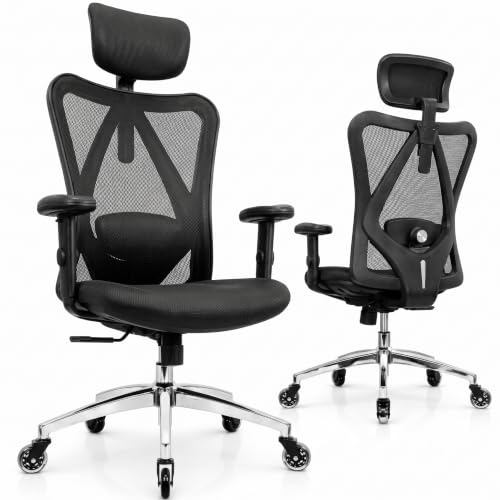
6. Duramont Ergonomic Office Chair
A Duramont Ergonomic Office Chair (ergonomic office chair), per the listing. Check price on Amazon.
Good for: Rollerblade wheels. Watch out: higher price.

Best for known brand
7. HON Ignition 2.0
A HON Ignition 2.0 (ergonomic office chair), per the listing. Check price on Amazon.
Good for: Known brand. Watch out: high price.
Best Picks by Category
They summarize listing data and are not hands-on test results.
- Highest listed rating (limited feedback): Breathable Mesh Ergonomic Office Chair — check price on Amazon. This is not an independent product-quality award.
- Most reviewed: Duramont Ergonomic Office Chair.
- Lowest price: Ergonomic Full Mesh Desk Chair — check price on Amazon.
- Premium option: HON Ignition 2.0 — check price on Amazon.
Price, Rating and Review Comparison
The table lists the picks with their price tier. Prices change often, so confirm the current price on Amazon.
| Product | Price | Rating | Ratings | Price tier |
|---|---|---|---|---|
| Ergonomic Full Mesh Desk Chair | Check price on Amazon | — | — | Mid-range |
| Breathable Mesh Ergonomic Office Chair | Check price on Amazon | — | — | Mid-range |
| TRALT Ergonomic Office Chair | Check price on Amazon | — | — | Mid-range |
| Ticova Ergonomic Office Chair | Check price on Amazon | — | — | Mid-range |
| SUNNOW Ergonomic Office Chair | Check price on Amazon | — | — | Mid-range |
| Duramont Ergonomic Office Chair | Check price on Amazon | — | — | Premium |
| HON Ignition 2.0 | Check price on Amazon | — | — | Premium |
How Much Feedback Backs Each Rating
A high average from a handful of ratings is weaker evidence than a slightly lower average from thousands. Here is how the sample size looks for each pick.
How to Choose
Lumbar
Adjustable support.
Armrests
Adjustable arms.
Mesh vs foam
Mesh breathes.
Seat Height, Depth and Sizing
A chair fits you only if its basic dimensions match your body and your desk. Start with seat height. With your feet flat on the floor, your thighs should sit roughly parallel to the ground and your knees at about a right angle. If the seat cannot go low enough, your feet may dangle, and if it cannot go high enough, your knees rise and your thighs press on the seat. Check the range of the gas lift on the listing and compare it with your height and your desk height.
Seat depth matters as much as height. You should be able to sit with your back against the backrest and still leave a gap of a few fingers between the seat edge and the back of your knees. A seat that is too deep presses on the calves and cuts circulation, and one that is too shallow gives too little thigh support. Some chairs have a sliding seat that adjusts the depth, which is useful when different people share the chair or when your height is at either extreme.
Seat width and weight rating are other practical checks. A narrow seat can feel cramped for larger users, and the weight capacity on the listing tells you what the frame and the gas lift are designed to hold. Choose a chair whose rating leaves a comfortable margin above your weight.
Finally, consider the seat padding. Firm cushions keep their shape longer, while very soft ones feel pleasant at first but can flatten. Check the description of the foam and the covering, and keep in mind that comfort over a full workday differs from the first impression.
Backrest, Lumbar Support and Recline Mechanisms
The backrest should support the natural curve of your lower back. Lumbar support comes in a few forms. A fixed curve is built into the backrest, an adjustable pad moves up and down or in and out, and some designs use a flexible frame that follows the spine. Adjustable lumbar helps because people differ in height and in the position of the curve. A support that hits too high or too low can be worse than none, so test the adjustment range.
Backrest height matters too. A taller back supports the shoulders and allows you to lean back and relax, while a mid-height back leaves your arms freer. Some chairs include a headrest, which is useful for leaning back and resting your neck during calls or reading, but it does not help much if you sit upright most of the time.
Look at the recline and tilt mechanism. A basic tilt moves the seat and back together, a synchro tilt moves the back at a different rate from the seat to keep your body in better alignment, and some chairs have a locking position or tension control. A tension knob adjusts how hard it is to lean back, which suits a range of body weights. Check whether the chair can lock in more than one position, since a chair that rocks continuously can be tiring for some people.
Chair descriptions often list many mechanisms, so focus on those you will actually use. A few well-made adjustments are better than many that feel flimsy.
Armrests, Mesh and Foam Compared
Armrests should support your forearms so that your shoulders stay relaxed while you work. Fixed arms are simple but may not fit your desk. Height-adjustable arms are a minimum for ergonomic use, and some chairs add width, depth and angle adjustment. Check that the arms can slide under your desk, and that they do not hit the desk edge when you pull in. Padding affects comfort, and wide hard arms can press on your elbows.
Upholstery makes a difference to comfort and upkeep. Mesh backs and seats allow air to pass, which helps in warm rooms, and they flex to follow your shape. Quality varies. A loose or thin mesh can sag over time, while a well-tensioned one supports for a long time. Foam seats can feel plush and cushioned, and dense foam resists compression. Fabric and faux leather add different looks, though faux leather may feel warmer and can crack with age.
Think about the climate and your habits. If you tend to feel hot, mesh is a sensible choice. If you prefer a softer seat, look for a cushion with a firm base or consider adding a seat pad. A chair that mixes mesh on the back with a padded seat is common and balances airflow with comfort.
Check the frame material too. Metal frames and bases feel sturdy, while plastic ones can flex or crack under load. The listing may specify the base material and the casters. For hard floors, soft caster wheels protect the surface and roll more quietly.
Assembly, Stability and Safety Checks
Many chairs arrive in a box and need assembly, so check what tools are included and how long assembly usually takes. Read the instructions carefully and tighten bolts firmly. Make sure the gas lift cylinder is properly seated, and be careful when you press the base onto the cylinder. Keep the packaging until you are sure the chair suits you in case you need to return it.
Stability is a safety matter. A five-point base spreads weight and prevents tipping, and good casters roll smoothly without wobbling. Do not stand on a rolling chair. Check that the base legs are strong and do not flex under load. Look at the weight capacity and the stated certification or testing the listing mentions, and verify it rather than assuming it is accurate.
When the chair arrives, check all adjustments. The lift should rise and hold, the tilt should lock, and the arms should slide and stay in place. Sit for a while and notice any creaks, rocking or pressure points. If something feels loose, tighten it, and if it persists, contact the seller.
Think about your flooring. A chair mat helps casters roll on carpet and protects hardwood from scratches. Keep wheels free of hair and debris, which can cause them to stick and wear. A small amount of regular maintenance, such as tightening screws and cleaning the wheels, makes the chair last longer.
Budget Tiers, Warranty and When to Replace
Office chairs vary widely in build quality. Lower-priced chairs may offer basic adjustments and lighter materials, so check the materials for the gas lift, base and casters. Mid-range chairs usually add more adjustments, firmer foam or better mesh, and sturdier frames. Higher-priced chairs often provide longer warranties, finer adjustment and better materials, though price alone does not guarantee a good fit. A lesser-known brand with few ratings, as the tables above show for some picks, is a less certain choice than one with a large sample, so weigh the evidence carefully.
Before you buy, ask these questions. What is the seat height range? Does the chair have adjustable lumbar, arms and tilt? What is the weight capacity? How long is the warranty, and which parts does it cover? Is the return policy clear, and who pays for return shipping on a bulky item? Is there customer support that answers questions?
Sit time matters. If you sit for many hours each day, put more weight on adjustability and build quality. If you use the chair for short sessions, a simpler model may be enough.
Signs that it is time to replace a chair include a seat that has flattened and no longer supports you, a backrest that has lost tension or cracked, a gas lift that sinks during use, wheels that no longer roll, armrests that wobble and frayed or broken mesh. If you notice persistent discomfort, check your setup, and consider talking to a professional about ergonomics. A good chair works best together with a well-arranged desk, monitor and keyboard, and regular breaks to stand and move.
Setting Up the Chair to Fit Your Body
An ergonomic chair only helps if it is adjusted for you, and most people leave the settings where the factory put them. Take a few minutes after assembly to go through the controls in a sensible order. Start with height. Sit back in the seat and set the height so your feet rest flat on the floor with your knees at about the same level as your hips or slightly lower. If your feet dangle, a footrest can fill the gap.
Next, check the seat depth if the chair has it. You should be able to sit all the way back, with your lower back against the backrest, and still have a little space between the front edge of the seat and the back of your knees. Then set the lumbar support so it meets the curve of your lower back, not the middle of it. If the chair does not have an adjustable lumbar, a small rolled towel or a cushion can help, though it is not a perfect substitute.
- Seat height: feet flat, thighs roughly level.
- Seat depth: a gap between the seat edge and the back of the knees.
- Lumbar: aligned with the lower back curve.
- Armrests: shoulders relaxed, elbows near a right angle.
- Recline tension: enough resistance to support you without pushing back.
Finally, adjust the recline and tilt. A little recline while you work can reduce load on the spine, but a chair that tips too easily will make you tense. Set the tension so the backrest follows you with light pressure. Revisit these settings after a week, since your body adapts.
Floors, Casters and the Gas Lift
Parts that sit under the seat get less attention than they deserve. Casters, the wheels, come in different types. Hard plastic wheels are usually made for carpet, and softer rubber or polyurethane wheels are intended for hard floors, where they roll quietly and are less likely to scratch. If you have a wood or tile floor, check the listing for caster material, or plan to buy replacements, which are inexpensive and swap in easily on many chairs.
The gas lift is the cylinder that raises and lowers the seat. Many are tested to standard classes for strength, and a reputable listing will mention it. A lift that slowly sinks while you sit is a sign of wear and a reason to ask about the warranty. Check the height range in the listing against your desk height, and compare it with your own leg length, since a lift that does not go low enough can leave tall or short users with poor posture.
- Match caster type to your floor: soft wheels for hard floors, standard for carpet.
- Use a chair mat on carpet if the chair is hard to roll.
- Check the listed seat height range against your desk and legs.
- Listen for creaks or wobble in the first weeks, and tighten fittings as the manual recommends.
A five-point base is standard because it resists tipping. Make sure all five legs are fully seated and the casters are pushed firmly in, since a loose caster is a common source of accidents.
Arranging Your Desk Around the Chair
The chair is one piece of a workstation, and the rest of the setup can undo its benefits. Position the monitor so the top of the screen is near eye level and about an arm’s length away. If you look down or crane your neck, the best chair in the world will not fix it. Put the keyboard and mouse close enough that your elbows stay near your sides.
Desk height matters, too. If the desk is too high for your chair settings, you will raise the seat and leave your feet off the floor, or you will shrug your shoulders to reach the keys. If you can, adjust the desk or use a keyboard tray. If the desk is fixed, set the chair so your forearms are level with the keyboard, and use a footrest to support your feet.
- Monitor: top near eye level, an arm’s length away.
- Keyboard and mouse: close to your body, wrists in a neutral position.
- Lighting: reduce glare on the screen.
- Breaks: stand and move every so often, whatever chair you use.
Even a well-adjusted chair is not made to be sat in all day without a break. Short walks and stretches matter as much as the seat you use.
Ordering Online: Delivery, Returns and Fit Checks
Chairs are bulky, and many buyers cannot try one before ordering, so the return policy matters more than for small items. Before you buy, read the return window and see who pays for return shipping. A chair in a large box can be costly to send back, and repacking all the parts is a chore. Keep the original box and packing until you are sure the chair suits you.
Plan for assembly. Most chairs arrive in parts and take a short time to put together with included tools, but a few steps, like seating the gas lift, are easier with a second person. Lay out the parts on a clear floor and check them against the parts list before you begin, so you can report missing pieces right away.
Check the listed dimensions against your own. Seat width, seat depth and backrest height should suit your body, and the overall chair height should clear your desk. Taller users should look at backrest height, and smaller users should check the lowest seat height. Customer photos and questions on the listing can show what the chair looks like in real rooms.
- Read the return window, return shipping terms and any restocking fee.
- Keep the box and fittings until you have used the chair for a while.
- Check dimensions against your desk and your body.
- Test every adjustment in the first week, and report problems promptly.
A Closer Look at Each Pick, Chair by Chair
The seven chairs in this guide cover the full ergonomic ladder, from accessible mesh chairs sold by lesser-known brands, through adjustable mid-range models, to a known-brand chair at the premium step. They all promise support, but they deliver it differently: some through breathable mesh, some through adjustable lumbar systems, some through sturdy executive-style build, and one through the service and consistency of an established office furniture name. The notes below judge each pick by the job it is actually bought for, using the strengths and cautions already flagged in the listings above, so you can match the chair to your body, your desk and your working day.
A shared truth runs through the list. Ergonomic is not a shape, it is a fit. A chair becomes ergonomic when its seat depth matches your thighs, its lumbar support meets your lower back at the right height, and its armrests meet your forearms without lifting your shoulders. Every pick below can achieve that for the right body. None of them achieves it automatically for every body, which is why dimensions and adjustment ranges matter more than the label on the box.
Breathable Mesh Ergonomic Chair: The Cool Entry Point
The opening pick is the breathable mesh route, aimed at buyers who sit warm and want airflow through the back and seat at an accessible step. It suits home workers in warm rooms, anyone who has suffered through summer afternoons on a padded chair, and buyers furnishing a first proper desk setup. Mesh also flexes with your back rather than holding a fixed shape, which many people find forgiving across a day of small position changes.
The caution is the lesser-known brand, so let the listing details do the work a badge would otherwise do. Confirm the adjustment list carefully, especially whether the lumbar support moves, whether the arms adjust in height, and what the weight rating and base material are. Mesh quality varies widely, and a well-tensioned mesh supports for years while a loose one sags, so read owner feedback for comments about the seat staying firm. If the adjustments cover your needs and the dimensions fit, this is the coolest-running start in the guide.
TRALT Ergonomic Chair: The Lumbar-Led Mid Option
The TRALT is positioned around lumbar support, and it suits buyers whose main complaint with their current chair is an aching lower back by mid-afternoon. If you have tried cushions and rolled towels and still end the day stiff, a chair that builds its support into the backrest, at a position you can work with, is the logical next step. It is aimed at full-time desk workers rather than occasional users, because lumbar design only proves itself across long, ordinary weeks.
Its watch-out is to check assembly, which is worth taking seriously rather than treating as boilerplate. Set aside unhurried time, lay the parts out, and tighten fixings in the order the instructions give, because a lumbar mechanism assembled loosely will never feel as designed. During the first week, experiment with the support position in small steps and give each setting a full day before judging it. Lower backs adapt slowly, and the right setting often feels merely neutral at first, which is exactly what success feels like.
Ergonomic Full Mesh Desk Chair: Adjustable Lumbar, Full Airflow
The full mesh chair extends the mesh idea to the whole chair and pairs it with adjustable lumbar support, making it the pick for buyers who want maximum airflow and a support they can position rather than accept. It suits hot offices, south-facing rooms, and anyone who moves between upright work and leaned-back reading and wants the backrest to keep contact throughout. Adjustable lumbar matters most for users whose height sits at either end of the range, where fixed supports tend to land in the wrong place.
The brand is lesser known, so verify the mechanism claims on the listing: how the lumbar moves, whether the seat depth or height range suits your legs, and what the frame and base are made from. Full mesh seats feel firmer than foam and distribute weight differently, which most owners adapt to within days but some never love. If you prefer a plush sit, consider the foam-seated picks below instead. If cool and supportive is your brief, this chair answers it most completely in the middle of the list.
Ticova Ergonomic Chair: High Back With Adjustment
The Ticova is the high-back adjustable pick, aimed at taller users and anyone who wants support that continues up to the shoulders and head area when leaning back. A high back changes how a chair is used across a day: calls, reading and thinking pauses become genuinely restful positions rather than slouches. It suits people who alternate between focused upright work and reclined review, and who find mid-back chairs leave their upper back unsupported.
Check assembly on this pick as the listing advises, and pay particular attention to the backrest fixings and any headrest adjustment, since a high back acts as a lever and loose bolts announce themselves as creaks and flex. Confirm the seat depth against your thighs, because high-back chairs sometimes pair the tall back with a deep seat that shorter users cannot sit back into properly. When the dimensions fit, this is the most versatile posture range in the guide, from upright typing to a proper lean-back with your head supported.
SUNNOW Ergonomic Chair: The Sturdy Executive Style
The SUNNOW brings an executive style to the ergonomic list, described as sturdy, and it suits buyers who want a chair that looks and feels substantial: managers, client-facing home offices, and anyone who prefers a padded, commanding seat to a technical mesh look. Executive styling usually means more padding and a larger presence in the room, which some buyers experience as comfort and authority in equal measure.
Its caution is the higher step, so judge it on build evidence. Look for the frame and base materials, the weight rating with a sensible margin, and owner feedback about padding staying supportive rather than packing down. Padded chairs also run warmer than mesh, so weigh your room climate honestly. If you want the executive feel with ergonomic intent and your room stays cool, this pick delivers that combination more fully than the mesh models around it.
Duramont Ergonomic Chair: The Rollerblade-Wheel Pick
The Duramont is noted in this guide for its rollerblade-style wheels, a detail that sounds minor and is not. Wheels of that type roll smoothly and quietly and are notably kinder to hard floors than standard casters, which makes this pick a favourite for hardwood home offices where noise and floor marks are real concerns. The guide data also shows it drawing the most buyer attention in this list, which makes its feedback patterns especially worth reading before you buy.
The higher step is its caution, so confirm that the chair around the wheels earns it: lumbar adjustment, armrest adjustment, seat dimensions and rating should all match your needs, not just the rolling. If they do, the Duramont offers something genuinely rare, an ergonomic chair you can move around a hard-floor office in near silence, gliding to a printer or shelf without the rattle and drag most chairs produce. For shared homes and night workers, that quiet alone can justify the choice.
HON Ignition 2.0: The Known-Brand Benchmark
The HON closes the list as the known-brand benchmark, from a maker with a long history in office seating. It suits buyers who value predictable build quality, clearer specifications, established warranty handling and a chair that an organisation could buy for a whole team without surprises. For a home office that is really a full-time workplace, that predictability has a cash value: fewer gambles, easier parts and service, and a design refined across many users rather than a single listing season.
The high step is the honest caution. You are paying for the brand system as much as for the chair, and a careful buyer should still verify the fit fundamentals, seat depth, lumbar position and armrest range, because even the best badge cannot make the wrong dimensions comfortable. If the fit is right and the budget allows, this is the lowest-risk purchase in the guide. If the budget is tight, the mid-range picks above can fit a given body just as well, provided you do the measuring the brand premium would otherwise do for you.
Comparing the Picks Head to Head
Organise the seven by your dominant need and the list resolves itself. Heat points to the mesh chairs, with the full mesh model adding adjustable lumbar. A specific lower-back complaint points to the TRALT and the adjustable mesh and Ticova models, where support position can be tuned. Presence and padding point to the SUNNOW. Hard floors and quiet movement point to the Duramont. Minimum risk points to the HON. What should not drive the choice is the sheer count of adjustments, because an adjustment you never use adds cost and complexity without adding comfort.
Budget thinking follows the same logic. The accessible mesh picks ask you to verify more yourself. The premium picks charge for verification done by the brand. Neither approach is wrong, but be consistent: if you buy at the accessible end, invest the saved money’s worth of time in measuring, reading feedback and testing adjustments during the return window. That discipline, more than any single feature, is what separates satisfied owners from returners in this category.
Living With an Ergonomic Chair: Setup and Daily Habits
Set the chair up as a system with your desk, not as a standalone object. Feet flat, thighs roughly level, a small gap behind the knees, lumbar support meeting the curve of your lower back, armrests carrying your forearms with shoulders relaxed, and your screen raised so you are not looking down all day. Adjust one element at a time over the first week and keep notes, because bodies adapt slowly and the best setting is often the one that feels unremarkable by Friday. If others share the chair, agree on how to reset it, or the setup work will be undone daily.
Then protect the setup with movement. Change position often, stand and walk briefly at regular intervals, and use the recline rather than perching on the seat edge when you read or talk. Clean casters, re-check bolts after the first weeks, and lift rather than drag the chair when you move it. No chair in this guide can fix back pain, and persistent pain deserves professional advice, but a well-fitted chair plus regular movement is the combination that long desk days actually reward.
Common Mistakes When Choosing an Ergonomic Chair
The most common mistake is buying the ergonomic label and skipping the dimensions, then discovering the seat is too deep or the lumbar pad lands above the lower back. The second is demanding every adjustment and then never tuning any of them, leaving an expensive chair in its factory position. The third is ignoring the floor and desk: casters that chew hardwood, armrests that cannot pass under the desk, and a seat range that never meets your desk height will defeat a good chair daily.
A final mistake is judging comfort in the first ten minutes. Firm, supportive chairs often feel merely fine at first and excellent by the second week, while plush chairs can feel wonderful initially and tiring by the second month. Use the return window properly, work full days in the chair, test every adjustment, and let ordinary weeks, not first impressions, make the final call.
Matching Each Ergonomic Pick to a Real Routine
If you work from home full-time at one desk, your chair is effectively your workplace, and consistency matters more than novelty. That routine rewards the HON for buyers who want the lowest-risk, best-supported purchase, and rewards careful buyers at every other step who will measure, tune and test methodically during the return window. Whichever you choose, invest the first week in setup as this guide describes, because a full-time chair set up casually will underperform a mid-range chair set up properly, every working day, for years.
If your room runs hot or your work involves long, still sessions of writing, coding or calls, airflow becomes a health feature rather than a luxury, and the mesh picks move to the front. Choose between them by lumbar design: fixed and simple if your back has never complained, adjustable if it has, or if your height makes fixed supports land unreliably. Pair a mesh chair with the movement habit this guide repeats, since even the coolest seat cannot substitute for standing and walking at intervals.
If you split the desk with another person, or your work alternates between intense upright tasks and reclined reading and calls, favour adjustment range and back height: the Ticova pattern, with its high back and tunability, suits households and varied days. Agree on a reset routine so each user starts from the agreed setup rather than from wherever the last person left it, and expect shared chairs to need their bolt checks and caster cleaning more often.
If your floor is hardwood and your household values quiet, let the Duramont’s wheel design carry real weight in your decision, and more broadly let caster choice be part of any pick: soft, floor-kind wheels or a suitable mat protect the room the chair lives in. A chair that is comfortable but slowly damages the floor, or rattles across it during night work, fails its owner in a way that only appears after the return window, so decide it now, on purpose.
Whichever routine matches yours, close the decision the same way. Verify seat depth, lumbar position, armrest behaviour at your desk, rating margin and assembly demands against your body and your room, then order once, assemble carefully, and judge the chair on full working days. Ergonomic satisfaction is built in that order, and every pick in this guide can deliver it for the buyer who follows the order honestly.
Frequently Asked Questions
Best office chair?
HON Ignition 2.0.
Cheapest?
Mesh chairs.
Mid?
Ticova.
How do I know if the seat depth is right?
Sit with your back against the backrest and check that a few fingers fit between the seat edge and the back of your knees. If the seat is too deep, a sliding seat or a smaller chair may help.
Is mesh or foam better for an office chair?
Mesh breathes and suits warm rooms, while foam gives a softer feel. Quality matters more than the material, so read how the seat and back are built.
Do I need adjustable armrests?
Adjustable arms help you support your forearms at the right height and fit under your desk. Fixed arms may be fine if they match your body and desk.
How much lumbar support is enough?
The support should match the curve of your lower back without pushing you forward. Adjustable lumbar lets you find the right height and depth.
What does the weight rating mean?
It is the maximum load the chair is designed to hold. Choose a chair with a rating comfortably above your weight.
Can I use a chair mat?
Yes. A mat helps casters roll on carpet and protects hardwood floors. Choose one that suits your flooring type.
How long should an office chair last?
It depends on the build, the use and the care. Replace the chair when it no longer supports you, when parts fail or when adjustments no longer hold.
Can a chair fix back pain?
A well-fitted chair can make sitting more comfortable, but it is not a medical treatment. For ongoing pain, consult a qualified professional and also review your desk setup and movement habits.
Does an ergonomic chair need a headrest?
Not necessarily. A headrest helps if you recline often or like to lean back and rest your neck, but it can get in the way if you sit upright. Choose based on how you sit, and check whether the listing offers one that adjusts.
What is the correct way to sit in an office chair?
Sit all the way back with your feet flat on the floor and your knees near hip height. Let the backrest support your lower back, keep your shoulders relaxed and your forearms level with the desk, and leave a small gap behind your knees.
Are office chair casters different for hard floors?
Yes. Hard plastic casters are often supplied for carpet, while softer rubber or polyurethane casters roll quietly and are gentler on wood and tile. Many chairs accept replacement casters, so you can swap them if the supplied ones do not suit your floor.
How often should I get up from my desk chair?
There is no single rule, but many ergonomics guides suggest changing position often and standing up and moving for a few minutes every half hour or so. A good chair helps, but regular movement matters at least as much as the seat itself.
Bottom Line
For value, the mesh chairs or Ticova. For known brand, the HON Ignition 2.0.
More Gaming Chairs Guides
- Best Gaming Chairs with Footrest
- Best Chair Mats for Hardwood
- Gaming Chair Buying Guide
- Best Gaming Chairs
- Best Big and Tall Gaming Chairs
- All Gaming Chairs guides
Related Guides
- 6 Best Gaming Chairs: Corsair T3 Rush, GTPLAYER and More (2026)
- 6 Best Big and Tall Gaming Chairs: GTPLAYER, YFO, Athena (2026)
- 6 Best Gaming Chairs with Footrest: GTPLAYER and More (2026)
- 5 Best Chair Mats for Hardwood Floors: Clear and Anti-Slip (2026)
- Gaming Chair Buying Guide: Lumbar, Weight, Size, Budget (2026)