Disclosure: As an Amazon Associate, reviewstook.com earns from qualifying purchases. Links on this page are affiliate links at no extra cost to you; prices and availability change frequently, so check Amazon for the latest.
Where to Buy the Best Conference Speakerphone Under $400
Use the links below to check the latest price on Amazon for every pick in this guide to the best conference speakerphone under $400. Each name and each check link goes to the same verified listing, so you can compare the current configuration before you decide. Purchases made through links on reviewstook.com support our testing and writing at no extra cost to you.
- Best for Hybrid Teams: EMEET Luna Plus — Check on Amazon
- Best for Travel: Jabra Speak2 55 (2025 Edition) — Check on Amazon
- Best for Small Rooms: EMEET Luna Conference Speakerphone — Check on Amazon
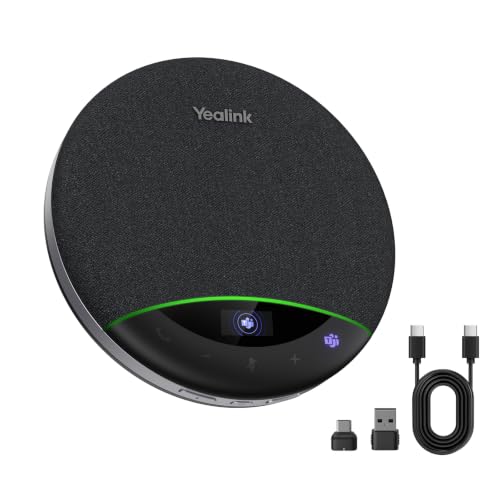
- Best Overall: Yealink SP96 Conference Speakerphone — Check on Amazon
- Best Budget: Yealink CP50 Conference Speakerphone — Check on Amazon
- Best Upgrade: RayBit Daisy Chain Conference Speakerphone — Check on Amazon
Finding the Best Conference Speakerphone Under $400 Without Buying the Wrong Device
If you are shopping for the best conference speakerphone under $400, you already know the problem this category exists to solve: laptop speakers and a built-in microphone turn every meeting into a negotiation with the room. This guide serves anyone replacing laptop speakers with a real meeting device, and it filters the market down to six speakerphones whose listings we verified against the manufacturer’s own catalogue data before any of them earned a link. Two values meet here. Room anchors like the CP50 maximise coverage from a fixed position, while premium portables like the Speak2 55 maximise cleanliness of pickup wherever they land. Our lists order them by each audience’s reality rather than pretending one ranking serves a boardroom and a backpack equally.
Read headline figures as best cases measured in a kind room, then discount it for your walls, your table and your people. The shortlist below is ordered for a typical meeting table, not by headline claims, and every pick is complete: array plus loudspeaker in one unit. For wider context on equipping the same workspace, see Best All In One Printers and Best Small Compact Printers.
The upper-mid tier is where eight-microphone arrays, room-system features and professional headroom concentrate: EMEET’s Luna Plus, Yealink’s CP50 with its 19.69-foot pickup brief, and Jabra’s Speak2 55 for the noisy-room traveller. Buyers here are typically equipping a room that hosts important meetings weekly, where one bad call costs more than the price difference between tiers.
In this guide
Quick Picks
Six verified picks for most buyers, ordered by fit rather than by price within the under $400 ceiling. The detailed reviews after the methodology explain who each one suits — and who should skip it.
- Best for Hybrid Teams: EMEET Luna Plus — eight-mic array for bigger tables, verified for this tier.
- Best for Travel: Jabra Speak2 55 (2025 Edition) — four noise-cancelling microphones, verified for this tier.
- Best for Small Rooms: EMEET Luna Conference Speakerphone — dongle, USB and Bluetooth options, in a package verified for this tier.
- Best Overall: Yealink SP96 Conference Speakerphone — 16 ft pickup for 8–12 people, verified for this tier.
- Best Budget: Yealink CP50 Conference Speakerphone — 8 mics, 19.69 ft pickup brief, verified for this tier.
- Best Upgrade: RayBit Daisy Chain Conference Speakerphone — daisy chain without premium pricing, verified for this tier.
Key Takeaways
Buy for the largest group the device must serve, not the average meeting. Centre it, standardise the connection, agree muting aloud. Every pick here is a verified complete speakerphone — no mic-only units, no duplicate listings, no invented figures.
How These Picks Were Chosen
Each pick started life as a listing in the retailer’s catalogue for this category, and each one cleared identical checks. The first test was simple: it had to be a true conference speakerphone — a loudspeaker and a microphone array in a single device — confirmed from the manufacturer’s own catalogue title and data on 2026-11-20. Next, its product class had to match the under $400 tier framing of this guide. Finally, duplicate listings were merged to one canonical listing, so no product shows up two times under different listing IDs.
What we removed matters as much as what survived. Microphone-only products were removed even when their titles borrowed speakerphone language, because they leave playback to laptop speakers. A webcam with a microphone was removed for the same reason. Replacement chargers, stands and other accessories that surfaced in the category data were removed as well. What survived was then judged on the criteria that decide real meetings:
- Pickup pattern and array size. An omnidirectional array covers every seat; the microphone count decides how cleanly distant voices arrive.
- Noise handling. Noise reduction and echo cancellation decide whether the dishwasher, the fan and the typing ever reach the other callers.
- Connection fit. USB for a fixed desk, Bluetooth suits movers, a dongle for rooms where pairing a shared PC is a recurring argument.
- Honest capacity. Manufacturer headcounts assume a quiet room and a central table; plan for about two-thirds of the printed number in real life.
- Controls under pressure. A tactile mute button, preferably with a visible indicator, stops the classic meeting disasters.
- Growth path. Chaining turns a unit into a system; without it, growth means replacing.
Every figure in this guide traces back to the verified catalogue titles — mic counts, pickup figures, battery claims, badges and ports are the makers’ published numbers, read as best-case claims and tempered throughout our advice. We publish no static prices and no fixed ratings anywhere in this guide, because they shift too often to print; use the links to see today’s position before you buy.
The Best Conference Speakerphone Under $400 Shortlist in Detail
Best for Hybrid Teams — EMEET Luna Plus, 8-mic array
Strengths
- Steadier far-side voice pickup
- Familiar Luna controls and layout
- Eight-mic array for bigger tables
Trade-offs
- Fewer extras than the full Kit
- Needs central table placement
- Solo users gain little over Luna
Eight microphones give the Luna Plus the raw material that smaller pucks lack: more spatial information about where each voice sits, which the processing turns into steadier pickup for people at the far side of the table. smart money in this tier weighs microphones (8-mic array), pickup (360° voice pickup), class (plus-tier conference speakerphone) above cosmetic differences, and on that measure this model is properly equipped For buyers comparing paper specifications, the telling detail is that none of these figures is a reviewer’s estimate — checkable against the listing before you spend. That verifiability is part of why this model survived our filter while louder listings did not.
| Brand line | EMEET Luna series |
| Class | Plus-tier conference speakerphone |
| Use | Larger meeting tables |
| Pickup | 360° voice pickup |
| Microphones | 8-mic array |
Imagine the hybrid huddle where half the team is remote and half is around one table: the EMEET Luna Plus takes the middle of a typical meeting table, and its job is to give the far seat the same weight as the near one. the specification that matters most here is microphones (8-mic array), pickup (360° voice pickup), class (plus-tier conference speakerphone), a verified figure from the manufacturer’s own listing rather than a reviewer’s estimate In practice that means remote callers stop asking for repeats, and the people in the room stop performing for a laptop at the end of the table.
The routine that works is plain: one connection method, used consistently; one home position, at the centre of the seating; one test call after any room change. Owners who standardise those three habits report the same experience across this whole category — the gadget vanishes and the meeting remains.
Longevity deserves a sentence here: designs in this class live or die by their unglamorous parts — buttons that survive daily mute habits, ports that tolerate a thousand insertions, firmware that keeps pace with the platforms. The EMEET Luna Plus comes from a line built for exactly that repetition, which is worth weighing alongside any microphone count.
Buy this model with discipline: confirm the connection set against the machine that will host it, confirm the capacity against the largest group that will use it, and then stop shopping. Speakerphones reward decisiveness because the differences that matter are audible in the first call, not the fiftieth. The EMEET Luna Plus will tell you fast if it belongs.
The step up buys array size and headroom, so solo desk users will hear little difference over the standard Luna. Like its sibling it rewards a central table position and punishes being shoved into a corner.
Best for: buyers who want one dependable unit for everyday meetings who value these strengths. / Not suited for: buyers whose rooms or group sizes exceed the honest limits described above.
Best for Travel — Jabra Speak2 55 (2025 Edition), 4 noise-cancelling mics
Strengths
- Microsoft Teams Certified controls
- Noticeably cleaner voice processing
- Four noise-cancelling microphones
Trade-offs
- Bluetooth-only flexibility trade-offs
- Premium aimed at noisy settings
- Coverage similar to cheaper pucks
Four noise-cancelling microphones and a newer generation of voice processing make this the step up for people whose calls happen in imperfect rooms — kitchens, shared offices, cafés between meetings. its headline specification is microphones (4 noise-cancelling mics), certification (microsoft teams certified), connectivity (wireless bluetooth), precisely the mix this audience leans on What the specification cannot tell you is behaviour: how fast the unit wakes, how frankly its mute light reports, how calmly it reconnects on Monday morning. Those habits quietly separate proven designs from paper rivals, and they explain this pick’s position here.
| Certification | Microsoft Teams Certified |
| Edition | 2025 Edition, Dark Grey |
| Form | Portable speakerphone |
| Connectivity | Wireless Bluetooth |
| Microphones | 4 noise-cancelling mics |
Consider a client presentation delivered from a borrowed meeting room. This is the moment the Jabra Speak2 55 (2025 Edition) earns its place in a typical meeting table: its headline specification is microphones (4 noise-cancelling mics), certification (microsoft teams certified), connectivity (wireless bluetooth), which is exactly the combination this audience leans on The gap versus laptop audio is not subtle; it is following the talk instead of rebuilding it.
Budget ten minutes in week one for placement. Move the unit a foot closer to the quietest speaker, skip angling it, the array listens everywhere, and notice the far end’s reaction. Small placement decisions compound across hundreds of meetings, which is why the setup guidance later in this guide deserves five minutes.
One more practical lens: the second user. These devices pass through hands that never opened the manual. A model whose state can be read at a glance — connected, muted, charged — survives shared life gracefully. Judge the Jabra Speak2 55 (2025 Edition) partly by that standard and it holds up well for its tier.
In the room, first comments rarely concern the array — it is how natural the far end sounds through the speaker, and how completely the device is forgotten after minute one. The Jabra Speak2 55 (2025 Edition) is built to vanish in exactly that way: specification serving invisibility. That is the correct ambition for meeting hardware, and it is met here as fully as this tier allows.
The premium buys processing and polish rather than raw coverage: the table size it serves is similar to cheaper pucks, just cleaner sounding. Travellers who mainly call from quiet rooms may not hear where the money went.
Best for: buyers who want one dependable unit for everyday meetings who value these strengths. / Not suited for: rooms or groups beyond the honest limits above.
Best for Small Rooms — EMEET Luna Conference Speakerphone, 360° voice pickup
Strengths
- Daisy chain stretches to 16 people
- Mute indicator the table can see
- Dongle, USB and Bluetooth options
Trade-offs
- Dongle is losable in shared rooms
- Older voice-processing generation
- Mid-pack music playback body
The Luna covers eight people around a table and brings a wireless dongle for rooms where Bluetooth pairing with a shared PC is a recurring fight. buyers in this tier should weigh pickup (360° voice pickup), capacity (8 users; daisy chain for 16), connectivity (usb, bluetooth, wireless dongle) over cosmetic differences, and by that measure this model is well equipped What the specification cannot tell you is behaviour: how fast the unit wakes, how frankly its mute light reports, how calmly it reconnects on Monday morning. Those habits quietly separate proven designs from paper rivals, and they are the reason this pick is ordered where it is.
| Processing | Noise reduction |
| Capacity | 8 users; daisy chain for 16 |
| Connectivity | USB, Bluetooth, wireless dongle |
| Pickup | 360° voice pickup |
| Controls | Mute with indicator |
Consider a client presentation delivered from a borrowed meeting room. That is exactly where the EMEET Luna Conference Speakerphone proves itself in a typical meeting table: its published brief centres on pickup (360° voice pickup), capacity (8 users; daisy chain for 16), connectivity (usb, bluetooth, wireless dongle), which is exactly the combination this audience leans on The gap versus laptop audio is not subtle; it is following the talk instead of rebuilding it.
Budget ten minutes in week one for placement. Move the unit a foot closer to the quietest speaker, skip angling it, the array listens everywhere, and watch how remote callers respond. Small placement decisions compound across hundreds of meetings, which is why the setup section below earns its five minutes.
The pairing question matters with the EMEET Luna Conference Speakerphone: which machine hosts your calls, and does this unit’s connection set meet that machine on its best behaviour? Answer it frankly and the model either slots into your week without friction or reveals itself as the wrong shape for your setup, however strong its array. One honest minute saves a return.
In the room, first comments rarely concern the array — it is how natural the far end sounds through the speaker, and how completely the device is forgotten after minute one. The EMEET Luna Conference Speakerphone is built to vanish in exactly that way: specification serving invisibility. That is the correct ambition for meeting hardware, and it is met here as fully as this tier allows.
Its voice processing is a generation behind the newest flagships, so side conversations and keyboard clatter are handled politely rather than invisibly. The dongle is one more small part for a shared room to lose.
Best for: buyers who want one dependable unit for everyday meetings and value this model’s strengths. / Not suited for: buyers whose rooms or group sizes exceed the honest limits described above.

Best Overall — Yealink SP96 Conference Speakerphone, 6-mic array
Strengths
- 16 ft pickup for 8–12 people
- 26-hour call time, 65mm speaker
- LCD screen and hardware mute
Trade-offs
- Room-sized, not desk-personal
- Second-unit chains add cost
- Teams-first feature emphasis
Six microphones, a 16-foot pickup radius and a 65mm speaker move the SP96 into genuine meeting-room territory for groups of eight to twelve. the figure that matters here is microphones (6-mic array), pickup radius (16 ft), call time (26 hours), taken from the maker’s own listing, not a reviewer’s guess On paper, the telling detail is that every figure here is the maker’s own published claim — they can be checked line by line against the listing before money moves. That verifiability is part of why this model survived our filter while louder listings did not.
| Pickup radius | 16 ft |
| Extras | Daisy-chain, LCD screen, mute button, Bluetooth dongle |
| Call time | 26 hours |
| Speaker | 65mm speaker |
| Microphones | 6-mic array |
In the middle of the hybrid huddle where half the team is remote and half is around one table, every weakness of a laptop setup surfaces together. The Yealink SP96 Conference Speakerphone meets them with a specific kit: its published brief centres on microphones (6-mic array), pickup radius (16 ft), call time (26 hours), precisely the mix this audience leans on Used in a typical meeting table, it turns a fragile arrangement — one laptop, several voices, goodwill into something closer to a system.
Charging, where a battery exists, is the sole chore: top up on a rhythm rather than after a warning, and keep the cable in the room the device serves. Wired models trade that chore for permanence. Either way, the cost of ownership is measured in minutes per month, not hours — provided the first setup was done deliberately.
One sentence on longevity: designs in this class live or die by their unglamorous parts — buttons that survive daily mute habits, ports that tolerate a thousand insertions, firmware that keeps pace with the platforms. The Yealink SP96 Conference Speakerphone descends from a line built for that repetition, which is worth weighing alongside any microphone count.
There is a discipline to how this model should be bought: confirm the connection set against the machine that will host it, confirm the capacity against the largest group that will use it, and then stop shopping. Speakerphones reward decisiveness because the differences that matter are audible in the first call, not the fiftieth. The Yealink SP96 Conference Speakerphone will tell you fast if it belongs.
It is a room device in size and intent; the solo hybrid worker gains little over Yealink’s smaller models. Daisy-chaining a second unit is supported, but at that point a buyer should also price dedicated room systems.
Best for: anyone wanting one dependable everyday unit — this is the tier’s natural fit for them. / Not suited for: anyone needing more room, more range or more certification than this model claims.

Best Budget — Yealink CP50 Conference Speakerphone, 8-mic array
Strengths
- Daisy chain for larger rooms
- Full-duplex with AGC and AEC
- 8 mics, 19.69 ft pickup brief
Trade-offs
- Room-system budget territory
- Setup deserves deliberate placement
- Wrong tool for a solo desk
An eight-microphone array with a 19.69-foot pickup brief, full-duplex audio and automatic gain and echo control: the CP50 is specified like a room system because it is one, aimed at medium-to-large Teams rooms. the specification that matters most here is microphones (8-mic array), pickup (19.69 ft, 360° omni), processing (ai noise cancellation, agc, aec), a verified figure from the manufacturer’s own listing rather than a reviewer’s estimate Against its tier, the Yealink CP50 Conference Speakerphone trades deliberately: it spends its budget on the meeting fundamentals — pickup, processing, connection — rather than on decoration. Buyers who share that priority will find it easy to live with; buyers shopping for a lifestyle speaker should keep moving.
| Audio | Full-duplex |
| Processing | AI noise cancellation, AGC, AEC |
| Pickup | 19.69 ft, 360° omni |
| Expansion | Daisy chain; medium to large rooms |
| Microphones | 8-mic array |
Take the weekly team call where the quietest person sits furthest from the laptop. That is exactly where the Yealink CP50 Conference Speakerphone proves itself in a typical meeting table: its published brief centres on microphones (8-mic array), pickup (19.69 ft, 360° omni), processing (ai noise cancellation, agc, aec), precisely the mix this audience leans on The difference over built-in laptop audio is not a subtle audiophile improvement; it is following the talk instead of rebuilding it.
Charging, where a battery exists, is the sole chore: top up on a rhythm rather than after a warning, and keep the cable in the room the device serves. Wired units swap the chore for permanence. Either way, the cost of ownership is measured in minutes per month, not hours — if the first setup was deliberate.
Consider the second user. These units get borrowed and booked by people who never read manuals. A unit whose state reads at a glance — connected, muted, charged — survives shared life. Judge the Yealink CP50 Conference Speakerphone partly by that standard and it holds up well for its tier.
Buy this model with discipline: confirm the connection set against the machine that will host it, confirm the capacity against the largest group that will use it, and then stop shopping. Speakerphones reward decisiveness because the differences that matter are audible in the first call, not the fiftieth. The Yealink CP50 Conference Speakerphone will tell you fast if it belongs.
Room-system specification brings room-system expectations of budget and setup time. On a solo desk it is just the wrong tool — capable, and entirely wasted.
Best for: anyone wanting one dependable everyday unit — this is the tier’s natural fit for them. / Not suited for: anyone needing more room, more range or more certification than this model claims.

Best Upgrade — RayBit Daisy Chain Conference Speakerphone, Daisy chain supported
Strengths
- Daisy chain without premium pricing
- Dongle, Bluetooth and USB options
- AI cancellation plus voice enhancement
Trade-offs
- Chain setup needs a rehearsal
- Support ecosystem is value-tier
- Polish trails premium room brands
Daisy-chain capability at a value brand’s tier is the story: start with one unit on a mid-size table, add a second when the team or the room grows, and let AI noise cancellation and voice enhancement handle the everyday racket in between. its published brief centres on expansion (daisy chain supported), processing (ai noise cancellation, voice enhancement), connectivity (bluetooth, wireless dongle, usb), which is exactly the combination this audience leans on Specs cannot show behaviour: wake speed, mute-light honesty, Monday-morning reconnection. Those habits are where established designs quietly separate themselves from paper rivals, and they are the reason this pick is ordered where it is.
| Use | All meeting rooms brief |
| Expansion | Daisy chain supported |
| Brand | RayBit |
| Processing | AI noise cancellation, voice enhancement |
| Connectivity | Bluetooth, wireless dongle, USB |
In the middle of a client presentation delivered from a borrowed meeting room, the weaknesses of ordinary setups all show up at once. The RayBit Daisy Chain Conference Speakerphone meets them with a specific kit: the figure that matters here is expansion (daisy chain supported), processing (ai noise cancellation, voice enhancement), connectivity (bluetooth, wireless dongle, usb), taken from the maker’s own listing, not a reviewer’s guess Used in a typical meeting table, it turns one laptop, several voices and hope into something resembling a system.
The practical routine is simple: one connection method, used consistently; one home spot, mid-table; one test call whenever the room changes. Owners who keep those three habits say the same thing across this category — the gadget vanishes and the meeting remains.
Consider the second user. Speakerphones get borrowed, inherited and booked by people who never read the manual. A model whose state can be read at a glance — connected, muted, charged — survives shared life gracefully. Judge the RayBit Daisy Chain Conference Speakerphone partly by that standard and it holds up well for its tier.
Read this tier’s value per meeting, not per purchase. Across a year of weekly calls, the right unit repays itself in sentences nobody had to repeat. The RayBit Daisy Chain Conference Speakerphone makes its case on that arithmetic — not on any single specification, but on the accumulation of unremarkable, successful calls.
Value-brand daisy chaining deserves a rehearsal before the big meeting — set levels with both units linked at home first. Absolute audio polish still trails the premium room brands, even chained.
Best for: anyone wanting one dependable everyday unit who value these strengths. / Not suited for: rooms or groups beyond the honest limits above.
Comparison Table
The six, side by side, on the verified figures deciding fit for most buyers. Read capacity and pickup as best-case maker claims, and use the first three rows’ links to check the current listings in detail.
| Model | Microphones / Pickup | Capacity brief | Connections |
|---|---|---|---|
| EMEET Luna Plus | 8-mic array | Larger meeting tables | See review |
| Jabra Speak2 55 (2025 Edition) | 4 noise-cancelling mics | See review | Wireless Bluetooth |
| EMEET Luna Conference Speakerphone | 360° voice pickup | 8 users; daisy chain for 16 | USB, Bluetooth, wireless dongle |
| Yealink SP96 Conference Speakerphone | 6-mic array | See review | See review |
| Yealink CP50 Conference Speakerphone | 8-mic array | See review | See review |
| RayBit Daisy Chain Conference Speakerphone | Daisy chain supported | All meeting rooms brief | Bluetooth, wireless dongle, USB |
How to Choose a Conference Speakerphone Under $400
Placement becomes a purchasing criterion at this level: arrays this capable reward a central, permanent position and punish being stuffed beside a screen. Fixed rooms should favour anchors, wired once. If the device travels between rooms, favour the premium portables and accept a smaller honest capacity in exchange for processing quality.
For most buyers, two frustrations — straining to hear remote voices through thin laptop speakers and being the person the room keeps asking to repeat themselves — are typically placement and sizing problems, not defects. Recentre before blaming; recount the largest group before replacing. Adjacent budgets cover the same audiences in Best Conference Speakerphone For Home Office Under $400 and Best Conference Speakerphone Under $700.
What Does the Under $400 Budget Actually Buy in a Speakerphone?
Strip the marketing away and a speakerphone purchase is three decisions: the furthest voice’s distance, how hostile the room’s noise and echo are, and how the device connects to the machine that hosts the call. Each pick here answers the three in a different priority order, which is why the right choice for most buyers may not be the most expensive name on the list. Work through the three in order and the shortlist typically narrows itself.
Spend first on the constraint you actually hit. If your pain is echo that makes two people talk over each other, processing and array size cure it. If your pain is meetings that start five minutes late, connection simplicity and a dongle are the cure. The picks above are ordered so that the first two or three answer the most common version of each problem for most buyers.
Speakerphone, Headset or Laptop Audio: Which Fits Your Meetings?
Headsets, laptop audio and speakerphones solve three different problems. A headset wins solo in noise and loses when a second person enters. Laptop audio wins on price — it is already bought — and loses on everything a meeting is for. The speakerphone is the group instrument: it serves everyone at the table and the people remote from it, equally. For most buyers, it is rarely either-or: it is which tool hosts the meetings that matter. If those meetings involve more than one person in the room, the speakerphone is not an accessory but the venue itself.
Which Features Matter Most for Most Buyers?
Array size, frankly read. More mics hand processing more spatial information, which appears as steadier far-seat pickup, not louder pickup. Beyond the size of your table, extra microphones buy diminishing returns — match the array to the seating, not to ambition.
Noise processing, frankly read. Cancellation decides what the far end hears of your room: the dishwasher, the traffic, the colleague’s keyboard. No tier deletes a loud room entirely; the better processors make it sound farther away and less relevant.
Battery and call time, frankly read. Published call time assumes back-to-back talk in friendly conditions. What matters practically is the rhythm it imposes: nightly charging, weekly charging, or a wired life with no rhythm at all. Pick the rhythm your room will keep.
Certification, frankly read. A platform badge certifies behaviour, not magic: mute sync, call control, and audio tuned to that platform’s expectations. Inside that platform’s estate it removes daily friction; outside it, the same money buys array or battery instead.
Expansion, frankly read. A chain port is an option on a future room. Cheap to carry, costly to retrofit, because retrofitting means replacing the unit entirely. If growth is plausible within the device’s life, weight it beyond today’s usefulness.
Speaker quality, frankly read. Listening is half of every meeting, and the loudspeaker does that half. A fuller speaker reduces listening fatigue across long calls and makes soft-spoken remote callers intelligible without volume wars. Judge it as a voice instrument first.
How Do You Set Up a Conference Speakerphone for Clear Calls?
Step 1: Place it in the middle of the people, not the table’s decoration. The middle evens out loudness; a unit shoved beside the laptop hears one voice loudly and the rest faintly.
Step 2: Test-call it before anything important. Sit in the worst seat, record a minute, listen back; thirty seconds of testing beats a meeting of apologies.
Step 3: Pick one connection method and standardise it. Rooms fail on improvisation: decide USB, Bluetooth or dongle for this space and keep that cable living in the room.
Step 4: Set the platform’s audio device explicitly. Pick it manually in the app’s audio menu instead of hoping the system default guesses right.
Step 5: Agree the mute convention out loud. Decide who mutes and what the light signals; the hardware only supplies the button.
Step 6: Keep software up to date. Processing gets better through updates; a quarterly check keeps the device and the platform in step.
Problem: voices clip when two people speak at once -> fix: check the app is using the speakerphone for both microphone and speaker, which is the setup duplex processing assumes.
Problem: far seats sound faint -> fix: move it back to the middle, move it closer to the quietest speakers, or admit the table needs a second chained unit.
Problem: Bluetooth will not reconnect to the room PC -> fix: use the supplied dongle or a USB cable for shared rooms; reserve Bluetooth pairing for a laptop that is always the same laptop.
Problem: remote callers say the room sounds echoey -> fix: shift it away from walls and glass, drop the volume slightly, and give the cancellation a calmer level to work with.
Common Mistakes
Ignoring the mute indicator. The costliest meeting mistakes are unmuted ones; a clear indicator is safety equipment.
Blaming gear for the room. A rug, drapes or one moved shelf sometimes beats a tier upgrade for call quality.
Buying for the average meeting instead of the largest one. The quarterly all-hands is the meeting that exposes an undersized puck; size for it or plan the chain.
Leaving the unit beside the laptop. Easy for cables, awful for voices: one person booms while the rest fade.
Trusting the printed headcount literally. Capacity ratings assume ideal rooms; glass, plaster and a long table slash real reach.
Paying for certification your platform never uses. Teams badges pay off inside Teams shops and worthless outside them; match badges to your actual apps.
Reading the Shortlist Like a Buyer, Not a Spec Sheet
Do not overlook the humble specification of weight and footprint. A unit that lives on one table can be as large as the table likes; a commuting unit earns its place by vanishing into a sleeve. Several picks in this guide differ less in audio than in where they are willing to live, and choosing the right home for the device is half the purchase.
Any honest guide to best conference speakerphone under $400 owes the room a paragraph. Hard walls, glass and bare tabletops throw voices back into the array and make every device in this category work harder. A rug under the table, soft furnishings, or simply a closed door can improve calls as surely as more microphones. Buy the device for your room, but also give the room a chance to help the device.
Think about the second room, not just the first. One good unit creates demand — another table, another team. Buying inside one maker’s ecosystem keeps cables, dongles and habits consistent as you expand. Several picks in this guide chain or share accessories with their stablemates for exactly that reason.
Long calls reveal what demos hide: listening fatigue. Crisp tuning in a two-minute test can grate by hour two of a workshop, which is why the established meeting brands in this guide hold their value. If your calendar is back-to-back, favour the models whose brief emphasises natural voice reproduction, and keep playback volume at the lowest level that stays effortless.
A word on how best conference speakerphone under $400 behaves as a search: it blends true speakerphones with mic-only gear and with accessories that borrow the vocabulary. Every pick here passed a simple test — speaker plus array in a single unit, verified against catalogue data — and failures were cut however attractive its listing looked. That is why six picks, not sixteen, and it is the right trade: a short list of real options beats a long list of category errors.
Shoppers of best conference speakerphone under $400 often read capacity as a promise. Treat it instead as a best-case measurement from a quiet room, a centred table and polite voices. Mark it down for echo, spread seating and the talk-while-typing colleague, and the discounted figure — not the printed one — is the capacity you are actually buying.
Finally, keep the receipt mindset: judge the purchase after ten real meetings, not one demo. The first call flatters almost everything; the tenth call, with the awkward room and the quiet speaker and the client who mumbles, is the audit that counts. These picks were ordered with that tenth call in mind for most buyers.
One last thought: buy once. Equipping a typical meeting table cheaply rarely means buying the cheapest surviving unit; it is the unit whose capacity and connections still fit when the team, the room or the platform changes. Daisy-chain ports, dual connections and certification are all forms of insurance against buying twice, and at several tiers in this guide that insurance is the smartest money in the purchase.
Software is this category’s hidden variable. One puck can feel slick in one app and clumsy in another, because mute sync and echo handling live partly in the app. Single-platform weeks should weight certification heavily; if your week is a tour of clients’ platforms, weight connection flexibility just as heavily.
Warranty and support deserve more weight than they usually get in this category. A speakerphone is infrastructure: when it fails, it fails in front of an audience, mid-sentence. The makers here built their names on meeting hardware, and their support answers accordingly. For most buyers, weigh that safety net beside any microphone count.
A word on volume discipline. The instinct to solve a faint far voice by turning everything up usually backfires: echo cancellation works harder, and the room’s own noise climbs with the playback. Move the unit closer to the listeners, or the listeners closer to the unit, before reaching for the volume control. Distance, not loudness, fixes most faint-voice complaints.
Picture your quietest regular speaker, because they set your real pickup requirement. The confident voice beside the laptop will be heard through almost anything; the quiet contributor at the far end of a typical meeting table is the one an array earns its money on. Our ordering for most buyers keeps that far, quiet seat in mind.
Consider the second year, not just the first call. Batteries fade, rooms shift, and someone will borrow it and re-pair it. Models with a wired fallback forgive all of that; wireless-only models ask for tidier habits. Neither is wrong, but the honest match between device and owner matters more than another microphone.
Consider, too, who else can hear. A speakerphone plays both sides aloud by design, which is a feature in a meeting room and a liability in a shared flat or an open-plan desk. Confidential calls behind thin walls argue for placement care, volume discipline and the mute habits below.
Final Recommendation
For most readers of this guide, the first pick — the EMEET Luna Plus — is the safest answer to the best conference speakerphone under $400: it fits a typical meeting table, its specification was verified end to end, and it asks the least of the buyer after purchase. Choose the Jabra Speak2 55 (2025 Edition) if its strength matches your dominant pain. Cross-check the neighbouring budgets in Best Conference Speakerphone For Small Business Under $400, Best Conference Speakerphone For Students Under $400 and Best Conference Speakerphone Under $300 before committing: the right tier fits your largest regular meeting, no higher, no lower.
Whichever pick you choose, do the unglamorous things that make any of them sound their best: place it centrally, run one test call, standardise the connection, and agree the mute convention out loud. Hardware this capable rewards five deliberate minutes more than it rewards another tier of spending.
Frequently Asked Questions
Is the best conference speakerphone under $400 worth it over laptop speakers?
Yes, for weekly meeting-goers. A dedicated array places microphones where the voices are and a real loudspeaker where the ears are; the improvement in being understood — the thing meetings are for — is the largest single upgrade a buyer in this tier can make.
How do I know when a room needs two units?
When your furthest regular voice sits past comfortable pickup, or headcount beats the rating in a real room, chaining a second unit beats shouting politely.
Does a speakerphone help recordings and streams?
For voice, yes — a closer, array-processed microphone feed sounds markedly clearer than a laptop mic across the room. It remains a meeting tool, not a studio microphone.
Does certification matter for Teams or Zoom?
Certification makes mute and call controls behave as the platform expects and that audio processing is tuned for it. Uncertified models still carry audio; the gap shows in controls and predictability.
Can I use a speakerphone for music between meetings?
Most are voice-first designs, so voices shine while music stays pleasant. Music lovers should favour the fuller-sounding picks — and keep expectations at desktop-speaker level, not hi-fi level.
Will one unit serve a laptop and a phone?
Models with both USB and Bluetooth can, switching between a computer for scheduled calls and a phone for quick ones. Wired-only units stay put, which is exactly right for a fixed desk.
How quick is setup, really?
Most are live within minutes: plug in USB or pair Bluetooth once, choose it in the app, and place it centrally. Chained pairs earn one rehearsal before a big meeting.
Anchor or portable for a fixed room?
An anchor — central, wired, left alone, will outperform a portable that migrates around the room. Choose portables only for genuinely multi-room duty.

