Some links in this guide are affiliate links, which means this site may earn an affiliate commission when readers buy through them, at no extra cost to the buyer. That commission supports the research behind these buying guides. Every model below was selected from manufacturer specifications, published brightness and throw data, and the buying criteria set out in this guide, so the reasoning behind each recommendation sits on the page in front of you rather than behind a score.
A conference room projector has a harder job than almost any other display in the building. The lights stay on because people take notes. The blinds stay half open because the room has a view nobody wants to give up. The content is rarely a film; it is a spreadsheet with eleven columns, a slide deck built by someone who loves small fonts, a dashboard with thin grey gridlines, and a video call window squeezed into one corner. A projector that flatters a movie in a darkened room can fail every one of those tasks, because home cinema design trades brightness for black depth, and a meeting room needs the opposite bargain.
That is why this guide is built around the working conditions of shared rooms rather than around headline specifications. Brightness is read against the light actually falling on the screen, not against a dark-room ideal. Resolution is judged by whether the back row can read body text in a document, not by whether a test pattern looks impressive from the front row. Throw ratio is treated as a property of the room you already have — its ceiling mount, its table length, its glass wall — because most conference rooms cannot be rebuilt around a projector. Fan noise matters because the unit often hangs directly above the people trying to hold a conversation. Wireless presenting matters because the costliest minutes in any meeting are the ones spent hunting for the right cable.
The five projectors below are all business data projectors, published by their makers for meeting and presentation work in lit rooms. Two are laser models that remove lamp changes from the maintenance calendar almost entirely. Two are high-output lamp models that deliver large-room brightness at a lower step in the range. Two are short-throw designs that solve the geometry of small rooms where a presenter would otherwise stand inside the beam. Between them they cover the three resolution tiers that meeting content actually uses, and each one earns its place for a different room, a different mounting situation, and a different presenting habit.
In this guide
Quick picks: best conference room projectors
| # | Product | Where to buy |
|---|---|---|
| 1 | Epson PowerLite L530U | Check on Amazon |
| 2 | Epson PowerLite 2250U | Check on Amazon |
| 3 | BenQ EW800ST | Check on Amazon |
| 4 | ViewSonic PA503W | Check on Amazon |
| 5 | Optoma ZH406ST | Check on Amazon |
What to look for in a conference room projector
Brightness, read against the light in the room
Brightness is the specification that decides whether a conference room projector works at all, and it is also the one most often read carelessly. The figure that matters is the manufacturer’s published ANSI lumen rating, measured under the ISO 21118 standard for data projectors, because it describes the total light the machine can put on the screen in its brightest usable mode. A common rule in presentation design is that a screen in a lit room wants several times the light per unit area that a dark cinema screen needs, which is why meeting-room projectors cluster between roughly 3,000 and 5,500 lumens while home cinema models happily sit far below that band.
Screen size dilutes brightness just as surely as windows do. The same projector lighting a 100-inch screen spreads its output over a quarter more area when the image grows to 120 inches, and the picture dims accordingly. Facilities teams planning a large boardroom screen should therefore treat brightness and image size as one decision, not two. Glass-walled rooms, west-facing windows, and screens that catch direct sun all push the requirement upward, while a modest huddle room with a 84-inch screen and dimmable downlights can stay comfortable at the lower end of the band.
There is a second brightness figure worth checking on three-chip LCD models: color light output. Epson publishes color brightness alongside white brightness for its 3LCD range, and on the two Epson picks below the two numbers are equal, which means saturated slides, brand colors, and charts hold their intensity instead of washing toward grey. Single-chip DLP models quote one ANSI figure and rely on their color wheel design; the practical advice is the same either way — compare published ANSI lumens, and be suspicious of any listing that quotes an unstandardized “LED lumens” or “lux” figure many times larger, a marketing conversion with no shared measurement behind it.
Laser or lamp: the maintenance decision
The light source determines what owning the projector feels like three years in. Lamp models cost less to buy and use a replaceable UHE lamp whose output fades gradually across its rated life — typically 5,000 to 6,000 hours in normal mode on the business models here, stretching to 10,000 or 15,000 hours in eco modes that trade some brightness for longevity. A ceiling-mounted lamp projector therefore carries a recurring task: someone has to get a ladder, swap the lamp at height, reset the timer, and dispose of the old unit, usually in the middle of the meeting season rather than at a convenient moment.
Laser models remove that task from the calendar. The laser light sources in this guide are rated by their makers at 20,000 to 30,000 hours, which at typical meeting-room duty — a few hours a day, weekdays only — exceeds the working life of the rest of the installation. Laser output also fades far more slowly and evenly than lamp output, so the brightness planned on installation day is close to the brightness still available years later, and there is no warm-up drift or lamp strike delay when a meeting starts. The trade is a higher purchase step and, on the larger laser chassis, more weight on the ceiling mount. For a single huddle room the lamp arithmetic often wins; for a fleet of rooms maintained by a small facilities team, laser’s near-zero touch time usually wins instead.
Resolution and the back-row text test
Meeting content is text, and text is unforgiving. The three native resolutions in this guide map to three levels of document detail. WUXGA at 1920 by 1200 adds vertical room over Full HD, which suits tall documents, code, and dashboards that benefit from extra rows on screen. Full HD at 1920 by 1080 matches the output of nearly every laptop and video call platform, so nothing is scaled or letterboxed in ordinary use. WXGA at 1280 by 800 remains serviceable for slide decks and large-type content, but small spreadsheet figures soften at big screen sizes, and the back row feels it first.
A useful planning test is to imagine the smallest text the room genuinely shows — often the axis labels on a chart or the figures in a finance model — and check it against screen size and seating distance rather than against resolution alone. Doubling screen size at the same resolution enlarges the text but spreads the same pixels thinner; raising resolution at the same size sharpens the characters themselves. Rooms that live in spreadsheets should weight resolution heavily. Rooms that mostly show bold slide decks and video calls can trade some resolution for brightness or a shorter throw without the audience ever noticing.
Matching the panel shape to the screen
Native resolution carries a shape as well as a pixel count, and the shape should match the screen the room already owns. The WUXGA and WXGA picks in this guide are 16:10 panels, while the Full HD picks are 16:9, and the difference is visible the moment a mismatched source fills the screen. A 16:9 laptop image on a 16:10 screen leaves thin unused bands or invites a stretch mode that subtly fattens circles and faces; a 16:10 desktop on a 16:9 screen squeezes vertically or crops. None of these compromises is fatal, but a permanent installation repeats them at every meeting, so the screen’s aspect belongs on the same purchase line as the projector’s panel.
Hybrid meetings add a wrinkle, because video call platforms compose their shared content and participant galleries inside a 16:9 frame almost regardless of the room’s hardware. On a 16:10 installation the call window simply occupies the middle of the panel with the surplus height going unused during calls and returning for documents afterward — an acceptable trade that document-heavy rooms make happily. Rooms that exist primarily for video calls, by contrast, should weight the 16:9 picks more heavily, since their panels match the call frame exactly and spend no pixels on bands. The practical rule is to let the dominant content choose the shape: documents and desktops point to 16:10, call platforms and video point to 16:9, and mixed rooms should decide by which activity fills more hours each week.
Throw ratio and the geometry you already have
Throw ratio links the projector’s position to the image size it can produce: divide the distance from lens to screen by the ratio and you get the picture width. Standard-throw business models cluster around 1.4 to 2.3, which puts the lens somewhere across the middle or back of a typical meeting table’s length for a 100-inch image. The two Epson picks add generous optical zoom ranges of 1.6x, so an existing ceiling mount installed for an older projector can often be reused even when its position is not ideal for the new lens.
Short-throw models around a 0.5 ratio change the room’s social geometry entirely. Mounted just above and in front of the screen, they let a presenter stand close to the image without casting a shadow across it and without staring into the lens, which is why they suit teaching-style meetings, design reviews around a wall, and small rooms where the table fills most of the floor. Their weakness is the mirror image of their strength: the steep projection angle magnifies any unevenness in the wall or screen surface, and the fixed lens on most short-throw models leaves almost no placement tolerance, so the mount position must be measured carefully before drilling.
Lens shift is the quiet feature that separates install-grade projectors from portable ones. A model with vertical and horizontal shift can square the image optically from an off-center mount, while a model without it relies on keystone correction, which rescales the picture, discards some resolution, and softens exactly the fine text this category exists to display. Occasional keystone use on a cart projector is harmless; a permanent installation planned around heavy keystone correction is a specification error that the audience reads as fuzziness for years.
The screen surface is half the system
Brightness figures assume a surface, and the surface in many meeting rooms is an afterthought: a painted wall, a ageing pull-down screen with ripples, or a glass whiteboard doing double duty. Each one taxes the projector differently. A matte white screen with a gain near 1.0 spreads light evenly to wide seating angles, which suits long tables where the end seats view at an angle. Higher-gain surfaces concentrate light toward the center seats and can brighten a marginal projector, but they narrow the useful viewing cone and may hotspot under short-throw lenses whose light arrives at a steep angle.
Ambient light rejecting screens deserve a mention because they change the brightness arithmetic for glass-heavy rooms. Their optical layers reflect the projector’s light toward the audience while absorbing or redirecting light arriving from windows and ceiling fixtures, so a mid-brightness projector on an ALR screen can hold contrast that a brighter projector on plain matte white cannot. The pairing has rules: most ALR materials demand a minimum throw distance and punish short-throw geometry, which is why the two short-throw picks in this guide belong on plain matte surfaces unless the screen maker publishes explicit short-throw compatibility.
Walls themselves are the weakest option and sometimes the only one. A smooth, genuinely white wall performs respectably with a bright projector; an off-white or tinted wall shifts every color the machine produces, and any texture reads through the image at short throw. Rooms that project onto glass whiteboards gain a writing surface and lose image calm, since the glossy finish throws a specular hotspot toward the middle seats. None of this requires a large budget decision, but it does mean the projector and the surface should be specified together, because a screen upgrade can rescue a projector that looked underpowered, and a poor surface can make a strong projector look ordinary.
Wireless presenting and the cable question
Every meeting room eventually standardizes on how a laptop reaches the screen, and the projector’s built-in options shape that decision. Three approaches appear in this guide. Screen mirroring protocols — Miracast from Windows and Android devices, and AirPlay from Apple hardware — let a presenter share a screen without any software install, which suits visitor-heavy rooms. Vendor apps such as Epson’s iProjection add moderation features, multi-device layouts, and managed connections for rooms where an organizer controls whose screen is up. Smart projectors with an onboard operating system, represented here by the BenQ EW800ST, can open cloud files and run presentations with no laptop in the room at all.
Wired connections have not disappeared, and the port list still deserves a read. Two HDMI inputs are the practical minimum for a room with both a resident room PC and a table cable for guests. HDBaseT, found on the larger Epson laser pick, carries video, control, and network over a single long category cable run, which simplifies ceiling installations where the equipment rack sits far from the mount. Legacy VGA persists on several business models because corporate laptop fleets turn over slowly. None of this is glamorous, but the projector whose ports match the room’s actual laptops is the one that never generates a support ticket.
Fan noise in rooms where people talk
Projector noise ratings are quoted in decibels for normal and eco modes, and the gap between the two figures is often the most honest summary of a model’s character. The lamp models in this guide run between the low and high thirties in normal mode — audible in a quiet huddle room, unremarkable under the speech and air conditioning of a working boardroom. Eco modes drop several of them to around 29 to 31 decibels, at the cost of some brightness, which is why eco is best understood as a noise-and-lamp-life setting that bright rooms may not be able to afford.
Placement decides how much of the rated noise the audience actually receives. A projector ceiling-mounted above the middle of the table sits close to every ear in the room, while the same unit at the back wall or inside a ventilated hush enclosure fades into the background. Short-throw models mount above the screen, away from seated listeners, which partially offsets the modest output of their smaller fans. When comparing candidates for a small, quiet room, weight the eco-mode figure and the mounting position together rather than treating the headline decibel number as the whole story.
Installation, control, and fleet management
Rooms that belong to an organization rather than a person reward features that never appear in a product photograph. Wired LAN control with support for common protocols — Crestron, AMX, and PJLink recur across the business ranges here — lets an AV team monitor lamp hours, catch a projector left running overnight, and fold the display into the same control panel that handles the room’s audio and blinds. RS-232 serial remains the fallback that every control system understands. A powered USB port sounds trivial until it is the thing that keeps a wireless dongle or a streaming stick alive without a second power brick in the ceiling.
Weight and mounting deserve one line of arithmetic each. The laser Epson in this guide weighs a little over eight kilograms, roughly double the lamp models from BenQ and ViewSonic, and that difference decides whether an existing lightweight mount and ceiling tile grid can be reused or must be re-specified. Security fittings such as Kensington slots and security bars matter in rooms that double as public or student spaces. None of these details sells a projector, but together they decide whether installation day ends with a working room or a second visit.
The best conference room projectors

Epson PowerLite L530U — the install-grade laser for larger rooms
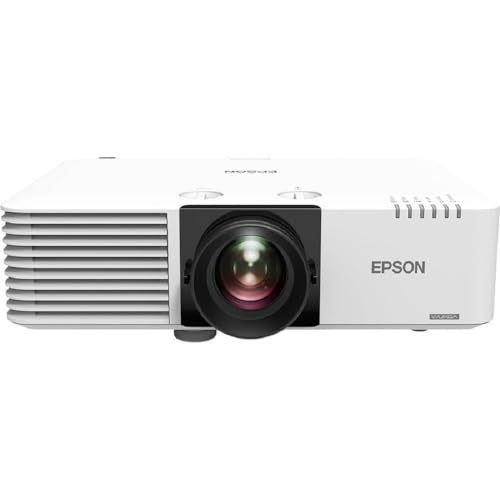
The PowerLite L530U is the projector in this guide built for the room that hosts the meeting everyone else joins remotely: the boardroom or training space with a big screen, a long table, and no tolerance for a dim picture. Epson rates it at 5,200 lumens of both color and white brightness from a three-chip 3LCD engine, and the native WUXGA panel at 1920 by 1200 gives documents and dashboards the extra vertical room that Full HD trims away. It is a laser model, rated by Epson for 20,000 hours of light source life in normal mode and up to 30,000 hours in extended mode, which removes lamp changes from the facilities calendar for the practical life of the installation.
The installation optics are the real argument. A throw ratio spanning 1.35 to 2.20 with a 1.6x optical zoom covers a wide band of ceiling positions, and lens shift of plus or minus 50 percent vertically and 20 percent horizontally lets the image be squared optically from a mount that is not perfectly centered — no keystone rescaling, no softened text. Epson also accepts a 4K input signal, so the room is not stranded if source equipment moves up a generation. Connectivity runs to the professional end of the category, with HDBaseT for long single-cable runs, wired networking for fleet management, and built-in wireless with Miracast support for cable-free presenting from Windows laptops.
Ownership details are equally deliberate. The sealed optical path of a laser 3LCD design sidesteps the filter-and-lamp rhythm of older installation projectors, fan noise drops to a rated 31 decibels in quiet mode, and the chassis, at a little over eight kilograms, is honest about being a permanent ceiling fixture rather than a portable. The 2,500,000:1 contrast figure Epson publishes reflects laser dimming behavior and matters less here than the brightness headroom, which is what keeps saturated charts saturated when the blinds are open.
Strengths
- 5,200 lumens of equal color and white brightness, the strongest output in this guide
- Laser light source rated to 20,000 hours, with an extended mode reaching 30,000 hours
- Generous 1.6x zoom plus vertical and horizontal lens shift for tolerant ceiling placement
- HDBaseT, wired LAN control, and built-in wireless with Miracast covering every presenting habit
Trade-offs
- The heaviest pick here, so older lightweight mounts and ceiling grids may need re-specifying
- Sits at the premium step of the range, which is hard to justify for a single small room
- Standard-throw lens still needs a proper mounting distance; it cannot solve a very short room
Who it suits
Choose the L530U for boardrooms, training rooms, and lecture-style spaces where the screen is large, the lights stay up, and the projector is expected to disappear into the ceiling for years without a maintenance visit. For an organization standardizing its flagship rooms on one install-grade model, the Epson PowerLite L530U is the name to put on the plan before you check price on Amazon.
Check price on Amazon: Epson PowerLite L530U
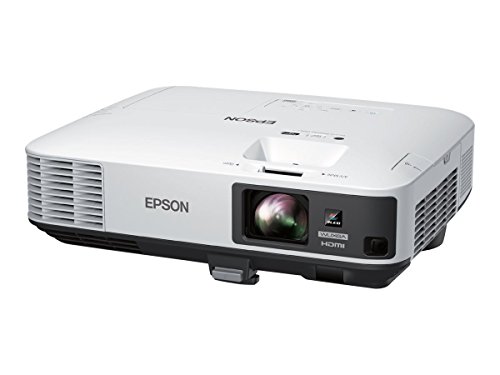
Epson PowerLite 2250U — high-brightness WUXGA on a lamp budget
The PowerLite 2250U delivers most of the L530U’s screen performance through a lamp instead of a laser, and the saving is the point. Epson rates the three-chip 3LCD engine at 5,000 lumens of color brightness and 5,000 lumens of white brightness, matched to the same native WUXGA resolution of 1920 by 1200. In a lit boardroom the visible result — bright, saturated slides with readable fine print — is close to its laser sibling, while the purchase step sits noticeably lower in the range. For a room that hosts serious presentations but cannot carry a laser line item, this is the arithmetic that usually wins the argument.
The lamp is a 300-watt UHE unit rated by Epson at up to 5,000 hours in normal mode and 10,000 hours in ECO mode, and that schedule is the ownership contract the buyer signs. Output fades as the lamp ages, so a room that needs every one of those 5,000 lumens on day one will want a replacement lamp budgeted before the picture dulls. The optical package stays installation-friendly: a throw ratio from 1.38 to 2.28 with the same 1.6x zoom family as the laser model, so ceiling positions remain flexible even without lens shift.
Presenting features are aimed squarely at working meetings. Built-in wireless networking supports Epson’s iProjection app, which can show content from multiple devices and moderate whose screen is shared — a genuinely useful pattern for workshops and classrooms-with-suites. A split-screen mode displays two sources side by side, the 16-watt built-in speaker is strong enough to carry video-call audio in a mid-size room without a separate sound system, and the port count includes two HDMI inputs, wired LAN, and RS-232 control. Fan noise is rated at 39 decibels in normal mode and 29 decibels in ECO, a spread that makes ECO the natural setting whenever the room’s light allows it.
Strengths
- 5,000 lumens of equal color and white brightness with a WUXGA panel for dense documents
- Built-in wireless with multi-device presenting and moderation through Epson’s software
- Wide 1.6x zoom range keeps existing ceiling mount positions usable
- Split-screen display and a strong 16-watt speaker cover hybrid meeting habits
Trade-offs
- Lamp replacement is a recurring cost and a ladder job, with output fading as the lamp ages
- Normal-mode fan noise is the highest here; quiet rooms will live in ECO and give up brightness
- No lens shift, so off-center mounts fall back on keystone correction and its softening effect
Who it suits
Pick the 2250U when the room needs genuine large-screen brightness and WUXGA detail, the presenting style mixes resident PCs with guest laptops, and the budget prefers a lower purchase step now over a higher one with no lamp schedule attached. Any shortlist drawn up for a mid-size or large meeting room should include the Epson PowerLite 2250U before you check price on Amazon.
Check price on Amazon: Epson PowerLite 2250U

BenQ EW800ST — the smart short-throw for huddle rooms
The EW800ST rethinks the small meeting room around two facts: the table is close to the wall, and nobody wants to open a laptop just to show one file. Its short-throw lens, at a 0.49 ratio, builds a 100-inch image from roughly a meter and a half of distance, so it mounts above the screen or sits at the table’s edge with the presenter standing beside the picture instead of inside the beam. The native WXGA panel at 1280 by 800 and a brightness rating of 3,300 ANSI lumens are sized for those smaller screens, where the short throw distance keeps the image dense and bright.
What separates it from every other pick here is the onboard smart system. The EW800ST runs BenQ’s Android-based platform with the BenQ Launcher, connects over Wi-Fi through an included wireless dongle, and can open files from cloud storage tied to a BenQ account, so a presenter can walk in with nothing but a phone and still run the meeting. Wireless casting from Windows and Android devices, Bluetooth audio output, and control from BenQ’s Smart Control phone app all serve the same huddle-room pattern: short meetings, rotating presenters, minimal setup ritual. The trade is that the smart layer is another system to keep updated, and its app catalog will never match a dedicated room PC.
Hardware details stay practical. The lamp is rated at 5,000 hours in normal mode and up to 15,000 hours in LampSave, fan noise runs at a rated 33 decibels in normal mode and 29 in eco, and the 2.6-kilogram body mounts easily above a screen. A single HDMI input is the one specification that feels tight for a room with both a resident PC and a guest cable, and the WXGA panel softens fine spreadsheet text sooner than the Full HD and WUXGA picks as screen size grows. Within its intended footprint — huddle rooms, small classrooms, and focus spaces with screens up to about 100 inches — those limits rarely surface.
Strengths
- Short 0.49 throw builds a big image in rooms where a standard lens cannot fit
- Onboard smart platform with cloud file access removes the laptop from quick meetings
- Wireless casting, Bluetooth audio out, and phone-based control suit rotating presenters
- LampSave mode stretches lamp life to a rated 15,000 hours
Trade-offs
- WXGA resolution is the softest here for small text at larger screen sizes
- Only one HDMI input, so a resident PC and a guest cable compete for the port
- The smart system needs account management and updates that a dumb projector never asks for
Who it suits
Pick the EW800ST for huddle rooms and small meeting spaces where presenters rotate constantly, the screen sits close to the seats, and walking in empty-handed to start a meeting is the behavior the room should encourage. A team refitting a cramped focus room will find the BenQ EW800ST answers it before you check price on Amazon.
Check price on Amazon: BenQ EW800ST

ViewSonic PA503W — the budget lamp workhorse
The PA503W is the value anchor of this guide: a WXGA business projector from ViewSonic’s long-running PA503 line, rated at 3,600 ANSI lumens with a 1280 by 800 DLP panel and a published 22,000:1 contrast ratio. It exists for the rooms that need a working projector more than they need a specification sheet — the small office, the training corner, the community space — and its design reflects that priority. Everything about it is conventional in the reassuring sense: standard throw, optical zoom, a full legacy port panel, and a lamp system built around stretching hours rather than chasing output records.
The optical package is a throw ratio of 1.55 to 1.70 with a 1.1x manual zoom, which lands a 100-inch image from a little over three meters — squarely in the middle of a typical small meeting room. ViewSonic’s SuperColor branding describes its color wheel tuning for saturated presentation graphics, and the SuperEco mode is the ownership headline: it dims the lamp when the signal idles and stretches rated lamp life from 5,000 hours in normal mode to as much as 15,000 hours, the longest lamp figure in this guide. For a projector that may run a few hours a week, that schedule can carry it across most of a decade of meetings.
Connectivity leans deliberately old-school, with one HDMI input, two VGA inputs, composite video, and audio in and out — a panel that still speaks to the older laptops and document cameras circulating in schools and small firms. The built-in speaker is a modest 2 watts, adequate for speech at close range but the weakest here for video calls, so rooms that lean on hybrid meetings should budget for a USB speakerphone or soundbar. There is no network control and no wireless, and the 2.2-kilogram chassis is plainly built for a fixed mount or a cart rather than for travel. Judged as a simple, bright-enough display engine at the budget step of the range, it does exactly the job its audience asks of it.
Strengths
- SuperEco lamp management stretches rated lamp life to as much as 15,000 hours
- Legacy-friendly port panel with dual VGA suits older laptop fleets and document cameras
- 3,600 ANSI lumens is enough for small rooms with ordinary lighting
- The lowest step in this guide’s range, in the budget tier rather than the mid-range
Trade-offs
- WXGA resolution and one HDMI input both trail the mid-range picks
- The 2-watt speaker is too small for video-call audio beyond a few listeners
- No wireless presenting, network control, or smart features of any kind
Who it suits
Choose the PA503W when the room is small, the laptop fleet is mixed in age, and the purchase needs to stay firmly in budget territory while still lighting a screen properly in a lit room. For a small office buying its first ceiling-mounted projector, the ViewSonic PA503W is the sensible default before you check price on Amazon.
Check price on Amazon: ViewSonic PA503W

Optoma ZH406ST — laser short-throw for tight, busy rooms
The ZH406ST pairs the two properties that small, heavily used rooms ask for and rarely get together: a short-throw lens and a laser light source. Optoma’s DuraCore laser engine is rated at 4,200 lumens with a Full HD 1920 by 1080 DLP panel, and the 0.5:1 throw ratio produces a 120-inch image from a little over four feet of distance, so the projector mounts almost directly above the screen in rooms where a standard lens would need the whole ceiling. Laser life is rated up to 30,000 hours, the longest figure in this guide, and the optical engine carries an IP6X airtight certification against dust ingress — a meaningful detail in rooms where the ceiling environment is dusty and access for cleaning is rare.
Because the lens sits so close to the screen, presenters can walk up to the image, point at figures, and annotate without shadows crossing the picture or light hitting their eyes, which changes how design reviews, training sessions, and classroom-style meetings feel. Four-corner correction helps square the image when the mount cannot sit perfectly on axis, and the projector supports 360-degree and portrait orientation for rooms that double as signage or exhibition space. Two 10-watt speakers are fitted, the strongest audio package here relative to size, giving video calls a fighting chance without external sound in a small room.
Connectivity is complete rather than exotic: dual HDMI, VGA, wired LAN with network control, RS-232, and a powered USB port for a casting dongle or streaming stick. The fixed lens has no optical zoom, so the mount position must be measured against the screen size before installation — the 0.5 ratio leaves no slack to trim the image afterward beyond a digital zoom that discards some picture area. At about four and a half kilograms it is a fixed installation piece, not a portable. Within those terms, it is the most maintenance-averse small-room projector in this guide: no lamps to schedule, a sealed engine that shrugs off dust, and brightness that stays consistent across years of daily meetings.
Strengths
- Laser source rated up to 30,000 hours with an IP6X sealed optical engine
- 0.5:1 short throw fills a 120-inch screen from just over four feet
- 4,200 lumens is strong output for a compact short-throw chassis
- Four-corner correction and 360-degree mounting cover awkward installations
Trade-offs
- Fixed lens with no optical zoom demands precise mount placement before drilling
- The steep throw angle shows up any ripple or unevenness in the screen surface
- Laser pricing puts it above the lamp short-throw alternatives for small rooms
Who it suits
Pick the ZH406ST for small meeting rooms, training spaces, and classrooms where the projector runs every day, the ceiling is short, and nobody on staff has time to think about lamps or filters. A facilities manager standardizing busy huddle spaces should study the Optoma ZH406ST closely before you check price on Amazon.
Check price on Amazon: Optoma ZH406ST
How the five compare
| Projector | Light source | Native resolution | Throw style | Presenting style | Best for |
|---|---|---|---|---|---|
| Epson PowerLite L530U | Laser | WUXGA | Standard, wide zoom, lens shift | Wired, HDBaseT, Miracast | Large boardrooms and training rooms |
| Epson PowerLite 2250U | Lamp | WUXGA | Standard, wide zoom | Built-in wireless, multi-device | Bright rooms on a lamp budget |
| BenQ EW800ST | Lamp | WXGA | Short throw | Smart platform, cloud files, casting | Huddle rooms with rotating presenters |
| ViewSonic PA503W | Lamp | WXGA | Standard | Wired, legacy ports | Budget rooms and older laptop fleets |
| Optoma ZH406ST | Laser | Full HD | Short throw | Wired, network control | Busy small rooms, minimal maintenance |
Read the table as a map of the decisions rather than a ranking. Light source divides the list into machines with a lamp schedule and machines without one. Throw style divides it into projectors that live across the room and projectors that live above the screen. Resolution divides it by the fineness of the documents the room shows. A shortlist built by answering those three questions honestly usually contains two of these five, and the choice between them then turns on the presenting habits and mounting constraints of the specific room.
Matching a projector to the room you have
The glass-walled boardroom. Ambient light is the dominant problem, and it cannot be negotiated with. Weight brightness first, resolution second, and treat the laser L530U as the reference point: high published output, equal color and white brightness for saturated reporting charts, and lens shift to work around the ceiling services that glass rooms always seem to hide. If the purchase must stay on a lamp, the 2250U keeps the same screen performance and accepts a lamp schedule as the price of admission.
The standard mid-size meeting room. Eight to twelve seats, one screen around 100 inches, a mix of resident PC and guest laptops. This is the 2250U’s home ground, and the decision turns on presenting style: rooms whose meetings are document-heavy and chaired by the same few people suit its bright, wired simplicity, while rooms with constant guest presenters can lean on its built-in wireless, or step toward the smart platform of the EW800ST if the room is also small.
The huddle room. Four seats, a screen on the short wall, meetings that start in ninety seconds. Short throw is the enabling property, and the choice is between the EW800ST’s smart, laptop-free presenting and the ZH406ST’s brighter laser image with a sealed engine. Rooms booked back to back all day lean laser; rooms used for quick stand-ups by rotating teams lean smart.
The training room. Rows of seats, an instructor at the screen, content that mixes documents, demonstrations, and video. Throw distance and back-row legibility dominate, so the WUXGA Epsons and the Full HD Optoma lead the conversation, and the instructor’s freedom to stand at the screen without shadowing it makes the short-throw ZH406ST worth its placement demands when the ceiling is short.
Mistakes that make good projectors look bad
Buying lumens for the screen you wish you had. Brightness requirements follow the installed screen and the room’s real light level. A projector specified against a dark-room assumption, or against a smaller screen than the one eventually fitted, will look washed out every day of its service life, and no picture setting repairs a shortfall in published output.
Planning the installation around keystone correction. Digital keystone rescales the image and softens fine detail permanently. It exists for temporary setups and minor errors. A permanent mount should be positioned, zoomed, and — where the model offers it — lens-shifted until the projected rectangle is square with correction at or near zero, especially in rooms whose content is text.
Forgetting the audio half of hybrid meetings. Built-in projector speakers range from adequate speech reinforcement to genuinely capable call audio, and the spread across this guide is wide. Rooms that live on video calls should evaluate the speaker, or budget for a speakerphone, with the same seriousness as the lens; a bright picture with thin, distant voices still reads as a broken meeting.
Ignoring the second year. Lamp timers, filter cleaning, firmware for smart platforms, and the slow fade of a lamp’s output all arrive after the installation photographs are taken. The cheapest projector to buy is occasionally the most expensive to keep, and the light-source decision made at purchase is the one that decides which of those calendars the room lives by.
Reading the specification sheet honestly
Projector specifications reward a skeptical reader, and three habits separate a sound shortlist from a misled one. The first concerns brightness units. ANSI lumens, measured under the ISO 21118 standard, is the only figure in this category with a shared definition, and every pick in this guide is quoted in it. Listings that headline a much larger number in “LED lumens”, “light source lumens”, or plain lux are measuring something else — sometimes the raw output of the light source before the optics take their share — and the honest response is to ignore the figure entirely and find the ANSI number or the manufacturer’s own datasheet.
The second habit concerns contrast ratios, which in this category range from five figures to seven and describe laboratory extremes rather than meeting-room reality. A dynamic contrast figure is achieved by dimming the light source on dark scenes, a behavior that presentation content — bright slides, white documents, charts — almost never triggers. In a lit room, the contrast the audience perceives is set mostly by ambient light falling on the screen, which is why two projectors with wildly different published ratios can look near-identical under office lighting, and why this guide treats contrast as a minor axis and brightness as the major one.
The third habit is to ask which mode a life or noise figure belongs to. Lamp life doubles or triples between normal and the most aggressive eco setting, fan noise falls by several decibels across the same span, and both improvements are paid for in brightness. A specification is only meaningful when the mode is named alongside it, which is why the pick sections above attach each life and noise figure to its mode rather than quoting the most flattering number available. Buyers comparing two finalists should line up like for like: normal mode against normal mode, eco against eco, and the same screen size against both.
Frequently asked questions
How many lumens does a conference room projector need?
For a typical lit meeting room with a screen between 84 and 120 inches, published ratings between roughly 3,300 and 5,200 ANSI lumens cover the realistic range, with the right point set by window light and screen size. Small huddle rooms sit comfortably at the lower end; glass-walled boardrooms and very large screens should shop at the top of the band. Treat any brightness figure that is not quoted as ANSI lumens with caution, since unstandardized conversions inflate the number without adding light.
Is laser or lamp better for a meeting room?
Laser suits rooms that run daily, are maintained centrally, or are expensive to access once installed, because rated light source life of 20,000 to 30,000 hours removes lamp changes and holds brightness steadier over time. Lamp models suit rooms on a tighter purchase budget and lighter schedules, provided someone owns the replacement calendar and the brightness fade that comes with lamp age. Neither is universally better; the duty cycle of the room decides.
Which resolution is right for spreadsheets and documents?
WUXGA at 1920 by 1200 is the strongest choice for document-heavy rooms because its extra vertical pixels show more rows and taller pages at readable sizes. Full HD at 1920 by 1080 matches laptop output exactly and serves mixed slide, document, and video work well. WXGA remains workable for bold slide decks and large-type content, but small figures in dense spreadsheets soften first at big screen sizes and long seating distances.
When does a short-throw projector make sense?
Short throw earns its place when the room is small, when presenters work at the screen, or when a standard lens position is blocked by the table, a low ceiling, or room services. Its costs are placement precision — fixed lenses leave almost no adjustment slack — and sensitivity to screen flatness, since the steep angle exaggerates surface ripples. In a long room with a clear ceiling line, a standard-throw model is usually the simpler installation.
What separates a conference room projector from a home theater projector?
The two categories optimize opposite variables. Home theater models trade brightness for deep blacks and high contrast in darkened rooms, and their published lumen ratings are correspondingly modest. Conference room projectors are data projectors: high published brightness for lit rooms, resolutions and picture modes tuned for text and charts, installation features such as lens shift and network control, and presenting connections built for laptops rather than media players. A model that excels at one job is usually mediocre at the other.
Every room in this category is a compromise between light, geometry, and habit, and the right projector is the one whose compromises match the meetings that actually happen there. Measure the screen, count the windows, watch how presenters really behave, and the shortlist builds itself — because in the end a conference room projector succeeds not when its specifications impress, but when nobody in the meeting thinks about it at all.