The best computer graphics cards are the single most important upgrade you can make to a gaming PC, because the graphics card decides what your games look like and how smoothly they run. A faster card means higher settings, higher frame rates, and a better experience in every game, while a weak card holds back even the fastest processor. The range here runs from the flagship RTX 5090 to the value RTX 5060 Ti, and every card below is a current model from a major brand.
The seven cards below cover the whole market. There are two NVIDIA flagships for 4K gaming, two mid-range NVIDIA cards for 1440p, two AMD cards that compete hard on value, and a budget-friendly 16GB card for 1080p and 1440p. All seven have at least 12GB of memory, all seven support modern features like ray tracing and upscaling, and all seven are sold as complete cards with matching model names. Pick the card that matches your monitor and the games you play, and you will not regret it.
Before the list, settle three practical questions. First, what resolution is your monitor, because a 4K monitor needs a flagship card, a 1440p monitor is happy with a mid-range card, and a 1080p monitor does not need more than the value picks here. Second, will the card fit your case and your power supply, because flagship cards are long, thick, and power-hungry. Third, how much memory do you need, because 16GB is the sensible minimum for modern games at high settings, and 12GB is the floor.
In this guide
Quick picks: best computer graphics cards
| # | Product | Where to buy |
|---|---|---|
| 1 | ASUS ROG Astral GeForce RTX 5090 32GB GDDR7 OC Edition Gaming Graphics Card | Check on Amazon |
| 2 | PNY NVIDIA GeForce RTX™ 5080 OC Triple-Fan Graphics Card | Check on Amazon |
| 3 | PNY NVIDIA GeForce RTX™ 5070 Ti OC Triple Fan, Graphics Card (16GB GDDR7, 256-bit, Boost Speed: 2572 MHz, PCIe® 5.0, HDM | Check on Amazon |
| 4 | GIGABYTE Radeon RX 9070 XT Gaming OC 16G Graphics Card, PCIe 5.0, 16GB GDDR6, GV-R9070XTGAMING OC-16GD Video Card | Check on Amazon |
| 5 | ASUS Prime Radeon RX 9070 EVO 16GB GDDR6 OC Edition Gaming Graphics Card | Check on Amazon |
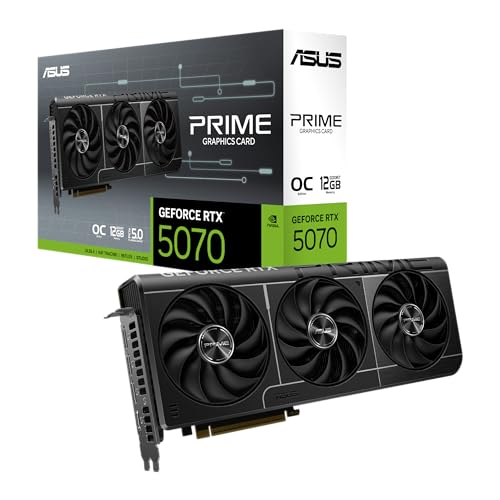
| 6 | ASUS PRIME GeForce RTX 5070 12GB GDDR7 OC Edition Gaming Graphics Card | Check on Amazon |
| 7 | PNY NVIDIA GeForce RTX™ 5060 Ti 16GB OC Dual-Fan Graphics Card | Check on Amazon |
How the best computer graphics cards were chosen
Each card below is a current graphics card from a major brand, chosen because it pairs a current GPU with enough memory for modern games and a cooling design built for sustained loads. A card qualified only if it is a genuine current model with a matching brand and model name, sold as a complete new card, and available as a verified listing. Renewed stock, third-party bundles with unclear configurations, and cards with no verifiable model listing did not qualify. The comparison weighs the GPU, the memory, the cooling design, the size and power requirements, and the value for the performance, because those are the things that decide whether a graphics card is worth its price.
Quick comparison
| # | Product | Best for |
|---|---|---|
| 1 | ASUS ROG Astral GeForce RTX 5090 32GB OC Edition Graphics Card | Flagship RTX 5090 with 32GB GDDR7 and quad fans |
| 2 | PNY NVIDIA GeForce RTX 5080 OC Triple-Fan Graphics Card | RTX 5080 with 16GB GDDR7 and triple fans |
| 3 | PNY NVIDIA GeForce RTX 5070 Ti OC Triple Fan Graphics Card | RTX 5070 Ti with 16GB GDDR7 and triple fans |
| 4 | Gigabyte Radeon RX 9070 XT Gaming OC 16G Graphics Card | RX 9070 XT with 16GB GDDR6 and triple fans |
| 5 | ASUS Prime Radeon RX 9070 EVO 16GB GDDR6 OC Edition Graphics Card | RX 9070 with 16GB GDDR6, compact dual-fan design |
| 6 | ASUS PRIME GeForce RTX 5070 12GB GDDR7 OC Edition Graphics Card | RTX 5070 with 12GB GDDR7, SFF-ready design |
| 7 | PNY NVIDIA GeForce RTX 5060 Ti 16GB OC Dual-Fan Graphics Card | RTX 5060 Ti with 16GB, SFF-ready dual-fan card |
The table above is a shortcut, not a verdict. Two products can look close on a spec line and feel very different in daily use, so use it to narrow the field to two or three candidates, then read those full sections before deciding.

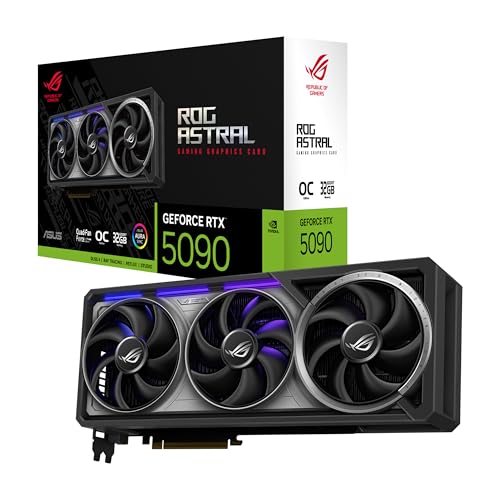
1. ASUS ROG Astral GeForce RTX 5090 32GB OC Edition Graphics Card
The ASUS ROG Astral GeForce RTX 5090 is the fastest graphics card you can buy, with 32GB of GDDR7 memory, a factory overclock, and a quad-fan cooling system in a 3.8-slot design. It is built for 4K gaming at the highest settings, with ray tracing and upscaling, and it handles creative work like 3D rendering and AI tasks as easily as games. The Astral is ASUS’s flagship card, and it shows in the build: a massive heatsink, four fans, and a design made to keep the fastest GPU on the market cool under load.
Verified specs
- NVIDIA GeForce RTX 5090 GPU
- 32GB GDDR7 memory
- OC Edition, factory overclocked
- PCIe 5.0, HDMI and DisplayPort 2.1
- Quad-fan cooling, 3.8-slot design
Strengths
- Fastest consumer GPU available, with 32GB of GDDR7 memory
- Quad-fan cooling keeps the card cool under sustained load
- Factory overclock gives extra performance out of the box
The 32GB of memory is the headline, because it means the card never runs out of memory in modern games, even at 4K with high-resolution textures, and it future-proofs the card for years. The quad-fan cooling is the other win: four fans move more air at lower speeds, so the card stays cool without sounding like a jet.
Before you buy, it is worth checking the practical details that cause most returns. Confirm that the listing shows the exact model name and configuration you expect, because similar models often share a name and differ in one specification that matters. Check the size and the connections against your setup, and make sure you know what is included in the box and what is sold separately. Read the return policy before ordering, and when the product arrives, test it with your real setup in the first few days rather than leaving it in the box. A quick check at the start saves a return later, and it is the simplest way to be sure the product you receive is the one you meant to buy.
Trade-offs
- Very large 3.8-slot card, needs a big case
- High power draw, needs a strong power supply
- Most expensive card on this list by a wide margin
This is a flagship in every sense, including size and power: it needs a large case, a strong power supply, and a budget to match. If you game at 1440p rather than 4K, the 5080 below gives you nearly the same experience for far less money.
Who it fits best
4K gamers, creators, and anyone who wants the fastest graphics card available with no compromises.
Best for: 4K gamers and creators who want the fastest GPU with 32GB of memory.
Not suited for: 1440p and 1080p gamers, who should buy the 5080 or 5070 Ti, and small cases.
Check price on Amazon: ASUS ROG Astral GeForce RTX 5090 32GB GDDR7 OC Edition Gaming Graphics Card

2. PNY NVIDIA GeForce RTX 5080 OC Triple-Fan Graphics Card
The PNY GeForce RTX 5080 OC is the sensible flagship: a 16GB GDDR7 card with a triple-fan cooler and a factory overclock to 2730 MHz boost, built for 4K gaming at high settings and 1440p gaming at the highest frame rates. It is close to the 5090 in most games, for considerably less money, and the triple-fan design keeps it cool without taking up four slots. For a gamer who wants flagship performance without flagship excess, the 5080 is the sweet spot.
Verified specs
- NVIDIA GeForce RTX 5080 GPU
- 16GB GDDR7 memory, 256-bit
- OC Edition, boost speed 2730 MHz
- PCIe 5.0, HDMI and DisplayPort
- Triple-fan cooling design
Strengths
- Near-flagship performance for considerably less than the 5090
- 16GB of GDDR7 memory, enough for 4K gaming
- Triple-fan cooling in a standard three-slot design
The value is the story here: the 5080 delivers most of the 5090’s gaming performance at 4K, and all of it at 1440p, for far less money, and the 16GB of memory is enough for modern games at high settings. The triple-fan cooler is the other win: it fits in a normal case without the 3.8-slot bulk of the Astral.
Before you buy, it is worth checking the practical details that cause most returns. Confirm that the listing shows the exact model name and configuration you expect, because similar models often share a name and differ in one specification that matters. Check the size and the connections against your setup, and make sure you know what is included in the box and what is sold separately. Read the return policy before ordering, and when the product arrives, test it with your real setup in the first few days rather than leaving it in the box. A quick check at the start saves a return later, and it is the simplest way to be sure the product you receive is the one you meant to buy.
Trade-offs
- 16GB of memory is half the 5090's 32GB
- Still a large, power-hungry card
- Factory overclock adds performance but also heat
The 16GB of memory is the compromise to weigh: it is enough for today’s games at 4K, but the 5090’s 32GB is more future-proof for the most demanding titles. The card is still large and power-hungry, so check your case and power supply before ordering.
Who it fits best
4K gamers who want near-flagship performance, and 1440p gamers who want the highest frame rates.
Best for: 4K gamers who want flagship performance without the 5090's size and cost.
Not suited for: 1080p gamers, who should buy a cheaper card, and small form-factor builds.
Check price on Amazon: PNY NVIDIA GeForce RTX™ 5080 OC Triple-Fan Graphics Card

3. PNY NVIDIA GeForce RTX 5070 Ti OC Triple Fan Graphics Card
The PNY GeForce RTX 5070 Ti OC is the 1440p champion: a 16GB GDDR7 card with a triple-fan cooler and a factory overclock, built for high-refresh 1440p gaming and capable 4K gaming at sensible settings. It has the same 16GB of memory as the 5080, which matters more than most people realise, because memory is what limits a card in modern games. For a gamer with a 1440p monitor, the 5070 Ti is the best value on this list.
Verified specs
- NVIDIA GeForce RTX 5070 Ti GPU
- 16GB GDDR7 memory, 256-bit
- OC Edition, boost speed 2572 MHz
- PCIe 5.0, HDMI and DisplayPort
- Triple-fan cooling design
Strengths
- 16GB of memory, the same as the 5080, for far less money
- Excellent 1440p performance at high refresh rates
- Triple-fan cooling keeps it quiet under load
The 16GB of memory is the reason to buy this card over the cheaper 5070, because it means the card will handle future games at high settings without running out of memory. At 1440p, the 5070 Ti is fast enough for nearly every game at high refresh rates, which is where most gamers actually play.
Before you buy, it is worth checking the practical details that cause most returns. Confirm that the listing shows the exact model name and configuration you expect, because similar models often share a name and differ in one specification that matters. Check the size and the connections against your setup, and make sure you know what is included in the box and what is sold separately. Read the return policy before ordering, and when the product arrives, test it with your real setup in the first few days rather than leaving it in the box. A quick check at the start saves a return later, and it is the simplest way to be sure the product you receive is the one you meant to buy.
Trade-offs
- Slower than the 5080 at 4K, where the gap shows
- Triple-fan design is longer than dual-fan cards
- Still needs a capable power supply
At 4K the 5080 pulls ahead, so if you have a 4K monitor, the step up is worth it. The triple-fan cooler is longer than a dual-fan design, so measure your case, and the card still needs a proper power supply with the right connectors.
Who it fits best
1440p gamers who want high refresh rates, and 4K gamers on a budget.
Best for: 1440p gamers who want 16GB of memory and high frame rates for the money.
Not suited for: 4K gamers who want maximum settings, who should choose the 5080.

4. Gigabyte Radeon RX 9070 XT Gaming OC 16G Graphics Card
The Gigabyte Radeon RX 9070 XT Gaming OC is AMD’s answer to the 5070 Ti: a 16GB GDDR6 card with a factory overclock and Gigabyte’s WINDFORCE triple-fan cooling, built for 1440p gaming at high refresh rates and capable 4K gaming. The RX 9070 XT competes directly with NVIDIA’s mid-range cards on raster performance, and it does so for less money, which makes it the value pick for gamers who do not need NVIDIA’s ray tracing lead. For a 1440p gamer who wants the most frames for the money, the 9070 XT is hard to beat.
Verified specs
- AMD Radeon RX 9070 XT GPU
- 16GB GDDR6 memory
- Gaming OC Edition, factory overclocked
- PCIe 5.0, HDMI and DisplayPort
- WINDFORCE triple-fan cooling
Strengths
- Strong 1440p performance for less than the competing NVIDIA cards
- 16GB of memory, enough for modern games at high settings
- WINDFORCE triple-fan cooling keeps it cool and quiet
The value is the point: the 9070 XT delivers 1440p performance close to the 5070 Ti for less money, and the 16GB of memory means it will not run out of memory in modern games. The WINDFORCE cooling is the other win: three fans keep the card cool without the noise of a smaller cooler.
Before you buy, it is worth checking the practical details that cause most returns. Confirm that the listing shows the exact model name and configuration you expect, because similar models often share a name and differ in one specification that matters. Check the size and the connections against your setup, and make sure you know what is included in the box and what is sold separately. Read the return policy before ordering, and when the product arrives, test it with your real setup in the first few days rather than leaving it in the box. A quick check at the start saves a return later, and it is the simplest way to be sure the product you receive is the one you meant to buy.
Trade-offs
- Ray tracing performance trails NVIDIA's cards
- Upscaling ecosystem is less mature than NVIDIA's DLSS
- Power draw is higher than the competing NVIDIA cards
AMD’s ray tracing is behind NVIDIA’s, so if you play ray-traced games, the 5070 Ti above is the better pick. The upscaling is also less mature than DLSS, although it is improving. For pure raster performance at 1440p, though, the 9070 XT is excellent value.
Who it fits best
1440p gamers who want the most performance for the money and do not prioritise ray tracing.
Best for: Value-focused 1440p gamers who want 16GB of memory and strong raster performance.
Not suited for: Ray tracing enthusiasts, who should choose an NVIDIA card.

5. ASUS Prime Radeon RX 9070 EVO 16GB GDDR6 OC Edition Graphics Card
The ASUS Prime Radeon RX 9070 EVO is the compact AMD card: a 16GB GDDR6 card with a factory overclock in a 2.5-slot design with Axial-tech fans, built for 1440p gaming in a smaller case. It is the little brother of the 9070 XT, with the same 16GB of memory and a slightly slower GPU, and it fits in cases where a triple-fan card will not. For a gamer building in a compact case who wants AMD value, the Prime RX 9070 is the pick.
Verified specs
- AMD Radeon RX 9070 GPU
- 16GB GDDR6 memory
- OC Edition, factory overclocked
- PCIe 5.0, HDMI and DisplayPort 2.1
- 2.5-slot Axial-tech fan design
Strengths
- 16GB of memory in a compact 2.5-slot card
- Fits smaller cases that triple-fan cards cannot
- Good 1440p performance for the money
The compact size is the reason to buy this card, because a 2.5-slot card fits in cases where a triple-fan 9070 XT will not, and the 16GB of memory means it will handle modern games at high settings. The Axial-tech fans are the other win: they move air efficiently in a small cooler.
Before you buy, it is worth checking the practical details that cause most returns. Confirm that the listing shows the exact model name and configuration you expect, because similar models often share a name and differ in one specification that matters. Check the size and the connections against your setup, and make sure you know what is included in the box and what is sold separately. Read the return policy before ordering, and when the product arrives, test it with your real setup in the first few days rather than leaving it in the box. A quick check at the start saves a return later, and it is the simplest way to be sure the product you receive is the one you meant to buy.
Trade-offs
- Slower than the 9070 XT, as the name suggests
- Ray tracing trails NVIDIA's cards
- Dual-fan cooler is louder under load than a triple-fan design
The 9070 is a step below the 9070 XT in speed, so if your case fits a triple-fan card, the XT is the better buy for the money. The dual-fan cooler works harder under load, so it is louder than the triple-fan cards here, and AMD’s ray tracing remains behind NVIDIA’s.
Who it fits best
Compact-case builders who want AMD value and 16GB of memory in a smaller card.
Best for: Small-case 1440p gamers who want a compact AMD card with 16GB of memory.
Not suited for: Buyers with room for a triple-fan card, who should choose the 9070 XT.
Check price on Amazon: ASUS Prime Radeon RX 9070 EVO 16GB GDDR6 OC Edition Gaming Graphics Card

6. ASUS PRIME GeForce RTX 5070 12GB GDDR7 OC Edition Graphics Card
The ASUS PRIME GeForce RTX 5070 is the compact NVIDIA card: a 12GB GDDR7 card with a factory overclock in a 2.5-slot, SFF-ready design, built for 1440p gaming in a small case. It has NVIDIA’s full feature set, including DLSS upscaling and strong ray tracing, in a card that fits where the bigger triple-fan models will not. For a gamer building in a compact case who wants NVIDIA features, the PRIME 5070 is the pick.
Verified specs
- NVIDIA GeForce RTX 5070 GPU
- 12GB GDDR7 memory
- OC Edition, factory overclocked
- SFF-ready, PCIe 5.0, HDMI and DisplayPort 2.1
- 2.5-slot Axial-tech fan design
Strengths
- Full NVIDIA feature set, including DLSS and strong ray tracing
- SFF-ready 2.5-slot design fits compact cases
- Good 1440p performance with efficient power use
The NVIDIA features are the reason to buy this card over the AMD alternatives: DLSS upscaling is the most mature upscaling available, and the ray tracing is stronger than AMD’s. The SFF-ready design is the other win, because it fits in compact cases that the triple-fan cards cannot.
Before you buy, it is worth checking the practical details that cause most returns. Confirm that the listing shows the exact model name and configuration you expect, because similar models often share a name and differ in one specification that matters. Check the size and the connections against your setup, and make sure you know what is included in the box and what is sold separately. Read the return policy before ordering, and when the product arrives, test it with your real setup in the first few days rather than leaving it in the box. A quick check at the start saves a return later, and it is the simplest way to be sure the product you receive is the one you meant to buy.
Trade-offs
- 12GB of memory is the least on this list
- Slower than the 5070 Ti, as the name suggests
- Compact cooler is louder under load than a triple-fan design
The 12GB of memory is the compromise to weigh: it is enough for most games at 1440p today, but it is the first thing that will feel tight in future games at high settings. If your case fits a bigger card, the 5070 Ti above is the better buy for its 16GB of memory.
Who it fits best
Compact-case builders who want NVIDIA features and good 1440p performance.
Best for: Small-case gamers who want DLSS and ray tracing in a compact 12GB card.
Not suited for: Buyers with room for a bigger card, who should choose the 5070 Ti for its 16GB.
Check price on Amazon: ASUS PRIME GeForce RTX 5070 12GB GDDR7 OC Edition Gaming Graphics Card


7. PNY NVIDIA GeForce RTX 5060 Ti 16GB OC Dual-Fan Graphics Card
The PNY GeForce RTX 5060 Ti 16GB OC is the value card with a surprise: 16GB of memory, the same as the 5070 Ti and the 5080, in the cheapest card on this list. The dual-fan design is compact and SFF-ready, the boost speed is 2692 MHz, and the card handles 1080p gaming at high refresh rates and 1440p gaming at sensible settings. For a gamer on a budget who still wants 16GB of memory and NVIDIA’s DLSS, the 5060 Ti is the smartest buy here.
Verified specs
- NVIDIA GeForce RTX 5060 Ti GPU
- 16GB GDDR7 memory, 128-bit
- OC Edition, boost speed 2692 MHz
- SFF-ready, PCIe 5.0
- Dual-fan cooling design
Strengths
- 16GB of memory, the same as cards costing far more
- Full NVIDIA feature set, including DLSS upscaling
- Compact dual-fan design fits small cases
The 16GB of memory is the story, because it is the same amount as the 5070 Ti and the 5080, which means the card will not run out of memory in modern games, and it will age better than the 8GB version of the same card. The DLSS support is the other win: upscaling makes the card faster than its raw speed suggests.
Before you buy, it is worth checking the practical details that cause most returns. Confirm that the listing shows the exact model name and configuration you expect, because similar models often share a name and differ in one specification that matters. Check the size and the connections against your setup, and make sure you know what is included in the box and what is sold separately. Read the return policy before ordering, and when the product arrives, test it with your real setup in the first few days rather than leaving it in the box. A quick check at the start saves a return later, and it is the simplest way to be sure the product you receive is the one you meant to buy.
Trade-offs
- 128-bit memory bus is narrower than the bigger cards
- Slower than the 5070 at 1440p in demanding games
- Dual-fan cooler is louder under sustained load
The narrow 128-bit memory bus is the trade-off for the price: it limits how fast the card can feed its 16GB of memory, so the card is slower than the 5070 in demanding 1440p games. The dual-fan cooler is also louder than a triple-fan design under load. For 1080p gaming, though, none of that matters much.
Who it fits best
Budget gamers who want 16GB of memory, DLSS, and good 1080p or 1440p performance.
Best for: Budget gamers who want a 16GB NVIDIA card with DLSS for 1080p and 1440p.
Not suited for: 4K gamers, and 1440p gamers who want maximum settings.
Check price on Amazon: PNY NVIDIA GeForce RTX™ 5060 Ti 16GB OC Dual-Fan Graphics Card
Buying guide
Warranties, returns, and checking your purchase
Most products in this guide come with a manufacturer warranty, and the length and coverage vary by brand, so check the warranty terms before you buy rather than after something goes wrong. Keep the packaging until you have tested the product, because a return is much easier with the original box. When the product arrives, check that the model name, the configuration, and the included accessories match the listing, and test it with your real setup in the first few days. If anything is wrong, contact the seller promptly, because return windows are limited and the first week is the time to find problems.
Resolution: match the card to your monitor
The card you need depends on your monitor, not on your budget. A 4K monitor needs a flagship card like the 5090 or the 5080, because 4K has four times the pixels of 1080p and needs the power to match. A 1440p monitor is happy with a 5070 Ti, a 9070 XT, or a 5070, and a 1080p monitor does not need more than the 5060 Ti. Buying a faster card than your monitor needs wastes money, and buying a slower card than your monitor needs wastes the monitor.
Memory: 16GB is the sensible minimum
Modern games use more memory than ever, and the memory on your graphics card is the first thing that limits performance at high settings. 16GB is the sensible minimum for a card you plan to keep for years, because games already use more than 12GB at 4K with high-resolution textures. The 5060 Ti 16GB is the proof: it has the same memory as cards costing far more, and it will age better than the 8GB version of the same card. If you have to choose between a faster GPU and more memory, choose the memory.
Size, power, and cooling
Check three things before you buy: whether the card fits your case, whether your power supply can feed it, and whether your case has enough airflow. Flagship cards are long, thick, and power-hungry, and they need a large case, a strong power supply with the right connectors, and good airflow. A card that overheats will throttle, which means it slows down to protect itself, and a throttled flagship performs like a mid-range card. Measure your case, check your power supply, and make sure your case has intake and exhaust fans.
How to use and care for your pick
Keep the card’s fans clean, because dust on the heatsink is the most common cause of a graphics card running hot and loud: a can of compressed air every few months keeps it cool. Do not block the intake fans of your case, and make sure the card has room to breathe, because a card crammed against a drive cage will overheat. Update the graphics drivers regularly, because new games often need the latest driver to run well, and check for driver updates after major game releases. If the card starts to sag in its slot, a support bracket is a cheap fix that protects the motherboard.
Common mistakes to avoid
The most common mistake is buying the fastest card and pairing it with a slow processor or a 1080p monitor, because the card will sit idle waiting for the rest of the system. The second mistake is ignoring the power supply: a flagship card needs a strong supply with the right connectors, and a weak supply will cause crashes under load. The third mistake is buying the 8GB version of a card to save money, because memory is the first thing that limits a card in modern games, and 8GB is already tight. Match the card to your monitor, check your power supply, and buy the 16GB version.
Final recommendation
For most gamers, the PNY RTX 5070 Ti is the right card: it has 16GB of memory, it handles 1440p at high refresh rates, and it costs far less than the flagships. If you game at 4K, the RTX 5080 is the sensible flagship, and the RTX 5090 is the fastest card money can buy. If you want the most frames for the money at 1440p, the RX 9070 XT is the value pick, and if you are on a budget, the RTX 5060 Ti 16GB is the smartest buy. Match the card to your monitor first, and the rest follows.
Frequently asked questions
What is the best graphics card for gaming?
For most gamers, the RTX 5070 Ti is the best balance of performance, memory, and value, with 16GB of memory and strong 1440p performance. If you game at 4K, the RTX 5080 is the sensible flagship, and the RTX 5090 is the fastest card available. If you want the most frames for the money, the RX 9070 XT is the value pick.
How much VRAM do I need in a graphics card?
16GB is the sensible minimum for a card you plan to keep for years, because modern games already use more than 12GB at high settings. 12GB is enough for 1440p gaming today, but it will feel tight sooner. 8GB is already tight in modern games and is worth avoiding on a new card.
Is the RTX 5090 worth it?
It depends on your monitor. The RTX 5090 is the fastest graphics card available, with 32GB of memory, and it is worth it if you game at 4K with the highest settings or do heavy creative work. If you game at 1440p, the 5080 or the 5070 Ti gives you nearly the same experience for far less money.
AMD or NVIDIA graphics card?
NVIDIA leads on ray tracing and upscaling, with DLSS the most mature upscaling available, while AMD competes on value, offering strong raster performance for less money. If you play ray-traced games or use DLSS, choose NVIDIA. If you want the most frames for the money at 1440p, the RX 9070 XT is excellent value.
Will a new graphics card fit my PC?
Check three things: the length and thickness of the card against your case, the power supply wattage and connectors against the card’s requirements, and the airflow in your case. Flagship cards are long, thick, and power-hungry, and they need a large case and a strong power supply. Measure before you buy.
More from Reviewstook
If this guide helped, these related guides cover the rest of your setup: Best Small Graphics Cards, Best CPU Air Coolers Under 10000, Best Deals on Gaming Laptops Right Now.
Conclusion
The best computer graphics cards are not the fastest ones: they are the ones that match your monitor, your case, and your budget. The 5070 Ti is the best card for most gamers, the 5080 is the sensible flagship for 4K, the 5090 is the fastest card money can buy, the 9070 XT is the value pick, and the 5060 Ti 16GB is the smartest budget buy.
Match the card to your monitor, buy 16GB of memory, and check your case and power supply before ordering. Get those three decisions right, and any of the seven cards here will serve you well for years.