A small graphics card solves a problem that full-size cards cannot: fitting real graphics performance into a small case. Small form factor PCs, home theater PCs, and compact office machines all need a graphics card that is short, narrow, and low-profile, and the cards on this list are built for exactly that. They are single-fan or dual-fan designs, low-profile or mini-ITX sized, and they deliver genuine gaming and productivity performance without needing a huge case or a massive power supply.
This guide compares seven small graphics cards, from the low-profile RTX 3050 models that bring current-generation performance to a small case, to the compact GT 1030 and RX 550 cards that suit home theater and office machines. Every card below is a small form factor design, and each one is built around a different priority: maximum performance in a small size, the lowest possible profile, or the best value for a basic display upgrade. The list is ordered so you can find the right card for your case quickly.
A note on size before the list: small graphics cards come in two kinds, and they are not the same. A low-profile card is short in height and fits in slim cases, usually with a low-profile bracket included. A mini or ITX card is short in length but full height, and it fits in compact cases that are short front to back. Check which kind your case needs before buying, because a card that is the wrong kind will not fit no matter how good it is. Measure your case, check the power supply, and then choose from the list below.
In this guide
Quick picks: best small graphics cards
| # | Product | Where to buy |
|---|---|---|
| 1 | msi Gaming GeForce GT 1030 4GB DDR4 64-bit HDCP Support DirectX 12 DP/HDMI Single Fan OC Graphics Card (GT 1030 4GD4 LP | Check on Amazon |
| 2 | MAXSUN AMD Radeon RX 550 4GB Low Profile Small Form Factor Video Graphics Card for Gaming Computer PC GPU GDDR5 ITX SFF | Check on Amazon |
| 3 | msi Gaming RTX 3050 LP 6G OC Graphics Card (NVIDIA RTX 3050, 96-Bit, Boost Clock: 1492 MHz, 6GB GDDR6 14 Gbps, HDMI/DP | Check on Amazon |
| 4 | SOYO GeForce RTX 3050 6GB GDDR6 Low Profile Gaming Graphics Card, 96-Bit 2304SP GPU HDMI 2.1/DP 1.4a, PCIe 4.0 x8, Half- | Check on Amazon |
| 5 | maxsun GeForce RTX 3050 6GB Graphics Cards GDDR6 Video Graphics Card GPU for Gaming PC Mini Small Form Factor SSF Slim L | Check on Amazon |
| 6 | maxsun GEFORCE GTX 1050 Ti 4GB GDDR5 128 Bit Video Gaming Graphics Card for Gaming PC Mini Small Form Factor SSF Slim Lo | Check on Amazon |
| 7 | msi Gaming RTX 3050 Ventus 2X 6G OC Graphics Card (NVIDIA RTX 3050, 96-Bit, Boost Clock: 1492 MHz, 6GB GDDR6 14 Gbps, HD | Check on Amazon |
Quick comparison
| # | Product | Best for |
|---|---|---|
| 1 | MSI Gaming GeForce GT 1030 4GB DDR4 Low Profile Graphics Card | Low-profile GT 1030 for HTPC and office PCs |
| 2 | MAXSUN AMD Radeon RX 550 4GB Low Profile Small Form Factor Graphics Card | Low-profile RX 550 for small form factor gaming |
| 3 | MSI Gaming RTX 3050 LP 6G OC Graphics Card | Low-profile RTX 3050 with 6GB GDDR6 |
| 4 | SOYO GeForce RTX 3050 6GB GDDR6 Low Profile Gaming Graphics Card | Low-profile RTX 3050 with half-height design |
| 5 | maxsun GeForce RTX 3050 6GB Graphics Card, Mini Small Form Factor | Mini RTX 3050 for small form factor gaming PCs |
| 6 | maxsun GEFORCE GTX 1050 Ti 4GB GDDR5 Mini Small Form Factor Graphics Card | Mini GTX 1050 Ti for compact budget gaming |
| 7 | MSI Gaming RTX 3050 Ventus 2X 6G OC Graphics Card | Compact dual-fan RTX 3050 with 6GB GDDR6 |
The table above is a shortcut, not a verdict. Two products can look close on a spec line and feel very different in daily use, so use it to narrow the field to two or three candidates, then read those full sections before deciding.

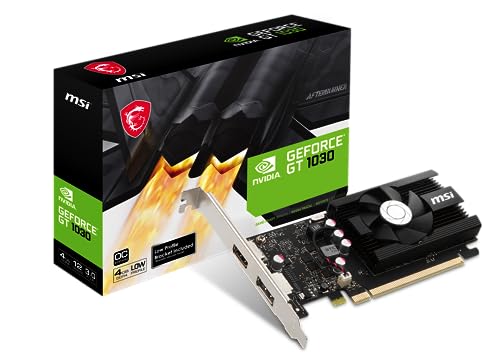
1. MSI Gaming GeForce GT 1030 4GB DDR4 Low Profile Graphics Card
The MSI GeForce GT 1030 4GB low-profile card is the smallest and most basic card on this list, and it is built for a specific job: adding a display output and light graphics acceleration to a small PC that has none. It is a single-fan, low-profile design that fits in slim cases where a full-size card cannot, and it provides DisplayPort and HDMI outputs for a modern monitor or television. The 4GB of DDR4 memory is enough for video playback, office work, and very light gaming, and the DirectX 12 support means it works with current software.
On paper, the headline facts are straightforward: Low-profile single-fan design; 4GB DDR4 memory; 64-bit memory interface; DirectX 12 support; DP and HDMI outputs. None of that makes it the right pick for everyone, but it does define the audience clearly. If those headline facts match what you actually need day to day, this is a shortlist candidate rather than a curiosity. If they do not match, the rest of this section will make that obvious quickly, and you can move on to the next pick without losing anything.
What stands out
- Low-profile single-fan design
- 4GB DDR4 memory
- 64-bit memory interface
- DirectX 12 support
- DP and HDMI outputs
The low-profile design is the point: this card fits in slim office PCs and home theater PCs that no other card on this list can enter, and it does so without needing extra power connectors. The single fan keeps it quiet, and the DisplayPort and HDMI outputs cover modern displays. For a PC that needs a display output and a little graphics acceleration, it is the cheapest and smallest solution.
Before you buy, it is worth checking the practical details that cause most returns. Confirm that the listing shows the exact model name and configuration you expect, because similar models often share a name and differ in one specification that matters. Check the size and the connections against your setup, and make sure you know what is included in the box and what is sold separately. Read the return policy before ordering, and when the product arrives, test it with your real setup in the first few days rather than leaving it in the box. A quick check at the start saves a return later, and it is the simplest way to be sure the product you receive is the one you meant to buy.
Trade-offs to weigh
The GT 1030 is an entry-level card, and it will not run modern games at good settings; it is a display and media card, not a gaming card. The DDR4 memory is slower than the GDDR6 memory on the other cards here, and the 64-bit interface limits bandwidth. If you want to play modern games, look at the RTX 3050 models below instead.
Who it fits best
Best for home theater PCs, office machines, and slim cases that need a display output and light graphics rather than gaming performance.

2. MAXSUN AMD Radeon RX 550 4GB Low Profile Small Form Factor Graphics Card
The MAXSUN AMD Radeon RX 550 4GB is a low-profile small form factor card that brings real gaming capability to a slim case. The RX 550 is an entry-level gaming GPU, and it can run older and less demanding games at good settings, which is more than the GT 1030 can claim. The 4GB of GDDR5 memory and the 128-bit interface give it more bandwidth than the DDR4 cards, and the low-profile design means it fits in slim cases and small form factor builds that a full-size card cannot enter.
On paper, the headline facts are straightforward: Low-profile small form factor design; 4GB GDDR5 memory; 128-bit memory interface; ITX and SFF compatible; DirectX 12 support. None of that makes it the right pick for everyone, but it does define the audience clearly. If those headline facts match what you actually need day to day, this is a shortlist candidate rather than a curiosity. If they do not match, the rest of this section will make that obvious quickly, and you can move on to the next pick without losing anything.
What stands out
- Low-profile small form factor design
- 4GB GDDR5 memory
- 128-bit memory interface
- ITX and SFF compatible
- DirectX 12 support
The combination of a low-profile design and genuine entry-level gaming performance is the standout, because it means a slim PC can actually play games rather than just display them. The GDDR5 memory and 128-bit interface give it a real advantage over DDR4 cards, and the small form factor design fits in ITX and SFF cases. For a compact PC that needs to game, this is the affordable entry point.
Before you buy, it is worth checking the practical details that cause most returns. Confirm that the listing shows the exact model name and configuration you expect, because similar models often share a name and differ in one specification that matters. Check the size and the connections against your setup, and make sure you know what is included in the box and what is sold separately. Read the return policy before ordering, and when the product arrives, test it with your real setup in the first few days rather than leaving it in the box. A quick check at the start saves a return later, and it is the simplest way to be sure the product you receive is the one you meant to buy.
Trade-offs to weigh
The RX 550 is an older, entry-level GPU, and it will not run modern demanding games at high settings; it is a card for older games, esports titles, and light gaming. MAXSUN is a less well-known brand than MSI or ASUS, so support and availability may vary. The 4GB of memory is enough for its performance level but will limit it in newer games.
Who it fits best
Best for small form factor PCs that need to play older games and esports titles, and for budget compact builds.

3. MSI Gaming RTX 3050 LP 6G OC Graphics Card
The MSI Gaming RTX 3050 LP 6G OC is the most capable low-profile card on this list, and it is the one that proves a small card can play modern games. The RTX 3050 is a current-generation NVIDIA graphics card with ray tracing and AI features, and the 6GB of GDDR6 memory is enough for modern games at good settings. The low-profile design means it fits in slim cases, and the factory overclock to a 1492 MHz boost clock squeezes extra performance out of the small form factor. The HDMI and DisplayPort outputs cover modern monitors.
On paper, the headline facts are straightforward: Low-profile design; NVIDIA RTX 3050 GPU; 6GB GDDR6 memory; 96-bit interface, 1492 MHz boost clock; HDMI and DisplayPort outputs. None of that makes it the right pick for everyone, but it does define the audience clearly. If those headline facts match what you actually need day to day, this is a shortlist candidate rather than a curiosity. If they do not match, the rest of this section will make that obvious quickly, and you can move on to the next pick without losing anything.
What stands out
- Low-profile design
- NVIDIA RTX 3050 GPU
- 6GB GDDR6 memory
- 96-bit interface, 1492 MHz boost clock
- HDMI and DisplayPort outputs
The RTX 3050 in a low-profile form factor is the standout, because it brings current-generation gaming, ray tracing, and AI upscaling to a slim PC that could never fit a full-size card. The 6GB of GDDR6 memory is the right amount for 1080p gaming, and the factory overclock adds performance without any effort from the buyer. For a small case that needs to play modern games, this is the best card here.
Before you buy, it is worth checking the practical details that cause most returns. Confirm that the listing shows the exact model name and configuration you expect, because similar models often share a name and differ in one specification that matters. Check the size and the connections against your setup, and make sure you know what is included in the box and what is sold separately. Read the return policy before ordering, and when the product arrives, test it with your real setup in the first few days rather than leaving it in the box. A quick check at the start saves a return later, and it is the simplest way to be sure the product you receive is the one you meant to buy.
Trade-offs to weigh
A low-profile RTX 3050 is still a compact card, and it will run warmer and louder than a full-size RTX 3050 with larger fans, because there is less room for cooling. The 96-bit memory interface is narrower than the full-size card, which limits bandwidth at higher resolutions. It is also more expensive than the entry-level cards, because it packs a modern GPU into a small size.
Who it fits best
Best for slim PCs and small form factor builds that need to play modern games at 1080p, and for anyone who refuses to compromise on graphics performance.

4. SOYO GeForce RTX 3050 6GB GDDR6 Low Profile Gaming Graphics Card
The SOYO GeForce RTX 3050 6GB low-profile card is another current-generation RTX 3050 in a small form factor, and it brings the same modern gaming capability to a slim case. The 6GB of GDDR6 memory and the 2304 stream processors give it the power to run modern games at good settings, and the half-height low-profile design means it fits in slim cases that a full-size card cannot enter. The HDMI 2.1 and DisplayPort 1.4a outputs support modern high-refresh monitors and televisions, and the PCIe 4.0 interface keeps it current.
On paper, the headline facts are straightforward: Low-profile gaming graphics card; NVIDIA RTX 3050 GPU; 6GB GDDR6 memory; 96-bit, 2304SP GPU; HDMI 2.1 and DisplayPort 1.4a. None of that makes it the right pick for everyone, but it does define the audience clearly. If those headline facts match what you actually need day to day, this is a shortlist candidate rather than a curiosity. If they do not match, the rest of this section will make that obvious quickly, and you can move on to the next pick without losing anything.
What stands out
- Low-profile gaming graphics card
- NVIDIA RTX 3050 GPU
- 6GB GDDR6 memory
- 96-bit, 2304SP GPU
- HDMI 2.1 and DisplayPort 1.4a
The modern RTX 3050 GPU in a low-profile card is the story, because it means a slim PC can run current games with ray tracing and AI features, which is a capability that simply did not exist in small form factors a few years ago. The HDMI 2.1 output supports modern televisions and high-refresh displays, and the 6GB of GDDR6 memory is the right amount for 1080p gaming. For a compact build that needs modern performance, this is a strong choice.
Before you buy, it is worth checking the practical details that cause most returns. Confirm that the listing shows the exact model name and configuration you expect, because similar models often share a name and differ in one specification that matters. Check the size and the connections against your setup, and make sure you know what is included in the box and what is sold separately. Read the return policy before ordering, and when the product arrives, test it with your real setup in the first few days rather than leaving it in the box. A quick check at the start saves a return later, and it is the simplest way to be sure the product you receive is the one you meant to buy.
Trade-offs to weigh
SOYO is a less established brand than MSI or ASUS, so long-term support and driver updates may be less certain, and the compact cooler will run warmer than a full-size card. The 96-bit memory interface limits bandwidth at higher resolutions, so this card is best at 1080p rather than 1440p. The low-profile design also means the card is small and light, which is good for fit but means less cooling capacity.
Who it fits best
Best for slim PCs that need a modern RTX 3050 and are comfortable with a less well-known brand in exchange for a low-profile design.

5. maxsun GeForce RTX 3050 6GB Graphics Card, Mini Small Form Factor
The maxsun GeForce RTX 3050 6GB mini card is a small form factor RTX 3050 built for compact gaming PCs that are short front to back. The mini design is short in length rather than low in height, which suits ITX cases and compact towers that have full-height slots but limited length. The RTX 3050 GPU brings current-generation gaming performance, ray tracing, and AI features to a small case, and the 6GB of GDDR6 memory is enough for modern games at 1080p. It is a card for builders who have a small case but refuse to give up gaming performance.
On paper, the headline facts are straightforward: Mini small form factor design; NVIDIA RTX 3050 GPU; 6GB GDDR6 memory; Slim SFF design; Gaming PC graphics card. None of that makes it the right pick for everyone, but it does define the audience clearly. If those headline facts match what you actually need day to day, this is a shortlist candidate rather than a curiosity. If they do not match, the rest of this section will make that obvious quickly, and you can move on to the next pick without losing anything.
What stands out
- Mini small form factor design
- NVIDIA RTX 3050 GPU
- 6GB GDDR6 memory
- Slim SFF design
- Gaming PC graphics card
The mini length is the advantage, because it fits in compact ITX cases that a full-length card cannot enter, while keeping a full-height design that allows a larger fan than a low-profile card. The RTX 3050 GPU delivers modern gaming performance, and the 6GB of GDDR6 memory covers 1080p gaming comfortably. For a compact gaming PC, this is the right balance of size and performance.
Before you buy, it is worth checking the practical details that cause most returns. Confirm that the listing shows the exact model name and configuration you expect, because similar models often share a name and differ in one specification that matters. Check the size and the connections against your setup, and make sure you know what is included in the box and what is sold separately. Read the return policy before ordering, and when the product arrives, test it with your real setup in the first few days rather than leaving it in the box. A quick check at the start saves a return later, and it is the simplest way to be sure the product you receive is the one you meant to buy.
Trade-offs to weigh
A mini card has a smaller cooler than a full-size card, so it will run warmer and louder under load, and maxsun is a less well-known brand than the major manufacturers. The mini design is short in length but full height, so it will not fit in a slim low-profile case; check your case type before buying. The 6GB of memory is enough for 1080p but will limit the card at higher resolutions.
Who it fits best
Best for compact ITX gaming PCs that need a short card with modern RTX 3050 performance and a full-height slot.

6. maxsun GEFORCE GTX 1050 Ti 4GB GDDR5 Mini Small Form Factor Graphics Card
The maxsun GeForce GTX 1050 Ti 4GB mini card is the budget gaming option on this list, a compact card that brings entry-level gaming to a small case for the least money. The GTX 1050 Ti is an older GPU, but it can still run esports titles and older games at good settings, and the 4GB of GDDR5 memory with a 128-bit interface gives it enough bandwidth for 1080p gaming at modest settings. The mini small form factor design fits in compact cases, and the slim profile means it does not need a large power supply or a big case.
On paper, the headline facts are straightforward: Mini small form factor design; NVIDIA GTX 1050 Ti GPU; 4GB GDDR5 memory; 128-bit memory interface; Slim SFF design. None of that makes it the right pick for everyone, but it does define the audience clearly. If those headline facts match what you actually need day to day, this is a shortlist candidate rather than a curiosity. If they do not match, the rest of this section will make that obvious quickly, and you can move on to the next pick without losing anything.
What stands out
- Mini small form factor design
- NVIDIA GTX 1050 Ti GPU
- 4GB GDDR5 memory
- 128-bit memory interface
- Slim SFF design
The price is the advantage, because this card delivers real gaming capability in a mini form factor for less than the RTX 3050 models, and it does so without needing a powerful power supply. The 4GB of GDDR5 memory and the 128-bit interface are enough for esports and older games, and the mini design fits in compact builds. For a budget compact PC, this is the affordable entry point to gaming.
Before you buy, it is worth checking the practical details that cause most returns. Confirm that the listing shows the exact model name and configuration you expect, because similar models often share a name and differ in one specification that matters. Check the size and the connections against your setup, and make sure you know what is included in the box and what is sold separately. Read the return policy before ordering, and when the product arrives, test it with your real setup in the first few days rather than leaving it in the box. A quick check at the start saves a return later, and it is the simplest way to be sure the product you receive is the one you meant to buy.
Trade-offs to weigh
The GTX 1050 Ti is an older GPU, and it will not run modern demanding games at high settings; it is a card for esports titles, older games, and light gaming. It lacks the ray tracing and AI features of the RTX cards, and the 4GB of memory will limit it in newer games. maxsun is a less well-known brand, so support may vary.
Who it fits best
Best for budget compact PCs that need to play esports titles and older games, and for builders who want the cheapest mini gaming card.

7. MSI Gaming RTX 3050 Ventus 2X 6G OC Graphics Card
The MSI Gaming RTX 3050 Ventus 2X 6G OC is the compact dual-fan card on this list, and it is the best choice for a small case that has full-height slots but limited length. The Ventus 2X design uses two fans in a short card, which gives it better cooling than a single-fan mini card, and the factory overclock to a 1492 MHz boost clock adds performance. The RTX 3050 GPU brings current-generation gaming, ray tracing, and AI features, and the 6GB of GDDR6 memory is the right amount for 1080p gaming. The dual-fan design is quieter than a single fan working alone.
On paper, the headline facts are straightforward: Dual-fan Ventus 2X design; NVIDIA RTX 3050 GPU; 6GB GDDR6 memory; 96-bit, 1492 MHz boost clock; HDMI and DisplayPort outputs. None of that makes it the right pick for everyone, but it does define the audience clearly. If those headline facts match what you actually need day to day, this is a shortlist candidate rather than a curiosity. If they do not match, the rest of this section will make that obvious quickly, and you can move on to the next pick without losing anything.
What stands out
- Dual-fan Ventus 2X design
- NVIDIA RTX 3050 GPU
- 6GB GDDR6 memory
- 96-bit, 1492 MHz boost clock
- HDMI and DisplayPort outputs
The dual-fan cooling is the advantage, because two fans move more air at lower speeds than one fan, which means the card runs cooler and quieter than a single-fan mini card. The RTX 3050 GPU delivers modern gaming performance, and the factory overclock adds a little extra without any effort. MSI is a well-established brand with good support, and the Ventus design is proven. For a compact case with full-height slots, this is the best card here.
Before you buy, it is worth checking the practical details that cause most returns. Confirm that the listing shows the exact model name and configuration you expect, because similar models often share a name and differ in one specification that matters. Check the size and the connections against your setup, and make sure you know what is included in the box and what is sold separately. Read the return policy before ordering, and when the product arrives, test it with your real setup in the first few days rather than leaving it in the box. A quick check at the start saves a return later, and it is the simplest way to be sure the product you receive is the one you meant to buy.
Trade-offs to weigh
The Ventus 2X is compact but not low-profile, so it will not fit in a slim case that needs a half-height card; check your case type before buying. The dual-fan design is still shorter than a full-size card, so it will run warmer than a large triple-fan model. The 96-bit memory interface limits bandwidth at higher resolutions, so this card is best at 1080p.
Who it fits best
Best for compact cases with full-height slots that need a quiet, cool-running RTX 3050 with dual-fan cooling.
Buying guide
Warranties, returns, and checking your purchase
Most products in this guide come with a manufacturer warranty, and the length and coverage vary by brand, so check the warranty terms before you buy rather than after something goes wrong. Keep the packaging until you have tested the product, because a return is much easier with the original box. When the product arrives, check that the model name, the configuration, and the included accessories match the listing, and test it with your real setup in the first few days. If anything is wrong, contact the seller promptly, because return windows are limited and the first week is the time to find problems.
Low-profile or mini: which size do you need?
Low-profile cards are short in height and fit in slim cases, usually with a low-profile bracket that replaces the full-height one. Mini or ITX cards are short in length but full height, and they fit in compact cases that are short front to back. The two are not interchangeable, so check your case before buying: measure the height available for the card and the length available, and check whether your case takes a low-profile bracket or a full-height one. Buying the wrong size is the most common mistake with small graphics cards.
How much performance do you need?
The right card depends on what you play. For video playback, office work, and a display output, a GT 1030 is enough. For esports titles and older games, an RX 550 or a GTX 1050 Ti will do. For modern games at 1080p, you need an RTX 3050, which is the smallest current-generation card that handles modern titles well. Do not buy more card than you need, because a small case has limited cooling and a small power supply, and an oversized card will be wasted.
Power supply: the hidden limit
Small graphics cards are designed to work with modest power supplies, and most of the cards on this list draw their power from the PCIe slot alone, without extra connectors. That is a major advantage for small PCs, because it means you do not need to upgrade the power supply. Check the card’s power requirements against your power supply’s capacity, and remember that the power supply also needs to run the processor, the storage, and the fans. When in doubt, choose the card with the lower power draw.
Cooling in a small case
A small case has less airflow than a large one, so a graphics card that runs hot will make the whole PC hotter. Single-fan cards are compact but they have to spin faster to move enough air, which makes them louder. Dual-fan cards are cooler and quieter, but they are larger. In a small case, airflow matters more than in a large one, so make sure the case has intake and exhaust fans, and keep the cables tidy so they do not block the airflow.
Outputs: HDMI, DisplayPort, and DVI
Check the outputs on the card against your monitor or television. Modern monitors use HDMI and DisplayPort, and most small cards provide both, but older monitors may need DVI or VGA, which newer cards often lack. The number of outputs matters too: if you run two monitors, the card needs two outputs of the right type. Adapters can solve most mismatches, but they add cost and clutter, so it is better to buy a card with the outputs you need.
Will a small card bottleneck my PC?
A graphics card can only perform as well as the rest of the system allows, and a weak processor or slow storage can limit a powerful card. In a small PC, the processor is often a modest one, so an RTX 3050 may be more card than the processor can use fully. That is not necessarily a problem: the card will still perform well, and it gives you headroom for a future processor upgrade. But if your processor is very old, a cheaper card may deliver the same experience for less money.
Frequently asked questions
What is a low-profile graphics card?
A low-profile graphics card is short in height, designed to fit in slim cases that cannot take a full-height card. It usually comes with a low-profile bracket that replaces the standard bracket, and it is shorter and narrower than a full-size card. Low-profile cards are common in office PCs, home theater PCs, and small form factor builds.
Can a small graphics card play modern games?
Yes, if it is a modern card. An RTX 3050 in a low-profile or mini form factor can play modern games at 1080p at good settings, with ray tracing and AI upscaling. An older card like a GT 1030 cannot, because it was never designed for gaming. The size of the card does not decide its performance; the GPU inside it does.
Do small graphics cards need extra power connectors?
Most small cards draw all their power from the PCIe slot and do not need extra connectors, which is a major advantage for small PCs with modest power supplies. More powerful small cards may need a single 6-pin or 8-pin connector, so check the card’s requirements against your power supply before buying.
Will a small graphics card fit in my case?
It depends on the case. Measure the length and height available for the card, and check whether the case takes a low-profile or a full-height bracket. A low-profile card fits in slim cases, a mini card fits in compact cases that are short front to back, and a compact dual-fan card fits in cases with full-height slots but limited length. When in doubt, measure twice.
Is a GT 1030 enough for a home theater PC?
Yes, for video playback and a display output. The GT 1030 handles 4K video playback, provides HDMI and DisplayPort outputs, and runs quietly in a small case. It is not a gaming card, so it will not run modern games well, but for a home theater PC that plays video and streams content, it is more than enough.
Conclusion
The best small graphics card depends on your case and your games. The MSI RTX 3050 LP 6G OC is the best low-profile card for modern gaming, bringing current RTX performance to a slim case. The MSI RTX 3050 Ventus 2X is the best compact dual-fan card for cases with full-height slots, with better cooling and quieter operation. The SOYO and maxsun RTX 3050 models are strong alternatives in the same class. And the GT 1030 and RX 550 are the best choices for home theater and office PCs that need a display output rather than gaming performance. Whichever you choose, measure your case first, because fit is the only thing that cannot be fixed after purchase.
Buy the card that fits your case and matches the games you actually play. A low-profile card for a slim case, a mini card for a compact case, and a dual-fan card for a case with full-height slots: that is the whole decision. Check the power supply, check the outputs, and you will have a small card that delivers real performance in a case that a full-size card could never enter.