A CPU air cooler is the most reliable way to keep a processor cool, and it has a strong case against liquid cooling for most builders. It has no pump to fail, no liquid to leak, and no software to manage, and a good air cooler will cool a modern processor quietly for a decade. The best air coolers use a tower of fins, several copper heat pipes, and one or two large fans to move heat away from the processor, and the difference between a good one and a great one is measured in degrees and decibels.
This guide compares seven of the best CPU air coolers available, from the value champions that dominate build recommendations to the premium quiet models from be quiet!. Every cooler below is a tower design with heat pipes and PWM fans, and each one is built for a different priority: maximum cooling per dollar, silent operation, compact size, or a display that shows temperatures at a glance. The list is ordered so you can find your priority quickly.
A note on the keyword before the list: the under-10000 figure in the search term is a budget qualifier rather than a precise price, and the coolers below are all affordable air coolers rather than exotic liquid systems. We have not listed prices, because they change constantly, but every cooler here is a mainstream air cooler in the value to mid-range bracket. What matters is cooling performance, noise, size, and whether it fits your case and your memory, and each section covers those points.
In this guide
Quick picks: best cpu air coolers under 10000
| # | Product | Where to buy |
|---|---|---|
| 1 | Thermalright Peerless Assassin 120 Vision MAX ARGB Black CPU Air Cooler, Twin Tower Radiator 2150RPM,480×854 Resolving P | Check on Amazon |
| 2 | Thermalright Peerless Assassin 120 SE CPU Cooler, 6 Heat Pipes AGHP Technology, Dual 120mm PWM Fans, 1550RPM Speed, for | Check on Amazon |
| 3 | be quiet! Dark Rock Pro 6 Air CPU Cooler, 7 Heatpipes, 2 PWM Fans, 300W TDP | Check on Amazon |
| 4 | Thermalright Phantom Spirit 120 EVO CPU Cooler,7×6mm Heat Pipes CPU Air Cooler,Dual PWM Fan Computer Cooling,2150RPM Spe | Check on Amazon |
| 5 | be quiet! Pure Rock Pro 3 Black AMD and Intel Air CPU Cooler, 250W TDP | Check on Amazon |
| 6 | Thermalright Assassin X120 Refined SE CPU Air Cooler, 4 Heat Pipes, TL-C12C PWM Fan, Aluminium Heatsink Cover, AGHP Tech | Check on Amazon |
| 7 | Thermalright Peerless Assassin 120 SE ARGB White CPU Air Cooler, 6 Heat Pipes CPU Cooler, Dual 120mm TL-C12CW-S PWM Fan | Check on Amazon |
Quick comparison
| # | Product | Best for |
|---|---|---|
| 1 | Thermalright Peerless Assassin 120 Vision MAX ARGB Black | Dual-tower cooler with temperature display |
| 2 | Thermalright Peerless Assassin 120 SE CPU Cooler | Best-value dual-tower cooler with 6 heat pipes |
| 3 | be quiet! Dark Rock Pro 6 Air CPU Cooler | Premium silent cooler with 300W TDP |
| 4 | Thermalright Phantom Spirit 120 EVO CPU Cooler | Seven-heat-pipe dual-tower cooler with 2150 RPM fans |
| 5 | be quiet! Pure Rock Pro 3 Black, AMD and Intel Air CPU Cooler | Compact double-tower cooler with 250W TDP |
| 6 | Thermalright Assassin X120 Refined SE CPU Air Cooler | Single-tower budget cooler with 4 heat pipes |
| 7 | Thermalright Peerless Assassin 120 SE ARGB White CPU Air Cooler | White dual-tower cooler with ARGB fans |
The table above is a shortcut, not a verdict. Two products can look close on a spec line and feel very different in daily use, so use it to narrow the field to two or three candidates, then read those full sections before deciding.

1. Thermalright Peerless Assassin 120 Vision MAX ARGB Black
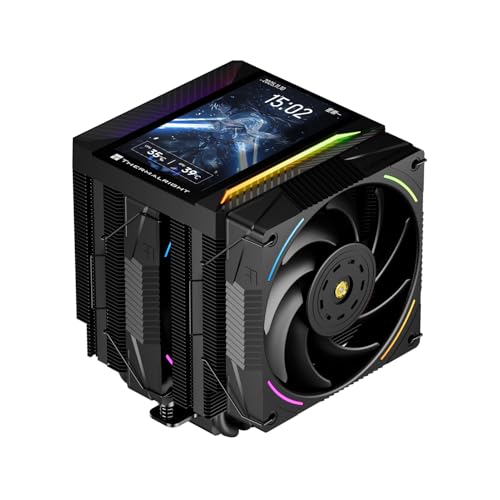
The Thermalright Peerless Assassin 120 Vision MAX is the showpiece of the Peerless Assassin line, taking the dual-tower design that made the original famous and adding a display that shows system information at a glance. The twin tower radiator gives it a large surface area for shedding heat, and the fans spin up to 2150 RPM when the processor is working hard, moving a serious amount of air. The display is the feature that sets it apart from every other cooler on this list, because it turns a functional component into a visible part of the build.
On paper, the headline facts are straightforward: Twin tower radiator design; 2150 RPM fans; 480×854 resolving display; ARGB lighting; Black finish. None of that makes it the right pick for everyone, but it does define the audience clearly. If those headline facts match what you actually need day to day, this is a shortlist candidate rather than a curiosity. If they do not match, the rest of this section will make that obvious quickly, and you can move on to the next pick without losing anything.
What stands out
- Twin tower radiator design
- 2150 RPM fans
- 480×854 resolving display
- ARGB lighting
- Black finish
The dual-tower design is proven, and the Peerless Assassin line has a reputation for cooling far above its price, which is why it appears in so many build guides. The display adds a practical touch, letting you see temperatures without opening monitoring software, and the ARGB lighting fits modern builds with glass side panels. For a builder who wants both performance and presentation, this is the most interesting cooler here.
Before you buy, it is worth checking the practical details that cause most returns. Confirm that the listing shows the exact model name and configuration you expect, because similar models often share a name and differ in one specification that matters. Check the size and the connections against your setup, and make sure you know what is included in the box and what is sold separately. Read the return policy before ordering, and when the product arrives, test it with your real setup in the first few days rather than leaving it in the box. A quick check at the start saves a return later, and it is the simplest way to be sure the product you receive is the one you meant to buy.
Trade-offs to weigh
A dual-tower cooler is large, and it can interfere with tall memory modules or the first expansion slot, so check your case and memory clearance before buying. The fans are fast at full speed, which means they can be audible under heavy load, and the display adds cost over the standard Peerless Assassin. If your case is small or your memory is tall, measure first.
Who it fits best
Best for builders with a glass-panel case who want top-tier air cooling and a temperature display as a showpiece.
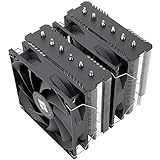

2. Thermalright Peerless Assassin 120 SE CPU Cooler
The Thermalright Peerless Assassin 120 SE is the cooler that changed the value equation for air cooling, and it remains the default recommendation for builders who want maximum cooling per dollar. It uses six heat pipes with Thermalright’s AGHP technology to move heat from the processor into a twin tower of fins, and two 120mm PWM fans push air through those fins at up to 1550 RPM. The SE edition trims the extras to keep the price down, and the result is a cooler that competes with models costing several times as much.
On paper, the headline facts are straightforward: 6 heat pipes with AGHP technology; Dual 120mm PWM fans; 1550 RPM fan speed; Twin tower design; SE value edition. None of that makes it the right pick for everyone, but it does define the audience clearly. If those headline facts match what you actually need day to day, this is a shortlist candidate rather than a curiosity. If they do not match, the rest of this section will make that obvious quickly, and you can move on to the next pick without losing anything.
What stands out
- 6 heat pipes with AGHP technology
- Dual 120mm PWM fans
- 1550 RPM fan speed
- Twin tower design
- SE value edition
The cooling performance per dollar is the best on this list, and it is not close: six heat pipes, a dual tower, and two PWM fans give it the thermal headroom to cool a powerful processor without breaking a sweat. The PWM fans adjust their speed to the load, so the cooler is quiet at idle and only spins up when the processor is working hard. For a builder on a budget, this is the cooler to beat.
Before you buy, it is worth checking the practical details that cause most returns. Confirm that the listing shows the exact model name and configuration you expect, because similar models often share a name and differ in one specification that matters. Check the size and the connections against your setup, and make sure you know what is included in the box and what is sold separately. Read the return policy before ordering, and when the product arrives, test it with your real setup in the first few days rather than leaving it in the box. A quick check at the start saves a return later, and it is the simplest way to be sure the product you receive is the one you meant to buy.
Trade-offs to weigh
The SE edition is a value model, so it lacks the display, the ARGB lighting, and the premium finish of the more expensive Peerless Assassin variants. It is also a large dual-tower cooler, so it needs case clearance and can conflict with tall memory. The fans are good but not the quietest on this list, and the design is functional rather than beautiful.
Who it fits best
Best for budget builders who want the most cooling for the least money and do not care about lighting or displays.
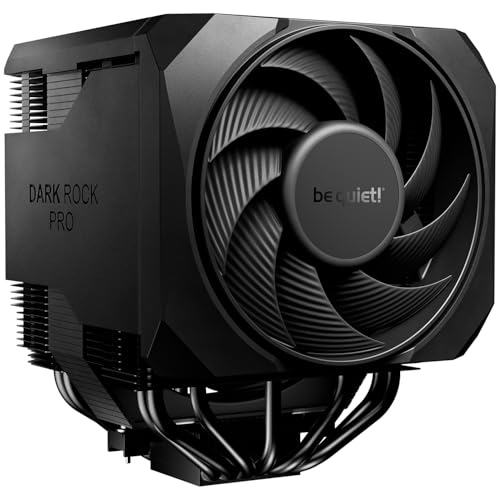
3. be quiet! Dark Rock Pro 6 Air CPU Cooler
The be quiet! Dark Rock Pro 6 is the premium silent cooler on this list, built for people who want their PC to be heard as little as possible. It uses seven heat pipes and two PWM fans to deliver a 300W TDP cooling capacity, which is enough for the most powerful consumer processors, and it does so with the quiet fans that give the brand its name. The semi-passive mode is a clever touch: at low loads the fans can stop entirely, so the PC is silent when you are browsing or working, and they only spin up when the processor needs them.
On paper, the headline facts are straightforward: 7 heat pipes; 2 PWM fans; 300W TDP cooling capacity; Semi-passive mode; High RAM and VRM clearance. None of that makes it the right pick for everyone, but it does define the audience clearly. If those headline facts match what you actually need day to day, this is a shortlist candidate rather than a curiosity. If they do not match, the rest of this section will make that obvious quickly, and you can move on to the next pick without losing anything.
What stands out
- 7 heat pipes
- 2 PWM fans
- 300W TDP cooling capacity
- Semi-passive mode
- High RAM and VRM clearance
The noise level is the reason to buy this cooler, because be quiet! fans are among the quietest in the industry, and the semi-passive mode makes the PC silent at idle. The 300W TDP capacity gives it headroom for high-end processors, and the design includes high RAM and VRM clearance, which solves the compatibility problems that plague many large coolers. For a quiet build, this is the benchmark.
Before you buy, it is worth checking the practical details that cause most returns. Confirm that the listing shows the exact model name and configuration you expect, because similar models often share a name and differ in one specification that matters. Check the size and the connections against your setup, and make sure you know what is included in the box and what is sold separately. Read the return policy before ordering, and when the product arrives, test it with your real setup in the first few days rather than leaving it in the box. A quick check at the start saves a return later, and it is the simplest way to be sure the product you receive is the one you meant to buy.
Trade-offs to weigh
Premium silence costs more than the value coolers here, and the Dark Rock Pro 6 is a large, heavy cooler that needs a sturdy case and a motherboard that can support its weight. The dark, understated design will not suit builders who want lighting or a display. It is also overkill for a modest processor, where a cheaper cooler would do the same job.
Who it fits best
Best for builders who prioritize silence above all else and who run a powerful processor in a quiet room.
Check price on Amazon: be quiet! Dark Rock Pro 6 Air CPU Cooler, 7 Heatpipes, 2 PWM Fans, 300W TDP

4. Thermalright Phantom Spirit 120 EVO CPU Cooler
The Thermalright Phantom Spirit 120 EVO is the performance step up from the Peerless Assassin, with seven six-millimeter heat pipes instead of six and fans that spin up to 2150 RPM. The extra heat pipe and the faster fans give it more thermal headroom, which matters when a processor is running a sustained heavy load like rendering or compiling, where the temperature keeps climbing over minutes rather than seconds. The dual PWM fans adjust to the load, so the cooler is quiet when the PC is idle and only works hard when it has to.
On paper, the headline facts are straightforward: 7 six-millimeter heat pipes; Dual PWM fans; 2150 RPM fan speed; Dual tower design; EVO edition. None of that makes it the right pick for everyone, but it does define the audience clearly. If those headline facts match what you actually need day to day, this is a shortlist candidate rather than a curiosity. If they do not match, the rest of this section will make that obvious quickly, and you can move on to the next pick without losing anything.
What stands out
- 7 six-millimeter heat pipes
- Dual PWM fans
- 2150 RPM fan speed
- Dual tower design
- EVO edition
The seven heat pipes and faster fans give this cooler an edge over the standard Peerless Assassin in sustained heavy loads, and the dual-tower design provides a large surface area for shedding heat. The PWM control keeps noise down at idle, and the EVO edition is still priced as a value cooler rather than a premium one. For a builder who runs heavy workloads, this is the sweet spot between price and performance.
Before you buy, it is worth checking the practical details that cause most returns. Confirm that the listing shows the exact model name and configuration you expect, because similar models often share a name and differ in one specification that matters. Check the size and the connections against your setup, and make sure you know what is included in the box and what is sold separately. Read the return policy before ordering, and when the product arrives, test it with your real setup in the first few days rather than leaving it in the box. A quick check at the start saves a return later, and it is the simplest way to be sure the product you receive is the one you meant to buy.
Trade-offs to weigh
The faster fans are louder at full speed than the slower fans on the Peerless Assassin SE, so this cooler trades some quiet for performance. It is a large dual-tower design, so case clearance and memory height need checking before buying. The design is functional rather than decorative, with no display or lighting to show off.
Who it fits best
Best for builders who run sustained heavy workloads like rendering or compiling and want extra thermal headroom for a fair price.

5. be quiet! Pure Rock Pro 3 Black, AMD and Intel Air CPU Cooler
The be quiet! Pure Rock Pro 3 Black is the compact premium option, a double-tower cooler that delivers a 250W TDP capacity in a smaller footprint than the Dark Rock Pro 6. The two silent 120mm PWM fans are the heart of it, moving air through the twin towers without the noise that cheaper fans produce, and the compact design means it fits in more cases and clears more memory than the larger premium coolers. It supports both AMD and Intel processors, so it is a safe choice whatever platform you are building on.
On paper, the headline facts are straightforward: 250W TDP cooling capacity; Double-tower compact design; 2 silent 120mm PWM fans; AMD and Intel compatible; Black finish. None of that makes it the right pick for everyone, but it does define the audience clearly. If those headline facts match what you actually need day to day, this is a shortlist candidate rather than a curiosity. If they do not match, the rest of this section will make that obvious quickly, and you can move on to the next pick without losing anything.
What stands out
- 250W TDP cooling capacity
- Double-tower compact design
- 2 silent 120mm PWM fans
- AMD and Intel compatible
- Black finish
The compact size is the practical advantage, because it fits cases and memory configurations that the larger coolers cannot, and the 250W TDP is still enough for most powerful processors. The silent fans live up to the brand name, and the black finish looks good in any build without drawing attention to itself. For a builder who wants premium quiet cooling in a mid-size case, this is the right size.
Before you buy, it is worth checking the practical details that cause most returns. Confirm that the listing shows the exact model name and configuration you expect, because similar models often share a name and differ in one specification that matters. Check the size and the connections against your setup, and make sure you know what is included in the box and what is sold separately. Read the return policy before ordering, and when the product arrives, test it with your real setup in the first few days rather than leaving it in the box. A quick check at the start saves a return later, and it is the simplest way to be sure the product you receive is the one you meant to buy.
Trade-offs to weigh
The compact design means less surface area than the larger coolers, so it will run a few degrees warmer than the Dark Rock Pro 6 under a sustained heavy load. It costs more than the value coolers, and the understated design will not appeal to builders who want lighting or a display. The 250W capacity is generous but not the highest on this list.
Who it fits best
Best for mid-size builds where a large cooler will not fit, and for builders who want quiet premium cooling without the bulk.
Check price on Amazon: be quiet! Pure Rock Pro 3 Black AMD and Intel Air CPU Cooler, 250W TDP

6. Thermalright Assassin X120 Refined SE CPU Air Cooler
The Thermalright Assassin X120 Refined SE is the single-tower budget option on this list, and it is the right cooler for builds that do not need a dual tower. It uses four heat pipes with AGHP technology and a single TL-C12C PWM fan to cool a processor, and the aluminium heatsink cover gives it a finished look that cheaper single-tower coolers often lack. The single-tower design is smaller and lighter than a dual tower, so it fits in compact cases and clears tall memory without any fuss.
On paper, the headline facts are straightforward: 4 heat pipes; TL-C12C PWM fan; Aluminium heatsink cover; AGHP technology; Refined SE edition. None of that makes it the right pick for everyone, but it does define the audience clearly. If those headline facts match what you actually need day to day, this is a shortlist candidate rather than a curiosity. If they do not match, the rest of this section will make that obvious quickly, and you can move on to the next pick without losing anything.
What stands out
- 4 heat pipes
- TL-C12C PWM fan
- Aluminium heatsink cover
- AGHP technology
- Refined SE edition
The size is the advantage: a single-tower cooler fits almost any case, clears any memory, and puts less weight on the motherboard than a dual tower. The PWM fan adjusts to the load, so it is quiet at idle, and the price is the lowest on this list. For a mid-range processor in a compact build, this cooler is all you need, and it leaves money for other parts.
Before you buy, it is worth checking the practical details that cause most returns. Confirm that the listing shows the exact model name and configuration you expect, because similar models often share a name and differ in one specification that matters. Check the size and the connections against your setup, and make sure you know what is included in the box and what is sold separately. Read the return policy before ordering, and when the product arrives, test it with your real setup in the first few days rather than leaving it in the box. A quick check at the start saves a return later, and it is the simplest way to be sure the product you receive is the one you meant to buy.
Trade-offs to weigh
Four heat pipes and one fan cannot match the cooling capacity of a dual-tower cooler with six or seven heat pipes, so this is not the right choice for a high-end processor under sustained load. The single fan has to work harder, which means it can be louder than a dual-fan cooler at the same temperature. It is a budget cooler, and it performs like one under heavy loads.
Who it fits best
Best for compact builds and mid-range processors where a dual-tower cooler is overkill or will not fit.

7. Thermalright Peerless Assassin 120 SE ARGB White CPU Air Cooler
The Thermalright Peerless Assassin 120 SE ARGB White is the same proven dual-tower cooler as the standard SE, dressed for a white build. It uses six heat pipes and two 120mm PWM fans to deliver the same cooling performance that made the Peerless Assassin famous, and it adds ARGB lighting and a white finish that suits modern builds with white cases, white motherboards, and glass side panels. The white finish is not just cosmetic: it is the difference between a cooler that blends into a white build and one that sticks out.
On paper, the headline facts are straightforward: 6 heat pipes; Dual 120mm TL-C12CW-S PWM fans; ARGB lighting; White finish; Twin tower design. None of that makes it the right pick for everyone, but it does define the audience clearly. If those headline facts match what you actually need day to day, this is a shortlist candidate rather than a curiosity. If they do not match, the rest of this section will make that obvious quickly, and you can move on to the next pick without losing anything.
What stands out
- 6 heat pipes
- Dual 120mm TL-C12CW-S PWM fans
- ARGB lighting
- White finish
- Twin tower design
The cooling performance is the same as the standard Peerless Assassin SE, which means six heat pipes, a dual tower, and two PWM fans at a value price. The ARGB lighting adds a visual element that the standard SE lacks, and the white finish is genuinely hard to find among high-performance air coolers, most of which are black. For a white-themed build, this is the obvious choice.
Before you buy, it is worth checking the practical details that cause most returns. Confirm that the listing shows the exact model name and configuration you expect, because similar models often share a name and differ in one specification that matters. Check the size and the connections against your setup, and make sure you know what is included in the box and what is sold separately. Read the return policy before ordering, and when the product arrives, test it with your real setup in the first few days rather than leaving it in the box. A quick check at the start saves a return later, and it is the simplest way to be sure the product you receive is the one you meant to buy.
Trade-offs to weigh
The white finish and ARGB lighting add cost over the standard black SE, and the cooler is still a large dual-tower design that needs case clearance and can conflict with tall memory. The ARGB lighting needs a compatible motherboard header or controller to work, and the fans are good but not the quietest on this list.
Who it fits best
Best for white-themed builds where the cooler needs to match the case and the lighting, without giving up cooling performance.
Buying guide
Warranties, returns, and checking your purchase
Most products in this guide come with a manufacturer warranty, and the length and coverage vary by brand, so check the warranty terms before you buy rather than after something goes wrong. Keep the packaging until you have tested the product, because a return is much easier with the original box. When the product arrives, check that the model name, the configuration, and the included accessories match the listing, and test it with your real setup in the first few days. If anything is wrong, contact the seller promptly, because return windows are limited and the first week is the time to find problems.
Air cooling versus liquid cooling
Air coolers have no pump, no liquid, and no software, which means there is almost nothing to fail. A good air cooler will last the life of several builds, and if a fan dies, it can be replaced in minutes for a few dollars. Liquid coolers can be quieter under extreme loads and look cleaner in some builds, but they add a pump that can fail, liquid that can leak, and a finite lifespan. For most builders, a good air cooler is the safer and simpler choice, and the coolers on this list prove that air cooling can handle even powerful processors.
How many heat pipes do you need?
Heat pipes carry heat from the processor to the fins, and more pipes generally mean more cooling capacity. Four heat pipes are enough for a mid-range processor, six are the sweet spot for most powerful processors, and seven give extra headroom for sustained heavy loads. The pipe diameter matters too: six-millimeter pipes are standard, and the number of pipes is a useful shorthand when comparing coolers, but the fan quality and the fin area matter just as much.
Single tower or dual tower?
A dual-tower cooler has two stacks of fins and usually two fans, which gives it more surface area and more cooling capacity than a single tower. The cost is size: a dual tower is taller, wider, and heavier, and it can block tall memory or the first expansion slot. A single tower is smaller, lighter, and fits almost anywhere, but it cannot match a dual tower under a heavy sustained load. Choose a dual tower for a powerful processor and a single tower for a mid-range chip or a compact case.
Noise: what to look for
Noise is measured in decibels, but the number that matters is the noise at the load you actually run. PWM fans are the key feature, because they slow down when the processor is idle and only spin up under load, so a cooler with PWM fans is quiet when you are working and louder only when you are rendering or gaming. Larger fans move more air at lower speeds, which is why 120mm fans are quieter than smaller ones, and premium fans from be quiet! are noticeably quieter than budget fans at the same speed.
Clearance: case, memory, and motherboard
Before buying a cooler, check three clearances: the case height, the memory height, and the motherboard layout. The case must be tall enough for the cooler, the memory must be short enough to fit under the fan, and the cooler must not block the first expansion slot. The manufacturers publish these measurements, and it is worth five minutes to check them against your case and memory. A cooler that does not fit is a return, not a bargain.
TDP: what the number means
TDP, or thermal design power, is the amount of heat a cooler is rated to handle, measured in watts. A cooler rated at 250W can handle a processor that produces up to 250W of heat, and a 300W cooler has more headroom. The number is a useful guide, but it is not a precise measurement, because manufacturers test differently. As a rule, buy a cooler rated comfortably above your processor’s heat output, because headroom means lower temperatures and quieter fans.
Frequently asked questions
Is air cooling enough for a powerful processor?
Yes, for almost every consumer processor. A good dual-tower air cooler with six or seven heat pipes can handle the most powerful mainstream processors, and it does so without the complexity of liquid cooling. Only extreme overclocking or workstation processors with very high heat output genuinely need liquid cooling.
How loud are CPU air coolers?
It depends on the fans and the load. At idle, a cooler with PWM fans is nearly silent, because the fans slow down or stop. Under a heavy load, the fans spin faster and produce more noise, but a quality cooler with large fans is still quieter than a cheap cooler working hard. Premium fans from be quiet! are noticeably quieter than budget fans at the same speed.
Will a dual-tower cooler fit in my case?
It depends on the case height and the memory height. Dual-tower coolers are tall, and they can conflict with tall memory modules or the first expansion slot. Check the cooler’s height against your case’s maximum cooler height, and check the memory clearance against your memory modules. When in doubt, measure before you buy.
Do I need to replace the thermal paste?
Most coolers come with thermal paste pre-applied or included in the box, and that is fine for a first installation. Thermal paste should be replaced if you remove the cooler, or after several years if temperatures start to climb. Use a pea-sized amount in the center and let the cooler spread it when you mount it.
How long does a CPU air cooler last?
A very long time. The heatsink itself has no moving parts and will last indefinitely, and the fans are the only wear item. A fan can be replaced in minutes, and many coolers use standard 120mm fans that are easy to find. A good air cooler bought today can serve through several processor upgrades.
Conclusion
The best CPU air cooler depends on your priority. The Thermalright Peerless Assassin 120 SE is the best value on this list, with dual-tower cooling for a budget price. The Phantom Spirit 120 EVO is the best step up for heavy sustained workloads. The be quiet! Dark Rock Pro 6 is the quietest premium cooler, and the Pure Rock Pro 3 is the best compact premium option. And the Vision MAX is the showpiece for builders who want a display. Whichever you choose, check the clearance first, because a cooler that does not fit is the only real mistake you can make.
Buy the cooler that matches your processor and your case, not the one with the longest spec sheet. Six heat pipes and a dual tower cover almost every processor, a PWM fan keeps it quiet at idle, and a reputable brand means the mounting hardware will actually fit. Install it carefully, check your temperatures under load, and you will have cooling you never have to think about again.