The best down-blowing CPU coolers are low-profile air coolers whose fan sits on top of the heatsink and blows air down onto the motherboard, instead of a tower cooler whose fan pushes air sideways through a tall stack of fins. That one difference in airflow direction decides whether a cooler fits in a slim case at all. A tower cooler needs 150 mm or more of clearance above the processor, while a down-blowing cooler can be as short as 37 mm, which is why small form factor builds, home theatre PCs, and slim office machines almost always use one.
Down-blowing coolers do a second job that tower coolers do not: the air that passes through the heatsink continues down and across the motherboard, cooling the memory, the voltage regulators, and the chipset area around the socket. In a compact case with little airflow of its own, that wash of air over the board is worth a great deal, because a small case has no room for extra case fans to do the same work. The six coolers in this guide are all down-blowing designs, and each one is a low-profile cooler from a named brand, with the model stated in its listing.
The six coolers in this guide are the Noctua NH-L9i chromax.black, a 37 mm cooler for the smallest builds; the Noctua NH-L12S, a 70 mm low-profile cooler with a 120 mm slim fan; the Noctua NH-C14S, a top-flow cooler with a 140 mm fan and six heatpipes; the be quiet! Shadow Rock LP, a 130W TDP low-profile cooler; the Thermalright AXP90 X47, a 47 mm cooler with a 92 mm slim fan; and the Scythe Big Shuriken 3 Rev.B, a 67 mm cooler with a 120 mm fan. Every one of them blows air down onto the board, and every one of them fits cases a tower cooler cannot enter.
A down-blowing cooler is not the right choice for every build, and this guide is honest about that. A tall tower cooler with a 120 mm or 140 mm fan moves more air through more fin area, so it cools a hot processor further than any low-profile cooler can. A down-blowing cooler trades that headroom for height: it fits where a tower cannot, and it cools the board around the socket, but it will not tame the hottest desktop processors under a heavy sustained load. The picks in this guide are for builds where height is the limit, and where a quiet, compact cooler matters more than the last few degrees.
Height is the first number to check before buying any cooler in this guide, and the comparison table below lists the height of each pick so the choice is easy to make. Measure the clearance from the processor to the case panel, subtract a few millimetres for safety, and pick a cooler shorter than that number. The second number to check is the thermal design power rating, which the listings state for some picks and which tells a buyer roughly how much heat the cooler is built to move. The sections after the table give the detail for each cooler, including who each one fits and where each one falls short.
In this guide
Quick picks: best down blowing cpu coolers
| # | Product | Where to buy |
|---|---|---|
| 1 | Noctua NH-L9i chromax.black | Check on Amazon |
| 2 | Noctua NH-L12S | Check on Amazon |
| 3 | Noctua NH-C14S | Check on Amazon |
| 4 | be quiet! Shadow Rock LP | Check on Amazon |
| 5 | Thermalright AXP90 X47 | Check on Amazon |
| 6 | Scythe Big Shuriken 3 Rev.B | Check on Amazon |
How the picks were chosen for the best down-blowing CPU coolers
The picks were chosen from the product listings returned by the site product search, and only coolers whose listing described a low-profile, down-blowing design made the list. Each listing title was checked for the brand and the model, and a cooler was only linked when both matched the listing. Tower coolers were excluded even when they appeared in the same search results, because the article is about down-blowing coolers, not about tower coolers in general, and a buyer searching for this kind of cooler needs a low-profile part.
Height was the second filter, because a down-blowing cooler earns its place by fitting a short case. Every pick in this guide states its height in its listing, from 37 mm for the Noctua NH-L9i chromax.black to 142 mm for the Noctua NH-C14S, and every one of them is shorter than a typical tower cooler. A cooler whose listing did not state a height, or whose design was a tower with a sideways fan, was not counted, because a buyer of a small case needs the height number before anything else.
The third filter was the listing itself. Every pick is a new listing from a named brand, with the model stated in the title. Listings for used or renewed coolers were excluded, and listings whose titles named a different model were excluded too. Fan-only listings, such as a replacement fan sold without a heatsink, were also excluded, because the article is about complete coolers, and a fan on its own does not cool a processor.
What makes a down-blowing cooler good for a small case
The first quality that matters is height. A good down-blowing cooler is short enough for the case it goes into, and the height is stated in the listing so the buyer can check it before ordering. The shortest cooler in this guide, the Noctua NH-L9i chromax.black at 37 mm, fits cases that no other air cooler can enter, while the tallest, the Noctua NH-C14S at 142 mm, needs a case with room for a wide top-flow design. A buyer should measure the case clearance first, because a cooler that is a few millimetres too tall simply does not fit, and there is no way to make it fit.
The second quality is the fan. A down-blowing cooler lives or dies by its fan, because the fan is what pushes air through the fins and down onto the board. The picks in this guide use slim fans from 92 mm to 140 mm, and the fan size tells a buyer a good deal about the cooler: a larger fan moves the same air more slowly and more quietly than a smaller one, while a smaller fan fits a shorter cooler. The Noctua NH-C14S uses a 140 mm fan, the Noctua NH-L12S and the Scythe Big Shuriken 3 Rev.B use 120 mm fans, and the Noctua NH-L9i chromax.black and the Thermalright AXP90 X47 use 92 mm slim fans.
The third quality is the wash of air over the motherboard. A tower cooler pushes air out of the back of the case and leaves the board to fend for itself, while a down-blowing cooler pushes air down across the memory slots and the voltage regulators. That matters most in a small case with little airflow, where the board components can run hot even when the processor itself is cool.
Low-profile coolers, top-flow coolers, and how to choose between them
Low-profile coolers are the shortest kind in this guide: the Noctua NH-L9i chromax.black at 37 mm, the Thermalright AXP90 X47 at 47 mm, and the Scythe Big Shuriken 3 Rev.B at 67 mm are all built for cases with very little clearance. Their advantage is fit: they go into slim home theatre cases, tiny mini-ITX boxes, and slim office machines where nothing taller will close. Their trade-off is thermal headroom, because a short heatsink has less fin area than a tall one, so these coolers suit processors with modest heat output rather than the hottest desktop chips.
Top-flow coolers are the wider kind: the Noctua NH-C14S is the clearest example in this guide, with a 140 mm fan and six heatpipes in a top-flow layout at 142 mm of height. Their advantage is that a wide heatsink with a large fan moves a good deal of air while staying quiet, and the air still flows down over the board. Their trade-off is width and height: a top-flow cooler needs more room above the board and more room around the socket, so it fits a compact case but not the very smallest ones.
Mid-height low-profile coolers sit between the two: the Noctua NH-L12S at 70 mm and the be quiet! Shadow Rock LP are built for small cases that still have some room above the board. Their advantage is balance: they cool further than the shortest coolers while still fitting cases a tower cannot enter. A buyer who is unsure which kind to choose should measure the case first, then pick the tallest cooler that fits, because a taller cooler with a larger fan is usually quieter than a shorter one doing the same work.
Quick picks at a glance
| Cooler | Height | Fan | Best for |
|---|---|---|---|
| Noctua NH-L9i chromax.black | 37 mm | 92 mm slim | The smallest cases |
| Noctua NH-L12S | 70 mm | 120 mm slim | Quiet small cases |
| Noctua NH-C14S | 142 mm | 140 mm | Most cooling here |
| be quiet! Shadow Rock LP | Low profile | Low profile fan | Quiet budget pick |
| Thermalright AXP90 X47 | 47 mm | 92 mm slim | Slim HTPC builds |
| Scythe Big Shuriken 3 Rev.B | 67 mm | 120 mm | Balanced small case |
The best down-blowing CPU coolers

Noctua NH-L9i chromax.black
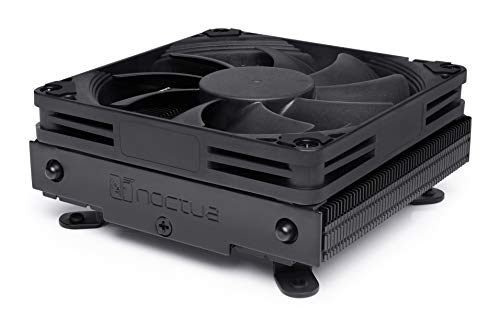
The Noctua NH-L9i chromax.black is the shortest cooler in this guide, and it is the pick for the smallest cases. The listing title states the brand Noctua, the model NH-L9i chromax.black, a quiet high-performance low-profile design, a height of only 37 mm, ITX and small form factor use, low-noise cooling, support for LGA1200 and LGA1151, a 92 mm slim fan, no RAM or PCIe overhang, and a rich accessory kit. At 37 mm tall it fits cases that no other cooler in this guide can enter, which is exactly what a tiny build needs.
The chromax.black finish is the difference between this listing and the standard NH-L9i, and it matters for a build with a window or a dark interior: the cooler is black instead of the usual brown and beige, so it blends into a black build rather than standing out. The 92 mm slim fan is the other key part, because a slim fan keeps the total height at 37 mm while still moving air down through the fins and across the board.
Key specs:
- Height: only 37 mm
- Fan: 92 mm slim fan
- Sockets: LGA1200 and LGA1151
- Design: low-profile, ITX and small form factor
- Clearance: no RAM or PCIe overhang
Strengths:
- Only 37 mm tall, fits the smallest cases
- Black finish suits dark builds
- No overhang over memory or PCIe slots
Trade-offs:
- Short heatsink limits cooling headroom
- 92 mm fan works harder than a larger fan
- Best for modest processors, not the hottest chips
The Noctua NH-L9i chromax.black fits the builder of a tiny mini-ITX machine, a slim home theatre PC, or a small form factor case with almost no cooler clearance. It is the pick when the case panel is only a few centimetres above the board.
Best for: the smallest cases, where no taller cooler fits. Not suited for: a hot desktop processor under a heavy sustained load.
Check price on Amazon: Noctua NH-L9i chromax.black

Noctua NH-L12S
The Noctua NH-L12S is the quiet low-profile pick in this guide. The listing title states the brand Noctua, the model NH-L12S, a quiet high-performance low-profile design, a height of 70 mm, ITX and small form factor use, low-noise cooling, four heatpipes, support for Intel and AMD, a 120 mm slim fan, and a rich accessory kit. At 70 mm tall with a 120 mm fan it is the middle of the Noctua low-profile range: taller than the NH-L9i, shorter than the NH-C14S, and quieter than either of the smaller coolers because its larger fan does not need to spin as fast.
Four heatpipes carry heat from the base into the fins, and the 120 mm slim fan pushes air down through those fins and across the board. That combination is what makes the NH-L12S a good cooler for a small case that still has 70 mm of clearance: it cools further than a 37 mm cooler while staying far shorter than any tower.
Key specs:
- Height: 70 mm
- Fan: 120 mm slim fan
- Heatpipes: 4
- Sockets: Intel and AMD
- Design: low-profile, ITX and small form factor
Strengths:
- 120 mm fan runs quietly for its cooling
- Four heatpipes move heat well for its size
- Mounts on Intel and AMD boards
Trade-offs:
- 70 mm needs more clearance than the shortest coolers
- No TDP rating stated in the title
- Costs more than budget low-profile coolers
The Noctua NH-L12S fits the builder of a compact case with 70 mm of cooler clearance who wants quiet cooling. It is the pick for a small form factor desktop that runs all day, where fan noise matters as much as temperature.
Best for: quiet cooling in a compact case with 70 mm of clearance. Not suited for: a case with less than 70 mm above the processor.
Check price on Amazon: Noctua NH-L12S

Noctua NH-C14S
The Noctua NH-C14S is the top-flow pick in this guide, and it is the cooler with the most cooling headroom of the six. The listing title states the brand Noctua, the model NH-C14S, a quiet high-performance top-flow design, a height of 142 mm, top-flow low-noise cooling, six heatpipes, support for Intel and AMD, a 140 mm fan, high RAM compatibility, and a rich accessory kit. Top-flow is the other name for down-blowing: the fan sits on top of the heatsink and pushes air down through the fins and onto the board.
Six heatpipes and a 140 mm fan are what set the NH-C14S apart from the shorter coolers in this guide. More heatpipes carry more heat from the processor into the fins, and a larger fan moves more air at a lower speed, so the cooler runs quietly while cooling further.
Key specs:
- Height: 142 mm
- Fan: 140 mm fan
- Heatpipes: 6
- Sockets: Intel and AMD
- Design: top-flow, high RAM compatibility
Strengths:
- Six heatpipes and a 140 mm fan cool the furthest here
- Top-flow air cools the board around the socket
- High RAM compatibility avoids memory conflicts
Trade-offs:
- 142 mm tall, needs a roomy compact case
- Wider than the shortest low-profile coolers
- Heavier than the small coolers in this guide
The Noctua NH-C14S fits the builder of a compact case with room for a 142 mm top-flow cooler who wants the most cooling a down-blowing design can give. It is the pick for a powerful processor in a small case, where a tower will not fit but a hot chip still needs cooling.
Best for: maximum cooling from a down-blowing cooler. Not suited for: the very smallest cases, where 142 mm will not fit.
Check price on Amazon: Noctua NH-C14S

be quiet! Shadow Rock LP
The be quiet! Shadow Rock LP is the quiet budget pick in this guide. The listing title states the brand be quiet!, the model Shadow Rock LP, a 130W TDP low-profile design, Intel compatibility with sockets 1700, 1200, 1150, 1151, 1155 and 2011 square ILM, AMD AM4 support, a silver finish, and the model code BK002. The 130W TDP rating is the number that matters most here, because it tells a buyer how much heat the cooler is built to move, and 130W covers a wide range of desktop processors.
Socket support is the other strength of this listing: it covers Intel sockets from 1150 through 1700 and AMD AM4, so the same cooler fits an older board and a newer one. The low-profile design keeps the cooler short for a small case, and the be quiet! name is a promise of low noise, which is what a buyer of a quiet build is paying for.
Key specs:
- TDP: 130W
- Intel sockets: 1700, 1200, 1150, 1151, 1155, 2011 square ILM
- AMD socket: AM4
- Design: low profile
- Model code: BK002
Strengths:
- 130W TDP rating covers many processors
- Broad Intel and AMD socket support
- Quiet brand with a low-profile design
Trade-offs:
- Height is not stated in the title
- Fan size is not stated in the title
- Silver finish may not suit a black build
The be quiet! Shadow Rock LP fits the buyer who wants a quiet low-profile cooler with a stated TDP rating for a mid-range processor. It is the pick for an office machine, a home theatre PC, or a compact desktop where the processor is warm but not extreme.
Best for: quiet cooling of a mid-range processor with a known TDP. Not suited for: a processor that draws far more than 130W under load.
Check price on Amazon: be quiet! Shadow Rock LP

Thermalright AXP90 X47
The Thermalright AXP90 X47 is the slim home theatre pick in this guide. The listing title states the brand Thermalright, the model AXP90 X47, a low-profile design, a 92 mm TL-9015 slim PWM fan, ITX use, a height of 47 mm, support for AMD AM4 and AM5 and Intel 1150, 1151, 1155, 1200 and 1700, and the model code AXP90 X47 in brackets. At 47 mm tall it is only 10 mm taller than the Noctua NH-L9i, which makes it a good choice for slim cases that have just a little more room than the very smallest.
The 92 mm TL-9015 slim PWM fan is the part that keeps the height down: a slim fan is thinner than a standard fan, so the whole cooler stays at 47 mm while the fan still pushes air down through the fins. PWM control is the other useful feature, because it lets the motherboard slow the fan when the processor is idle and speed it up under load, which keeps a home theatre PC quiet during a film and cool during a game.
Key specs:
- Height: 47 mm
- Fan: 92 mm TL-9015 slim PWM fan
- AMD sockets: AM4 and AM5
- Intel sockets: 1150, 1151, 1155, 1200, 1700
- Design: low profile, ITX
Strengths:
- Only 47 mm tall for slim cases
- PWM fan runs quiet at idle
- Fits current AMD and Intel sockets
Trade-offs:
- 92 mm fan works harder than a 120 mm fan
- Short heatsink limits cooling headroom
- No TDP rating stated in the title
The Thermalright AXP90 X47 fits the builder of a slim home theatre PC or a compact ITX machine with 47 mm of clearance. It is the pick when the case is too short for a 70 mm cooler but has a little more room than the 37 mm minimum.
Best for: slim home theatre and ITX builds with 47 mm of clearance. Not suited for: a hot processor that needs a taller cooler.
Check price on Amazon: Thermalright AXP90 X47

Scythe Big Shuriken 3 Rev.B
The Scythe Big Shuriken 3 Rev.B is the balanced pick in this guide. The listing title states the brand Scythe, the model Big Shuriken 3 Rev.B, a 120 mm low-profile design, a height of 67 mm, and support for Intel LGA1700 and LGA1151 and AMD AM5 and AM4. At 67 mm tall with a 120 mm fan it sits between the shortest coolers and the tallest ones: it fits cases that a 70 mm cooler would crowd, while its 120 mm fan moves more air more quietly than a 92 mm fan.
The Rev.B revision is the current version of a long-running Scythe design, and the listing states support for the newest sockets on both sides: Intel LGA1700 and AMD AM5, alongside the older LGA1151 and AM4. The 120 mm fan is the other advantage, because a larger fan at a lower speed is quieter than a small fan working hard.
Key specs:
- Height: 67 mm
- Fan: 120 mm
- Intel sockets: LGA1700, LGA1151
- AMD sockets: AM5, AM4
- Design: low profile, Rev.B
Strengths:
- 120 mm fan is quieter than a 92 mm fan
- Fits current Intel and AMD sockets
- 67 mm height balances fit and cooling
Trade-offs:
- 67 mm needs more room than the shortest coolers
- No TDP rating stated in the title
- No heatpipe count stated in the title
The Scythe Big Shuriken 3 Rev.B fits the builder of a compact case with 67 mm of clearance who wants a quiet 120 mm fan. It is the pick for a small gaming machine or a compact workstation where the cooler must be short but the processor still works hard.
Best for: a balanced small case with a 120 mm fan and 67 mm of clearance. Not suited for: the very slimmest cases, where only a 37 mm or 47 mm cooler fits.
Check price on Amazon: Scythe Big Shuriken 3 Rev.B
Buying guide for down-blowing CPU coolers
Measure the clearance first
The first step in buying a down-blowing cooler is to measure the clearance from the top of the processor to the case panel, and then to subtract a few millimetres for safety. The height stated in the listing is the height of the cooler itself, and the case needs a little extra room for airflow and for the panel to close without pressing on the fan. A cooler that is a few millimetres too tall will not fit at all, and there is no way to trim a heatsink to make it fit.
The picks in this guide range from 37 mm to 142 mm, so the measurement decides the shortlist before anything else. Measure twice, then buy once.
Match the cooler to the processor heat
The second step is to match the cooler to the heat the processor produces. A low-profile cooler suits a processor with modest heat output, while a hot processor needs a taller cooler with more fin area and a larger fan. The be quiet! Shadow Rock LP states a 130W TDP rating, which is a useful guide: a processor that draws around that much or less under load is a fair match, while a processor that draws far more needs a bigger cooler or a different case.
A buyer who does not know the processor heat should look at the processor class rather than a single number. A modest desktop processor, a low-power chip, or an older processor will run well on any cooler in this guide, while a high-end processor running a heavy sustained load will run hot on the shortest coolers.
Check the socket and the memory
The third step is to check that the cooler fits the socket and clears the memory. Every pick in this guide states its socket support in its listing, and the range is broad: the Noctua coolers cover Intel and AMD, the be quiet! Shadow Rock LP covers Intel sockets from 1150 to 1700 and AMD AM4, and the Thermalright AXP90 X47 and Scythe Big Shuriken 3 Rev.B cover current Intel and AMD platforms. A buyer should check the socket against the board before ordering, because a cooler for the wrong socket cannot be mounted at all.
Memory clearance matters just as much, because a wide down-blowing cooler sits over the memory slots. The Noctua NH-L9i chromax.black states that there is no RAM overhang, and the Noctua NH-C14S states high RAM compatibility, which means both are designed to clear tall memory.
Think about noise as well as temperature
The fourth step is to think about noise, because a cooler that keeps the processor cool but whines all day is a poor choice for a machine that sits on a desk. A larger fan moves the same air more slowly than a smaller fan, so the coolers in this guide with 120 mm and 140 mm fans will usually be quieter than the ones with 92 mm fans. The Noctua NH-C14S with its 140 mm fan and the Noctua NH-L12S with its 120 mm slim fan are the quietest picks here, while the 92 mm coolers work harder and are louder under load.
PWM control helps too, because it lets the motherboard slow the fan when the processor is idle. A buyer who values silence should pick the largest fan that fits the case and a cooler with PWM control.
Do not forget the case airflow
The fifth step is to remember that a down-blowing cooler still needs fresh air. The cooler pushes air down onto the board, but that air has to come from somewhere, and in a small case with no intake fan the cooler will recirculate warm air.
A buyer should also keep the cables tidy, because a cable draped across the cooler blocks the airflow that the fan is trying to push down. Route the cables around the cooler, not over it, and keep the intake vent clear of dust.
Using and caring for a down-blowing CPU cooler
Mounting the cooler
Mounting a down-blowing cooler is straightforward, but it rewards care. Fit the mounting hardware for the socket first, following the instructions that come with the cooler, and tighten the screws in a cross pattern a little at a time so the pressure is even. Uneven pressure can leave a gap on one side, which hurts cooling more than any other single mistake.
Use the thermal paste that comes with the cooler, or a small pea-sized drop in the centre of the processor if the cooler ships without paste. Too much paste squeezes out over the board, and too little leaves dry spots, so a small amount in the centre is the right call.
Keeping the fan clean
A down-blowing cooler collects dust on top of its fan, because the fan faces up and dust settles on it. A quick blast of compressed air every few months keeps the fan and the fins clear, and a soft brush takes off dust that the air leaves behind. Hold the fan still while blowing it out, because letting it spin freely can damage the bearing.
A clean cooler runs quieter as well as cooler, because a dusty fan has to spin faster to move the same air.
Checking temperatures after fitting
After fitting a new cooler, a buyer should check the processor temperature under load with a monitoring tool, and compare it with the temperature before the change. A cooler that is fitted well should hold the processor well below its limit under a sustained load, and the fan should settle to a steady speed rather than surging up and down.
If the temperature is higher than expected, the first thing to check is the mounting: a loose screw, a forgotten plastic cover on the base, or a cable pressing on the fan are the usual causes. Fixing the mounting is almost always cheaper and quicker than buying a different cooler.
When to replace a cooler
A down-blowing cooler lasts for years, and the usual reason to replace one is a change of socket or a move to a hotter processor, not wear. The fan is the part that wears first, and a fan that rattles or will not spin smoothly should be replaced before it stops altogether, because a stopped fan will let the processor overheat in minutes.
A buyer who moves a cooler to a new board should check that the mounting hardware fits the new socket, and should clean off the old thermal paste and apply fresh paste before refitting. Old paste dries out and loses its ability to carry heat, so fresh paste is a small job that makes a real difference.
Common mistakes when buying a down-blowing CPU cooler
Buying a cooler taller than the case
The most common mistake is buying a cooler without measuring the case clearance, and finding that the side panel will not close. The height in the listing is the whole story, and a cooler that is even a few millimetres too tall is unusable. Measure the clearance, subtract a few millimetres, and buy a cooler shorter than the result.
Choosing the shortest cooler for a hot processor
The second mistake is choosing the shortest cooler for the hottest processor. A 37 mm cooler is a marvel of compact design, but it cannot move as much heat as a 142 mm top-flow cooler, and a hot processor will run loud and warm on it. Match the cooler to the processor heat, not just to the case size, and pick the tallest cooler that fits.
Forgetting the memory and the PCIe slot
The third mistake is forgetting that a wide down-blowing cooler sits over the memory slots and sometimes over the first PCIe slot. A cooler that blocks a memory slot forces the buyer to use shorter memory or to leave a slot empty, which is a poor trade. Check the clearance the listing states, and pick a cooler that clears the memory, like the Noctua NH-L9i chromax.black with its stated lack of overhang.
Ignoring the socket
The fourth mistake is ordering a cooler for the wrong socket. The picks in this guide cover a wide range of sockets, but no cooler fits every socket, and a cooler bought for LGA1700 will not mount on AM5 without the right hardware. Check the socket in the listing against the board, and confirm that the mounting hardware for that socket is in the box.
Final recommendation
The best down-blowing CPU cooler for most small builds is the Noctua NH-L12S, because it balances height, noise, and cooling better than any other pick in this guide: at 70 mm tall with a 120 mm slim fan and four heatpipes, it fits a wide range of compact cases while running quietly, and it mounts on both Intel and AMD boards. A buyer with a case that has 70 mm of clearance should start here.
A buyer with a smaller case should pick by height: the Noctua NH-L9i chromax.black at 37 mm for the very smallest cases, the Thermalright AXP90 X47 at 47 mm for slim home theatre machines, and the Scythe Big Shuriken 3 Rev.B at 67 mm for a compact case that wants a quiet 120 mm fan. A buyer who wants the most cooling a down-blowing design can give should choose the Noctua NH-C14S, and a buyer who wants a stated TDP rating and broad socket support at a lower cost should choose the be quiet! Shadow Rock LP.
Related reading on Reviewstook: see our guides to CPU cooler buying guide, best 1151 socket CPU coolers, best low-profile CPU cooler for budget builds under 100 for more on this topic.
Frequently asked questions about down-blowing CPU coolers
What is a down-blowing CPU cooler?
A down-blowing CPU cooler is an air cooler whose fan sits on top of the heatsink and blows air down onto the motherboard, rather than a tower cooler whose fan pushes air sideways. The air passes through the fins and continues down across the memory and the voltage regulators, which cools the board as well as the processor. Down-blowing coolers are usually low-profile, which is why they are the standard choice for small cases.
Are down-blowing coolers good for gaming?
A down-blowing cooler is good for gaming when the processor heat is modest and the case is small. The picks in this guide suit compact gaming machines with mid-range processors, and the Noctua NH-C14S with six heatpipes and a 140 mm fan is the strongest choice here for a gaming processor.
How tall can a down-blowing cooler be?
Down-blowing coolers in this guide range from 37 mm for the Noctua NH-L9i chromax.black to 142 mm for the Noctua NH-C14S. The right height is whatever fits the case: measure the clearance from the processor to the case panel, subtract a few millimetres, and pick a cooler shorter than that number. A cooler taller than the clearance will not fit at all.
Do down-blowing coolers cool the motherboard too?
Yes, and that is one of their main advantages. The fan pushes air down through the heatsink and across the board, which cools the memory, the voltage regulators, and the chipset area around the socket. That matters most in a small case with little airflow, where the board components would otherwise run hot even when the processor itself is cool.
Is the Noctua NH-L9i enough for a modern processor?
The Noctua NH-L9i chromax.black is enough for a modern processor with modest heat output, such as a low-power desktop chip or a processor in a home theatre PC. It is 37 mm tall, so it fits cases nothing else can enter, but its short heatsink limits how much heat it can move.
What is the difference between a down-blowing cooler and a top-flow cooler?
There is no difference: top-flow is another name for down-blowing. Both describe a cooler whose fan sits on top of the heatsink and pushes air down onto the board. The Noctua NH-C14S in this guide is described in its listing as a top-flow cooler, and it works the same way as the other down-blowing coolers here. The opposite design is a tower cooler, whose fan pushes air sideways through a tall stack of fins.