CFast 2.0 is a card format used in some cinema and high end stills cameras. It uses a SATA interface rather than the SD format, which is why it reaches read speeds above 500 MB/s, and a camera must have a CFast slot to use one.
The six cards below cover several capacities and makers. Specs come from each Amazon listing page. We have not used these cards ourselves, and speed, endurance and compatibility claims are the makers’ own. Always check your camera’s supported card list before buying.
As an Amazon Associate we earn from qualifying purchases. Links below are affiliate links, and they do not change the product information we give.

What to Look For
| Feature | Why it matters |
|---|---|
| Camera slot | Only cameras with a CFast slot can use these cards |
| Write speed | Sustained write decides which video formats a card can record |
| Video class | VPG130 means a 130 MB/s minimum sustained write per the makers |
| Capacity | Larger cards hold more minutes of high bitrate video |
| Warranty | Terms run from limited to lifetime |
Specs at a Glance
| Card | Capacity | Read / write | Class | Warranty |
|---|---|---|---|---|
| SanDisk Extreme PRO 128GB | 128 GB | 525 / 450 MB/s | VPG130 | Lifetime limited |
| SanDisk Extreme PRO 512GB | 512 GB | 525 / 450 MB/s | VPG130; Class 10 | Lifetime limited |
| Sony CAT-G64 | 64 GB | 530 / 510 MB/s | Class 10; V30 field | 5 years limited |
| Angelbird AV PRO CF | 256 GB | 560 / 525 MB/s | Stable stream 480 MB/s | 3 years limited |
| Exascend Essential | 1 TB (also 512, 256, 128) | 550 / 530 MB/s | VPG130 | 5 years |
| Dogfish | 128 GB | 525 read; media 400 MB/s | Not stated | Not stated |
The 6 Best CFast 2.0 Cards
Top pickBest for cinema cameras
1. SanDisk Extreme PRO 128GB
A 128 GB CFast 2.0 card with up to 525 MB/s read and 450 MB/s write per the maker, Video Performance Guarantee 130 for cinema quality 4K and a lifetime limited warranty. The listing names ARRI, Blackmagic Design and Canon cameras and a 4.54 g weight.
Suits: cinema cameras. Strengths: VPG130 and a lifetime warranty. Weaknesses: modest capacity. Skip it if you shoot long takes.

View SANDISK 128GB Extreme PRO CFast 2.0 Memory Card – SDCFSP-128G-G46D on Amazon
Best for long shoots
2. SanDisk Extreme PRO 512GB
The larger version of the same line, with 512 GB, 525 MB/s read, 450 MB/s write, VPG130 and a Class 10 field. The maker notes that speeds may be lower depending on the host device. The warranty is lifetime limited.
Suits: long shoots. Strengths: a large capacity from one maker. Weaknesses: a speed identical to the 128 GB. Skip it if 128 GB is enough.

View SANDISK 512GB Extreme PRO CFast 2.0 Memory Card – SDCFSP-512G-G46D on Amazon
Best for canon bodies
3. Sony CAT-G64
A 64 GB CFast G Series 2.0 card with 530 MB/s read and up to 510 MB/s write, a Class 10 field, a V30 field, a 130 MB/s minimum write for cinema video, File Rescue software and a 5 year limited warranty. The listing names Canon EOS 1DX Mark II and C200 type cameras.
Suits: Canon bodies. Strengths: fast write and a 5 year warranty. Weaknesses: only 64 GB. Skip it if you need space.

View Sony CAT-G64 64GB High Performance CFast G Series 2.0 Memory Card on Amazon
Best for high bitrate video
4. Angelbird AV PRO CF
A 256 GB card with 560 MB/s max read and 525 MB/s max write, plus a 480 MB/s consistent write figure the maker calls Stable Stream. The listing mentions up to 12K RAW, thermal and power management, a 3 year limited warranty and a data recovery service.
Suits: high bitrate video. Strengths: the highest listed read speed here. Weaknesses: a shorter warranty than Sony. Skip it if you want the longest warranty.

View Angelbird AV PRO CF 256 GB – CFast 2.0 Memory Card on Amazon
Best for a large capacity
5. Exascend Essential
A CFast 2.0 line with 128 GB, 256 GB, 512 GB and 1 TB capacities. The 1 TB listing shows 550 MB/s read, 530 MB/s write, VPG130, 4K support and a 5 year warranty. The title carries several capacities, so choose the right option on the page.
Suits: a large capacity. Strengths: 1 TB and a 5 year warranty. Weaknesses: a multi capacity title that can confuse. Skip it if you only need 128 GB.

View Exascend Essential 1 TB / 512 GB / 256 GB CFast 2.0 Card, Read up to 550MB/s on Amazon
Best for a second or backup card
6. Dogfish 128GB
A 128 GB CFast 2.0 card with up to 525 MB/s read and a 400 MB/s media speed field. The maker claims MLC NAND and describes dust, magnet, temperature and X ray proofing. The listing shows no warranty or video class, and the maker’s claims are not checked here.
Suits: a second or backup card. Strengths: a lower cost brand. Weaknesses: fewer details and a new brand. Skip it if you need a stated video class.
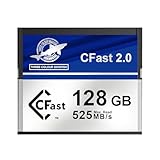
View Dogfish 128GB CFast 2.0 Memory Card, Up to 525MB/S Read on Amazon
Care Notes
- Format the card in the camera, not the computer.
- Use a CFast reader to copy files, not a USB SD reader.
- Keep spare cards in a case to protect the contacts.
- Check the camera’s firmware support list before first use.
Mistakes to Avoid
- Buying a CFast card for a camera with only an SD slot.
- Reading only the read speed and ignoring write.
- Picking the wrong capacity option on a multi size listing.
- Skipping the camera’s compatible card list.
Confirming Your Camera Supports CFast
Before comparing cards, confirm that your camera can use them at all. A CFast 2.0 card is not interchangeable with SD, CompactFlash or CFexpress, and it will not fit or work in a slot built for another format. The camera’s manual or the maker’s support page lists the slot types, and many makers also publish a list of cards they have approved for each body and recording mode.
Approval lists matter because a card can be fast on paper and still not be the one a camera maker recommends for its highest-quality modes. If your camera lists specific cards for its top data rates, treat that list as the starting point, then use the specs below to choose among them.
Check the firmware too. Some cameras need a firmware update before they recognize newer or larger-capacity cards, and the release notes often say so. If you plan to buy a very large card, look for the largest capacity the camera is documented to handle.
Also check whether your camera has one slot or two. With two slots you can record to both at once as a live backup, or split recording between them, and in that case matching the two cards in capacity and speed keeps things predictable. With a single slot, reliability becomes more important since there is no second copy.
Finally, consider other gear in the chain. If you use external recorders, monitors or card readers, confirm they also accept CFast, because a card that works in the camera is only useful if you can read it afterward.
Reading Speed Ratings the Right Way
Card listings lead with big read speeds, but recording video depends on how fast the card can write data continuously, not how quickly it can be read. Read speed mainly affects how fast you copy footage to a computer. Sustained write speed decides whether the card can keep up with the camera’s data rate without dropping frames.
Look for a stated minimum sustained write figure rather than a peak. A video performance rating such as VPG130 describes a guaranteed minimum write rate according to the makers, and it is more useful for planning than a best-case number. Peak write numbers are measured under ideal conditions, and real results can be lower, especially when a card is nearly full or has been heavily used.
Compare the card’s rating to the camera’s bitrate for your chosen recording mode. Your camera manual or recording menu normally states the data rate for each format and frame rate. Keep a margin above that figure instead of choosing a card that only just meets it, because small dips in write speed can end a take.
If a listing gives no video class and no sustained write number, treat the speed claims as incomplete and check the maker’s own documentation. A missing figure does not mean a card is bad, but it does mean you cannot plan around it. Also remember that the host device can limit speed, so a card will not exceed what your camera or reader supports.
How Much Capacity Do You Need
Capacity should come from your shooting pattern, not from the largest number on the page. A simple calculation helps: take the camera’s data rate in megabits or megabytes per second, convert to a consistent unit, and divide the card’s usable capacity by that rate to estimate recording time. Usable capacity is a little lower than the label because of formatting overhead, so leave some margin.
Think about the longest uninterrupted take you shoot. Interview and event work can run for a long time, and a card that fills mid-take forces a swap at the worst moment. Short-take work, such as commercial or narrative shooting, may do well with smaller cards that you swap often, as long as you have enough of them for a full day.
There are good arguments for both approaches:
- Fewer large cards mean fewer swaps, but all your footage sits on one card, so a single failure costs more.
- More small cards spread risk and make it easy to label and offload by scene, but they need more handling and storage.
Whichever you choose, buy enough cards to complete a full shooting day without erasing anything before it has been backed up. Do not reformat a card until the footage is copied in at least two places. If a listing offers several capacities under one title, select the exact option you want before checking out, and confirm it in the order summary.
Offloading and Backing Up Footage
A fast card is only part of a safe workflow. Plan how footage gets from card to storage, and who is responsible for checking it. CFast cards need a CFast-compatible reader, and the reader’s interface can limit copy speed, so a slow connection wastes the card’s read performance.
A sensible routine looks like this:
- Copy the card to two separate drives before doing anything else.
- Use software that verifies the copy, such as checksum comparison, rather than a plain drag and drop.
- Check that the files open and play, and that the file count and sizes match.
- Only then clear the card, ideally by formatting it in the camera.
Eject the card properly from the computer before removing it, since pulling it out mid-transfer can corrupt files. Do not let a card sit nearly full for long periods, and avoid recording to a card at the very edge of its capacity.
Label cards by number and mark used ones clearly, so no one reformats a card that still holds the only copy of a shoot. Some makers include recovery software or a recovery service with their cards. If so, read the terms, and remember it is a last resort, not a backup plan.
Reliability, Warranty and Replacement Signs
Because a card holds irreplaceable footage, reliability deserves attention alongside speed. Warranty terms vary from limited to lifetime, and a longer warranty is helpful, but read what it covers: usually the card itself, not the lost footage. Keep your purchase record in case you need to make a claim.
Counterfeit cards exist across all memory formats. Buy from sellers that are authorized by the maker, check that the listing matches the product you receive, and compare the packaging and markings against the maker’s own guidance. If a card seems unusually cheap for what it claims, that is a reason for caution. Test any new card before a real shoot by recording a long test clip and checking it plays back cleanly from start to finish.
Handle cards carefully. The connector pins are small, so keep them dry and clean, store cards in cases, and avoid bending or dropping them. Do not remove a card while the camera is writing.
Signs it is time to replace a card include write errors, files that will not play back, the camera reporting that the card needs repair or cannot be formatted, and slowdowns that make previously smooth recording drop frames. Do not keep using a card that has shown errors for important work. Move it to non-critical tasks or retire it, and replace it before the next shoot.
CFast Cards FAQ
Are CFast and CFexpress the same?
No. They are different formats with different slots, so a camera must list the one you buy.
Which cards list VPG130?
The two SanDisk cards and the Exascend list VPG130. Sony lists a 130 MB/s minimum write for cinema video.
Can I use a CFast card in an SD card slot?
No. CFast has its own slot shape and interface, so it only works in devices built for it. An adapter does not make an SD-only camera accept CFast.
Why is my card slower than the listing says?
Listed figures are the maker's best-case numbers, and real speeds depend on the camera, the reader and the connection. A nearly full card or a slow reader can also reduce results.
Should I format the card in the camera or on the computer?
In the camera. Formatting in the camera sets up the file structure the camera expects, which lowers the risk of errors during recording.
How many cards should I carry?
Enough to shoot a full day without erasing any card before its footage is backed up in two places. For long events, bring extras for any swaps and spares in case a card fails.
Is a longer warranty a sign of a better card?
It shows the maker stands behind the product, but it does not cover lost footage. Pair it with the video class, camera approval and your own testing.
Do I need a special reader to copy files?
You need a reader that supports CFast cards. A standard SD or USB stick reader will not take them, so check the reader's listing and its connection type.
Will a bigger card always record longer?
Yes, at the same data rate, but only up to what the camera supports. Check the camera's maximum documented capacity and any firmware requirement.
CFast 2.0 Compared With XQD, CFexpress and SD
Memory card formats overlap in confusing ways, so it helps to place CFast among its neighbors before buying. CFast 2.0 uses a SATA-based interface and a card shape close to, but not interchangeable with, older CompactFlash. CFexpress uses a PCIe interface and a different connector, while XQD is a separate format that CFexpress Type B later absorbed in many camera bodies. SD cards are smaller still and use their own slot design.
The practical takeaway is that the slot in your camera decides everything. A body with a CFast slot accepts CFast cards and nothing else, and a CFexpress body will not take a CFast card regardless of how fast the card is. Some cameras pair two different slot types, so you may need one card of each kind. Before spending money, find the exact slot labels in the manual or spec sheet.
- CFast 2.0 is mature, widely documented and often found on cinema and professional bodies from several years ago.
- CFexpress is the newer path and tends to appear on current flagship cameras.
- SD is the cheapest per gigabyte but is usually the slowest option for sustained high-bitrate video.
If you own an older body that you plan to keep, CFast remains a sensible format to buy into. If you are about to replace the camera, check which format the new one uses before stocking up on cards.
Why Cards Slow Down During Long Recordings
A card that performs well in a short test can behave differently across a long take. Flash memory writes data in blocks, and as a card fills it has less free space to rearrange those blocks efficiently. Many cards also generate heat during sustained writing and may reduce their speed to protect themselves. Neither effect is a defect; both are normal behavior for flash storage, and they are the main reasons a published sustained-write figure is more useful than a peak number.
You can reduce the chance of surprises with a few habits:
- Format the card in the camera before each shoot so the file structure matches what the camera expects.
- Avoid running a card to the last few percent of capacity for demanding formats, since the camera may struggle to find clean write space.
- Keep cards out of direct sun and hot car interiors before use, because a warm card starts the session with less thermal headroom.
- Do a long test recording at your real settings before an important job, not just a short clip.
If dropped frames or recording stops appear, note the codec, resolution and frame rate before blaming the card. The camera setting may simply ask for more than the card can sustain.
Planning Card Counts for a Shoot Day
The right number of cards depends on how you shoot, not just the file size. A wedding photographer shooting stills in bursts has different needs from a documentary operator rolling for long takes. Start by estimating your recording data rate, multiply by the hours you expect to record, and add a margin. Then divide that total by the capacity you plan to buy.
Using several moderate cards instead of one large card spreads risk. If one card fails or is lost, you lose a portion of the day rather than all of it. On the other hand, constant card swaps interrupt long events and create more chances to mislabel or misplace media. Many shooters settle on a middle path, such as two or three mid-size cards per day with a clear system for which ones are full.
A simple routine works well: keep empty cards in one pocket or case slot, move full ones to a different, marked spot, and never reformat a card until you have confirmed two copies of its contents exist. Label cards with numbers so you can trace a problem file back to a specific card.
Card Readers, Cables and Computer Ports
Copy speed depends on the whole chain, not only the card. A CFast reader must support the SATA-based interface, and a basic reader on a slow USB port will bottleneck a fast card. Look for a reader that states its USB generation and confirm that the port on your computer matches. A fast reader plugged into an older port will behave like a slow one.
Cable quality matters too. A short, well-made cable reduces dropouts during long transfers, and a loose or worn connector is a common cause of interrupted copies. If you work with large files, consider a direct reader rather than connecting the camera itself as a drive, which ties up the camera battery and may run slower.
- Check that the reader lists CFast 2.0 support explicitly.
- Use a port on the computer itself rather than an unpowered hub when possible.
- Eject the card through the operating system before pulling it out to avoid file system damage.
Frequently Asked Questions
Can I recover files from a CFast card after deleting them?
Sometimes, but there is no guarantee. Deleting usually removes the file listing rather than erasing the data, so recovery software can occasionally find footage. The chance drops sharply once you record new files over the same space. If you delete something by mistake, stop using the card immediately and attempt recovery before shooting again.
Do CFast cards get hot during use?
They can warm up during sustained writing, especially in demanding video modes or warm weather. Mild warmth is normal. If a card feels very hot or the camera warns about temperature, give it time to cool, shade the camera, and consider lowering the recording bitrate. Heat is a common reason performance dips over a long take.
Is it safe to fill a CFast card completely?
It generally works, but it is not ideal for demanding recording. A nearly full card has less free space for the controller to manage writes, which can reduce sustained speed. Many shooters swap cards before reaching the very end, and they copy and verify footage before reusing the card.
How long do CFast cards last?
There is no single answer, since lifespan depends on how much data you write, how you handle the card and the manufacturer’s design. Flash memory wears with use, and warranty terms offer a rough guide to what a maker expects. Replace a card that shows errors, unexplained slowdowns or failed copies, and keep backups regardless of age.
The Short Version
For VPG130 from a well known maker, the SanDisk 128GB. For more space, the SanDisk 512GB or Exascend 1 TB. For Canon bodies, the Sony CAT-G64. For the top read speed, the Angelbird AV PRO CF. For a backup card, the Dogfish.