reviewstook.com is reader-supported. When you buy through links on our site, we may earn an affiliate commission.
Where to buy
All six options below are available through Amazon — follow any pick’s link to check price on Amazon and confirm exactly what the listing includes, since several of these cameras travel in bundles whose extras range from genuinely useful to decorative. For a business buying one camera that several people will use, the boring details in a listing — cable length, mount type, warranty terms — matter more than the headline resolution.
The best cameras for website video blogs serve a different master from a YouTube channel’s camera. A video embedded on a small business website — the plumber explaining a boiler fault, the bakery owner walking through the morning’s bake, the consultant answering the question every client asks — is not chasing subscribers. It is doing a job of trust at the exact moment a visitor decides whether to call, book or buy. That changes what good means. The picture must look credible rather than cinematic, the workflow must survive being operated by whoever in the business has twenty spare minutes, and the camera must produce a file that behaves itself when it is uploaded to a website builder, compressed by a hosting platform and played on a phone over a weak connection in a car park.
So this guide judges cameras as business equipment. Can a non-specialist set it up on a Tuesday and film the month’s videos in one sitting? Does it make a workshop, a treatment room or a shop floor look like a place a customer would trust? Does it forgive the lighting those rooms actually have? The six picks span the realistic budgets of small firms: two webcams for desk-based explainers, two compacts for premises tours and product demonstrations, one mirrorless body for the business whose website is its showroom, and one pick that is not a camera purchase at all — because for some websites, the honest recommendation is to spend the money elsewhere first.
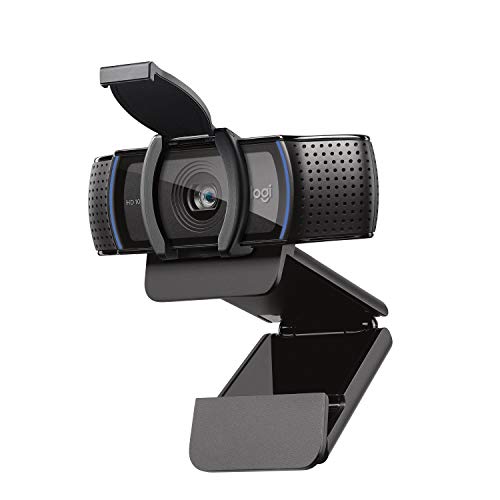
- Logitech C920S HD Pro Webcam: check price on Amazon
- NexiGo N60: check price on Amazon
- Sony ZV-1F: check price on Amazon
- DJI Osmo Pocket 3: check price on Amazon
- Nikon Z50 II: check price on Amazon
- The phone already in your pocket, on a tripod: prose-only pick, explained below
One distinction runs through everything that follows. A channel films for an audience that chose to watch; a website films for a visitor who is deciding whether to stay. Website video therefore rewards clarity, brevity and a human face at a sensible size in the frame, and it punishes anything that makes a business look careless — shaky footage, echoing sound, a proprietor squinting into a badly placed lens. Keep that test in mind and the picks below sort themselves quickly.
Key Takeaways
- The Logitech C920S is the default desk explainer camera: proven, private by design, and understood by every computer it meets.
- NexiGo’s N60 covers the second desk and the tight budget without embarrassing the business on screen.
- Sony’s ZV-1F films products and people with a polish that makes a small firm look established.
- The DJI Osmo Pocket 3 turns a premises tour from a seasick wobble into a guided walk.
- Nikon’s Z50 II is the showroom choice when the website carries the whole sales conversation.
- A phone on a tripod, lit properly, beats a new camera used badly — the prose-only pick argues the case.
In this guide
Quick Picks
| Camera | Badge | Why it earns its place |
|---|---|---|
| Logitech C920S HD Pro Webcam | Best desk explainer | The safe pair of eyes for FAQ videos, updates and screen-side answers. |
| NexiGo N60 | Best budget webcam | Honest 1080p for the second office, the spare desk, the satellite branch. |
| Sony ZV-1F | Best for product demos | Focus that steps to the item in your hand while you keep talking. |
| DJI Osmo Pocket 3 | Best for premises tours | A gimbal steadies walkthroughs of shops, salons, sites and showrooms. |
| Nikon Z50 II | Best showroom body | Mirrorless depth for businesses whose website is the sales floor. |
| Your current smartphone on a tripod | Best zero-purchase start | Filming this week beats filming perfectly next quarter. |
What does a website video actually need from a camera?
Less resolution than the marketing suggests, and more reliability. An embedded player on a service page typically shows video in a window far smaller than a television, frequently on a phone, and the platform compresses whatever you upload. A clean, well-lit 1080p picture survives that journey beautifully; a noisy 4K picture shot in a dim workshop arrives as mush with a bigger file size. What the camera must guarantee is consistency: the same framing every time the business films, focus that stays on the person explaining, and exposure that does not lurch when someone walks past a window. It must also be operable by the business’s least technical person, because in a small firm the camera’s owner is whoever is free. We therefore weighted setup simplicity, forgiving autofocus and honest performance under ordinary ceiling lights above every specification that sounds impressive in a listing. We also considered the embed itself — a camera whose files are standard, whose aspect ratio suits web players, and whose workflow ends in an uploadable file without transcoding adventures scored heavily, because a video that never reaches the page persuades nobody.
Two practicalities close the criteria. Storage: a business’s videos are records as much as marketing, so the camera’s files should land in the firm’s normal backup from the day filming starts, not in a personal account that leaves with an employee. And consent: anyone filmed — staff, customers, visitors caught in a tour — deserves to know and to agree, a habit that costs a sentence of conversation and protects the business from the one video problem no camera can fix. Equipment chosen with those two habits in mind serves the website for years without ever making the firm regret a frame of it.

Logitech C920S HD Pro Webcam — Best desk explainer
Few products in this guide have filmed more small-business websites than the C920S. It is the camera of the FAQ video and the monthly update: clipped to the office monitor, framing the owner at the desk where customers already imagine them, producing a picture whose entire message is ‘a real person, in a real business, answering you directly.’ Its 1080p image is not the sharpest here and was never the point. The point is that it is never the reason a video did not get made.
The privacy shutter deserves its place in a business context rather than a gadget one. A camera on a work computer that can be physically covered settles staff nerves, satisfies cautious clients on calls, and removes the low-grade worry that follows lens-equipped desks. For firms in advice, care or finance-adjacent trades, that little flap of plastic is a governance feature wearing a simple disguise.
Picture manners are tuned for the talking head at a desk: autofocus that stays with a face through natural movement, light correction that rescues the office whose only window is behind the chair, and a field of view wide enough for a natural frame without swallowing the whole room. It asks nothing — no menus to learn, no settings to maintain — which is why the staff member deputised to film the updates will actually film them.
Sound from its stereo microphones is adequate for a quiet office and honest about its limits in a workshop. Businesses filming explainers at a desk can start here and add a separate microphone later; businesses filming in echoing spaces should read the audio section below before blaming any camera for what a hard-walled room does to a voice.
Choose the C920S when the website’s video job is a person explaining things from a desk, filmed regularly by ordinary humans. It is the lowest-risk purchase in this guide, and for a great many small firms it is also the final one — the camera that quietly serves for years while the business spends its money on things customers value more.
- Format: 1080p USB webcam with privacy shutter
- Framing: desk-distance field of view for one speaker
- Audio: built-in stereo microphones
- Setup: plug-and-play across office computers
Strengths
- Understood by every computer and colleague
- Physical privacy cover for work desks
- Forgiving picture under office lighting
Trade-offs
- 1080p ceiling in a 4K world
- Workshop noise defeats its microphones
- Fixed framing once clipped in place
Best for: service businesses filming FAQ and update videos at a desk. Not suited for: premises tours, product close-ups, or noisy working environments.
There is a quiet operational virtue in choosing the camera your industry already uses. Staff moving between employers arrive pre-trained, a borrowed replacement matches the mount and the framing, and every troubleshooting answer online assumes your exact device. For a business, that ecosystem of familiarity is worth real money over a five-year life, and it is one more reason the C920S keeps its place at the head of this list: it is not merely a good webcam, it is the shared standard that makes a firm’s video habits portable between people, desks and branches without a single retraining conversation.

NexiGo N60 — Best budget webcam
Every business has a second location for video: the other branch, the home office of the partner who handles the blog, the spare desk where the apprentice films the how-to clips. The N60 exists for those desks. It delivers an honest 1080p picture at a budget tier, with a privacy cover and a microphone that handles a quiet room respectably, and it does so without asking the business to standardise on premium hardware for people who film twice a month.
Judge it by the job and it is well aimed. Website visitors do not compare your video against a studio production; they compare it against the competitor’s page, which very likely has no video at all, or a wobbling phone clip from 2019. A steady, lit, clearly framed N60 explainer wins that comparison every time, and the money saved against a premium webcam buys the tripod, the lamp and the backdrop that lift the result further than resolution would.
Its software control is a small-business kindness: settings can be adjusted from the computer rather than by reaching for the camera, so the person filming can fix a too-wide frame or a dim picture from the chair. The fixed focus philosophy suits a seated speaker at a consistent distance — set the chair, set the camera, and every subsequent session inherits the arrangement.
Weaknesses arrive exactly where the price predicts. Low light is handled adequately rather than gracefully, fast movement is not its friend, and it will not flatter a face the way larger sensors do. None of those matter for a seated explainer in a lit room, which is the precise and common job this camera is bought for.
Buy the N60 for second desks, satellite staff and first attempts — the branch manager’s updates, the trainee’s tutorials, the pilot series the business is testing before investing. If the pilot becomes the website’s centrepiece, the business will know exactly which upgrade it needs and why; until then, this is money proportioned to the task.
- Format: 1080p USB webcam
- Controls: software adjustment from the computer
- Cover: built-in privacy cover
- Fit: seated speaker at a fixed desk distance
Strengths
- Budget price that frees money for light and support
- Software control without touching the camera
- Perfectly credible for embedded web players
Trade-offs
- Ordinary low-light manners
- Not built for movement or tours
- Picture flatters less than bigger-sensor picks
Best for: second desks, branch updates and pilot video series. Not suited for: flagship homepage films or dim, echoing workspaces.
Think of the N60 as the camera of the pilot scheme and the outpost. A firm testing whether video moves its enquiries should not begin by equipping every desk like a studio; it should put an honest camera where the experiment is happening, learn what the audience responds to, and let the results argue for the upgrades. The N60’s adequacy is strategic — good enough that a failed experiment indicts the format rather than the equipment, cheap enough that a successful one can be scaled across desks in a single order. Many a website’s video library began exactly this way: one modest camera, one willing colleague, and a month of evidence.

Sony ZV-1F — Best for product demos
A product demonstration is the most persuasive video a small business can publish and the hardest to film with a webcam, because the star of the video keeps changing: one moment the owner’s face, the next the item in their hands, small enough that focus and framing decide whether the visitor sees it or a blur shaped like it. The ZV-1F was built for exactly that alternation. Its product showcase behaviour steps focus to the object held toward the lens, holds it there while the talking continues, then returns to the face — a party trick that happens to be the entire grammar of demo video.
The 1-inch sensor and wide fixed lens suit the physical reality of small premises. In a cramped treatment room, a jeweller’s bench or a kitchen showroom corner, the wide view fits the person and the workspace from a tripod distance those rooms can actually offer, and the sensor keeps the picture clean under the mixed lighting — daylight, spots, a warm lamp — that real premises mix without asking a camera’s permission.
For website use, its virtues compound quietly. Files are standard and well behaved for upload; the camera starts quickly, which suits filming between customers; the microphone direction favours the person in front of it over the room behind. A business can batch a month of sixty-second demonstrations in one morning, each ending with the product in focus and the owner mid-sentence rather than mid-squint at a hunting lens.
The fixed lens is the standing caveat: the framing is the framing, so the tripod position must be chosen with care, and a business wanting tight close-ups of tiny components should stage them deliberately — bring the item to the camera, which is what the showcase mode rewards. Battery discipline applies as with any compact: a spare or USB power for a long filming morning.
Choose the ZV-1F when the website sells things that can be held, turned over and shown. It makes a one-person business look like it has a media department, and it does so at the exact moments — the close-up, the reveal, the comparison in hand — where buying decisions are actually made.
- Format: compact camera, 1-inch sensor, fixed wide lens
- Focus: product showcase mode for held items
- Colour: this listing is the white finish
- Power: USB charging suits desk-side filming
Strengths
- Focus follows the product, not just the person
- Wide lens fits small rooms and benches
- Batch-filming speed for monthly content
Trade-offs
- Fixed lens fixes your working distance
- Close detail needs deliberate staging
- Battery sized for sessions, not days
Best for: retailers, makers and clinics demonstrating products or treatments. Not suited for: wide premises walkthroughs or multi-person scenes.
Build the filming session around the product’s rhythm and the ZV-1F rewards you further. Script the hand movements, not just the words: raise the item on the sentence that names it, turn it on the sentence that describes the feature, set it down before the price-and-practicalities sentence so focus returns to your face for the part where trust matters. That choreography sounds theatrical written down and feels invisible on screen, where it reads simply as competence. It is also repeatable by whoever covers for you — a colleague can learn the raise-turn-rest pattern in one sitting, which is how a small firm’s video style survives holidays and staff changes.

DJI Osmo Pocket 3 — Best for premises tours
The tour is the second great website genre: the walk through the salon, the site, the showroom, the rental property, the gym at its quiet best. Filmed on an ordinary camera it is a seasick sway that makes good premises look suspect. The Pocket 3’s three-axis gimbal exists to delete that problem. Walking footage comes out level and gliding, doorways stop lurching, and the visitor’s attention stays on the space instead of on the filming. For businesses whose premises are the product, that steadiness is not polish — it is the message.
Its size changes who can film. A gimbal camera the weight of a phone can be carried by the person showing the space, operated one-handed while the other hand opens doors and gestures at features, and its face tracking keeps a presenter framed during the talking segments at the start and end of the walk. The rotating screen flips to vertical for the social clips that increasingly feed the website’s traffic, so one filming session stocks both the page and the profiles that lead to it.
Audio while walking is where small cameras usually surrender; the Pocket 3’s compatibility with DJI’s wireless microphones gives the presenter a voice that stays constant while the rooms change around them. A guided tour narrated clearly, over steady pictures, at a walking pace a visitor can absorb — that is a sales asset a business can film in an afternoon and use for years.
Respect its limits. It is a small camera with a fixed lens: it will not zoom across a warehouse, and cavernous or very dark spaces will test it. A gimbal is also a mechanism that prefers its case to a site toolbox. For premises of ordinary scale in ordinary light — which describes most businesses reading this — those limits rarely appear.
Buy the Pocket 3 if your website needs to show a place. Estate and letting work, hospitality, fitness, workshops that welcome visitors, showrooms of every kind: anywhere the customer’s real question is ‘what is it like there?’, this is the camera that answers it honestly and steadily.
- Format: gimbal-stabilised camera, 1-inch sensor
- Stabilisation: three-axis mechanical gimbal
- Screen: rotating display for vertical clips
- Audio: pairs with DJI wireless microphones
Strengths
- Walkthroughs that glide instead of sway
- One-handed filming while presenting
- Vertical versions from the same session
Trade-offs
- Fixed lens, no reach across big spaces
- Very dark premises test its sensor
- Gimbal wants careful storage
Best for: tours of shops, salons, properties, gyms and showrooms. Not suited for: huge warehouses or filming in near darkness.
Route planning is the unglamorous skill that separates a good tour from a rambling one, and the Pocket 3 supports the planning unusually well because its small size invites rehearsal. Walk the route once with the camera off, noting where light changes — the bright window halfway down the salon, the dim corridor to the treatment rooms — then walk it filming, at the pace of a customer being shown around by a proud owner rather than a surveyor. Ninety seconds of that, steady and narrated, tells a prospective visitor more than a gallery of forty photographs, and the gimbal ensures the only thing they remember is the premises themselves.

Nikon Z50 II — Best showroom body
Some websites are brochures; others are the entire sales floor. The design studio, the bespoke kitchen firm, the clinic with considered interiors, the maker whose workshop is a brand — for these businesses the homepage film carries the weight a showroom visit would, and it deserves a real camera. The Z50 II is the sensible summit of this guide: a mirrorless body with interchangeable lenses, colour presets that make attractive footage achievable for non-specialists, and stills strong enough to supply the website’s photography from the same device.
Its appeal for a business is the preset philosophy. Nikon’s colour recipes and the camera’s friendly automation let a non-photographer produce warm, finished-looking video without a colour-grading chapter in their life, while the controls remain fully manual for the day the business hires or becomes someone who wants them. Wireless sharing moves clips to the phone or computer for the website’s content system without a card-reader ritual, which matters when the person filming is also the person uploading, invoicing and answering the phone.
As a system it grows the way businesses grow. Start with the standard lens for explainers and tours of modest rooms; add a fast prime when the interview series becomes the site’s flagship; add a wider lens when the premises films begin. Each addition is a deliberate purchase against a known job, which is how equipment budgets should behave, and the body remains the centre of all of it for years.
The costs are the familiar mirrorless ones. It needs a tripod, a microphone plugged into it rather than borrowed from it, and an owner willing to spend one afternoon learning its menus. Its built-in sound is a scratch track, not a solution. A business filming twice a year should not buy it; a business whose website films monthly and photographs weekly should not buy less.
Choose the Z50 II when the website is the showroom and the camera will also be the firm’s photographer. It is the only pick here that can carry an entire visual identity — film, product photography, team portraits, premises stills — and that consolidation is its real economy.
- Format: APS-C mirrorless, interchangeable lenses
- Colour: built-in presets for finished-looking footage
- Sharing: wireless transfer to phone and computer
- Role: video body and website stills camera in one
Strengths
- One device for the site’s film and photography
- Presets flatter non-specialist operators
- Lens system grows with the business
Trade-offs
- Needs tripod and a real microphone
- An afternoon of menus to learn
- Too much camera for twice-a-year filming
Best for: design-led firms whose website is their showroom. Not suited for: occasional filming or anyone wanting zero setup.
One more consolidation deserves emphasis, because it decides budgets. A website needs stills constantly — the team page, the finished-project gallery, the product shots, the premises on a bright morning — and most small firms currently source them from phones of varying vintage and hope. The Z50 II replaces that lottery with one competent instrument and one set of habits. When the same device, the same light and the same eye produce the site’s films and photographs, the pages begin to look designed rather than accumulated, and visitors read that coherence as the business’s character before they read a single word of copy.
Your current smartphone on a tripod — Best zero-purchase start
This pick has no link because there is nothing to buy, and it may be the most useful recommendation in the guide. The phone already in the business owner’s pocket films at resolutions beyond what an embedded web player will ever show, focuses capably, and is understood by its owner down to the last setting. What phone footage usually lacks is not quality but discipline: it is handheld, backlit, filmed from chest height against a window, with the room’s echo doing the narration. A tripod, a window faced rather than backed, and a room chosen for softness fix three quarters of that in one afternoon.
Consider what the saved money buys instead. A simple microphone that plugs into the phone transforms intelligibility — the single quality website visitors judge most harshly. A basic light softens the office’s ceiling glare. A plain backdrop or a tidied, deliberate corner of the premises gives every video a recognisable home. Spent that way, a camera budget produces a visibly and audibly better website this month, while the firm learns — from real uploads and real visitor behaviour — what its videos actually need.
The phone route also teaches the format before the firm pays for it. Ten published explainers reveal whether visitors watch, where they stop, and which questions the videos must answer; that knowledge turns a later camera purchase from a guess into a specification. Businesses that buy the camera first routinely discover their audience wanted shorter videos, closer framing or captions — discoveries that cost nothing on a phone.
Its ceiling is real and should be named. Phones struggle with product close-ups, with long filming sessions, with premises tours beyond a slow pan, and with looking like a considered production rather than a captured moment. When the website’s ambitions reach those jobs, the picks above are waiting, and the firm will buy them with evidence in hand.
Treat this pick as the guide’s honesty clause. If the business has no videos yet, start here this week. If it has twenty phone videos and clear evidence of what they cannot do, buy the camera that does that thing. Either way, the website gets better on purpose rather than on hope.
- Format: the phone you already own
- Support: tripod and a fixed filming position
- Audio: add a plug-in microphone first
- Cost: nothing until evidence justifies a camera
Strengths
- Filming can start this week
- Money goes to sound and light first
- Teaches the format before the spend
Trade-offs
- Weak at close-ups and long sessions
- Tours limited to slow, careful movement
- Footage can look captured, not produced
Best for: businesses publishing their first website videos. Not suited for: firms with an established video library and known unmet needs.
Set two ground rules if the phone becomes the interim studio camera. First, it films in flight mode with notifications silenced, because a supplier’s text arriving mid-take has ended more good recordings than any technical failure. Second, it films from the same tripod position in the same room every time, so the website’s videos share a backdrop and a light — the beginnings of a visual identity the business will later hand over, intact, to whichever dedicated camera it eventually buys. Interim equipment treated with permanent discipline stops looking interim remarkably quickly.
How long should a website video be, and how does that change the camera choice?
Most service-page videos earn their keep between forty-five seconds and three minutes: long enough to answer one question properly, short enough that a deciding visitor finishes it. That brevity is liberating for equipment. Nobody needs cinema battery life for a two-minute explainer; nobody needs a cinema sensor for a player window on a contact page. What short videos demand instead is speed of setup — the camera that is ready in one minute gets the monthly batch filmed, while the camera that needs twenty minutes of assembly gets postponed until the batch quietly becomes next quarter’s intention. Film in batches regardless of length: one set-up, one lighting arrangement, four or five scripts. Batching is why consistency appears across a website’s videos, and consistency is what makes a small firm look like an organised one. Choose the camera whose Tuesday-morning setup you can picture without sighing, and the content calendar survives contact with the business’s real life.
Why does sound matter more than picture on a business website?
Because the visitor is listening for competence. A slightly soft picture of the owner reads as approachable; a voice bouncing off a tiled room reads as careless, and the visitor cannot un-hear it. Rooms cause most of it — hard floors, bare walls and high ceilings are echo machines — so choose the softest room the business has, add cushions, curtains or stock boxes to break up reflections, and place the microphone close to the speaker, because closeness beats expense at every price. Webcams sit at monitor distance, which is workable; cameras on tripods across a room need their microphone brought to the person, by cable or wireless. Test with headphones before the real take and listen for the room rather than the words: if you can hear the space more than the speaker, move closer, soften the room, or change rooms. That one test, honestly passed, lifts a business’s videos further than any camera upgrade in this guide.
What should a business film first?
The questions the phone already answers. Every small firm fields the same five enquiries weekly; film those five answers and the website starts working like an extra staff member. Follow with the trust pieces: the owner introducing the business by name, a walk around the premises for visitors who have never been, the demonstration of the thing most often misunderstood. Resist filming the cinematic brand story first — it is the hardest genre, the least watched, and the one whose absence nobody notices. Practical videos get watched to the end, get shared between partners and families making decisions, and get found by searchers typing the exact question the video answers. A camera bought to film those will justify itself within a month; a camera bought for a brand film justifies itself at a wrap party that may never happen.
How should a business prepare a room for filming in under an hour?
Work in rings, from the camera outward. First ring, the frame itself: sit where you will sit, look at the picture, and remove everything that does not earn its place — the stacked paperwork, the branded mug of a supplier, the coat on the door. Second ring, the light: close or open curtains until your face is lit evenly from the front, and move the desk lamp to fill the shadow side rather than to brighten the ceiling. Third ring, the sound: turn off the fridge hum, the fan, the notification sounds, and clap once on a test recording to hear how much room is in your voice. Fourth ring, the background’s story: one shelf of relevant objects, the framed certificate, the tools of the trade arranged like you mean it. An hour spent this way photographs as a business that has its act together, because for that hour, demonstrably, it did. Photograph the finished arrangement with your phone and tape the picture inside a cupboard door — next month’s setup then takes ten minutes and matches this month’s exactly.
What makes visitors actually press play on a service page?
The thumbnail and the first five seconds, which are really one decision. A face looking at the camera, mid-expression, with the question the video answers visible in the page text beside it, outperforms every scenic opening ever embedded. Visitors press play to meet a person, not to watch a building. Once playing, the video must reward the click immediately: name the question, promise the answer’s shape, then deliver it without preamble about the business’s history. Camera choice feeds this quietly — a camera that starts instantly and frames a face well makes the honest, direct opening easy to film, while a fussy setup tempts its owner into wide establishing shots and logo animations that visitors skip or abandon. Judge every filming habit by whether it gets a real face talking to the visitor sooner; the metrics of small-business video are decided in those first seconds far more than in any specification.
How do you keep a website’s videos looking consistent as staff change?
Write the setup down as if for a stranger, because one day a stranger — a new hire, a covering colleague — will use it. One page suffices: a photograph of the camera position, the three settings that must not change, where the light stands, the chair’s distance marked on the floor with tape, and the file-naming habit the website’s library depends on. Consistency is a documentation problem wearing a technology costume. Every model shortlisted here was picked partly for how little such a document needs to say about it: webcams that simply work, presets that remember themselves, phones whose owners already know them. A business that documents its setup owns a style; a business that keeps it in one person’s head rents one, and the rent comes due at the worst possible moment.
Where should website videos live — embedded, linked, or both?
Embed the keepers on the pages they serve, and treat social platforms as the distribution that leads visitors back to those pages. An explainer embedded beside the service it explains works at the moment of decision; the same video only on a social profile works for whoever the algorithm shows it to, which may include nobody local. File discipline supports the strategy: keep the master files in the business’s own storage, named by question rather than by date, so that when the website is redesigned — and it will be — the library survives the move and the new pages inherit working assets instead of broken embeds and lost originals. Cameras that produce standard files without exotic wrappers serve this archival life best, another quiet point in favour of the mainstream picks in this guide. A video library is a business asset with a longer life than any single camera; buy and file accordingly.
How do you film a testimonial without making the customer regret it?
Customers do businesses a favour on camera, and the filming should feel like one being returned. Keep it short, keep the camera at their eye level, and ask the two questions whose answers cannot ramble: what was the problem, and what is different now. Any steady camera in this guide films an adequate testimonial in a lit room; the craft is in the care around it — a quiet space, water on the table, the promise kept that it will be brief. Film two takes of the key answer and let the customer choose nothing; choosing is your job, and sparing them the review process is part of the thanks. Testimonials filmed with this lightness get volunteered for; testimonials filmed as productions get declined, and a page of genuine faces saying specific things remains the most persuasive video a local business can own.
What should the filming kit bag contain besides the camera?
Remarkably little, if each item earns its place. The tripod or mount that holds the camera at eye level. The microphone that brings the voice close. A cleaning cloth, because a fingerprint on a small lens softens a month of videos before anyone notices why. A spare cable and the charger, because the most common filming failure in small businesses is not image quality but a flat battery and a missing lead. A roll of tape for marking positions and taming cables. And the one-page setup sheet from the consistency section, laminated by experience if not by plastic. That bag, kept together and kept charged, is the difference between a business that films when it plans to and a business that films when the stars align. The camera is the bag’s most expensive resident and, day to day, not its most important one.
How do seasonal and update videos change the buying logic?
A website’s video life is not only its evergreen explainers. There are the seasonal messages — the heating firm’s autumn check reminder, the accountant’s year-end deadlines, the retailer’s delivery cut-offs — and the reactive updates when something in the trade changes and the business wants its customers hearing it from them first. These videos are worthless if they take a week to produce; their entire value is timeliness. That argues for the camera that lives set up, or sets up in minutes, over the camera with the finest image and the longest ritual. It also argues for a standing arrangement — a corner that is always filmable, a backdrop that needs no dressing — because the update that must be filmed today will be filmed in whatever the room currently looks like. Businesses that publish timely updates are read as attentive; the equipment decision that enables attentiveness is boring, permanent readiness, and it should be made deliberately.
What does accessibility require from a business’s filming habits?
Captions were covered in the questions below; accessibility reaches further into how the videos are made. Speak the important visuals aloud — the model number, the price-bearing detail, the before-and-after difference — so a visitor who cannot see the frame still receives the information. Keep demonstrations inside the frame’s centre, where a cropped or zoomed view keeps them. Avoid conveying anything by colour alone, and say what the colour is when it matters. None of this asks anything of the camera; all of it asks something of the script, and a business that builds the habits early finds its videos serve every visitor rather than the imagined average one. It is also, not incidentally, good search practice and good manners, three justifications that rarely align so neatly.
How should a business decide between filming in-house and hiring it out?
Price the two honestly across a year. A hired crew buys polish and buys it per day; the videos are beautiful, infrequent, and slightly intimidating to update, so they age in place while the business changes around them. In-house filming buys frequency and ownership: the explainers multiply, the updates stay current, and the style becomes the firm’s own face rather than a production company’s. Most small businesses land on the hybrid — one hired day for the flagship homepage film, in-house cameras for everything that must stay alive — and the picks in this guide are chosen for the in-house half of that bargain. The deciding question is not which looks better in the first month. It is which arrangement still produces accurate, current video in the eighteenth month, when the prices have changed, the staff have changed, and the website must not be caught describing a business that no longer exists.
Comparison Table
| Camera | Form | Films best | Signature strength | Watch out for |
|---|---|---|---|---|
| Logitech C920S HD Pro Webcam | Webcam | Desk explainers | Zero-learning operation | Noise and movement |
| NexiGo N60 | Webcam | Second-desk updates | Budget honesty | Dim rooms |
| Sony ZV-1F | Compact | Product demos | Showcase focus | Fixed framing |
| DJI Osmo Pocket 3 | Gimbal camera | Premises tours | Steady walking shots | Dark, huge spaces |
| Nikon Z50 II | Mirrorless | Showroom films and stills | Whole visual identity | Setup and microphone needed |
| Smartphone on a tripod | Already owned | First explainers | Starts this week | Close-ups and tours |
Which mistakes make a good business look amateur on video?
The window silhouette leads the list: the owner filmed against bright daylight becomes a shape, not a person, and trust drains out of the frame. Turn around and face the light. Second is the echoing room chosen because it looks impressive — marble and glass photograph beautifully and sound like a stairwell. Third, the camera at waist height on a desk pile, filming upward at a proprietor who appears to be addressing a security camera. Fourth, reading a script from just beside the lens with eyes visibly travelling; a spoken answer, slightly imperfect, outperforms a read one at every moment. Fifth, publishing without watching the upload — compression, captions and the player’s thumbnail all deserve one check on a phone, because that is where the visitor will meet it. None of these mistakes is about equipment, which is precisely why a modest camera used with care beats the finest body in this guide used without it.
Final Recommendation
Start where your website actually is. No videos yet: the phone on a tripod, a microphone, the five questions your customers always ask. Desk explainers as a habit: the C920S for the main desk, the N60 for everywhere else. Products to show: the ZV-1F. Premises to show off: the Pocket 3. A website that is the whole showroom: the Z50 II, bought once and used for film and photography alike. Whichever you choose, batch the filming, face the light, and put the microphone close — the camera is the smallest part of looking trustworthy, and this guide’s picks simply make sure it is never the part that lets the business down.
Related guides
- Best DIY Security Cameras for Small Business: Self-Installed Systems With Local Storage
- Best Digital Cameras for Filming: Practical Picks for Creators, Events and Small Business
- Best Cameras with Video for Teen Creators: Hybrid Picks Parents Can Trust
Frequently Asked Questions
Is 1080p enough for a business website?
For embedded players, comfortably yes. Visitors watch in modest windows, often on phones, and platforms compress uploads regardless. A well-lit 1080p video looks more professional than a dim 4K one, and its files upload faster and behave better on ordinary hosting.
Should the owner appear on camera, or use voiceover?
The owner, wherever the trade allows it. Website video is a trust instrument, and a face attached to a name converts better than narration over stock footage. Voiceover suits process shots — hands working, premises empty — where a person would block the view.
Do we need captions on website videos?
Yes, as a default. Many visitors watch muted — in offices, on trains, beside sleeping children — and captions also help search engines understand the page. Most platforms generate them automatically; spend ten minutes correcting names and trade terms.
How often should a small business publish video?
Monthly consistency beats weekly ambition abandoned by spring. A batch of four short explainers filmed in one morning covers a month of pages and posts, and the rhythm keeps the camera setup familiar instead of forgotten.
Can one camera serve two branches?
It can travel, but consistency suffers: each branch films in different light with different habits. A modest webcam per branch, matched in framing, usually serves the website better than one premium camera on a rota.
What is the first upgrade after the camera?
The microphone, then the light, in that order for spoken video. Visitors forgive a plain picture with clear sound and abandon a beautiful picture they cannot comfortably hear. Both upgrades cost less than any camera in this guide.
Measure the library once a year, briefly and without vanity. Which videos get watched to the end, which pages with video produce enquiries, which questions keep arriving by phone despite having a video that answers them — those three lists tell the business what to film next, what to refilm better, and what to retire. A camera strategy reviewed against that evidence stays a business tool. One reviewed against other businesses’ websites becomes a shopping habit, and shopping was never the point of any of this.
And keep the outtakes folder. Not for entertainment — although it will provide some — but because the false starts show the next person exactly how the regular presenter handles a stumble: pause, breathe, repeat the sentence, carry on. New staff learn more about the firm’s on-camera manner from three honest outtakes than from any style guide, and the library of finished videos quietly gains a training department.
Should website videos be hosted on the site itself or on a video platform?
On a platform, embedded into the site, for almost every small business. Self-hosted video files punish mobile visitors and the firm’s bandwidth alike, while platform players adapt quality to the connection and handle the formats. Keep the master files in your own archive either way, so the library outlives any platform account.
Related Guides
For the rest of the small-business media kit, see our reading on simple lighting for office video, the practical notes on recording clear speech in echoing rooms, and our checklist for embedding video without slowing your pages.


