reviewstook.com is reader-supported. When you buy through links on our site, we may earn an affiliate commission.
Where to Buy a Camera for Watching Over a Child at Night
Parents searching for the best cameras for childhood epilepsy are usually looking for one thing above all: eyes on their child’s room at night, from their own bed, without sleeping in a chair beside the cot forever. The best cameras for childhood epilepsy households are therefore monitoring cameras judged by a parent’s criteria — clear night vision across a dark bedroom, sound sensitive enough to carry a change in breathing or movement through a wall, alerts that wake a sleeping adult without alarming the whole house nightly, and recording that lets a family review the night with their child’s care team. This guide ranks six options by exactly those criteria.
An essential honesty belongs at the top, before any product: a general-purpose camera is not a medical device. It does not detect seizures reliably, it does not replace any monitoring your child’s clinicians have recommended, and dedicated seizure-detection devices exist as a separate, specialised category that your care team can advise on. What the cameras here do — and do well — is extend a parent’s awareness: a live view, honest night audio, motion alerts as a prompt to check, and a recording of the night that can inform conversations with the people who actually manage your child’s care. Four picks are purpose-built baby and room monitors covered prose-only; two are verified-pool webcams that suit a PC-based monitoring setup, linked normally.
Every family’s situation differs — the child’s age, the room layout, whether a parent sleeps beside them, what the care team has already put in place — so the reviews are written as fit guidance rather than a league table. Read the sections on alerting, privacy and safe sleep as carefully as the camera reviews; in this category, how a camera is used matters as much as which camera it is.
Key Takeaways
- These cameras provide monitoring and peace of mind — they are not medical devices and cannot reliably detect seizures.
- Night vision quality and audio sensitivity are the two specifications that matter most in a child’s dark bedroom.
- Recording matters: a reviewable night is genuinely useful in conversations with your child’s care team.
- Dedicated baby monitors work without Wi-Fi or accounts; app-based systems add remote viewing and smarter alerts.
- Two verified-pool webcams suit families who prefer a PC-based, locally controlled monitoring setup.
- Camera placement must respect safe-sleep guidance — mounted clear of the cot, cords far out of reach, always.
In this guide
Quick Picks
| Pick | Badge | Why it suits a monitoring household |
|---|---|---|
| Nanit Pro | Best app-based monitor | Excellent night imaging, breathing-motion monitoring features and a reviewable record of the night. |
| CuboAi Plus | Best alert-focused design | Alerts for face-covering and rollover events plus strong night vision and sleep analytics for parents. |
| VTech VM819 | Best no-Wi-Fi workhorse | A dedicated parent-unit monitor with long range, night vision and audio — no app, no account, no internet. |
| Infant Optics DXR-8 Pro | Best interchangeable lenses | Swappable lenses including a zoom for the cot view, on a private, hack-resistant dedicated link. |
| Logitech C920S | Best PC-based budget view | A dependable webcam for a spare-PC monitoring station with local recording under your control. |
| NexiGo N60 | Best simple second angle | An affordable USB camera for a playroom or a second viewpoint in a locally recorded setup. |
How Did We Choose the Best Cameras for Childhood Epilepsy Households?
We started from the night itself. The camera’s infrared view must resolve a small child’s position and movement across a typical bedroom, not merely show a glowing cot-shaped blur, and its microphone must carry the sounds a parent listens for — stirring, vocalising, unusual quiet after activity — through a closed door’s worth of distance. We weighted monitors whose night performance is their design centre, not a daylight camera’s afterthought, and we treated marketing claims about detection with the scepticism this category demands: features that prompt a parent to check are valuable; promises that a consumer camera diagnoses or guarantees detection are not claims this guide repeats or relies on.
Alerting philosophy came next. A monitor that cries wolf hourly trains exhausted parents to mute it, which is worse than no monitor at all; a monitor whose sensitivity can be tuned — motion zones, sound thresholds, delays — respects the household’s sleep while keeping the prompt meaningful. Recording and review formed the third criterion, because families consistently tell clinicians that being able to show the night, rather than describe it from broken sleep, changes the quality of the conversation. Local recording options scored for privacy; cloud options scored for convenience, with the trade stated plainly.
Finally, the unglamorous fundamentals: safe mounting clear of the sleep space, cords that can be routed entirely out of reach, a parent unit or app that behaves at 3 a.m. without updates or login screens, and a manufacturer’s privacy and security posture worthy of a camera in a child’s bedroom. The six picks divide those virtues between the dedicated-monitor world and the PC-based world, and the fit notes say which households each world suits.
What Can a Camera Honestly Do for Your Family?
Three things, stated without inflation. It can shorten the distance between your bed and your child’s room to a glance, which for many parents converts a night of listening at doors into something closer to rest. It can prompt — a sound, a movement, an alert — sending you to check sooner than you might otherwise have checked, with all the caveats about false alarms and missed events that honest prompting carries. And it can remember: a recording of the night’s events, timestamped and reviewable, which parents can share with clinicians who otherwise work from a tired family’s recollection.
What it cannot do bears repeating because the stakes are a child’s safety: it cannot watch in the medical sense, cannot be relied on to recognise a seizure, and cannot substitute for the supervision and any dedicated monitoring your care team advises. Families should treat the camera as one layer among several — alongside the care plan, the sleeping arrangements and the guidance of the professionals who know the child — and should raise the monitoring question at appointments, where dedicated devices and current guidance can be matched to the individual child. This guide’s cameras earn their place inside that layered picture, not instead of it.
Nanit Pro — Best app-based monitor
The Nanit Pro is the monitor parents most often describe as their window into the night: mounted above the cot or bed, it delivers a strikingly clear overhead view in darkness, tracks sleep patterns across the night, and offers breathing-motion monitoring through its special sleepwear system — a feature families should understand as a wellness prompt within the app, and discuss with their care team like everything else in this category. For the recording criterion this guide weights heavily, its event history and saved clips give parents something concrete to review and share.
The system’s intelligence lives in the app and a subscription tier, which is its honest trade: remote viewing from anywhere, alerts tuned by the platform, and analytics that improve over time, against a dependence on Wi-Fi, an account and ongoing costs for the full feature set. Privacy-conscious families should read its data practices as carefully as its night-vision samples. For parents who want the most developed monitoring ecosystem and are comfortable inside it, the Nanit is the benchmark the others are measured against.
- Format: Wi-Fi smart monitor, overhead mounting
- Night view: excellent infrared clarity
- Features: sleep tracking, breathing-motion system, event clips
- Viewing: app-based, local and remote
- Costs: subscription unlocks the full analytics
Strengths
- The clearest overhead night view in this guide.
- A reviewable record of the night supports care-team conversations.
- Sleep insights help families see patterns tired memory misses.
Trade-offs
- Full features sit behind a subscription and a cloud account.
- Wi-Fi dependence means an outage is a monitoring outage.
- Wellness features must not be mistaken for medical monitoring.
Best for: parents wanting the richest app-based view and record of the night.
Not suited for: families avoiding clouds, accounts or subscriptions.
CuboAi Plus — Best alert-focused design
CuboAi built its name on alerting: its monitor watches for a baby’s face being covered and for rollovers, and notifies parents — the kind of prompt-based design this guide endorses when it is understood as a prompt to check, not a guarantee of detection. Its night vision is strong, its sleep analytics are thoughtfully presented, and its design — a bird-shaped camera on a stand or wall mount — is the rare monitor that a child’s room absorbs without looking like a security installation.
Like the Nanit, it is a Wi-Fi, app-centred system with the convenience and the dependencies that implies, and its alert features are tuned for infants in cots more than for older children in beds — families of toddlers and school-age children should weigh how the detection features map to a child who moves around a whole room. As an alerting layer for the cot years, thoughtfully used and honestly understood, it is among the most parent-centred designs here.
- Format: Wi-Fi smart monitor
- Alerts: face-covered and rollover notifications
- Night view: strong infrared performance
- Features: sleep analytics, danger-zone alerts
- Viewing: app-based with sharing for caregivers
Strengths
- Alert design focuses on the events parents actually fear at night.
- Gentle design suits a child’s room better than security styling.
- Caregiver sharing keeps grandparents and sitters inside the loop.
Trade-offs
- Detection features are infant-centred; older children outgrow their design.
- App and cloud dependence, as with all smart monitors here.
- Alerts prompt checking — they are not, and cannot be, a safety guarantee.
Best for: cot-years families wanting the most thoughtful alert prompts.
Not suited for: older children’s whole-room monitoring or offline households.
VTech VM819 — Best no-Wi-Fi workhorse
The VM819 is the monitor for families who want the camera to be a camera and nothing else: a camera unit in the child’s room and a dedicated parent unit with its own screen, talking over a private radio link — no Wi-Fi, no app, no account, nothing to hack through the internet and nothing to update at midnight. Its night vision covers the room honestly, its audio is clear, its range crosses a house and garden, and its parent unit’s battery lasts through the night it is needed. For older children, the same simplicity applies: a view and a sound feed, owned entirely by the household.
What it surrenders is the smart layer — no recordings to review unless you add them, no remote viewing from outside the home, no analytics. For many families in this guide’s situation, that trade is the point: the monitoring stays inside the house, works during internet outages, and asks nothing of exhausted parents but a glance. As the dependable baseline of a layered setup — the always-on local monitor beneath any smarter additions — it earns its place permanently.
- Format: dedicated video monitor, private link
- Night view: infrared with automatic switching
- Audio: two-way talk and clear sound feed
- Range: long, through a typical house
- Connectivity: none — no Wi-Fi or account
Strengths
- Total independence from internet, apps and accounts.
- A dedicated screen that simply works at 3 a.m.
- Privacy by architecture, not by settings.
Trade-offs
- No recording or review of the night.
- No viewing from outside the home.
- Image detail is a tier below the smart monitors.
Best for: privacy-first families and as the reliable base layer of any setup.
Not suited for: parents who need recordings for care-team review.
Infant Optics DXR-8 Pro — Best interchangeable lenses
The DXR-8 Pro’s distinction is optical: interchangeable lenses, including a zoom lens that frames the cot or bed tightly from across the room, on a dedicated monitor link with a reputation for reliability and privacy. That zoom matters in real bedrooms, where the only safe mounting point may be a shelf across the room and a wide lens would shrink the child to a dozen pixels. Its parent unit offers a large, clear screen, its night vision is strong, and its active noise reduction keeps the audio feed cleaner than most dedicated monitors manage.
It shares the dedicated-monitor trade — no app, no cloud recording, no remote view — and answers with the dedicated-monitor virtues: instant-on, private and boringly dependable. For families whose priority is the clearest possible local view of the sleep space, with the lens matched to the room rather than the room rearranged for the lens, it is the connoisseur’s choice in this guide.
- Format: dedicated monitor with swappable lenses
- Lenses: standard, zoom and wide options
- Night view: strong infrared with clear audio
- Link: private, non-Wi-Fi connection
- Screen: large parent unit display
Strengths
- The zoom lens solves real mounting-distance problems.
- Private link and instant-on suit security-conscious households.
- Audio clarity leads the dedicated-monitor class.
Trade-offs
- No recording, remote viewing or smart alerts.
- Extra lenses are separate purchases to plan for.
- Premium pricing for a deliberately simple system.
Best for: families wanting the best local view with complete privacy.
Not suited for: parents who need an app, alerts or a reviewable record.

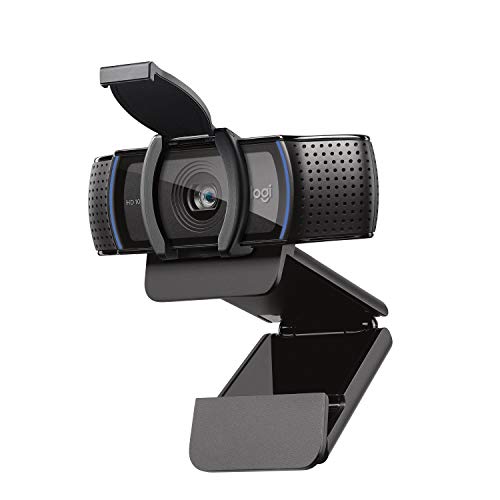
Logitech C920S — Best PC-based budget view
Some families prefer their monitoring to live on a computer they control — recording locally, on their own software, with no manufacturer’s cloud in the story — and the C920S is the classic camera for that station. Mounted safely in the child’s room and connected to a spare PC or a small dedicated machine, it provides a dependable 1080p view with a privacy shutter for the hours monitoring is off, and local recording software can keep the night’s footage on a drive in your own home. Its low-light performance is honest rather than specialised — a small lamp’s glow or a night-light lifts it considerably — and its microphone serves a room’s ambience adequately at short range.
The caveats are the setup’s nature: it needs the PC awake, the software configured, and a parent comfortable owning that chain, and it has no infrared of its own, so very dark rooms will want one of the dedicated monitors instead or a low light source the child sleeps well with. As the flexible, locally controlled layer — also useful for daytime playroom viewing and video calls with family — it is the budget-conscious route into recorded monitoring without a subscription.
- Format: USB webcam for PC-based monitoring
- Video: 1080p with autofocus
- Recording: local, via your own software
- Privacy: physical shutter built in
- Night: needs some ambient light; no infrared
Strengths
- Local recording keeps footage entirely in the family’s hands.
- No subscription, account or cloud dependence.
- Doubles as an excellent family video-call camera by day.
Trade-offs
- No infrared — dark rooms need a light source or a different pick.
- Requires a PC and setup effort the dedicated monitors avoid.
- Alerts depend on the software you choose and configure.
Best for: technically comfortable families wanting local, recorded monitoring cheaply.
Not suited for: pitch-dark rooms or parents wanting a plug-and-go monitor.

NexiGo N60 — Best simple second angle
The N60 is the utility player of this guide: an affordable 1080p USB webcam with a privacy cover and a wide-enough view to serve as the second angle in a PC-based setup — the playroom by day, the doorway view at night, the backup camera that costs little enough to simply have. In a layered monitoring arrangement, that second viewpoint resolves the first camera’s blind corner and gives parents context when a sound needs locating. Its low-light behaviour, like the Logitech’s, is a daylight design’s honesty: pair it with the room’s night-light rather than expecting infrared miracles.
It will not be a household’s only monitor for a dark bedroom, and it makes no claim to be. Its place is the family that has built the local-recording station described above and wants coverage of the second space — the sibling’s room, the play area, the hall — without a second full system. Bought for that job, with its limits understood, it is exactly the right size of purchase.
- Format: USB webcam
- Video: 1080p with fixed focus
- Privacy: cover included
- Role: second angle in PC-based setups
- Night: works with a night-light’s ambient glow
Strengths
- Affordable coverage for the second room or angle.
- Plug-and-play simplicity with local recording software.
- Privacy cover for the hours the camera is off duty.
Trade-offs
- No infrared and modest low-light reach.
- Fixed focus is less forgiving of placement than autofocus.
- A supporting player, not a primary night monitor.
Best for: second angles and daytime rooms in a locally recorded setup.
Not suited for: primary monitoring of a dark bedroom.
How Do the Best Cameras for Childhood Epilepsy Households Compare?
| Camera | Type | Night strength | Recording | Internet needed? |
|---|---|---|---|---|
| Nanit Pro | Smart monitor | Excellent | Cloud clips and history | Yes |
| CuboAi Plus | Smart monitor | Strong | App-based events | Yes |
| VTech VM819 | Dedicated monitor | Good | None | No |
| Infant Optics DXR-8 Pro | Dedicated monitor | Strong | None | No |
| Logitech C920S | Webcam + PC | Needs ambient light | Local, your software | No |
| NexiGo N60 | Webcam + PC | Needs ambient light | Local, your software | No |
The table’s deepest divide is philosophy: smart monitors that think in a cloud, dedicated monitors that think nowhere at all, and PC setups that think in your own house. Families in this guide’s situation should choose the philosophy first — it decides privacy, cost and what happens in an outage — and the model second.
How Do You Place a Camera Safely in a Child’s Bedroom?
Placement is a safety task before it is a photography task. Mount the camera high and angled down at the sleep space, or on a shelf it cannot be pulled from, with every cord routed along the wall and secured entirely out of a child’s reach — across the room and behind furniture where necessary, because a cord within reach of a cot or a climbing child is a hazard no footage justifies. Follow the safe-sleep guidance your clinicians and national bodies give for the sleep space itself: the camera watches the cot or bed; it never shares it, and nothing the camera needs — mounts, cables, lights — should enter it.
Then tune the view like a parent, not a technician: the child large enough in frame that position and movement read clearly, the door inside the frame’s edge if night wandering is part of your picture, and the night-light placed so it helps the camera without shining into the child’s eyes. Test at the real hour, with the real darkness, lying in your own bed with the parent unit or phone in hand — because that, and not the showroom demo, is the monitoring you are buying.
What Should You Discuss With Your Child’s Care Team?
Bring the monitoring question to the people who know your child: what, if anything, do they recommend watching for at night in your child’s specific case; are dedicated seizure-detection devices appropriate for your family, and which kind; how would they like nighttime events documented if you are recording; and what sleeping arrangement do they advise as the foundation the camera merely supplements? Families who have this conversation buy cameras differently — usually more calmly, and sometimes discovering that the care plan already answers half the anxiety the shopping was trying to soothe.
Share recordings thoughtfully when you have them: short, timestamped clips of the events that prompted questions, rather than a hard drive of whole nights. Clinicians’ time is finite, and a family that arrives with the relevant ninety seconds and a clear question gets a different appointment from one that arrives with a terabyte and a worry. The cameras in this guide that record — the smart monitors and the PC setups — exist in this section’s service as much as in the night’s.
Which Mistakes Do Parents Make With Monitoring Cameras?
Believing the marketing over the care plan
Consumer cameras are sold with language that drifts toward reassurance no device in this guide can honestly sell. The care plan from your child’s clinicians is the authority; the camera is equipment inside it. Any product — in this guide or beyond it — whose claims make you feel the plan matters less should be distrusted on that ground alone.
Tuning alerts until they are ignored
Maximum sensitivity feels safest and works worst: a monitor that alerts for every roll and sigh teaches exhausted parents to sleep through it or switch it off. Tune for the events you would act on, accept the quieter night, and review the settings as the child grows — the right threshold for a baby is wrong for a seven-year-old, and the monitor should grow up with its subject.
Mounting for the photograph instead of the child
The prettiest angle is rarely the safest or the most informative. Cords come first, then the clarity of the child’s position in frame, then everything else. A slightly awkward view from a properly secured mount is a success; a beautiful view from a camera a toddler can reach is a failure wearing good composition.
Letting the camera replace the check
A quiet screen can mean a sleeping child or a failed camera, a flat battery, a frozen app. When something feels wrong — or even periodically, as a drill — go and look with your own eyes. The monitor’s job is to prompt the check and shorten the distance, never to certify the night from a bedside table.
Final Recommendation
For most families, start with the layer that cannot fail: a dedicated monitor like the VTech or the Infant Optics for the always-on local view, then add the smart layer — Nanit’s record of the night or CuboAi’s alert prompts — if your care team conversations suggest the recording and prompts will genuinely be used. Technically comfortable households can build the same layers locally with the Logitech station and the NexiGo’s second angle. Above all, buy the camera as part of the care plan, place it with cords and safe sleep first, and let it do its honest work: shortening the distance between your bed and your child’s, one glance at a time.
Related guides
- Best Cameras for Monitoring: Home Monitoring Picks for Rooms, Pets and Empty Houses
- Best Cameras for Horse Stall — Night Watch, Foaling and Dark-Barn Monitoring That Earns Its Sleep
Frequently Asked Questions
Can a baby monitor detect seizures?
No consumer camera or baby monitor reliably detects seizures, and none in this guide claims to. Dedicated seizure-detection devices exist as a separate category using different sensors and evidence; whether one suits your child is a question for their care team, who know the type and pattern of their epilepsy.
Is recording the night actually useful for clinicians?
Often, yes — a short, timestamped clip of an event can inform a consultation far better than a tired recollection. Ask your care team what they would find useful and in what format, and keep clips organised by date so the relevant night is findable.
Wi-Fi smart monitor or dedicated monitor — which is safer?
They fail differently. Dedicated monitors cannot be reached through the internet and work in outages, but offer no recording or remote view. Smart monitors record and alert richly but depend on accounts, updates and your network’s security. Many families layer both, as the recommendation above suggests.
Where exactly should the camera point?
At the sleep space from a secured mount outside it, angled so the child’s whole body and position read clearly, with cords routed entirely out of reach. Confirm the view at night, from your own bed, before trusting it.
How can I protect the privacy of a camera in my child’s room?
Use strong, unique passwords and two-factor authentication on any account, keep firmware updated, prefer local or dedicated-link systems where privacy is paramount, use the physical shutter or power switch for off-duty hours on the webcams, and review who has app access as caregivers change.
How Does Monitoring Change as a Child Grows?
The cot years are a camera’s easiest assignment: one small person, one defined sleep space, a view that barely changes. The toddler and school years redraw the problem — the child moves around a whole room, leaves the bed, reads, plays quietly at hours when the household sleeps — and the monitor’s job shifts from watching a sleeper to knowing a room’s state. Wide views gain value over tight cot framing, which is where the Infant Optics’ wide lens option and the webcams’ room coverage earn their keep, and alert thresholds must be re-tuned from “any movement” to “the movements that matter”, or the system drowns the parents it was bought to rest.
Privacy grows with the child, and the monitoring should shrink gracefully in step: a camera appropriate for a baby’s room needs rethinking for a nine-year-old’s, in placement, in hours and in who can view it. Families do well to make the camera a discussed, agreed presence as the child becomes old enough to have views about it — including, eventually, the view that it should go. The goal was never surveillance of a childhood; it was a bridge across the years when a parent’s presence needed extending, and bridges are meant to be crossed and, in time, retired.
What Does a Sustainable Night Routine Look Like for Parents?
The monitor serves the parents’ sleep as much as the child’s safety, and routines protect both. Set the parent unit or phone where a glance is possible without a search; agree which parent responds to which prompt on which nights, because two half-awake adults duplicating every check is its own exhaustion; and keep a simple log — a notebook by the bed beats an app nobody opens — of the nights events happened, since patterns across weeks are what care teams can actually reason from, and what tired memory reliably invents wrongly.
Build the failure drill in daylight: what does the household do when the monitor loses signal, the power cuts, the app logs out? The dedicated monitors shine in this drill by having almost nothing to fail, and every setup benefits from the parents having answered the question before 3 a.m. asks it. A monitoring system, like everything else in a caring household, works because the people around it have thought — not because the camera has.
How Do You Monitor Away From Home — Travel, Hospital and Grandparents?
Travel rearranges the geometry: unfamiliar rooms, different darkness, a child sleeping in a travel cot or a strange bed. The portable end of this guide travels best — a smart monitor that joins the holiday home’s Wi-Fi, or the webcam-and-laptop station for families already running it — while the dedicated monitors work anywhere instantly, which is why many families keep one as the travel unit even after upgrading at home. In grandparents’ houses, simplicity rules twice over: the system the grandparents can operate at midnight is the right system, whatever its specifications.
Hospital stays and respite care are conversations, not purchases: ask the ward or the carers what monitoring is already in place and what of your own is welcome, because professional settings have their own systems and rules. The family’s camera knowledge still helps — you will read a new setup’s strengths in minutes — but the layered principle holds: the camera supplements the care arrangement, and away from home the care arrangement is somebody else’s to lead.
How Should Siblings and Shared Rooms Change the Setup?
A shared room doubles the cast and complicates every alert: the sibling’s nightmare, coughing fit or dawn expedition will trigger the system tuned for one child, and parents learn quickly to read the monitor’s prompts as a question — which child, what kind of movement — rather than an answer. Wider framing helps, and so does placing the camera for the child whose monitoring matters most while accepting the sibling inside the same frame. Talk to the sibling, at their level, about why the camera is there; children accept remarkable things explained honestly, and resent mysterious ones, and a sibling who understands the camera becomes its ally — the one who calls out when something seems wrong — rather than its saboteur.
Two-child households with different needs sometimes justify the layered answer at room scale: a dedicated monitor holding the simple always-on view, and recordings kept only for the child whose care plan uses them, with retention and access set accordingly. The principle is proportionality — monitor what the care requires, no more — applied with the same care to data as to cameras.
What Does the Evidence-Minded Parent Do Differently?
They treat every claim — including this guide’s — as a hypothesis to test in their own child’s room. They trial the camera for a fortnight before trusting its prompts, noting which alerts were worth waking for and which were weather. They ask the care team before buying the second device, not after. They keep the log, date the clips, and let patterns rather than single nights drive decisions. And they hold the technology to a household standard: if the monitor is increasing the family’s anxiety rather than organising it, the setup is wrong regardless of its specifications, and changing it is a success, not a surrender.
That stance, more than any model choice, is what this guide hopes to leave behind. The families who fare best with monitoring technology are the ones who remain its editors — tuning, questioning, retiring — while the cameras, from the humblest dedicated unit to the smartest app, do the narrow, honest work of carrying a picture and a sound across a dark house to the people who love the child in the room.
Should we tell our child about the camera?
At an age where they can understand, yes — in the same matter-of-fact tone as the rest of the care plan: it helps Mum and Dad check on you at night so everyone sleeps better, and here is where it points. Children who know and accept the arrangement relax around it; children who discover a hidden camera learn a different lesson entirely, and it is not the one a caring household wants to teach.
How Do You Test a Monitor Before Trusting It?
Give it a fortnight’s probation with the household as its examiner. Night one is geometry: the view from your bed, the child’s size in frame, the cords’ final audit. The first week is alert calibration — a notebook by the parent unit recording every prompt and whether it deserved to wake anyone — from which the sensitivity settings get their evidence-based values rather than their factory ones. The second week is failure rehearsal: unplug the router if it is a smart system, let the parent unit’s battery run down once in daylight, open the app on the second parent’s phone, and discover every login, update and flat-battery behaviour while the stakes are a drill.
Only after probation does the monitor join the care plan as a working layer — and even then, it stays on the household’s review cycle, retested when the child changes rooms, beds or medication, because all three change what the night looks like. That probation discipline is the difference between a family that owns a monitoring system and a family that owns a camera and a hope, and it costs nothing but a notebook and a fortnight’s honesty.
What Support Exists Beyond the Camera?
Families navigating childhood epilepsy do not do it with gadgets alone, and a responsible guide should point past its own category. Epilepsy charities and family organisations in most countries run helplines, parent networks and practical guidance on nights, safety and schooling that no camera manual contains; paediatric epilepsy nurses are often the most practical advisors a family will ever meet; and parent communities — moderated, experienced, awake at the same hours you are — carry the kind of knowledge that only shared nights produce. The camera questions in this guide are, in the end, small questions. The big ones have human addresses, and families should feel entirely entitled to use every one of them.
Within the home, share the monitoring load where you can: partners spelling each other, grandparents briefed on the setup during stays, respite where it is offered. A camera that lets a second trusted adult hold the watch for a night is, for many parents, the most valuable feature in this entire guide — rest is not a luxury in a caring household, it is infrastructure, and every pick above was judged partly by how safely it lets somebody else keep the vigil for a while.
A closing word to the parent reading this at the end of a long day, possibly a long night: the fact that you are researching this carefully is itself part of your child’s safety — the camera is only the artefact of the attention you are already paying. Choose the monitor that fits your home’s philosophy and your care team’s advice, mount it safely, tune it honestly, and then let it take its modest place in the team around your child: the clinicians, the family, the plan, and one small camera on the wall, watching the dark so that you, sometimes, can rest. That rest is not a small thing. In a house like yours, it is one of the main things — and it is what every camera in this guide is ultimately for. Set yours up this week, run the fortnight’s probation without skipping the boring parts, and bring your notes — the alert log, the clips, the questions the nights raised — to the next appointment, where the people who know your child can help you decide what, if anything, the setup needs next. That is the camera working exactly as it should: not as an answer, but as a member of the team that finds answers together. Choose it kindly, place it safely, and may your household’s nights grow, slowly and then noticeably, more restful — with the monitor’s small screen glowing on the bedside table, the child asleep in the next room, and the distance between those two facts finally, mercifully, short.
What About Daytime — Naps, Play and Quiet Time?
Night dominates this guide because night dominates parents’ worry, but the same cameras earn their keep by day in quieter ways. Nap monitoring for younger children is the obvious shift-change, with the same view and the same prompts serving a parent downstairs. For older children, the camera’s daytime role is usually narrower and should be agreed as such — a check-in during quiet time for a child who needs rest after a difficult morning, a view of the playroom while a parent cooks — rather than general supervision, which belongs to adults in the room. The webcams’ shutters and the smart monitors’ privacy modes exist for exactly this boundary-keeping: the camera that can be visibly, physically off is the camera a growing child can live with.
Daylight also exposes the one technical gap in the webcam picks — none of this guide’s cameras struggles in daylight, but the PC-based pair come into their own there, doubling as the family’s video-call and playroom cameras, which spreads their modest cost across the whole day. When a household adds up a monitor’s value, the honest arithmetic includes those daylight hours, and it is often the arithmetic that justifies the second angle.
How Long Should Recordings Be Kept, and Who Should See Them?
Retention is a care decision disguised as a storage setting. A rolling week covers most families’ rhythm of noticing, reviewing and raising questions; clips of specific events can be exported and kept with the child’s records for as long as they remain clinically useful, shared with the care team through whatever channel they prefer. Beyond that, indefinite archives of a child’s bedroom serve no one — they grow the privacy surface without growing the care — and the disciplined deletion of old footage is part of running the system kindly. Set the retention deliberately, in the app or the recording software, rather than inheriting whatever default the manufacturer chose.
Access deserves the same deliberation: the smallest possible list of viewers, reviewed when caregivers change, with grandparents and sitters given the access their role needs and no more. If a relationship or an arrangement ends, change the passwords the same week. These are unglamorous habits, and they are the difference between a monitoring system that protects a child in every sense and one that protects them in only the sense its box advertised.
What if our child shares a room with us?
Room-sharing families need less camera, not none: the monitor’s value shifts from the night — where a parent’s own senses are present — to the hours the child sleeps while the household is still awake downstairs, and to naps. A simple dedicated monitor covers those windows completely, and the smart layers can wait until the child’s own room makes them relevant. Buy for the arrangement you have, revisit when it changes, and let nobody sell you a system sized for a house you do not live in.
Can a monitor help with a child who wanders at night?
As a prompt, yes: a camera covering the bedroom door or the landing, with motion alerts tuned to that zone, can tell parents a small person is abroad sooner than waiting for the sound of the stairs. It remains a prompt to go and look, not a containment system — doors, gates and the household’s own night arrangements do the physical work — but as the layer that wakes the household kindly and early, many families in this guide’s situation count it among the camera’s most practical gifts.
One more reassurance, because the parents reading this guide tend to be the ones who blame themselves for not doing enough: a household with a care plan, a safely placed camera from this list, a notebook by the bed and a care team on the phone has built a thoughtful, layered night. Perfection is not available in this category and was never the standard; attentiveness is, and yours is already evident in the reading. Choose the camera, set it up this week, and let the household’s nights be a little more ordinary — ordinary being, for families like yours, the most precious word in this entire guide. May there be many ordinary nights ahead — monitored lightly, slept deeply, and remembered, if they are remembered at all, for nothing more dramatic than a household at rest.
How Do You Choose Between the Smart and Simple Philosophies, Finally?
Ask three questions of your household and let the answers choose. Do we need a record of the night for our care conversations — if yes, the smart monitors or the PC station must be in the setup, because the dedicated pair cannot record. Do we trust ourselves to maintain accounts, updates and passwords well — if the honest answer is “barely, on our current sleep”, the dedicated monitors’ freedom from all three is worth more than any feature list. And who else needs to watch — a grandparent across town argues for the app; a sitter in the next room argues for the parent unit. Most families land, as this guide’s recommendation lands, on the layered answer: simple at the core, smart where it earns its complexity, and a care team who know the arrangement exists. Decide by those questions and the model names almost choose themselves — and whichever name yours chooses, the household around it, attentive and honest about what a camera is, remains the real monitoring system, as it was before the camera arrived and as it will be long after the camera has been retired to a drawer. Everything between those two points is just a family, doing its best, with a little help from the six honest devices above — chosen carefully, placed safely, tuned patiently, and held, always, in their proper place: underneath the care plan, behind the clinicians’ advice, and beside the parents whose attention no device will ever replace. Set the camera up, write the first page of the notebook, and let tonight be the first night the new arrangement stands watch with you — quietly, competently, and in its proper place in a house that was already, camera or no camera, doing the essential thing: paying attention to a child, through the night, together.
What Questions Should You Ask Before You Buy?
Before any model name is chosen, a household does well to answer a short list out loud, together, ideally with the care team’s input still fresh. Where will the camera mount, and can every cord reach a socket without crossing anywhere a child can reach? Who will hold the watching on which nights, and what wakes that person — a screen’s glow, a sound, a vibration? What will we do with recordings: keep them a week, export the important ones, show them to whom? What is our plan the first time the system fails at night — because the honest answer, rehearsed once in daylight, is worth more than a second camera bought in panic later?
Then the budget question, asked without embarrassment: what can this household sustain — not just buy, but sustain, in subscriptions, replacements and attention — for the years this monitoring may run? The dedicated monitors answer that question with a single purchase and no tail; the smart systems answer with a smaller start and a continuing cost that buys their recording and their intelligence. Neither answer is wrong. The wrong answer is the one chosen without asking, discovered month by month, in a house that had enough surprises already.
Answer those, and the six reviews above sort themselves with unusual speed: the recording question points to Nanit, CuboAi or the PC pair; the simplicity question points to VTech or Infant Optics; the mounting question may point to the zoom lens; the second-room question finds the NexiGo waiting. That sorting, done by your household’s answers rather than by any guide’s ranking, is the most reliable purchasing instrument in this entire article — the cameras were only ever the shortlist.
Related Guides
Related reading: best cameras for baby photos, best cameras for blue iris system and best cameras for boys age 10.


