The best AMD ITX motherboards pack a full Ryzen system into a board the size of a paperback book, and that is the whole appeal of mini-ITX: a small case on your desk instead of a tower on the floor, with no real compromise on performance. A good ITX board runs the same Ryzen 7000, 8000, or 9000 processor as a full-size board, takes the same DDR5 memory and the same graphics card, and still finds room for two M.2 SSDs, Wi-Fi, and a proper power delivery system.
The seven boards below cover the full ITX range for AMD’s AM5 socket: budget A620 boards for affordable builds, mid-range B650 and B650E boards that suit most people, and premium X670E boards for builders who want every feature. ASUS, Gigabyte, MSI, and ASRock are all represented, because each brand approaches the same small board differently — some prioritise power delivery, some prioritise connectivity, and some prioritise price. Every board here is mini-ITX, every one takes DDR5, and every one is a current model.
Before the list, settle three questions. First, which processor will you run, because a Ryzen 9 needs stronger power delivery than a Ryzen 5, and the VRM is the part of an ITX board that matters most. Second, how many M.2 drives and USB devices do you need, because ITX boards have fewer slots and ports than ATX boards, and you cannot add what is not there. Third, check your case: mini-ITX cases vary enormously, so confirm the board, the CPU cooler height, and the graphics card length all fit before you order anything.
In this guide
Quick picks: best amd itx motherboards
| # | Product | Where to buy |
|---|---|---|
| 1 | ASUS ROG Strix B650E-I Gaming WiFi AMD Ryzen AM5 mini-ITX motherboard, 10 + 2 power stages, DDR5, two M.2 slots, PCIe 5. | Check on Amazon |
| 2 | GIGABYTE B650I AORUS Ultra AMD AM5 ITX Motherboard, Support Ryzen 9000/8000/7000 Series, DDR5, 8+2+1 Power Phase, PCIe 5 | Check on Amazon |
| 3 | MSI MPG B650I EDGE WIFI AMD AM5 M-ITX Motherboard, 2x DDR5 ~64GB, 1x PCI-E x16, 2x M.2, 4x SATA, 2x USB2.0, 5x USB 3.2 | Check on Amazon |
| 4 | ASRock B650E PG-ITX WiFi AMD Ryzen 7000 Series CPU Compatible (Soket AM5) B650 Mini-ITX Motherboard | Check on Amazon |
| 5 | ASUS ROG Strix X670E-I Gaming WiFi AMD X670 AM5 Ryzen™ Desktop 9000 & 7000 mini-ITX mITX Motherboard, 10+2 Power Stages | Check on Amazon |
| 6 | Gigabyte A620I AX Motherboard – Supports AMD Ryzen 8000 CPUs, 5+2+1 Phases Digital VRM, up to 6400MHz DDR5 (OC), 1xPCIe | Check on Amazon |
| 7 | ASRock B650I Lightning WiFi AMD AM5 Mini-ITX Motherboard, Supports AMD Ryzen 9000/8000/7000 Series Processors, DDR5 7200 | Check on Amazon |
How the best amd itx motherboards were chosen
Each board below qualified only if it is a genuine AMD AM5 mini-ITX motherboard, sold as a current model with its exact model name matching the listing, and widely available. A board qualified only if its chipset, socket, and form factor match the listing, with no ATX or Micro-ATX board standing in for it. The comparison weighs power delivery, memory support, M.2 and PCIe provision, connectivity including Wi-Fi and USB, and value, because those are the things that decide whether a board still suits your build a year after you buy it.
Quick comparison
| # | Product | Best for |
|---|---|---|
| 1 | ASUS ROG Strix B650E-I Gaming WiFi | Best overall B650E ITX board |
| 2 | Gigabyte B650I AORUS Ultra | Best Gigabyte ITX with PCIe 5.0 |
| 3 | MSI MPG B650I Edge WiFi | Best MSI ITX for clean, simple builds |
| 4 | ASRock B650E PG-ITX WiFi | Best ASRock ITX with PCIe 5.0 |
| 5 | ASUS ROG Strix X670E-I Gaming WiFi | Premium X670E ITX with USB4 |
| 6 | Gigabyte A620I AX | Best budget A620 ITX board |
| 7 | ASRock B650I Lightning WiFi | Fast DDR5 ITX board for memory tuning |
The table above is a shortcut, not a verdict. Two products can look close on a spec line and feel very different in daily use, so use it to narrow the field to two or three candidates, then read those full sections before deciding.

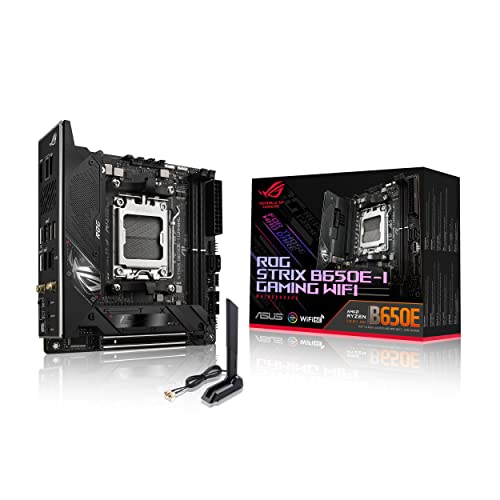
1. ASUS ROG Strix B650E-I Gaming WiFi
The ASUS ROG Strix B650E-I Gaming WiFi is the board most builders should buy for a Ryzen ITX system, because it gets the balance right: a 10+2 stage power delivery that handles a Ryzen 9, two M.2 slots, PCIe 5.0 for both the graphics card and storage, DDR5 memory, and Wi-Fi 6E, all on a mini-ITX board that fits in the smallest cases. The BIOS is the best in the business for tuning and updating, and the board’s layout is thoughtful, with the M.2 slots stacked under a heatsink that actually works.
Verified specs
- AM5 mini-ITX, B650E chipset
- 10+2 power stages
- DDR5, two M.2 slots
- PCIe 5.0 graphics and storage
- Wi-Fi 6E, 2.5Gb LAN
Strengths
- Strong 10+2 power delivery for high-end Ryzen CPUs
- PCIe 5.0 for graphics and storage
- Excellent BIOS and the best software support here
The power delivery is the reason this board tops the list: 10+2 stages run cool even with a Ryzen 9 under load, which is exactly what a small case needs, because hot VRMs in a cramped case cause throttling. PCIe 5.0 on both the graphics slot and an M.2 slot means the board will not limit your next GPU or SSD upgrade, and the ASUS BIOS makes memory tuning straightforward.
Before you buy, it is worth checking the practical details that cause most returns. Confirm that the listing shows the exact model name and configuration you expect, because similar models often share a name and differ in one specification that matters. Check the size and the connections against your setup, and make sure you know what is included in the box and what is sold separately. Read the return policy before ordering, and when the product arrives, test it with your real setup in the first few days rather than leaving it in the box. A quick check at the start saves a return later, and it is the simplest way to be sure the product you receive is the one you meant to buy.
Trade-offs
- Costs more than the budget boards here
- Only two M.2 slots and two RAM slots, as with all ITX
- No USB4, which the X670E-I has
This is a premium B650E board, so it costs more than the A620 options, and the premium buys power delivery and PCIe 5.0 rather than extra slots — ITX always means two RAM slots and limited expansion. If you need USB4, step up to the X670E-I below, but most builders will never miss it.
Who it fits best
Most Ryzen ITX builders who want a board that handles any AM5 CPU.
Best for: A no-compromise mid-range ITX build with strong power delivery.
Not suited for: Budget builds, where the A620 boards below save real money.

2. Gigabyte B650I AORUS Ultra
The Gigabyte B650I AORUS Ultra is Gigabyte’s answer to the B650E-I, and it is a strong board in its own right: an 8+2+1 phase power design, DDR5 memory, PCIe 5.0, two M.2 slots, and Wi-Fi 6E, with Gigabyte’s familiar AORUS styling and a full-coverage heatsink over the power stages. It runs Ryzen 7000, 8000, and 9000 processors, it handles a Ryzen 9 without complaint, and it costs a little less than the ASUS while giving up very little that matters.
Verified specs
- AM5 mini-ITX, B650 chipset
- 8+2+1 power phases
- DDR5, PCIe 5.0
- Two M.2 slots
- Wi-Fi 6E
Strengths
- Solid 8+2+1 power design for high-end CPUs
- PCIe 5.0 and two M.2 slots
- Good value against the ASUS equivalent
The power design is the headline: 8+2+1 phases with a proper heatsink keep a Ryzen 9 running at full speed in a small case, which is the hardest job an ITX board has. The board also keeps PCIe 5.0, so your next graphics card and SSD are covered, and the price undercuts the ASUS by enough to matter when you are budgeting a whole build.
Before you buy, it is worth checking the practical details that cause most returns. Confirm that the listing shows the exact model name and configuration you expect, because similar models often share a name and differ in one specification that matters. Check the size and the connections against your setup, and make sure you know what is included in the box and what is sold separately. Read the return policy before ordering, and when the product arrives, test it with your real setup in the first few days rather than leaving it in the box. A quick check at the start saves a return later, and it is the simplest way to be sure the product you receive is the one you meant to buy.
Trade-offs
- BIOS is less polished than ASUS
- Fewer USB ports on the rear panel
- Memory overclocking headroom trails the best
Gigabyte’s BIOS works fine but takes more clicks to do the same jobs as the ASUS BIOS, and the rear USB count is lower, so count your peripherals before ordering. Memory overclocking is decent rather than exceptional, though most builders will run standard EXPO profiles and never notice.
Who it fits best
Builders who want strong power delivery and PCIe 5.0 for less than the ASUS.
Best for: A high-end Ryzen ITX build on a slightly tighter budget.
Not suited for: Builders who want the most refined BIOS, or who need many rear USB ports.

3. MSI MPG B650I Edge WiFi
The MSI MPG B650I Edge WiFi is the straightforward choice in this list: a well-built B650 ITX board with two DDR5 slots, two M.2 slots, four SATA ports for extra storage, and Wi-Fi 6E, in MSI’s clean black-and-silver design. It does not chase headline features like PCIe 5.0 graphics, and it does not need to: for a Ryzen 7 or Ryzen 5 build with a current graphics card, it gives you everything that matters and nothing you will pay for and never use.
Verified specs
- AM5 mini-ITX, B650 chipset
- 2x DDR5 slots, up to 64GB
- 2x M.2 slots, 4x SATA
- PCIe x16 slot
- Wi-Fi 6E
Strengths
- Clean layout that is easy to build in
- Four SATA ports for extra drives
- Competitive price for a B650 ITX board
The layout is the selling point: the connectors are where you expect them, the M.2 slots are accessible, and building in a small case is less frustrating than on boards that cram everything together. Four SATA ports are genuinely useful if you carry over old hard drives or SATA SSDs, and the price leaves money for a better CPU or GPU.
Before you buy, it is worth checking the practical details that cause most returns. Confirm that the listing shows the exact model name and configuration you expect, because similar models often share a name and differ in one specification that matters. Check the size and the connections against your setup, and make sure you know what is included in the box and what is sold separately. Read the return policy before ordering, and when the product arrives, test it with your real setup in the first few days rather than leaving it in the box. A quick check at the start saves a return later, and it is the simplest way to be sure the product you receive is the one you meant to buy.
Trade-offs
- No PCIe 5.0 graphics slot
- Power delivery is adequate, not overbuilt
- Rear I/O is sparser than the premium boards
The missing PCIe 5.0 graphics slot only matters if you plan to buy a PCIe 5.0 graphics card, and no current card needs it, so this is a future-proofing question rather than a present problem. The power delivery handles a Ryzen 7 comfortably and a Ryzen 9 with airflow, but it is not the board for heavy overclocking, and the rear I/O is functional rather than generous.
Who it fits best
Ryzen 5 and Ryzen 7 builders who want a clean, affordable ITX board.
Best for: A sensible mid-range ITX build without paying for unused features.
Not suited for: Ryzen 9 overclockers, and anyone planning a PCIe 5.0 graphics card soon.

4. ASRock B650E PG-ITX WiFi
The ASRock B650E PG-ITX WiFi brings PCIe 5.0 to a lower price than the ASUS or Gigabyte boards, which makes it the value pick for builders who want next-generation connectivity without the premium price. The B650E chipset gives you a PCIe 5.0 graphics slot and a PCIe 5.0 M.2 slot, the board takes DDR5 and Ryzen 7000, 8000, and 9000 processors, and Wi-Fi 6E is included. ASRock’s Phantom Gaming styling is understated, and the layout is compact without being cramped.
Verified specs
- AM5 mini-ITX, B650E chipset
- DDR5, PCIe 5.0
- Wi-Fi 6E
- Two M.2 slots
- Compact ITX layout
Strengths
- Cheapest PCIe 5.0 ITX board here
- Full B650E feature set at a mid-range price
- Good M.2 cooling for a board this size
The price is the story: PCIe 5.0 usually costs premium money, and this board brings it to the mid-range, which matters if you keep a board for five years and upgrade the GPU and SSD along the way. The M.2 heatsink does a proper job too, which is not guaranteed at this price, and the board runs cool enough for a small case with decent airflow.
Before you buy, it is worth checking the practical details that cause most returns. Confirm that the listing shows the exact model name and configuration you expect, because similar models often share a name and differ in one specification that matters. Check the size and the connections against your setup, and make sure you know what is included in the box and what is sold separately. Read the return policy before ordering, and when the product arrives, test it with your real setup in the first few days rather than leaving it in the box. A quick check at the start saves a return later, and it is the simplest way to be sure the product you receive is the one you meant to buy.
Trade-offs
- Power delivery trails the ASUS and Gigabyte boards
- BIOS is functional rather than friendly
- Fewer premium touches, like extra USB4 or debug LEDs
The power delivery is fine for a Ryzen 7 and acceptable for a Ryzen 9 at stock settings, but it is not the board for sustained overclocking, and the BIOS takes some learning. There are no luxury features like a debug display, so troubleshooting a failed boot takes more patience, but at this price that is a fair trade.
Who it fits best
Value-focused builders who want PCIe 5.0 without the premium price.
Best for: Future-proofing on a budget: PCIe 5.0 at a mid-range price.
Not suited for: Heavy overclockers, and builders who want the most polished BIOS.

5. ASUS ROG Strix X670E-I Gaming WiFi
The ASUS ROG Strix X670E-I Gaming WiFi is the most capable board in this list, and the one to buy if you want everything: the X670E chipset, a 10+2 stage power delivery, PCIe 5.0, DDR5, Wi-Fi 6E, and USB4 Type-C ports that no other board here offers. It is built for a flagship Ryzen 9 in a tiny case, with a stacked M.2 layout, a proper VRM heatsink, and the best BIOS in the business. It costs the most, and it earns it.
Verified specs
- AM5 mini-ITX, X670E chipset
- 10+2 power stages
- DDR5, PCIe 5.0
- USB4 Type-C ports
- Wi-Fi 6E, 2.5Gb LAN
Strengths
- Only board here with USB4
- Flagship power delivery for any AM5 CPU
- Best BIOS and the most connectivity
USB4 is the feature that sets this board apart: two high-speed Type-C ports for fast external storage and displays, which no other board in this list offers. The power delivery is overbuilt in the best way, running a Ryzen 9 cool and quiet, and the BIOS is the easiest to tune, with clear memory and fan controls that make setup painless.
Before you buy, it is worth checking the practical details that cause most returns. Confirm that the listing shows the exact model name and configuration you expect, because similar models often share a name and differ in one specification that matters. Check the size and the connections against your setup, and make sure you know what is included in the box and what is sold separately. Read the return policy before ordering, and when the product arrives, test it with your real setup in the first few days rather than leaving it in the box. A quick check at the start saves a return later, and it is the simplest way to be sure the product you receive is the one you meant to buy.
Trade-offs
- Highest price in this list by a clear margin
- Stacked M.2 layout runs warm without airflow
- Overkill for a Ryzen 5 or Ryzen 7 build
The price is the obvious trade-off: this board costs as much as some CPUs, and a Ryzen 5 will never use its power delivery or its USB4 ports. The stacked M.2 slots need case airflow to stay cool, so plan your fan layout, and if you are building with a mid-range CPU, the B650E-I below gives you nearly everything for much less.
Who it fits best
Flagship builders who want every feature in the smallest possible board.
Best for: A no-compromise Ryzen 9 ITX build with USB4.
Not suited for: Budget and mid-range builds, where the money is better spent on the CPU or GPU.

6. Gigabyte A620I AX
The Gigabyte A620I AX is the cheapest board in this list, and it is the right choice for a budget Ryzen build: an AM5 mini-ITX board with a 5+2+1 phase power design, DDR5 support up to 6400MHz overclocked, Wi-Fi 6E, and a single PCIe slot for your graphics card. It gives up PCIe 5.0 and some M.2 slots, but for a Ryzen 5 with one SSD and one graphics card, none of that matters, and the money saved goes straight into a better CPU or GPU.
Verified specs
- AM5 mini-ITX, A620 chipset
- 5+2+1 phase digital VRM
- DDR5 up to 6400MHz (OC)
- 1x PCIe slot
- Wi-Fi 6E
Strengths
- Lowest price here for a real AM5 ITX board
- Handles a Ryzen 5 comfortably
- Wi-Fi 6E included at this price
The value is the point: this board costs far less than the B650 options and still runs a Ryzen 5 properly, with Wi-Fi 6E included rather than sold as an add-on. For a first build or a budget gaming PC in a small case, it leaves the most money for the parts that affect performance, which is the right priority.
Before you buy, it is worth checking the practical details that cause most returns. Confirm that the listing shows the exact model name and configuration you expect, because similar models often share a name and differ in one specification that matters. Check the size and the connections against your setup, and make sure you know what is included in the box and what is sold separately. Read the return policy before ordering, and when the product arrives, test it with your real setup in the first few days rather than leaving it in the box. A quick check at the start saves a return later, and it is the simplest way to be sure the product you receive is the one you meant to buy.
Trade-offs
- No PCIe 5.0, and fewer M.2 slots
- 5+2+1 VRM is not enough for a Ryzen 9
- Basic rear I/O and no premium features
The compromises are honest ones: no PCIe 5.0, fewer storage slots, and a power design built for a Ryzen 5 or Ryzen 7, not a Ryzen 9. If you plan to upgrade to a high-end CPU later, buy a B650 board instead. If your build is a Ryzen 5 with one SSD, this board is all you need.
Who it fits best
Budget builders with a Ryzen 5 and a single SSD and graphics card.
Best for: The cheapest proper start to an AM5 mini-ITX build.
Not suited for: Ryzen 9 builders, and anyone who needs two M.2 drives or PCIe 5.0.

7. ASRock B650I Lightning WiFi
The ASRock B650I Lightning WiFi is the memory-tuning pick of this list: a B650 ITX board rated for DDR5 speeds above 7200MHz overclocked, which is faster than most boards here, with support for Ryzen 9000, 8000, and 7000 processors, two M.2 slots, and Wi-Fi 6E. If you care about memory performance — and Ryzen CPUs reward fast memory more than most — this board gives you the headroom to tune, at a price well below the premium ASUS boards.
Verified specs
- AM5 mini-ITX, B650 chipset
- DDR5 7200+ (OC)
- Supports Ryzen 9000/8000/7000 series
- Two M.2 slots
- Wi-Fi 6E
Strengths
- Best DDR5 overclocking support here
- Good value for a full-featured B650 ITX board
- Solid connectivity including Wi-Fi 6E
The memory support is the reason to choose this board: DDR5 speeds above 7200MHz overclocked give Ryzen CPUs a real performance lift in some workloads, and few ITX boards at this price offer the same headroom. The rest of the board is solid too, with two M.2 slots and Wi-Fi 6E, so you are not giving up basics to get the memory speed.
Before you buy, it is worth checking the practical details that cause most returns. Confirm that the listing shows the exact model name and configuration you expect, because similar models often share a name and differ in one specification that matters. Check the size and the connections against your setup, and make sure you know what is included in the box and what is sold separately. Read the return policy before ordering, and when the product arrives, test it with your real setup in the first few days rather than leaving it in the box. A quick check at the start saves a return later, and it is the simplest way to be sure the product you receive is the one you meant to buy.
Trade-offs
- Memory overclocking needs manual tuning to reach top speeds
- Power delivery is mid-range
- Less premium styling than the AORUS or ROG boards
The headline memory speeds need manual tuning and a good memory kit — enabling EXPO gets you most of the way there, but the top speeds take patience. The power delivery handles a Ryzen 7 easily and a Ryzen 9 at stock, but it is not built for heavy overclocking, and the design is plain compared with the premium boards.
Who it fits best
Builders who want fast DDR5 and good value in an ITX board.
Best for: Memory tuning and Ryzen performance on a mid-range budget.
Not suited for: Builders who want plug-and-play simplicity, or extreme CPU overclocking.
Buying guide
Warranties, returns, and checking your purchase
Most products in this guide come with a manufacturer warranty, and the length and coverage vary by brand, so check the warranty terms before you buy rather than after something goes wrong. Keep the packaging until you have tested the product, because a return is much easier with the original box. When the product arrives, check that the model name, the configuration, and the included accessories match the listing, and test it with your real setup in the first few days. If anything is wrong, contact the seller promptly, because return windows are limited and the first week is the time to find problems.
Chipset: A620 versus B650 versus X670E
A620 is the budget chipset: it runs Ryzen CPUs properly but drops PCIe 5.0, limits USB ports, and usually offers fewer M.2 slots. B650 is the sweet spot for most builders, with PCIe 5.0 on the E variants, good USB provision, and strong power delivery. X670E adds more PCIe lanes, more USB, and features like USB4, but costs much more. For a Ryzen 5 or 7, B650 is the right choice; for a Ryzen 9 or a flagship build, X670E earns its price.
Power delivery: the VRM matters most in ITX
The VRM — the power stages that feed the CPU — is the most important part of an ITX board, because a small case has little airflow and a hot VRM throttles the CPU. Look for 8 or more power stages with a proper heatsink if you run a Ryzen 7 or 9. The ASUS boards here lead on VRM quality, the Gigabyte and ASRock boards are close behind, and the A620 board is built for lower-power CPUs.
M.2 slots and storage
Most ITX boards have two M.2 slots, and that is enough for most builders: one fast drive for Windows and games, one larger drive for storage. Check whether the M.2 slots share bandwidth with the graphics slot or SATA ports, because some boards disable a SATA port when the second M.2 slot is used. If you need more than two fast drives, ITX may be the wrong form factor.
Memory: DDR5 speed and capacity
All AM5 boards take DDR5, and Ryzen CPUs benefit from fast memory — 6000MHz is the sweet spot for most builds, with tighter timings mattering more than raw speed above that. ITX boards have two RAM slots, so buy the capacity you need now: 32GB is the sensible choice for gaming and general use, 64GB if you edit video or run virtual machines. Check the board’s memory support list before buying an unusual kit.
How to use and care for your pick
Keep the BIOS updated, because AMD and the board makers release updates that improve memory compatibility and add support for new processors — but read the update notes first and never update during a storm or a power cut. Keep the VRM heatsink and the M.2 heatsink free of dust, because a small case traps heat, and use the board’s fan controls to set a quiet curve that still moves air over the power stages. When you install the board, use the standoffs your case provides and do not overtighten the screws, which can crack the board or warp it.
Common mistakes to avoid
The most common mistake is buying an A620 board for a Ryzen 9, which the power delivery cannot feed properly, so the CPU throttles and the board runs hot. The second is forgetting to check case compatibility: cooler height, graphics card length, and power supply size all matter more in ITX than in a tower. The third is buying slow DDR5 to save money, which costs Ryzen performance. Finally, do not skip the BIOS update that adds support for your processor — a new CPU in an old BIOS is the most common reason a new build does not boot.
Final recommendation
For most builders, the ASUS ROG Strix B650E-I is the right AMD ITX motherboard: strong power delivery, PCIe 5.0, and the best BIOS. If budget matters, the Gigabyte A620I AX is a genuine board for a Ryzen 5 build, and the ASRock B650E PG-ITX brings PCIe 5.0 to the mid-range. If you want everything, the X670E-I is the flagship, and if you tune memory, the ASRock B650I Lightning is the pick. Match the board to your CPU first, and the rest follows.
Frequently asked questions
Can an ITX board run a Ryzen 9?
Yes, if the power delivery is strong enough. The ASUS B650E-I, the Gigabyte B650I AORUS Ultra, and the X670E-I here all handle a Ryzen 9. The A620 board does not, and the mid-range boards need good case airflow. Check the VRM specification before pairing a high-end CPU with a budget board.
Do I need PCIe 5.0 on an ITX board?
Not yet, for most people: no current graphics card needs PCIe 5.0, and PCIe 4.0 SSDs are fast enough for gaming. PCIe 5.0 matters if you keep a board for five years and upgrade the GPU and SSD, or if you move very large files. The B650E and X670E boards here have it; the B650 and A620 boards do not.
How much RAM can an ITX board take?
Two slots, so up to 64GB with two 32GB sticks on most boards here, and 128GB on some with newer BIOS versions. For gaming, 32GB is the sweet spot; for video editing and virtual machines, 64GB is worth it. Buy the capacity you need now, because there are no spare slots to add later.
Will my ATX power supply fit in an ITX case?
It depends on the case: many ITX cases take an SFX power supply only, while some take a full ATX unit. Check your case’s specification before buying, and remember that a smaller power supply often costs more per watt. The board itself takes a standard 24-pin and 8-pin CPU connector.
Is mini-ITX harder to build in than ATX?
Yes, a little: cable management is tighter, cooler clearance is smaller, and you install parts in a specific order. Take your time, plan the cable routing before you start, and install the M.2 drives and memory before you mount the board. The result — a small, quiet PC on your desk — is worth the extra care.
More from Reviewstook
If this guide helped, these related guides cover the rest of your setup: our guide to motherboards from 2018, our guide to computer graphics cards, our guide to computer hard drives, our guide to CPU air coolers under $100.
Conclusion
The best AMD ITX motherboard is the one whose power delivery matches your processor and whose features match your build. The ASUS B650E-I wins overall, the Gigabyte A620I AX wins on price, the ASRock B650E PG-ITX wins on PCIe 5.0 value, and the X670E-I wins on features. Every board here runs a real Ryzen system in a tiny case — the choice is about how much headroom and how many features you want to pay for.
Match the board to your CPU first, then check the M.2 slots, the memory speed, and the case fit. A well-chosen ITX board disappears into the build and never holds you back, and that is exactly what a good motherboard should do.