Disclosure: As an Amazon Associate, reviewstook.com earns from qualifying purchases. Links on this page are affiliate links at no extra cost to you; prices and availability change frequently, so check Amazon for the latest.
Where to Buy
The six machines used as case studies in this all in one pc pros and cons analysis are current Amazon listings verified through the Creators API on 2026-11-20; each one is cited below because it demonstrates a specific advantage or disadvantage with real specifications, not as a generic example.
- The Pro Case at Its Strongest: ASUS P440VA Touch (Core i5 / 16GB / 1TB) — Check on Amazon
- The Modern Platform Case: HP OmniStudio 27 AI (Ryzen AI 7 / 16GB) — Check on Amazon
- The Power-User Case: Lenovo IdeaCentre 27 (i7-13620H / 16GB / 512GB) — Check on Amazon
- The Budget-Spec Case: STGSivir AIO 21.5 (Core i5 / 16GB / 512GB) — Check on Amazon
- The Memory-First Case: Cybrimax 24 AIO (i5 / 16GB / 256GB) — Check on Amazon
- The Small-Space Case: MECHAZER AIO 19 Compact (i5 / 8GB / 256GB) — Check on Amazon
All of the models above are sold through Amazon, and reviewstook.com (reviewstook.com) links each pick to its Amazon listing so you can confirm the exact configuration before ordering — all-in-one listings often offer several memory and storage variants under one page, and the variant, not the headline, is what arrives in the box.
All in One PC Pros and Cons: The Honest Ledger
Every all in one pc pros and cons list on the internet agrees on the headlines — tidy desk good, no upgrades bad — and most stop there, which is a disservice, because the interesting truth lives one level down. The tidy desk is not one advantage but four separate ones, each worth different amounts to different people. The upgrade limit is not one disadvantage but a bundle of consequences that arrive at different times in the machine’s life, some of which can be planned around and some of which cannot. This analysis takes the ledger line by line, tests each entry against real machines you can buy today, and ends with the only verdict that matters: which side of the ledger your household belongs on.
Context first, because pros and cons are meaningless in a vacuum. The all-in-one competes against two alternatives: the traditional tower plus monitor, and the laptop on a desk. Against the tower, it trades flexibility for simplicity. Against the laptop, it trades portability for a bigger screen, better ergonomics and usually more computer for the money. Every pro and con below is really a statement about one of those two trades, and the machines in this article — from a flagship ASUS touchscreen to a 19-inch compact — were chosen to show where each trade is won and where it is lost. If you are still at the stage of choosing a specific model, our All In One PC Buying Guide applies this ledger to a shortlist; this article exists for the prior question of whether the format itself deserves your money.
The Pros, Weighed Properly
Pro 1: one purchase, one box, one cable. The deepest advantage is not tidiness as aesthetics but tidiness as logistics. There is no compatibility research, no monitor-versus-graphics-output puzzle, no second and third purchase. The machine arrives complete — screen, computer, speakers, webcam, keyboard, mouse — and is working within the hour. For non-technical buyers, gift purchases, businesses equipping desks and anyone who has ever lost an afternoon to a tower build, this is worth real money, and it recurs at every house move and desk rearrangement for the machine’s whole life.
Pro 2: the screen is always right. A laptop on a desk sits too low and too close; a tower’s monitor is right only if you bought the right monitor. An all-in-one’s display is designed for the machine, positioned by a stand built for its weight, and sized for desktop work — 24 or 27 inches of it, at eye level, all day. Ergonomics is the pro nobody lists and everybody feels: neck and shoulder comfort across a working week is a genuine, compounding advantage over the laptop it usually replaces.
Pro 3: the bundle economics are better than they look. Compare an all-in-one’s price against a bare tower and it looks expensive. Compare it against tower plus monitor plus speakers plus webcam plus the wireless keyboard and mouse you would actually buy, and the gap narrows to something modest — sometimes to nothing. The ASUS case study below is the extreme example: touch display, 1TB of storage, performance processor, peripherals included, one invoice.
Pro 4: shared and visible spaces. Kitchens, family rooms, reception desks, surgeries, classrooms, shop counters — anywhere a computer is furniture, the all-in-one’s single-object neatness is a functional feature, not a style preference. It is also the safer format around children and the easier one to keep clean, with one surface to wipe instead of a tower’s vents and fans drawing dust at floor level.
Pro 5: quiet, cool and current. Most all-in-ones use efficient mobile-class processors, which means low heat, low noise and modest electricity bills. And the modern end of the category is genuinely modern: the HP case study below carries an AI-ready Ryzen platform, the Acer in our companion coverage runs a 120Hz screen, and Wi-Fi 6 or 6E is now normal. The format is not a compromise museum; its mainstream is a perfectly current computer.
The Cons, Stated Without Flinching
Con 1: the upgrade ceiling is real. In most all-in-ones the processor and graphics can never change, and in many the memory and storage cannot either. The practical consequence is that the machine’s useful life is set at purchase. This is manageable — buy 16GB and 512GB and the ceiling sits years away — but it is not removable, and it converts every under-bought specification from an inconvenience into a countdown.
Con 2: all your eggs share one basket. When a tower’s monitor dies, you replace a monitor. When an all-in-one’s screen dies out of warranty, the computer inside is effectively held hostage, and repairs mean surrendering the whole machine. The same logic applies in reverse to the computer side. This concentration of failure is the format’s least-discussed con and the strongest argument for buying a brand with a painless service network.
Con 3: gaming and heavy graphics are capped. Integrated graphics define the category. Casual games, older titles, photo editing — fine. Modern demanding games, serious 3D, heavy video effects — the wrong tool, and no setting changes that. Buyers whose leisure is gaming should be reading about compact gaming PCs instead, starting with something like Best 1080p Gaming PC For Small Spaces Under $500 for the budget end of that world.
Con 4: you pay for the integration. Part for part, the all-in-one premium over a tower exists — you are paying for miniaturisation, the display engineering and the assembly. The bundle maths in Pro 3 softens this considerably, but a buyer who already owns a good monitor, speakers and peripherals is paying for duplicates, and for that buyer the con stands at full strength.
Con 5: specification traps at the budget end. The format’s pretty face makes weak configurations easier to sell. A beautiful 24-inch screen around 8GB of memory, 256GB of storage and an unspecified processor generation — the Cybrimax and MECHAZER case studies below show both ends of this — is a machine whose compromises arrive within the year. The format does not cause this, but its showroom appeal enables it, and the defence is the discipline in How To Choose An All In One PC: verify the variant, name the chip, count the memory.
In this guide
Quick Picks
- The Pro Case at Its Strongest: ASUS P440VA Touch (Core i5 / 16GB / 1TB) — touch, 1TB and a performance i5 show how complete the format can be
- The Modern Platform Case: HP OmniStudio 27 AI (Ryzen AI 7 / 16GB) — AI-ready silicon shows where the category is heading
- The Power-User Case: Lenovo IdeaCentre 27 (i7-13620H / 16GB / 512GB) — a 10-core i7 proves all-in-ones are not automatically slow
- The Budget-Spec Case: STGSivir AIO 21.5 (Core i5 / 16GB / 512GB) — 16GB and 512GB at a budget tier complicate the value argument — in a good way
- The Memory-First Case: Cybrimax 24 AIO (i5 / 16GB / 256GB) — memory-rich and simple, the value end of the compromise
- The Small-Space Case: MECHAZER AIO 19 Compact (i5 / 8GB / 256GB) — the extreme of the space-saving pro, TN panel and all
How These Case Studies Were Chosen
Each machine below was verified through the Amazon Creators API on 2026-11-20 and selected because it isolates one side of the ledger: the ASUS shows the pro case at maximum strength, the HP shows the platform’s modern direction, the Lenovo shows the power ceiling is higher than the format’s reputation, and the three smaller-brand machines show the budget end where the cons concentrate — unspecified processors, older wireless standards, TN panels and external adapters. Judged together they make the article’s real point: “all-in-one” is not one product with one set of pros and cons, but a spectrum, and where a given machine sits on it is a specification question.
Case Studies: The Ledger Applied to Six Real Machines
The Pro Case at Its Strongest — ASUS P440VA Touch (Core i5 / 16GB / 1TB)
Strengths
- Touch display adds direct interaction that most AIOs on this list lack
- 1TB SSD is the roomiest storage in this roundup
- Core i5-13420H is a genuinely capable performance-class processor
Trade-offs
- Wired keyboard and mouse undercut the clean-desk promise slightly
- Touch encourages fingerprints on an anti-glare panel you will clean often
- Performance-class processor in a slim chassis means fans will be audible under load
| Display | 23.8-inch FHD anti-glare touch |
|---|---|
| Processor | Intel Core i5-13420H |
| Memory | 16GB DDR5 RAM |
| Storage | 1TB SSD |
| Operating system | Windows 11 Home |
| In the box | Wired keyboard and mouse |
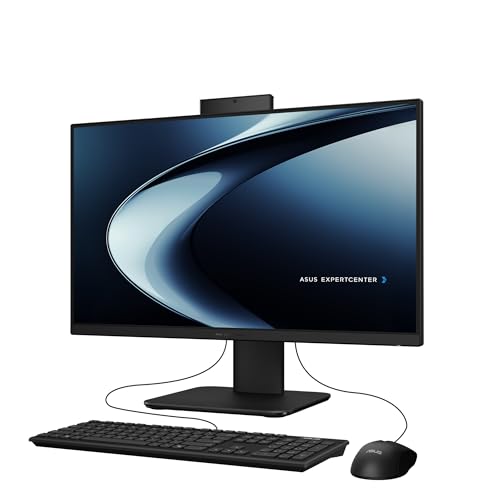
In any honest pros-and-cons account, the ASUS P440VA Touch (Core i5 / 16GB / 1TB) is useful because it shows both sides of the all-in-one bargain in one machine. It exists for families and professionals who want touch interaction plus the strongest all-round specification here, and the pro side of the ledger is easy to see: everything arrives in one box, the desk stays clean, setup is measured in minutes, and the 23.8-inch FHD anti-glare touch is permanently positioned at a sensible height and distance instead of wobbling on a stack of books the way a laptop does. For shared and visible rooms, that tidiness is not a cosmetic extra — it is the reason the category exists.
The specification is where the pros get specific. With Intel Core i5-13420H, 16GB DDR5 RAM and 1TB SSD, the machine covers the mainstream workload — browsing, office documents, streaming, calls, light photo work — without the compromises that make cheap computers feel cheap within a month. The con side is structural rather than specific to this model: the components are sealed behind the screen, so the upgrade path that a tower PC offers simply does not exist here. What you buy is, with minor peripheral exceptions, what you will still have in five years, which is why the balance of this particular specification matters so much at purchase time.
And the model-specific con must be stated as plainly as the pros: the wired peripherals feel like a small own-goal on a machine whose entire appeal is a clean, minimal desk. Weigh that against the pros above and the verdict writes itself for most readers. If the limitation touches something you do weekly, it is not a footnote, it is the decision. If it touches something you might do once, someday, in theory, then the pros — the clean desk, the single purchase, the coherent specification — carry the day, and this is exactly the kind of machine the all-in-one format was invented to produce.
Best for: families and professionals who want touch interaction plus the strongest all-round specification here. / Not suited for: buyers for whom the wired peripherals feel like a small own-goal on a machine whose entire appeal is a clean, minimal desk.

The Modern Platform Case — HP OmniStudio 27 AI (Ryzen AI 7 / 16GB)
Strengths
- Ryzen AI processor brings a modern neural engine for AI-assisted Windows features
- Radeon 840M integrated graphics are a clear step above basic integrated graphics
- Large 27-inch screen suits split-screen work and media alike
Trade-offs
- Full HD resolution is the ceiling — no higher-resolution panel option in this configuration
- AI features depend on software support that is still maturing
- Premium positioning means you pay for the newest platform, not for a discrete GPU
| Display | 27-inch FHD |
|---|---|
| Processor | AMD Ryzen AI 7 445 |
| Memory | 16GB RAM |
| Storage | 512GB SSD |
| Graphics | AMD Radeon 840M |
| Operating system | Windows 11 Home |
| Colour | Jet Black |
In any honest pros-and-cons account, the HP OmniStudio 27 AI (Ryzen AI 7 / 16GB) is useful because it shows both sides of the all-in-one bargain in one machine. It exists for buyers who want the most modern AIO platform on this list, with stronger integrated graphics for light creative work and casual gaming, and the pro side of the ledger is easy to see: everything arrives in one box, the desk stays clean, setup is measured in minutes, and the 27-inch FHD is permanently positioned at a sensible height and distance instead of wobbling on a stack of books the way a laptop does. For shared and visible rooms, that tidiness is not a cosmetic extra — it is the reason the category exists.
The specification is where the pros get specific. With AMD Ryzen AI 7 445, 16GB RAM and 512GB SSD, the machine covers the mainstream workload — browsing, office documents, streaming, calls, light photo work — without the compromises that make cheap computers feel cheap within a month. The con side is structural rather than specific to this model: the components are sealed behind the screen, so the upgrade path that a tower PC offers simply does not exist here. What you buy is, with minor peripheral exceptions, what you will still have in five years, which is why the balance of this particular specification matters so much at purchase time.
And the model-specific con must be stated as plainly as the pros: there is still no discrete graphics card, so demanding games and heavy 3D work remain out of reach despite the up-to-date processor. Weigh that against the pros above and the verdict writes itself for most readers. If the limitation touches something you do weekly, it is not a footnote, it is the decision. If it touches something you might do once, someday, in theory, then the pros — the clean desk, the single purchase, the coherent specification — carry the day, and this is exactly the kind of machine the all-in-one format was invented to produce.
Best for: buyers who want the most modern AIO platform on this list, with stronger integrated graphics for light creative work and casual gaming. / Not suited for: buyers for whom there is still no discrete graphics card, so demanding games and heavy 3D work remain out of reach despite the up-to-date processor.

The Power-User Case — Lenovo IdeaCentre 27 (i7-13620H / 16GB / 512GB)
Strengths
- 10-core i7-13620H is the strongest processor in this entire roundup
- HDMI input lets the screen double as a monitor for a laptop or console
- Windows 11 Pro and USB-C suit professional setups
Trade-offs
- Wired peripherals on a premium machine feel out of step
- 512GB storage is merely adequate next to the flagship processor
- Performance-class chip will spin fans up under sustained load
| Display | 27-inch |
|---|---|
| Processor | Intel Core i7-13620H, 10-core |
| Memory | 16GB DDR5 |
| Storage | 512GB SSD |
| Ports | USB-C, HDMI in and out |
| Operating system | Windows 11 Pro |
| In the box | Wired keyboard and mouse |
In any honest pros-and-cons account, the Lenovo IdeaCentre 27 (i7-13620H / 16GB / 512GB) is useful because it shows both sides of the all-in-one bargain in one machine. It exists for power users who want genuine processor muscle and a screen that can moonlight as a standalone monitor, and the pro side of the ledger is easy to see: everything arrives in one box, the desk stays clean, setup is measured in minutes, and the 27-inch is permanently positioned at a sensible height and distance instead of wobbling on a stack of books the way a laptop does. For shared and visible rooms, that tidiness is not a cosmetic extra — it is the reason the category exists.
The specification is where the pros get specific. With Intel Core i7-13620H, 10-core, 16GB DDR5 and 512GB SSD, the machine covers the mainstream workload — browsing, office documents, streaming, calls, light photo work — without the compromises that make cheap computers feel cheap within a month. The con side is structural rather than specific to this model: the components are sealed behind the screen, so the upgrade path that a tower PC offers simply does not exist here. What you buy is, with minor peripheral exceptions, what you will still have in five years, which is why the balance of this particular specification matters so much at purchase time.
And the model-specific con must be stated as plainly as the pros: the processor outclasses everything else here, which makes the merely adequate storage and wired peripherals feel like the corners that were cut to pay for it. Weigh that against the pros above and the verdict writes itself for most readers. If the limitation touches something you do weekly, it is not a footnote, it is the decision. If it touches something you might do once, someday, in theory, then the pros — the clean desk, the single purchase, the coherent specification — carry the day, and this is exactly the kind of machine the all-in-one format was invented to produce.
Best for: power users who want genuine processor muscle and a screen that can moonlight as a standalone monitor. / Not suited for: buyers for whom the processor outclasses everything else here, which makes the merely adequate storage and wired peripherals feel like the corners that were cut to pay for it.
The Budget-Spec Case — STGSivir AIO 21.5 (Core i5 / 16GB / 512GB)
Strengths
- 16GB of memory and a 512GB SSD are strong figures at a compact size
- HDMI adds flexible second-screen or output options
- RGB keyboard will please younger users and gamers on a budget
Trade-offs
- Wi-Fi 5 rather than Wi-Fi 6 dates the wireless specification
- Smaller brand, thinner long-term support picture
- Unspecified i5 generation — verify the exact chip in the listing
| Display | 21.5-inch FHD |
|---|---|
| Processor | Core i5 |
| Memory | 16GB RAM |
| Storage | 512GB SSD |
| Wireless | Wi-Fi 5, Bluetooth |
| Extras | RGB keyboard, HDMI |
| Operating system | Windows 11 Home |
In any honest pros-and-cons account, the STGSivir AIO 21.5 (Core i5 / 16GB / 512GB) is useful because it shows both sides of the all-in-one bargain in one machine. It exists for budget buyers who want memory and storage headroom in a compact frame, and the pro side of the ledger is easy to see: everything arrives in one box, the desk stays clean, setup is measured in minutes, and the 21.5-inch FHD is permanently positioned at a sensible height and distance instead of wobbling on a stack of books the way a laptop does. For shared and visible rooms, that tidiness is not a cosmetic extra — it is the reason the category exists.
The specification is where the pros get specific. With Core i5, 16GB RAM and 512GB SSD, the machine covers the mainstream workload — browsing, office documents, streaming, calls, light photo work — without the compromises that make cheap computers feel cheap within a month. The con side is structural rather than specific to this model: the components are sealed behind the screen, so the upgrade path that a tower PC offers simply does not exist here. What you buy is, with minor peripheral exceptions, what you will still have in five years, which is why the balance of this particular specification matters so much at purchase time.
And the model-specific con must be stated as plainly as the pros: the older Wi-Fi standard and unspecified processor generation are where the savings show — acceptable, but go in with eyes open. Weigh that against the pros above and the verdict writes itself for most readers. If the limitation touches something you do weekly, it is not a footnote, it is the decision. If it touches something you might do once, someday, in theory, then the pros — the clean desk, the single purchase, the coherent specification — carry the day, and this is exactly the kind of machine the all-in-one format was invented to produce.
Best for: budget buyers who want memory and storage headroom in a compact frame. / Not suited for: buyers for whom the older Wi-Fi standard and unspecified processor generation are where the savings show — acceptable, but go in with eyes open.
The Memory-First Case — Cybrimax 24 AIO (i5 / 16GB / 256GB)
Strengths
- 16GB of memory at this tier is the standout figure
- 24-inch screen is the sweet spot for a single home-office display
- Simple space-saving design brief
Trade-offs
- External wireless adapter instead of built-in Wi-Fi
- 256GB storage is tight next to the generous memory
- Processor described only by clock speed — generation unspecified
| Display | 24-inch |
|---|---|
| Processor | i5, up to 3.3GHz |
| Memory | 16GB RAM |
| Storage | 256GB SSD |
| Wireless | External Wi-Fi 6 + Bluetooth adapter |
| Operating system | Windows 11 Home |
In any honest pros-and-cons account, the Cybrimax 24 AIO (i5 / 16GB / 256GB) is useful because it shows both sides of the all-in-one bargain in one machine. It exists for home-office buyers who multitask heavily in browser and office apps and want memory above all, and the pro side of the ledger is easy to see: everything arrives in one box, the desk stays clean, setup is measured in minutes, and the 24-inch is permanently positioned at a sensible height and distance instead of wobbling on a stack of books the way a laptop does. For shared and visible rooms, that tidiness is not a cosmetic extra — it is the reason the category exists.
The specification is where the pros get specific. With i5, up to 3.3GHz, 16GB RAM and 256GB SSD, the machine covers the mainstream workload — browsing, office documents, streaming, calls, light photo work — without the compromises that make cheap computers feel cheap within a month. The con side is structural rather than specific to this model: the components are sealed behind the screen, so the upgrade path that a tower PC offers simply does not exist here. What you buy is, with minor peripheral exceptions, what you will still have in five years, which is why the balance of this particular specification matters so much at purchase time.
And the model-specific con must be stated as plainly as the pros: the memory-versus-storage imbalance is the story: brilliant for forty open tabs, cramped for a big local photo library. Weigh that against the pros above and the verdict writes itself for most readers. If the limitation touches something you do weekly, it is not a footnote, it is the decision. If it touches something you might do once, someday, in theory, then the pros — the clean desk, the single purchase, the coherent specification — carry the day, and this is exactly the kind of machine the all-in-one format was invented to produce.
Best for: home-office buyers who multitask heavily in browser and office apps and want memory above all. / Not suited for: buyers for whom the memory-versus-storage imbalance is the story: brilliant for forty open tabs, cramped for a big local photo library.
The Small-Space Case — MECHAZER AIO 19 Compact (i5 / 8GB / 256GB)
Strengths
- Smallest footprint here — genuinely fits where other AIOs cannot
- Wi-Fi 6 and Bluetooth 5.3 are current wireless standards
- Adequate core specification for study and office basics
Trade-offs
- TN panel has narrow viewing angles and weaker colour than IPS rivals
- 19 inches is cramped for split-screen work
- 8GB and 256GB are minimum-viable figures
| Display | 19-inch 1080p TN |
|---|---|
| Processor | Core i5 |
| Memory | 8GB RAM |
| Storage | 256GB SSD |
| Wireless | Wi-Fi 6, Bluetooth 5.3 |
| In the box | Mouse and keyboard |
In any honest pros-and-cons account, the MECHAZER AIO 19 Compact (i5 / 8GB / 256GB) is useful because it shows both sides of the all-in-one bargain in one machine. It exists for students and space-starved users who need a real Windows PC in the smallest possible footprint, and the pro side of the ledger is easy to see: everything arrives in one box, the desk stays clean, setup is measured in minutes, and the 19-inch 1080p TN is permanently positioned at a sensible height and distance instead of wobbling on a stack of books the way a laptop does. For shared and visible rooms, that tidiness is not a cosmetic extra — it is the reason the category exists.
The specification is where the pros get specific. With Core i5, 8GB RAM and 256GB SSD, the machine covers the mainstream workload — browsing, office documents, streaming, calls, light photo work — without the compromises that make cheap computers feel cheap within a month. The con side is structural rather than specific to this model: the components are sealed behind the screen, so the upgrade path that a tower PC offers simply does not exist here. What you buy is, with minor peripheral exceptions, what you will still have in five years, which is why the balance of this particular specification matters so much at purchase time.
And the model-specific con must be stated as plainly as the pros: the screen technology and size are the compromise: it is the right answer only when space, not screen quality, is the deciding factor. Weigh that against the pros above and the verdict writes itself for most readers. If the limitation touches something you do weekly, it is not a footnote, it is the decision. If it touches something you might do once, someday, in theory, then the pros — the clean desk, the single purchase, the coherent specification — carry the day, and this is exactly the kind of machine the all-in-one format was invented to produce.
Best for: students and space-starved users who need a real Windows PC in the smallest possible footprint. / Not suited for: buyers for whom the screen technology and size are the compromise: it is the right answer only when space, not screen quality, is the deciding factor.
Comparison Table
Read this table as the ledger in numbers: the top rows show what the format can be, the lower rows show what its budget end asks you to accept.
| Model | Display | Processor | Memory | Storage | Link |
|---|---|---|---|---|---|
| ASUS P440VA Touch (Core i5 / 16GB / 1TB) | 23.8-inch FHD anti-glare touch | Intel Core i5-13420H | 16GB DDR5 RAM | 1TB SSD | Check on Amazon |
| HP OmniStudio 27 AI (Ryzen AI 7 / 16GB) | 27-inch FHD | AMD Ryzen AI 7 445 | 16GB RAM | 512GB SSD | Check on Amazon |
| Lenovo IdeaCentre 27 (i7-13620H / 16GB / 512GB) | 27-inch | Intel Core i7-13620H, 10-core | 16GB DDR5 | 512GB SSD | Check on Amazon |
| STGSivir AIO 21.5 (Core i5 / 16GB / 512GB) | 21.5-inch FHD | Core i5 | 16GB RAM | 512GB SSD | Check on Amazon |
| Cybrimax 24 AIO (i5 / 16GB / 256GB) | 24-inch | i5, up to 3.3GHz | 16GB RAM | 256GB SSD | Check on Amazon |
| MECHAZER AIO 19 Compact (i5 / 8GB / 256GB) | 19-inch 1080p TN | Core i5 | 8GB RAM | 256GB SSD | Check on Amazon |
How to Live With the Cons: Mitigations That Actually Work
Knowing the cons is only useful if you act on the ones that can be acted on. The upgrade ceiling is mitigated at purchase, not after: buy memory and storage one tier above today’s need, because in this format headroom is lifespan. The single-basket risk is mitigated by brand choice and by backups — keep your files in cloud or external storage and a screen failure becomes an inconvenience instead of a data emergency; our storage-minded readers may also find Best Small Form Factor PC Cases useful when speccing the tower they are comparing against. The graphics ceiling is mitigated by honesty: if gaming matters, stream games or keep a console for the big titles and let the all-in-one do everything else. The budget-spec trap is mitigated by the variant check and by preferring listings that name their processor generation in full. None of these mitigations are expensive. All of them are cheaper than the replacement purchase they prevent.
Common Mistakes in Reading Pros and Cons
The first mistake is treating the ledger as a score: five pros versus five cons tells you nothing, because the entries have weights, and the weights are personal. A con that touches your daily work outweighs three pros that touch your weekends. The second mistake is importing someone else’s ledger — a gamer’s devastating con is a receptionist’s irrelevance. The third is judging the format by its worst budget examples, which is like judging laptops by the cheapest one in the shop. The fourth is the reverse: judging by the flagship and ordering the budget model. And the fifth is forgetting the third option entirely — for some households the honest answer to this whole article is a laptop and a dock, and recognising that is a success of the analysis, not a failure of the format.
Final Recommendation
The ledger balances like this. If your computing is documents, browsing, calls, media and light creativity; if the machine will live in a visible, shared or space-limited room; and if you will buy the specification properly the first time — the pros win, and they win by more the longer the machine serves. If you game seriously, upgrade habitually, already own excellent peripherals, or need a machine whose parts must be replaceable — the cons win, and no single model will talk you out of it. Readers in the first group should shortlist from our hands-on verdicts in All In One PC Reviews; readers still torn should run the money side of the argument in Is An All In One PC Worth It, which prices both sides of this ledger over a full ownership life.
The Ledger by User: Whose Pros Outweigh Whose Cons
The home worker. For this reader the pros run deep: a proper screen at a proper height for eight hours a day, a webcam at eye level, one tidy object in a room that is also a home. The cons barely touch them — they do not upgrade for fun, and their workload is the mainstream one the format serves. Verdict: pros win clearly, provided the specification is bought at the mainstream level, because an under-powered work machine is a daily tax on the person least able to deduct it.
The family. Shared rooms, shared accounts, homework that escalates yearly. The pros — tidiness, safety, one wipe-clean surface, a screen everyone can gather around — are worth more here than anywhere. The cons arrive on a schedule: the specification ceiling meets the children’s growing demands in year three or four, which is why families should buy the most headroom of any group in this article. Verdict: pros win, but only with the headroom bought up front.
The gamer. The shortest section in this article. The con — integrated graphics — is not a trade-off for this reader; it is the whole product failing its main test. Every pro in the ledger is a consolation prize. Verdict: cons win outright, and the honest recommendation is a compact gaming tower, with the all-in-one considered only as a second machine for everything else.
The small business. Reception desks, treatment rooms, point-of-sale-adjacent workstations, shared office machines. The pros are operational: fast deployment, nothing to steal in pieces, a professional face to customers, identical machines that any staff member can sit at. The cons are manageable with process — a spare unit or a fast service agreement answers the single-basket risk, and business workloads are exactly the light-to-mainstream band the format serves. Verdict: pros win for front-of-house and shared desks; individual power users in the same business may still belong on towers.
The older or non-technical user. This reader gains the most from the format’s deepest pro: there is almost nothing to learn, connect, or break. One button, one screen, everything included, video calls with family at a flattering height. The cons — upgrade ceilings, specification traps — are precisely the burdens this reader least wants to manage, which is why the buying decision should be made with or by someone who will apply the variant-check discipline on their behalf. Verdict: pros win by the widest margin of any group, and the margin is measured in confidence, not specifications.
The creative hobbyist. Photo editing, light video, music production at the enthusiastic-amateur level. The mainstream and premium machines here handle this work genuinely well, and the big screens flatter it. The cons wait at the serious end: long video exports, large 3D work and discrete-GPU effects mark the boundary. Verdict: pros win until the hobby becomes a profession, at which point the honest machine changes category — and a well-bought all-in-one still retires gracefully into family duty.
Frequently Asked Questions
What is the biggest advantage of an all-in-one PC?
Completeness in a single purchase. Screen, computer, speakers, webcam and peripherals arrive in one box, set up in under an hour, and occupy a desk with one object and one power cable. For shared, visible or small spaces — and for buyers who do not want a project — that completeness is worth more than any single specification.
What is the biggest disadvantage of an all-in-one PC?
The upgrade ceiling. The processor and graphics are fixed for life and, in many models, memory and storage are too, so the machine’s useful lifespan is decided on the day you buy it. The mitigation is simple but must happen at purchase: buy memory and storage a tier above today’s needs.
Are all-in-one PCs good value compared with a tower and monitor?
Compared fairly — tower plus monitor plus speakers plus webcam plus peripherals — the all-in-one premium is modest, and at the mainstream tier it can vanish. Compared against a bare tower alone, it looks expensive, but that comparison quietly omits everything the all-in-one includes. Buyers who already own good peripherals are the exception: for them the premium is real.
Can an all-in-one PC be repaired if the screen breaks?
Yes, but the repair means the whole machine goes away, computer included, and out-of-warranty screen repairs can approach the value of an entry replacement. This concentration of risk is the strongest argument for buying a major brand with an accessible service network, and for keeping files backed up externally as a matter of routine.
Do all-in-one PCs overheat or throttle because everything is in the screen?
Mainstream models use efficient mobile-class processors designed for slim enclosures, and in everyday workloads they run quietly and coolly. Performance-class models with H-series chips will spin up fans under sustained load — video exports, compiling — which is normal behaviour for the chip class, in this format or any other.
Is an all-in-one or a laptop better for a home office?
If the desk is permanent, the all-in-one: a bigger screen at the right height, a proper keyboard, more storage and usually more computer for the money, with no battery ageing in the background. If the work moves — between rooms, sites or cities — the laptop wins by definition. Many households end up with the all-in-one as the fixed workstation precisely because a laptop already covers the moving part.
How long do the cons take to actually bite?
The specification cons bite on a schedule set at purchase: an 8GB, 256GB machine typically starts feeling tight in years two to three, while a 16GB, 512GB machine usually reaches years five or six before the ceiling matters. The failure-concentration con is random rather than scheduled, which is why backups and brand support, not specifications, are its mitigation.


