
Where to buy
Every price and order on this page goes through Amazon. Check the live listing for the current price and stock before you buy — several picks below are only good purchases at specific prices, and the reviews say exactly which ones. We may earn a commission from qualifying purchases.
- Best first white gaming PC for most beginners: Skytech King 95, Ryzen 7 9800X3D, RTX 5070 Ti 16GB — Check on Amazon
- Strongest white build here, only on a coupon day: Skytech O11 Vision, Ryzen 7 9800X3D, RTX 5080 16GB — Check on Amazon
- Best if you also edit, stream or create: iBUYPOWER Element Pro White, Core i9-14900KF, RTX 5070 Ti 16GB — Check on Amazon
See 3 more Amazon options
- Best-looking glass showcase: Thermaltake LCGS View i1470S-170, Core i7-14700F, RTX 5070 12GB — Check on Amazon
- Best for fast competitive games, deal days only: Skytech Omega, Ryzen 7 7800X3D, RTX 4070 Super 12GB — Check on Amazon
- Best if $3,000 has to cover the monitor too: Skytech Azure 3, Ryzen 7 7700X, RTX 5070 12GB — Check on Amazon
Read the full guide ↓
Disclosure: As an Amazon Associate, reviewstook.com earns from qualifying purchases. Links to Amazon on this page are affiliate links; they cost you nothing extra. Listing details such as price and availability change often, so check the current Amazon listing before you buy.
Buying your first gaming PC is confusing at any budget, but $3,000 adds a particular trap: the listings are written for people who already know the vocabulary, and almost every product name is a code. This guide translates as it goes. Every pick below is a complete, ready-to-use white gaming PC sold on Amazon — you unbox it, plug it in, sign into Windows, install your games and play. Nothing here needs assembling and nothing is second-hand: all six are sold new and complete, with standard memory sticks inside rather than memory soldered to the board. A plain-language glossary below defines the twelve words that actually matter, and a step-by-step walkthrough covers your first evening with the machine, including the one cable mistake that makes new owners think their PC arrived broken.
Three honest facts before the picks. First, there is no RTX 5090 gaming PC anywhere near $3,000, in white or in black — the cheapest 5090 system verified in this research series sits far above this budget. If a listing hints at 5090 performance at this budget, it is describing something else. Second, under $3,000 a white RTX 5080 PC exists only when a coupon is live — the one in this guide comes with a walk-away price rule instead of a promise. Third, “white gaming PC” needs grading: a white box around standard black parts is common at this price, and is not the same purchase as a coordinated white build. Every pick below is graded on how white it actually is, from its listing documents — never its photos.
One piece of market context: component prices spiked hard in late 2026 — memory and storage especially — so ready-built systems assembled from parts bought earlier are currently competitive with, and often cheaper than, building the same machine yourself; a comparable parts list priced for this research came to more than the whole $3,000 budget. If your real budget is lower, our guide to the Best White Gaming PC For Beginners Under $2500 takes the same plain-language approach one tier down.
In this guide
Quick Picks
In a hurry? Match your situation to a row.
| Your situation | Pick | Why it fits a first-time buyer | Link |
|---|---|---|---|
| Best first white gaming PC for most people | Skytech King 95, Ryzen 7 9800X3D, RTX 5070 Ti 16GB | Strongest everyday buy under $3,000; best-documented white parts | Check on Amazon |
| You want the most powerful one and can wait for a deal | Skytech O11 Vision, Ryzen 7 9800X3D, RTX 5080 16GB | A genuine 4K machine in a white panoramic case, under $3,000 only with a coupon | Check on Amazon |
| You will also edit video, stream or do heavy work | iBUYPOWER Element Pro White, Core i9-14900KF, RTX 5070 Ti 16GB | 24-core Intel flagship for work beyond games; keyboard and mouse in the box | Check on Amazon |
| The PC is also furniture — looks lead | Thermaltake LCGS View i1470S-170, Core i7-14700F, RTX 5070 12GB | Edge-to-edge glass white showcase case; buy when its live price sits at the low end of its range, not the high end | Check on Amazon |
| You play fast competitive games on a high-refresh monitor | Skytech Omega, Ryzen 7 7800X3D, RTX 4070 Super 12GB | An elite gaming processor in a white case — remarkable at its deal price, wrong at its high price | Check on Amazon |
| Your $3,000 covers the whole desk, monitor included | Skytech Azure 3, Ryzen 7 7700X, RTX 5070 12GB | Current-generation white build at the low end of this tier, leaving money for a proper monitor | Check on Amazon |
How These Picks Were Chosen
The $3,000 ceiling was treated as a hard rule: each system either sells at or under $3,000 as its normal Amazon price, or — for the deal-dependent picks — is known to reach $3,000 or below when a promotion is live, each with its walk-away rule stated. This guide prints no product prices: prices on these listings move weekly and a hard number would likely be stale before you read it, so check the current price on Amazon for every pick and apply the budget rule to the live listing. One pick’s price could not be pinned down reliably at all; rather than invent one, its review gives you the rule to apply to the live listing.
The white grading works like this, and it is deliberately strict. Listings get graded only on what their specification data documents — case color, cooler color, memory description, graphics card model — because listing photographs are marketing renders, routinely shared between color versions of the same machine. The grades are: complete (case, card, cooler and memory all documented white); strong partial (case and at least one major internal part documented white, card not guaranteed); partial (white case documented, internals unspecified or under a “brand may vary” clause); and case-only (a white shell around documented dark parts). Here is the headline result, stated plainly because it shapes everything below: at $3,000 on Amazon, no system earns “complete.” Every maker in this guide reserves the right to vary the graphics card brand, so nobody guarantees you a white graphics card at this budget. A fully coordinated white build was found in research only as a maker-direct configuration priced over this budget, and not sold on Amazon. What you can buy here are strong partials and partials, and each review tells you exactly which parts are documented white and which are a coin flip.
A note on how performance is described. Nobody here has benchmarked these six machines, so this guide prints no frame-rate numbers — invented figures would be a disservice. Instead, each pick is described by what its card tier is built for: which resolution it renders comfortably, and where it needs upscaling’s help. One definition matters: when this guide says a machine renders “native 1440p,” it means the game is actually drawn at 2560×1440 pixels. Upscaling features such as DLSS draw the game smaller and stretch it up intelligently — DLSS Quality at 1440p renders internally at roughly 1707×960 — which looks very good, but is not the same purchase as a card that draws the full picture.
Finally, a reassurance that applies to all six picks equally. None of them is a renewed or refurbished listing, none is a barebone kit missing parts you must buy and fit yourself, and none uses soldered memory that can never be upgraded. All six are complete, new, assembled systems with standard memory and storage you can add to later.
The Words in the Listings, in Plain Language
- Graphics card (GPU). The part that draws your games, and the biggest factor in gaming performance. Model names like RTX 5070 Ti, RTX 5080 and RTX 4070 Super are tiers — higher numbers generally mean a faster card.
- Processor (CPU). The part that runs the game itself — world, physics, other players — and everything else the PC does. AMD’s “X3D” chips are specially strong for games; Intel’s Core i7 and i9 are its high-end lines.
- RAM (memory). The PC’s short-term workspace, measured in gigabytes (GB). All six picks here carry 32GB — the comfortable amount for gaming in 2026. “DDR5” is the current generation of memory.
- SSD (storage). Where your games and files live permanently, in gigabytes or terabytes (1TB ≈ 1,000GB). Modern games are large, so 1TB fills faster than new buyers expect; 2TB is breathing room. “Gen4 NVMe” is the current fast type.
- Resolution — 1080p, 1440p, 4K. How many pixels your screen shows. 1080p is the basic standard; 1440p is visibly sharper and the sweet spot for the cards here; 4K is sharpest and by far the hardest for a card to draw — it must produce every pixel, every frame.
- DLSS and upscaling. A trick modern NVIDIA cards use: the game is drawn smaller and cleverly stretched to fill your screen, which runs much faster than drawing every pixel and usually looks close to identical. DLSS is NVIDIA’s version.
- Prebuilt. A PC that arrives assembled, tested and with Windows installed — every pick in this guide. Building your own from separate parts is the opposite, and at current prices is not the money-saver it once was.
- Power supply (PSU) and wattage. The box inside the PC that feeds electricity to everything else, rated in watts (W). It matters for one practical reason: a future graphics card upgrade needs enough watts and the right connectors — so a named, generously rated supply is what makes an upgrade promise honest.
- AIO liquid cooler. A sealed water-cooling loop (AIO means “all in one”) that keeps the processor cool and quiet — and, in a white build, a major visual element, which is why its documented color affects the grades below.
- The “F” at the end of an Intel processor name. Intel chips normally include basic built-in graphics; a name ending in F — or KF — means that chip was left out to save cost, so the motherboard’s own monitor sockets produce no picture at all. Two picks below have F processors; the walkthrough flags which.
- “Graphics card brand may vary.” A clause in several listings below: the maker can fit a card from any of its suppliers. Model and performance are as advertised, but the card’s appearance — including whether its cover is white or black — is not promised. In a glass white build, that clause decides whether the look is coordinated or mismatched.
- Renewed, barebone and soldered. Renewed means refurbished second-hand; barebone means a partial kit missing parts you must buy and install; soldered memory is fixed to the board forever. None of the six picks here is any of the three — all arrive new, complete, with upgradeable memory.
The 6 Best White Gaming PCs for Beginners Under $3,000
Skytech King 95, Ryzen 7 9800X3D, RTX 5070 Ti 16GB (Model ST-KING95-1671-W-AM)
Who it suits: A first-time buyer who wants to make one decision and be done — the strongest white gaming PC in this guide that you can simply buy on an ordinary day, inside the budget whenever we have checked it.
The hardware first, in plain terms. The Ryzen 7 9800X3D is the flagship gaming processor of its generation. Its partner, the RTX 5070 Ti with 16GB of memory, is the card this budget is really about: it draws true 1440p at high speed in competitive games, handles demanding 1440p titles with ray tracing when DLSS helps, and stretches to entry-level 4K with DLSS Quality. Around those two, nothing is skimped: 32GB of DDR5-5600 RGB memory, a 1TB Gen4 SSD, a 360mm liquid cooler, and an 850W Gold power supply built to the current ATX 3 standard, with the connector a modern high-end card wants. And because that power supply is documented, this is one of the picks where a future graphics card swap can honestly be promised.
The white execution is the best-evidenced in this guide, which is why a white guide puts it first. The listing documents the case in white with wrap-around glass, and coverage of this exact model documents the liquid cooler in white too — the large assembly dominating the view through the glass is white, not a black unit behind white panels. That earns the guide’s only strong partial grade at this level: case and cooler documented white, with one honest gap (see the limitation below).
Price is the other reason it leads: check the current price on Amazon and you will find this model sitting comfortably inside the budget — on deal days and in quieter weeks alike — which the 5080 pick below cannot claim. Against comparable black 5070 Ti systems from the same research, the white version carries little to no premium: on typical days the extra cost for white is small, and on deal days it can vanish entirely.
- Ryzen 7 9800X3D plus RTX 5070 Ti — the strongest processor-and-card pairing that sells under $3,000 every day.
- White case and white liquid cooler both documented — the most coordinated white build in this guide.
- 850W Gold ATX 3 power supply and 32GB of memory: no supporting part is a compromise.
- Priced inside the budget on deal days and ordinary days alike — check price on Amazon.
Honest limitation: Skytech’s listing includes the “graphics card brand may vary” clause, so the color of the card’s cover is not guaranteed — a black or silver card can arrive inside this white build — and wrap-around glass means you will see it every day. If a guaranteed-white card is the entire point of your purchase, no Amazon system at this budget promises one — that takes a maker-direct custom order, or building the PC yourself.
Choose it if you want this guide’s best white gaming PC and would rather not watch for sales. Skip it if an unguaranteed card color would genuinely bother you, or only an RTX 5080 will do and you can wait for the pick below.

Skytech O11 Vision, Ryzen 7 9800X3D, RTX 5080 16GB (Model ST-O11V-2568-W-AL)
Who it suits: A beginner with a 4K screen (or one on the list) and a flexible timetable, willing to buy the strongest white machine here only in the week a coupon pulls it under the ceiling.
On specification alone, this is the most powerful PC here. The same flagship Ryzen 7 9800X3D drives an RTX 5080 with 16GB of memory — the card that makes true 4K at high settings a normal expectation, and draws 1440p at very high speed. The supporting parts step up a tier as well: an X870 motherboard, 2TB of storage instead of 1TB, 32GB of faster DDR5-6000 RGB memory, the same documented 850W Gold ATX 3 power supply class as the King 95 — which keeps a future card swap honestly on the table — and a 360mm liquid cooler. It all sits inside Lian Li’s PC-O11 Vision panoramic case — glass on three sides — which the Amazon listing itself documents in white in its specification block.
Now the price rule, because this pick lives or dies by it. White RTX 5080 systems typically sit above this guide’s budget, and this listing normally lives up in that territory. What earns it a place here is documented behavior in its model family: the O11 Vision 5080 line has been seen on Amazon with deep discounts, and a further coupon has pulled a family variant under the $3,000 ceiling. Coupons like that are temporary, and that discounted variant carried a smaller SSD. So the rule is mechanical: check the current price on Amazon, and buy this PC only when the listing in front of you totals $3,000 or less with the coupon applied. At that point, nothing else in this guide is close. Above that price, the King 95 above is the correct purchase.
Two things to verify, flagged because beginners would not know to look. The listing’s title advertises Wi-Fi 7 while one of its own specification fields says 802.11ac. The listing contradicts itself; treat the wireless standard as unconfirmed if fast Wi-Fi matters to you. The “brand may vary” clause applies here too, so the grade is partial: a documented white panoramic case, card color not guaranteed. Deal against deal, it carries a modest premium over comparable black 5080 systems — the honest going rate for this case and color.
- RTX 5080 with the flagship X3D processor, 2TB of storage and DDR5-6000 — the strongest specification here.
- White Lian Li O11 Vision panoramic case, documented in the Amazon listing itself.
- Its model family has reached this budget on Amazon with a coupon — in budget while the deal lasts.
- True 4K is this machine’s home territory, not its stretch goal.
Honest limitation: This is a deal-only pick — above $3,000 is where its everyday price sits, the coupon example belonged to a sibling variant, and if no discount is live when you shop, the answer is the King 95 — not a stretched budget. The listing also contradicts itself on Wi-Fi.
Choose it if 4K is your target and you catch it at $3,000 or under, coupon applied. Skip it if it is at its everyday price, or you need the PC this week, sales or no sales.
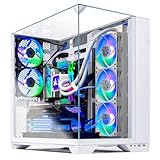
iBUYPOWER Element Pro White, Core i9-14900KF, RTX 5070 Ti 16GB (Model EPWI9N57T01)
Who it suits: A beginner whose PC will work as well as play — video editing, streaming or heavy multitasking alongside games — who prefers an Intel machine from a large, established builder.
The configuration pairs Intel’s Core i9-14900KF with the same RTX 5070 Ti 16GB that powers the King 95. The 14900KF is a 24-core flagship processor: far more than games alone need, and genuinely valuable if the machine also renders video, encodes streams or compiles code. For games alone, the 9800X3D in the King 95 is the stronger processor at a similar tier — this pick earns its place through the wider workload. Around the pair sit 32GB of DDR5 RGB memory, a 1TB SSD and Windows 11 Home, plus a gaming keyboard and mouse in the box — something none of the Skytech picks include, and genuinely useful if you own neither.
Two beginner-specific notes. First, that “KF” means no built-in graphics — the motherboard’s monitor sockets will never produce a picture, so your screen must plug into the graphics card (the walkthrough covers this for both picks it applies to). Second, the power supply: its rating is not pinned down in the verified listing data, so unlike the King 95 and O11 Vision, no promise can be made here about a future graphics card upgrade — check the label on the unit when it arrives.
On white execution, the pattern inverts: the case is the most plainly documented in this guide, the interior the least. Amazon’s own data for this exact model states the color as White — no inference from photographs needed. Beyond the case, the listing data does not specify the cooler type or the internal parts’ colors, and iBUYPOWER builds this family with whichever contracted components are on the line. The grade is therefore partial, honestly earned: a verified white case around an interior the paperwork does not describe.
Pricing needs the same candor: no stable Amazon price could be pinned for this exact model — it moves with iBUYPOWER’s promotion calendar — so this guide prints no number rather than inventing one. As labeled market context only: a sibling, the white Element 9 Pro with a Core Ultra 7 and the same RTX 5070 Ti, sells through retailers such as Newegg — a sign of where this family sits in the tier, not a quote for this listing. Apply the O11 Vision’s rule here too: check the current price on Amazon, and the pick earns its place only while the live listing reads $3,000 or under — toward the lower half of this tier it is a competitive 5070 Ti system by any measure.
- Core i9-14900KF plus RTX 5070 Ti — the strongest mixed gaming-and-work configuration here.
- Case color documented as White in Amazon’s own data for this exact model.
- Keyboard and mouse included — the only pick that helps a from-scratch setup.
- Family positioned in the lower half of this tier at retail — a fair price is realistic.
Honest limitation: For this exact model, no stable Amazon price could be pinned, and its internal component colors and power supply rating are not documented — you are buying a verified white case and a strong specification, with the interior, the upgrade headroom and the final price all confirmed only on the live listing and the delivered unit.
Choose it if your workload runs past games into production work, you want Intel’s flagship doing it, and the live listing reads $3,000 or under. Skip it if gaming is the whole workload — the King 95’s chip is the better games processor — or if a documented interior and power supply matter more to you than the CPU.

Thermaltake LCGS View i1470S-170, Core i7-14700F, RTX 5070 12GB (Model V17S-B760-570-LCS)
Who it suits: A beginner who cares about the desk as much as the games — someone buying a glass showcase that happens to be a strong PC, from a company whose main business is cases and cooling.
Thermaltake builds cases first and computers second, and it shows. The View i1470S-170 wraps its parts in an edge-to-edge tempered-glass showcase chassis in the line’s white Snow finish — the “S” in the model code is the white edition — presenting the build like a display piece. Inside are a Core i7-14700F processor, an RTX 5070 with 12GB of memory, 32GB of Thermaltake’s own ToughRam DDR5-6000 RGB memory (joint-fastest in this guide), a 1TB SSD, a B760 motherboard, Wi-Fi and Windows 11. As a gaming machine it is a strong high-refresh 1440p system: the RTX 5070 draws true 1440p in competitive games and uses DLSS upscaling in heavier ones.
The white grade is partial, led by the case: the Snow showcase chassis is the documented white element, the memory’s RGB lighting is documented, and the graphics card’s cover color is not something the verified listing data guarantees. Through edge-to-edge glass that gap is on display, so it is graded, not glossed. Two specification gaps deserve naming, because beginners only discover them later. The verified listing data does not pin down the power supply’s wattage or the exact cooler model — unusual at this price. The practical consequence: no graphics card upgrade can be promised here, because nobody can confirm the power supply can feed a hungrier card until you read its label on the delivered unit.
Its 14700F is the set’s other F-suffix chip, so the same rule applies in its strongest form: motherboard sockets mean a black screen, every time — plug into the graphics card.
Price is where discipline matters most for this pick. Its price swings widely for the identical machine, so check the current price on Amazon before judging it. At the low end of its range the value defends itself: a modest premium over the cheapest current RTX 5070 systems buys the showcase case, the fast memory and the Thermaltake build. At the high end, you are paying close to King 95 money for a graphics card a full tier lower, and that trade is very hard to justify. So the “white premium” here runs from modest on a good day to steep on a bad one — the listing in front of you decides.
- Edge-to-edge glass white showcase chassis — the strongest furniture-grade presentation here.
- ToughRam DDR5-6000 RGB memory, joint-fastest in this guide.
- Core i7-14700F and RTX 5070: a balanced, strong 1440p specification.
- A fair showcase price when its live price sits at the low end of its range.
Honest limitation: You are paying for presentation, and the price swings hard: at the high end of its range you are paying King 95 money for an RTX 5070 system, while the same money buys the King 95’s stronger card and processor — and the unpinned power supply wattage and cooler cloud any future upgrade plan.
Choose it if the desk’s look leads your decision and the live price sits at the low end of its range. Skip it if it is priced up at King 95 level — that is King 95 money — or if a future graphics card upgrade is already planned.

Skytech Omega, Ryzen 7 7800X3D, RTX 4070 Super 12GB (Model ST-OMEGA2-1126-W-AM)
Who it suits: A beginner whose gaming is fast and competitive, comfortable buying a previous-generation graphics card at a deal price to get an elite gaming processor in a white case.
This pick exists because of its processor. The Ryzen 7 7800X3D was its generation’s flagship gaming CPU, and in competitive games — where how consistently fast the processor feeds frames matters as much as the card — it remains a genuinely elite chip. Its partner is the RTX 4070 Super with 12GB of memory: in raw drawing power it sits close to the current RTX 5070, it renders true 1440p at very high speed in competitive titles, and it handles heavier games with DLSS upscaling. The rest of the specification is complete and modern: 32GB of DDR5-5600 RGB memory, a 1TB Gen4 SSD, a B650 motherboard on AMD’s current AM5 platform — which accepts future processors as drop-ins — and a 750W Gold power supply with a documented rating, all inside the white edition of Skytech’s Omega case (the “-W-” in the model code is the white version). Between the named power supply, the standard case and the AM5 board, it has the clearest upgrade path of any pick here.
What you give up against the current generation: there is no DLSS 4 multi-frame generation on the 4070 Super, so in the newest single-player games it cannot manufacture extra frames the way this guide’s 50-series cards can; its 12GB of memory, comfortable at 1440p today, runs tighter at 4K; and the card comes from a superseded line, which matters at resale. The white grade is partial: the case is documented white; the card’s color is unguaranteed under Skytech’s “brand may vary” clause.
Everything about this pick is the price. On deal days — check the current price on Amazon — it is remarkable: an elite gaming processor, 32GB of memory and a 4070 Super in a white case for plain-RTX-5070 money, with a white premium of effectively zero against current-generation systems. At the top of its range, the logic inverts: within reach of 5070 Ti money for a previous-generation card, and no processor advantage closes that gap. Buy this machine at its deal price, or do not buy it at all.
- Ryzen 7 7800X3D — an elite processor for fast competitive gaming, and the point of the build.
- RTX 4070 Super renders true 1440p at high speed in competitive titles.
- 32GB of memory, a documented 750W Gold power supply, and an AM5 board with a real upgrade path.
- On deal days, value nothing current-generation matches at that moment — check price on Amazon.
Honest limitation: A previous-generation graphics card: no DLSS 4 multi-frame generation, 12GB of memory, and at the top of its price range it is simply the wrong purchase next to the 5070 Ti systems above.
Choose it if it is sitting at its deal price and your gaming is high-refresh 1440p competition. Skip it if it is listed at the top of its range, or if 4K and the newest frame-generation features top your list — spend that money on the King 95.

Skytech Azure 3, Ryzen 7 7700X, RTX 5070 12GB (Model ST-AZURE3-1851-W-AM)
Who it suits: A beginner spending $3,000 on the whole desk rather than the tower alone — someone who would rather have a complete current-generation white setup and a good monitor than a flagship tower feeding an old screen.
Do not let its position at the end of the list fool you — the specification is more serious than its price suggests. A Ryzen 7 7700X drives an RTX 5070 (12GB): current-generation, with DLSS 4 and multi-frame generation, which the Omega above cannot offer. Memory runs to 32GB of DDR5-6000 RGB, joint-fastest in this guide, with a 1TB Gen4 SSD for storage and a 360mm liquid cooler; and the power supply is an 850W Gold unit built to the ATX 3 standard — a class above what systems at this price usually carry, and a documented rating that keeps a future graphics card swap honestly available. The white Azure case is a tempered-glass design, and the machine sits on AM5, so it shares the Omega’s drop-in processor upgrade path.
Its white grade is partial, in the same family pattern: case documented white, the cooler’s lighting documented (its own color not stated), and the card under Skytech’s brand-may-vary clause, so its cover color is not guaranteed — the same coin flip the flagship picks ask, at roughly half their price.
The pricing is the headline. On deal days this model sits among the cheapest current-generation RTX 5070 systems verified in this research in any color — check the current price on Amazon — which makes its white premium effectively zero. What that leaves is a large share of a $3,000 budget unspent — which is where your monitor comes from. The trade, honestly stated, is graphics tier. At 1440p the machine is entirely at home; in the heaviest titles it leans on DLSS where the King 95 renders natively, and at 4K it upscales rather than rendering natively.
- Current-generation RTX 5070 with DLSS 4, in a documented white case with a 360mm liquid cooler.
- 850W Gold ATX 3 power supply and DDR5-6000 memory — supporting parts a class above its price.
- Priced at the low end of this tier on deal days — white premium effectively zero.
- Leaves a large share of the budget for the monitor and the rest of the desk.
Honest limitation: The RTX 5070 sits a tier below the 5070 Ti picks: true 1440p in most games, DLSS-dependent in the heaviest, and an upscaling card at 4K. If the tower alone is the budget and maximum performance is the goal, this pick deliberately leaves headroom unused.
Choose it if the $3,000 has to cover the whole setup, or you simply want a current-generation white build and your change back. Skip it if every dollar is for the tower and you play the most demanding titles at native resolution — move up to the King 95.

Comparison Table
All six side by side. This guide prints no static prices — check the current price on Amazon; the live listing is the only price that counts. White grades count only documented specification data, never listing photos.
| System | Processor | Graphics card | Memory / Storage | White grade | Price | Link |
|---|---|---|---|---|---|---|
| Skytech King 95 | Ryzen 7 9800X3D | RTX 5070 Ti 16GB | 32GB DDR5-5600 / 1TB | Strong partial — case and white cooler documented | Check price on Amazon | Check on Amazon |
| Skytech O11 Vision | Ryzen 7 9800X3D | RTX 5080 16GB | 32GB DDR5-6000 / 2TB | Partial — white panoramic case documented | Usually over $3,000; in budget only with a coupon — check price on Amazon | Check on Amazon |
| iBUYPOWER Element Pro White | Core i9-14900KF | RTX 5070 Ti 16GB | 32GB DDR5 / 1TB | Partial — case documented white, interior unspecified | No stable price pinned; family sits in the lower half of this tier — check price on Amazon | Check on Amazon |
| Thermaltake LCGS View i1470S-170 | Core i7-14700F | RTX 5070 12GB | 32GB DDR5-6000 / 1TB | Partial — white glass showcase case | Swings widely — check price on Amazon | Check on Amazon |
| Skytech Omega | Ryzen 7 7800X3D | RTX 4070 Super 12GB | 32GB DDR5-5600 / 1TB | Partial — white case documented | Deal-dependent — check price on Amazon | Check on Amazon |
| Skytech Azure 3 | Ryzen 7 7700X | RTX 5070 12GB | 32GB DDR5-6000 / 1TB | Partial — white case documented | Low end of this tier — check price on Amazon | Check on Amazon |
Your First Evening: Setting Up, Step by Step
- Unbox and inspect before plugging anything in. Check the glass for cracks, look inside for anything loose after shipping, and photograph the graphics card that arrived — under the “brand may vary” clause, that photo is your record of what was delivered.
- Choose the spot. The machine needs open air around its vents — never sealed inside a closed cabinet, where its own heat has nowhere to go.
- Plug the monitor into the graphics card — this is the step that matters. On the back of the PC there are two sets of display sockets: a vertical cluster up high, on the motherboard, and a horizontal row lower down, on the graphics card itself. Your cable goes in the lower, graphics card row. Which failure you get from the wrong row depends on your pick. On the iBUYPOWER Element Pro White and the Thermaltake LCGS View, the processor is an F model with no built-in graphics at all, so the motherboard sockets produce a completely black screen — the PC will sound alive, the fans will spin, and the monitor will say “no signal.” Nothing is broken; the cable is simply in the wrong place. On the four AMD machines — the King 95, O11 Vision, Omega and Azure 3 — the processor carries basic built-in graphics, so the motherboard sockets do show a picture, and nothing looks wrong. But your games then run on that weak built-in graphics instead of the card you paid for: the desktop feels fine and games crawl. It is the quietest trap in PC ownership.
- Connect keyboard and mouse. Only the Element Pro White includes them; the other five assume you already own a set, so have one ready.
- Power on and let Windows set itself up. Connect the power cable, flip the switch on the back of the power supply, press the power button, and follow the first-run prompts. Let the initial Windows updates finish before judging anything.
- Verify the machine you received. In Windows Settings or Task Manager, confirm the graphics card model and the 32GB of memory match what you ordered. This two-minute check is your protection under the “brand may vary” clause, and it proves step 3 worked: if the powerful card is your display adapter, the cable is right.
- Update the graphics driver and set your screen properly. Install NVIDIA’s driver app and let it update the card’s software. Then set your monitor’s resolution in Windows display settings — and if you bought a high-refresh screen, raise the refresh rate there too, because new monitors commonly default to 60Hz.
- Note the power supply for later. If your pick has a documented power supply (King 95, O11 Vision, Omega, Azure 3), its rating is the number any future card upgrade will be planned around. On the Element Pro and Thermaltake, read the label on the unit itself — their listings leave it unpinned.
What Else You Will Spend
A monitor comes first, because none of these six PCs includes one. These machines are built to feed a 1440p high-refresh screen, and pairing one with an old basic 1080p office monitor wastes much of what you paid for. That is precisely the Azure 3’s argument: at its deal price it leaves a large share of the budget for the screen and the rest of the desk. A keyboard and mouse are the second item — included only with the Element Pro White.
The deal-dependent picks’ catches are not parts to buy; they are the machine plus a condition. The O11 Vision is the machine plus patience — it only counts at $3,000 or under with a coupon applied, and the correct “fix” when no coupon is live is the King 95. The Omega is the machine plus timing — a bargain at its deal price, and at the top of its range the fix is not buying it. The Element Pro White is the machine plus verification — it belongs in your cart only while its live listing reads at or under $3,000.
How to Choose
Start from your screen, not the tower. Playing at 1440p points to the 5070 Ti picks, with the King 95 as the default; 4K points to the O11 Vision on a coupon week — the same ladder governs any Best 4K Gaming PC Under $3000, because the constraint is the card market, not the color. A whole-desk budget points to the Azure 3. Comparing more broadly, our Best Gaming PC For Beginners Under $3000 covers the same budget without the white requirement.
Grade the white yourself before ordering. Read the specification block, not the photo gallery: Is the case documented white? The cooler? The memory — white, or only lighted? Is the card a named white-edition model, or does the listing reserve the right to vary the brand? On every Skytech pick here it does reserve it — which leaves the largest component in the window unguaranteed, and if a guaranteed-white card is non-negotiable, your routes are a maker-direct custom order or building it yourself, not an Amazon prebuilt at this budget.
Respect the walk-away rules. O11 Vision: $3,000 hard, coupon applied, or buy the King 95. Omega: at its deal price or not at all. Thermaltake: at the low end of its range, not the high end. Element Pro White: only while the live listing reads at or under $3,000. These machines run on a promotion calendar; the same PC is a good buy one week and a poor one the next.
Check the supporting parts like a builder would. At this budget, accept nothing less than 32GB of memory, Gen4 storage, and — if a future card upgrade matters to you — a power supply the listing actually names. The King 95, O11 Vision, Omega and Azure 3 document theirs (850W, 850W, 750W and 850W respectively), which is why upgrade paths are promised only for those four. The Element Pro and Thermaltake leave theirs unpinned; treat any upgrade there as “check the label when it arrives.” Platform counts too: the four AMD picks sit on AM5, which accepts future processors as drop-ins, while the two Intel picks sit on LGA1700, a finished platform.
Common Mistakes
Plugging the monitor into the motherboard. The classic first-evening error, covered in step 3 above: a black screen on the two F-processor picks, silently slow games on the other four. If your new PC “feels slow,” check this cable first.
Trusting the listing photos. Renders are produced from the maker’s cleanest build and shared across color variants. The specification block is the contract; the photo is advertising.
Assuming the graphics card will be white. The card is the biggest, most visible part inside a glass case, and at this budget no Amazon listing guarantees its color. Buyers surprised by a black card in a white showcase were not deceived — the clause was in the listing.
Paying the everyday price for a deal machine. An O11 Vision above $3,000, an Omega at the top of its range, a Thermaltake at the top of its range — each is a product this guide recommends, at another price. At this tier, the expensive mistake is rarely the wrong system; it is the right system on the wrong week.
Final Recommendation
For most beginners, buy the Skytech King 95: the strongest processor-and-card pairing selling under $3,000 every day, the best-documented white execution in this guide, and a price inside the budget whenever we have checked it. Its one compromise — the unguaranteed graphics card color — is one every rival here shares. If 4K is your screen and your timing is flexible, watch the Skytech O11 Vision instead, and buy it only the week a coupon brings it to $3,000 or below. The rest sort themselves by what you value: work beyond gaming, the Element Pro White; the showcase desk, the Thermaltake near the low end of its price range; competitive high-refresh play, the Omega on deal days; the whole-desk budget, the Azure 3 with money left for the monitor. The base guide to the Best White Gaming PC Under $3000 covers the same tier without the beginners framing; our Best Gaming PC Under $3000 drops the color requirement.
Frequently Asked Questions
I am a complete beginner. Which one should I just buy?
The Skytech King 95. It is the strongest machine here that sells under $3,000 without a coupon or deal watch; its white case and cooler are both documented, and its documented 850W power supply keeps future upgrades open.
My new PC shows a black screen or “no signal.” Is it broken?
Almost certainly not — check the monitor cable. It must go into the graphics card’s sockets, low on the back of the case, not the motherboard’s above them. On the Element Pro White and the Thermaltake — the two F-processor picks — the wrong sockets mean no picture at all. On the four AMD picks the wrong sockets still show a picture but make games run slowly, so if games feel sluggish rather than absent, check the same cable.
Will the graphics card inside my white PC actually be white?
Not guaranteed, on any pick here. Every maker reserves the right to vary the card brand, so the card that arrives can wear a black or silver cover inside your white case — the most common gap between white listings and white deliveries at this budget, and why no pick here earns the “complete” grade.
Related Guides
- Best White Gaming PC Under $3000
- Best White Gaming PC Under $2500
- Best White Gaming PC Under $1500
- Best White Gaming PC For 1440p Gaming Under $3000
- Best White Gaming PC For Streaming Under $3000
- Best White Gaming PC For Small Spaces Under $3000
- Best White Gaming PC For Beginners Under $2500
- Best Prebuilt Gaming PC Under $3000


