Where to buy
Check the latest price, availability and delivery on Amazon. Orders are placed on Amazon. We may earn a commission from qualifying purchases.
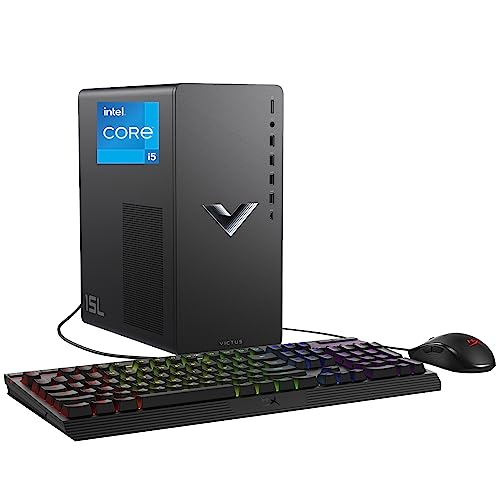
- Best for a small space under $700: HP Victus 15L Gaming Desktop TG02-1020h, i5-13400F, RTX 3050, 512GB SSD — Check on Amazon
- IPASON Gaming PC Desktop, Ryzen 5 5600, RTX 3060 12GB, 16GB RAM, 1TB NVMe SSD — Check on Amazon
- Skytech Blaze 3.0 Gaming PC, i5-10400F, RTX 3060, 16GB RAM, 1TB SSD, 600W Gold PSU — Check on Amazon
- ZOTAC MEK Gaming PC, Ryzen 5 5500, RTX 3050, 16GB RAM, 650W Gold PSU — Check on Amazon
See 2 more Amazon options
- STGAubron Gaming PC Desktop, Ryzen 5 5500, RTX 3050 6GB, 16GB RAM, 1TB SSD — Check on Amazon
- ZER-LON Gaming PC AOV4060, Ryzen 5 5500, RTX 4060, 16GB RAM, 1TB NVMe SSD — Check on Amazon
Read the full guide ↓
Disclosure: As an Amazon Associate, reviewstook.com earns from qualifying purchases. Links to Amazon on this page are affiliate links; they cost you nothing extra. Listing details such as price and availability change often, so check the current Amazon listing before you buy.
Start with the honest truth about this search, because it decides everything below: under $700, a prebuilt gaming PC is almost never a small PC. Five of the six machines in this guide are tower-class desktops — full-size cases that stand on the floor or swallow a desk corner whole — and not one of them, at any point in the research behind this guide, documents a VESA bracket or any way to mount it behind a monitor. If your room genuinely needs a computer that disappears, the machines you are describing are mini PCs, and they live in a different guide. What this guide does instead is the next best thing, and for most small rooms it is the thing that actually matters: it grades the six prebuilts worth buying at this budget as installations. Which one has a documented compact footprint. Which ones arrive finished, so the case never has to be opened on a cramped desk. Which ones schedule a case-opening for you in week one. And how each one wants to be placed — because in a small room, a tower’s address is a decision: the floor space it takes, the air it breathes, the cables that drop behind the desk, and the heat it pours into a room that may already run warm.
One pick here is a genuine compact desktop: the HP Victus 15L, whose case size is in its name and documented at roughly 15 litres — a fraction of a conventional tower’s volume, and the only size figure in this guide we can print, because it is the only one the underlying research documents. Everything else is graded by form-factor class, with exact measurements deliberately left to the live listings: prebuilt sellers change cases between production runs, and a dimension copied from a review of last year’s batch helps nobody. The gaming honesty from the base guide carries over unchanged: $700 is a 1080p budget, the RTX 3060 12GB is its resident card, the lone RTX 4060 machine is a sale-only visitor with a hard buy-only-at-$700-or-less rule, and native 1440p or 4K gaming is not on offer at this price no matter what a listing implies. Small room, same arithmetic.
In this guide
Quick Picks
Short on time, or comparing several options at once? Each row below names the small-space situation and the prebuilt that suits it, with a link to the listing.
| Buyer type | Pick | Why it stands out | Link |
|---|---|---|---|
| Smallest documented footprint | HP Victus 15L TG02-1020h, i5-13400F / RTX 3050 | The only compact case here — roughly 15 litres, documented — sized for a desk a tower would crowd off | Check on Amazon |
| Least installation work, standard tower | IPASON Gaming PC, Ryzen 5 5600 / RTX 3060 12GB | Arrives complete — 16GB and 1TB fitted — so nothing needs opening or adding on a small desk | Check on Amazon |
| No delivery-day case opening | Skytech Blaze 3.0, i5-10400F / RTX 3060 | Published 600W Gold PSU means the upgrade ceiling is known without ever lifting the side panel | Check on Amazon |
| One planned opening, then done | ZOTAC MEK, Ryzen 5 5500 / RTX 3050 | Published 650W Gold PSU; the only scheduled job is a second drive when the 500GB fills | Check on Amazon |
| Big storage, homework attached | STGAubron Gaming PC, Ryzen 5 5500 / RTX 3050 6GB | A full 1TB fitted — but the unpublished PSU makes a first-week inspection part of the install | Check on Amazon |
| Best graphics, when the sale is live | ZER-LON AOV4060, Ryzen 5 5500 / RTX 4060 | The strongest card at this budget — a tower like the rest, and only worth placing at $700 or less | Check on Amazon |
How These Picks Were Chosen
The six machines are the same verified set as our main Best Prebuilt Gaming PC Under $700 guide — same listings, same deal rules — re-graded here on installation criteria, because that is what a small-space buyer is actually choosing. We did not use these machines ourselves, and no measurement appears in this guide that the underlying listing research does not document. Where a case dimension is not documented, the review says so, grades the machine by its form-factor class, and sends you to the live listing for the number that matters: sellers revise cases, and the listing in front of you is the only measurement that describes the machine you will receive.
Five installation filters did the grading. The first is documented size: only one pick, the HP, documents a compact case, and that single fact outweighs every spec-sheet argument in a genuinely small room. The second is completeness on arrival. In a large room, adding a memory stick or a second drive is a ten-minute job on a clear worktop; in a small one it means clearing the desk, working over carpet, and keeping screws out of the sofa — so a machine that arrives finished, with nothing to add, grades above one that schedules work. The third is whether the power supply is published. A named PSU — 550W, 600W Gold, 650W Gold — means you know the machine’s upgrade ceiling from the listing; an unpublished one means the case gets opened in week one just to read a label, and that errand is part of this pick’s installation cost. The fourth is placement honesty: every pick here is an air-cooled tower or desktop that pulls air in and pushes heat out, and none of them belongs in a sealed cabinet, a closed TV unit, or a wardrobe with the door shut — the reviews grade how forgiving each machine’s placement can be, and the checklist below turns that into measurements. The fifth is cabling: all six machines power from an internal supply, so none of them adds an external brick to house — the cable question is the simpler one of a power cord, a monitor lead and a network cable dropping from the case to where they need to reach.
Two disciplines from the base guide are kept at full strength. Prices change often, so check the live price on Amazon before you buy: the ZER-LON remains a purchase only at a live price of $700 or less, and the HP should be judged honestly as a machine plus the memory stick it should have shipped with. And mounting is claimed only where it is documented — which here means it is claimed for no pick at all. No machine in this guide documents a VESA bracket, a wall mount, or a behind-monitor fitting. They stand: on the desk, beside it, or under it. Plan the floor and shelf space accordingly, and be suspicious of any third-party listing photo that shows one of these towers floating behind a screen.
The 6 Best Prebuilt Gaming PCs for Small Spaces Under $700
HP Victus 15L Gaming Desktop TG02-1020h — i5-13400F, RTX 3050, 512GB SSD
Who it suits: The small-space buyer first and the gamer second — someone whose desk, shelf or floor patch is genuinely limited, and who will trade upgrade room for the one documented compact case at this budget.
The Victus earns first place in this guide on a single documented fact: its case is a compact desktop of roughly 15 litres, a size class the other five picks do not approach. That is the difference between a machine that sits on a student desk beside the monitor and one that evicts the monitor to make room; between a PC that fits the shelf of a TV unit — on an open shelf, with air around it — and one that lives on the floor because there is nowhere else. Placement flexibility follows from the size: this is the one pick that can plausibly go on the desk rather than under it, which also shortens every cable run, keeps the power button and front ports within reach, and lifts the machine’s intakes off the carpet dust that floor-standing towers breathe. The hardware inside is respectable for the footprint: the newest processor in this guide, a ten-core Intel Core i5-13400F with headroom to spare, an RTX 3050 for 1080p gaming, a 512GB SSD and Windows 11 Home. Check the price on Amazon and judge it against the room it saves, not against the tower prices.
The installation does carry one scheduled job, and it is not optional. The Victus ships with 8GB of RAM, and 8GB is below the floor for a gaming PC in 2026 — games stutter, and the graphics card takes the blame for what the memory caused. Budget a second matching stick as part of the purchase price and fit it on day one, while the desk is already clear; priced honestly, this is a machine plus a memory upgrade. The second cost of the small case is permanence: the compact proprietary case and power supply leave little room for a more powerful graphics card later, so the HP’s smallness is a finished-appliance smallness. It will not grow. What you are buying is the footprint, HP’s support and driver infrastructure behind it — a genuine manufacturer safety net none of the marketplace picks match — and a strong CPU, in the only box here that respects a small room’s geometry.
- Roughly 15-litre compact case — the only documented small footprint in this guide, and the reason it leads.
- Desk-plausible placement: shorter cable drops, reachable ports, intakes lifted off carpet level.
- HP’s support, driver and warranty infrastructure — the strongest safety net here.
- The newest, strongest CPU in the guide: a ten-core i5-13400F.
Honest limitation: It ships with only 8GB of RAM — the second stick is part of the real price and part of the install — and the proprietary compact case and PSU largely close the graphics-card upgrade path. This RTX 3050’s memory is not stated in the verified sources and is not claimed here.
Choose it if the room is the constraint and you will fit the memory stick immediately. Skip it if you have floor space for a tower and want 16GB in the box plus an upgrade path — the machines below trade size for exactly that.

IPASON Gaming PC Desktop — Ryzen 5 5600, RTX 3060 12GB, 16GB RAM, 1TB NVMe SSD
Who it suits: The small-room buyer who has one floor patch or desk end for a standard tower and wants the installation to end the day the box arrives.
Judged purely as an installation, the IPASON’s virtue is that there is barely one. It is a tower-class case — the research behind this guide documents no dimensions for it, so measure from the live listing before you commit a specific alcove — but it arrives complete in a way none of its tower rivals quite match: 16GB of memory fitted, a full 1TB NVMe drive fitted, Windows 11 Home installed. No memory to add, no second drive pencilled in for next month, no reason to open the case on a desk that has no spare surface. In a small room that completeness is worth real money, because every future opening is a logistics exercise. The specification inside is the strongest everyday one at this budget: a Ryzen 5 5600, and the RTX 3060 in its 12GB variant — the card and memory buffer that define this tier’s 1080p gaming and age the most gracefully. The power supply’s wattage is published at 550W, which matters to the installer as much as to the upgrader: the ceiling is known from the listing, so no delivery-day panel removal is needed just to learn what a future card swap would require. Check the price on Amazon before you buy.
Placement grading is conventional tower discipline. It stands on the floor or a desk end, pulls air through its case, and wants open space around its panels rather than a cabinet; nothing about it is documented as mountable, and it should not be wedged between furniture and wall with its exhaust facing a surface. Two listing cautions from the base research carry over at full size. The listing notes the graphics card brand may vary — the model and its 12GB are the contract, the cooler shroud is not — and this listing family has shown configuration drift, so confirm the style name in your cart reads as the Ryzen 5 5600 / RTX 3060 configuration, and verify the delivered machine against the listing in the first days, while a return would still be simple. Support runs through the marketplace seller rather than a builder’s own operation, which is the trade for the specification per dollar.
- Arrives finished: 16GB and 1TB fitted, so the small-desk installation ends at plug-in.
- Published 550W PSU — the upgrade ceiling is known without opening the case.
- RTX 3060 with 12GB — the strongest everyday gaming specification under $700.
- Check the price on Amazon — it sits in the heart of this under-$700 tier.
Honest limitation: A tower-class case with no documented dimensions in the research — confirm its size on the live listing before assigning it a tight spot — and support runs through the marketplace seller.
Choose it if you have room for one standard tower and want zero follow-up work. Skip it if every litre counts — that is the HP above — or a domestic warranty line matters more than specification per dollar.

Skytech Blaze 3.0 Gaming PC — i5-10400F, RTX 3060, 16GB RAM, 1TB SSD, 600W Gold PSU
Who it suits: The buyer with a tower-sized patch of floor who wants the machine’s whole file — support, power supply, upgrade ceiling — settled before it arrives, so installation is a one-evening event.
The Blaze 3.0 grades well in a small room for a reason that never appears on a spec sheet: predictability. Skytech is an established US system integrator with its own support operation and warranty process, which means the machine’s life in your room is backed by a company rather than a marketplace inbox. More concretely for the installer, the power supply is published in full — 600W, 80+ Gold — the best-documented PSU story in this guide. That single line removes the most common reason a new prebuilt gets opened in week one: you already know the upgrade ceiling, so the side panel stays on until the day a future card actually goes in. The rest of the fit-out is complete as shipped: an Intel Core i5-10400F, an RTX 3060, 16GB of DDR4-3200 memory and a 1TB SSD, so like the IPASON it asks for no day-two purchases. Check the price on Amazon — it belongs at the top end of this guide’s budget, fairly positioned for what it is. The research documents no case dimensions for it, so treat it as a standard tower-class footprint and confirm the measurements on the live listing if your spot is tight.
Placement is standard tower discipline: floor or desk end, air around the panels, exhaust not aimed at a wall or curtain, and no cabinet with a door. Two compromises from the base research should be weighed before it takes up residence. The i5-10400F sits on a platform Intel has finished — it plays today’s games perfectly well alongside the 3060, but there is no meaningful CPU upgrade path in the socket, so this machine’s second act is a graphics card swap and nothing more. And the listing ships Windows 10 Home rather than Windows 11; the processor is on Microsoft’s Windows 11 supported list, so the upgrade is free — schedule it into the first evening’s setup rather than treating it as a defect. Note also that the verified sources do not headline this RTX 3060’s memory, so no figure is claimed for it here. Buyers comparing purely on gaming hardware should read Best Prebuilt Gaming PC For Beginners Under $700 for the wider hand-held tour of this tier; buyers comparing on installation should note that this is the tower that asks the least of a small room after the HP.
- Published 600W 80+ Gold PSU — no delivery-day case opening to learn the ceiling.
- Complete as shipped: 16GB and 1TB fitted, nothing to add in week one.
- An established US integrator stands behind it, with its own support channel and warranty process.
- Positioned at the top end of this budget tier — check the price on Amazon.
Honest limitation: The 10th-generation Intel platform is finished — no CPU upgrade path — the listing ships Windows 10 Home (free Windows 11 upgrade during setup), and no case dimensions are documented in the research, so verify the live listing’s measurements for a tight spot.
Choose it if a builder’s support operation and a published power supply rank level with raw specification in your priorities. Skip it if you want the longest platform runway — the Ryzen machines here age better — or your space cannot take a standard tower at all.

ZOTAC MEK Gaming PC — Ryzen 5 5500, RTX 3050, 16GB RAM, 650W Gold PSU
Who it suits: The forward-thinking buyer whose room fits a tower today and whose plan includes one scheduled opening in a year or two — a bigger graphics card — rather than any work this month.
The MEK’s installation profile is defined by a component most guides skip: a 650W 80+ Gold power supply, the strongest and best-documented in this list, published by a company whose main business is graphics hardware. For a small-space buyer that number does quiet work. It means the machine’s one planned future event — unplugging the RTX 3050 and installing a substantially stronger card — is a single purchase and a single opening, with no power supply swap turning it into a full rebuild on a small desk. Until that day, the machine asks nothing: Ryzen 5 5500, 16GB of DDR4-3200, Windows 11 Home, and Wi-Fi 6E, the best wireless in this guide, which in a room where the router lives elsewhere can spare you a long Ethernet run across the floor. Check the price on Amazon — it lives at this budget rather than visiting it on sale. No case dimensions are documented in the research; grade it as tower-class and take exact measurements from the live listing.
The concessions are two, and both are about the calendar rather than the room. The RTX 3050 is a class below the 3060 machines above: at 1080p it plays esports titles at high refresh and modern games at medium-to-high settings with upscaling helping, but it will not hold high settings in the newest releases the way the IPASON’s 3060 12GB will. Storage is the scheduled job — 500GB of NVMe fills quickly at modern game sizes, so most owners should plan a second drive in the first year, ideally fitted in the same session as a future card swap so the case opens once, not twice. This RTX 3050’s memory is not stated in the verified sources and is not claimed here. Buy the MEK as a platform with a card to grow out of, installed once and left alone, and it is one of the calmest purchases in the guide; buy it expecting day-one parity with the 3060 picks and it will disappoint by design.
- 650W 80+ Gold PSU — the future card swap stays a one-opening job, PSU already bought.
- Wi-Fi 6E, the best wireless here — can spare a small room a cross-floor cable run.
- Fully published specification from an established hardware maker.
- Lives at this budget rather than visiting it on sale — check the price on Amazon.
Honest limitation: The RTX 3050 is a full class below the RTX 3060 picks for today’s games, and the 500GB SSD schedules a second drive within the first year. No case dimensions are documented in the research.
Choose it if your room fits a tower and your upgrade is a single planned event, not a hobby. Skip it if you want the strongest gaming performance on day one and never intend to open the case — that is the IPASON.

STGAubron Gaming PC Desktop — Ryzen 5 5500, RTX 3050 6GB, 16GB RAM, 1TB SSD
Who it suits: The value hunter with a tower-sized spot who would rather do one deliberate inspection in week one than pay the next tier for storage.
On the numbers that are published, this is a lot of machine for the money and for the room: a Ryzen 5 5500, an RTX 3050 in its documented 6GB variant, 16GB of memory and — the specification that punches above this tier — a full 1TB solid-state drive, in a case with four RGB fans, Wi-Fi 6 and Bluetooth 5.2. The storage matters to a small-space install more than it first appears: 1TB fitted means no external drive colonising the desk and no early second-drive opening, and a large library lives inside the box. Check the price on Amazon — it sits in the upper part of this budget tier. The four fans cut both ways in a small room — airflow is generous, which the machine needs, but a fan-lit case is also a presence: if the PC will share a bedroom, decide before it arrives whether the lighting is a feature or a negotiation. No case dimensions are documented in the research, so confirm the live listing’s measurements before assigning it a shelf or alcove; treat it as tower-class until the listing proves otherwise.
The condition attached to this recommendation is the longest in the guide, and in this guide it is framed as what it is: part of the installation. The listing leaves three specifications unpublished that a buyer deserves to know — the power supply’s wattage and brand, the memory’s speed, and whether the SSD uses the fast NVMe interface or the slower SATA one. None is a reason to refuse the machine; all three are reasons to inspect it. In the first week, while the desk is still in setup mode, open the case or the system information panel, read the PSU label, confirm the memory speed and the drive interface, and write the answers down. If they are reasonable, you have bought the best storage value in this guide and you know your upgrade ceiling. If the power supply turns out to be a minimal unit, you have learned that while returning it is still easy. Either way, the inspection happens once, on your schedule, rather than as a surprise in year three.
- 1TB SSD fitted — no external drive on the desk and no early second-drive opening.
- The 3050’s 6GB is documented in the listing, so there is no guessing about the card’s ceiling.
- Strong storage value for the tier — check the price on Amazon.
Honest limitation: The listing does not publish the PSU wattage or brand, the RAM speed, or the SSD interface — all three must be verified on the delivered machine before the return window closes, which makes a first-week case opening part of this install. No case dimensions are documented in the research.
Choose it if capacity per dollar tops your list and the week-one inspection sounds like a fair trade. Skip it if unpublished specifications bother you; the ZOTAC further up publishes every one of them for similar money.

ZER-LON Gaming PC AOV4060 — Ryzen 5 5500, RTX 4060, 16GB RAM, 1TB NVMe SSD
Who it suits: The patient buyer whose room fits a standard tower and who can wait for a sale to put the newest graphics generation in it.
Nothing about the ZER-LON’s installation is small, and this guide will not pretend otherwise: it is a tower-class prebuilt like the IPASON, Skytech, ZOTAC and STGAubron above, with no case dimensions documented in the research and no mounting of any kind. What it offers a small room is not size but a reason to stop shopping — the strongest graphics card this budget ever touches, an RTX 4060 with current-generation upscaling and frame generation, around a Ryzen 5 5500, 16GB of memory, a 1TB NVMe drive and Windows 11 Home, complete as shipped. If the card means the machine stays satisfying a year longer before anyone thinks about opening it, that is a genuine small-space virtue: the best installation is the one you do once. But price is the whole story of this pick, and the rule is the hardest in the guide: it sits above this budget at its everyday price, dipping into this tier only on sale. Buy this machine only when the live price is at or under $700. At that price it jumps to the front of this list on the strength of its card alone. Above this budget it is a machine from the next tier wearing this tier’s search term, and the correct move is to close the tab and set a price alert — the Best Prebuilt Gaming PC Under $800 guide is where it belongs at that money.
Two specification notes complete the install picture. The Ryzen 5 5500 runs on the older PCIe 3.0 interface, which costs the 4060 a few percent of its performance — not a different class of machine, but a reason this pick wins on its card rather than its platform. And the power supply wattage is not published in the listing material we could verify, so like the STGAubron, this machine schedules a small delivery-week errand: open the case once, read the label, and know your ceiling. Wi-Fi is the older Wi-Fi 5 standard, adequate for gaming on a home connection, though a wired run is kinder to a small room’s one machine. Plan its placement as a standard tower — floor or desk end, air around it, exhaust unobstructed — and let the checklist below size the spot before the sale, not after it, because sale stock does not wait for a tape measure.
- An RTX 4060 — no other current-generation card reaches this budget at all.
- 16GB of memory and a full 1TB NVMe drive fitted — nothing to add on arrival.
- Frame generation adds headroom in the most demanding 1080p titles.
Honest limitation: It is a sale-only machine — its everyday price sits above this budget — its PSU wattage is unpublished, and nothing about it is compact: no documented dimensions, no mounting, tower-class placement only.
Choose it if the live price reads $700 or less and your room takes a standard tower. Skip it if you are buying today at whatever it costs — at its everyday price the IPASON is the better purchase — or if the room itself is the problem, which only the HP solves.

Comparison Table
| Product | Graphics card | Installation profile | Power supply | Link |
|---|---|---|---|---|
| HP Victus 15L TG02-1020h (i5-13400F) | RTX 3050 | Compact desktop, roughly 15 litres documented — the only small footprint here; one day-one RAM stick to fit | Proprietary compact unit | Check on Amazon |
| IPASON Gaming PC (Ryzen 5 5600) | RTX 3060 12GB | Tower class, dimensions not documented; arrives finished — no scheduled openings | 550W, published | Check on Amazon |
| Skytech Blaze 3.0 (i5-10400F) | RTX 3060 | Tower class, dimensions not documented; complete as shipped, ceiling known from the listing | 600W 80+ Gold, published | Check on Amazon |
| ZOTAC MEK (Ryzen 5 5500) | RTX 3050 | Tower class, dimensions not documented; one planned opening for a second drive | 650W 80+ Gold, published | Check on Amazon |
| STGAubron Gaming PC (Ryzen 5 5500) | RTX 3050 6GB | Tower class, dimensions not documented; first-week inspection opening is part of the deal | Not published | Check on Amazon |
| ZER-LON AOV4060 (Ryzen 5 5500) | RTX 4060 | Tower class, dimensions not documented; complete as shipped — sale price only | Not published | Check on Amazon |
Measure Before You Buy: The Five-Step Small-Space Checklist
Every disappointment in this category is a measurement that happened after the delivery instead of before it. Run these five steps in order, with the live listing of the machine you want open beside you, because the listing — not a review of an earlier production run — carries the dimensions of the case you will actually receive.
- Step 1 — Measure the spot. Tape-measure the exact footprint and height of where the PC will live: the desk end, the floor patch beside it, the shelf. Then read the case dimensions on the live listing and compare all three numbers, not just the width. For the five tower-class picks here, the research documents no dimensions, so the listing is your only source — if a listing will not state them, treat that as a reason to choose a machine that does, or to leave slack in every direction. The HP is the exception that proves the rule: its roughly 15-litre compact case is documented, which is why it can be assigned to a shelf with confidence.
- Step 2 — Ventilation clearance. Whatever spot you measured needs open air on the sides the case breathes through and room behind it for exhaust to escape. As a working rule, leave a hand’s width of clear space around the intake panels and nothing at all behind the exhaust but open room. This step is also where the sealed cabinet dies: no machine in this guide — tower or compact — belongs inside a closed TV unit, a wardrobe, or a cupboard with the door shut. A gaming PC under load is a small space heater with opinions; sealed in, it throttles, gets loud, and ages early. If the only available spot is enclosed, the answer is a different spot or a different kind of computer, not a quieter fan curve.
- Step 3 — The brick address. Good news, stated plainly: none of the six machines here uses an external power brick. Every one houses its power supply inside the case, so there is no second object to find a home for, no adapter to dangle behind the desk. The address you do need is a wall socket within the power cord’s comfortable reach of the measured spot — not stretched, not shared with a heater — and, for the machines whose PSU is unpublished, one more line in the plan: their supply is internal and invisible until the case opens, which is why the STGAubron and ZER-LON schedule a label-reading in week one.
- Step 4 — Cable drop. From the back of the case, three things must reach: the monitor lead, the power cord, and ideally a network cable. Measure those runs with the case in its measured spot, not on the desk in front of you. A tower on the floor beside a desk drops its cables a long way; the compact HP, sitting on the desk, shortens every run and keeps the front ports reachable. If the router is in another room and a cable run is impossible, weigh the wireless standards in this guide honestly — the ZOTAC’s Wi-Fi 6E is the strongest fallback here, and the ZER-LON’s older Wi-Fi 5 the weakest.
- Step 5 — Then order. Only now, with the spot measured, the air planned, the socket confirmed and the cables routed on paper, check the live price on Amazon and place the order. For the ZER-LON this order matters twice: run the checklist before the sale appears, because a sale-priced machine will not wait while you find a tape measure — and if the price on the day is above $700, the checklist has still done its job, because it fits the IPASON or the Skytech just as well.
Heat, Airflow and the Room Itself
A small room changes the physics of a gaming PC in one way buyers underestimate: the heat has nowhere to go. Every watt these machines draw becomes warmth in the room, and a tower under a desk in a small bedroom will raise the temperature around your legs across a long session. Placement is the only real lever you have. Keep the case out of direct sun and away from radiators; never push its rear flush against a wall or curtain, because that is where the exhaust lives; and if it stands on carpet, a board or stand under it keeps the lower intakes breathing instead of grazing pile. The compact HP has one genuine thermal advantage beyond its size — on a desk, its intakes sit in cleaner, cooler air than a floor tower’s, and its exhaust is easier to aim into the room rather than into a wall. None of that rescues a sealed cabinet. The refusal in Step 2 is absolute for a reason: an enclosed space turns every one of these machines into its own oven, and the performance you paid for is the first thing the heat takes.
How to Choose a Prebuilt Gaming PC for a Small Space
- Decide whether the room or the gaming leads. If the space is genuinely tight — a shelf, a small desk, a shared room — the HP’s documented compact case is the only pick designed for it. If you have one honest floor patch, the towers open up, and the choice becomes about installation work rather than size.
- Count the openings, not just the litres. A machine that arrives finished (IPASON, Skytech) installs once. A machine with a known scheduled job (the HP’s memory stick, the ZOTAC’s second drive) installs once plus a planned session. A machine with unpublished specifications (STGAubron, ZER-LON) installs once plus an inspection. In a small room, that ranking is worth as much as a spec tier.
- Never accept a dimension from anywhere but the live listing. Sellers revise cases between runs. The research behind this guide documents a size for exactly one pick; for the other five, the listing in front of you is the measurement of record, and Step 1 of the checklist is built around it.
- Treat mounting claims as guilty until documented. No pick here documents a VESA bracket or wall mount. If a marketplace photo shows a tower floating behind a monitor, it is showing you a different product or a render. These machines stand — plan the standing space.
- Keep the gaming honesty from the base guide. This is a 1080p budget. The RTX 3060 12GB is the resident card; the RTX 4060 visits on sale under a hard $700 ceiling; the RTX 3050 machines trade a card class for their other virtues. A small room does not change that arithmetic, and upscaling language in a listing does not either — compare the full tier in Best Prebuilt Gaming PC For 1440p Gaming Under $700 if a 1440p monitor is part of the plan.
- Price the whole installation. The HP is a machine plus a memory stick. The ZOTAC is a machine plus an eventual second drive. The STGAubron is a machine plus an hour of inspection. The ZER-LON only fits this budget on sale days. The sticker is the beginning of each price, not the whole of it.
- Match the support to the household. In a shared or family room, the machine everyone uses should be the one someone will fix: HP’s manufacturer infrastructure and Skytech’s integrator support are worth more there than a spec line. Solo buyers comfortable with seller-based support can take the IPASON’s hardware-per-dollar trade knowingly.
Common Buying Mistakes
- Ordering a tower for a shelf. Five of these six machines are tower-class; measure the spot against the live listing’s dimensions before the box ships, not while the courier is at the door.
- Sealing a gaming PC in a cabinet, TV unit or wardrobe. Enclosed air turns any of these machines into a throttling, loud, short-lived one. The refusal applies to the compact HP too — small is not the same as sealed-safe.
- Believing a mounting photo. No pick in this guide documents VESA or wall mounting; a listing image showing otherwise is not documentation.
- Copying a dimension from a review of an older production run. Cases change. The live listing is the only measurement that describes your machine.
- Forgetting the day-one jobs in the budget and the diary. The HP needs its memory stick fitted immediately, not eventually; the STGAubron needs its inspection inside the return window, not after it.
- Paying the everyday price for the sale-only machine. The ZER-LON usually sits well above this budget; buying it at its everyday price because the search said “under $700” is the most expensive mistake in this tier, whatever room it lands in.
- Aiming the exhaust at a wall, curtain or the back of a desk panel. Heat that cannot leave is performance you do not get, and in a small room it is also comfort you do not get.
- Splitting the budget wrong. If the whole setup is being bought at once, a cheaper machine from Best Prebuilt Gaming PC Under $500 plus a desk and monitor that fit the room can beat a $700 tower standing in the wrong place.
Final Recommendation
- Genuinely small rooms: HP Victus 15L TG02-1020h — plus the RAM stick it needs.
- One tower, zero follow-up: IPASON Gaming PC (Ryzen 5 5600, RTX 3060 12GB).
- Support-first households: Skytech Blaze 3.0.
- One planned upgrade, then done: ZOTAC MEK, for the 650W Gold power supply.
- Storage value with homework: STGAubron Gaming PC, inspection done in week one.
- Sale hunters with a tower spot: ZER-LON AOV4060 — only at a live price of $700 or less.
Our top two for a small space are the HP Victus 15L, the only machine here whose compact size is documented rather than hoped for, and the IPASON Gaming PC, for rooms that can take a standard tower and want the strongest specification with the least installation work. Between them they cover the two honest shapes of this purchase: shrink the machine, or place the machine well. If neither shape fits — if the desk is truly tiny and the budget is firm — the honest detour is a mini PC rather than a prebuilt tower, and Best Mini PC For Small Spaces Under $700 grades that category on the same installation criteria. Buyers whose priority is the stream rather than the room should compare Best Prebuilt Gaming PC For Streaming Under $700, and everyone should run the five-step checklist before ordering: at this tier, in a small room, the tape measure is worth as much as the graphics card.
Frequently Asked Questions
Are any prebuilt gaming PCs under $700 actually small?
One, by this guide’s evidence standard. The HP Victus 15L documents a compact case of roughly 15 litres and can sit on a desk or open shelf where a tower cannot. The other five picks are tower-class desktops whose research documents no dimensions; they may be slimmer or larger than each other in ways only their live listings can confirm. If a computer must mount behind a monitor or vanish into a drawer-sized space, no prebuilt in this guide does that — that is mini PC territory.
Can I put one of these PCs inside a TV unit or cabinet?
No — not with the door closed, and not in any fully enclosed space. Every machine here is air-cooled and exhausts heat into its surroundings; sealed in, it will throttle under load, run loud, and age early. An open-backed, open-front shelf with clear space around the case is fine. A sealed cabinet is the single placement this guide refuses for all six picks, the compact HP included.
Do any of these PCs mount behind a monitor or on a wall?
None of them documents it. No pick in the research behind this guide lists a VESA bracket, wall mount or behind-monitor fitting, so this guide claims mounting for no pick. They are standing machines: desk, floor or open shelf. Treat any listing photograph suggesting otherwise as marketing, not specification.
Why does this guide only print one size figure?
Because only one is documented. The HP’s roughly 15-litre case is stated in its own listing material; the other five listings’ verified research records no dimensions, and sellers revise cases between production runs. Inventing or importing figures from other models would give you a precise number for the wrong machine. Measure your spot, then read the dimensions on the live listing of the exact machine you are buying — Step 1 of the checklist exists for this reason.
Is the HP’s 8GB of RAM really a problem?
Yes, and it is priced into this guide’s recommendation rather than hidden. Modern games alongside Windows, a browser and a chat app push past 8GB, and the resulting stutter gets blamed on the graphics card. The fix is one inexpensive matching stick, fitted on day one while the desk is clear — after which the Victus is a complete machine. What would be unacceptable is a listing presenting 8GB as a finished gaming specification; this guide treats it as a machine plus a stick, in bold, in the review.
What if my room is small but I want the RTX 4060 machine?
Then two conditions must both hold: your measured spot must fit a standard tower with air around it, and the live price must be $700 or less. The ZER-LON usually sits above this budget at its everyday price, so it is a sale purchase, not an everyday one. Run the checklist before the sale, set a price alert, and if both conditions never meet on your timeline, the IPASON delivers most of the experience with none of the waiting.
Should I buy a tower and place it well, or a mini PC instead?
It depends on which constraint is real. If a floor patch or desk end exists and gaming performance per dollar leads, a tower placed with air around it — the IPASON or Skytech here — is the stronger gaming machine, and placement discipline solves the room. If the space itself is the hard limit, a mini PC is the honest category: our Best Small Form Factor Gaming PC Under $700 and mini PC guides grade machines that are small by design rather than by placement. What does not work is buying a tower and hoping it shrinks.
- Best Prebuilt Gaming PC Under $700
- Best Prebuilt Gaming PC Under $500
- Best Prebuilt Gaming PC Under $800
- Best Prebuilt Gaming PC For Beginners Under $700
- Best Prebuilt Gaming PC For Streaming Under $700
- Best Prebuilt Gaming PC For 1440p Gaming Under $700
- Best Mini PC For Small Spaces Under $700
- Best Small Form Factor Gaming PC Under $700
- Best Gaming PC Under $700
- Best Budget Gaming PC Under $700


