Where to buy
Check the latest price, availability and delivery on Amazon. Orders are placed on Amazon. We may earn a commission from qualifying purchases.
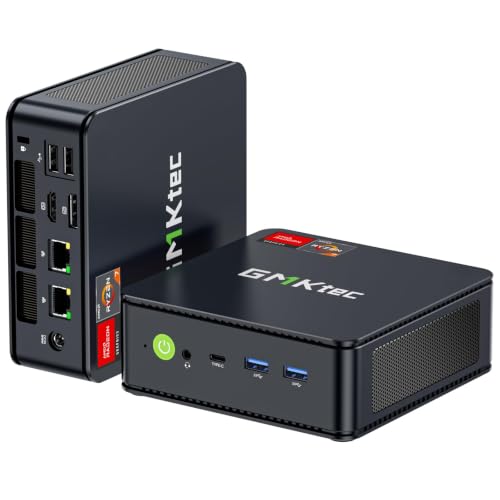
- Best overall for streaming under $400: GMKtec M5 Plus Gaming Mini PC, Ryzen 7 5825U, 32GB RAM, 1TB SSD — Check on Amazon
- Beelink SER5 MAX Mini PC, Ryzen 7 5800H, 16GB RAM, 500GB SSD — Check on Amazon
- Dell RGB Gaming Tower, Core i7 6th Gen, GTX 1050 Ti 4GB, 16GB RAM, 512GB SSD (Renewed) — Check on Amazon
- BOSGAME P4 Light Gaming Mini PC, Ryzen 7 5700U, 32GB RAM, 1TB SSD — Check on Amazon
- ACEMAGICIAN AM06 Pro Mini Gaming PC, Ryzen 7 5800U, 16GB RAM, 512GB SSD — Check on Amazon
See 1 more Amazon option
- KAMRUI E3B Mini Gaming PC, Ryzen 5 7430U, 32GB RAM, 512GB SSD — Check on Amazon
Read the full guide ↓
Disclosure: As an Amazon Associate, reviewstook.com earns from qualifying purchases. Links to Amazon on this page are affiliate links; they cost you nothing extra. Listing details such as price and availability change often, so check the current Amazon listing before you buy.
Streaming is the most demanding thing you can ask a cheap PC to do, because it is never one job. A stream machine has to play the game, compress every frame into a broadcast in real time, run your scenes, chat and browser, and push the result up your internet connection — all at once, all without dropping frames your viewers can see. Four hundred dollars does not buy a machine that does all of that for this year’s biggest games, and this guide will not pretend otherwise. What it buys, chosen carefully, is a machine that streams honestly in three real ways: broadcasting the esports, indie and older games it can genuinely play; serving as the dedicated encode box for a console, where the game renders somewhere else and this PC only has to broadcast it; and carrying talk, desktop and creative streams where the camera matters more than the frame rate. Picked for those jobs — and graded on their encoders first, because the encoder is the part of a stream PC that cannot be faked — the six machines below are the best streaming PCs under $400 we can verify.
Two facts about this tier should be on the table before any product names. The first is that no machine in this guide encodes AV1. AV1 encoding — the format behind the cleanest modern streams on YouTube and Twitch’s enhanced broadcasting — exists only on current-generation graphics hardware that costs more than this entire budget, so every pick here broadcasts in H.264, the format every platform still accepts everywhere. The second is that five of these six machines encode with the AMD hardware encoder built into a Ryzen integrated GPU, and the sixth — a renewed tower — encodes with an older NVIDIA NVENC block. Those two encoders do not produce the same picture at the same bitrate, and the difference is visible exactly where streamers live: at Twitch’s bitrate ceiling, in fast motion. This guide grades that difference openly, because at $400 the encoder, the memory headroom and the network connection decide your stream quality far more than the processor’s headline does.
In this guide
Quick Picks
Short on time, or comparing several options at once? Each row below names a streaming job and the machine that suits it, with a link to the listing.
| Streaming job | Pick | Why it stands out | Link |
|---|---|---|---|
| Best overall for streaming under $400 | GMKtec M5 Plus Gaming Mini PC, Ryzen 7 5825U | 32GB of RAM, 1TB of storage and dual wired LAN around a Vega 8 encoder | Check on Amazon |
| Best one-box game-and-stream mini | Beelink SER5 MAX Mini PC, Ryzen 7 5800H | The strongest integrated graphics here — the game side holds up best while it encodes | Check on Amazon |
| Best encoder in the guide | Dell RGB Gaming Tower, GTX 1050 Ti (Renewed) | The only discrete encoder — a Pascal NVENC block that never touches game rendering | Check on Amazon |
| Best for recording and a big library | BOSGAME P4 Light Gaming Mini PC, Ryzen 7 5700U | 1TB of storage and 32GB of RAM for streams, recordings and the games behind them | Check on Amazon |
| Best expandable stream box | ACEMAGICIAN AM06 Pro Mini Gaming PC, Ryzen 7 5800U | An extra 2.5-inch drive bay — cheap room for a growing recording archive | Check on Amazon |
| Best value stream station | KAMRUI E3B Mini Gaming PC, Ryzen 5 7430U | Strong budget-tier value — a natural dedicated encode box for a console setup | Check on Amazon |
How These Picks Were Chosen
The budget was applied the same way as in our general guide to this tier: every machine below is a complete, working computer from a real US Amazon listing that sells at or regularly within $400, includes Windows, and can stream the day it arrives. Barebones kits were excluded for the same reason as before — a streamer shopping for a machine does not need a second shopping list before the first broadcast. Where a listing drifts above the line, the review says so and tells you to check the live price on Amazon rather than promising a figure.
Within that filter, the grading order changed completely, because streaming changes what matters. First comes the encoder: the hardware block that turns frames into a broadcast. Five picks encode through the AMD hardware encoder in their Ryzen integrated graphics; one encodes through the NVIDIA NVENC block in a GTX 1050 Ti. We graded what each encoder actually is — its generation, its format support, its picture quality at streaming bitrates — and we credited nothing the silicon does not have. There is no AV1 encoder in this guide, no second encoder hiding in any of these machines, and no pick was given credit for software encoding heroics its processor cannot sustain next to a game. Second comes simultaneous load: streaming is a multitasking workload, so memory capacity, core count and storage room for recordings were graded as streaming specifications, not afterthoughts — a machine that plays a game beautifully but stutters when OBS, a browser and a recording join in is a bad stream PC whatever its benchmarks say. Third comes the network: every pick was checked for how it gets online, because a broadcast that leaves over congested Wi-Fi drops frames no encoder can save.
We did not use these machines ourselves. We read the maker listings and specification pages and compared encoders, processors, memory configuration, storage and connectivity, favoring listings that publish their numbers in full. Listings that hide the processor generation or dress an office PC in streaming language were excluded, and the one renewed machine is labeled renewed in its name, its review and its price conditions. Performance language throughout is class- and settings-based — we quote no frames-per-second figures for any game, because invented precision would tell you less than an honest settings class does.
What Streaming Actually Asks of a $400 PC
Before the reviews, the workflow itself — because most disappointment at this budget comes from shopping for one job and discovering three. A live stream is three workloads wearing one coat. The game (or console, or camera) produces the picture. The encoder compresses that picture into a broadcast stream in real time, sixty times a second, without falling behind. And the machine runs everything around the broadcast — OBS scenes and overlays, chat, alerts, a browser, Discord — while uploading the result continuously. A $400 machine has finite strength for each job, and the art of this budget is deciding which jobs it must do itself and which it can hand off.
The platforms set the encoder’s exam. Twitch’s standard is roughly 6,000 kbps with constant bitrate (CBR) encoding and a two-second keyframe interval, at 1080p or below — a hard ceiling that squeezes every encoder, and squeezes older ones hardest, because six megabits is not much room for fast-moving game footage. YouTube is the friendlier exam at this tier: it accepts considerably higher bitrates, accepts 1440p streams (which also earn your viewers a better-processed picture), and supports AV1 live encoding — though, to repeat the tier’s standing fact, nothing in this guide can produce AV1, so on YouTube these machines broadcast H.264 at generous bitrates, where the extra bits visibly flatter the AMD encoders discussed below. If your heart is set on AV1, the honest address is a higher budget tier, not a different pick from this page.
That leaves the three honest streaming shapes at $400, and every review below names which shapes its pick can hold. Shape one: the one-box light-game stream. The PC plays an esports, indie or older game and encodes it at the same time. This works because those games leave the machine most of its strength, and because a hardware encoder is a separate block that does not consume the processor cores the game is using. Shape two: the console stream. A console plays the game; a capture card hands the picture to the PC; the PC only encodes and broadcasts. This is the best-looking stream $400 produces, because the whole machine serves the broadcast — and it is the shape that makes even the most budget-focused pick here genuinely capable. Shape three: the talk and desktop stream. Podcasts, Just Chatting, creative work, retro emulation with friends — light pictures, heavy personality. Every machine in this guide does shape three without breaking stride. What no pick here does is shape four — one-box streaming of modern, demanding releases — because those games already spend the whole machine on themselves. Buyers whose game list starts there need the step up to a discrete-graphics tier, and this guide’s job is to say so before your first stream, not after it.
The 6 Best Gaming PCs for Streaming Under $400
GMKtec M5 Plus Gaming Mini PC, Ryzen 7 5825U, 32GB RAM, 1TB SSD
Who it suits: The streamer who wants one new machine that does the whole job — game, encode, scenes, chat and recordings — without a single specification sitting at the tier’s minimum.
Every streaming workload is a queue of jobs competing for the same memory, and the M5 Plus is the pick that arrives with the queue already managed. Its encoder is the AMD hardware encoder built into the Ryzen 7 5825U’s Vega 8-class integrated graphics — the same encoder generation as the other Ryzen minis here, an H.264 hardware block that OBS drives through its AMD encoder option. On its own that encoder is unremarkable; what makes this the best streaming machine in the guide is everything around it. Thirty-two gigabytes of dual-channel memory means the game, the encoder’s workspace, OBS, a browser full of chat and dashboards, and a local recording can all be resident at once without the machine swapping itself into stutters — the simultaneous-load failure that quietly ruins more cheap streams than any encoder does. The 1TB SSD means recordings and a real game library coexist instead of competing. And dual 2.5GbE LAN ports mean the wired connection this guide insists on is not a hope but a specification: this box was built to be plugged in.
The 5825U is an eight-core processor, which matters in one specific streaming way: it gives you a survivable fallback. Hardware encoding should always be the default here, but for a talk stream, a desktop stream or a retro night — workloads with no demanding game attached — the eight cores can carry a software encode or a heavier OBS scene stack without complaint, an option the six-core and four-core picks below do not really have. The graphics run at a lower power level than the Beelink’s, so in the most demanding esports scenes the game side gives a little ground; in exchange the machine runs cool and quiet, which a microphone appreciates. Check price on Amazon to confirm it sits within this budget tier on the day you shop — on the strength of its specification it is not merely the best streaming PC in this guide, it is one of the strongest-value streaming stations in this tier.
- 32GB of RAM and a 1TB SSD — the simultaneous-load and recording headroom this tier usually lacks.
- Dual 2.5GbE wired LAN: the broadcast leaves by cable, as it should.
- Eight cores make software encoding a real fallback for talk and desktop streams.
Honest limitation: The AMD encoder is visibly softer than NVENC at Twitch’s 6,000 kbps ceiling in fast motion, and the lower-power graphics sit a step behind the Beelink’s when the game itself is the load.
Choose it if you want one complete machine for one-box light-game streams, console streams or talk streams, with nothing at minimum spec. Skip it if your one-box game list is the most demanding esports scenes and nothing else matters — the Beelink’s graphics headroom is the narrower, better tool for that single job.

Beelink SER5 MAX Mini PC, Ryzen 7 5800H, 16GB RAM, 500GB SSD
Who it suits: The one-box streamer whose games are the point — a player broadcasting esports and last-generation titles from the same small machine, who wants the strongest game performance this budget can encode alongside.
The SER5 MAX carries the same AMD hardware H.264 encoder as the pick above, inside the strongest graphics configuration in this guide. Its Ryzen 7 5800H runs its Vega 8-class integrated graphics at a 54W power level the slimmer minis do not match, and for a one-box streamer that headroom is spent exactly where one-box streaming hurts: the game renders with room to spare, so OBS can composite scenes and the encoder can work without the whole machine living at its limit. Rendering headroom is stream quality — a game that saturates its GPU drops frames in the broadcast before the encoder ever sees them — and no other mini here gives the game side as much slack. The eight-core processor matches the GMKtec’s fallback options, triple display output (HDMI, DisplayPort and USB-C) makes a two-screen streamer desk easy, and the box, roughly five inches square and under two inches tall, mounts behind a monitor where its fan noise stays out of the microphone’s way. Check price on Amazon — it is also one of the more affordable, budget-tier ways into this guide.
The streaming grades tighten where the general guide’s did. Sixteen gigabytes of memory is the floor for this workload, not a comfort: the integrated graphics borrow from that same pool, so a demanding game plus OBS plus a browser asks real discipline — close the extra tabs, keep scenes lean — where the 32GB picks simply absorb the load. The 500GB SSD is the second pinch, and streaming sharpens it: local recordings are large, a handful of long sessions plus two or three modern game installs will fill it, and a streamer who records everything should budget the swap to a larger drive (the machine accepts up to 2TB, and memory can rise to 64GB) as a planned second purchase rather than a surprise. Neither point dethrones it for its job; both argue that its job is the game-first stream, not the everything-at-once station.
- Strongest integrated graphics in the guide, at a full 54W — the most rendering slack for one-box streams.
- Triple display output for a proper two-screen streaming desk.
- Strong budget-tier value — check price on Amazon.
Honest limitation: 16GB of shared memory and a 500GB SSD are both at the workload’s floor — simultaneous load and recording space need managing, not ignoring.
Choose it if your stream is one-box esports, indie or older AAA and the game side matters most. Skip it if you record everything and run a heavy scene stack — the GMKtec’s memory and storage fit that life better.

Dell RGB Gaming Tower, Core i7 6th Gen, GTX 1050 Ti 4GB, 16GB RAM, 512GB SSD (Renewed)
Who it suits: One specific streamer: the one who cares most about how the broadcast itself looks at Twitch bitrates, and who accepts a renewed, older machine as the price of the best encoder under $400.
Here is the encoder fact this whole guide bends around: the GTX 1050 Ti in this renewed tower carries NVIDIA’s NVENC hardware encoder — Pascal generation, a dedicated block on the card that compresses the broadcast without touching the hardware rendering your game. NVENC of even this older generation produces a visibly cleaner H.264 picture at Twitch’s roughly 6,000 kbps ceiling than the AMD encoders in the minis above, particularly in the fast motion where the AMD picture softens. It is the same reason a generation of budget streamers built around exactly this class of card. The card also renders the game with its own 4GB of memory rather than borrowing the system’s, so a one-box esports or older-AAA stream on this machine divides its labor the way streaming PCs are supposed to: card plays and encodes, processor runs the show around it. And uniquely in this guide, the encoder can one day be replaced — the card sits in a slot, and a future low-power card swap is a future encoder upgrade, though honesty requires the footnote: only a current RTX 40-series-class card would add AV1, while an Ampere-class swap would bring a newer NVENC but still no AV1.
Everything else about this pick is a condition, and the conditions are the review. It is an Amazon Renewed machine — used and refurbished — on a sixth-generation Core i7 platform from 2015: four cores to run OBS, chat and the game-adjacent load, no processor upgrade path, and the oldest simultaneous-load ceiling in this guide, which argues for lean scenes and hardware encoding always. Its pricing enforces its own rule: this renewed listing can drift above this guide’s budget. So the rule is hard: check price on Amazon, and this pick qualifies only on days the live price is at or under the $400 budget line. Above that, walk away. If you buy at or under the line, stress-test everything inside the return window — the card under load, the encoder on a test stream, drive health, fan noise — because renewed hardware earns trust by passing tests, not by arriving in a box.
- The only discrete encoder in the guide — Pascal NVENC, the cleanest Twitch picture at this budget.
- The card has its own 4GB of memory; game and broadcast stop competing for the system’s.
- The only pick whose encoder can ever be upgraded, because the card sits in a slot.
Honest limitation: Renewed hardware on a 2015 four-core platform, and it drifts above $400 often enough that the live price decides whether it belongs here at all.
Choose it if the live price is at or under $400 and broadcast picture quality at Twitch bitrates is your first priority. Skip it if the price is above the line on the day you shop, or you want new hardware, eight cores and a full warranty — that is the GMKtec.

BOSGAME P4 Light Gaming Mini PC, Ryzen 7 5700U, 32GB RAM, 1TB SSD
Who it suits: The streamer with a backlog — a big installed library, long sessions, recordings of everything, and a machine expected to be a media and emulation box between broadcasts.
The P4 brings the GMKtec’s streaming formula — Vega 8-class AMD hardware encoding, 32GB of memory, 1TB of storage, dual 2.5GbE wired LAN — wrapped around a Ryzen 7 5700U running at the lower power level typical of this slimmer design. For the streaming shapes it serves, that trade is barely visible: a console stream through a capture card spends nothing on game rendering, a talk stream spends little, and a one-box stream of esports or last-decade titles sits comfortably inside what this chip’s graphics do at 1080p on sensible settings. The storage deserves a streamer’s specific appreciation: a terabyte holds the library and the archive, so recording every session for clips and highlights stops being a space negotiation, and the triple 4K display outputs (HDMI, DisplayPort and USB-C) run a multi-screen desk without adapters. Check price on Amazon — it delivers the joint-best specification in this guide within this budget tier.
The caveat is this listing family’s known quirk, and for a streamer it matters twice. The P4 name has been sold with more than one processor under near-identical titles, including a 5825U variant. The ASIN above is the one tied by specification records to the 5700U configuration reviewed here — but the correct habit is to read the live listing’s specification table before ordering and check the machine again on delivery, because an encoder-first purchase made on the wrong chip is the wrong purchase however good the price was. If the chip in the box is not the chip in the title, that is a return, not a disappointment to live with. That discipline, plus the standard first-week routine — current AMD driver from AMD, a full security scan or clean Windows install on any value-brand machine — is the whole of this pick’s fine print.
- 32GB of RAM and 1TB of storage: the library and the recording archive on one machine.
- Dual 2.5GbE LAN, WiFi 6E and triple 4K outputs — the best connectivity in the guide.
- The full 32GB / 1TB specification in this budget tier — check price on Amazon.
Honest limitation: The listing family has carried more than one processor under similar titles — verify the exact configuration on the live listing and on delivery, because your encoder depends on it.
Choose it if you record everything, keep everything installed, and want the versatile machine between streams. Skip it if you cannot face the configuration check, or want the single strongest one-box graphics — that is the Beelink.

ACEMAGICIAN AM06 Pro Mini Gaming PC, Ryzen 7 5800U, 16GB RAM, 512GB SSD
Who it suits: The growing streamer — someone starting lean whose recordings pile up month after month, and who wants the machine that absorbs that growth with the cheapest possible parts.
The AM06 Pro’s streaming hardware is familiar in the best way: a Ryzen 7 5800U with Vega 8-class integrated graphics and the same AMD hardware H.264 encoder as the picks above, eight cores for the surrounding load, dual LAN for the wired rule, and triple 4K outputs. Its distinguishing feature looks boring on a spec sheet and matters enormously by month six of streaming: a 2.5-inch drive bay alongside the M.2 SSD. Recordings are the storage nobody budgets for — long sessions at good quality accumulate into hundreds of gigabytes — and this is the only pick here that grows its archive with an inexpensive laptop drive instead of a premium NVMe, up to 2TB total per the listing. For a streamer building a clip library, a VOD archive or a backlog of footage to edit, that bay is a genuine workflow feature wearing a boring name. Check price on Amazon — it competes directly with the Beelink in this budget tier while offering the same graphics and encoder family.
The compromises mirror the Beelink’s, with one of temperament added. Memory is 16GB where the GMKtec and BOSGAME offer 32GB at similar money, so simultaneous load needs the same discipline: lean scenes, managed tabs, hardware encoding always. The 5800U’s lower power ceiling means its graphics, core for core the equal of the SER5 MAX’s, run a little slower in sustained play. And ACEMAGICIAN is a value brand with seller-led support, so the budget-mini-PC routine is not optional decoration: verify the configuration on arrival, run a full security scan or a clean Windows install in the first week, and buy through Amazon so the return window protects you while you do it. None of that avoids the machine — it is the routine for the class — but a streamer who wants the least possible fuss should know the 32GB picks ask less of it.
- Extra 2.5-inch drive bay — the cheapest recording-archive growth path in this guide.
- Vega 8-class graphics and encoder, dual LAN, triple 4K outputs.
- Budget-tier value — check price on Amazon for the current listing.
Honest limitation: 16GB of memory where rivals offer 32GB, and seller-led value-brand support that makes the first-week hygiene routine genuinely necessary.
Choose it if you find it well priced when you check price on Amazon, or your recording archive is the growth problem you can already see coming. Skip it if you want maximum memory headroom from day one — that is the GMKtec or the BOSGAME.

KAMRUI E3B Mini Gaming PC, Ryzen 5 7430U, 32GB RAM, 512GB SSD
Who it suits: The console streamer on a budget — a buyer whose games live on a console or a second machine, and who needs an affordable, competent station to encode, broadcast and record them.
Reframe this pick by the streaming shapes and it stops looking like the weakest machine here. Its Ryzen 5 7430U carries Vega 7 integrated graphics — seven graphics cores on the older architecture, a clear step below the Vega 8 machines — and the same generation of AMD hardware H.264 encoder. As a one-box game streamer that graphics gap is real: this is the pick for esports at modest settings, indie games and talk streams, not for squeezing demanding titles. But hand it shape two — a console’s picture arriving through a capture card — and the gap nearly vanishes, because the console does the rendering and this machine’s whole job becomes the job its encoder, six cores and 32GB of dual-channel memory do perfectly well: encode the broadcast, run the scenes, record the session. Thirty-two gigabytes in this tier is the quiet headline — it is the simultaneous-load specification streamers actually feel — alongside a 512GB SSD, WiFi 6, triple display output, memory upgradeable to 64GB and storage to 2TB, and a VESA plate in the box for mounting the whole station behind a monitor. Check price on Amazon — it is positioned as a strong budget-tier value pick in this guide.
Two disciplines protect the purchase. First, the configuration check: the E3B is sold in a 32GB version (this ASIN, the one reviewed) and a 16GB version under a different listing, and for streaming the difference is not a detail — confirm the 32GB configuration is the one in your cart. Second, the honest ceiling: as a one-box machine this is the first pick to run out of graphics, and a streamer whose plans grow toward demanding PC titles will outgrow it before the others. KAMRUI is a value brand with seller-led support, so the standard routine applies — clean install or full scan in the first week, packaging kept until the second. Within those lines, it is a strong-value honest streaming station in this guide, and for the console-first streamer it may be the smartest.
- Strong budget-tier value, with the streamer’s 32GB of RAM included — check price on Amazon.
- A natural dedicated encode box: console in via capture card, broadcast out, nothing wasted on rendering.
- Upgradeable to 64GB of memory and 2TB of storage; VESA mount in the box.
Honest limitation: Vega 7 graphics are the weakest here — as a one-box game streamer it tops out at esports, indie and older titles sooner than any other pick.
Choose it if your games render on a console or your one-box list is light, and you want the station money spent on memory instead of graphics. Skip it if one-box PC gaming is the main event — start at the Beelink or the GMKtec.
Comparison Table
| Product | Encoder | RAM / Storage | Best streaming use | Link |
|---|---|---|---|---|
| GMKtec M5 Plus, Ryzen 7 5825U | AMD hardware H.264 (Vega 8-class iGPU) | 32GB / 1TB | The complete one-box and console-stream station | Check on Amazon |
| Beelink SER5 MAX, Ryzen 7 5800H | AMD hardware H.264 (Vega 8-class iGPU, 54W) | 16GB / 500GB | One-box esports and older-AAA streams | Check on Amazon |
| Dell RGB Tower (Renewed), GTX 1050 Ti | NVIDIA NVENC, Pascal generation (discrete) | 16GB / 512GB | Cleanest Twitch picture — only at $400 or less | Check on Amazon |
| BOSGAME P4, Ryzen 7 5700U | AMD hardware H.264 (Vega 8-class iGPU) | 32GB / 1TB | Recording-heavy streams and big libraries | Check on Amazon |
| ACEMAGICIAN AM06 Pro, Ryzen 7 5800U | AMD hardware H.264 (Vega 8-class iGPU) | 16GB / 512GB + 2.5″ bay | A growing recording archive on cheap drives | Check on Amazon |
| KAMRUI E3B, Ryzen 5 7430U | AMD hardware H.264 (Vega 7 iGPU) | 32GB / 512GB | Dedicated console-stream encode box | Check on Amazon |
Setting Up OBS on a $400 Stream Machine
The software is free; the settings are where this budget is won or lost. These are the decisions that matter on the six machines above, in the order OBS asks for them.
Pick the hardware encoder — always. On the five Ryzen minis, select the AMD hardware H.264 encoder in OBS’s output settings; on the renewed Dell, select NVIDIA NVENC (H.264). Never select the software (x264) encoder for a one-box game stream on this tier: software encoding spends the same processor cores your game, scenes and chat are using, and the result is a stream that stutters exactly when the game gets busy. The one exception is a talk or desktop stream on the eight-core minis, where no game competes and a software encode is survivable — survivable, not better. The hardware blocks exist precisely so the broadcast does not tax the show.
Set the rate control like a broadcaster. Use constant bitrate (CBR) — variable bitrate is for recordings, not live platforms. For Twitch, set roughly 6,000 kbps and a two-second keyframe interval; that is the platform’s expected shape, and exceeding the bitrate does not buy quality Twitch will pass through. For YouTube, use the same two-second keyframes but take the higher bitrate YouTube accepts — on the AMD encoders especially, extra bits are the cheapest picture quality in this entire guide, visibly reducing the softness fast motion causes. If you record at the same time, record at a higher quality setting than the stream where the machine allows it — and on the 500GB-class picks, watch the drive: recordings accumulate faster than intuition says.
Choose the output resolution your encoder can afford. A 1080p canvas is right for every pick here. As the broadcast resolution, 1080p suits talk streams, console streams and one-box esports on the Vega 8 machines; 720p is the honest sweet spot for fast-motion games on the AMD encoder and for anything one-box on the Vega 7 KAMRUI — at a fixed 6,000 kbps, fewer pixels each get more bits, and viewers reliably prefer a sharp 720p picture to a soft 1080p one. Sending a 1440p stream to YouTube is reasonable for a talk or console-capture broadcast; it is not a resolution these integrated GPUs can render games at while encoding, and setting it for one-box play buys only dropped frames.
Read the three lag counters like a diagnostician. OBS reports three distinct failures, and each has a different fix. Rendering lag means the graphics hardware is saturated — the game is taking everything and OBS cannot draw its scenes; the fix is on the game side: cap the game’s frame rate, lower its settings, or trim animated sources from your scenes. Encoding lag means the encoder is falling behind; confirm the hardware encoder is actually selected (this is the classic symptom of a stream accidentally running on software encoding), then step the encoder preset toward speed, then drop the output to 720p before touching anything else. Network lag — dropped frames in the network column — is never the encoder’s fault: it is the upload path, and its fix is the next paragraph.
Wire the broadcast. This is a rule, not a preference. Every machine in this guide should stream over a wired Ethernet connection to the router. Wi-Fi — even the WiFi 6 and 6E these minis carry, even with the router in the same room — shares its airtime with every device in the home and varies by the minute, and a live upload is the one traffic type that cannot buffer its way out of a bad ten seconds. The GMKtec, BOSGAME and ACEMAGICIAN picks document wired LAN ports (dual, in each case) in their listings; whatever your pick, run the cable, and treat Wi-Fi as the fallback for everything in the house except the broadcast. If your internet plan’s upload speed is itself marginal, no setting fixes that — lower the bitrate until the network counter stays clean, and let a stable 4,500 kbps stream beat an ambitious 6,000 kbps one that drops frames.
The Rest of the Kit: What Else a Streamer Spends On
The PC is the largest purchase in a streaming setup, but it is not the purchase your viewers will judge first — they hear you before they study your picture, and they forgive a modest picture long before they forgive bad audio. This section is deliberately price-free: it names the order to buy things in, not figures, because none of these items is inside any pick’s price above and none should be silently folded into your $400 decision.
Microphone first. A basic USB microphone, positioned close to your mouth with its gain set sensibly, improves a stream more than any other single purchase — more than the encoder difference between the picks in this guide, honestly. Every machine here has the ports and the processor headroom for one; buy it before anything else in this section.
Lighting second. If you appear on camera, one decent light aimed at your face does more for your picture than a camera upgrade, because every affordable camera is starved for light. A desk lamp you already own, repositioned, is a legitimate starting point.
Webcam third. Only after light. A modest webcam in good light outperforms a premium webcam in a dim room, and your phone, used as a camera, is a respectable stopgap on every pick here. Position and light first; sensor later.
Capture card — console sources only. A capture card has exactly one job in this guide’s world: bringing a console’s (or a second PC’s) picture into the stream machine. If you stream games played on the same PC, a capture card does nothing at all — the game is already in the machine — and buying one for a one-box setup is this hobby’s most common wasted purchase. If you stream console games, it is the purchase that unlocks shape two above, the best-looking stream this budget produces, and it is what turns the KAMRUI into a first-class streaming station. Headphones you already own complete the kit: they keep game audio out of the microphone, which your viewers will notice more than anything on this page.
How to Choose a Streaming PC Under $400
- Name your streaming shape first. One-box light games, console-through-capture, or talk and desktop. The shape decides the pick: game-first buyers start at the Beelink, console streamers can start at the KAMRUI, and everyone else should start at the GMKtec and argue their way away from it.
- Grade the encoder before the processor. At streaming bitrates the encoder is your picture quality. This guide contains exactly two encoder stories — AMD hardware H.264 in the Ryzen minis, cleaner but older-platform Pascal NVENC in the renewed Dell — and no AV1 anywhere. Any listing at this price implying a modern encoder is describing something that does not exist.
- Never accept 8GB of RAM, and prefer 32GB. Streaming is simultaneous load: game, encoder workspace, OBS, browser, chat. Integrated graphics borrow system memory on top of that. Sixteen gigabytes is the floor; the three 32GB picks remove the squeeze entirely, which is why they rank where they do.
- Budget storage for recordings, not just games. A streamer fills drives from two directions. The 1TB picks hold a library and an archive together; on a 500GB-class pick, plan the larger drive — or the ACEMAGICIAN’s 2.5-inch bay — as a scheduled purchase, not an emergency.
- Wire it, whatever you buy. The broadcast leaves by Ethernet cable. Treat documented wired LAN as a streaming feature when comparing listings, and never plan a stream around Wi-Fi because the listing advertises a fast wireless standard.
- Respect the renewed rule. The Dell is the best encoder here and a conditional purchase: at or under $400, stress-tested inside its return window, it is a legitimate streamer’s bargain. Above $400 it is an old platform wearing a premium, and the new minis win.
- Verify the configuration twice. Once on the live listing before ordering — mini-PC families sell multiple chips and memory sizes under near-identical titles, and your encoder depends on the chip — and once when the box arrives. A wrong configuration discovered in week one is a return; discovered in week six, it is a regret.
- Do the first-week routine. Current AMD graphics driver from AMD (or NVIDIA’s, for the Dell), Windows Update completed, a full security scan or clean Windows install on any value-brand machine, and a private test stream — with the OBS stats window open — before your first public broadcast.
- Count the whole desk. Microphone before webcam, light before camera, capture card only for console sources, and a monitor or TV you already own counts toward the setup. The $400 is the PC budget; the stream budget is the PC plus the order of purchases above.
Common Buying Mistakes
- Shopping for a game machine and discovering streaming later. The spec that wins gaming comparisons — peak graphics — is not the spec that wins streams; encoder, memory and networking decide broadcasts, and they are graded differently on purpose in this guide.
- Chasing AV1 at $400. No machine at this price encodes it. Sellers who imply otherwise are describing decode support or nothing at all; AV1 encoding begins several tiers up.
- Streaming over Wi-Fi because the listing boasts WiFi 6E. Wireless standards describe best-case speed in an empty room; a live upload needs boring consistency, which is spelled E-t-h-e-r-n-e-t.
- Leaving OBS on its software encoder. On this tier that single setting converts a capable machine into a stuttering one, because the encode starts eating the game. Hardware encoder, always — the OBS section above exists largely to prevent this mistake.
- Buying the renewed tower above $400 because it was “in the $400 guide”. Its inclusion is price-conditional — check price on Amazon and only buy it when it sits within the budget line.
- Ordering from a multi-configuration listing without confirming the variant — the 16GB and 32GB versions of the same mini PC, and the two chips sold under the BOSGAME P4’s name, are different streaming machines.
- Recording everything to a nearly full 500GB drive, then blaming the PC for the dropped frames and failed saves that a full disk causes mid-stream.
- Buying a capture card for a one-box setup. It captures sources outside the machine; a game already running on the machine needs no capturing. Console streamers: essential. One-box streamers: furniture.
- Judging the first test stream by eye instead of by the stats window. Rendering, encoding and network lag look identical on a monitor and have opposite fixes; the counters tell you which problem you actually have.
Final Recommendation
- Most streamers: GMKtec M5 Plus — 32GB of memory, 1TB of storage and dual wired LAN around a Vega 8 encoder; the complete station.
- One-box game-first streamers: Beelink SER5 MAX — the strongest graphics here, so the game and the broadcast stop competing.
- Broadcast quality above all: Dell RGB Tower (Renewed) — the NVENC picture is the best at Twitch bitrates, only on days its live price is at or under $400.
- Recording-heavy streamers: BOSGAME P4 — the library and the archive on one terabyte, after the configuration check.
- Growing archives: ACEMAGICIAN AM06 Pro — the 2.5-inch bay turns recording growth into a cheap-drive errand.
- Console streamers on a budget: KAMRUI E3B — the encode box that spends its budget on memory, at strong budget-tier value here.
Our top two for the typical reader of this search are the GMKtec M5 Plus, because streaming is a multitasking workload and it is the only pick that arrives with every part of that workload properly provisioned, and the Beelink SER5 MAX, for the one-box player whose games are the show and who needs the game side to hold up while the broadcast rides along. Between them they cover the two honest shapes of a $400 stream: the everything station, and the games-first mini. Buyers whose ambitions outgrow this tier — modern releases one-box, AV1 encoding, high-refresh 1440p broadcasts — should see Best Gaming PC For Streaming Under $500 and Best Gaming PC Under $700; buyers shopping this same budget for a first machine or a small room should see Best Gaming PC For Beginners Under $400 and Best Gaming PC For Small Spaces Under $400. Wire the machine, pick the hardware encoder, run a private test stream with the stats window open — and a $400 stream chosen with open eyes will look and sound better than most viewers expect.
Frequently Asked Questions
Can you really stream from a PC under $400?
Yes — in the three shapes this guide is built around: one-box streams of esports, indie and older games; console streams where the PC only encodes and broadcasts; and talk, desktop and creative streams. What $400 cannot do is one-box streaming of modern, demanding releases, because those games already consume the whole machine before the broadcast asks for anything. That shape begins at the discrete-graphics tiers above this budget.
Which encoder do these PCs use, and does it matter?
It is the specification that matters most. The five Ryzen mini PCs encode with AMD’s hardware H.264 encoder — competent, and visibly softer than NVIDIA’s in fast motion at Twitch’s bitrate ceiling. The renewed Dell encodes with a Pascal-generation NVENC block, the cleanest Twitch picture in this guide. None of the six encodes AV1; that capability exists only on current-generation graphics hardware several tiers up, and on YouTube these machines compensate with the higher H.264 bitrates YouTube accepts.
Is a mini PC or the renewed tower better for streaming?
For most streamers, a mini PC: new, warrantied, eight cores for the multitasking, and memory and storage options the tower does not match at this price. The tower wins on exactly one axis — its NVENC encoder’s picture at Twitch bitrates — plus the unique ability to swap its card, and therefore its encoder, later. It makes sense only at or under $400, tested hard inside its return window.
Do I need a capture card?
Only if your games are played somewhere else. A capture card brings a console’s or a second PC’s picture into the stream machine; it does nothing for games running on the stream machine itself. Console streamers should consider it close to essential — it unlocks the best-looking stream shape at this budget. One-box streamers should spend the money on a microphone instead.
Why does everyone insist on a wired connection?
Because dropped frames from the network cannot be recovered by any encoder or setting. Wi-Fi throughput varies with every device and wall in the home, minute by minute; a live upload needs the opposite — a boring, constant path. Every pick in this guide belongs on an Ethernet cable to the router while it broadcasts, whatever its wireless specification says.
Should I stream at 1080p or 720p on these machines?
At Twitch’s roughly 6,000 kbps, the honest answer is: 1080p for talk, console-capture and lighter games; 720p for fast-motion games, especially on the AMD encoders, where the same bits spread across fewer pixels produce a visibly cleaner picture. On YouTube, higher accepted bitrates make 1080p the easier default. The OBS stats window, not pride, should make the final call — if the encoding or rendering counter climbs, step the resolution down.
Can these PCs record while they stream?
Yes, with the storage caveat this guide keeps repeating. Recording alongside the broadcast is a second encode-adjacent workload and a steady consumer of disk space. The 1TB picks absorb it casually; on the 500GB-class machines, record selectively or plan the storage upgrade — and never let a drive fill mid-stream, which produces failures that look like encoder problems and are not.


