Where to buy
Check the latest price, availability and delivery on Amazon. Orders are placed on Amazon. We may earn a commission from qualifying purchases.
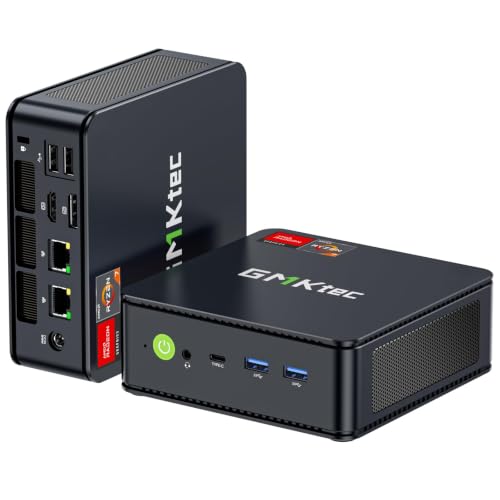
- Best overall for streaming: GMKtec M5 Plus Gaming Mini PC, Ryzen 7 5825U, 32GB RAM, 1TB SSD — Check on Amazon
- Beelink SER5 MAX Mini PC, Ryzen 7 5800H, 16GB RAM, 500GB SSD — Check on Amazon
- BOSGAME P4 Light Gaming Mini PC, Ryzen 7 5700U, 32GB RAM, 1TB SSD — Check on Amazon
- ACEMAGICIAN AM06 Pro Mini PC, Ryzen 7 5800U, 16GB RAM, 512GB SSD — Check on Amazon
- KAMRUI E3B Mini Gaming PC, Ryzen 5 7430U, 32GB RAM, 512GB SSD — Check on Amazon
See 1 more Amazon option
- Dell RGB Gaming Tower, Core i7 6th Gen, GTX 1050 Ti, 16GB RAM, 512GB SSD (Renewed) — Check on Amazon
Read the full guide ↓
Disclosure: As an Amazon Associate, reviewstook.com earns from qualifying purchases. Links to Amazon on this page are affiliate links; they cost you nothing extra. Listing details such as price and availability change often, so check the current Amazon listing before you buy.
Streaming asks a PC to do two jobs at once: play the game and broadcast it. Under $400, that second job is where the truth comes out, because the part of the machine that does the broadcasting — the video encoder — is the part budget listings never mention. So here is the whole guide in one paragraph. Five of the six machines below are Ryzen mini PCs whose integrated Vega graphics carry an AMD video encoder of the same generation: it encodes H.264 and HEVC, it has no AV1 encode at all, and at the roughly 6,000 kbps Twitch allows, its picture is visibly softer than a modern NVIDIA encoder’s. The sixth machine, a renewed Dell tower, holds this guide’s only dedicated encoder — the Pascal-generation NVENC block inside its GTX 1050 Ti — which is a real hardware encoder and the cleanest game-streaming tool here, but an older generation of one, attached to renewed 2015-platform hardware with a strict price rule. No machine in this guide encodes AV1. If a listing at this price implies otherwise, it is wrong.
What streaming under $400 honestly looks like, then, is this. Talking, desktop and just-chatting streams: every machine here, at 1080p60, comfortably. Console play brought in through a capture card: every machine here, because the console does the rendering and the PC only encodes. Streams of games the PC itself is rendering: the light catalogue — esports titles, indies, older games — encoded at 720p60 or 1080p30, with the Dell’s NVENC holding a cleaner picture than the mini PCs’ shared-silicon encoding. What it does not look like is a modern one-machine setup pushing demanding new games at 1080p60; that needs a current graphics card with a current encoder, and those start appearing in new towers at higher budgets. Below, the picks are graded encoder-first: what encodes your picture, what else is fighting for the same silicon and memory while it does, how much room your recordings get, and the OBS settings that make each machine behave. The quick picks come first, then the encoder explained in plain terms, detailed reviews of all six, a setup section, the kit this budget does not include, a comparison table, a buyer’s checklist, the mistakes that ruin first streams, and the questions new streamers ask most.
In this guide
Quick Picks
Short on time? Each row names a streaming job and the machine that suits it, with a link to the listing.
| Streaming job | Pick | Why it stands out | Link |
|---|---|---|---|
| Best overall for streaming | GMKtec M5 Plus, Ryzen 7 5825U, 32GB, 1TB | The simultaneous-load pick: 32GB of memory and a terabyte of recording room around its Vega encoder | Check on Amazon |
| Best game performance behind the stream | Beelink SER5 MAX, Ryzen 7 5800H, 16GB, 500GB | The strongest integrated graphics in the guide, so the game leaves the encoder more room | Check on Amazon |
| Best value load-carrier | BOSGAME P4, Ryzen 7 5700U, 32GB, 1TB | The GMKtec’s memory-and-storage formula at a budget-tier price — check price on Amazon — with dual fast Ethernet | Check on Amazon |
| Best console-capture station | ACEMAGICIAN AM06 Pro, Ryzen 7 5800U, 16GB, 512GB | Vega 8 encoding plus a 2.5-inch bay that becomes a dedicated recording archive | Check on Amazon |
| Cheapest credible stream box | KAMRUI E3B, Ryzen 5 7430U, 32GB, 512GB | Budget-tier pricing with 32GB of RAM — check price on Amazon — talk, desktop and capture streams done properly | Check on Amazon |
| Only dedicated encoder | Dell RGB Gaming Tower, i7 6th Gen, GTX 1050 Ti (Renewed) | A real NVENC hardware encoder — renewed hardware, bought only at or under $400 | Check on Amazon |
How These Picks Were Chosen
The budget was applied as a ceiling, not a target: every machine below is a real Amazon listing that sells at or regularly within $400 in the United States — check price on Amazon for the current listing, because mini PC prices at this tier move weekly with coupons and Prime pricing.
We did not use these machines ourselves. We read the maker listings and specification pages, and for this guide the first filter was the encoder, because the encoder is the streaming spec. Each pick’s encoding hardware was identified from its documented silicon — never from listing adjectives — and graded on what that silicon actually does: which codecs it encodes, and how its picture holds up at the bitrate Twitch actually permits. The second filter was simultaneous load. A streaming PC runs the game, OBS, a browser with chat and alerts, and a recording, all at once, and on the mini PCs the encoder, the game and the system all draw from one shared pool of memory — so 32GB machines and dual-channel configurations graded ahead of 16GB ones, and 8GB listings were excluded however cheap. The third filter was recording room: streams get saved, clips pile up, and a 500GB drive that also holds your games fills faster than new streamers expect, so terabyte machines and expansion paths earned their places. The fourth was the honesty filter, carried over from the base guide: any listing whose title promised a gaming or streaming experience its silicon cannot deliver was dropped, and the one renewed machine that survived carries its condition, its age and its price behaviour in the open. One pick behaves differently from the rest: the renewed Dell crosses $400 often enough that its review carries a hard rule — it earns its place here only on days when the live price sits at or under the line.
Finally, every pick was judged on its exit as well as its entrance. A first streaming PC is rarely a last one, so each review states the upgrade-or-replace path plainly: what you can add later, what is fixed forever, and what the machine becomes — office PC, media box, home server, a dedicated capture-and-encode station beside a stronger games machine — on the day it stops being your main streaming rig.
The Encoder Is the Streaming Spec
When you stream, your PC turns each frame of your game into a compressed video feed, live, sixty times a second. That compression is encoding, and it is done by a small dedicated block of silicon — not by the part of the chip you think of as “the graphics.” Which block your machine has decides how clean your stream looks at a given bitrate, and it decides how much of the machine is left over for the game itself. There are three encoding stories in this guide, and every pick has exactly one of them.
The dedicated block: Pascal NVENC. The renewed Dell’s GTX 1050 Ti carries NVIDIA’s NVENC encoder in its Pascal generation. It is a genuinely separate piece of hardware: the game renders on the card’s graphics cores while NVENC encodes on its own block, so encoding costs the game almost nothing. That separation is why dedicated encoders are the correct tool for one-machine game streaming. The honesty notes are two. Pascal is the older generation of NVENC — it predates the quality leap NVIDIA made with the Turing generation that followed, so at Twitch’s bitrate its picture is good rather than modern. And it encodes H.264 and HEVC only: there is no AV1 encode on this card, full stop.
The shared block: AMD VCN of the Vega generation. All five mini PCs encode on the video block built into their Ryzen processors, alongside the Vega 7 or Vega 8 integrated graphics. It is real hardware encoding — OBS will offer it as the AMD hardware encoder — and it handles H.264 and HEVC. Its limits are the mirror image of the Dell’s. It has no AV1 encode; that arrived in AMD silicon generations later than these chips. Its H.264 picture at Twitch’s roughly 6,000 kbps is visibly softer than NVENC’s — fine detail in fast-moving scenes smears sooner — a gap that narrows on YouTube, where higher bitrates forgive a weaker encoder. And it shares everything: the same silicon renders your game and encodes your stream, and the same memory pool feeds the game, the encoder, OBS and your browser. That sharing, not the encoder alone, is what grades the mini PCs below.
The fallback: x264 on the processor. OBS can also encode on ordinary CPU cores. On the eight-core Ryzen chips in this guide, x264 at its veryfast preset is a legitimate fallback for talk, desktop and just-chatting streams, where the screen is mostly still and the cores are idle. It is not a game-streaming plan: the moment a game loads those same cores, software encoding and the game fight, and the stream loses. Treat x264 as the talk-show setting, not the gameplay setting, on every machine here.
Two platform facts frame all of it. Twitch’s standard ceiling is roughly 6,000 kbps with constant bitrate and a two-second keyframe interval, and that ceiling is what exposes a weak encoder — there is no spare bitrate to hide in. YouTube accepts higher bitrates and 1440p uploads, which flatter every encoder in this guide. And 4K streaming is limited by the platforms, not by anything you can buy at this price; it is not a reason to choose one of these machines over another.
The 6 Best Entry Level Gaming PCs for Streaming Under $400
GMKtec M5 Plus Gaming Mini PC, Ryzen 7 5825U, 32GB RAM, 1TB SSD
Who it suits: The new streamer whose show is talk, desktop and light games — and who wants the whole stack, game plus OBS plus browser plus recording, to fit without anything swapping or stuttering.
The M5 Plus takes the top spot for a reason that has nothing to do with its encoder, because its encoder is the same Vega-generation AMD block as every other mini PC here: H.264 and HEVC, no AV1, softer than NVENC at Twitch’s bitrate. What separates it is everything around that encoder. Its eight-core Ryzen 7 5825U is paired with 32GB of RAM and a 1TB SSD fitted from the factory, and on a shared-memory machine those two numbers are the streaming spec after the encoder itself. Thirty-two gigabytes is what lets a game, OBS with a browser-source overlay stack, a chat browser and Windows coexist without the machine dipping into swap mid-stream. The terabyte is where your recordings live — stream archives and clips grow relentlessly, and on this machine they do not evict your game library to do it. The honest workflow: talk and desktop at 1080p60 all day; console play through a capture card at 1080p60; the PC’s own light games — esports, indies, older titles — encoded at 720p60 or 1080p30. Check price on Amazon for the current listing, since pricing at this tier moves with coupons.
The supporting cast suits a streaming desk: dual 2.5GbE network ports mean the wired connection this guide insists on is never a dongle negotiation, WiFi 6E covers everything else, and triple 4K display output runs a game screen, a chat screen and a spare. The upgrade runway is the best among the mini PCs here — memory to 64GB, two SSD slots for up to 4TB — so the recording archive can grow without replacing the box. Its second career is equally clear: a 32GB machine with dual fast Ethernet retires into a home server or a dedicated capture-and-encode box beside a future games PC.
- 32GB RAM and 1TB SSD fitted — the simultaneous-load and recording headroom this tier usually lacks.
- Dual 2.5GbE LAN: a proper wired stream connection built in, not adapted.
- The longest upgrade runway here: memory to 64GB, and two SSD slots good for 4TB in total.
Honest limitation: The encoder is the shared Vega-generation block — no AV1, and a softer H.264 picture than NVENC at Twitch’s bitrate; the efficiency-tuned processor also gives a little ground to the full-power Beelink in long game sessions.
Choose it if your stream is talk, desktop, console capture or light games and you want nothing in the stack to run out of room. Skip it if your stream is built around demanding games the PC itself renders — no encoder setting fixes that at $400.

Beelink SER5 MAX Mini PC, Ryzen 7 5800H, 16GB RAM, 500GB SSD
Who it suits: The streamer whose games come first — the esports player who broadcasts their own matches and wants the strongest game performance this budget offers behind the stream.
The SER5 MAX’s Ryzen 7 5800H is an eight-core chip running its Vega 8 integrated graphics at a full-power 54W, the strongest rendering silicon in this guide. For streaming, that strength buys encoder room indirectly: the lighter the game loads the shared silicon, the cleaner the same silicon’s encoding stays, so this is the mini PC whose own-game streams hold together best — esports titles encoded at 720p60, or 1080p30 where the game is light. Talk, desktop and capture-card console streams run at 1080p60 like every pick here. The encoder itself is the family Vega-generation AMD block: H.264 and HEVC, no AV1, softer than NVENC at 6,000 kbps — stated here so the strongest-graphics crown does not smuggle in an encoder claim it has not earned. Check price on Amazon for the current listing.
The machine around the chip is a sorted streaming desk box: Windows 11 Pro, WiFi 6, and HDMI, DisplayPort and USB-C outputs for a game display plus a chat display. Its two constraints are the ones to plan around. Sixteen gigabytes of RAM is the working floor for a game-plus-OBS-plus-browser stack, not the comfort zone — it plays and streams this tier’s games fine, but the 32GB machines above and below it age more gracefully under load. And 500GB of storage is the tightest recording budget in the guide: keep recordings on a schedule, or plan the SSD swap (the slot takes up to 2TB) as the first upgrade. RAM expands to 64GB, so both constraints are fixable in place; the graphics and encoder, being part of the processor, are fixed forever, and an outgrown SER5 MAX retires to office, media or second-PC duty. One listing caution: this model family sells several processor variants under similar names, so confirm the 5800H configuration in the title is the one you are paying for.
- Strongest integrated graphics in the guide, at a full-power 54W setting — the most encoder room of the mini PCs.
- Check price on Amazon — a budget-tier pick that leaves room in the budget for a microphone.
- Triple-display output and Windows 11 Pro: game screen and chat screen from one small box.
Honest limitation: 16GB of RAM and 500GB of storage are the tightest simultaneous-load and recording budgets here, and the encoder is the shared Vega block — no AV1, softer than NVENC at Twitch’s bitrate.
Choose it if your stream is your own esports and light games and rendering strength matters most. Skip it if your show is talk-heavy with a big recording archive — the GMKtec’s headroom serves that better.

BOSGAME P4 Light Gaming Mini PC, Ryzen 7 5700U, 32GB RAM, 1TB SSD
Who it suits: The value-minded streamer who wants the GMKtec’s load-carrying formula — 32GB, a terabyte, serious networking — at a lower, budget-tier price — check price on Amazon — and accepts an older processor to get it.
The P4 pairs an eight-core Ryzen 7 5700U with 32GB of RAM and a full 1TB SSD — check price on Amazon for the current listing. For streaming, read it as the budget version of the top pick’s argument: the memory pool is big enough for the game-plus-OBS-plus-browser stack, the terabyte holds the library and the recordings, and dual 2.5GbE ports plus WiFi 6E make the wired rule easy to obey. The encoder is the Vega-generation AMD block — H.264 and HEVC, no AV1 — and the 5700U’s integrated graphics sit in the KAMRUI’s class rather than the Beelink’s, a generation behind the 5825U. So grade the workflows a notch plainer than the GMKtec’s: talk, desktop and console capture at 1080p60; its own esports and indie games at 720p60 or 1080p30; older games streamed with resolution scaling and honest expectations.
That networking also defines the best second career in this guide: when a P4 is outgrown as a streaming machine, dual fast Ethernet makes it a natural home server, media library or network-storage brain — and in the nearer term, the same ports make it a credible dedicated capture-and-encode box beside a stronger games PC. One warning belongs in any honest review of this listing: this model family has also been sold in a different processor variant under a near-identical title, so check the live listing’s specification table and confirm the configuration in the title is the one in your cart before paying. That ten-second habit — title, spec table, cart — protects every purchase after this one too.
- 32GB RAM and 1TB SSD at a budget-tier price — check price on Amazon — the load-carrier formula without the premium.
- Dual 2.5GbE LAN and WiFi 6E: the most connected box in the guide, wired streaming included.
- The best second career here — home server or dedicated encode box when you upgrade.
Honest limitation: The older processor’s graphics and encoder sit a class below the top picks’, and the listing family mixes variants — verify the exact configuration before ordering.
Choose it if you want 32GB and a terabyte at a budget-tier price and your games are the light catalogue. Skip it if rendering strength is the point — the Beelink spends similar money better.

ACEMAGICIAN AM06 Pro Mini PC, Ryzen 7 5800U, 16GB RAM, 512GB SSD
Who it suits: The living-room streamer — anyone whose show is console play, couch co-op and talk, run through one small box under the television.
The AM06 Pro is built around the Ryzen 7 5800U, an eight-core chip with Vega 8 graphics and the family’s Vega-generation encoder: H.264 and HEVC, no AV1. Its streaming shape follows from where it lives. The console does the rendering, a capture card brings the picture in, and this box’s whole job is encoding and running OBS — the lightest load in this guide, and one this chip handles at 1080p60 without drama. Its own games stream the family way: esports and indies at 720p60 or 1080p30. Check price on Amazon for the current listing — it is a genuine value pick for this job in this budget tier.
The feature that separates it from every other mini PC here is physical, and it is a streaming feature: alongside the 512GB NVMe drive there is a 2.5-inch expansion bay, so your recordings get their own cheap, bulk archive instead of competing with games on the main drive — the neatest recording-storage answer in the guide. Dual LAN ports, triple 4K output over HDMI, DisplayPort and USB-C, and WiFi 6 round out a box designed for a TV stand. Two honest notes. Sixteen gigabytes of RAM is the guide’s floor: adequate for capture and talk work, tighter if the PC also renders the game, and the first thing a growing setup makes you wish were 32GB. And ACEMAGICIAN is a value brand, so apply the standard new-PC hygiene that suits any budget mini PC — run Windows Update and a security scan during setup, and consider a clean Windows install if anything about the preinstalled software bothers you.
- The console-capture pick: Vega 8 encoding with the rendering done by your console, not the PC.
- Extra 2.5-inch drive bay — a dedicated recording archive for very little money.
- Check price on Amazon for the current listing in this budget tier.
Honest limitation: 16GB of RAM is the floor rather than the comfort zone, the encoder has no AV1, and value-brand support is thinner than the big names’.
Choose it if your stream is console play or talk from the living room. Skip it if the PC must render and encode demanding games itself — that job is hard for this whole guide, and least suited to this pick.

KAMRUI E3B Mini Gaming PC, Ryzen 5 7430U, 32GB RAM, 512GB SSD
Who it suits: The streamer starting from zero on the tightest budget — talk, desktop and console-capture first, light games second, with money left over for the microphone.
The E3B leads with its specification: it is a budget-tier option — check price on Amazon — and unlike most listings at the low end of this tier, the specification has not been hollowed out to reach that positioning. The specification still reads 32GB of dual-channel RAM, a 512GB SSD, WiFi 6 and three display outputs. For streaming, that memory figure is the story: at 32GB, the talk-and-capture stack — OBS, browser, chat, recording — never fights itself, which is exactly the workload this machine is for. The compromise lives in the processor: the Ryzen 5 7430U has six cores and Vega 7 graphics, the weakest rendering in the guide, with the family’s Vega-generation encoder (H.264 and HEVC, no AV1). So its own-game streams are the lightest version of the family offer: esports and indies at 720p60, older games at 1080p30 with modest settings, and x264 veryfast is a reasonable talk-only fallback on its six cores — but talk, desktop and capture at 1080p60 are full-strength, and those are most first channels’ actual schedules.
Two practical virtues suit the job. A VESA mounting plate is included, so the PC can bolt to the back of a monitor and disappear — a tidy, quiet streaming corner in a shared room. And the upgrade path is real: memory to 64GB, storage to 2TB, so the cheap entry is not a corner. One configuration warning matters more here than anywhere: this exact 32GB configuration is the one to buy — a 16GB sibling configuration exists under a separate listing, and on a shared-memory streaming machine halving the memory pool is a genuine downgrade, not a saving. Confirm the 32GB, 2×16GB specification on the live listing before you pay. What you are buying is best understood as a broadcast station with a known ceiling: everything except PC-rendered gameplay done properly, at a budget-tier price that leaves room in the budget for the microphone and lighting that will do more for a first stream than any encoder upgrade.
- Check price on Amazon — the cheapest credible stream box in the guide, with 32GB of RAM intact.
- VESA plate included: mounts behind a monitor for a zero-footprint streaming corner.
- Memory and storage both upgrade later, so the low way in is not a dead end.
Honest limitation: Vega 7 graphics are the weakest rendering here — its own games stream at the family’s floor — and the 16GB sibling configuration is a trap to avoid at checkout.
Choose it if your show is talk, desktop or console capture and the budget must also buy the kit. Skip it if your own gameplay is the content — step up to the Beelink or the GMKtec.
Dell RGB Gaming Tower, Core i7 6th Gen, GTX 1050 Ti 4GB, 16GB RAM, 512GB SSD (Renewed)
Who it suits: The one streamer the mini PCs cannot serve properly: the player whose stream is their own gameplay, who wants a dedicated hardware encoder doing that job — and who accepts second-hand hardware to get one under $400.
This pick is a trade from end to end, and it should be made with both eyes open. What you get is the only dedicated encoder in the guide: the GTX 1050 Ti’s Pascal-generation NVENC block, which encodes your stream on its own silicon while the card’s graphics cores render the game. That separation is the correct architecture for one-machine game streaming, and it shows: the esports catalogue and its generation of games stream at 1080p60 with a cleaner picture at Twitch’s bitrate than any shared-silicon pick here manages, because NVENC of any generation holds detail better than the Vega block, and because the encoder is never competing with the game for the same silicon or memory. The card’s 4GB of dedicated video memory also stops the settings complaints that integrated graphics attract. What you give up is newness and headroom. Pascal NVENC is the older generation — it predates NVIDIA’s Turing-era quality leap — and it encodes H.264 and HEVC only, with no AV1. The machine is Amazon Renewed: refurbished, graded Excellent, sold by a third-party refurbisher with a 90-day refund-or-replacement window rather than a manufacturer’s warranty, built on a processor platform from 2015 that has no upgrade future.
The price gets a paragraph of its own, because on this pick the price is the condition. Its live price moves around this guide’s ceiling. So the rule is absolute and simple to state: buy only when the live price sits at or under $400, and when it does not, walk away without regret — it always comes back down. If you do buy, use the 90-day window the way it is meant to be used: stream-test the machine in the first week with your most demanding game, watch the OBS stats counters the setup section below describes, check temperatures and stability, and confirm every port and fan works — renewed hardware that survives a hard first fortnight usually serves for years. Its upgrade path is narrow but real: it is the only pick with a graphics slot, so a later low-power card swap is physically possible — but check the fitted power supply’s rating first, and accept that the 2015 platform caps how far that road goes. For talk, desktop and capture streaming, the new mini PCs above are the safer buy. For a gameplay-first channel on this budget, this — bought at the right price, tested hard on arrival — is the honest way to get a dedicated encoder.
- The only dedicated encoder in the guide — Pascal NVENC, encoding on its own block while the card renders.
- A full-size tower — the only chassis here that could ever take a different graphics card.
- Amazon Renewed, graded Excellent, with 90 days to refund or replace it.
Honest limitation: Renewed 2015-platform hardware: an older-generation encoder with no AV1, a refurbisher’s warranty instead of a maker’s, and a price that drifts above $400 — it qualifies only at or under the line.
Choose it if your own gameplay is the stream and you will stream-test it inside the return window. Skip it if new hardware, a maker’s warranty or five years of growth are what you are buying.

Set Up OBS Once, Correctly
Every machine in this guide runs the same free software — OBS Studio — and most first-stream problems are settings, not hardware. Work through this once, in order.
- Pick the encoder your silicon actually has. On the Dell, choose the NVIDIA NVENC H.264 encoder — that dedicated block is the reason the machine is in this guide. On the five mini PCs, choose the AMD hardware H.264 encoder. Reserve x264 for talk and desktop scenes on the eight-core machines, at the veryfast preset; the moment a game shares those cores, go back to the hardware encoder. On every machine, the wrong choice here is the one that feels like a quality upgrade — software encoding at a slow preset — because it spends the exact cores your game needs.
- Set the platform numbers, not wishes. For Twitch: constant bitrate (CBR) at or under roughly 6,000 kbps, a keyframe interval of 2 seconds, and an output resolution your encoder can feed honestly — 1080p60 for talk, desktop and capture; 720p60 or 1080p30 for games the PC renders itself. For YouTube you can raise the bitrate and the output, and every encoder in this guide looks better for it. Chasing 1080p60 gameplay output on shared silicon just spends bitrate on a picture the encoder cannot hold.
- Wire the connection. Stream on Ethernet, not WiFi — no exceptions at any budget. A cable removes the single largest cause of dropped frames, and most picks here make it easy: the GMKtec and BOSGAME carry dual 2.5GbE ports, the ACEMAGICIAN has dual LAN, and the rest have a standard port waiting. WiFi is for everything else in the room.
- Learn the three counters. OBS’s Stats dock separates your problems into three numbers, and each has a different fix. Rendering lag means the graphics are saturated — cap the game’s frame rate and lower its settings until the counter clears. Encoding lag means the encoder is overloaded — drop the output resolution or frame rate (1080p30 instead of 1080p60), and never record at a higher quality than you stream on shared silicon. Dropped frames in the network column are your connection, not your PC — go wired, then lower the bitrate. Guessing wastes evenings; the counters tell you which lever to pull.
- Give recordings their own room. Record to the largest, emptiest drive you have — the terabyte in the GMKtec or BOSGAME, the 2.5-inch bay drive in the ACEMAGICIAN — and clear archives on a schedule. A recording that fills the system drive mid-stream takes the stream with it.
- Test off-air, at full load. Run a private test stream or a long local recording with the game, browser and alerts all live, and watch the three counters for ten minutes. Every problem in this section announces itself there first, in private, instead of in front of your first audience.
What $400 Does Not Include
The PC is the middle of a streaming setup, not the whole of it, and the honest order of the remaining spending matters more than the amounts — which is why this section names no prices: the base research for this guide documents none for accessories, and the microphone you already own may be better than the one you were about to buy. Spend in this order. Microphone first. Viewers forgive a soft picture for an hour; they leave bad audio in a minute, and no encoder in this guide fixes a laptop-grade mic across a room. Any decent USB microphone, close to your mouth, is the largest single upgrade a first stream can get. Lighting second. A ordinary lamp aimed at your face does more for a webcam picture than a camera upgrade, because cameras are mostly light-starved, not pixel-starved. Webcam third — and only if your format uses one; talk and gameplay channels routinely start without. Capture card last, and only for console play: it has exactly one job, bringing a console’s picture into the PC, and it does nothing for games the PC renders itself. Notice what is not on the list: nothing in the kit makes a pick in this guide encode better, which is why the kit is never counted inside a pick’s price — a budget-tier machine plus the right microphone is a better first channel than a dearer machine plus a headset mic.
Comparison Table
| Product | Encoder | Best streaming use | Link |
|---|---|---|---|
| GMKtec M5 Plus, Ryzen 7 5825U | AMD VCN (Vega gen) — H.264/HEVC, no AV1 | Talk, desktop, capture and light games with the most load headroom | Check on Amazon |
| Beelink SER5 MAX, Ryzen 7 5800H | AMD VCN (Vega gen) — H.264/HEVC, no AV1 | Your own esports and light games, strongest rendering behind the stream | Check on Amazon |
| BOSGAME P4, Ryzen 7 5700U | AMD VCN (Vega gen) — H.264/HEVC, no AV1 | The load-carrier formula at a budget-tier price | Check on Amazon |
| ACEMAGICIAN AM06 Pro, Ryzen 7 5800U | AMD VCN (Vega gen) — H.264/HEVC, no AV1 | Console capture under the TV, with a bay for the recording archive | Check on Amazon |
| KAMRUI E3B, Ryzen 5 7430U | AMD VCN (Vega gen) — H.264/HEVC, no AV1 | Cheapest credible talk, desktop and capture station | Check on Amazon |
| Dell RGB Tower, GTX 1050 Ti (Renewed) | Pascal NVENC — H.264/HEVC, no AV1 | Your own gameplay on a dedicated encoder, bought at or under $400 only | Check on Amazon |
How to Choose Your Streaming PC Under $400
- Name your stream before you name a machine. Talk, desktop and console-capture streams run at full strength on every pick here. Streams of games the PC itself renders are the constrained case — light catalogue at 720p60 or 1080p30 on the mini PCs, or the Dell’s dedicated encoder for a gameplay-first channel. Most first channels are the first kind; buy for the stream you will actually run.
- Grade the encoder, not the adjectives. At this price there are exactly two encoder stories — the Vega-generation AMD block in the mini PCs and Pascal NVENC in the renewed Dell — and neither encodes AV1. A listing that implies a modern encoder in this budget tier is describing silicon it does not have.
- Count the whole stack’s memory, not the game’s. Game plus OBS plus browser plus recording all draw from one pool, and on the mini PCs the graphics and encoder drink from it too. Sixteen gigabytes is the working floor; 32GB is the comfortable choice and the best streaming insurance at this tier. Never buy 8GB, and never buy the KAMRUI’s 16GB sibling by mistake.
- Budget recording storage separately. Archives and clips grow every session. A terabyte machine, an expansion bay or a second slot saves you the delete-or-drop-frames shuffle within the first months of streaming.
- Plan the wired connection. Ethernet is part of the streaming spec, not an accessory. Dual-port machines make it effortless; whatever you buy, the cable is non-negotiable.
- Verify the exact configuration at checkout. Mini PC listings sell several variants under one title — the Beelink’s processor variants, the BOSGAME’s near-identical titles, the KAMRUI’s 16GB sibling. Check that the processor, RAM and storage in the title match the specification table and the item in your cart.
- Budget the kit, in order. Microphone first, lighting second, webcam if your format needs one, capture card only for console play. A cheaper PC plus a real microphone beats a dearer PC plus a bad one, every time.
- Know the ceiling and the exit. No machine here grows a modern encoder later — the mini PCs’ encoders are part of their processors, and the Dell’s platform is end-of-line. What they do is start your channel now and retire gracefully: capture box, media PC, home server. The step to one-machine 1080p60 gameplay streaming is a newer graphics card, and it lives at higher budgets.
- Give the price a week if you can. Coupon and Prime cycles move prices at this tier. Check price on Amazon for the current listing; waiting for a better cycle can help, and on the renewed Dell it is the whole difference between in budget and out.
Common Buying Mistakes
- Believing a $400 listing that promises AV1 encoding or a modern encoder. Neither exists at this price; the newest encoder here is a 2016-generation NVENC, and every AV1 claim at this tier is a red flag about the seller.
- Judging a streaming PC by its game performance alone. The game is half the load; the encoder, the browser and the recording are the other half, and they share the same silicon and memory.
- Streaming over WiFi because the desk is far from the router. Dropped frames are a connection problem with a cable-shaped solution; a long Ethernet lead is the cheapest stream-quality upgrade that exists.
- Choosing x264 at a slow preset for “quality.” On shared cores it starves the game and stutters the stream; the hardware encoder exists precisely so you do not have to.
- Setting 1080p60 gameplay output on a shared-silicon mini PC because the box says 4K. Output resolution is a promise your encoder must keep at 6,000 kbps — 720p60 kept honestly looks better than 1080p60 smeared.
- Spending the whole $400 on the PC and streaming through a headset microphone. Audio is the first thing viewers judge; the kit order in this guide — mic before everything — is not a suggestion.
- Buying a capture card for PC games. It captures consoles. For games the PC renders, it adds cost, latency and a second failure point, and encodes nothing.
- Paying over the line for the renewed tower in a week when it was cheaper last month. The price cycles, and waiting for the dip is part of the bargain; the rule — at or under $400, or not at all — exists for exactly this moment.
- Skipping the off-air test and the first-week stress test. Ten minutes of private testing with the Stats dock open finds the problems your first audience would otherwise find for you — and on renewed hardware, the return window only protects you while it is open.
- Ordering the wrong variant. Listings bundle several configurations under one page; the 16GB version of a 32GB pick is a different streaming machine, and the one in the headline photo is not always the one in the cart.
Final Recommendation
- Most first streamers: GMKtec M5 Plus.
- Your own esports and light games: Beelink SER5 MAX.
- Load-carrying value: BOSGAME P4.
- Console capture in the living room: ACEMAGICIAN AM06 Pro.
- Tightest budget: KAMRUI E3B.
- A dedicated encoder, with conditions: Dell RGB Gaming Tower (Renewed) — only at or under $400.
Our top two for a first streaming PC at this budget are the GMKtec M5 Plus, for the memory and storage headroom that keeps the whole streaming stack comfortable, and the Beelink SER5 MAX, for the strongest rendering behind the stream at a budget-tier price that leaves room for a microphone. Between them they cover the two shapes a first channel usually takes: a talk-and-capture show that must never stutter, and a gameplay show that needs every scrap of graphics the budget has. The BOSGAME is the same headroom formula for less money, the ACEMAGICIAN is the living-room capture station with the cleverest recording storage, the KAMRUI is the honest budget-tier way in, and the Dell is the specialist’s answer — the only dedicated encoder here, at a renewed price, on strict conditions. Buyers whose budget can stretch should also see Best Entry Level Gaming PC Under $500 and Best Entry Level Gaming PC Under $700, where modern encoders begin to appear; our sibling guide Best Streaming PC Under $400 covers the dedicated streaming-PC angle at the same ceiling. Name your stream first, check the live listing’s configuration and price, wire the connection, buy the microphone — and let the encoder, not the adjectives, make the decision.
Frequently Asked Questions
Can a PC under $400 really stream?
Yes — the right streams. Talk, desktop and just-chatting shows at 1080p60, console play through a capture card at 1080p60, and light games the PC renders itself at 720p60 or 1080p30 all work on the machines in this guide. What it cannot do is demanding modern games rendered and encoded on one machine at 1080p60; that needs a current graphics card with a current encoder, which this budget cannot buy new.
What is an encoder, and why does it matter more than the processor?
The encoder is the silicon that compresses your gameplay into the video feed your viewers watch, live. A dedicated encoder — like the NVENC block in the renewed Dell’s graphics card — does that work on its own hardware, leaving the game untouched. A shared encoder, like the AMD block in the mini PCs, shares silicon and memory with the game, OBS and your browser, so it grades the whole machine under load, not just the picture. Neither type in this guide encodes AV1.
Why does my stream look soft at 6,000 kbps?
Because that bitrate is Twitch’s ceiling, and it is where encoder generations show. The Vega-generation AMD encoder in the mini PCs smears fine detail sooner than NVENC at the same bitrate; the Dell’s Pascal NVENC holds up better but predates NVIDIA’s later quality leap. The honest fixes are a lower output resolution (720p60 keeps more detail per pixel than a starved 1080p60), and YouTube, whose higher bitrates forgive every encoder here.
Should I use x264 or the hardware encoder?
The hardware encoder, for gameplay — always. Software x264 encoding spends the same processor cores your game is using, and on these machines that trade stutters both. x264 at veryfast has one legitimate job here: talk and desktop streams on the eight-core picks, where the screen is mostly still and the cores are free.
Do I need a capture card?
Only if you stream console games. The card brings a console’s picture into the PC so the PC can encode and broadcast it — that is the entire job. If your games run on the PC itself, a capture card adds cost and latency and encodes nothing; put the money toward the microphone instead.
Is the renewed Dell a risky buy for a streamer?
It is a different kind of purchase, not automatically a bad one. You trade a maker’s warranty for a refurbisher’s 90-day window and a 2015 platform, in exchange for the only dedicated encoder under $400. It works out if you buy at the right price — at or under $400, per this guide’s rule — and stream-test everything hard in the first week while the window is open. If that sounds like hassle you do not want, the new mini PCs are the safer first streaming PC.
What should I buy after the PC?
A microphone, before anything else — viewers judge audio first and forgive almost everything else. Then lighting for your face, then a webcam if your format uses one, and a capture card only when a console joins the setup. None of it belongs in the PC’s price, and the right order will do more for a first channel than any upgrade inside these budgets.
- Best Entry Level Gaming PC Under $400
- Best Entry Level Gaming PC Under $500
- Best Entry Level Gaming PC Under $700
- Best Entry Level Gaming PC For Beginners Under $400
- Best Entry Level Gaming PC For Small Spaces Under $400
- Best Streaming PC Under $400
- Best Budget Gaming PC Under $400
- Best Mini Gaming PC Under $400
- Best 1080p Gaming PC Under $400
- Best Compact Gaming PC For Streaming Under $400


