Where to buy
Check the latest price, availability and delivery on Amazon. Orders are placed on Amazon. We may earn a commission from qualifying purchases.
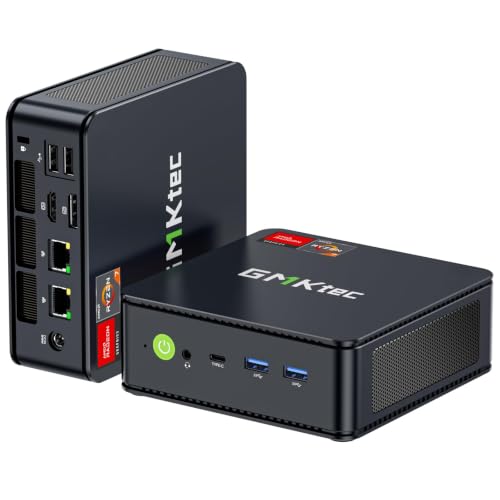
- Best overall for a 1440p screen: GMKtec M5 Plus Gaming Mini PC, Ryzen 7 5825U, 32GB RAM, 1TB SSD — Check on Amazon
- Beelink SER5 MAX Mini PC, Ryzen 7 5800H, 16GB RAM, 500GB SSD — Check on Amazon
- BOSGAME P4 Light Gaming Mini PC, Ryzen 7 5700U, 32GB RAM, 1TB SSD — Check on Amazon
- ACEMAGICIAN AM06 Pro Mini Gaming PC, Ryzen 7 5800U, 16GB RAM, 512GB SSD — Check on Amazon
See 2 more Amazon options
- KAMRUI E3B Mini Gaming PC, Ryzen 5 7430U, 32GB RAM, 512GB SSD — Check on Amazon
- Dell RGB Gaming Tower, Core i7, GTX 1050 Ti, 16GB RAM, 512GB SSD (Renewed) — the strongest graphics here, in a full-size tower — Check on Amazon
Read the full guide ↓
Disclosure: As an Amazon Associate, reviewstook.com earns from qualifying purchases. Links to Amazon on this page are affiliate links; they cost you nothing extra. Listing details such as price and availability change often, so check the current Amazon listing before you buy.
Start with the sentence most guides in this category bury: nothing in this guide renders modern games natively at 2560×1440. Not the five mini PCs, whose integrated Radeon graphics are 1080p hardware by design, and not the one discrete graphics card here, a GTX 1050 Ti that was an entry-level 1080p card when it launched in 2016. If native 1440p rendering in current releases is the requirement, this is the wrong budget entirely, and no honest wording can fix that. So what does “a compact gaming PC for 1440p gaming under $400” truthfully mean? Three things, all of them worth having. First, every pick here drives a 1440p monitor at its native resolution for the desktop — text, browsing, documents and video are genuinely, visibly sharper on a 1440p panel, and these machines output well beyond 1440p on paper. Second, games render at 1080p or below and are upscaled to fill the panel, which on a typical 27-inch 1440p screen looks considerably better than the phrase “not native” suggests. Third, the lightest end of a library — esports titles, older games, indie releases — can run at or near native 1440p at low settings even on this hardware. A 1440p monitor paired with a $400 compact PC is a sensible purchase; it is just a purchase about the screen you look at all day and the games you upscale to it, not about native 1440p rendering.
That distinction — the resolution the screen shows versus the resolution the graphics hardware actually draws — organizes everything below. Each pick is graded on its real rendering class, on how well its memory configuration feeds that rendering, on which upscaling tools its hardware can actually use, and on whether it holds its performance through a long session or fades. The monitor advice matters as much as the PC advice: a 1440p panel is not wasted money alongside these machines, because monitors outlive PCs — the screen you buy today is the screen a stronger future PC will want — but it should be bought with clear eyes about which pixels are native and which are reconstructed. Below are the quick picks, full reviews of all six machines, a comparison table with an honest 1440p verdict for each, a setup guide for rendering and upscaling settings, the mistakes that waste money in this category, and answers to the questions 1440p shoppers actually ask.
Render Resolution vs Display Resolution: The Distinction That Decides This Purchase
A 1440p frame contains about 3.69 million pixels. A 1080p frame contains about 2.07 million. Rendering natively at 1440p therefore asks a graphics processor to shade roughly 78 percent more pixels than 1080p, every frame — and the integrated graphics in a $400 mini PC, and a 2016 entry-level card, simply do not have that shading budget for modern games. That is the whole problem, stated in one paragraph. Everything else in this category is a strategy for coping with it gracefully.
The main strategy is upscaling: the game renders at a lower internal resolution, and software reconstructs a 1440p image from it. The standard quality modes publish their render scales, and the numbers are worth knowing before you shop. A Quality-mode upscale to a 1440p output renders at roughly 1707×960 internally — about 1.64 million pixels, less than a native 1080p frame — and reconstructs the rest. A Performance-mode upscale renders at roughly 1280×720, under a million pixels, and leans much harder on the reconstruction. Two practical consequences follow. First, a game running an upscaler in Quality mode at 1440p output can demand less of the graphics hardware than the same game rendered at plain 1080p, while usually looking cleaner on a 1440p panel, because the upscaler is designed for exactly that panel. Second, the gap between Quality and Performance is the gap between “slightly soft in motion” and “visibly reconstructed” — Quality is the default setting to reach for on every machine in this guide, and Performance is the fallback for the heaviest titles and the weakest graphics here.
Which upscaler can these machines use? Only one name matters, and it is not the famous one. DLSS is NVIDIA technology that requires the Tensor cores found in RTX graphics cards; nothing in this guide has them. The Dell’s GTX 1050 Ti is a Pascal-generation card that predates DLSS entirely, and AMD’s integrated graphics obviously cannot run it either. The upscaler available here is FSR, which games implement in software rather than tying to one brand of hardware — where a game includes it, it runs on the Vega integrated graphics in the five mini PCs and on the Dell’s Pascal card alike. Not every game includes it, and the fallback in those titles is the game’s own render-resolution or resolution-scale slider, which does the same job with less sophistication: render lower, display at 1440p. Between FSR where offered, resolution scaling where not, native rendering for esports and older titles, and a native 1440p desktop for everything else, a $400 compact PC uses a 1440p monitor honestly — as long as nobody promised you native 1440p AAA gaming on the way in.
In this guide
Quick Picks
Short on time, or comparing several options at once? Each row below names a buyer type and the product that suits it, with a link to the listing.
| Buyer type | Pick | Why it stands out | Link |
|---|---|---|---|
| Best overall for a 1440p panel | GMKtec M5 Plus, Ryzen 7 5825U, 32GB/1TB | 32GB dual-channel feeds the integrated graphics best — the most upscaling headroom here | Check on Amazon |
| Best sustained rendering | Beelink SER5 MAX, Ryzen 7 5800H, 16GB/500GB | A 54W chip that holds its clocks — and its render resolution — through long sessions | Check on Amazon |
| Best value alongside a monitor purchase | BOSGAME P4, Ryzen 7 5700U, 32GB/1TB | The 32GB/1TB recipe in a value-tier package, leaving room in the overall setup for the 1440p screen itself | Check on Amazon |
| Best behind the monitor | ACEMAGICIAN AM06 Pro, Ryzen 7 5800U, 16GB/512GB | VESA-mounts to the back of the 1440p panel it drives — PC and screen as one object | Check on Amazon |
| Best budget route | KAMRUI E3B, Ryzen 5 7430U, 32GB/512GB | Esports at 1440p low settings, everything else upscaled, with 32GB fitted as the guide’s budget route | Check on Amazon |
| Strongest raw graphics (not compact) | Dell Gaming Tower, GTX 1050 Ti (Renewed) | The only pick that renders lighter titles at native 1440p — in a full-size refurbished tower | Check on Amazon |
How These Picks Were Chosen
Three filters from the wider compact category applied first. A pick had to be a complete, ready-to-run PC — processor, memory, storage and Windows installed — because a barebones kit is not a $400 computer, it is the beginning of a more expensive one. It had to be genuinely compact, a mini PC of roughly a litre or less, with one disclosed exception explained below. And it had to fit this guide’s under-$400 budget framing — check price on Amazon before you order, because prices at this tier move weekly with coupons and Prime pricing.
On top of those sat the 1440p-specific grading, which is where this guide differs from a general compact roundup. The first test was display output: every pick is documented driving multiple displays at up to 4K, so a 1440p desktop at native resolution is never in doubt — the panel will be fed properly for work and media. The second test was rendering class, graded strictly on documented graphics hardware: AMD’s Vega 8 integrated graphics in four of the mini PCs, Vega 7 in the fifth, and the Dell’s discrete GTX 1050 Ti, which is the strongest raw renderer here and still a 1080p-class card. The third test was memory configuration, which matters more for upscaling than shoppers expect: integrated graphics draw their frame buffer and bandwidth from system RAM, so a dual-channel 32GB machine sustains a higher internal render resolution than a 16GB machine with a similar chip, and every mini PC pick here ships dual-channel. The fourth test was upscaling honesty: FSR where a game includes it is the one upscaler this hardware can use, DLSS is unavailable to all six machines, and no pick was credited with an upscaling feature its hardware does not support.
The sixth pick needs its disclosure repeated: the renewed Dell tower is not compact, not new, and not reliably within this budget — check its live price on Amazon before treating it as an under-$400 option. It is included because it is the only discrete-graphics route at this money and the strongest renderer in the guide, and because 1440p shoppers deserve to see what that route actually costs: a full-size refurbished tower on a decade-old platform. It is labelled as an exception everywhere it appears, and it carries a strict rule — buy it only on a day the live price is at or under $400. We did not use these products ourselves; we read the maker listings and specification pages and compared graphics hardware, memory configuration, storage, dimensions and outputs, favouring listings that publish their numbers in full.
The 6 Best Compact Gaming PCs for 1440p Gaming Under $400
GMKtec M5 Plus Gaming Mini PC — Ryzen 7 5825U, 32GB RAM, 1TB SSD
Who it suits: The 1440p buyer who wants the strongest version of the honest deal — the best-fed integrated graphics in this guide, in a box that disappears behind the monitor it drives.
The M5 Plus earns the top spot for a reason specific to this angle: memory. Its Ryzen 7 5825U carries Radeon Vega 8 integrated graphics, and integrated graphics have no memory of their own — the frame buffer, the textures and the bandwidth all come from system RAM. This machine ships with 32GB of DDR4 in dual channel and a 1TB NVMe SSD, which is the fullest configuration in the guide, and it is exactly the configuration an upscaling workflow rewards. When a game renders internally at 1707×960 and reconstructs to your 1440p panel, the graphics unit is working from shared memory the whole time; 32GB dual-channel gives it both the capacity and the bandwidth to hold that Quality-mode render where a leaner machine drops to Performance mode or to plain 1080p. In practical terms: esports and older titles can be tried at native 1440p on low settings, modern games belong in FSR Quality or at a 1080p render, and the desktop, browser and video are native 1440p all day through its triple 4K-capable display outputs.
The rest of the machine supports the role quietly. The 5825U is a 15W-class chip, so sustained loads run cooler and quieter than the H-series Beelink below — relevant when the PC sits on the desk beside the monitor rather than across the room. The chassis is about 128.8 × 127 × 47.8 mm, roughly 0.78 litres and around half a kilogram, small enough to VESA-mount behind the panel or vanish under it. Dual 2.5GbE LAN and WiFi 6E are work credentials on top. Pricing is the last piece: check price on Amazon — it is the most complete 1440p-pairing package in this budget tier. The standing caution for the value-brand class applies: support runs through the seller, so keep your order records.
- 32GB dual-channel RAM and 1TB SSD — the configuration integrated graphics and upscaling benefit from most.
- Vega 8 graphics with the memory headroom to hold Quality-mode upscaling in modern titles.
- About 0.78 litres and a 15W-class chip: mounts behind the 1440p panel and runs quietly beside it.
Honest limitation: Vega 8 is a 1080p rendering class, full stop — native 1440p belongs to esports and older games at low settings, and there is no upgrade path to discrete graphics later.
Choose it if you are buying the 1440p monitor and the PC together and want the fewest compromises on the PC side. Skip it if native 1440p rendering in new releases is the actual requirement — that requirement starts at a much larger budget, in a much larger box.

Beelink SER5 MAX Mini PC — Ryzen 7 5800H, 16GB RAM, 500GB SSD
Who it suits: The long-session player — the buyer whose worry is not the first ten minutes of a game but the second hour, when lesser chips quietly give back their performance.
Upscaling workloads punish fading hardware in a specific way: when a chip throttles, the game’s dynamic resolution or your manual settings are what slip, and the image on the 1440p panel softens mid-session. The SER5 MAX is built against exactly that failure. Its Ryzen 7 5800H is a 45W-class H-series processor run at a 54W TDP setting in this listing — several times the sustained power budget of the U-series chips around it — and under a long gaming load that is the difference between holding a Quality-mode render and sliding down from it. The graphics are the same Vega 8 class as the GMKtec’s, fed by 16GB of dual-channel DDR4: correctly configured, though 16GB shared between Windows, the game and the graphics unit is the guide’s tighter memory budget, and it is the honest reason this machine ranks second rather than first for this particular angle.
The case is the smallest here — 4.96 × 4.44 × 1.65 inches and 2.44 lb per the listing, about 0.6 litres — and 54W in that volume is the densest heat load in the guide, so placement is part of the purchase: open desk or behind the monitor with air around it, never sealed in a cabinet, and expect the fan to be the most audible of the six under sustained load. Storage is the other compromise, 500GB against a modern library, with a documented way out — the listing supports RAM to 64GB and storage to 2TB, making this the most upgradeable pick after purchase, and a memory upgrade is the one later change that genuinely helps its upscaling story by widening the shared pool. Check price on Amazon before you order; for a buyer who plays long sessions at a desk, it is the performance-per-litre and performance-per-hour winner of this guide.
- 54W-mode 5800H holds its clocks — and therefore its render resolution — through long sessions.
- Smallest case in the guide at roughly 0.6 litres; triple display output over HDMI, DisplayPort and USB-C.
- Room to grow after purchase: the listing supports up to 64GB of RAM and 2TB of storage.
Honest limitation: 16GB of shared memory is the tighter budget for an upscaling workflow, 500GB fills quickly, and the 54W mode in a 0.6-litre case makes this the most placement-sensitive and most audible pick under load.
Choose it if your sessions are long, your desk has open air, and you value sustained rendering over storage. Skip it if the PC must live in a closed cabinet, or if you would rather have 32GB fitted from day one — that is the GMKtec or the BOSGAME.

BOSGAME P4 Light Gaming Mini PC — Ryzen 7 5700U, 32GB RAM, 1TB SSD
Who it suits: The buyer doing the full basket maths — PC plus 1440p monitor — who wants the GMKtec’s memory-and-storage recipe to leave money for the screen.
The P4’s case for this angle is value. The configuration tied to this listing — Ryzen 7 5700U, Vega 8 graphics, 32GB dual-channel DDR4, 1TB NVMe SSD — should be checked on Amazon before you order. That is the same memory configuration that makes the M5 Plus the best upscaling machine here, positioned in the value tier of this guide, and in a 1440p purchase that positioning matters when the monitor is part of the same basket. The 5700U is a close relative of the 5825U, same eight Zen 3 cores and same Vega 8, so the rendering story matches: native 1440p for esports and older titles at low settings, FSR Quality upscaling or a 1080p render for modern games, and a native 1440p desktop the rest of the day. The P4 chassis family measures about 5.1 inches square and 1.8 inches tall, roughly 0.77 litres at about 2.2 lb, and the port list — dual 2.5GbE, triple 4K display output, WiFi 6E — gives it second careers in media and home-server duty.
Two cautions belong to this pick specifically. The listing family is the first: BOSGAME has sold the P4 line in both 5700U and 5825U variants under near-identical titles, so confirm the processor, the 32GB and the 1TB on the live page before ordering — the specification table is the product, the title is marketing. The second is the brand: support runs through the seller storefront rather than a global service network, so buy it as a specification, not a service promise. Noise follows the U-series pattern — audible in a silent room under load, unobtrusive across one, quick to settle. If the live configuration matches the documented one, check price on Amazon — this is a strong hardware-per-dollar proposition in this tier, and the pick that makes the PC-plus-1440p-monitor basket add up.
- The guide’s value configuration: 32GB in dual channel and a 1TB SSD — check price on Amazon.
- Same Vega 8 rendering class as the top pick, so the same Quality-mode upscaling story.
- Value-tier positioning helps when the 1440p panel is part of the same purchase.
Honest limitation: BOSGAME sells this P4 family with two different processors under titles that look nearly identical, so the live page’s specification table has to be checked before ordering — and support comes from the seller’s storefront rather than a service network.
Choose it if the live listing shows the 32GB/1TB configuration and the monitor is part of the same purchase. Skip it if the page shows a lesser variant at the same money, or if in-warranty support matters more to you than specification for the tier.

ACEMAGICIAN AM06 Pro Mini Gaming PC — Ryzen 7 5800U, 16GB RAM, 512GB SSD
Who it suits: The tidy-desk and living-room buyer — the person who wants the PC physically attached to the 1440p panel it drives, so the screen is the only object on the desk.
The AM06 Pro is the largest mini PC here and still tiny: 5.19 × 5.19 × 1.96 inches per the model’s published specifications, about 0.86 litres. What the extra fraction of a litre buys is the guide’s best mounting story — the case VESA-mounts behind a monitor, which makes the 1440p pairing literal: one panel, one bracket, no visible computer. For a 1440p desk setup that is a genuinely appealing shape, and the specification behind it is the familiar honest recipe — Ryzen 7 5800U with Vega 8 graphics, 16GB dual-channel DDR4, 512GB NVMe — plus one storage trick the others lack, a 2.5-inch expansion bay, so a cheap SATA drive can grow the library later. The rendering story matches the class: a native 1440p desktop, esports and older titles at native 1440p on low settings, and FSR Quality upscaling or a 1080p render for modern releases. Its 15W-class chip profile makes it, with the M5 Plus, one of the two calmest machines here under load — a real consideration when the PC is mounted inches behind the screen you are sitting in front of.
The caveats are two. Memory first: 16GB is the guide’s floor for shared-memory graphics rather than its comfort zone — it works, dual-channel and correctly configured, but the 32GB machines hold an upscaled image with more headroom when a game, Windows and a browser are all resident. Price second: check price on Amazon before comparing it with the BOSGAME — Prime and standard pricing can differ, so check which applies to you. The value-brand note given across this series applies here too: run a security scan on first boot, and treat a clean Windows install as a reasonable first hour with any budget mini PC. Judged as the panel’s partner rather than a standalone box, the AM06 Pro is the placement pick of this guide.
- VESA-mounts behind the 1440p monitor — the zero-footprint version of this purchase.
- A 2.5-inch drive bay — unique among these six picks — lets a cheap SATA drive expand the library later.
- 15W-class chip keeps fan noise low at desk distance, where a mounted PC sits closest to you.
Honest limitation: 16GB of RAM is the floor, not the comfort zone, for an upscaling workflow on shared memory, and pricing can differ by Prime membership — check price on Amazon.
Choose it if the PC is going behind a 1440p monitor in a shared or tidy space. Skip it if you want 32GB fitted from day one, or if the live price you would pay does not fit this budget.

KAMRUI E3B Mini Gaming PC — Ryzen 5 7430U, 32GB RAM, 512GB SSD
Who it suits: The budget disciplinarian whose library is esports, indie and emulation — the buyer who wants the cheapest properly configured machine and understands exactly which rendering class that buys.
The E3B is where this guide’s honesty matters most, because its graphics are the weakest here: a Ryzen 5 7430U with Vega 7 graphics, one compute unit below the Vega 8 machines. Placed against the 1440p question, that defines its role precisely. Esports and light titles at native 1440p on low settings are a realistic expectation — that is genuinely this machine’s native-1440p story, and for a competitive-games library it is a satisfying one. Heavier 3D games are a different conversation: a 1080p render upscaled to the panel, or FSR in Performance mode where a title offers it, and settings expectations set accordingly. What keeps the E3B competitive despite the smaller graphics unit is the memory: 32GB across two sticks, dual-channel, the configuration shared-memory graphics crave — and it is fitted as the budget route in this guide — check price on Amazon for the 32GB configuration.
The chassis is the second smallest here — 128 × 128 × 41.2 mm, about 0.68 litres and roughly 560 grams — and a VESA plate is included, so it can ride behind the 1440p monitor out of the box and take no desk at all. Placement follows the low-wattage pattern: quiet at desktop distances, audible in a silent room under load, happiest with open air. Two purchase disciplines apply. The configuration trap is the sharp one: a 16GB sibling of this machine exists under a separate listing, and at 16GB this pick’s whole argument — a properly fed integrated GPU on a budget — collapses, so confirm the page in front of you says 32GB before ordering. And the value-brand first-boot routine from the other reviews applies unchanged: scan, update, verify. Bought correctly, the E3B is the guide’s proof that a sensible 1440p-panel setup — native desktop, esports at native resolution, the rest upscaled — is achievable within this budget tier.
- A budget-tier route to a 32GB dual-channel machine — check price on Amazon.
- Esports and light titles at native 1440p low settings are a realistic claim for this pick.
- A VESA plate is in the box and the chassis is about 0.68 litres, so it can live behind the monitor from day one.
Honest limitation: Vega 7 is a step below the Vega 8 picks in demanding 3D games, where Performance-mode upscaling or a 1080p render is the realistic setting — and the 16GB sibling listing is a trap that voids the pick’s argument if clicked by mistake.
Choose it if esports, indie games and emulation are your library, and you want a 32GB machine in the budget tier of this guide. Skip it if recent 3D releases are your main games — the Vega 8 machines hold a visibly better upscaled image.
Dell RGB Gaming Tower Computer — Core i7, GTX 1050 Ti 4GB, 16GB RAM, 512GB SSD (Renewed)
Who it suits: The buyer who wants the strongest raw rendering available under $400, has floor space for a tower, and accepts refurbished hardware on an old platform to get it.
Every disclosure from the intro applies to this pick at full strength. It is not compact — it is a full-size RGB gaming tower. It is not new — it is an Amazon Renewed machine, professionally inspected and resold, built around a 6th-generation Intel Core i7. And its price will not sit still, so check price on Amazon: it belongs in this guide only on days the live price is at or under $400; on the days it sits above, the correct action is to pass. What justifies its presence at a 1440p angle is the GeForce GTX 1050 Ti with 4GB of dedicated memory. It is the strongest renderer in this guide: its graphics memory never competes with system RAM, and lighter and older titles at native 1440p on low settings are a more comfortable expectation here than on any mini PC, with its era’s AAA games rendered at 1080p and upscaled.
Its upscaling limits are equally specific, and they are the point shoppers most often get wrong: the GTX 1050 Ti is a Pascal-generation card, and DLSS requires RTX Tensor cores that Pascal does not have. There is no DLSS on this machine, at any setting, ever. Its upscaling route is the same one the mini PCs use — FSR where a game includes it, and in-game render-resolution scaling where one does not. The platform around the card is a dead end: a decade-old processor generation with no meaningful upgrade path, renewed condition under Amazon’s inspection program rather than a Dell factory warranty, and unit-to-unit variation that new machines do not have. It earns its place because 1440p shoppers deserve the real comparison: the strongest rendering under $400 costs you compactness, newness and platform future, all three at once. If those trades are acceptable and the live price is under the line, it is a legitimate back-catalog and esports machine for a 1440p panel. If any of them is not, the mini PCs above are the honest answer.
- Strongest raw rendering in the guide, with 4GB of dedicated graphics memory that system RAM never competes with.
- Lighter and older titles at native 1440p low settings are most comfortable on this pick.
- Check price on Amazon — it qualifies only on days the live price sits under the budget line.
Honest limitation: It fails this guide’s own category — full-size, refurbished, on a decade-old platform — it has no DLSS despite the NVIDIA badge — check price on Amazon; it is a buy only on days the live price is at or under $400.
Choose it if rendering strength outranks size, newness and future upgrades, and the live price is under the line. Skip it if size, newness or a platform future matter to you — and skip it on the frequent days its price sits above $400.

Comparison Table
| Product | Size / volume | Graphics | Honest 1440p verdict | Link |
|---|---|---|---|---|
| GMKtec M5 Plus, 5825U, 32GB/1TB | ~128.8 × 127 × 47.8 mm, ~0.78 L | Radeon Vega 8 (integrated) | Best upscaled image here; native 1440p for esports and older titles | Check on Amazon |
| Beelink SER5 MAX, 5800H, 16GB/500GB | 4.96 × 4.44 × 1.65 in, ~0.6 L | Radeon Vega 8 (integrated) | Holds its upscaled render most consistently through long sessions | Check on Amazon |
| BOSGAME P4, 5700U, 32GB/1TB | ~5.1 × 5.1 × 1.8 in, ~0.77 L | Radeon Vega 8 (integrated) | Same render class as the top pick, with value-tier positioning | Check on Amazon |
| ACEMAGICIAN AM06 Pro, 5800U, 16GB/512GB | 5.19 × 5.19 × 1.96 in, ~0.86 L | Radeon Vega 8 (integrated) | 1080p-render upscaling from behind the panel it drives | Check on Amazon |
| KAMRUI E3B, 7430U, 32GB/512GB | 128 × 128 × 41.2 mm, ~0.68 L | Radeon Vega 7 (integrated) | Esports at native 1440p low; heavier games render at 1080p or below | Check on Amazon |
| Dell Gaming Tower, GTX 1050 Ti (Renewed) | Full-size tower — not compact | GTX 1050 Ti 4GB (discrete) | Light titles at native 1440p, the rest at 1080p — if the live price qualifies | Check on Amazon |
How to Choose a Compact Gaming PC for a 1440p Monitor
- Decide which 1440p you are buying. Display resolution and render resolution are separate purchases sharing one phrase. Every pick here delivers the first natively and the second by upscaling. If a listing, a headline or a salesperson blurs the two, treat everything else they say with suspicion.
- Buy the 1440p monitor anyway — for the right reasons. A native 1440p desktop is sharper for work, reading and video every hour the PC is on, and monitors outlive PCs: this screen is the one a stronger future machine will want. What a 1440p panel does not do is oblige your current PC to render games natively at 1440p.
- Do not fund the monitor by starving the PC. If the basket forces a choice, the dual-channel memory configuration matters more to your games than the panel’s resolution does. A 32GB dual-channel PC on a good 1080p screen out-games a 16GB single-stick PC upscaling to a 1440p screen. In this guide that means: never solve the budget by dropping to a lesser configuration of the same machine.
- Set games up in the right order. Output resolution to 2560×1440 first, so the desktop and the game’s interface are native. Then, in demanding titles, enable FSR in Quality mode — an internal render of roughly 1707×960 — before touching anything else. Drop to Performance mode, roughly 1280×720 internally, only for the heaviest games or on the Vega 7 KAMRUI. Esports and older titles can simply be tried at native 1440p on low settings.
- Remember plain 1080p rendering is a legitimate setting. A 1920×1080 render is about 2.07 million pixels — more shading work than a Quality-mode upscale’s internal frame. Where a game has no FSR, setting its render resolution to 1080p and letting it display on the 1440p panel is a respectable middle path, not a failure.
- Keep refresh-rate expectations in their lane. A high-refresh 1440p monitor pairs beautifully with these PCs for desktop smoothness and esports play. In demanding modern games, no pick here fills a high-refresh panel — buy the refresh rate for the games that use it and the PC you will own next, not for this one.
- Confirm the exact configuration on the live page. Listing families swap processors and memory sizes under near-identical titles — this guide flags the P4’s variants and the E3B’s 16GB sibling explicitly. The specification table on the page is the product; the title is not.
- Apply the Dell rule literally. The renewed tower qualifies only when its live price is at or under $400, and only if a full-size refurbished tower on an old platform genuinely fits your room and your plans. Check price on Amazon — the listing in front of you today is the only one that counts.
- Give the box air, wherever it lives. Behind a monitor is ventilated space; inside a closed TV cabinet is an oven. A throttling chip lowers its clocks, and in an upscaling workflow the render resolution is what quietly slips. Placement is a picture-quality setting in this category.
- Run the first-boot routine on any value brand. Security scan, Windows updates, driver updates, and a look through what is installed. It takes an hour, applies to every budget mini PC regardless of badge, and converts an unknown software state into a known one.
Common Buying Mistakes
- Expecting native 1440p gaming in modern releases because a title or a search phrase says “1440p gaming PC.” At $400, 1440p describes the screen, not the render.
- Confusing display output with rendering. “Supports 4K” on a mini PC listing means the desktop and video can be output at 4K — it says nothing about games, which are a 1080p conversation at this price.
- Looking for DLSS on this hardware. DLSS needs RTX Tensor cores; the Dell’s Pascal card predates them and AMD’s integrated graphics never had them. FSR, where a game includes it, is the upscaler here.
- Buying a single-stick 16GB configuration to save money, and halving the memory bandwidth the integrated graphics upscale from.
- Setting an upscaler straight to Performance mode and judging the panel by the result. Quality mode — roughly 1707×960 rendered — is the default; Performance is the fallback, and the difference on screen is large.
- Paying over $400 for the renewed Dell, because it appeared in an under-$400 guide. The rule is the live price, not the headline — check price on Amazon before you order.
- Ordering from a listing family without confirming the live configuration — the P4’s processor variants and the E3B’s 16GB sibling are this guide’s standing examples.
- Assuming a later upgrade will make the machine a true 1440p PC. On the mini PCs, RAM and storage can change; the graphics are the chip’s graphics forever. The component that carries forward to a future native-1440p setup is the monitor.
Final Recommendation
- Most 1440p buyers: GMKtec M5 Plus.
- Long sessions at a desk: Beelink SER5 MAX.
- PC and monitor in one basket: BOSGAME P4.
- Mounted behind the panel: ACEMAGICIAN AM06 Pro.
- Esports libraries, smallest budgets: KAMRUI E3B.
- Strongest rendering, size and newness aside: Dell Gaming Tower (Renewed) — only at a live price of $400 or under.
Our top two for a 1440p setup at this budget are the GMKtec M5 Plus, whose 32GB dual-channel memory gives its Vega 8 graphics the most upscaling headroom in the guide, and the Beelink SER5 MAX, whose 54W chip holds its render resolution through the long sessions where lesser machines fade. If PC and monitor are being bought together, the BOSGAME P4 matches the top pick’s memory recipe with value-tier positioning that helps when the screen is part of the same purchase; if the PC is destined to live behind the panel, the AM06 Pro is built for exactly that; and if the library is esports and emulation, the KAMRUI E3B delivers the honest version of this setup as the budget route here. Shoppers who can stretch the PC budget should also see Best Compact Gaming PC For 1440p Gaming Under $500, and those weighing the whole category rather than the compact corner of it should start with Best 1440p Gaming PC Under $400. Buy the monitor with clear eyes, set the upscaler to Quality, confirm the configuration on the live listing, and check the live price before you order — at $400, that honesty is the difference between a 1440p setup that delights you and one that disappoints you for a reason nobody mentioned.
Frequently Asked Questions
Can any compact PC under $400 really game at native 1440p?
In the lightest part of a library, yes: esports titles, older games and indie releases at low settings are a realistic native-1440p expectation on the stronger picks here, most comfortably on the Dell’s discrete card and the Vega 8 mini PCs. In modern AAA releases, no — every machine in this guide renders those at 1080p or below and upscales to the panel. Anyone who promises otherwise at this price is describing the display output, not the rendering.
Is a 1440p monitor wasted on one of these PCs?
No. The desktop, browsing, documents and video all run at the panel’s native 1440p and are visibly sharper for it; games upscale to the same panel with FSR where a title includes it; and a monitor typically outlives two PCs, so this screen is the one your next, stronger machine will be paired with. What would be wasted is buying the monitor instead of a properly configured PC — the memory configuration matters more to your games than the panel does.
What upscaling do these PCs actually support?
FSR, in the games that include it — it is implemented by the game in software, so it runs on the AMD integrated graphics in the mini PCs and on the Dell’s NVIDIA card alike. Where a game has no FSR, the fallback is its render-resolution or resolution-scale setting. DLSS is unavailable on all six machines: it requires RTX Tensor cores, which the Vega graphics do not have and which the GTX 1050 Ti predates.
Which upscaling mode should I use, Quality or Performance?
Quality, as the default everywhere in this guide: at a 1440p output it renders roughly 1707×960 internally and reconstructs, which is demanding enough to look convincing and light enough for Vega-class graphics. Performance renders roughly 1280×720 and leans far harder on reconstruction — reserve it for the heaviest titles, and expect to reach for it more often on the Vega 7 KAMRUI than on the Vega 8 machines.
Would I be better off with a 1080p monitor and a stronger PC?
It is a legitimate alternative shape for the same total money, and for a library of demanding modern games it can be the better one — see Best 1080p Gaming PC Under $400 for that side of the category. The 1440p route wins on desktop sharpness, media and future-proofing the screen; the 1080p route wins on native rendering today. What does not work is splitting the difference into a weak PC and a 1440p panel bought on a misunderstanding.
Can I upgrade one of these later into a true native-1440p machine?
Not the graphics — on the mini PCs the GPU is part of the processor, permanently, and RAM and storage are the only upgradeable parts. The Beelink’s documented headroom (RAM to 64GB, storage to 2TB) widens the shared-memory pool and helps its upscaling consistency, but it does not change its rendering class. Plan on the 1440p monitor being the component that carries forward, and a future PC being the native-1440p step.
Is the renewed Dell a better 1440p buy than a new mini PC?
For raw rendering, yes — its GTX 1050 Ti is the strongest graphics hardware here, and lighter titles at native 1440p sit most comfortably on it. For size, newness, warranty and platform future, the mini PCs win, and it has no DLSS despite the brand. Check price on Amazon before you decide: it is the right buy for a narrow buyer: back-catalog and esports games, floor space available, live price under the line.


