The best sound cards for Gigabyte GA-970 motherboards are internal PCIe sound cards that fit the PCIe x1 slots of the GA-970A boards and give a system built on that platform cleaner sound than the onboard audio. The GA-970A is an AM3+ motherboard from the era of the FX processors, and its onboard audio was adequate for its day, but a dedicated sound card adds a better digital-to-analog converter, a headphone amplifier, and surround sound that the onboard chip cannot match. This guide covers six internal PCIe sound cards that fit a GA-970A board, and every one of them is a genuine internal card with a PCIe connection stated in its listing.
The six cards in this guide are the Creative Sound Blaster Audigy Fx Pro, a hi-res PCIe card for a clean stereo upgrade; the Creative Sound Blaster AE-X, a hi-res PCIe card rated at 32-bit and 384kHz; the Creative Sound Blaster Z SE, an internal PCI-e gaming card with a 116 dB signal-to-noise ratio and a 600-ohm headphone amplifier; the Creative Sound BlasterX AE-5 Plus, a SABRE32-class gaming card with Dolby Digital and DTS; the Creative Sound Blaster Audigy FX V2, a straightforward PCIe sound card from the Audigy line; and the Asus Strix SOAR, a 7.1 PCIe gaming sound card. Each one is an internal card, which means it plugs into a PCIe slot inside the case, unlike a USB sound card or a USB DAC.
A GA-970A board has PCIe x1 slots that accept these cards, and that is the compatibility that matters most. A PCIe x1 card fits in any PCIe slot of x1 size or larger, so a sound card can go into a spare x1 slot without disturbing the graphics card in the x16 slot. The cards in this guide are all PCIe x1 cards, and a buyer should check that the board has a free x1 slot before ordering, because a board with every slot filled has nowhere to put a sound card. A low-profile bracket is also worth checking for a small case, because some of these cards ship with a full-height bracket only.
A sound card is bought for sound quality, and the numbers in the listings are the way to compare it. The signal-to-noise ratio, stated in decibels, says how quiet the background is: the Z SE states 116 dB and the AE-5 Plus states up to 122 dB, and a higher number means a quieter background. The bit depth and sample rate, such as 32-bit and 384kHz on the AE-X and the AE-5 Plus, say how much detail the card can handle, and the headphone amplifier, such as the 600-ohm amplifier on the Z SE, says how well the card can drive demanding headphones. These numbers are from the listings, and they are the fairest way to compare cards that cannot be heard before buying.
A word about drivers is worth adding before the picks, because the GA-970A is an older platform and the cards here span several generations. A sound card needs a driver for the operating system in use, and a buyer should check the maker driver page for the system before ordering. The newer cards in this guide, such as the AE-X and the Audigy Fx Pro, are current models with current drivers, while the older cards, such as the Strix SOAR and the Audigy FX V2, are established models whose drivers cover the common systems. A card without a driver for the system is a card that cannot work, whatever its specification.
In this guide
Quick picks: best sound cards for gigabyte ga 970
| # | Product | Where to buy |
|---|---|---|
| 1 | Creative Sound Blaster Audigy Fx Pro | Check on Amazon |
| 2 | Creative Sound Blaster AE-X | Check on Amazon |
| 3 | Creative Sound Blaster Z SE | Check on Amazon |
| 4 | Creative Sound BlasterX AE-5 Plus | Check on Amazon |
| 5 | Creative Sound Blaster Audigy FX V2 | Check on Amazon |
| 6 | Asus Strix SOAR 7.1 | Check on Amazon |
How the picks were chosen for the best sound cards for Gigabyte GA-970
The picks were chosen from the product listings returned by the site product search, and only internal PCIe sound cards made the list. Each listing title was checked for the brand and the model, and a card was only linked when both matched the listing. External USB sound cards and USB DACs were not counted, because a GA-970 board needs an internal card for this article, and a USB device is a different kind of product. Motherboards and graphics cards that appeared in the search results with the words fit for in their titles were not counted either, because they are not sound cards at all.
Compatibility with the GA-970A was the second filter. Every pick is a PCIe card that fits a PCIe x1 slot, which is the slot a GA-970A board provides for a sound card. A card that needs a different slot, or a card that is too large for a typical case, was not counted. The guide includes cards from the budget end to the high end, so that a buyer at any budget can find a fit, and it includes both stereo cards and surround cards, so that a buyer can choose by the speaker setup in use.
The third filter was the listing itself. Every pick is a new listing from a named sound card brand: Creative or Asus. Listings for used or renewed cards were excluded, and listings whose titles named a different model were excluded too. Listings that named only a brand and a vague description, with no model, were left out, because a pick needs a model a buyer can check.
What makes a sound card good for a GA-970 board
The first quality that matters is the PCIe connection. A good sound card for a GA-970A board is a PCIe x1 card, because that is the slot the board provides, and the card should fit without blocking the graphics card or the other slots. All six picks in this guide are PCIe cards, and the buyer should check the case for room: a card with a large heatsink or a tall bracket needs space, and a small case may need a low-profile bracket. The Z SE and the AE-5 Plus are gaming cards with larger boards, while the Audigy Fx Pro and the Audigy FX V2 are smaller and simpler.
The second quality is the converter and the noise floor. A sound card replaces the onboard audio chip, and its job is to turn digital audio into analog sound with less noise and more detail. The signal-to-noise ratio in the listing is the simplest measure: the Z SE states 116 dB and the AE-5 Plus states up to 122 dB, and a higher number means a quieter background. The DAC class matters too: the AE-5 Plus states a SABRE32-class DAC, which is a known high-quality converter, and the AE-X states 32-bit and 384kHz, which is the highest resolution in this guide.
The third quality is the headphone amplifier. Many buyers buy a sound card for headphones rather than for speakers, and a card with a proper amplifier drives demanding headphones that onboard audio cannot. The Z SE states a 600-ohm headphone amplifier, which covers almost any headphone, and the AE-5 Plus states a discrete headphone bi-amplifier. A buyer with ordinary headphones will hear the difference in clarity, and a buyer with high-impedance headphones will hear the difference in volume and control.
Stereo cards, gaming cards, and surround cards
Stereo cards are the simplest kind in this guide, and the Audigy Fx Pro and the Audigy FX V2 are the examples: they focus on clean two-channel sound for music and for everyday listening, with hi-res audio and surround sound support but no gaming extras. A stereo card suits a buyer who listens to music, watches films, and wants a cleaner sound than the onboard chip, without paying for gaming features that will never be used.
Gaming cards are the most featured kind, and the Z SE and the AE-5 Plus are the examples: both state gaming in their titles, both have a headphone amplifier and a microphone equalizer, and both support Dolby Digital and DTS surround. The AE-5 Plus adds RGB lighting and a SABRE32-class DAC, while the Z SE adds ASIO support and a 116 dB signal-to-noise ratio. A gaming card suits a buyer who plays games with headphones, talks on a microphone, and wants virtual surround sound.
Surround cards are the kind that drive a multi-speaker setup, and the Asus Strix SOAR is the clearest example with its 7.1 channels, while the Z SE states discrete 5.1 and virtual 7.1. A surround card suits a buyer with a 5.1 or 7.1 speaker system, or a buyer who watches films with surround sound. A buyer with only two speakers does not need a surround card, and a stereo card will serve better for the same money.
Quick picks at a glance
| Sound card | Connection | Key spec | Best for |
|---|---|---|---|
| Audigy Fx Pro | PCIe | Hi-res audio | Clean stereo upgrade |
| Sound Blaster AE-X | PCIe | 32-bit/384kHz | Hi-res detail |
| Sound Blaster Z SE | PCI-e | 116 dB SNR | Gaming and headphones |
| Sound BlasterX AE-5 Plus | PCIe | 122 dB SNR | Top gaming card |
| Audigy FX V2 | PCIe | Audigy line | Simple upgrade |
| Asus Strix SOAR | PCIe | 7.1 channels | Surround gaming |
The best sound cards for Gigabyte GA-970


Creative Sound Blaster Audigy Fx Pro
The Creative Sound Blaster Audigy Fx Pro is the clean stereo pick in this guide. The listing title states the brand Creative, the model Sound Blaster Audigy Fx Pro, hi-res PCIe sound, hi-res audio, surround sound, and a clean audio upgrade for a PC. It is a PCIe sound card, which means it plugs into a PCIe x1 slot on a GA-970A board and replaces the onboard audio with a dedicated converter and amplifier.
Hi-res audio is the feature that defines this card, because it means the card can handle audio at a higher resolution than the onboard chip, and the result is a cleaner sound with less background noise. Surround sound support is the other advantage: the card can drive a surround setup as well as a stereo one, so it covers both music and films. For a buyer who wants a simple, modern card from a known brand, the Audigy Fx Pro is the straightforward choice.
Key specs:
- Connection: PCIe sound card
- Audio: hi-res audio
- Sound: surround sound
- Use: PC upgrade
Strengths:
- Hi-res audio for cleaner sound
- PCIe card fits a GA-970A x1 slot
- Surround sound support included
Trade-offs:
- No signal-to-noise ratio stated
- No headphone amplifier stated
- Fewer gaming features than the Z SE
The Audigy Fx Pro fits the buyer who wants a simple sound upgrade for music and films. It is the pick for a GA-970A system that is used for listening rather than for competitive gaming.
Best for: a clean stereo upgrade on a GA-970A board. Not suited for: a gamer who wants a headphone amplifier and mic EQ.
Check price on Amazon: Creative Sound Blaster Audigy Fx Pro


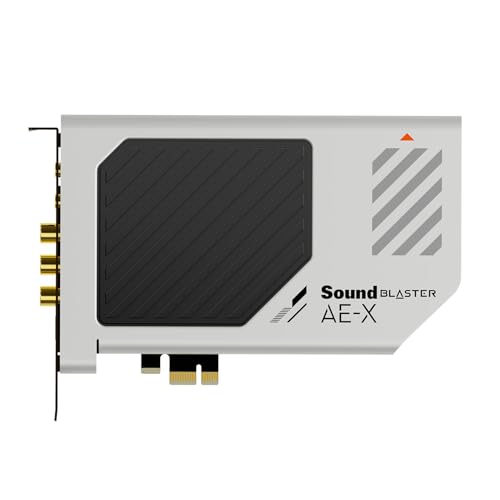
Creative Sound Blaster AE-X
The Creative Sound Blaster AE-X is the hi-res detail pick in this guide. The listing title states the brand Creative, the model Sound Blaster AE-X, a hi-res PCIe sound card for PC, 32-bit and 384kHz audio, hi-res audio, and desktop app support. It is a PCIe card for a GA-970A board, and its 32-bit and 384kHz rating is the highest resolution stated in this guide.
Thirty-two-bit and 384kHz audio means the card can handle the most detailed digital audio available, and the difference shows in quiet passages and in the fine detail of a recording. Desktop app support is the other advantage: the card is controlled from a desktop application, so the buyer can adjust the equalizer, the surround settings, and the headphone output without opening the case. For a buyer who listens to high-resolution music, the AE-X is the card that makes the most of it.
Key specs:
- Connection: PCIe sound card
- Resolution: 32-bit/384kHz
- Audio: hi-res audio
- Control: desktop app support
Strengths:
- Highest resolution in this guide
- Hi-res audio for detailed listening
- Desktop app for easy control
Trade-offs:
- No signal-to-noise ratio stated
- No headphone amplifier stated
- Newer model, fewer long-term reports
The Sound Blaster AE-X fits the buyer who listens to high-resolution music on a GA-970A system. It is the pick for a music lover who wants the most detail the board can deliver.
Best for: high-resolution music listening. Not suited for: a gamer who wants surround and mic features.
Check price on Amazon: Creative Sound Blaster AE-X

Creative Sound Blaster Z SE
The Creative Sound Blaster Z SE is the gaming and headphones pick in this guide, and it is the best-specified card here for the money. The listing title states the brand Creative, the model Sound Blaster Z SE, an internal PCI-e gaming sound card and DAC, 24-bit and 192kHz audio, a 116 dB signal-to-noise ratio, ASIO support, a 600-ohm headphone amplifier, microphone EQ, discrete 5.1 and virtual 7.1 surround, and support for Dolby Digital Live and DTS. It is a card that covers gaming, headphones, and surround sound in one slot.
The 600-ohm headphone amplifier is the feature that matters most for a headphone user, because it drives almost any headphone properly, including high-impedance models that onboard audio cannot. The 116 dB signal-to-noise ratio is the quietest background stated in this guide after the AE-5 Plus, and ASIO support matters for a buyer who records or produces audio, because it gives low-latency input. Microphone EQ is the other advantage: it shapes the voice for chat and streaming, which is why this card is a favourite for gaming.
Key specs:
- Connection: internal PCI-e gaming sound card
- Resolution: 24-bit/192kHz, 116 dB SNR
- Headphones: 600-ohm amplifier
- Surround: discrete 5.1, virtual 7.1, Dolby Digital Live, DTS
- Extra: ASIO, mic EQ
Strengths:
- 600-ohm headphone amplifier
- 116 dB SNR for a quiet background
- ASIO and mic EQ for gaming and recording
Trade-offs:
- Gaming design, less plain than the Audigy cards
- Needs a free PCIe slot near the graphics card
- Virtual 7.1, not discrete 7.1
The Sound Blaster Z SE fits the gamer who plays with headphones on a GA-970A system. It is the pick for competitive play, for voice chat, and for a buyer who wants one card for games, music, and films.
Best for: gaming with headphones on a GA-970A board. Not suited for: a pure music listener who needs no gaming features.
Check price on Amazon: Creative Sound Blaster Z SE
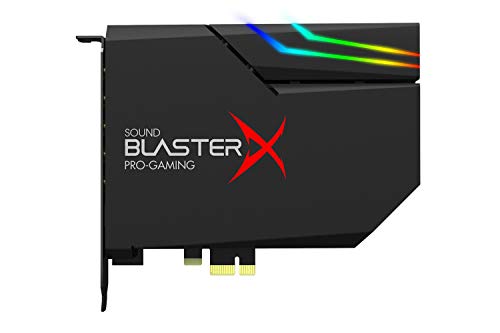
Creative Sound BlasterX AE-5 Plus
The Creative Sound BlasterX AE-5 Plus is the top card in this guide. The listing title states the brand Creative, the model Sound BlasterX AE-5 Plus, a SABRE32-class hi-res 32-bit and 384kHz PCIe gaming sound card and DAC, Dolby Digital and DTS, a discrete headphone bi-amplifier, a signal-to-noise ratio of up to 122 dB, and an RGB lighting system. It is the highest-specified card here, and its 122 dB signal-to-noise ratio is the quietest background stated in this guide.
The SABRE32-class DAC is the heart of this card, because it is a converter class known for clean, detailed sound, and the 32-bit and 384kHz rating matches the AE-X for resolution. The discrete headphone bi-amplifier is the other advantage: it drives each headphone channel separately, which gives better control and a wider soundstage than a single amplifier. RGB lighting is a cosmetic extra that suits a windowed case, and Dolby Digital and DTS cover surround sound for films and games.
Key specs:
- Connection: PCIe gaming sound card and DAC
- Resolution: 32-bit/384kHz, up to 122 dB SNR
- DAC: SABRE32-class
- Headphones: discrete headphone bi-amp
- Surround: Dolby Digital and DTS, RGB lighting
Strengths:
- Quietest background in this guide
- SABRE32-class DAC for detailed sound
- Discrete headphone bi-amplifier
Trade-offs:
- Most expensive class of card here
- RGB lighting is cosmetic, not sound
- Larger board needs case room
The Sound BlasterX AE-5 Plus fits the buyer who wants the best sound a GA-970A board can give. It is the pick for a high-end headphone setup, for serious gaming, and for a buyer who wants the top card in this guide.
Best for: the best sound quality in this guide. Not suited for: a budget build, where the Audigy cards cost less.
Check price on Amazon: Creative Sound BlasterX AE-5 Plus


Creative Sound Blaster Audigy FX V2
The Creative Sound Blaster Audigy FX V2 is the simple upgrade pick in this guide. The listing title states the brand Creative and the model Sound Blaster Audigy FX V2, and it is a sound card from the long-running Audigy line, now in its second version. It is a PCIe sound card that fits a GA-970A x1 slot and replaces the onboard audio with a dedicated card, and its simplicity is the point: it does the job of a sound card without the gaming extras of the Z SE or the AE-5 Plus.
The Audigy line has been the default sound card upgrade for many years, and the V2 is the current version of that idea: a card that improves music, films, and games over onboard audio, with a driver and a control panel from Creative. A buyer who wants a known, straightforward card for a GA-970A system, and who does not need a headphone amplifier or surround extras, will find the Audigy FX V2 does what is asked of it.
Key specs:
- Connection: PCIe sound card
- Line: Sound Blaster Audigy FX V2
- Brand: Creative
Strengths:
- Simple, proven Audigy design
- PCIe card fits a GA-970A x1 slot
- Straightforward upgrade from onboard audio
Trade-offs:
- Few specifications stated in the title
- No headphone amplifier stated
- No surround format stated
The Audigy FX V2 fits the buyer who wants the simplest sound card upgrade. It is the pick for a GA-970A system that needs better sound for music and films, without gaming extras.
Best for: a simple sound upgrade on a GA-970A board. Not suited for: a headphone user who needs a strong amplifier.
Check price on Amazon: Creative Sound Blaster Audigy FX V2

Asus Strix SOAR 7.1 Sound Card
The Asus Strix SOAR is the surround pick in this guide, and it is the only card here from Asus. The listing title states the brand Asus, the model Strix SOAR, a 7.1 PCIe gaming sound card, and the model code 90YB00J0-M1UA00. It is a 7.1-channel card, which means it drives a full surround speaker system with seven speakers and a subwoofer, and it is a gaming card from the Strix line, built for players who want positional audio.
Seven-point-one channels are the feature that defines this card, because no other pick here states discrete 7.1 channels. A buyer with a 7.1 speaker system gets true surround sound rather than virtual surround, and a gamer hears footsteps and direction with more accuracy than a stereo card can give. The Strix line is Asus gaming hardware, so the card is built for the same audience as a gaming motherboard and a gaming graphics card, and it fits a GA-970A gaming system well.
Key specs:
- Connection: PCIe gaming sound card
- Channels: 7.1
- Model code: 90YB00J0-M1UA00
- Line: Asus Strix
Strengths:
- True 7.1 channels for surround
- Gaming card from the Strix line
- Model code stated for exact matching
Trade-offs:
- Older model, check driver support
- Needs a 7.1 speaker system to shine
- No signal-to-noise ratio stated
The Strix SOAR fits the buyer with a 7.1 speaker system on a GA-970A board. It is the pick for surround films and positional gaming audio, where discrete channels beat virtual surround.
Best for: a 7.1 surround setup on a GA-970A board. Not suited for: a stereo-only setup, where a simpler card costs less.
Check price on Amazon: Asus Strix SOAR 7.1
Buying guide for sound cards for Gigabyte GA-970
Check the free PCIe slot first
A sound card needs a free PCIe x1 slot, and a GA-970A board with a large graphics card and other cards may have none free. Open the case, count the slots, and check that the slot is not blocked by the graphics card cooler. A sound card in a blocked slot is a sound card that cannot be installed, whatever its specification, so check the slot before ordering.
Match the card to the speakers or headphones
A buyer with two speakers needs a stereo card, a buyer with a 5.1 system needs a surround card, and a buyer with demanding headphones needs a card with a headphone amplifier. The Z SE and the AE-5 Plus are the headphone picks here, the Strix SOAR is the surround pick, and the Audigy cards are the stereo picks. Buy the card for the listening setup in use, not for the features that sound impressive in a listing.
Read the signal-to-noise ratio
The signal-to-noise ratio is the simplest number for comparing sound cards, because it says how quiet the background is. The Z SE states 116 dB and the AE-5 Plus states up to 122 dB, and a higher number means a quieter background. A card that states no ratio is not necessarily a bad card, but a buyer who cares about quiet backgrounds should favour the cards that state one.
Check the driver for the operating system
A sound card is useless without a driver, and the GA-970A is an older platform, so the driver check matters. Visit the maker driver page for the card and the system in use, and check that a driver exists before ordering. The newer Creative cards have current drivers, while the older Strix SOAR needs a check for the system in use. A card with no driver is a card that stays in its box.
Mind the case and the bracket
A sound card ships with a full-height bracket, and a small case may need a low-profile bracket instead. Check the case size and the bracket in the box, and check that the card clears the graphics card and the case side. A card that does not fit the case is a return, and a return is avoidable with a tape measure.
Using and caring for a sound card on a GA-970 board
Install it with the power off
A sound card is installed with the computer off and unplugged, and the card should be seated firmly in the PCIe x1 slot with the bracket screwed in. Touch the case metal first to discharge static, and do not force the card: a card that does not fit the slot is in the wrong slot. A careful install takes five minutes and saves a damaged board.
Disable the onboard audio
A system with two sound devices can send audio to the wrong one, so disable the onboard audio in the BIOS or in the system settings after installing the card. Set the new card as the default device, test it with music and with a game, and check that the front-panel headphone socket still works if it is connected to the card. A card that is not the default is a card that is never heard.
Keep the drivers current
A sound card driver that is years old can cause crackling, dropouts, or missing features, and the maker releases updates for new systems and new games. Check the driver page once a year, and update when a new version appears. A driver update is free, and it is the simplest sound upgrade there is.
Keep the case clean and cool
A sound card sits inside a warm case, and dust on its components can cause noise and heat. Clean the case filters regularly, keep the airflow clear, and do not block the card with cables. A cool, clean case gives a quieter card, and a quiet card is the whole point of the upgrade.
Common mistakes when buying a sound card for Gigabyte GA-970
Buying a USB card by mistake
A USB sound card or a USB DAC looks like a sound card in a search result, but it is not an internal card, and it does not fit a PCIe slot. Check the listing title for PCIe or PCI-e before ordering, and do not buy a USB device for this article. The cards in this guide are all internal PCIe cards, and the USB devices in the search results were left out.
Buying a motherboard instead of a sound card
Search results for sound cards include motherboards and graphics cards with the words fit for in their titles, and a buyer who does not read the title can order a motherboard by mistake. Check that the listing names a sound card brand and model, and that the title says sound card, not motherboard. A motherboard is not a sound card, whatever the search result says.
Forgetting the driver check
A sound card without a driver for the operating system is a silent card, and the GA-970A is old enough that some newer cards may not support older systems, while some older cards may not support newer ones. Check the maker driver page before ordering, and do not assume that a card works with every system. Five minutes on the driver page prevents a return.
Expecting a miracle from a budget card
A sound card improves the sound, but it cannot fix bad speakers or bad headphones. A buyer with cheap speakers will hear a small improvement, while a buyer with good headphones or a good speaker system will hear a large one. Spend on the speakers or the headphones first, and on the sound card second, because the card is only as good as what it drives.
Final recommendation
For most buyers, the Creative Sound Blaster Z SE is the best sound card for Gigabyte GA-970 to buy first, because it combines a 116 dB signal-to-noise ratio, a 600-ohm headphone amplifier, ASIO support, and surround sound in one card, and it covers gaming, headphones, and films. The Sound BlasterX AE-5 Plus is the pick for buyers who want the best sound here, with a SABRE32-class DAC and up to 122 dB, and the Audigy Fx Pro is the pick for buyers who want a simple stereo upgrade.
Buyers who listen to high-resolution music should choose the Sound Blaster AE-X, because its 32-bit and 384kHz rating is the highest here, and buyers with a 7.1 speaker system should choose the Asus Strix SOAR, because it is the only discrete 7.1 card in this guide. Whatever the choice, the rule is the same: check the free PCIe slot, check the driver, and buy the card for the speakers or headphones already in use.
Related reading on Reviewstook: see our guides to best sound cards, best USB sound cards, best gaming headsets for more on this topic.
Frequently asked questions about sound cards for Gigabyte GA-970
Will a PCIe sound card fit a Gigabyte GA-970A motherboard?
Yes, if the board has a free PCIe x1 slot. The GA-970A boards have PCIe x1 slots, and the cards in this guide are PCIe x1 cards, so they fit a free x1 slot or a larger PCIe slot. Check that the slot is free and not blocked by the graphics card cooler before ordering, and check the case for room.
Is a sound card better than onboard audio on a GA-970A?
A dedicated sound card usually gives cleaner sound than the onboard audio of a GA-970A board, because it has a better converter, a quieter background, and a headphone amplifier. The improvement is clearest with good headphones or speakers. The Z SE in this guide states a 116 dB signal-to-noise ratio, which is far quieter than typical onboard audio.
Do I need a driver for a sound card on a GA-970A?
Yes. Every sound card needs a driver for the operating system in use, and the GA-970A is an older platform, so the driver check matters. Visit the maker driver page for the card and the system before ordering, and check that a driver exists. The newer Creative cards have current drivers, while older cards need a check.
What is the difference between a PCIe sound card and a USB DAC?
A PCIe sound card plugs into a slot inside the computer and replaces the onboard audio, while a USB DAC plugs into a USB port outside the case. A PCIe card suits a desktop that stays in one place, and a USB DAC suits a laptop or a system that moves. This guide covers PCIe cards only, because the GA-970A is a desktop board.
Can a sound card drive 7.1 surround speakers?
The Asus Strix SOAR in this guide states 7.1 channels, so it drives a full 7.1 speaker system. The Sound Blaster Z SE states discrete 5.1 and virtual 7.1, which suits a 5.1 system or a headphone user who wants virtual surround. A buyer with only two speakers does not need a surround card.
What does the signal-to-noise ratio mean on a sound card?
It measures how quiet the background is, in decibels. A higher number means less hiss and noise behind the music. The Z SE states 116 dB and the AE-5 Plus states up to 122 dB, and both are quieter than typical onboard audio. It is the simplest number for comparing sound cards.
Can I use headphones and speakers with the same sound card?
Yes. A sound card has separate outputs for speakers and for headphones, and the control software switches between them. The Z SE and the AE-5 Plus in this guide both have a headphone amplifier, so the headphones get a proper amplified output while the speakers use the line output. Set the default output in the system settings, and switch when the listening setup changes.