The best 4G routers with SIM card slot are routers that take a mobile data SIM directly, so they create a Wi-Fi network from a 4G signal without a separate modem, a phone hotspot, or a fixed broadband line. A SIM slot is the feature that makes the difference: the router connects to the mobile network on its own, shares that connection with every device in the house, the campervan, or the office, and keeps working wherever there is a mobile signal. This guide covers six routers with a SIM card slot, from a small travel router with a battery to an outdoor unit built for a farm or a worksite.
The six routers in this guide are the Cudy LT500, a dual-band home router with a SIM slot and VPN support; the Cudy LT700 Outdoor, a weatherproof outdoor unit with a gigabit port and power-over-Ethernet; the GL.iNet GL-E750V2 MUDI, a pocket travel router with a 7000mAh battery; the GL.iNet GL-X2000 Spitz Plus, a Wi-Fi 6 dual-SIM router for a home, an RV, or an office; the TP-Link TL-MR150, a simple N300 router that needs no configuration; and the TP-Link TL-MR100, a 300Mbps wireless N router with a SIM slot. Each one is a genuine 4G router with a SIM slot stated in its listing title, so a buyer can tell exactly what is in the box.
A 4G router with a SIM slot solves a problem that a fixed broadband line cannot: it works anywhere there is a mobile signal. A household in a rural area with slow fixed broadband can use a 4G router as its main connection, a campervan can carry its own Wi-Fi on the road, a small office can have backup internet that takes over when the main line fails, and a worksite can have Wi-Fi on the first day, before any line is installed. The SIM is usually a data SIM from a mobile carrier, and the router takes over the job of a phone hotspot while doing it better: it stays on, it serves more devices, and its antennas reach further.
The routers in this guide differ in speed, in size, and in purpose, and the right one depends on where it will live. A travel router fits in a pocket and runs from a battery, a home router sits on a shelf and serves a household, and an outdoor router survives rain and heat on the side of a building. The comparison table below gives the short version, and the sections after it give the detail for each router, including who each one fits and where each one falls short.
A word about 4G speed is worth adding before the picks, because the numbers in router listings are easy to misread. A 4G router rated at 150Mbps or 300Mbps on the mobile side will only reach those speeds with a strong signal and a carrier plan that allows them, and the Wi-Fi speed in the listing is a separate number: a router can have fast Wi-Fi and a slow mobile connection, or the other way around. The real speed in daily use depends on the signal strength at the location, the carrier, and the plan, so a buyer should test with the carrier that works best where the router will live, and should check the data allowance before streaming video all day.
In this guide
Quick picks: best 4g routers with sim card slot
| # | Product | Where to buy |
|---|---|---|
| 1 | Cudy LT500 4G Router | Check on Amazon |
| 2 | Cudy LT700 Outdoor 4G Router | Check on Amazon |
| 3 | GL.iNet GL-E750V2 MUDI Travel Router | Check on Amazon |
| 4 | GL.iNet GL-X2000 Spitz Plus Router | Check on Amazon |
| 5 | TP-Link TL-MR150 4G Router | Check on Amazon |
| 6 | TP-Link TL-MR100 4G Router | Check on Amazon |
How the picks were chosen for the best 4G routers with SIM card slot
The picks were chosen from the product listings returned by the site product search, and only routers with a SIM card slot stated in the title made the list. Each listing title was checked for the brand and the model, and a router was only linked when both matched the listing. A 5G router was not counted, because the article is about 4G routers, and a mobile hotspot without router features was not counted either, unless it was a router in its own right. Modems without Wi-Fi were excluded, because a modem alone does not create a Wi-Fi network.
Use was the second filter, because a 4G router is bought for a place: a home, an RV, a trip, or outdoors. The guide includes a travel router with a battery, a Wi-Fi 6 home and RV router, a simple home router, and a weatherproof outdoor router, so that a buyer at any use can find a fit. A router that only works in one country was noted where the listing states it, because a buyer who travels needs to know before ordering.
The third filter was the listing itself. Every pick is a new listing from a named router brand: Cudy, GL.iNet, or TP-Link. Listings for used or renewed routers were excluded, and listings whose titles named a different model were excluded too. One listing in the search results named a 4G router model but carried no brand in its title, so it was left out: a pick needs a brand a buyer can check.
What makes a 4G router with a SIM slot good
The first quality that matters is the SIM slot itself, and it should be a real slot for a standard SIM, not a built-in chip that only works with one carrier. All six picks in this guide have a physical SIM slot stated in the listing: the Cudy routers take a nano SIM, the GL.iNet MUDI takes a SIM card, and the TP-Link routers take a SIM for their 4G connection. A physical slot means the buyer can change carriers by changing the SIM, which is the freedom that makes a 4G router worth buying.
The second quality is the Wi-Fi it creates. A 4G router is only as good as the network it shares, and the picks here range from N300 single-band Wi-Fi on the TP-Link models to dual-band AC1200 on the Cudy models and Wi-Fi 6 on the GL.iNet Spitz Plus. Dual-band Wi-Fi matters in a household with many devices, because the 5GHz band carries fast traffic and the 2.4GHz band reaches further through walls. A buyer with a few phones and a laptop will be happy with N300, while a household with streaming, video calls, and smart devices should look at the dual-band and Wi-Fi 6 picks.
The third quality is the mobile category, which decides the fastest speed the router can pull from the network. The GL.iNet Spitz Plus states CAT 12, which is the fastest mobile category in this guide, while the Cudy LT700 Outdoor states 300Mbps downlink with carrier aggregation. The TP-Link models state 300Mbps wireless speed, which is the Wi-Fi side rather than the mobile side. A buyer should read both numbers: the mobile number decides the internet speed, and the Wi-Fi number decides how fast devices talk to the router.
Travel routers, home routers, and outdoor routers
Travel routers are the small, battery-powered routers in this guide, and the GL.iNet GL-E750V2 MUDI is the clearest example: a pocket router with a 7000mAh battery that runs for hours, weighs 285 grams, and creates Wi-Fi from a SIM wherever it goes. A travel router suits a person who works from hotels, trains, and cafes, or a family that wants one Wi-Fi network for all its devices on holiday. The trade-off is speed and capacity: a travel router serves a few devices well, but it is not a home router for a household.
Home routers are the larger, mains-powered routers: the Cudy LT500, the TP-Link TL-MR150, and the TP-Link TL-MR100 sit on a shelf, stay plugged in, and serve a household all day. The Cudy LT500 adds dual-band Wi-Fi and VPN support, while the TP-Link models add simplicity: the TL-MR150 states that it needs no configuration, which is the feature a non-technical buyer wants most. A home router suits a household that uses 4G as its main connection, or as a backup when the fixed line fails.
Outdoor and specialist routers are the third kind: the Cudy LT700 Outdoor is weatherproof to IP65 and runs from power-over-Ethernet, so it can live on the side of a building or a pole, and the GL.iNet Spitz Plus is a Wi-Fi 6 dual-SIM router for a home, an RV, or an office, with detachable antennas and carrier certification. These routers suit a farm, a worksite, a boat, or an RV, where the router lives outside or moves, and where a normal home router would fail or lose signal.
Quick picks at a glance
| Router | Wi-Fi | SIM | Best for |
|---|---|---|---|
| Cudy LT500 | AC1200 dual-band | Nano SIM slot | Home 4G |
| Cudy LT700 Outdoor | AC1200 dual-band | SIM slot | Outdoor use |
| GL.iNet MUDI | 300 + 433Mbps | SIM card slot | Travel |
| GL.iNet Spitz Plus | Wi-Fi 6 | Dual-SIM | RV and home |
| TP-Link TL-MR150 | N300 | SIM slot | Simple home 4G |
| TP-Link TL-MR100 | 300Mbps N | SIM slot | Budget home 4G |
The best 4G routers with SIM card slot
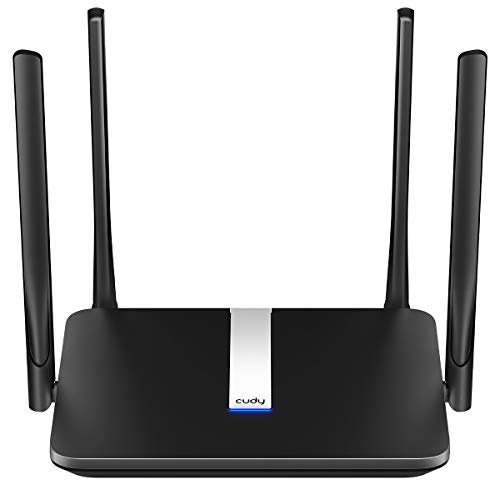
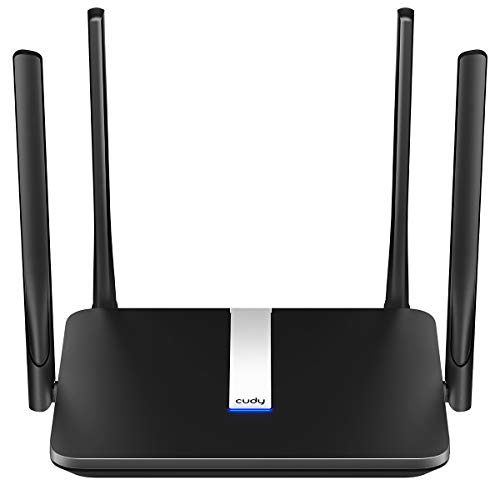
Cudy LT500 4G Router
The Cudy LT500 is the home pick in this guide, and it is the most complete 4G router here for a household. The listing title states the brand Cudy, the model LT500, 4G AC1200 dual-band Wi-Fi, a SIM slot, 867 plus 300Mbps cellular Wi-Fi, four 100Mbps ports, a nano SIM slot, and multiple VPN server and client support, with app and cloud control. It is a 4-port Wi-Fi 5 router, which means it serves wired devices as well as wireless ones, and its dual-band Wi-Fi gives a household both a fast 5GHz band and a far-reaching 2.4GHz band.
VPN support is the feature that sets the LT500 apart from the simpler picks here. A router that runs a VPN server lets a traveller connect home securely, and a router that runs a VPN client protects every device in the house at once, without software on each one. App and cloud control are the other advantage: the router can be managed from a phone, and its settings can be checked from anywhere, which suits a household that is often away.
Key specs:
- Wi-Fi: AC1200 dual-band Wi-Fi 5 (867 + 300Mbps)
- SIM: nano SIM slot
- Ports: 4 x 100Mbps
- VPN: multiple VPN server and client
- Control: app and cloud control
Strengths:
- Dual-band Wi-Fi for a household
- VPN server and client built in
- Four wired ports for fixed devices
Trade-offs:
- 100Mbps ports, not gigabit
- Needs a mains socket, no battery
- Setup is deeper than the TP-Link picks
The Cudy LT500 fits the household that uses 4G as its main connection and wants proper networking. It is the pick for a rural home, a small office, or a flat where the fixed line is slow or absent.
Best for: a household that needs a full 4G router with VPN. Not suited for: travel, where a battery router fits in a pocket.
Check price on Amazon: Cudy LT500 4G Router

Cudy LT700 Outdoor 4G Router
The Cudy LT700 Outdoor is the outdoor pick in this guide, and it is built for places where a normal router cannot live. The listing title states the brand Cudy, the model LT700 Outdoor, 4G AC1200 dual-band Wi-Fi, a SIM slot, IP65 weatherproofing, 300Mbps downlink with carrier aggregation, one gigabit Ethernet port, power-over-Ethernet, and an operating range of minus 40 to 75 degrees Celsius with 6kV surge protection. It also states mesh, VPN, app, and cloud support.
IP65 weatherproofing and power-over-Ethernet are the features that define this router. It can be mounted on a wall or a pole, it takes power and data through one Ethernet cable, and it keeps working in rain, dust, and heat that would kill an indoor router. The 300Mbps downlink with carrier aggregation is the fastest stated mobile speed among the Cudy picks, which suits a farm, a worksite, or a rural property where the router sits outside for the best signal.
Key specs:
- Wi-Fi: AC1200 dual-band Wi-Fi 5 (867 + 300Mbps)
- SIM: SIM slot
- Weatherproof: IP65, minus 40 to 75C
- Port: 1 x gigabit Ethernet, PoE
- Mobile: 300Mbps downlink, carrier aggregation
Strengths:
- IP65 weatherproof for outdoor mounting
- PoE, one cable for power and data
- Fastest stated Cudy mobile speed here
Trade-offs:
- Only one Ethernet port
- Outdoor mounting takes planning
- Needs a PoE supply or injector
The Cudy LT700 Outdoor fits the property that needs Wi-Fi where no indoor router can go. It is the pick for a farm, a workshop, a holiday site, or a rural home where the best signal is outside.
Best for: outdoor 4G where the signal is best outside. Not suited for: a flat or a small home, where the LT500 is simpler.
Check price on Amazon: Cudy LT700 Outdoor 4G Router

GL.iNet GL-E750V2 MUDI Travel Router
The GL.iNet GL-E750V2 MUDI is the travel pick in this guide, and it is the only router here with a battery. The listing title states the brand GL.iNet, the model GL-E750V2 MUDI, 4G LTE, a portable travel design, a SIM card slot, OpenWrt, OpenVPN and WireGuard, a 7000mAh battery with 8 hours of use, 300 plus 433Mbps Wi-Fi, and a pocket size of 285 grams. It is a portable router that creates a private Wi-Fi network from a SIM, and its battery means it works on a train, in a hotel, or in a cafe with no socket in sight.
OpenWrt is the feature that sets the MUDI apart from the simpler travel routers. It is an open router system that supports VPN clients, ad blocking, and custom settings, so a technical traveller can shape the router to the trip. The 8-hour battery is the other advantage: it lasts a working day, and it can also charge a phone in a pinch. At 285 grams it is lighter than most phones, so it disappears into a bag.
Key specs:
- Battery: 7000mAh, 8 hours
- Wi-Fi: 300 + 433Mbps
- SIM: SIM card slot
- System: OpenWrt, OpenVPN, WireGuard
- Weight: 285 grams
Strengths:
- Battery powered for a full working day
- OpenWrt with VPN support
- Pocket size at 285 grams
Trade-offs:
- Slower Wi-Fi than the home picks
- Battery needs charging every day
- OpenWrt suits technical users best
The GL.iNet MUDI fits the traveller who works from anywhere. It is the pick for hotels, trains, conferences, and holidays, where one private Wi-Fi network for every device beats a public hotspot.
Best for: travel Wi-Fi from a SIM, in a pocket. Not suited for: a household, where a mains router serves more devices.
Check price on Amazon: GL.iNet GL-E750V2 MUDI Travel Router

GL.iNet GL-X2000 Spitz Plus 4G Router
The GL.iNet GL-X2000 Spitz Plus is the most capable router in this guide. The listing title states the brand GL.iNet, the model GL-X2000 Spitz Plus, 4G LTE CAT 12, Wi-Fi 6, a dual-SIM design, detachable antennas, T-Mobile and AT&T IoT certification, OpenWrt VPN support, and use in a home, an RV, on road trips, or in offices. It is the only Wi-Fi 6 router in this guide and the only one with two SIM slots, which means it can hold a SIM from two carriers and switch between them.
CAT 12 is the fastest mobile category in this guide, and Wi-Fi 6 is the newest Wi-Fi standard here, so the Spitz Plus is the pick for buyers who want the fastest 4G router on the list. Dual-SIM is the practical advantage: one SIM can be the main connection and the other the backup, or one can be for home and one for travel, and the router switches without a SIM swap. Detachable antennas are the other advantage, because a better antenna on the roof of an RV can turn a weak signal into a usable one.
Key specs:
- Mobile: 4G LTE CAT 12
- Wi-Fi: Wi-Fi 6
- SIM: dual-SIM
- Antennas: detachable
- System: OpenWrt VPN, T-Mobile and AT&T IoT certified
Strengths:
- Fastest mobile category in this guide
- Wi-Fi 6 for many devices
- Dual-SIM with detachable antennas
Trade-offs:
- North America only, per the listing
- Costs more than the simple picks
- OpenWrt suits technical users best
The GL.iNet Spitz Plus fits the RV owner, the remote worker, or the small office that needs the fastest 4G router here. It is the pick for a home on wheels, a rural office, or a household that wants two carriers in one box.
Best for: the fastest 4G router in this guide, for RV and home. Not suited for: use outside North America, where the listing says it is not for sale.
Check price on Amazon: GL.iNet GL-X2000 Spitz Plus Router

TP-Link TL-MR150 4G Router
The TP-Link TL-MR150 is the simple pick in this guide. The listing title states the brand TP-Link, the model TL-MR150, N300Mbps Wi-Fi, a 4G and 3G SIM slot, connection for up to 32 devices, no configuration required, and support for a guest network and parental control. It is a wireless 4G LTE router, which means it takes a SIM, connects to the mobile network, and shares that connection over Wi-Fi, with no setup beyond inserting the SIM.
No configuration required is the feature that matters most for this router. A buyer who does not want to learn networking can plug it in, insert a SIM, and have Wi-Fi, and the guest network and parental control are the extras that make it a household router rather than a bare modem. Thirty-two devices is enough for a family of phones, tablets, laptops, and a television, and N300 Wi-Fi is enough for browsing, streaming, and video calls at ordinary quality.
Key specs:
- Wi-Fi: N300Mbps
- SIM: 4G/3G SIM slot
- Devices: up to 32
- Setup: no configuration required
- Features: guest network, parental control
Strengths:
- No configuration, works out of the box
- Guest network and parental control
- Serves up to 32 devices
Trade-offs:
- N300 single-band Wi-Fi is the slowest here
- No VPN support stated
- No 5GHz band for fast traffic
The TP-Link TL-MR150 fits the buyer who wants 4G Wi-Fi with no learning curve. It is the pick for a first 4G router, a holiday home, a relative, or a small flat where simple beats fast.
Best for: simple 4G Wi-Fi with no setup. Not suited for: a household with heavy streaming, where dual-band helps.
Check price on Amazon: TP-Link TL-MR150 4G Router

TP-Link TL-MR100 4G Router
The TP-Link TL-MR100 is the budget pick in this guide. The listing title states the brand TP-Link, the model TL-MR100, 300Mbps wireless N speed, a 4G LTE Wi-Fi router with a SIM slot, and the TP-Link name. It is the simplest router in this guide: a SIM goes in, Wi-Fi comes out, and the household is online. There are no advanced features stated in the title, and that is the point: this router does one job, and it does it without fuss.
A 300Mbps wireless N router is enough for the everyday internet: browsing, email, streaming at ordinary quality, and video calls. It will not win a speed test against the dual-band or Wi-Fi 6 picks here, but it will serve a small household reliably, and its price class makes it the cheapest way into 4G home internet in this guide. For a holiday home, a spare router, or a household that only needs the basics, that is enough.
Key specs:
- Wi-Fi: 300Mbps wireless N
- SIM: SIM slot
- Type: 4G LTE Wi-Fi router
- Brand: TP-Link
Strengths:
- Simplest router in this guide
- SIM in, Wi-Fi out
- Budget way into 4G home internet
Trade-offs:
- Single-band N Wi-Fi only
- No advanced features stated
- Slowest Wi-Fi in this guide
The TP-Link TL-MR100 fits the buyer who wants the cheapest working 4G router. It is the pick for a holiday home, a spare, or a small household where the internet is for browsing and streaming, not for heavy work.
Best for: budget 4G Wi-Fi for a small household. Not suited for: a busy household, where the LT500 or Spitz Plus serve better.
Check price on Amazon: TP-Link TL-MR100 4G Router
Buying guide for 4G routers with SIM card slot
Start with the carrier and the signal
A 4G router is only as good as the mobile signal where it lives, so the carrier matters more than the router. Check which carrier has the strongest signal at the location, and buy a SIM from that carrier, because a fast router on a weak network is slower than a simple router on a strong one. The GL.iNet Spitz Plus in this guide is certified for T-Mobile and AT&T, and the listing says it is for North America only, so a buyer should check carrier support before ordering any router.
Match the Wi-Fi to the household
A household with a few phones and a laptop will be happy with the N300 Wi-Fi of the TP-Link picks, while a household with streaming, video calls, and smart devices should look at the dual-band AC1200 of the Cudy picks or the Wi-Fi 6 of the Spitz Plus. Count the devices, count the streams, and buy the Wi-Fi that covers them all at once, because a router that is fine for two devices can struggle with ten.
Check the data plan before streaming
A 4G connection usually has a data allowance, and video streaming eats it fast: a film can use several gigabytes, and a household that streams every evening can use hundreds of gigabytes a month. Check the plan allowance before buying, and consider an unlimited or large data plan for a router that is the main home connection. A router with a data monitor or a usage alert helps, and the Cudy app control is useful for watching usage.
Decide where the router will live
A travel router belongs in a pocket, a home router belongs on a shelf, and an outdoor router belongs on a wall or a pole. The place decides the pick: the MUDI for travel, the LT500 or the TP-Link models for a shelf, the LT700 Outdoor for outside, and the Spitz Plus for an RV or a home that needs the fastest connection. A router in the wrong place is a router that underperforms, whatever its specification.
Plan the antennas
The antennas decide how far the Wi-Fi reaches and how well the router hears the mobile network. A router with detachable antennas, such as the Spitz Plus, can take a better antenna, and a router mounted high and near a window hears the network better than one buried in a cupboard. Put the router where the signal is strongest, keep it away from thick walls and metal, and test a few positions before fixing it in place.
Using and caring for a 4G router with SIM card slot
Put the router where the signal is
A 4G router works best near a window, high up, and away from thick walls, metal, and other electronics. Test a few positions and watch the signal bars or the app reading, because moving a router by a metre can change the speed by half. A router hidden in a cupboard is a router starved of signal, and no setting fixes that.
Keep the SIM safe and the firmware current
A SIM in a router is a SIM that can be stolen with the router, so keep the router in a safe place and set a SIM PIN if the carrier supports it. Update the router firmware when the maker releases an update, because updates fix bugs and security issues, and a router that never updates is a router that slowly becomes unsafe.
Restart it once in a while
A router that runs for months without a restart can grow slow, because its memory fills and its mobile connection goes stale. A restart once a month, or a scheduled restart if the router supports it, keeps the connection fresh and the speed up. It takes a minute, and it is the simplest maintenance a router has.
Watch the data usage
A 4G plan with a limit can run out at the worst time, so check usage regularly in the first month. The Cudy app and the GL.iNet interface both show usage, and a household that streams video should know its monthly total before the bill arrives. Set an alert with the carrier if one is available, and keep a spare SIM or a second plan for the month the allowance runs out.
Common mistakes when buying a 4G router with SIM card slot
Buying before checking the signal
The most common mistake is buying a 4G router and discovering that the carrier has no signal at the location. Check the signal with a phone on the same carrier first, and test in the room where the router will live. A router cannot create a signal where there is none, and a different carrier is often the fix.
Confusing Wi-Fi speed with internet speed
A router can advertise fast Wi-Fi and still deliver slow internet, because the Wi-Fi speed is the speed between devices and the router, while the internet speed is decided by the mobile network. Read both numbers in the listing, and judge the router by the mobile number for internet use. A buyer who expects gigabit internet from a 4G router will always be disappointed.
Buying a 5G router by mistake
A 5G router looks like a 4G router and costs more, and a buyer who does not read the listing can pay for 5G where there is no 5G signal. Check the listing title for 4G LTE, and check that the price matches the technology. The routers in this guide are all 4G, and a 5G router was deliberately left out.
Forgetting the data allowance
A household that streams video all day can use a monthly data allowance in a week, and the bill or the throttling that follows is the surprise. Check the plan, count the streaming hours, and buy a plan that fits the household. A 4G router is a wonderful main connection only when the data plan is big enough.
Final recommendation
For most households, the Cudy LT500 is the best 4G router with SIM card slot to buy first, because it combines dual-band Wi-Fi, four wired ports, and VPN support in a proper home router, and it serves a household all day. The GL.iNet Spitz Plus is the pick for buyers who want the fastest 4G router here, with CAT 12, Wi-Fi 6, and dual SIM, and the GL.iNet MUDI is the pick for travellers, because its battery and pocket size make it the only router here that works anywhere with no socket.
Buyers who want the simplest router should choose the TP-Link TL-MR150, because it needs no configuration and adds a guest network and parental control, and buyers who need Wi-Fi outdoors should choose the Cudy LT700 Outdoor, because its weatherproofing and power-over-Ethernet are built for that job. Whatever the choice, the rule is the same: check the carrier signal first, match the Wi-Fi to the household, and buy a data plan big enough for the way the household actually uses the internet.
Related reading on Reviewstook: see our guides to best travel routers, best Wi-Fi 6 routers, best gaming routers for more on this topic.
Frequently asked questions about 4G routers with SIM card slot
How does a 4G router with a SIM card slot work?
It takes a mobile data SIM, connects to the 4G network like a phone, and shares that connection over Wi-Fi with every device nearby. The SIM slot is built into the router, so no separate modem or phone hotspot is needed. The router stays on, serves many devices at once, and works wherever there is a mobile signal.
Do I need a special SIM for a 4G router?
A normal data SIM from a mobile carrier works in most cases, but the plan matters: a router uses far more data than a phone, because it serves a whole household. Check that the plan allows use in a router, and consider a large or unlimited data plan if the router is the main home connection. Some carriers sell data-only SIMs made for routers.
Can a 4G router replace fixed broadband?
Yes, in many places, especially rural areas where fixed broadband is slow. A 4G router can be the main home connection, and it has the advantage of working anywhere with a signal. The limits are speed, which depends on the signal, and data, which depends on the plan. A household that streams a lot should check the data allowance first.
What is the difference between a 4G router and a mobile hotspot?
A mobile hotspot is a small battery device for a few phones on the move, while a 4G router is a proper router: it stays plugged in, serves more devices, has better antennas, and often has wired ports, VPN support, and a guest network. The GL.iNet MUDI in this guide is the closest to a hotspot, because it has a battery, but it is still a router with OpenWrt and VPN support.
Can I use a 4G router in an RV or a campervan?
Yes, and it is one of the best uses for a 4G router. The GL.iNet Spitz Plus in this guide is made for RVs and road trips, with dual SIM and detachable antennas, and the GL.iNet MUDI travels in a pocket. A 12V power supply or a portable power station runs the router on the road, and a roof antenna improves the signal.
Does a 4G router need a configuration?
Most do not need much: insert the SIM, plug the router in, and it connects. The TP-Link TL-MR150 in this guide states that it needs no configuration at all. Technical routers such as the GL.iNet models offer more settings, including VPN and OpenWrt options, but the basic connection still works out of the box.