The best non-subscription security cameras are the cameras that record to local storage and never ask for a monthly plan. A security camera should watch the house, not charge rent, and the cameras in this guide store video on a memory card, a built-in drive, or a home hub, so the footage stays in the house and the bill stays at zero. Every camera below states its no-subscription design in the listing title, either as no subscription, no monthly fee, or subscription-free local storage.
A subscription camera looks cheap until the monthly fee is added up over a year, and the fee never stops. A camera that needs a plan will stop recording to the cloud the month the plan lapses, and the buyer who cancels the plan loses the history. A non-subscription camera avoids that trap entirely: the video is stored at home, the camera keeps recording whether or not a plan exists, and the only cost after the purchase is the camera itself.
The six cameras in this guide cover the main buyers. The eufy 4K Indoor Camera E30 is the indoor pick for a room or a nursery, the eufy 4K Indoor Cam S350 is the dual-camera pick for a wide room, the eufy SoloCam S340 is the solar pick for a garden or a driveway, the Reolink Argus PT Ultra is the 4K solar pick for a large property, the Tapo SolarCam C402 is the budget solar pick for a door or a garden, and the eufy eufyCam C37 is the pan-and-tilt solar pick for a wide outdoor view. All six are sold as new listings.
This guide covers six best non-subscription security cameras: four eufy cameras, one Reolink camera, and one Tapo camera. Every pick states its brand, its model, and its no-subscription storage in the listing title, so a buyer can tell before buying that no monthly plan is needed. The comparison table below gives the short version, and the sections after it give the detail.
A non-subscription camera is also a privacy choice, because the footage stays at home instead of sitting on a company server. A camera that records to a memory card or a home hub gives the buyer control over the video, and the buyer can check the footage, delete it, or keep it without asking a service. The guide below is written for the buyer who wants a camera that watches the house and nothing else.
In this guide
Quick picks: best non subscription security cameras
| # | Product | Where to buy |
|---|---|---|
| 1 | eufy Security 4K Indoor Camera E30 | Check on Amazon |
| 2 | eufy Security 4K Indoor Cam S350 | Check on Amazon |
| 3 | eufy Security SoloCam S340 | Check on Amazon |
| 4 | REOLINK Argus PT Ultra 4K Solar Security Camera | Check on Amazon |
| 5 | Tapo SolarCam C402 KIT | Check on Amazon |
| 6 | eufy Security eufyCam C37 | Check on Amazon |
How the picks were chosen for the best non-subscription security cameras
Every camera below started as a listing returned by the reviewstook.com product lookup, and every listing was checked the same way. First, the title had to name the exact brand and the exact model, because a eufy E30 is not a eufy S350, and a Reolink Argus PT Ultra is not a Reolink RLC-520A. Second, the title had to confirm the no-subscription design, either by stating no subscription, no monthly fee, or subscription-free local storage, because a camera that needs a plan is the wrong pick for this guide.
The cameras were also checked for the details that decide real use. The resolution decides how clearly a face or a number plate can be seen, and the picks here run from 2K to 4K, so every camera shows detail. The power decides where the camera can go, and the picks here cover plug-in indoor cameras and solar outdoor cameras, so a buyer can cover a room and a garden. The storage decides how long the footage is kept, and the picks here store video on a memory card, a built-in drive, or a home hub.
One more check shaped the list: the camera must be a genuine security camera that records without a plan, not a doorbell, not a camera that needs a subscription for basic recording, and not an accessory. Arlo cameras were left out, because Arlo is built around a subscription for cloud recording, and Blink cameras were left out, because Blink needs a sync module and a plan for full recording. The six cameras below are all non-subscription cameras, sold as new listings, with the brand, the model, and the storage stated in the title.
What a non-subscription security camera is, and how it stores video
A non-subscription security camera records video to storage the buyer owns, instead of to a company cloud that charges a monthly fee. The storage can be a microSD card inside the camera, a built-in drive, or a home hub that collects video from several cameras. The footage stays in the house, the camera keeps recording whether or not a plan exists, and the buyer can watch live video and review recordings in the app without paying anything extra.
A memory-card camera is the simplest shape. A card of 128GB or 256GB holds days or weeks of motion clips, and the buyer can take the card out and copy the footage. The eufy E30 and S350 in this guide record to local storage, and the Tapo SolarCam C402 states subscription-free local storage in the title. A card camera suits a single room or a single door, and it is the cheapest way to start.
A solar camera is the outdoor shape. A solar panel keeps the battery charged, so the camera can sit on a garden wall or a driveway without a cable, and it records to a built-in drive or a card. The eufy SoloCam S340, the Reolink Argus PT Ultra, and the eufy eufyCam C37 in this guide are all solar cameras, and they suit a garden, a driveway, or a large property where running a cable is hard.
A home-hub camera is the whole-house shape. A hub such as the eufy HomeBase collects video from several cameras and stores it in one place, and the buyer can watch every camera from one app. The Reolink Argus PT Ultra in this guide states home hub compatibility in the title, and a hub system suits a buyer who wants several cameras and one place to keep the footage.
What makes a good non-subscription security camera
Local storage is the first test, and it decides whether the camera is truly free of a plan. A good non-subscription camera states its storage in the title, either as no subscription, no monthly fee, or subscription-free local storage, and the buyer should check that wording before buying. A camera that only mentions a free trial, or that hides the plan in the small print, is not a non-subscription camera, and a buyer who checks the title will not be caught out.
Resolution is the second test. A 2K camera shows a face clearly at a doorway, and a 4K camera shows a number plate across a driveway, so the resolution should match the distance. The picks here run from 2K to 4K, and a buyer should choose 4K for a large garden or a driveway, and 2K for a room or a door. A camera with a low resolution will record the event without showing the detail that matters.
Power is the third test. An indoor camera can plug into a socket and record all day, while an outdoor camera needs a battery and a solar panel, or a cable to the house. The solar cameras in this guide keep their batteries charged from daylight, and a buyer should check that the panel faces the sun and is not shaded by a roof. A camera that runs out of power at night is a camera that misses the event.
Night vision and detection are the fourth test. A good camera sees in the dark in colour or in clear infrared, and it tells a person apart from a passing cat, so the phone does not buzz all night. The picks here carry AI detection for people, pets, and vehicles, and a buyer should check the detection in the title, because a camera that alerts on every leaf will be switched off within a week.
Quick picks at a glance
| Camera | Resolution and power | Storage | Best for |
|---|---|---|---|
| eufy 4K Indoor Camera E30 | 4K, plug-in, pan and tilt | No subscription, local | Indoor rooms |
| eufy 4K Indoor Cam S350 | 4K dual cameras, 8x zoom | No subscription, local | Wide rooms |
| eufy SoloCam S340 | 3K dual-lens, solar | No monthly fee, 8GB built-in | Gardens and driveways |
| Reolink Argus PT Ultra | 4K, solar, pan and tilt | No subscriptions, home hub | Large properties |
| Tapo SolarCam C402 | 1080p, solar, battery | Subscription-free local storage | Doors and gardens |
| eufy eufyCam C37 | 2K, solar, pan and tilt | No monthly fee | Wide outdoor views |
The best non-subscription security cameras
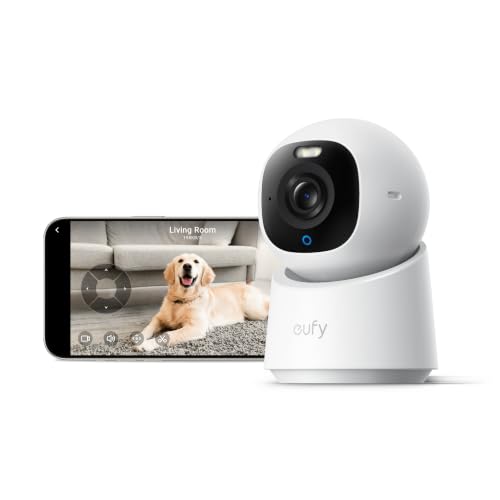
eufy Security 4K Indoor Camera E30
The eufy Security 4K Indoor Camera E30 is the indoor pick for a room or a nursery, and it is the most affordable camera in this guide. The title states the brand, the E30 model, the 4K resolution, the no-subscription design, the pan-and-tilt movement, AI tracking, AI detection, 24/7 recording, colour night vision, and two-way audio. A 4K indoor camera shows a room in sharp detail, and the pan-and-tilt head follows a child or a pet across the room.
An indoor camera is the right answer when the buyer wants to watch a room, a baby, or a pet without paying a monthly fee. The E30 plugs into a socket, records around the clock to local storage, and lets the buyer talk through the camera from the phone. It suits a nursery, a living room, a hallway, and a home office, and it is the camera to buy first when the house has no cameras at all.
Key specs:
- Resolution: 4K
- Design: pan and tilt
- Subscription: none
- Recording: 24/7
- Audio: two-way
Strengths:
- 4K resolution shows a room in detail
- No subscription, records to local storage
- Pan and tilt follows a child or a pet
Trade-offs:
- Indoor use only, needs a socket
- Single camera covers one room
- Needs Wi-Fi to watch from the phone
The eufy E30 fits the buyer who wants a first camera for a room or a nursery. It is the pick for a baby monitor, a pet camera, and a living room, and for anyone who wants a sharp indoor camera with no monthly fee.
Best for: Indoor rooms, nurseries, and pet watching. Not suited for: Outdoors, a garden, or a driveway that needs a weatherproof camera.
Check price on Amazon: eufy Security 4K Indoor Camera E30


eufy Security 4K Indoor Cam S350
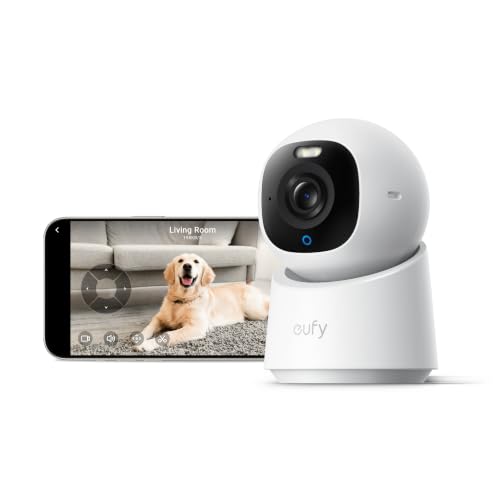
The eufy Security 4K Indoor Cam S350 is the dual-camera pick for a wide room, and it is the camera for a buyer who wants to see the whole room at once. The title states the brand, the S350 model, the 4K resolution, the no-subscription design, the dual cameras, the 8x zoom, the 360-degree coverage, AI auto-tracking, and human, pet, and cry detection. Two cameras in one body give a wide view and a close zoom at the same time, so the buyer sees the room and the detail.
A dual-camera indoor camera is the right answer when one camera must cover a large space. The S350 watches a whole living room, zooms in on a face or a pet, and tracks movement on its own, so the buyer does not have to steer it. It suits a large living room, an open-plan space, a nursery where the crib sits far from the camera, and a shop floor where the whole room matters.
Key specs:
- Resolution: 4K
- Cameras: dual
- Zoom: 8x
- Coverage: 360 degrees
- Subscription: none
Strengths:
- Dual cameras give a wide view and a zoom
- 8x zoom shows detail across a room
- No subscription, records to local storage
Trade-offs:
- Indoor use only, needs a socket
- Dual-camera body is larger than a single camera
- Needs Wi-Fi to watch from the phone
The eufy S350 fits the buyer who wants one camera to cover a wide room. It is the pick for a large living room, an open-plan space, and a nursery, and for anyone who wants a zoom and a wide view in one camera.
Best for: Wide rooms, large living rooms, and nurseries. Not suited for: Outdoors, or a small room where a single camera is enough.
Check price on Amazon: eufy Security 4K Indoor Cam S350


eufy Security SoloCam S340, 3K Dual-Lens Solar Security Camera
The eufy Security SoloCam S340 is the solar pick for a garden or a driveway, and it is the camera for a buyer who wants outdoor coverage without a cable. The title states the brand, the SoloCam S340 model, the 3K dual-lens design, the solar power, the 360-degree coverage, the pan and tilt, AI detection and tracking, colour night vision, no monthly fee, and 8GB of built-in storage. A solar panel keeps the battery charged, and the dual lenses give a wide view and a close zoom.
A solar camera is the right answer when the camera must sit where no socket reaches. The S340 mounts on a garden wall or above a driveway, charges from daylight, and records to its built-in storage, so the buyer never pays a plan and never runs a cable. It suits a garden, a driveway, a side gate, and a large property where the camera sits far from the house.
Key specs:
- Resolution: 3K
- Cameras: dual-lens
- Power: solar
- Storage: 8GB built-in
- Fee: no monthly fee
Strengths:
- Solar power needs no cable or socket
- Dual lenses give a wide view and a zoom
- No monthly fee, built-in storage
Trade-offs:
- Solar panel needs daylight to stay charged
- 8GB built-in storage is fixed
- Needs Wi-Fi to watch from the phone
The eufy SoloCam S340 fits the buyer who wants an outdoor camera without a cable or a plan. It is the pick for a garden, a driveway, and a side gate, and for anyone who wants a solar camera that simply works.
Best for: Gardens, driveways, and cable-free outdoor use. Not suited for: Indoors, or a shaded spot where the solar panel gets no sun.
Check price on Amazon: eufy Security SoloCam S340

REOLINK Argus PT Ultra, 4K Solar Security Camera
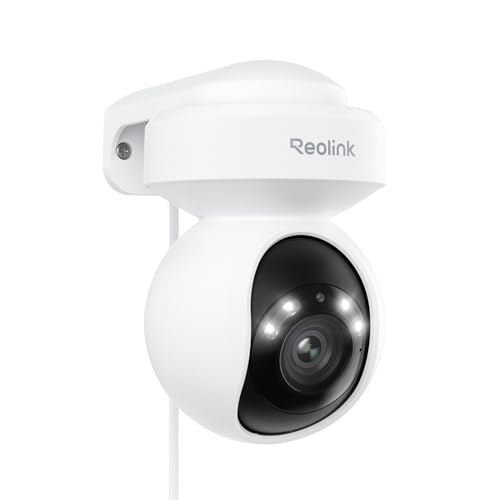
The REOLINK Argus PT Ultra is the 4K solar pick for a large property, and it is the sharpest outdoor camera in this guide. The title states the brand, the Argus PT Ultra model, the 4K resolution, the solar power, the 360-degree pan and tilt, auto-tracking, 8MP colour night vision, Wi-Fi 6, no subscriptions, and home hub compatibility. A 4K solar camera shows a number plate across a driveway, and the home hub option stores video from several cameras in one place.
A 4K solar camera is the right answer when the property is large and the detail matters. The Argus PT Ultra watches a driveway, a garden, or a farmyard, follows movement on its own, and records in colour at night, so the buyer sees what happened and who did it. It suits a large house, a farm, a workshop yard, and any property where the camera sits far from the door.
Key specs:
- Resolution: 4K
- Sensor: 8MP
- Power: solar
- Movement: 360-degree pan and tilt
- Subscription: none
Strengths:
- 4K resolution shows detail at distance
- Solar power needs no cable
- Home hub option stores video from several cameras
Trade-offs:
- Solar panel needs daylight to stay charged
- 4K video uses more storage than 2K
- Needs Wi-Fi 6 coverage outdoors
The Reolink Argus PT Ultra fits the buyer who wants the sharpest outdoor camera without a plan. It is the pick for a large property, a driveway, and a farmyard, and for anyone who wants 4K detail and a home hub.
Best for: Large properties, driveways, and 4K outdoor detail. Not suited for: Indoors, or a small garden where a 2K camera is enough.
Check price on Amazon: REOLINK Argus PT Ultra 4K Solar Security Camera

Tapo SolarCam C402 KIT, 1080p Outdoor Wireless Security Camera
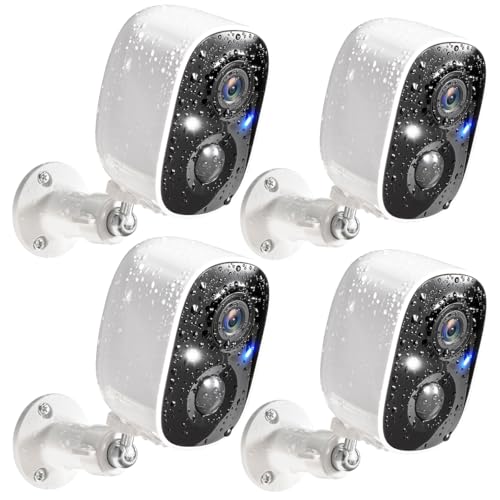
The Tapo SolarCam C402 is the budget solar pick for a door or a garden, and it is the cheapest outdoor camera in this guide. The title states the brand, the SolarCam C402 model, the 1080p resolution, the battery power with solar, person detection, subscription-free local storage or optional cloud, and support for Alexa and Google. A 1080p solar camera shows a doorway clearly, and the subscription-free local storage means the buyer never pays a plan for basic recording.
A budget solar camera is the right answer when the buyer wants outdoor coverage without spending much. The C402 mounts above a door or in a garden, charges from its solar panel, and records to local storage, so the footage stays at home. It suits a front door, a back garden, a shed, and a first outdoor camera for a buyer who wants to try a solar camera before buying more.
Key specs:
- Resolution: 1080p
- Power: battery with solar
- Storage: subscription-free local
- Detection: person
- Voice: Alexa and Google
Strengths:
- Subscription-free local storage
- Solar power needs no cable
- Budget cost for a first outdoor camera
Trade-offs:
- 1080p is less sharp than 2K or 4K
- Solar panel needs daylight to stay charged
- Single camera covers one spot
The Tapo SolarCam C402 fits the buyer who wants a first outdoor camera without a plan or a big spend. It is the pick for a front door, a back garden, and a shed, and for anyone who wants to try solar security on a budget.
Best for: Doors, gardens, and a first outdoor camera. Not suited for: A large property, or a driveway where 4K detail matters.
Check price on Amazon: Tapo SolarCam C402 KIT

eufy Security eufyCam C37, Solar Camera, 2K Resolution
The eufy Security eufyCam C37 is the pan-and-tilt solar pick for a wide outdoor view, and it is the camera for a buyer who wants one camera to watch a whole garden. The title states the brand, the eufyCam C37 model, the solar power, the 2K resolution, the 360-degree pan and tilt, AI tracking, human, pet, and vehicle detection, a flexible solar panel, colour night vision, and no monthly fee. A pan-and-tilt head turns the camera to follow movement, so one camera covers what two fixed cameras would need.
A pan-and-tilt solar camera is the right answer when the area is wide and the budget covers one camera. The C37 mounts on a wall, charges from its flexible solar panel, and turns to follow a person or a vehicle across the garden, so the buyer sees the whole event. It suits a wide garden, a driveway, a courtyard, and a property where one camera must do the work of two.
Key specs:
- Resolution: 2K
- Power: solar
- Movement: 360-degree pan and tilt
- Detection: human, pet, vehicle
- Fee: no monthly fee
Strengths:
- Pan and tilt covers a wide garden
- Solar power needs no cable
- No monthly fee, AI tracking included
Trade-offs:
- 2K is less sharp than 4K at distance
- Solar panel needs daylight to stay charged
- Needs Wi-Fi to watch from the phone
The eufyCam C37 fits the buyer who wants one solar camera to watch a wide outdoor area. It is the pick for a garden, a driveway, and a courtyard, and for anyone who wants a pan-and-tilt camera with no monthly fee.
Best for: Wide gardens, driveways, and courtyards. Not suited for: Indoors, or a driveway where 4K number-plate detail matters.
Check price on Amazon: eufy Security eufyCam C37
How to buy the best non-subscription security cameras
Check the no-subscription wording in the title
A camera is only a non-subscription camera if the listing says so, and the buyer should check the title before buying. The cameras in this guide state no subscription, no monthly fee, or subscription-free local storage in the title, and that wording is the promise. A camera that only mentions a free trial, or that hides the plan in the small print, is not a non-subscription camera, and a buyer who checks the title will not be caught out by a monthly fee.
Match the resolution to the distance
A 2K camera shows a face clearly at a doorway, and a 4K camera shows a number plate across a driveway, so the resolution should match the distance the camera must cover. A buyer who watches a door can buy 1080p or 2K, while a buyer who watches a large garden or a driveway should buy 4K, such as the Reolink Argus PT Ultra in this guide. A camera with too little resolution will record the event without showing the detail that matters.
Plan the power before the mount
An indoor camera plugs into a socket, while an outdoor camera needs a battery and a solar panel, or a cable to the house. A solar camera must face the sun, and a panel shaded by a roof or a tree will not keep the battery charged. A buyer should walk the property, check where the sun falls, and choose the mount before buying, because a camera in the wrong place is a camera that misses the event.
Size the storage for the footage
Local storage holds days or weeks of clips, and the size decides how far back the buyer can look. A 4K camera uses more storage than a 2K camera, and a camera that records around the clock uses more than one that records motion only. A buyer should check the storage in the title, buy a memory card of the right size where the camera takes one, and check the oldest clip every month to make sure the footage is still there.
Test the detection before trusting it
A camera that alerts on every leaf, shadow, or passing cat will be switched off within a week, so the detection matters as much as the picture. The cameras in this guide carry AI detection for people, pets, and vehicles, and a buyer should set the detection zones in the app, turn off alerts for a busy road, and test the camera for a week before deciding it works. A camera that only alerts on people is a camera the buyer will keep.
How to look after a non-subscription security camera
Keep the lens and the solar panel clean
A dirty lens blurs the picture, and a dirty solar panel charges slowly, so both should be wiped with a soft cloth every month. An outdoor camera collects dust, pollen, and spider webs, and a quick wipe keeps the picture sharp and the battery charged. A buyer should check the camera after a storm, because wind can move the mount and rain can leave spots on the lens.
Check the storage every month
Local storage can fill up or fail, and a buyer should check the oldest clip every month to make sure the camera is still recording. A memory card that is full will overwrite the oldest footage, which is normal, but a card that has failed will record nothing at all. Replace a memory card every year or two, and keep a spare card in the drawer so the camera is never without storage.
Keep the camera firmware updated
The camera firmware fixes security holes and improves detection, and a buyer should install updates when the app offers them. A camera that is never updated can be reached by an attacker, and a camera that is updated stays safe. Set the app to remind the buyer about updates, and check the camera after a big update to make sure it still records.
Protect the footage and the account
The footage is private, and the camera account should be protected with a strong password and two-factor sign-in. A buyer should never share the camera account with anyone, and should never point a camera at a neighbour’s garden or a public road without checking the local rules. The camera watches the buyer’s property, and the footage belongs to the buyer.
Common mistakes when buying a non-subscription security camera
Assuming every camera is subscription-free
The most common mistake is buying a camera and finding out later that basic recording needs a plan. Arlo and Blink cameras are built around subscriptions, and a buyer who wants no monthly fee should avoid them. The fix is to check the title for no subscription, no monthly fee, or subscription-free local storage, as the cameras in this guide all state, before buying.
Mounting a solar camera in the shade
A solar camera in the shade will run out of power at night, and the buyer will find the camera dead when it matters most. A solar panel needs direct daylight, and a panel under a roof, a tree, or a north-facing wall will not charge. Walk the property at noon, check where the sun falls, and mount the panel where it sees the sky.
Pointing the camera at a busy road
A camera that watches a busy road will alert on every passing car, and the buyer will switch the alerts off within a week. Set the detection zone to cover only the property, turn off vehicle alerts where the road is busy, and test the camera for a week before deciding it works. A camera that only alerts on the property is a camera the buyer will keep.
Forgetting the storage card
Some cameras need a memory card bought separately, and a buyer who forgets the card will find the camera records nothing. Check the title and the listing for what storage is included, buy a card of the right size where one is needed, and fit it before mounting the camera. A camera without storage is a camera that watches and remembers nothing.
Our recommendation for the best non-subscription security cameras
For most homes, the eufy 4K Indoor Camera E30 is the first buy, because it covers a room in 4K with no subscription at a low cost, and it is the camera to buy when the house has no cameras at all. Add the eufy SoloCam S340 for the garden or the driveway, because its solar power and dual lenses cover the outdoors without a cable or a plan.
For a large property, the Reolink Argus PT Ultra is the right choice, because its 4K resolution and home hub option give the sharpest picture and the best storage. For a wide garden, the eufyCam C37 is the right choice, because its pan-and-tilt head covers the whole area. For a budget first outdoor camera, the Tapo SolarCam C402 is the right choice, because its subscription-free local storage costs nothing after the purchase. For a wide room, the eufy S350 is the right choice, because its dual cameras and 8x zoom see the whole room and the detail.
Whichever camera is bought first, the rule stays the same: check the no-subscription wording in the title, match the resolution to the distance, and mount the solar panel where it sees the sun. A camera bought on those rules will watch the house and charge nothing for it.
Related reading on Reviewstook: see our guides to best 4K PoE security cameras, best affordable security cameras for home, best 360-degree security cameras for more on this topic.
Frequently asked questions about non-subscription security cameras
Do non-subscription cameras record without Wi-Fi?
Most non-subscription cameras need Wi-Fi to send live video to the phone, but they record to local storage on the camera or the hub, so the footage is kept even if the internet drops. A camera that records to a memory card will keep recording during an outage, and the buyer can watch the footage when the connection returns. Check the listing for how the camera stores video.
How long does local storage keep footage?
It depends on the storage size, the resolution, and whether the camera records all the time or only on motion. A 128GB card holds days of motion clips at 2K, while a 4K camera that records around the clock fills storage faster. The cameras in this guide store video locally, and a buyer should check the oldest clip every month to see how far back the footage goes.
Can I watch a non-subscription camera on my phone?
Yes, the cameras in this guide all work with a phone app for live viewing and playback, and the app is free. The buyer watches live video, reviews recordings, and changes settings in the app without paying a plan. Some features, such as cloud backup, may cost extra, but basic viewing and local recording do not.
Are solar security cameras reliable in winter?
A solar camera charges more slowly in winter, because the days are short and the sun is low, so the buyer should mount the panel where it sees the most sun and keep it clean. The solar cameras in this guide carry batteries that last through cloudy days, and a camera that is fully charged before winter will keep working. Check the battery level in the app during the darkest weeks.
What is the difference between 2K and 4K security cameras?
A 4K camera records about four times the detail of a 1080p camera and twice the detail of a 2K camera, so it shows a face or a number plate at a greater distance. A 2K camera is enough for a doorway or a room, while a 4K camera suits a driveway or a large garden. A 4K camera also uses more storage, so the buyer should size the storage to match.