The best laptops or tablets are the ones that end the argument: a 2-in-1 that works as a laptop when you need a keyboard and as a tablet when you need a touchscreen. A laptop is better for typing, spreadsheets, and long documents. A tablet is better for reading, drawing, and watching video. A convertible or detachable 2-in-1 does both, and it costs less than buying a laptop and a tablet separately.
This guide compares six laptops or tablets, all verified against the site’s own product lookup with brand and model checked against each listing. Two are 16-inch Windows convertibles, the Lenovo Yoga 7i and the HP OmniBook X Flip. One is the Microsoft Surface Pro, a tablet-first detachable with an OLED screen. One is the Acer Chromebook Spin 314, the budget convertible. One is the Lenovo ThinkPad L13 Yoga, the business 2-in-1 with 32GB of memory. One is the Lenovo Chromebook Duet Gen 9, the ultra-portable 11-inch detachable.
The right choice depends on which side you lean toward. If you type all day, buy a convertible with a great keyboard. If you read and draw all day, buy a detachable that is a tablet first. If you live in a browser, a Chromebook is enough. The guide below explains the difference between convertible and detachable designs, what to look for in each, and how to choose the machine that fits the way you actually work.
One more point before the details: do not buy a 2-in-1 for the novelty of folding it. Buy it because the tablet mode will be used every day, for reading, for notes, for video, or for drawing. If the machine will live on a desk in laptop mode for its whole life, a normal laptop with a bigger screen and a lower price is the better buy. The 2-in-1 earns its premium only when both modes are used.
In this guide
Quick picks: best laptops or tablets
| # | Product | Where to buy |
|---|---|---|
| 1 | Lenovo Yoga 7i 16-Inch | Check on Amazon |
| 2 | HP OmniBook X Flip | Check on Amazon |
| 3 | Microsoft Surface Pro 2024 | Check on Amazon |
| 4 | Acer Chromebook Spin 314 | Check on Amazon |
| 5 | Lenovo ThinkPad L13 Yoga G5 | Check on Amazon |
| 6 | Lenovo Chromebook Duet Gen 9 | Check on Amazon |
How the picks were chosen
We started with the product lookup and kept only genuine laptops or tablets: convertible 2-in-1 laptops that fold back 360 degrees, and detachable tablets with keyboards. Pure laptops without a touchscreen and pure tablets without a keyboard were left out, because the keyword asks for laptops or tablets, and a 2-in-1 is the device that answers both.
Each candidate was checked by fetching its full listing title, which is how renewed units are caught: the short search title can hide the word Renewed, but the full title shows it. A renewed HP 2-in-1 Chromebook, two renewed Surface Go models, and a renewed Lenovo 500w Yoga were all rejected on that check. Generic no-brand 2-in-1 listings were also left out, because a product with no brand and no model cannot be verified. The six picks were then sorted by form and by price: two premium Windows convertibles, one tablet-first detachable, one business 2-in-1, and two Chromebooks at different sizes.
What a laptop or tablet really means
A laptop is a computer with a keyboard, a trackpad, and a screen that opens like a book. It is best for typing, for spreadsheets, and for work that needs a cursor. A tablet is a computer that is mostly screen, with a touchscreen and no keyboard. It is best for reading, drawing, watching video, and working with a finger or a pen.
A 2-in-1 is a computer that can be both. A convertible 2-in-1 has a keyboard that folds back 360 degrees, so the laptop becomes a tablet without detaching anything. A detachable 2-in-1 has a keyboard that snaps off, so the tablet is light and thin on its own. Convertibles are better for typing, because the keyboard is always there. Detachables are better as tablets, because the keyboard is not in the way.
There is a third form that is often confused with a 2-in-1: a laptop with a touchscreen that does not fold or detach. It is a good laptop, and the touchscreen is useful for tapping buttons and scrolling, but it is not a tablet, because the keyboard is always in the way. If the tablet mode matters, buy a convertible or a detachable, not a clamshell touchscreen. The distinction sounds small, but it is the difference between a device that works as a tablet and one that only pretends to.
The operating system matters as much as the form. Windows runs the most software, including the full Microsoft Office, professional tools, and games. Chrome OS runs web applications and Android apps, and it is simpler and more secure, but it cannot run Windows software. Choose the operating system for the software you need, then choose the form for how you work.
What makes the best laptops or tablets worth buying
First, the hinge or the detach mechanism must be good. A convertible that flops open or a detachable keyboard that wobbles will annoy you every day. The picks in this guide come from makers with a track record in 2-in-1 design, and their hinges and keyboards are proven.
Second, the screen must be good in both modes. A touchscreen that is dim or low resolution is fine for typing but poor for reading and drawing. Look for a full HD or better display, a bright panel, and a touchscreen that responds to a finger and a pen. Third, check the battery: a 2-in-1 that dies after four hours is a laptop that stays plugged in, which defeats the point of a portable device. Fourth, check the weight: a 16-inch convertible is a laptop first, while an 11-inch detachable is a tablet first, and the difference matters every time you pick it up.
Fifth, check the pen. A 2-in-1 with pen support is a note-taking and drawing device; one without it is a touchscreen laptop with a folding hinge. Some pens are included in the box, some are sold separately, and some machines do not support a pen at all. If drawing or handwriting matters, confirm the pen is included or budget for it, and check whether the screen supports the pressure levels the work needs.
Quick picks at a glance
| Product | Form | Screen | CPU | Best for |
|---|---|---|---|---|
| Lenovo Yoga 7i 16in | 2-in-1 convertible | 16 in 2K touch | Ultra 7 155U | Do-everything |
| HP OmniBook X Flip | 2-in-1 convertible | 16 in 2K touch | Ultra 7 256V | Premium 2-in-1 |
| Surface Pro 2024 | Detachable 2-in-1 | 13 in OLED touch | Snapdragon X Elite | Tablet-first |
| Acer Spin 314 | Convertible Chromebook | 14 in WUXGA touch | i3-N305 | Budget pick |
| ThinkPad L13 Yoga G5 | 2-in-1 convertible | 13.3 in FHD+ touch | Ultra 7 165U | Business pick |
| Chromebook Duet Gen 9 | Detachable tablet | 11 in FHD+ touch | Kompanio 838 | Ultra-portable |
The picks in detail

Lenovo Yoga 7i 2-in-1 Laptop – 16-Inch 2K Touchscreen, Core Ultra 7 155U, 1TB SSD
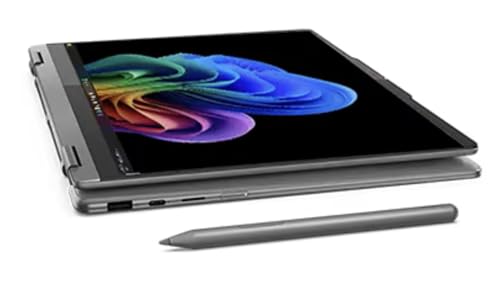
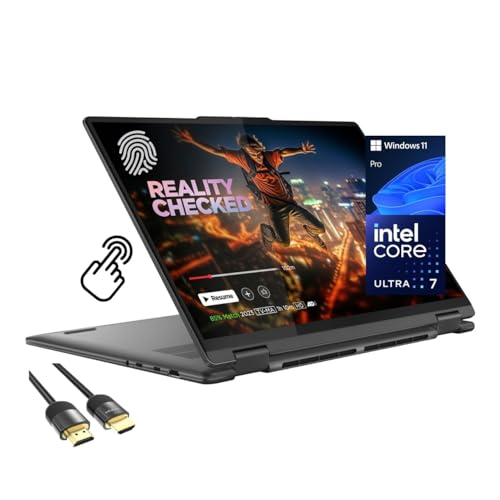
The Lenovo Yoga 7i is the do-everything pick: a 16-inch 2-in-1 laptop with a 2K touchscreen, an Intel Core Ultra 7 155U processor, 16GB of DDR5 memory, a 1TB PCIe 4.0 SSD, Wi-Fi 6E, a backlit keyboard, a fingerprint reader, Thunderbolt 4, and Windows 11 Pro. It folds back 360 degrees, so it works as a laptop for typing, a tablet for reading and drawing, and a tent for watching video. That flexibility is the whole answer to the laptop-or-tablet question: buy the machine that is both.
The 16-inch 2K display is the feature that makes the Yoga 7i work as a tablet as well as a laptop. A small 2-in-1 feels cramped when the keyboard is folded away, but a 16-inch screen gives room for a document, a video, or a drawing canvas. The touchscreen is responsive, and the Yoga Pen support means it can be a note-taking device as well as a work machine.
The Core Ultra 7 155U is a modern processor with AI acceleration, and the 16GB of DDR5 memory and 1TB SSD mean the laptop stays fast for years. Thunderbolt 4 lets it connect to a dock, a monitor, or fast external storage, so it can be the center of a desk setup as well as a portable machine.
For a buyer who cannot decide between a laptop and a tablet, the Yoga 7i is the answer that ends the debate. It is a full laptop when you need a keyboard, and a full tablet when you need a touchscreen, and the 16-inch display means neither mode feels like a compromise.
Key specs:
- 16-inch 2K touchscreen display
- Intel Core Ultra 7 155U, 16GB DDR5, 1TB PCIe 4.0 SSD
- Wi-Fi 6E, backlit keyboard, fingerprint reader, Thunderbolt 4, Windows 11 Pro
Strengths:
- 16-inch 2K touchscreen works as laptop and tablet
- Modern Ultra 7 processor with AI acceleration
- Thunderbolt 4 for docks and fast storage
Trade-offs:
- A 16-inch 2-in-1 is heavy as a tablet
- Higher cost than a basic laptop or tablet
- Battery life is shorter in tablet mode
Anyone who wants one device for work, study, and media. It suits students, office workers, and creators who need a keyboard for typing and a touchscreen for everything else.
Best for: one device that is both laptop and tablet Not suited for: anyone who wants a light tablet for reading in bed
Check price on Amazon: Lenovo Yoga 7i 16-Inch

HP OmniBook X Flip 2-in-1 Laptop – 16-Inch 2K IPS Touchscreen, Intel Ultra 7 256V
The HP OmniBook X Flip is the premium 2-in-1 pick: a 16-inch 2-in-1 laptop with a 2K IPS touchscreen, an Intel Ultra 7 256V processor, a backlit keyboard, and Windows 11 Pro. It is HP’s answer to the same question the Yoga 7i answers: why choose between a laptop and a tablet when one machine can be both, and do both well.
The Ultra 7 256V is a newer processor than the 155U in the Yoga 7i, with a faster neural processor for AI features and better efficiency, which means longer battery life. The 2K IPS touchscreen is bright and color-accurate, and the 16-inch size gives room for split-screen work, which is how most people actually use a laptop.
The OmniBook X Flip is built as a Copilot+ PC, which means it has the hardware for on-device AI features in Windows 11. Whether those features matter today is a matter of taste, but the hardware is there for the future, and the processor is fast enough for the present.
For a buyer who wants the newest processor and the most modern 2-in-1 design, the OmniBook X Flip is the pick. It is the direct competitor to the Yoga 7i, and the choice between them comes down to brand preference and the specific configuration on offer.
Key specs:
- 16-inch 2K IPS touchscreen
- Intel Ultra 7 256V processor
- Backlit keyboard; Windows 11 Pro
Strengths:
- Newest Ultra 7 processor with AI hardware
- Bright 2K IPS touchscreen
- Premium build and design
Trade-offs:
- Higher cost than the Yoga 7i
- A 16-inch 2-in-1 is heavy as a tablet
- Fewer configuration details in the listing
Buyers who want the newest processor and a premium 2-in-1. It suits professionals and students who want a machine that will stay current for years.
Best for: the newest 2-in-1 design Not suited for: tight budgets or light tablet use
Check price on Amazon: HP OmniBook X Flip

Microsoft Surface Pro 2-in-1 Laptop/Tablet (2024) – 13-Inch Touchscreen OLED, Snapdragon X Elite
The Microsoft Surface Pro 2024 is the tablet-first pick: a 13-inch 2-in-1 laptop and tablet with a touchscreen OLED display, a Snapdragon X Elite processor with 12 cores, 16GB of RAM, 256GB of storage, Windows 11 Copilot+ PC, and an Amazon Exclusive configuration in black. It is a tablet with a detachable keyboard, which means it is a tablet first and a laptop second, the opposite of the Yoga and the OmniBook.
The OLED display is the feature that sets the Surface Pro apart. OLED gives perfect blacks, vivid colors, and a contrast that an IPS display cannot match, which matters for movies, photos, and drawing. The 13-inch size is the right size for a tablet: light enough to hold, big enough to work on.
The Snapdragon X Elite is a different kind of processor from the Intel chips in the other picks: it is an ARM processor, like the one in a phone, with excellent battery life and instant wake. Most Windows applications run on it, and the ones that do not run through emulation. For a buyer who values battery life and portability over raw compatibility, it is a strong choice.
The Surface Pro is the best answer to the laptop-or-tablet question for a buyer who leans tablet. It is a tablet that becomes a laptop when the keyboard is attached, and it is the lightest and most portable machine in this group.
Key specs:
- 13-inch touchscreen OLED display
- Snapdragon X Elite, 12 cores, 16GB RAM, 256GB storage
- Windows 11 Copilot+ PC; detachable keyboard; Amazon Exclusive, black
Strengths:
- OLED display with perfect blacks and vivid color
- Tablet-first design, light and portable
- Excellent battery life from the ARM processor
Trade-offs:
- Keyboard and pen are separate purchases
- Some Windows apps run through emulation
- 256GB storage is small for the price
Buyers who lean tablet: note-takers, readers, and artists who want a laptop only sometimes. It suits anyone who carries a device all day and values lightness above all.
Best for: a tablet that becomes a laptop Not suited for: heavy desktop software that needs x86
Check price on Amazon: Microsoft Surface Pro 2024

Acer Chromebook Spin 314 CP314-2HN-30V1 – Convertible Laptop, Intel Core i3-N305
The Acer Chromebook Spin 314 is the budget pick: a convertible Chromebook with an Intel Core i3-N305 processor, a 14-inch WUXGA IPS touchscreen with Corning Gorilla Glass, 8GB of LPDDR5 memory, 128GB of eMMC storage, Wi-Fi 6E, and Chrome OS. It folds back 360 degrees, so it works as a laptop and a tablet, and it costs a fraction of the Windows 2-in-1 laptops in this group.
Chrome OS is the key to understanding this pick. A Chromebook runs web applications, Android apps, and Linux apps, and it stores files in the cloud. For a student or a worker whose life is in a browser, that is enough, and the Chromebook is faster, simpler, and more secure than a Windows laptop at the same price.
The Gorilla Glass touchscreen is a useful detail for a convertible that will be folded, touched, and carried daily. It resists scratches better than a plain glass screen, and the 14-inch WUXGA display is sharp enough for documents and video.
For a buyer on a budget who lives in a browser, the Spin 314 is the smartest choice in this group. It is a laptop and a tablet for the price of a basic tablet alone, and it does the job without the cost or the complexity of Windows.
Key specs:
- 14-inch WUXGA IPS touchscreen, Corning Gorilla Glass
- Intel Core i3-N305, 8GB LPDDR5, 128GB eMMC
- Wi-Fi 6E; Chrome OS; model CP314-2HN-30V1
Strengths:
- Lowest cost in this group by far
- Convertible design works as laptop and tablet
- Gorilla Glass touchscreen resists scratches
Trade-offs:
- Chrome OS cannot run Windows software
- 128GB eMMC storage is small
- The i3-N305 is modest for heavy work
Budget buyers who live in a browser: students, writers, and office workers whose applications are web-based. It suits a second machine or a first laptop for a child.
Best for: a budget convertible for browser work Not suited for: Windows software or heavy offline work
Check price on Amazon: Acer Chromebook Spin 314

Lenovo ThinkPad L13 Yoga G5 2-in-1 – Intel Ultra 7 165U, 32GB, 1TB SSD, 13.3-Inch Touchscreen
The Lenovo ThinkPad L13 Yoga G5 is the business pick: a 13.3-inch 2-in-1 with an Intel Ultra 7 165U processor, 32GB of LPDDR5 memory, a 1TB SSD, a touchscreen FHD+ display, a fingerprint reader, a backlit keyboard, Wi-Fi 6E, and Windows 11 Pro. It is a ThinkPad, which means a legendary keyboard, a sturdy chassis, and a design built for years of daily use.
The 32GB of memory is the headline here: twice the memory of the other picks, which means the L13 Yoga can run a browser with dozens of tabs, a spreadsheet, a video call, and a virtual machine at the same time without slowing down. For a professional who multitasks for a living, that memory is worth more than a faster processor.
The 13.3-inch size is the business sweet spot: big enough to work on, small enough to carry everywhere, and light enough to use as a tablet for reading documents. The ThinkPad keyboard is the best in this group, with deep travel and a firm feel that makes long typing sessions comfortable.
For a business buyer who needs a 2-in-1 that will last years and handle anything, the L13 Yoga G5 is the pick. It costs more than the Yoga 7i, but the extra memory, the ThinkPad build, and the smaller size justify it for anyone who works on the machine all day.
Key specs:
- 13.3-inch touchscreen FHD+ display
- Intel Ultra 7 165U, 32GB LPDDR5, 1TB SSD
- Fingerprint reader, backlit keyboard, Wi-Fi 6E, Windows 11 Pro
Strengths:
- 32GB of memory for heavy multitasking
- ThinkPad keyboard and build quality
- Compact 13.3-inch size for carrying
Trade-offs:
- Higher cost than the Yoga 7i
- Smaller screen than the 16-inch picks
- Business styling is plain
Business users and heavy multitaskers who need memory and a great keyboard. It suits professionals who run many applications at once and carry the laptop everywhere.
Best for: business work with heavy multitasking Not suited for: media work that needs a large screen
Check price on Amazon: Lenovo ThinkPad L13 Yoga G5

Lenovo Chromebook Duet Gen 9 – 11-Inch Tablet, 2-in-1 Laptop, MediaTek Kompanio 838
The Lenovo Chromebook Duet Gen 9 is the ultra-portable pick: an 11-inch tablet and 2-in-1 laptop with a full HD+ touchscreen, an 8-core MediaTek Kompanio 838 processor, 4GB of RAM, 128GB of storage, a detachable keyboard, and Chrome OS. It is the smallest and lightest machine in this group, and it is the closest thing to a pure tablet that still works as a laptop.
The detachable keyboard is the key: it snaps on for typing and snaps off for reading, so the Duet is a tablet when you want a tablet and a laptop when you need a keyboard. The 11-inch size fits in a small bag, on an airplane tray, and in one hand, which no other pick in this group can do.
The Kompanio 838 is a mobile processor, like the one in a phone, and it is efficient enough to give all-day battery life. Chrome OS keeps the machine fast and simple, and the 128GB of storage is enough for a cloud-based workflow. The 4GB of memory is the limitation: it handles a few tabs and one application at a time, but not heavy multitasking.
For a buyer who wants the lightest possible laptop-or-tablet, the Duet Gen 9 is the pick. It is a tablet first, a laptop second, and a travel companion that disappears into a bag.
Key specs:
- 11-inch full HD+ touchscreen
- 8-core MediaTek Kompanio 838, 4GB RAM, 128GB storage
- Detachable keyboard; Chrome OS
Strengths:
- Lightest and most portable in this group
- Detachable keyboard for laptop or tablet use
- All-day battery life from the mobile processor
Trade-offs:
- 4GB of memory limits multitasking
- Chrome OS cannot run Windows software
- Small screen for long typing sessions
Travelers and readers who want the lightest machine possible. It suits a second device for travel, a note-taking tablet, and a student who carries a small bag.
Best for: the lightest laptop-or-tablet Not suited for: heavy multitasking or Windows software
Check price on Amazon: Lenovo Chromebook Duet Gen 9
Buying guide: choosing between a laptop and a tablet
Convertible or detachable
A convertible is the safer choice for most people. The keyboard is always attached, so it can never be forgotten at home, and the laptop mode is as solid as a normal laptop. The trade-off is weight: a convertible is heavier as a tablet, because the keyboard is still there, folded behind the screen.
A detachable is the better tablet. The keyboard comes off, so the tablet is thin and light, and it feels like a real tablet in the hand. The trade-off is that the keyboard can be left behind, and the laptop mode is less stable on a lap, because the kickstand replaces the solid base of a laptop.
Windows or Chrome OS
Windows is the right choice if the software matters: full Office, professional tools, games, and anything that only runs on Windows. A Windows 2-in-1 is a full computer that happens to fold, and it can do anything a normal laptop can do.
Chrome OS is the right choice if the work lives in a browser: email, documents, video calls, and web applications. A Chromebook is faster to start, simpler to maintain, and cheaper than a Windows machine with the same screen. It cannot run Windows software, so check the applications first.
Screen size and weight
A 16-inch 2-in-1 is a desktop replacement: wonderful for work, heavy to carry, and awkward as a tablet. A 13-inch or 14-inch 2-in-1 is the middle ground: big enough to work on, small enough to carry, and usable as a tablet for reading. An 11-inch detachable is a travel device: light, portable, and best for reading and notes.
Choose the size for how the device will be used most. If it lives on a desk, buy the biggest screen. If it travels in a bag all day, buy the smallest screen that is still comfortable to type on.
What to check before you buy
Check the processor, the memory, and the storage against the software you need. Check whether the keyboard and pen are included or sold separately: the Surface Pro in this guide needs them bought separately, while the convertibles include the keyboard. Check the listing for the word Renewed, and check that the model number in the title matches the section in this guide.
Also check the ports. A 2-in-1 with only USB-C ports needs adapters for older accessories, while one with USB-A, HDMI, and a headphone jack is ready for anything. Thunderbolt 4 is a bonus for docks and fast storage, and it is worth having if the laptop will live on a desk.
Using and caring for your 2-in-1
Using the tablet mode
Fold the convertible back until it clicks, or detach the keyboard, and the machine switches to tablet mode. Use a finger or a pen for navigation, and keep the screen clean: a touchscreen shows fingerprints, and a dirty screen is hard to read. A microfiber cloth in the bag is the simplest accessory.
Do not force the hinge past its stop. A convertible hinge is designed to fold 360 degrees and no further, and forcing it will break the mechanism. If the hinge feels stiff, it is working as designed; if it feels loose, the laptop needs service.
Protecting the screen
A touchscreen is the most exposed part of a 2-in-1, and it is the most expensive part to replace. Use a sleeve or a case when the laptop travels, and do not put heavy objects on top of it in a bag. A screen protector is a cheap insurance policy, especially for a tablet that will be handled by children.
Clean the screen with a dry microfiber cloth, and use a screen cleaner made for coated glass if it needs more. Never use household glass cleaner, which can damage the coating, and never press hard on the screen, which can crack the panel.
Battery and updates
Keep the operating system and the drivers updated, because 2-in-1 features like auto-rotate and pen support depend on them. Charge the battery to around 80 percent for daily use if the maker offers a battery care mode, and do not leave the laptop plugged in for weeks at a time.
If the battery life drops suddenly, check for a runaway application or a pending update before assuming the battery has failed. A 2-in-1 that is always in tablet mode with the screen at full brightness will use more power than one in laptop mode with the brightness down.
Common mistakes to avoid
Buying a tablet when you need a laptop
The most common mistake is buying a detachable tablet and discovering that the keyboard is too small, the lap stability is poor, and the work needs a real laptop. If typing is the main job, buy a convertible with a full keyboard, not a detachable with a snap-on one.
Forgetting the keyboard and pen cost
Some detachables are sold without a keyboard or a pen, and those accessories cost a significant amount on top of the tablet. Check the listing before ordering, and budget for the keyboard and the pen if they are not included. A tablet without a keyboard is not a laptop replacement.
Choosing the wrong operating system
A Chromebook cannot run Windows software, and a Windows tablet cannot run Android apps as well as a Chromebook can. Check the applications before buying, and do not assume that a cheaper machine can do the same job as a more expensive one. The operating system is the most important choice in this guide.
Ignoring the weight
A 16-inch convertible weighs as much as a normal 16-inch laptop, and it is heavy as a tablet. If the device will be held in one hand for reading, buy a smaller detachable instead. Weight is the difference between a device that gets used every day and one that stays on the desk.
Final recommendation
For most buyers, the best laptops or tablets in this guide come down to the budget and the operating system. The Lenovo Yoga 7i is the best all-rounder: a 16-inch 2-in-1 with a great screen, a modern processor, and a keyboard that is always there. It is the machine to buy if you want one device that does everything and you do not want to think about it again.
If the budget is tight, the Acer Chromebook Spin 314 is the smart buy: a convertible for the price of a tablet, as long as the work lives in a browser. If the work is business, the ThinkPad L13 Yoga is the pick for its memory and keyboard. If the device will be carried everywhere, the Chromebook Duet Gen 9 is the lightest choice. And if the tablet matters most, the Surface Pro with its OLED screen is the one to buy. Whatever you choose, decide the operating system first, the form second, and the size third, and the right machine will be obvious.
And remember the simplest test of all: pick up the machine and fold it. If it feels solid, if the keyboard is comfortable, and if the tablet mode feels natural in the hand, it is the right one. A 2-in-1 is a device you touch all day, and the feel of it in the hand matters as much as the specifications on the page.
Related reading on Reviewstook: see our guides to 2-in-1 laptops, touchscreen laptops, Chromebooks for more on this topic.
Frequently asked questions
Should I buy a laptop or a tablet?
If you type for hours, buy a laptop. If you read, draw, and watch video, buy a tablet. If you do both, buy a 2-in-1: a convertible if typing matters most, a detachable if the tablet matters most. A 2-in-1 costs less than a laptop and a tablet bought separately, and it means one device to charge, update, and carry.
What is the difference between a convertible and a detachable 2-in-1?
A convertible has a keyboard that folds back 360 degrees, so the laptop becomes a tablet without detaching anything. A detachable has a keyboard that snaps off, so the tablet is thin and light on its own. Convertibles are better for typing and lap use; detachables are better as tablets and for carrying.
Can a Chromebook replace a Windows laptop?
For web-based work, yes. A Chromebook runs email, documents, video calls, and web applications well, and it is faster and simpler than a Windows laptop. For Windows software, professional tools, or games, no: a Chromebook cannot run them. Check the applications before choosing Chrome OS.
Is the Surface Pro a laptop or a tablet?
It is both, but it is a tablet first. The Surface Pro is a tablet with a detachable keyboard, so it feels like a tablet in the hand and becomes a laptop when the keyboard is attached. The keyboard and pen are sold separately, so budget for them. It is the best choice in this guide for a buyer who leans tablet.
How much memory does a 2-in-1 need?
For web work and documents, 8GB is enough. For heavy multitasking, video editing, or virtual machines, 16GB is better, and 32GB is best. The ThinkPad L13 Yoga in this guide has 32GB, which is why it is the business pick. Memory cannot be upgraded in most 2-in-1 laptops, so buy the amount you will need in two years, not the amount you need today.
Do 2-in-1 laptops have worse battery life than normal laptops?
Not necessarily. A 2-in-1 with an efficient processor can last as long as a normal laptop, and the ARM-based Surface Pro lasts longer than most. Battery life depends on the screen brightness, the processor, and how the device is used. A touchscreen at full brightness in tablet mode uses more power than a laptop screen at half brightness.