The best small USB sound cards fix the most annoying problem a laptop can have: audio that does not work properly. A headphone jack breaks, a laptop ships with a single combo jack that cannot take a separate mic, or the built-in sound is noisy and flat. A small USB sound card plugs into a USB port and gives the laptop proper audio outputs, often better than the ones it shipped with, for the cost of a lunch.
This guide compares six small USB sound cards, all verified against the site’s own product lookup with brand and model checked against each listing. Two are simple stereo adapters for fixing a broken jack. One is a 24-bit DAC for cleaner music. Three are 7.1-channel surround adapters for movies, games, and home theater setups driven from a computer. Every pick is compact, USB powered, and small enough to live in a laptop bag, ready whenever the audio misbehaves.
The right choice depends on the job. If the jack is broken, a stereo adapter is enough. If the sound is noisy, a DAC is the fix. If the laptop drives a surround speaker system, only a multi-channel card will do. The guide below explains each case, then walks through the six picks in detail so you can match the adapter to the problem instead of buying the biggest one on the shelf.
One more point before the details: a USB sound card is a repair, not a hobby. The best adapter is the one that fixes the problem and then disappears from your attention. If you find yourself reading forums about sample rates and driver versions, you have bought more adapter than you need. Start with the simplest pick that matches the job, and only upgrade if it does not solve the problem. Simple, cheap, and working beats fancy, expensive, and fiddly every single time.
In this guide
Quick picks: best small usb sound cards
| # | Product | Where to buy |
|---|---|---|
| 1 | Sabrent AU-MMSA | Check on Amazon |
| 2 | Sound Blaster Play! 3 | Check on Amazon |
| 3 | StarTech ICUSBAUDIO7D | Check on Amazon |
| 4 | Vantec 7.1 Channel Audio Adapter | Check on Amazon |
| 5 | Cubilux 7.1 USB Surround Sound Card | Check on Amazon |
| 6 | Plugable USB Audio Adapter | Check on Amazon |
How the picks were chosen
We started with the product lookup and kept only genuine external USB sound cards: small adapters that plug into USB and provide audio outputs. Generic USB-to-3.5 mm dongles that only pass audio through were considered, but the picks favor named sound cards with a clear model and a real audio chip, because those are the devices that fix a broken jack properly and sound better than the built-in audio.
Each candidate was checked by fetching its full listing title, which is how renewed units are caught: the short search title can hide the word Renewed, but the full title shows it. One renewed Creative Play! 3 listing was rejected on that check. The six picks were then sorted by job: two stereo jack-restorers, one DAC for cleaner sound, and three 7.1 surround cards at three different levels of build and specification.
We also checked that each pick is a real sound card and not a passive dongle. A passive adapter only changes the plug shape and relies on the laptop to do the conversion, so it cannot fix noisy audio or add channels. Every pick in this guide has its own audio chip, which is what makes it a sound card rather than a cable.
What a small USB sound card actually is
A USB sound card is a tiny external audio interface. Inside the adapter is a digital-to-analog converter and an amplifier, the same parts that live inside a laptop, but moved outside the electrically noisy chassis. The laptop sends digital audio over USB, the adapter converts it to analog, and the headphones or speakers receive a cleaner signal than the built-in jack would give them.
Small USB sound cards come in three kinds. Stereo adapters give you a headphone jack and a mic jack, and they fix a broken or missing jack. DAC adapters add better conversion quality, with higher bit depth and sample rates, for cleaner music. Surround adapters add multiple output channels, up to 7.1, for multi-speaker setups. The picks in this guide cover all three, so the right adapter depends on what you are connecting.
Size matters because these adapters travel. A stereo stick the size of a thumb drive can live in a laptop sleeve. A surround card is bigger and belongs on a desk. Both are USB powered, so neither needs a separate power supply, and both are plug and play on most systems, so setup is a matter of plugging in and choosing the adapter as the output device.
Power is another quiet advantage. Because the adapter draws a small amount of power from the USB port, it works on battery power without a wall socket, which matters on a plane, in a library, or anywhere the laptop runs unplugged. A desktop audio interface with its own power brick cannot do that, which is why small USB cards are the right tool for a laptop.
What makes the best small USB sound cards worth buying
First, the adapter must work without a fight. Plug and play on Windows and Mac is the baseline, and Linux support is a bonus that matters to a lot of laptop users. An adapter that needs a driver download, a reboot, and a control panel is a bad buy when a plug-and-play adapter does the same job.
Second, match the channels to the speakers. A stereo adapter cannot drive a 5.1 speaker set, and a 7.1 card is wasted on a pair of headphones. Count the speakers before you buy. Third, check the sample rate if you listen to high-resolution audio: 24-bit 96 kHz is good for most listeners, while 384 kHz matters only for high-resolution files. Fourth, check the connectors: separate headphone and mic jacks for a headset, SPDIF for a receiver, and line-in if you want to record as well as listen.
Fifth, think about where the adapter will live. An adapter that stays on a desk can be bigger and heavier, while one that travels needs to be small, tough, and easy to unplug without a fight. The aluminum body of the Cubilux earns its keep in a bag, while the tiny SABRENT can stay plugged into a laptop without snagging on anything.
Quick picks at a glance
| Product | Channels | Sample rate | Jacks | Best for |
|---|---|---|---|---|
| Sabrent AU-MMSA | Stereo | Not listed | Headphone + mic | Jack repair |
| Sound Blaster Play! 3 | Stereo | 24-bit 96 kHz | Headphone + mic | Better sound |
| StarTech ICUSBAUDIO7D | 7.1 | Not listed | SPDIF + 3.5 mm | Surround |
| Vantec 7.1 | 7.1 | Not listed | Analog 3.5 mm | Budget surround |
| Cubilux 7.1 | 7.1 | 48–384 kHz | Line-in + mic | Hi-res audio |
| Plugable | Stereo | Not listed | Speaker + mic | Any OS |
The picks in detail
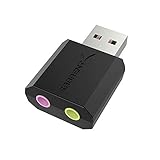

SABRENT USB External Stereo Sound Card Adapter – AU-MMSA
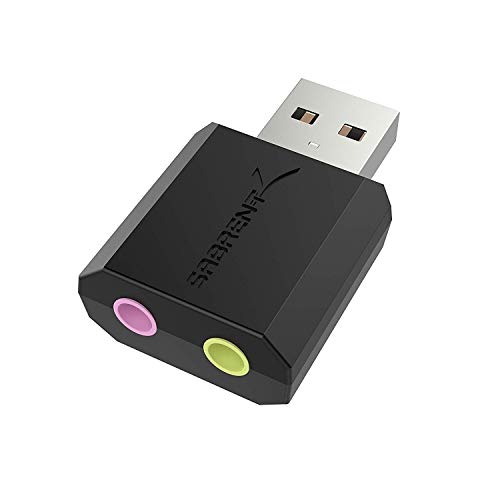
The SABRENT AU-MMSA is the simplest small USB sound card you can buy: a thumb-sized adapter that plugs into a USB port and gives a laptop separate 3.5 mm headphone and microphone jacks. It needs no drivers on Windows or Mac, so it works the moment you plug it in. If your laptop has a single combo jack, a broken headphone socket, or no audio jack at all, this adapter restores proper stereo output and a mic input in seconds.
The AU-MMSA is a stereo adapter, not a surround device, and that is the right scope for its job. It handles headphones, a headset with a mic, and small desktop speakers, and it does so without software, without a control panel, and without a power supply. The adapter is small enough to leave plugged in permanently or to toss in a laptop sleeve for travel.
For most people, this is the only USB sound card they will ever need. It fixes the two most common laptop audio problems, a missing jack and a broken jack, for the price of a coffee. Keep one in the laptop bag and one on the desk, and audio problems stop being problems.
The AU-MMSA is also the adapter to recommend to someone else. It is cheap enough to buy two, one for the desk and one for the bag, and simple enough that anyone can use it without instructions. When a friend says their laptop audio stopped working, this is the adapter to hand them.
Key specs:
- USB external stereo sound card adapter
- Separate 3.5 mm headphone and mic jacks
- Plug and play, no drivers; Windows and Mac; model AU-MMSA
Strengths:
- No drivers needed on Windows or Mac
- Separate headphone and mic jacks
- Tiny enough to leave plugged in
Trade-offs:
- Stereo only, no surround sound
- No volume control on the adapter
- No digital optical output
Anyone whose laptop has a broken, missing, or single combo audio jack. It suits students, office workers, and travelers who need headphones and a mic to just work on any machine.
Best for: fixing a broken or missing laptop audio jack Not suited for: surround sound or high-end headphone listening
Check price on Amazon: Sabrent AU-MMSA

Sound Blaster Play! 3 – USB Audio Adapter, 24-bit 96kHz
The Sound Blaster Play! 3 is the upgrade pick in this group: a small USB audio adapter from Creative that works as a 24-bit, 96 kHz USB DAC. Plug it into a laptop or desktop and it replaces the built-in audio with cleaner output, better detail, and a proper headphone amplifier stage. It is plug and play on PC and Mac, and it is small enough to carry in a pocket.
The 24-bit, 96 kHz specification matters for anyone who listens to high-quality audio or edits sound. The built-in audio on a thin laptop is often noisy, with a faint hiss or hum that cheap adapters cannot fix. A dedicated DAC like the Play! 3 moves the conversion outside the electrically noisy laptop chassis, which is why the same headphones sound cleaner through it.
The Play! 3 is still a small, simple device. It does not have the knobs, the surround modes, or the microphone preamp of a larger audio interface, and it does not need them. It does one job, better laptop audio, and it does it well enough that many listeners never need anything bigger.
The Play! 3 also works well as a travel DAC. It is small enough for a laptop sleeve, draws power from USB, and needs no software, so it improves the sound of any machine you plug it into: a work laptop, a hotel television with a USB port, or a friend’s computer. That portability is what makes it more useful than a larger desktop DAC.
Key specs:
- 24-bit, 96 kHz USB DAC
- Plug and play on PC and Mac
- Portable USB audio adapter; model Play! 3
Strengths:
- Cleaner sound than most built-in laptop audio
- 24-bit 96 kHz resolution for better detail
- Small and portable, no drivers needed
Trade-offs:
- Stereo only, no surround channels
- No hardware volume knob
- No optical digital output
Music listeners and casual audio editors who want cleaner sound from a laptop without a bulky interface. It suits anyone whose headphones hiss or sound flat on built-in audio.
Best for: cleaner laptop audio on a budget Not suited for: surround sound or professional recording
Check price on Amazon: Sound Blaster Play! 3
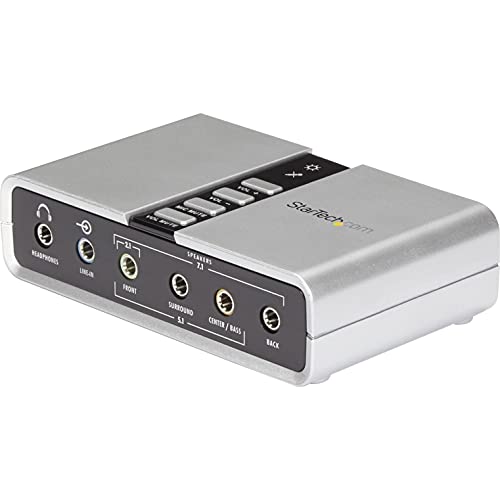
StarTech 7.1 USB Audio Adapter – External Sound Card ICUSBAUDIO7D
The StarTech ICUSBAUDIO7D is the surround sound pick: an external USB sound card that delivers up to 7.1-channel surround, with digital SPDIF output and analog 3.5 mm jacks. It is made for a laptop or PC that needs real multi-channel audio, whether for movies, games, or a home theater setup driven from a computer. Plug it into USB, connect your speakers or receiver, and the laptop gains the audio outputs it never had.
The ICUSBAUDIO7D has been around for years, and that is a strength. The drivers are mature, the device is widely compatible, and the combination of SPDIF digital output and analog jacks covers both modern receivers and older speaker sets. The SPDIF output sends digital audio to a receiver without conversion, which keeps the signal clean over a long cable run.
This is a bigger adapter than the stereo sticks in this group, and it is meant to stay on a desk rather than travel in a pocket. For a desktop replacement setup, a media PC, or a laptop that drives a surround speaker system, it is the right tool: full surround, digital output, and analog jacks in one small box.
The StarTech is also the safest choice for a mixed system. The SPDIF output feeds a modern receiver, while the analog jacks feed older powered speakers, so the same adapter can drive the receiver today and the old speaker set tomorrow. That flexibility is why it has stayed in production for years.
Key specs:
- Up to 7.1 surround sound
- Digital SPDIF output and analog 3.5 mm jacks
- External sound card for laptop and PC; model ICUSBAUDIO7D
Strengths:
- Full 7.1 surround from a USB port
- SPDIF digital output for receivers
- Mature drivers and wide compatibility
Trade-offs:
- Larger than a pocket adapter
- Needs drivers for full surround features
- Overkill for simple headphone use
Anyone who wants surround sound from a laptop or a media PC. It suits home theater setups, movie watchers, and gamers who run multi-channel speakers from a computer.
Best for: surround sound from a laptop Not suited for: travel or simple headphone listening
Check price on Amazon: StarTech ICUSBAUDIO7D

VANTEC USB External 7.1 Channel Audio Adapter
The VANTEC USB external 7.1-channel audio adapter is the budget surround option in this group. It plugs into a USB port and gives a laptop or desktop full 7.1-channel audio output, so a multi-speaker setup can run from a machine that only has a headphone jack. It is a straightforward adapter with no software to learn and no power supply to plug in.
VANTEC has sold this adapter for years, and its appeal is the same as it has always been: it adds surround sound to any computer for very little money. The adapter is compact enough to sit behind a monitor or on a desk without taking space, and it works with the standard audio drivers on Windows, so setup is a matter of plugging it in and choosing it as the output device.
For a secondary PC, a media machine, or a laptop that drives a speaker set in a bedroom or office, the VANTEC is the pragmatic choice. It does not have the polish or the digital output of the StarTech, but it delivers the channels that matter at a lower cost.
The VANTEC is also easy to replace. Because it is inexpensive and widely stocked, a second one can be bought for another room without thinking twice. That makes it the right choice for a house with more than one media PC, where each machine needs its own surround adapter.
Key specs:
- USB external 7.1-channel audio adapter
- Adds multi-channel audio to laptop or PC
- Compact external adapter
Strengths:
- Full 7.1 channels at a low cost
- Simple plug-in setup
- Compact enough for a crowded desk
Trade-offs:
- No digital SPDIF output listed
- No volume control on the adapter
- Basic build compared with premium adapters
A secondary PC or media machine that needs surround sound on a budget. It suits anyone adding multi-channel audio to a laptop without spending on a premium adapter.
Best for: budget surround sound Not suited for: digital receiver connections
Check price on Amazon: Vantec 7.1 Channel Audio Adapter

Cubilux 7.1 USB Surround Sound Card
The Cubilux 7.1 USB surround sound card is the modern surround pick: a full aluminum alloy USB-A adapter with a 48 kHz to 384 kHz sample rate range, line-in, and stereo mic input. The high sample rate ceiling is the headline: it supports high-resolution audio well beyond the 96 kHz of the stereo adapters in this group, so it suits listeners who play high-resolution files and want the adapter to keep up.
The aluminum body is more than a look. It shields the electronics from interference and it survives being tossed in a bag, which matters for an adapter that travels between a desk and a laptop. The line-in and stereo mic inputs make it a two-way device: it takes audio in as well as sending it out, so it can handle a headset with a mic or a line-level source.
Cubilux is a newer name than Creative or StarTech, but the specification is strong and the build is solid. For a listener who wants surround sound and high-resolution audio in one small adapter, it is the most capable device in this group.
The Cubilux also suits a listener who is building a system piece by piece. The high sample rate ceiling means the adapter will not be the bottleneck when the headphones or the speakers are upgraded later, so it is a buy-once choice rather than a stopgap that needs replacing with the next upgrade.
Key specs:
- 7.1 surround sound
- 48 kHz to 384 kHz sample rate range
- Full aluminum alloy body; line-in and stereo mic in; USB-A
Strengths:
- High-resolution audio up to 384 kHz
- Aluminum body resists damage and interference
- Line-in and mic input for two-way use
Trade-offs:
- USB-A only, needs an adapter for USB-C laptops
- Newer brand with less track record
- No hardware volume control listed
Listeners who play high-resolution audio and want surround sound in one adapter. It suits a desk setup where the adapter stays plugged in and the aluminum body earns its keep.
Best for: high-resolution surround audio Not suited for: USB-C-only laptops without an adapter
Check price on Amazon: Cubilux 7.1 USB Surround Sound Card

Plugable USB Audio Adapter
The Plugable USB audio adapter is the compact jack-restorer: it adds 3.5 mm speaker and mic ports to laptops that lack an audio jack, in a small external sound card that works on Windows, Mac, and Linux. It is plug and play, so there is no driver to install and no software to configure. Plug it in, plug the headset into it, and the laptop has proper audio again.
Plugable is known for small, reliable adapters, and this one follows the pattern: it does one job, it does it on every major operating system, and it stays out of the way. The adapter is compact enough to leave in a USB port permanently, which makes it a good fit for a laptop that lost its jack to damage or never had one.
For Linux users in particular, the Plugable is a safe choice. Many cheap adapters have patchy Linux support, but Plugable tests its adapters across Windows, Mac, and Linux, and the standard USB audio class means it works without proprietary drivers. That cross-platform support is the reason to pick it over a cheaper no-name adapter.
Plugable also backs its adapters with support that answers, which matters when an adapter misbehaves after an operating system update. A maker that tests across Windows, Mac, and Linux and stands behind the product is worth more than a cheaper adapter from a seller that disappears after the sale.
Key specs:
- Adds 3.5 mm speaker and mic ports
- Compact external sound card, plug and play
- Works on Windows, Mac, and Linux
Strengths:
- Works on Windows, Mac, and Linux
- Compact enough to leave plugged in
- No drivers or software needed
Trade-offs:
- Stereo only, no surround sound
- No volume control on the adapter
- No digital output
Anyone who needs a reliable audio jack on any operating system, including Linux. It suits students and workers who move between machines and want one adapter that works everywhere.
Best for: a cross-platform jack replacement Not suited for: surround sound or high-resolution listening
Check price on Amazon: Plugable USB Audio Adapter
Buying guide: choosing the right USB sound card
Fixing a broken or missing jack
If the laptop jack is broken or the machine never had one, a stereo adapter is all you need. The SABRENT AU-MMSA and the Plugable adapter both give you a headphone jack and a mic jack for very little money, and both are plug and play. Choose the SABRENT for the lowest cost and the Plugable if you use Linux or move between operating systems.
Do not buy a surround card to fix a broken jack. The extra channels will sit unused, the adapter will be bigger than it needs to be, and you will have paid for features that never get used. Fix the problem you have, not the problem you might have one day.
Cleaner sound for music and calls
If the jack works but the sound is noisy, thin, or flat, the problem is the built-in converter, and a DAC adapter is the fix. The Sound Blaster Play! 3 moves the conversion outside the laptop, which removes the hiss and hum that come from inside a crowded chassis. The result is cleaner music and clearer calls from the same headphones.
A DAC helps most with good headphones. Cheap earbuds will not reveal the difference, but a decent pair of over-ear headphones will. If you already own good headphones and the laptop sound disappoints you, a small DAC is the cheapest meaningful upgrade you can make.
Surround sound from a laptop
Surround sound needs a multi-channel card and a multi-speaker setup, and the two must match. Count the speakers first: a 5.1 set needs five speakers and a subwoofer, and a 7.1 set needs seven speakers and a subwoofer. Then pick the card that provides those channels. The StarTech ICUSBAUDIO7D is the most capable pick here, with SPDIF for a receiver, while the VANTEC is the budget option and the Cubilux is the high-resolution choice.
Remember that surround only works when the source is surround. A stereo music file will not become surround sound because the card has more channels, and a game or movie must be mixed for multi-channel audio to use them. If you mostly watch stereo content, a stereo adapter is the better buy.
USB-A, USB-C, and drivers
Check the laptop ports before you buy. Most small sound cards use USB-A, and a USB-C-only laptop needs a small USB-C to USB-A adapter to use them. That adapter costs little, but it is one more thing to carry, so factor it into the decision if the laptop has no USB-A port at all.
Drivers are the other check. Stereo adapters are usually plug and play, while surround cards may need a driver for the full channel count. Download the driver from the maker before the card arrives, and test the card with the speakers you will actually use, not just with headphones.
Using and caring for your USB sound card
Setting it as the output device
After plugging the adapter in, set it as the output device in the operating system sound settings. On Windows, that is the sound icon in the taskbar. On Mac, it is the Sound pane in System Settings. On Linux, it is the sound settings of the desktop environment. If the laptop keeps playing through its own speakers, the adapter is plugged in but not selected.
Set the adapter as the default device so it is used automatically when plugged in. Some laptops forget the setting after a reboot, so check it the first few times until the habit sticks.
Keeping the adapter safe
A small adapter sticking out of a USB port is easy to snap. Unplug it before putting the laptop in a bag, and store it in a small pouch rather than loose in a pocket with keys. A bent USB connector is the most common way these adapters die.
Keep the adapter dry and out of direct heat. The electronics inside are simple, but moisture and heat shorten their life. A drawer or a laptop sleeve is the right home, not a car dashboard in summer.
Updating drivers and firmware
Check the maker’s site for driver updates once after purchase, and again if the adapter misbehaves after an operating system update. Most stereo adapters need no driver at all, but surround cards can lose channels after a major OS update until the driver is refreshed.
If the adapter stops working after an update, unplug it, restart the laptop, and plug it back in before assuming it is broken. That simple reset fixes most USB audio problems.
Common mistakes to avoid
Buying surround for a stereo problem
The most common mistake is buying a 7.1 card to fix a broken headphone jack. The surround channels go unused, the adapter is bigger than needed, and the money is wasted. Match the adapter to the problem: stereo for a broken jack, DAC for noisy sound, surround for a speaker system.
Forgetting the USB-C adapter
A USB-A sound card cannot plug into a USB-C-only laptop without a small adapter. Buy the USB-C adapter at the same time as the sound card, or the sound card will sit in a drawer until the adapter arrives.
Leaving the adapter plugged in during travel
A small adapter sticking out of a laptop in a bag is a lever waiting to snap. Unplug it before packing the laptop, every time. A broken USB port costs far more to repair than the adapter is worth.
Judging sound with cheap headphones
A DAC cannot improve headphones that cannot reproduce the detail in the first place. If the headphones are the bottleneck, a better pair of headphones is a better buy than a better adapter. Test the adapter with the best headphones you own before deciding it made no difference.
Final recommendation
For most laptop owners, the best small USB sound cards in this guide come down to the problem at hand. If the jack is broken, buy the SABRENT AU-MMSA: it is cheap, it needs no drivers, and it restores a headphone jack and a mic jack in seconds. If the jack works but the sound is noisy, buy the Sound Blaster Play! 3: the 24-bit DAC cleans up the audio for the same headphones you already own, and it travels in a pocket.
If the laptop drives a surround speaker system, buy the StarTech ICUSBAUDIO7D for its SPDIF output and mature drivers, or the Cubilux 7.1 if high-resolution audio matters to you. Whatever you choose, check the ports, set the adapter as the output device, and unplug it before the laptop goes in a bag. A small adapter that works is worth more than a big one that does not fit the problem.
And keep the receipt. USB audio is one of those categories where a device can work perfectly on one machine and misbehave on another, usually because of a driver quirk or a USB port that does not supply enough power. Buy from a listing with a straightforward return policy, test the adapter with your own headphones and speakers in the first week, and swap it if it does not behave.
Related reading on Reviewstook: see our guides to 5.1 and 7.1 sound cards, USB audio interfaces, audio interfaces for more on this topic.
Frequently asked questions
Do USB sound cards need drivers?
Most stereo USB sound cards are plug and play on Windows, Mac, and Linux, and need no drivers at all. Surround cards may need a driver for the full channel count, so check the maker’s site after purchase. If the adapter is not recognized, try another USB port before downloading anything.
Will a USB sound card improve sound quality?
A USB sound card can improve sound quality by moving the digital-to-analog conversion outside the laptop, away from the electrical noise inside the chassis. The difference is clearest with good headphones and a DAC adapter. With cheap earbuds, the improvement is small, because the headphones are the bottleneck. A better adapter cannot fix a weak pair of headphones, so upgrade the headphones first if they are the weakest link in the chain.
Can a USB sound card fix a broken headphone jack?
Yes. A stereo USB sound card gives the laptop a new headphone jack and a mic jack through a USB port, bypassing the broken jack entirely. Plug the adapter in, set it as the output device, and the headphones work again. This is the cheapest repair for a broken laptop jack.
What is the difference between a USB sound card and a USB DAC?
A USB DAC is a type of USB sound card that focuses on conversion quality, usually with higher bit depth and sample rates for cleaner music. A general USB sound card may add channels, jacks, or surround sound instead. For music listening, a DAC is the better choice; for surround speakers, a multi-channel sound card is.
Do USB sound cards work with USB-C laptops?
Most small USB sound cards use USB-A, so a USB-C-only laptop needs a small USB-C to USB-A adapter. The sound card itself works the same once connected. Buy the USB-C adapter at the same time as the sound card so the two arrive together.
Can I use a USB sound card with a gaming console?
Some USB sound cards work with consoles that support USB audio, but support varies by console and by adapter, and surround features often do not carry over. Check the console maker’s compatibility list before buying, and prefer a card that is listed as working with the console you own rather than assuming any USB audio device will work.