The best gigabit wireless routers are the ones with gigabit ports for wired speed and a Wi-Fi radio fast enough to keep up with a gigabit internet plan. A gigabit router is a router with gigabit Ethernet ports, and it matters because a router with slower ports will cap a gigabit plan at a fraction of its speed. The six routers in this guide all have gigabit ports, and they cover Wi-Fi 6 and Wi-Fi 5, small flats and larger homes, and budgets from the cheapest to the fastest. Every listing was checked in full before it was linked.
A gigabit wireless router matters because the internet plan is only as fast as the slowest part of the network. A home with a gigabit plan and a router with 100 Mbps ports will never see more than 100 Mbps, no matter what the plan promises. A router with gigabit ports lets a wired computer, a console, and a television use the full speed, and a fast Wi-Fi radio lets the phones and laptops keep up. The router is the bottleneck most homes forget.
The routers in this guide cover the main uses. The TP-Link Archer AX21 is the best all-round pick, the TP-Link Archer AX73 is the long-range pick, the ASUS RT-AX3000 is the security pick, the NETGEAR Nighthawk R6700AX is the simple pick, the ASUS RT-AX1800S is the extendable pick, and the TP-Link Archer A6 is the budget pick with gigabit ports.
This guide covers six best gigabit wireless routers: three TP-Link routers, two ASUS routers, and one NETGEAR router. All six are sold as new listings, all six have their brand and model stated in the listing title, and all six state their speed, bands, and ports. The comparison table below gives the short version, and the sections after it give the detail.
In this guide
Quick picks: best gigabit wireless routers
| # | Product | Where to buy |
|---|---|---|
| 1 | TP-Link Archer AX21 WiFi 6 router | Check on Amazon |
| 2 | TP-Link Archer AX73 WiFi 6 router | Check on Amazon |
| 3 | ASUS RT-AX3000 gigabit wireless router | Check on Amazon |
| 4 | NETGEAR Nighthawk R6700AX WiFi 6 router | Check on Amazon |
| 5 | ASUS RT-AX1800S WiFi 6 router | Check on Amazon |
| 6 | TP-Link Archer A6 gigabit WiFi router | Check on Amazon |
How the picks were chosen for the best gigabit wireless routers
Every router below started as a listing returned by the reviewstook.com product lookup, and every listing was checked the same way. First, the title had to name the exact brand and the exact model, including every number and letter, because a TP-Link Archer AX21 V5 is not a TP-Link Archer AX21 V4, and an ASUS RT-AX3000 is not an ASUS RT-AX3000S. Second, the title had to state gigabit ports, because a router without gigabit ports cannot use a gigabit plan.
The routers were also checked for the details that decide real use. Wi-Fi speed decides wireless performance, and the routers here range from AC1200 to AX5400. Bands decide range and speed, and the routers here are all dual band. Coverage decides the home size, and the routers here state up to 1,500 square feet and long range coverage. Features decide security and gaming, and the routers here offer AiProtection, Adaptive QoS, parental control, VPN, and mesh support.
One more check shaped the list: the router must be a wireless router, not a wired-only router, a modem, or a mesh node alone. Listings for wired VPN routers, modem router combos, and renewed routers were left out, because a buyer searching for a gigabit wireless router wants a wireless router with gigabit ports. The six routers below are all wireless routers, sold as new listings, with the brand and the model stated in the title.
What a gigabit wireless router is, and who should buy one
A gigabit wireless router is a router with gigabit Ethernet ports and a wireless radio that broadcasts Wi-Fi. The gigabit ports connect wired devices at up to 1,000 Mbps, and the wireless radio connects phones, laptops, and televisions over Wi-Fi. The router takes the internet from the modem, shares it with the home, and protects the network with a firewall. A gigabit router is the minimum a home with a gigabit internet plan needs.
A gigabit wireless router suits anyone with a fast internet plan who wants the full speed on wired and wireless devices. It is the right choice when the plan is 500 Mbps or faster, when wired devices feel slow, when many devices share the network, and when the old router cannot keep up. It is not the right choice for a slow plan under 100 Mbps, because a cheaper router is enough for that, and it is not the right choice for a home that only uses wired connections, because a wired router is cheaper.
The six routers in this guide cover the main homes. The all-round and long-range picks are for larger homes, the simple pick is for a flat, the security pick is for a buyer who wants protection, the extendable pick is for a buyer who wants mesh later, and the budget pick is for a buyer who wants gigabit ports at the lowest price.
What makes a good gigabit wireless router
Gigabit ports are the first test, and they are the most important one. A router with gigabit ports lets a wired device use the full speed of a gigabit plan, and a router with slower ports caps it. All six routers here have gigabit ports, and a buyer should check the port count in the title, because four ports cover a computer, a console, a television, and a spare. A router with one gigabit port and the rest slower is not a gigabit router.
Wi-Fi speed and generation are the second test. Wi-Fi 6 is faster than Wi-Fi 5 with many devices, because it serves several devices at once instead of one at a time. The routers here range from AC1200 Wi-Fi 5 to AX5400 Wi-Fi 6, and a buyer with many devices should buy Wi-Fi 6. Speed is measured in AX numbers, and AX5400 is faster than AX3000, which is faster than AX1800.
Coverage and features are the third test. Coverage decides the home size, and a router that covers 1,500 square feet suits a flat, while a long-range router suits a larger home. Features decide security and gaming, and the routers here offer AiProtection, Adaptive QoS, parental control, VPN, and mesh support. A buyer who wants mesh later should look for AiMesh or Easy Mesh, and a buyer who wants security should look for AiProtection.
Quick picks at a glance
| Router | Speed and ports | Use | Best for |
|---|---|---|---|
| TP-Link Archer AX21 V5 | AX1800, Wi-Fi 6, gigabit, Easy Mesh | Home, gigabit plan | Best all-round router |
| TP-Link Archer AX73 | AX5400, Wi-Fi 6, gigabit, long range | Larger home, streaming | Best long-range router |
| ASUS RT-AX3000 | Wi-Fi 6, AiProtection, Adaptive QoS | Home, gaming, security | Best security router |
| NETGEAR Nighthawk R6700AX | AX1800, 1,500 sq ft, 20 devices | Flat, small house | Best simple Nighthawk |
| ASUS RT-AX1800S | Wi-Fi 6, AiMesh, VPN, security | Home, growing network | Best extendable router |
| TP-Link Archer A6 | AC1200, gigabit, MU-MIMO, OneMesh | Home, budget, gigabit plan | Best budget router |
The best gigabit wireless routers


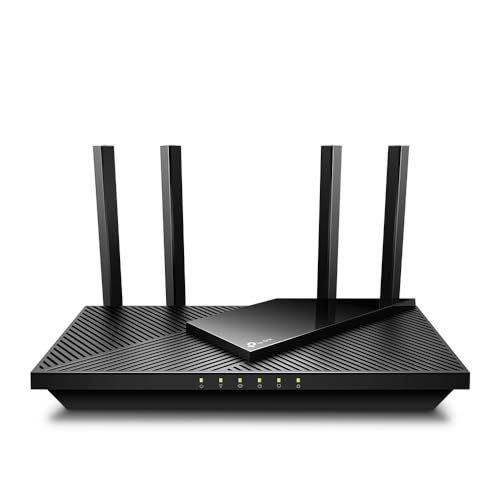
TP-Link AX1800 WiFi 6 Router Archer AX21 V5
The TP-Link AX1800 WiFi 6 Router Archer AX21 V5 is the best gigabit wireless router for most buyers, and it is the pick for a home that wants fast Wi-Fi without paying for more router than it needs. It is a TP-Link AX1800 WiFi 6 router, model Archer AX21 V5, with dual band wireless internet, gigabit ports, Easy Mesh, and Alexa support, a Certified for Humans device. The gigabit ports mean a wired device gets full speed, and the Wi-Fi 6 radio covers phones, laptops, and televisions at once.
The Archer AX21 suits a home with a gigabit internet plan and a dozen devices that all want Wi-Fi at the same time. The dual band design separates the fast 5 GHz band from the long-range 2.4 GHz band, the Easy Mesh support lets a second TP-Link device extend the network, and the Alexa support lets the buyer control it by voice. It is the router for a normal home with a fast plan.
Key specs:
- TP-Link AX1800 WiFi 6 router
- Archer AX21 V5
- Dual band wireless internet
- Gigabit
- Easy Mesh
- Works with Alexa
Strengths:
- Gigabit ports give wired devices full speed
- Wi-Fi 6 handles many devices at once
- Easy Mesh extends the network with a second device
Trade-offs:
- AX1800 is the slowest speed here
- A basic router with no 2.5G port
- Four antennas that cannot be removed
The TP-Link Archer AX21 fits a home with a gigabit plan and a dozen devices that want fast Wi-Fi.
Best for: a normal home with a gigabit internet plan. Not suited for: a large home that needs mesh coverage, or a buyer who wants 2.5G ports.
Check price on Amazon: TP-Link Archer AX21 WiFi 6 router

TP-Link AX5400 WiFi 6 Router Archer AX73
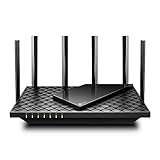
The TP-Link AX5400 WiFi 6 Router Archer AX73 is the long-range pick in this guide, and it is the pick for a buyer whose router must reach the far rooms. It is a TP-Link AX5400 WiFi 6 router, model Archer AX73, with dual band gigabit wireless internet for streaming and long range coverage. The AX5400 speed is three times the AX1800 of the Archer AX21, and the long range design covers a larger home from one router.
The Archer AX73 suits a buyer with a larger home, a gigabit plan, and many devices streaming at once. The dual band design separates streaming from browsing, the gigabit ports cover wired devices, and the long range coverage means fewer dead spots. It is the router for a larger home that wants one strong router instead of a mesh system.
Key specs:
- TP-Link AX5400 WiFi 6 router
- Archer AX73
- Dual band gigabit wireless internet
- For streaming
- Long range coverage
Strengths:
- AX5400 speed, three times the AX1800 pick
- Long range coverage for a larger home
- Dual band gigabit for streaming and browsing
Trade-offs:
- Costs more than the Archer AX21
- A larger router that needs more shelf space
- No 2.5G port stated in the title
The TP-Link Archer AX73 fits a buyer with a larger home and a gigabit plan who wants long range from one router.
Best for: long range coverage in a larger home. Not suited for: a small flat, or a buyer on the tightest budget.
Check price on Amazon: TP-Link Archer AX73 WiFi 6 router

ASUS RT-AX3000 Dual Band Gigabit Wireless Router
The ASUS RT-AX3000 Dual Band Gigabit Wireless Router is the security pick in this guide, and it is the pick for a buyer who wants protection built into the router. It is an ASUS RT-AX3000 ultra-fast dual band gigabit wireless router with next gen WiFi 6, Adaptive QoS, and AiProtection by Trend Micro, with 1x WAN, 4x 1G LAN, 1x USB 3.0, and AiMesh compatibility. The AiProtection blocks malicious sites, and the Adaptive QoS gives games and calls priority over downloads.
The RT-AX3000 suits a buyer who wants a router that protects the home network and keeps games smooth. The four gigabit LAN ports cover wired devices, the USB 3.0 port shares a drive or a printer, and the AiMesh support lets a second ASUS device extend the network. It is the router for a buyer who wants security and gaming features in one box.
Key specs:
- ASUS RT-AX3000 dual band gigabit wireless router
- Next gen WiFi 6
- Adaptive QoS
- AiProtection by Trend Micro
- 1x WAN, 4X 1G LAN, 1x USB 3.0
- AiMesh compatible
Strengths:
- AiProtection blocks malicious sites
- Adaptive QoS gives games and calls priority
- Four gigabit LAN ports and a USB 3.0 port
Trade-offs:
- AX3000 is slower than the AX5400 pick
- AiProtection needs a subscription for some features
- A larger router that needs shelf space
The ASUS RT-AX3000 fits a buyer who wants built-in security and gaming priority in a gigabit router.
Best for: a secure gigabit router with gaming priority. Not suited for: a buyer who wants the fastest speed here, or the lowest price.
Check price on Amazon: ASUS RT-AX3000 gigabit wireless router

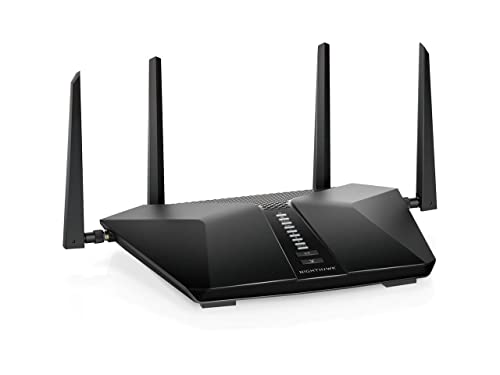
NETGEAR Nighthawk WiFi 6 Router R6700AX
The NETGEAR Nighthawk WiFi 6 Router R6700AX is the Nighthawk pick in this guide, and it is the pick for a buyer who wants a trusted name with clear coverage numbers. It is a NETGEAR Nighthawk WiFi 6 router, model R6700AX, covering up to 1,500 square feet at 1.8 Gbps, with reliable performance, easy setup, 20 devices, four gigabit ports, dual band, and AX1800 speed. The 1,500 square foot coverage suits a flat or a small house, and the 20 device limit covers the phones, laptops, and televisions of a normal home.
The R6700AX suits a buyer who wants a simple router from a known brand with numbers that are easy to understand. The four gigabit ports cover wired devices, the dual band design separates the fast and the long-range bands, and the easy setup gets the network running in minutes. It is the router for a buyer who wants a straightforward Nighthawk.
Key specs:
- NETGEAR Nighthawk WiFi 6 router R6700AX
- Up to 1,500 sq ft
- 1.8 Gbps
- 20 devices
- 4x gigabit ports
- Dual band, AX1800
Strengths:
- Clear coverage and device numbers in the title
- Four gigabit ports for wired devices
- Easy setup from a trusted brand
Trade-offs:
- Covers 20 devices, fewer than the larger picks
- AX1800 is the slowest speed here
- 1,500 square feet suits a flat, not a large house
The NETGEAR R6700AX fits a buyer in a flat or a small house who wants a simple Nighthawk router.
Best for: a flat or small house with a gigabit plan. Not suited for: a large house, or a home with more than 20 devices.
Check price on Amazon: NETGEAR Nighthawk R6700AX WiFi 6 router

ASUS RT-AX1800S Dual Band WiFi 6 Extendable Router
The ASUS RT-AX1800S Dual Band WiFi 6 Extendable Router is the extendable pick in this guide, and it is the pick for a buyer who wants a router that can grow into a mesh. It is an ASUS RT-AX1800S dual band WiFi 6 extendable router with subscription-free network security, parental control, a built-in VPN, AiMesh compatibility, and support for gaming, streaming, and smart home use. The AiMesh support means a second ASUS router can join it as a mesh node, and the subscription-free security means the protection costs nothing extra.
The RT-AX1800S suits a buyer who wants a small router now and a mesh network later. The parental control covers children devices, the built-in VPN covers remote access, and the dual band WiFi 6 covers the phones and laptops of a normal home. It is the router for a buyer who wants to start small and grow.
Key specs:
- ASUS RT-AX1800S dual band WiFi 6 extendable router
- Subscription-free network security
- Parental control
- Built-in VPN
- AiMesh compatible
- Gaming, streaming, smart home
Strengths:
- AiMesh lets it grow into a mesh network
- Subscription-free security costs nothing extra
- Parental control and built-in VPN included
Trade-offs:
- AX1800 is the slowest speed here
- A compact router with fewer ports stated
- Needs a second ASUS device for mesh coverage
The ASUS RT-AX1800S fits a buyer who wants a small router now and a mesh network later.
Best for: a small router that can grow into a mesh. Not suited for: a large home that needs mesh now, or a buyer who wants the fastest speed.
Check price on Amazon: ASUS RT-AX1800S WiFi 6 router

TP-Link AC1200 Gigabit Dual Band WiFi Router Archer A6
The TP-Link AC1200 Gigabit Dual Band WiFi Router Archer A6 is the budget pick in this guide, and it is the pick for a buyer who wants gigabit ports without paying for Wi-Fi 6. It is a TP-Link AC1200 gigabit dual band WiFi router, model Archer A6, with MU-MIMO wireless internet, four antennas, OneMesh, and AP mode, with long range coverage. The gigabit ports give wired devices full speed, and the four antennas cover a flat or a small house.
The Archer A6 suits a buyer with a gigabit plan who does not need Wi-Fi 6 yet and wants the lowest price with gigabit ports. The MU-MIMO design serves several devices at once, the OneMesh support lets a second TP-Link device extend the network, and the AP mode turns it into an access point. It is the router for a buyer who wants gigabit on a budget.
Key specs:
- TP-Link AC1200 gigabit dual band WiFi router
- Archer A6
- MU-MIMO wireless internet
- 4 x antennas
- OneMesh and AP mode
- Long range coverage
Strengths:
- Gigabit ports at the lowest price here
- Four antennas for long range coverage
- OneMesh and AP mode for flexibility
Trade-offs:
- Wi-Fi 5, not Wi-Fi 6, so it is slower with many devices
- AC1200 is the slowest speed here
- An older router with fewer features
The TP-Link Archer A6 fits a buyer with a gigabit plan who wants gigabit ports at the lowest price.
Best for: gigabit ports on the lowest budget. Not suited for: a buyer who needs Wi-Fi 6, or a home with many devices.
Check price on Amazon: TP-Link Archer A6 gigabit WiFi router
Buying guide for the best gigabit wireless routers
Check the internet plan speed first
Start with the internet plan, because the plan decides the router. A gigabit plan needs a gigabit router, and a plan under 100 Mbps does not. A buyer with a 500 Mbps plan should buy a gigabit router, because the plan is fast enough to need one, and a buyer with a 1 Gbps plan must buy one, because a slower router will cap the speed. Check the plan speed on the bill before buying.
The plan speed also decides the Wi-Fi speed needed. A gigabit plan with many wireless devices needs Wi-Fi 6, because Wi-Fi 5 will slow down when many devices share it. A buyer with a gigabit plan and a dozen devices should buy an AX1800 or faster Wi-Fi 6 router, and a buyer with a gigabit plan and few devices can buy a slower one.
Wi-Fi 6 or Wi-Fi 5: which generation
Wi-Fi 6 is faster than Wi-Fi 5 with many devices, because it serves several devices at once. The five Wi-Fi 6 routers in this guide are the right buy for a home with many phones, laptops, and televisions. The one Wi-Fi 5 router here, the TP-Link Archer A6, is the right buy for a home with few devices that wants gigabit ports at the lowest price.
A buyer who keeps a router for years should buy Wi-Fi 6, because new devices use it and old devices will be replaced. A buyer who replaces the router often can buy Wi-Fi 5 and save money. Check the generation in the title before buying, because AX means Wi-Fi 6 and AC means Wi-Fi 5.
Coverage: one router or a mesh
Coverage decides whether one router is enough or a mesh is needed. A router that covers 1,500 square feet suits a flat or a small house, and a long-range router suits a larger home. A buyer with a large home or thick walls should look at a mesh system, because one router cannot cover every room, and a buyer with a small home should buy one router.
The extendable routers here, the ASUS RT-AX1800S with AiMesh and the TP-Link routers with Easy Mesh, can grow into a mesh by adding a second device. A buyer who is not sure should buy an extendable router, because it covers the home now and can grow later. A buyer who knows the home needs mesh now should buy a mesh system instead.
Ports: how many wired devices
Count the wired devices before buying, because a router with four gigabit ports covers a computer, a console, a television, and a spare. A router with fewer ports will need a switch, and a switch is another box to buy and power. The ASUS RT-AX3000 and the NETGEAR R6700AX have four gigabit LAN ports, and a buyer with many wired devices should look for four.
The USB port matters too. A USB 3.0 port shares a drive or a printer with the home, and the ASUS RT-AX3000 has one. A buyer who wants to share a drive should look for a USB port, and a buyer who does not need it can skip it. Check the ports in the title before buying.
Security and parental control
A router protects the home network, and the security features decide how well. The ASUS RT-AX3000 has AiProtection by Trend Micro, which blocks malicious sites, and the ASUS RT-AX1800S has subscription-free network security, which costs nothing extra. A buyer who wants protection should look for these features, and a buyer with children should look for parental control.
Parental control lets the buyer limit the internet for children devices, and a VPN lets the buyer reach the home network from outside. The ASUS routers here offer both, and a buyer who works from home should look for a VPN. Check the security features in the title before buying, because a router without them leaves the network open.
Using and caring for a gigabit wireless router
Place the router and set it up
Place the router in the center of the home, high on a shelf, away from walls and metal, because Wi-Fi travels best with a clear path. Do not put the router in a cupboard or behind a television, because the signal will be blocked. A router in the center covers the home evenly, and a router in a corner leaves the far rooms weak.
After placing it, connect the modem to the WAN port, connect the wired devices to the LAN ports, and set a strong Wi-Fi password. Update the firmware on the first day, because new firmware fixes bugs and security holes. A router with old firmware is a router with known holes, and a buyer should update it before using it.
Keep the router cool and clean
A router runs all day, and it needs airflow to stay cool. Keep the vents clear, and do not stack books or boxes on it, because a router that overheats will slow down and drop connections. Dust the router with a dry cloth every few months, because dust blocks the vents and makes it run hotter.
Watch the router in the first week, because a router that drops connections or runs hot needs a better spot or more airflow. A router that stays cool will run for years, and a router that overheats will fail early. Good placement is the cheapest upgrade a router can get.
Look after the network for the long term
Check the router firmware once a month, because makers release updates that fix bugs and security holes. A router with the latest firmware is a secure router, and a router with old firmware is a risk. Set the router to update itself when possible, and check it by hand when it cannot.
Change the Wi-Fi password once a year, and check the connected devices for ones that should not be there. A device that is not recognized may be a neighbor using the network, and a buyer who finds one should change the password and check the security settings. A secure network is a network that is checked.
Common mistakes when buying a gigabit wireless router
Buying a router without gigabit ports
The most common mistake is buying a router with 100 Mbps ports for a gigabit plan. The router will cap the plan at 100 Mbps, and the buyer will never see the speed being paid for. Check the title for the word gigabit before buying, and check the port count, because a router with one gigabit port and the rest slower is not a gigabit router.
The same mistake happens with the Wi-Fi speed. A router with slow Wi-Fi will cap the wireless devices, even when the ports are gigabit. Check both the ports and the Wi-Fi speed in the title before buying, because both decide the real speed.
Buying a wired-only router by mistake
A wired VPN router has gigabit ports but no Wi-Fi, and a buyer who needs wireless will be disappointed. Listings for wired routers appear in the same search results, and a buyer in a hurry can buy one by mistake. Check the title for Wi-Fi or wireless before buying, and look at the photo for antennas.
The same care applies to modem router combos and mesh nodes sold alone. A modem router combo replaces the modem, and a mesh node alone cannot be the main router. Buy a wireless router with gigabit ports, and check the title before buying.
Buying a renewed router by mistake
Renewed routers appear in the same search results as new ones, and they cost less, but they carry no maker warranty and they may have been used hard. A router that was run all day for years will not last as long as a new one, and a buyer who saves money on a renewed router can lose it on an early failure. Buy new, from a known brand, and keep the warranty.
The listing title states whether a router is renewed, so read it before buying. A router with Renewed in the title is not a new router, no matter how good the price looks. The six routers in this guide are all new listings, and a buyer should check the title of any router before buying it.
Placing the router in the wrong spot
A router in a cupboard or behind a television will have weak Wi-Fi, no matter how good the router is. Place the router in the center of the home, high on a shelf, away from walls and metal, because Wi-Fi travels best with a clear path. A router in the center covers the home evenly, and a router in a corner leaves the far rooms weak.
The same care applies to the antennas. A router with antennas should have them pointing up and out, not flat or crossed, because the antennas shape the signal. A buyer who places the router well will get better Wi-Fi than a buyer who buys a stronger router and hides it.
Our recommendation for the best gigabit wireless router
The best gigabit wireless router for most buyers is the TP-Link AX1800 WiFi 6 Router Archer AX21 V5, because it has gigabit ports, Wi-Fi 6, Easy Mesh, and Alexa support at a sensible price. It covers a normal home with a gigabit plan and a dozen devices, and it is the router for a home that wants fast Wi-Fi without paying for more than it needs. A buyer with a gigabit plan should start there.
A buyer with a larger home should buy the TP-Link Archer AX73, because its AX5400 speed and long range cover more rooms from one router. A buyer who wants security should buy the ASUS RT-AX3000, a buyer who wants a simple Nighthawk should buy the NETGEAR R6700AX, and a buyer who wants a router that can grow into a mesh should buy the ASUS RT-AX1800S. A buyer on the tightest budget should buy the TP-Link Archer A6.
Whichever router is chosen, check the plan speed first, match the coverage to the home, and place the router in the center before buying. A router with gigabit ports, fast Wi-Fi, and a good spot will give the full speed of the plan. The right router is the one that lets the plan reach every device in the home.
Related reading on Reviewstook: see our guides to best Wi-Fi 6 router for home use under 30, best Wi-Fi 6 router for gaming under 30, best and fastest triband extenders for more on this topic.
Frequently asked questions about gigabit wireless routers
Do I need a gigabit router for a gigabit plan?
Yes, a gigabit plan needs a gigabit router, because a router with slower ports will cap the plan at the port speed. A home with a gigabit plan and a router with 100 Mbps ports will never see more than 100 Mbps, no matter what the plan promises. Check the title for the word gigabit before buying, and check the port count.
The Wi-Fi speed matters too. A gigabit plan with many wireless devices needs Wi-Fi 6, because Wi-Fi 5 will slow down when many devices share it. Buy a gigabit router with Wi-Fi 6 when the plan is gigabit and the home has many devices.
What is the difference between Wi-Fi 6 and Wi-Fi 5?
Wi-Fi 6 is faster than Wi-Fi 5 with many devices, because it serves several devices at once instead of one at a time. The five Wi-Fi 6 routers in this guide are the right buy for a home with many phones, laptops, and televisions. The one Wi-Fi 5 router here, the TP-Link Archer A6, is the right buy for a home with few devices that wants gigabit ports at the lowest price.
A buyer who keeps a router for years should buy Wi-Fi 6, because new devices use it. Check the generation in the title before buying, because AX means Wi-Fi 6 and AC means Wi-Fi 5.
How many devices can a gigabit router handle?
It depends on the router. The NETGEAR R6700AX in this guide states 20 devices, and the Wi-Fi 6 routers here handle more, because Wi-Fi 6 serves several devices at once. A home with a dozen devices will be fine with any router here, and a home with many smart devices should buy Wi-Fi 6.
The device count also depends on what the devices do. A dozen phones browsing is easy, and a dozen devices streaming video at once is hard. A buyer with many streaming devices should buy a faster router, like the Archer AX73 with AX5400 speed.
Should I buy a mesh system instead of one router?
A buyer with a large home or thick walls should buy a mesh system, because one router cannot cover every room. A buyer with a small home should buy one router, because it is cheaper and simpler. The extendable routers here, like the ASUS RT-AX1800S with AiMesh, can grow into a mesh by adding a second device.
A buyer who is not sure should buy an extendable router, because it covers the home now and can grow later. A buyer who knows the home needs mesh now should buy a mesh system instead of one router.
Where should I place my router?
Place the router in the center of the home, high on a shelf, away from walls and metal, because Wi-Fi travels best with a clear path. Do not put the router in a cupboard or behind a television, because the signal will be blocked. A router in the center covers the home evenly, and a router in a corner leaves the far rooms weak.
The antennas should point up and out, not flat or crossed, because they shape the signal. A buyer who places the router well will get better Wi-Fi than a buyer who buys a stronger router and hides it.