The best and fastest triband extenders are the ones that fix a dead zone without slowing the whole network down. A tri-band extender has three radios instead of two, and the third band carries the traffic between the extender and the router, so the speed stays high even far from the router. The six extenders in this guide were picked because their listing titles state the exact brand, model, Wi-Fi standard, speed, and coverage, and every listing was checked in full before it was linked.
A dual-band extender slows the network down, because it uses the same band to talk to the router and to the devices, and it can only do one at a time. A tri-band extender talks to the router on one band and to the devices on the others, so it does both at once, and the speed stays high. That is why tri-band costs more, and why it is worth it for a buyer who streams, games, or works from the far room.
Speed matters too, and the extenders here range from AC2200 to Wi-Fi 7 at 10 Gbps. The fastest extender here, the TP-Link RE653BE, is nearly twice as fast as the slowest, and it supports the most devices. But speed is limited by the router: a Wi-Fi 7 extender needs a Wi-Fi 7 router for full speed, and a Wi-Fi 6E extender needs a Wi-Fi 6E router for its 6GHz band.
This guide covers six triband extenders: three TP-Link models for Wi-Fi 6, Wi-Fi 6E, and Wi-Fi 7, and three NETGEAR mesh models for AC tri-band with smart roaming. All six are tri-band extenders, all six are sold as new listings, and all six have their Wi-Fi standard, speed, and coverage stated in the listing title, so the comparison is honest.
In this guide
Quick picks: best and fastest triband extenders
| # | Product | Where to buy |
|---|---|---|
| 1 | TP-Link RE813XE AXE5400 tri-band extender | Check on Amazon |
| 2 | TP-Link RE815X AX5400 tri-band extender | Check on Amazon |
| 3 | TP-Link RE653BE BE10000 Wi-Fi 7 tri-band extender | Check on Amazon |
| 4 | NETGEAR EX7700 AC2200 tri-band extender | Check on Amazon |
| 5 | NETGEAR EX7500 AC2200 tri-band extender | Check on Amazon |
| 6 | NETGEAR EX8000 AC3000 tri-band extender | Check on Amazon |
How the picks were chosen for the best and fastest triband extenders
Every extender below started as a listing returned by the reviewstook.com product lookup, and every listing was checked the same way. First, the title had to name the exact brand and the exact model, including every number and letter, because a TP-Link RE813XE is not a TP-Link RE815X, and a NETGEAR EX7700 is not a NETGEAR EX7500. Second, the title had to state tri-band, because a dual-band extender is a different product, and a buyer must know which one is being linked.
The extenders were also checked for the numbers that decide speed and coverage. Speed decides how fast the Wi-Fi is in the far room, and the extenders here range from 2200Mbps to 10 Gbps. Coverage decides how far the extender reaches, and the extenders here range from 2300 to 2800 square feet. Devices decide how many phones, laptops, and smart home gadgets can connect, and the extenders here range from 45 to 128 devices.
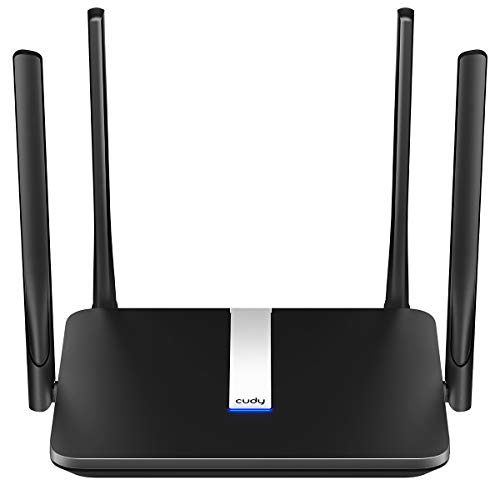
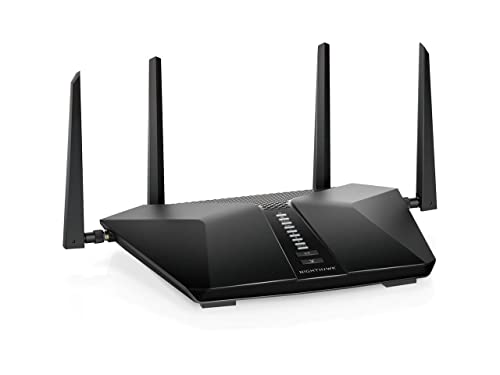
One more check shaped the list: the extender must be an extender, not a router or a mesh system. Listings for routers, mesh systems, and antennas were left out, because a buyer needs an extender to fix a dead zone, not a new router. The six extenders below are all tri-band range extenders, sold as new listings, with the Wi-Fi standard, the speed, and the coverage stated in the title.
What a triband extender is, and who should buy one
A triband extender is a device that picks up a Wi-Fi signal from the router and repeats it further, with three radios instead of two. The three bands are usually 2.4GHz, 5GHz, and a second 5GHz or a 6GHz band, and one band is used as a dedicated backhaul to the router, while the others serve the devices. That dedicated backhaul is what makes a tri-band extender faster than a dual-band one, because it does not have to share.
A triband extender suits anyone with a Wi-Fi dead zone: a bedroom with no signal, a home office in the far corner, a basement, or a garden room. It is the right choice when the router cannot be moved, when running a cable is not possible, and when the Wi-Fi must be fast in the far room. It is not the right choice for a buyer who needs a whole new network, because a mesh system does that better, and it is not the right choice for a buyer who can run a cable, because a wired access point is faster.
The six extenders in this guide cover the main uses. The TP-Link RE653BE is the pick for the fastest Wi-Fi, the TP-Link RE813XE is the pick for Wi-Fi 6E, the TP-Link RE815X is the pick for the best value, the NETGEAR EX7700 and EX7500 are the picks for NETGEAR mesh homes, and the NETGEAR EX8000 is the pick for the best AC tri-band performance.
What makes a good triband extender
Tri-band is the first test, and it is the one that defines this guide. A tri-band extender has a dedicated band for backhaul, so it keeps its speed far from the router, while a dual-band extender shares its bands and slows down. The titles in this guide state tri-band plainly, so there is no guessing, and the dual-band extenders that appeared in the search results were left out.
Speed and Wi-Fi standard are the second test. Speed decides how fast the Wi-Fi is in the far room, and the extenders here range from AC2200 to Wi-Fi 7 at 10 Gbps. The Wi-Fi standard decides what the extender can do: Wi-Fi 7 is the fastest, Wi-Fi 6E adds the 6GHz band, WiFi 6 is the standard, and AC is the older standard. Buy the fastest standard the router supports, because an extender cannot be faster than the router it connects to.
Coverage, devices, and mesh support decide the rest. Coverage decides how far the extender reaches, and the extenders here cover 2300 to 2800 square feet. Devices decide how many gadgets can connect, and the extenders here support 45 to 128 devices. Mesh support, like OneMesh on the TP-Link models and mesh smart roaming on the NETGEAR models, lets devices move between the router and the extender without dropping, and it is worth having in a home where people move around.
Quick picks at a glance
| Extender | Wi-Fi standard and speed | Coverage and devices | Best for |
|---|---|---|---|
| TP-Link RE813XE AXE5400 | Wi-Fi 6E, 5.4 Gbps | 2800 sq ft, 96 devices | Best Wi-Fi 6E pick |
| TP-Link RE815X AX5400 | WiFi 6, 5.4 Gbps | 2800 sq ft, 96 devices | Best value pick |
| TP-Link RE653BE BE10000 | Wi-Fi 7, 10 Gbps | 2800 sq ft, 128 devices | Fastest pick |
| NETGEAR EX7700 | AC2200 tri-band | 2300 sq ft, 45 devices | Best mesh pick |
| NETGEAR EX7500 | AC2200 tri-band | 2300 sq ft, 45 devices | Best compact mesh pick |
| NETGEAR EX8000 | AC3000 tri-band | 2500 sq ft, 50 devices | Best AC pick |
The best and fastest triband extenders
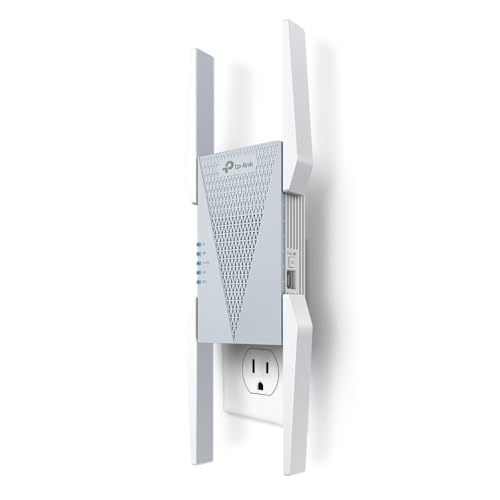
TP-Link RE813XE AXE5400 Wi-Fi 6E Tri-Band Extender
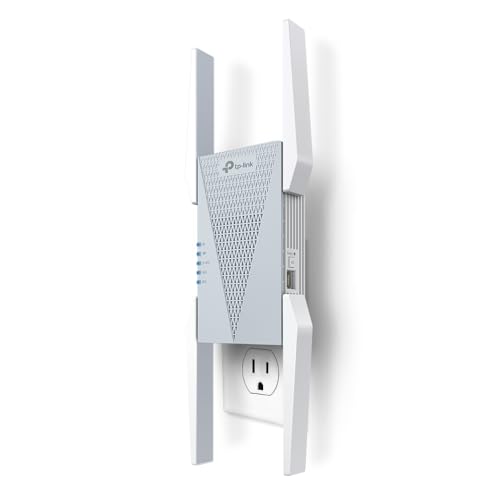
The TP-Link RE813XE AXE5400 is the Wi-Fi 6E pick in this guide, and it is the extender for a buyer who wants the 6GHz band without paying for Wi-Fi 7. It is a TP-Link RE813XE AXE5400 Wi-Fi 6E tri-band range extender with an Ethernet port, 5.4 Gbps wireless repeater amplifier, up to 2800 square feet, 96 devices, 6GHz band, 160MHz, app setup, and OneMesh. The tri-band design adds a 6GHz band for backhaul, so the extender talks to the router on one band and to the devices on the others, and the speed stays high.
The RE813XE suits a buyer with a Wi-Fi 6E router, a household with many devices, and anyone who wants fast Wi-Fi in a dead zone. Its 5.4 Gbps speed handles streaming and gaming, its 2800 square feet of coverage reaches the far rooms, and its OneMesh support lets it join a TP-Link mesh network. It is the extender for Wi-Fi 6E homes.
Key specs:
- TP-Link RE813XE AXE5400
- Wi-Fi 6E tri-band range extender
- 5.4 Gbps wireless repeater
- Up to 2800 sq ft, 96 devices
- 6GHz band, 160MHz, Ethernet port, OneMesh
Strengths:
- 6GHz band gives the extender a fast backhaul
- 5.4 Gbps handles streaming and gaming
- OneMesh joins a TP-Link mesh network
Trade-offs:
- Wi-Fi 6E needs a Wi-Fi 6E router to use the 6GHz band
- A plug-in extender that covers an outlet
- 96 devices is fewer than the Wi-Fi 7 model here
The RE813XE fits a buyer with a Wi-Fi 6E router, a household with many devices, and anyone who wants fast Wi-Fi in a dead zone.
Best for: Wi-Fi 6E homes. Not suited for: a buyer with an old Wi-Fi 5 router, or who wants the fastest Wi-Fi 7 speeds.
Check price on Amazon: TP-Link RE813XE AXE5400 tri-band extender

TP-Link RE815X AX5400 WiFi 6 Tri-Band Extender
The TP-Link RE815X AX5400 is the WiFi 6 pick in this guide, and it is the extender for a buyer who wants tri-band speed at a WiFi 6 price. It is a TP-Link RE815X AX5400 WiFi 6 tri-band range extender with an Ethernet port, 5.4 Gbps wireless repeater amplifier, up to 2800 square feet, 96 devices, internet signal booster, 160MHz, app setup, and OneMesh. Its tri-band design gives it a dedicated band for backhaul, so it is faster than a dual-band extender at the same price, and its 5.4 Gbps speed matches the Wi-Fi 6E model here.
The RE815X suits a buyer with a WiFi 6 router, a household that streams and games, and anyone who wants tri-band performance without paying for Wi-Fi 6E or Wi-Fi 7. Its 5.4 Gbps speed handles 4K streaming, its 2800 square feet of coverage reaches the far rooms, and its Ethernet port connects a wired device. It is the extender for WiFi 6 homes at the best value.
Key specs:
- TP-Link RE815X AX5400
- WiFi 6 tri-band range extender
- 5.4 Gbps wireless repeater
- Up to 2800 sq ft, 96 devices
- 160MHz, Ethernet port, OneMesh
Strengths:
- Tri-band speed at a WiFi 6 price
- 5.4 Gbps handles 4K streaming and gaming
- Ethernet port for a wired device
Trade-offs:
- No 6GHz band, unlike the Wi-Fi 6E and Wi-Fi 7 models
- A plug-in extender that covers an outlet
- WiFi 6 is slower than Wi-Fi 7
The RE815X fits a buyer with a WiFi 6 router, a household that streams and games, and anyone who wants tri-band speed at a good price.
Best for: WiFi 6 homes at the best value. Not suited for: a buyer who wants the 6GHz band, or the fastest Wi-Fi 7 speeds.
Check price on Amazon: TP-Link RE815X AX5400 tri-band extender

TP-Link RE653BE BE10000 Wi-Fi 7 Tri-Band Extender
The TP-Link RE653BE BE10000 is the fastest extender in this guide, and it is the extender for a buyer who wants the best Wi-Fi available. It is a TP-Link BE10000 Wi-Fi 7 tri-band range extender, MLO 6GHz, model RE653BE, with 10 Gbps wireless repeater, a 2.5 Gbps Ethernet port, internet signal booster for home, up to 2800 square feet, 128 devices, and EasyMesh. The 10 Gbps speed is nearly twice the other extenders here, the MLO technology bonds bands together for more speed, and the 2.5 Gbps Ethernet port connects a wired device at full speed.
The RE653BE suits a buyer with a Wi-Fi 7 router, a household with many devices and heavy use, and anyone who wants the fastest extender that can be bought. Its 10 Gbps speed handles anything, its 128 devices cover the largest households, and its EasyMesh support lets it join a mesh network. It is the extender for the fastest Wi-Fi.
Key specs:
- TP-Link RE653BE BE10000
- Wi-Fi 7 tri-band range extender, MLO 6GHz
- 10 Gbps wireless repeater
- 2.5 Gbps Ethernet port
- Up to 2800 sq ft, 128 devices, EasyMesh
Strengths:
- 10 Gbps, the fastest speed here
- MLO bonds bands for more speed
- 128 devices, the most here
Trade-offs:
- Wi-Fi 7 needs a Wi-Fi 7 router for full speed
- The fastest extender costs the most
- A plug-in extender that covers an outlet
The RE653BE fits a buyer with a Wi-Fi 7 router, a large household with many devices, and anyone who wants the fastest extender available.
Best for: the fastest Wi-Fi. Not suited for: a buyer with an old router, or who wants the cheapest extender.
Check price on Amazon: TP-Link RE653BE BE10000 Wi-Fi 7 tri-band extender
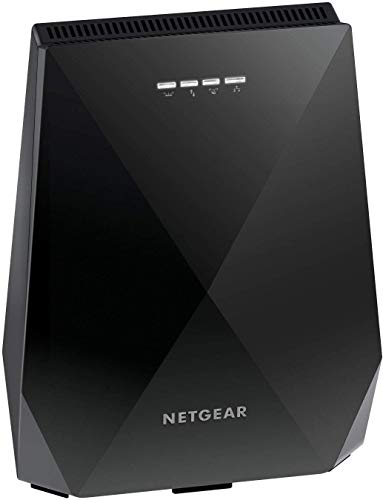
NETGEAR EX7700 AC2200 Tri-Band Extender
The NETGEAR EX7700 is the mesh extender in this guide, and it is the extender for a buyer with a NETGEAR mesh network. It is a NETGEAR WiFi mesh range extender, model EX7700, with coverage up to 2300 square feet and 45 devices, AC2200 tri-band wireless signal booster and repeater, up to 2200Mbps speed, plus mesh smart roaming. The mesh smart roaming lets devices move between the router and the extender without dropping, and the tri-band design gives it a dedicated band for backhaul.
The EX7700 suits a buyer with a NETGEAR router, a household that moves around the house with phones and laptops, and anyone who wants mesh roaming in an extender. Its 2300 square feet of coverage reaches the far rooms, its 45 devices cover a family, and its mesh roaming keeps video calls connected while walking. It is the extender for NETGEAR mesh homes.
Key specs:
- NETGEAR EX7700
- AC2200 tri-band mesh range extender
- Up to 2200Mbps speed
- Coverage up to 2300 sq ft, 45 devices
- Mesh smart roaming
Strengths:
- Mesh smart roaming keeps devices connected while moving
- Tri-band design with a dedicated backhaul band
- Works with NETGEAR mesh networks
Trade-offs:
- AC2200 is slower than the WiFi 6 and Wi-Fi 7 models here
- 2300 sq ft is less than the 2800 sq ft models
- 45 devices is fewer than the TP-Link models
The EX7700 fits a buyer with a NETGEAR router, a household that moves around with phones and laptops, and anyone who wants mesh roaming.
Best for: NETGEAR mesh homes. Not suited for: a buyer who wants the fastest speeds, or the largest coverage.
Check price on Amazon: NETGEAR EX7700 AC2200 tri-band extender
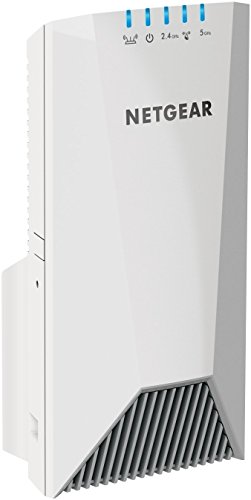
NETGEAR EX7500 AC2200 Tri-Band Extender
The NETGEAR EX7500 is the compact mesh extender in this guide, and it is the extender for a buyer who wants mesh roaming in a smaller package. It is a NETGEAR WiFi mesh range extender, model EX7500, with coverage up to 2300 square feet and 45 devices, AC2200 tri-band wireless signal booster and repeater, up to 2200Mbps speed, plus mesh smart roaming. It has the same speed, coverage, and mesh roaming as the EX7700, in a design that plugs into a wall outlet and stays out of the way.
The EX7500 suits a buyer with a NETGEAR router, a smaller home that needs one extender, and anyone who wants mesh roaming without a large device. Its 2300 square feet of coverage reaches the far rooms, its tri-band design keeps the speed up, and its mesh roaming keeps devices connected. It is the extender for compact mesh coverage.
Key specs:
- NETGEAR EX7500
- AC2200 tri-band mesh range extender
- Up to 2200Mbps speed
- Coverage up to 2300 sq ft, 45 devices
- Mesh smart roaming
Strengths:
- Mesh smart roaming keeps devices connected
- Tri-band design with a dedicated backhaul band
- Compact plug-in design
Trade-offs:
- AC2200 is slower than the WiFi 6 and Wi-Fi 7 models here
- 2300 sq ft is less than the 2800 sq ft models
- 45 devices is fewer than the TP-Link models
The EX7500 fits a buyer with a NETGEAR router, a smaller home that needs one extender, and anyone who wants compact mesh coverage.
Best for: compact mesh coverage. Not suited for: a buyer who wants the fastest speeds, or the largest coverage.
Check price on Amazon: NETGEAR EX7500 AC2200 tri-band extender
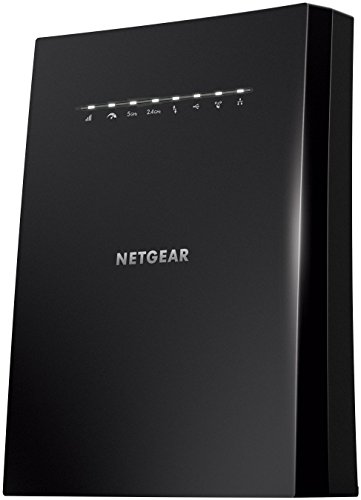
NETGEAR EX8000 AC3000 Tri-Band Extender
The NETGEAR EX8000 is the most powerful NETGEAR extender in this guide, and it is the extender for a buyer who wants the best AC tri-band performance. It is a NETGEAR WiFi mesh range extender, model EX8000, with coverage up to 2500 square feet and 50 devices, AC3000 tri-band wireless signal booster and repeater, up to 3000 Mbps speed, plus mesh smart roaming. Its 3000 Mbps speed is the fastest AC speed here, its 2500 square feet of coverage is the largest of the NETGEAR models, and its mesh roaming keeps devices connected.
The EX8000 suits a buyer with a large home, a household that streams in 4K, and anyone who wants the best AC extender NETGEAR makes. Its 3000 Mbps speed handles heavy use, its 2500 square feet reaches further than the other NETGEAR models, and its tri-band design keeps the speed up. It is the extender for the best AC tri-band performance.
Key specs:
- NETGEAR EX8000
- AC3000 tri-band mesh range extender
- Up to 3000 Mbps speed
- Coverage up to 2500 sq ft, 50 devices
- Mesh smart roaming
Strengths:
- 3000 Mbps, the fastest AC speed here
- 2500 sq ft, the largest NETGEAR coverage here
- Mesh smart roaming keeps devices connected
Trade-offs:
- AC3000 is slower than the WiFi 6 and Wi-Fi 7 models here
- A larger extender than the plug-in models
- 50 devices is fewer than the TP-Link models
The EX8000 fits a buyer with a large home, a household that streams in 4K, and anyone who wants the best AC extender NETGEAR makes.
Best for: the best AC tri-band performance. Not suited for: a buyer who wants WiFi 6 or Wi-Fi 7 speeds, or the cheapest extender.
Check price on Amazon: NETGEAR EX8000 AC3000 tri-band extender
Buying guide for the best and fastest triband extenders
Match the extender to the router
The extender cannot be faster than the router it connects to, so match the Wi-Fi standard first. A Wi-Fi 7 extender needs a Wi-Fi 7 router for full speed, a Wi-Fi 6E extender needs a Wi-Fi 6E router for its 6GHz band, and a WiFi 6 extender needs a WiFi 6 router. A fast extender on an old router will still work, but it will only run at the router speed, and the extra money is wasted.
Check the router before buying, and buy the extender that matches it. If the router is old, consider upgrading the router first, because a new router may fix the dead zone on its own. If the router is new and the dead zone remains, buy the extender that matches its standard.
Place the extender halfway, not at the dead zone
An extender must be placed where it can still hear the router clearly, which is halfway between the router and the dead zone, not in the dead zone itself. An extender placed in the dead zone hears the same weak signal the devices hear, and it repeats a weak signal, which is still weak. An extender placed halfway hears a strong signal and repeats it strongly.
Use the signal indicator on the extender, or the app, to find the right spot. A green light means a good signal, and a red light means the extender is too far from the router. Move it closer to the router until the light turns green, and then test the Wi-Fi in the dead zone. The right spot is found by trying, not by guessing.
Speed: how fast is fast enough
Speed decides what the Wi-Fi can do in the far room, and the extenders here range from 2200Mbps to 10 Gbps. A 2200Mbps extender is fast enough for streaming and browsing, a 5.4 Gbps extender is fast enough for 4K streaming and gaming, and a 10 Gbps extender is fast enough for anything. Buy the speed that matches the use, not the biggest number on the list.
Remember that the speed in the title is the total across all bands, not the speed one device gets. A 5.4 Gbps extender does not give one device 5.4 Gbps; it gives all devices 5.4 Gbps shared between them. That is still plenty for most homes, because few devices use their full speed at once.
Coverage and devices: how big is the home
Coverage decides how far the extender reaches, and the extenders here cover 2300 to 2800 square feet. A small home needs one extender, a large home may need two, and a home with thick walls needs more coverage than the numbers suggest, because walls block Wi-Fi. Buy the coverage that matches the home, and buy a second extender if one is not enough.
Devices decide how many gadgets can connect, and the extenders here support 45 to 128 devices. A home with a few phones and laptops needs 45, and a smart home with dozens of gadgets needs 128. Count the devices before buying, including the ones that are forgotten, like smart bulbs and cameras, because they all count.
Mesh or standalone: one network or two
A mesh extender joins the router network as one network, so devices move between them without dropping, while a standalone extender creates a second network with a different name, and devices must switch manually. The TP-Link models here support OneMesh, and the NETGEAR models here support mesh smart roaming, so they join the network as one. Buy a mesh extender when the router supports it, because one network is easier than two.
If the router does not support mesh, the extender will still work, but it will create its own network, and devices will need to switch. That is fine for a fixed device like a television, which stays in one place, but it is annoying for a phone that moves around the house. Check the router mesh support before buying.
Using and caring for a triband extender
Set up the extender with the app
Set up the extender with the app, because it is easier than the web interface and it shows the signal strength while placing it. Follow the app steps, connect the extender to the router network, and give it the same network name and password as the router when the app offers it, so devices move between them easily. Test the Wi-Fi in the dead zone after setup, and move the extender if the speed is still low.
Update the extender firmware when the app offers it, because updates fix bugs and improve performance. A firmware update takes a few minutes and should not be interrupted, so do it when the network is not needed. An extender that is kept updated is an extender that works well.
Keep the extender cool and clear
Keep the extender out of direct sun and away from heat, because it runs warm and heat slows it down. Keep it clear of metal objects and thick walls, because they block Wi-Fi, and keep it off the floor, because Wi-Fi travels better from a height. A plug-in extender that covers an outlet should be placed in an outlet that is not behind furniture.
Do not plug the extender into a power strip with many devices, because it needs a clean power supply, and do not unplug it often, because it takes a minute to reconnect. Leave it plugged in, and it will work every day without thinking about it.
Restart the extender when the Wi-Fi slows down
Restart the extender when the Wi-Fi slows down, because a restart clears the memory and reconnects to the router cleanly. Unplug it, wait ten seconds, and plug it back in, and it will reconnect in a minute. A restart once a month keeps the extender working well, and it is the first thing to try when the Wi-Fi is slow.
If the Wi-Fi is slow often, check the placement, because the extender may have been moved, or the router may have been moved. Check the firmware, because an old version may have a bug. And check the router, because the extender cannot fix a router that is failing.
Common mistakes when buying a triband extender
Placing the extender in the dead zone
The most common mistake is placing the extender in the dead zone itself, where it hears the same weak signal the devices hear and repeats a weak signal. An extender must be placed halfway between the router and the dead zone, where it can still hear the router clearly. Use the signal light or the app to find the right spot, and move the extender until the light is green.
The second mistake is buying a dual-band extender and expecting tri-band speed. A dual-band extender shares its bands and slows down, while a tri-band extender has a dedicated backhaul band. The titles in this guide state tri-band plainly, and the dual-band extenders that appeared in the search were left out.
Buying a faster extender than the router
The third most common mistake is buying a Wi-Fi 7 extender for a Wi-Fi 5 router and expecting Wi-Fi 7 speeds. An extender cannot be faster than the router it connects to, so the extra money is wasted. Match the extender to the router, and upgrade the router first if it is old.
The fourth mistake is buying a mesh system when an extender was needed, or an extender when a mesh system was needed. An extender fixes one dead zone, and a mesh system replaces the whole network. Buy an extender for one dead zone, and buy a mesh system when the whole home has weak Wi-Fi.
Forgetting the Ethernet port
The fifth most common mistake is forgetting that an extender with an Ethernet port can connect a wired device, like a television or a game console, and that wired connection is faster and more stable than Wi-Fi. The TP-Link models in this guide have Ethernet ports, and they are worth using for a device that stays in one place.
The sixth mistake is never updating the firmware. An extender with old firmware may have bugs that slow it down, and an update fixes them. Check the app once a month, and install updates when they appear.
Final recommendation
For most buyers, the TP-Link RE815X AX5400 is the best all-round choice in this guide. It is a tri-band WiFi 6 extender with 5.4 Gbps speed, 2800 square feet of coverage, and 96 devices, and it costs less than the Wi-Fi 6E and Wi-Fi 7 models. It is the extender for WiFi 6 homes at the best value. A buyer who chooses it gets tri-band speed, a dedicated backhaul band, and enough coverage for a large home, without paying for a Wi-Fi standard the router cannot use.
For the fastest Wi-Fi, buy the TP-Link RE653BE BE10000, with its 10 Gbps speed and 128 devices. For Wi-Fi 6E, buy the TP-Link RE813XE AXE5400, with its 6GHz band. For a NETGEAR mesh home, buy the NETGEAR EX7700 or EX7500, with mesh smart roaming. For the best AC tri-band performance, buy the NETGEAR EX8000, with its 3000 Mbps speed and 2500 square feet of coverage.
Whichever extender is chosen, match it to the router first, place it halfway between the router and the dead zone, and set it up with the app. A triband extender is bought once and used every day, and the right one is the one that matches the router and sits in the right spot. It is a solid choice.
Related reading on Reviewstook: see our guides to dual-band Wi-Fi routers, Wi-Fi 6 routers, Wi-Fi 7 routers for more on this topic.
Frequently asked questions about triband extenders
What is the difference between a tri-band and a dual-band extender?
A tri-band extender has three radios, and one band is used as a dedicated backhaul to the router, while the others serve the devices, so the speed stays high. A dual-band extender has two radios and must share them between the router and the devices, so it slows down. Tri-band costs more, and it is worth it for streaming, gaming, and working from the far room.
Where should I place my Wi-Fi extender?
Place the extender halfway between the router and the dead zone, where it can still hear the router clearly. An extender placed in the dead zone itself hears a weak signal and repeats it weakly. Use the signal light or the app to find the right spot, and move the extender until the light is green.
Do I need a Wi-Fi 7 extender for a Wi-Fi 7 router?
A Wi-Fi 7 extender gives full speed only with a Wi-Fi 7 router, but it will still work with an older router at the older speed. Match the extender to the router for the best value, and upgrade the router first if it is old. The TP-Link RE653BE in this guide is the Wi-Fi 7 pick, and it is the fastest extender here.
How many devices can a triband extender support?
The extenders in this guide support from 45 to 128 devices, depending on the model. A home with a few phones and laptops needs 45, and a smart home with dozens of gadgets needs 128. Count all the devices, including smart bulbs and cameras, because they all count, and buy the extender that supports them all.
Can a triband extender join a mesh network?
Yes, when the router and the extender support the same mesh system. The TP-Link models in this guide support OneMesh, and the NETGEAR models support mesh smart roaming, so they join the network as one and devices move between them without dropping. Check the router mesh support before buying, because a mesh extender on a non-mesh router will create its own network.