The best outdoor security doorbell cameras do three jobs at once: they show you who is at the door, they record what happens when you are not home, and they deter the kind of visitor you do not want. A good doorbell camera is the most useful piece of home security most people will buy, because the front door is where deliveries, visitors, and most trouble all arrive.
Choosing one means balancing video quality, power, and subscriptions. Battery models install anywhere but need charging, wired models run forever but need existing doorbell wiring, and 2K video looks sharper than 1080p when you need to read a face or a license plate. Some brands charge a monthly fee for video history, while others store video locally for free, and that difference matters more over years than the cost of the camera itself.
This guide rounds up seven outdoor security doorbell cameras that cover the main situations: battery and wired models from Ring, Google Nest, and Arlo, a dual-camera eufy with local storage, and budget options from Wyze and BOIFUN. Every pick below comes from the same product search used across this site, with its exact model name and listed features.
In this guide
Quick picks: best outdoor security doorbell cameras
| # | Product | Where to buy |
|---|---|---|
| 1 | eufy Security Video Doorbell E340 | Check on Amazon |
| 2 | Arlo Wireless Video Doorbell 2K HDR (2nd Gen) | Check on Amazon |
| 3 | Ring Battery Doorbell 2K (Newest Model) | Check on Amazon |
| 4 | Ring Wired Doorbell 4K Pro (Newest Model) | Check on Amazon |
| 5 | Google Nest Doorbell (Wired, 3rd Gen) | Check on Amazon |
| 6 | Google Nest Doorbell (Battery) | Check on Amazon |
| 7 | Wyze Battery Video Doorbell Wireless Camera | Check on Amazon |
| 8 | BOIFUN Video Doorbell Camera Wireless | Check on Amazon |
How the best outdoor security doorbell cameras were chosen
Picks were chosen for front-door use first. That means weather-resistant outdoor construction, clear video with a wide view of the porch, two-way audio, motion detection with useful alerts, and night vision that actually works. Both battery and wired options were included, and subscription requirements were weighed: models with local storage or useful free tiers were favored, since a doorbell that stops recording without a subscription is a poor deal. Each pick was checked against its listed configuration.
Quick comparison
| # | Product | Best for |
|---|---|---|
| 1 | eufy Security Video Doorbell E340 | Dual camera, 2K, local storage, no subscription |
| 2 | Arlo Wireless Video Doorbell 2K HDR (2nd Gen) | 2K HDR, wireless, head-to-toe video |
| 3 | Ring Battery Doorbell 2K (Newest Model) | 2K, battery, wide-angle, newest model |
| 4 | Ring Wired Doorbell 4K Pro (Newest Model) | 4K, 10x zoom, wired, night vision |
| 5 | Google Nest Doorbell (Wired, 3rd Gen) | 2K HDR, wired, intelligent alerts, 3rd Gen |
| 6 | Google Nest Doorbell (Battery) | Battery, HD HDR, smart alerts, Google Home |
| 7 | Wyze Battery Video Doorbell Wireless Camera | HD+, color night vision, budget, wireless |
| 8 | BOIFUN Video Doorbell Camera Wireless | 2K, 166-degree view, no subscription, wireless |
The table above is a shortcut, not a verdict. Two products can look close on a spec line and feel very different in daily use, so use it to narrow the field to two or three candidates, then read those full sections before deciding.
1. eufy Security Video Doorbell E340
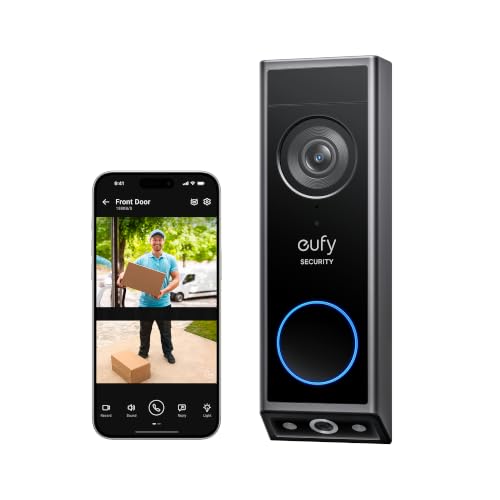
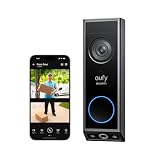
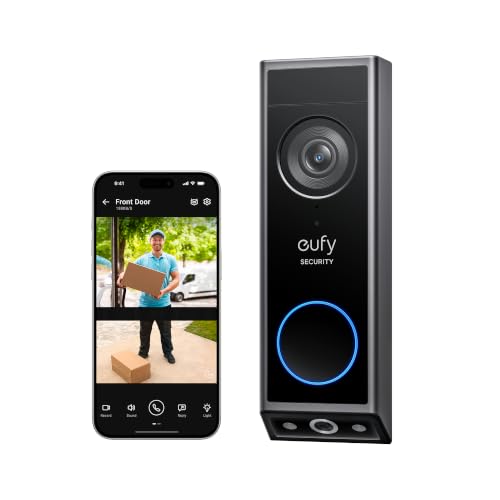
The eufy Security Video Doorbell E340 is a dual-camera video doorbell with 2K FHD resolution, 8GB of local storage, and no subscription required. Its two cameras give a head-to-toe view of the porch, so you can see a visitor face and a package on the ground in the same frame, and it works wirelessly for easy installation.
In daily use, the eufy E340 is the doorbell that quietly does its job without a monthly bill. Its dual cameras show a visitor face and a package on the ground in the same alert, and its local storage keeps clips on the device. Tune the motion zones to cover the porch and the path, but not the street, so passing cars do not fill the storage with false alerts.
Verified specs
- Dual cameras, 2K FHD resolution
- 8GB local storage, no subscription
- Head-to-toe view of visitors and packages
- Wireless installation
Strengths
- No subscription needed, with local storage included
- Dual cameras show faces and packages at once
- 2K video is sharp enough to identify visitors
The E340 is the best value in this guide for buyers who refuse monthly fees. Local storage means your video stays yours without a subscription, and the dual-camera design solves the oldest doorbell problem: seeing the package on the ground that a single camera misses.
Before you buy, it is worth checking the practical details that cause most returns. Confirm that the listing shows the exact model name and configuration you expect, because similar models often share a name and differ in one specification that matters. Check the size and the connections against your setup, and make sure you know what is included in the box and what is sold separately. Read the return policy before ordering, and when the product arrives, test it with your real setup in the first few days rather than leaving it in the box. A quick check at the start saves a return later, and it is the simplest way to be sure the product you receive is the one you meant to buy.
Trade-offs
- Local storage is limited to 8GB
- Wireless model needs periodic charging
- eufy app and ecosystem are smaller than Ring or Nest
Eight gigabytes holds a useful amount of clips, but heavy-traffic doors will cycle through it faster. If your porch sees constant motion, tune the detection zones to cut false alerts and save storage.
Who it fits best
Homeowners who want no subscription fees, package detection, and a simple wireless install.
Best for: Subscription-free video with a head-to-toe view.
Not suited for: Doors with constant motion that need large cloud storage.
Check price on Amazon: eufy Security Video Doorbell E340

2. Arlo Wireless Video Doorbell 2K HDR (2nd Gen)
The Arlo Wireless Video Doorbell 2K HDR is a second-generation wireless doorbell with 2K HDR head-to-toe video, single-band Wi-Fi, and front-door security features. It is built for sharp, detailed video in tricky light, with HDR handling the bright sky and dark porch in the same frame.
The Arlo 2nd Gen doorbell is at its best on a porch with tricky light. Its HDR video handles a bright sky behind a visitor and a shaded porch in the same frame, which is where cheaper doorbells wash out faces. Mount it at chest height, angle it to cover the approach path, and use the Arlo app to set activity zones so you are alerted to people, not to every passing car.
Verified specs
- 2K HDR head-to-toe video
- Wireless, single-band Wi-Fi
- Front-door security with motion detection
- Second-generation design
Strengths
- HDR video handles bright and dark areas well
- Head-to-toe view covers visitors and packages
- Arlo app is polished and reliable
The Arlo 2nd Gen is the image-quality pick for wireless installs. HDR matters at a front door, where the camera faces bright daylight and a shaded porch at once, and Arlo handles that contrast better than most. The head-to-toe framing also means packages stay in view.
Before you buy, it is worth checking the practical details that cause most returns. Confirm that the listing shows the exact model name and configuration you expect, because similar models often share a name and differ in one specification that matters. Check the size and the connections against your setup, and make sure you know what is included in the box and what is sold separately. Read the return policy before ordering, and when the product arrives, test it with your real setup in the first few days rather than leaving it in the box. A quick check at the start saves a return later, and it is the simplest way to be sure the product you receive is the one you meant to buy.
Trade-offs
- Some features need an Arlo subscription
- Battery needs periodic charging
- Single-band Wi-Fi can be weaker at long range
Arlo video history and smart alerts work best with a subscription, so factor that into the cost. If you want free local storage, the eufy E340 is the better fit.
Who it fits best
Homeowners who want the sharpest wireless video and a polished app, and who accept a subscription for full features.
Best for: Sharp HDR video in a wireless doorbell.
Not suited for: Buyers who want free local storage without a subscription.
Check price on Amazon: Arlo Wireless Video Doorbell 2K HDR (2nd Gen)
3. Ring Battery Doorbell 2K (Newest Model)
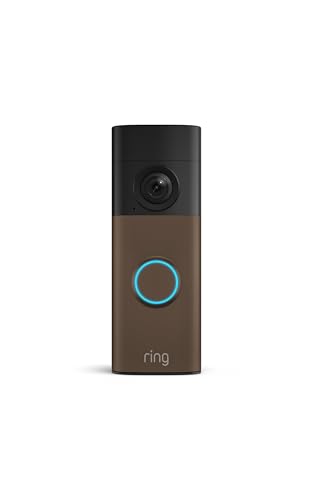
The Ring Battery Doorbell 2K is the newest Ring battery doorbell, with retinal wide-angle video, up to 6x enhanced zoom, two-way talk, and battery power that installs without wiring. It is the most popular doorbell camera line in this guide, with the largest ecosystem of chimes, cameras, and accessories.
The Ring Battery Doorbell 2K is the easy install in this guide. Charge the battery, mount it by the door, and connect it to Wi-Fi: no wiring needed. Its wide-angle view covers the whole porch, and its 2K video is sharp enough to identify visitors. Add a Ring Chime inside the house if you want to hear the doorbell in rooms far from the front door.
Verified specs
- 2K video, retinal wide-angle lens
- Up to 6x enhanced zoom
- Two-way talk, battery powered
- Newest Ring battery doorbell model
Strengths
- Largest ecosystem of accessories and integrations
- Battery install works on any door
- Wide-angle view covers the whole porch
Ring is the safe choice because of its ecosystem: chimes, cameras, and smart home integrations all work together, and most neighbors and installers already know it. The newest battery model adds 2K video and a wider view, which fixes the two most common complaints about older Ring doorbells.
Before you buy, it is worth checking the practical details that cause most returns. Confirm that the listing shows the exact model name and configuration you expect, because similar models often share a name and differ in one specification that matters. Check the size and the connections against your setup, and make sure you know what is included in the box and what is sold separately. Read the return policy before ordering, and when the product arrives, test it with your real setup in the first few days rather than leaving it in the box. A quick check at the start saves a return later, and it is the simplest way to be sure the product you receive is the one you meant to buy.
Trade-offs
- Video history needs a Ring subscription
- Battery needs charging every few months
- Wide-angle video can distort at the edges
Ring without a subscription is a live-view camera only, so budget for the plan if you want recordings. The battery lasts months in most installs, but cold weather shortens it.
Who it fits best
Homeowners who want the biggest ecosystem, easy battery install, and reliable alerts.
Best for: The most popular doorbell ecosystem, battery powered.
Not suited for: Buyers who refuse subscriptions or want local storage.
Check price on Amazon: Ring Battery Doorbell 2K (Newest Model)

4. Ring Wired Doorbell 4K Pro (Newest Model)
The Ring Wired Doorbell 4K Pro is the newest Ring wired doorbell, with 4K retinal wide-angle video, 10x enhanced zoom, and night vision. It is the sharpest doorbell camera in this guide, built for homes with existing doorbell wiring that want the best possible video quality.
The Ring Wired Doorbell 4K Pro is the sharpest doorbell in this guide, and it earns that title on homes with existing wiring. Its 4K video reads faces and packages at a distance, and its 10x zoom lets you check details after the fact. Make sure your Wi-Fi is strong at the front door, since 4K video needs more bandwidth than 1080p, and consider a mesh node nearby if the signal is weak.
Verified specs
- 4K video, retinal wide-angle lens
- 10x enhanced zoom
- Night vision, wired power
- Newest Ring wired doorbell model
Strengths
- 4K video is the sharpest in this guide
- 10x zoom reads details other doorbells miss
- Wired power means no charging ever
The Wired Doorbell 4K Pro is for homes that want the best video a doorbell can give. Four-K resolution means faces, packages, and license plates stay readable at a distance, and wired power means it never goes offline for charging. If you have doorbell wiring, this is the top of the Ring line.
Before you buy, it is worth checking the practical details that cause most returns. Confirm that the listing shows the exact model name and configuration you expect, because similar models often share a name and differ in one specification that matters. Check the size and the connections against your setup, and make sure you know what is included in the box and what is sold separately. Read the return policy before ordering, and when the product arrives, test it with your real setup in the first few days rather than leaving it in the box. A quick check at the start saves a return later, and it is the simplest way to be sure the product you receive is the one you meant to buy.
Trade-offs
- Needs existing doorbell wiring
- Video history needs a Ring subscription
- 4K video uses more bandwidth and storage
Wired installation is the only real barrier: without existing wiring, you need an electrician or a battery model instead. Check your wiring and your Wi-Fi strength before choosing 4K, since the video stream is demanding.
Who it fits best
Homeowners with doorbell wiring who want the sharpest video available and never want to charge a battery.
Best for: The sharpest doorbell video, wired and always on.
Not suited for: Homes without doorbell wiring or with weak Wi-Fi.
Check price on Amazon: Ring Wired Doorbell 4K Pro (Newest Model)

5. Google Nest Doorbell (Wired, 3rd Gen)
The Google Nest Doorbell (Wired, 3rd Gen) is the newest wired Nest doorbell, with 2K HDR video, intelligent alerts, and 24/7 live view in a 2025 model. It is built for Google Home households, with smart alerts that can tell people, packages, and animals apart.
The Nest Doorbell 3rd Gen is the smartest doorbell in this guide. Its intelligent alerts tell people, packages, and animals apart, so your phone buzzes for a delivery and not for a passing cat. Set up familiar face alerts for household members, and use the Google Home app to check the door from any room. Wired power means it never needs charging.
Verified specs
- 2K HDR video, wired power
- Intelligent alerts for people and packages
- 24/7 live view
- 2025 third-generation model
Strengths
- Intelligent alerts reduce false notifications
- Deep Google Home integration
- 2K HDR video with good night vision
The Nest Doorbell 3rd Gen is the smartest doorbell in this guide. Its alerts distinguish people, packages, and animals, so your phone buzzes for a delivery and not for a passing cat. For Google Home households, it integrates more deeply than any other pick here.
Before you buy, it is worth checking the practical details that cause most returns. Confirm that the listing shows the exact model name and configuration you expect, because similar models often share a name and differ in one specification that matters. Check the size and the connections against your setup, and make sure you know what is included in the box and what is sold separately. Read the return policy before ordering, and when the product arrives, test it with your real setup in the first few days rather than leaving it in the box. A quick check at the start saves a return later, and it is the simplest way to be sure the product you receive is the one you meant to buy.
Trade-offs
- Needs existing doorbell wiring
- Full features need a Nest Aware subscription
- Best suited to Google Home users
Nest Aware unlocks the best features, including longer video history and familiar face alerts, so factor the subscription into the cost. If you use Alexa instead of Google Home, Ring will integrate better.
Who it fits best
Google Home households who want smart alerts and wired reliability.
Best for: Smart alerts and Google Home integration, wired.
Not suited for: Alexa households or homes without doorbell wiring.
Check price on Amazon: Google Nest Doorbell (Wired, 3rd Gen)

6. Google Nest Doorbell (Battery)
The Google Nest Doorbell (Battery) is the wireless Nest doorbell, with 6x digital zoom, HD video, 24/7 live view, night vision, and HDR, in a battery-powered design that installs anywhere. It brings Nest smart alerts to homes without doorbell wiring.
The Nest Battery doorbell brings Nest smart alerts to homes without wiring. Mount it anywhere by the door, connect it to Google Home, and it will alert you to people and packages with the same intelligence as the wired model. Charge the battery every few months, more often in cold weather, and keep the firmware updated for the latest detection improvements.
Verified specs
- Battery powered, no wiring needed
- HD video with HDR and night vision
- 6x digital zoom
- Works with Google Home
Strengths
- Installs anywhere without wiring
- Smart alerts for people and packages
- Good night vision and HDR
The battery Nest is the flexible Nest option: it goes on any door, and its smart alerts and Google Home integration are the same as the wired model. For renters and homes without wiring, it is the easiest way into the Nest ecosystem.
Before you buy, it is worth checking the practical details that cause most returns. Confirm that the listing shows the exact model name and configuration you expect, because similar models often share a name and differ in one specification that matters. Check the size and the connections against your setup, and make sure you know what is included in the box and what is sold separately. Read the return policy before ordering, and when the product arrives, test it with your real setup in the first few days rather than leaving it in the box. A quick check at the start saves a return later, and it is the simplest way to be sure the product you receive is the one you meant to buy.
Trade-offs
- Battery needs periodic charging
- HD video is less sharp than the 2K wired model
- Full features need a Nest Aware subscription
The battery model trades video resolution for flexibility. If you have wiring, the 3rd Gen wired model is sharper; if you do not, this is the Nest to buy.
Who it fits best
Renters and homeowners without doorbell wiring who use Google Home and want smart alerts.
Best for: Nest smart alerts without wiring.
Not suited for: Homes with wiring that want the sharpest video.
Check price on Amazon: Google Nest Doorbell (Battery)

7. Wyze Battery Video Doorbell Wireless Camera
The Wyze Battery Video Doorbell is a wireless video doorbell with 1536×1536 HD+ resolution, color night vision, two-way audio, and a 1:1 head-to-toe view. It is the budget pick in this guide, offering a square head-to-toe image that shows visitors and packages together at a low cost.
The Wyze Battery doorbell is the budget pick that punches above its cost. Its square 1:1 view shows a visitor from head to toe and a package on the ground, and its color night vision is rare at this price. It suits a side door, a rental, or a first doorbell camera, and its wireless install means no wiring or electrician is needed.
Verified specs
- 1536×1536 HD+ resolution, 1:1 head-to-toe view
- Color night vision
- Two-way audio, battery powered
- Wireless installation
Strengths
- Lowest cost in this guide
- Square 1:1 view shows the whole porch
- Color night vision is rare at this cost
The Wyze doorbell is the budget surprise: a square image that covers head to toe, color night vision, and two-way audio for far less than the big brands. For a side door, a rental, or a first doorbell camera, it is hard to beat on value.
Before you buy, it is worth checking the practical details that cause most returns. Confirm that the listing shows the exact model name and configuration you expect, because similar models often share a name and differ in one specification that matters. Check the size and the connections against your setup, and make sure you know what is included in the box and what is sold separately. Read the return policy before ordering, and when the product arrives, test it with your real setup in the first few days rather than leaving it in the box. A quick check at the start saves a return later, and it is the simplest way to be sure the product you receive is the one you meant to buy.
Trade-offs
- Lower resolution than 2K models
- Wyze app and ecosystem are smaller
- Battery needs periodic charging
The Wyze trades resolution and polish for cost. Its video is good enough to identify visitors, but it will not match the 4K Ring or the 2K Arlo for fine detail at distance.
Who it fits best
Budget buyers, renters, and anyone who wants a capable doorbell camera for a side door or a first install.
Best for: Budget doorbell video with a head-to-toe view.
Not suited for: Buyers who want the sharpest video or the largest ecosystem.
Check price on Amazon: Wyze Battery Video Doorbell Wireless Camera

8. BOIFUN Video Doorbell Camera Wireless
The BOIFUN Video Doorbell Camera is a wireless video doorbell with no subscription required, 2K HD video, a 166-degree wide view, HDR night vision, and motion alerts. It is the second subscription-free pick in this guide, offering a wide view and 2K video at a budget cost.
The BOIFUN doorbell is the budget subscription-free option. Its 166-degree view covers a wide porch, its 2K video is sharp enough to identify visitors, and its lack of a subscription keeps the long-term cost low. Mount it at chest height, set the motion zones to cover the porch rather than the street, and it will cover a side door or a rental well.
Verified specs
- 2K HD video, 166-degree wide view
- No subscription required
- HDR night vision, motion alerts
- Wireless installation
Strengths
- No subscription needed
- Wide 166-degree view covers the porch
- 2K video at a budget cost
The BOIFUN is the budget subscription-free doorbell. Its 166-degree view covers a wide porch, its 2K video is sharp enough to identify visitors, and its lack of a subscription keeps the long-term cost low. For a side door or a rental, it is a strong value.
Before you buy, it is worth checking the practical details that cause most returns. Confirm that the listing shows the exact model name and configuration you expect, because similar models often share a name and differ in one specification that matters. Check the size and the connections against your setup, and make sure you know what is included in the box and what is sold separately. Read the return policy before ordering, and when the product arrives, test it with your real setup in the first few days rather than leaving it in the box. A quick check at the start saves a return later, and it is the simplest way to be sure the product you receive is the one you meant to buy.
Trade-offs
- Smaller brand with a smaller app ecosystem
- Battery needs periodic charging
- Fewer smart features than Ring or Nest
The BOIFUN trades brand polish and smart features for cost and freedom from subscriptions. Its video is good, but its app and integrations are simpler than the big brands. For basic doorbell duty, that is enough.
Who it fits best
Budget buyers, renters, and anyone who wants a subscription-free doorbell for a side door or a first install.
Best for: Budget subscription-free video with a wide view.
Not suited for: Buyers who want smart alerts or a large ecosystem.
Check price on Amazon: BOIFUN Video Doorbell Camera Wireless
Buying guide
Warranties, returns, and checking your purchase
Most products in this guide come with a manufacturer warranty, and the length and coverage vary by brand, so check the warranty terms before you buy rather than after something goes wrong. Keep the packaging until you have tested the product, because a return is much easier with the original box. When the product arrives, check that the model name, the configuration, and the included accessories match the listing, and test it with your real setup in the first few days. If anything is wrong, contact the seller promptly, because return windows are limited and the first week is the time to find problems.
Battery or wired: decide by your door
Battery doorbells install anywhere and need charging every few months, while wired models run forever but need existing doorbell wiring. If you have wiring, wired is better. If you do not, battery is the only option without an electrician. Check your wiring before you choose.
2K and 4K matter for identification
Higher resolution means faces, packages, and plates stay readable at a distance. For a front door where identification matters, 2K is worth it, and 4K is best. For a side door or a rental, 1080p or HD+ is usually enough.
Subscriptions are part of the cost
Most brands charge a monthly fee for video history and smart alerts, while eufy stores video locally for free. Over three years, a subscription can cost more than the camera. Compare the total cost, not just the purchase price, before you commit to a brand.
Mounting height and angle decide what you see
Mount the doorbell at about chest height, angled to cover the porch and the approach path. Too high and you see the tops of heads; too low and you miss faces. Test the view in the app before fixing the mount permanently.
Wi-Fi strength at the door is critical
A doorbell camera is only as good as its connection. Test your Wi-Fi at the front door before buying, and add a mesh node or extender if the signal is weak. A doorbell that drops offline is worse than no doorbell, because it gives false confidence.
How to use and care for your pick
Wipe the lens clean every few weeks, since dust, rain spots, and spider webs blur the video. Check the mount and the seal after storms, and keep the battery charged before cold weather, which shortens battery life. Update the firmware when prompted, since manufacturers improve detection and fix security issues through updates. Review your motion zones seasonally, since growing plants and changing light can trigger false alerts. If the doorbell goes offline, check the Wi-Fi first: most outages are a router problem, not a camera problem.
Common mistakes to avoid
The most common mistakes are mounting too high, ignoring Wi-Fi strength at the door, and forgetting the subscription cost. Another is setting motion sensitivity too high, which floods your phone with alerts until you turn notifications off entirely, defeating the purpose. People also forget to test two-way audio and the chime before finishing the install. Finally, many buyers never check local recording laws or tell household members about the camera, which causes trouble later.
Final recommendation
For most homes, the eufy E340 is the best starting point: dual cameras, 2K video, and no subscription. If you want the sharpest video and have wiring, the Ring Wired Doorbell 4K Pro is the top pick, while the Ring Battery Doorbell 2K is the easiest install for any door. Google Home households should choose the Nest Doorbell 3rd Gen wired, or the battery model without wiring, and budget buyers will be happy with the Wyze. Whichever you choose, mount it at the right height, test the Wi-Fi, and factor the subscription into the real cost.
Frequently asked questions
Do doorbell cameras need a subscription?
It depends on the brand. Ring, Nest, and Arlo need a subscription for video history and smart alerts, while eufy stores video locally for free. Without a subscription, most brands still offer live viewing, but recordings are limited or absent.
Battery or wired doorbell camera: which is better?
Wired is better if you have existing doorbell wiring, since it never needs charging. Battery is better if you do not have wiring, or if you rent. Battery models need charging every few months, more often in cold weather.
Can a doorbell camera see packages on the ground?
Yes, if it has a head-to-toe view. The eufy E340 uses dual cameras for this, while Arlo, Ring, and Wyze models use a tall or square field of view. A standard narrow camera may miss packages, so check the field of view before buying.
Do doorbell cameras work at night?
Yes, all picks in this guide have night vision, and the Wyze model adds color night vision. Night video is black and white on most models, but it is clear enough to identify visitors. A porch light improves night video noticeably.
Will a doorbell camera work with weak Wi-Fi?
Poorly. Doorbell cameras need a stable Wi-Fi connection at the front door, and a weak signal causes delayed alerts and dropped video. Test the signal at the door before buying, and add a mesh node or extender if needed.
Can I install a doorbell camera myself?
Yes, for battery models: charge the battery, mount the bracket, and connect to Wi-Fi. Wired models need existing doorbell wiring, and if you are not comfortable with low-voltage wiring, hire an electrician. Either way, test the view in the app before fixing the mount permanently.
More from Reviewstook
If this guide helped, these related guides cover the rest of your setup: Best Doorbell Camera Under 150, Best Doorbell Camera for Apartments Under 150, Best Doorbell Camera for Renters Under 150.
Conclusion
A doorbell camera is the most useful piece of home security most people will buy, and the right one depends on your door: wired or battery, subscription or local storage, and the video quality you need to identify a visitor. The seven picks in this guide cover all of those choices, from the subscription-free eufy E340 to the 4K Ring Pro.
Start with your wiring and your Wi-Fi, choose the brand whose ecosystem you already use, and remember that the subscription is part of the real cost. The best outdoor security doorbell cameras are the ones that stay online, record what matters, and tell you about it without crying wolf, and any of these seven will do that well.