reviewstook.com is reader-supported. When you buy through links on our site, we may earn an affiliate commission.
Where to buy
This guide assumes you already know how to expose a frame, and that what you need from a camera is not encouragement but capability. Past the beginner stage, the best canon cameras for videos stop being a question of simplicity and become a conversation about recording depth: frame rates that survive slow motion, codecs that hold up in the grade, focus systems that track a subject through a real room, and bodies that keep recording when a client, a ceremony or a once-only event refuses to pause. The beginner’s question — which camera will not confuse me — is answered in a companion guide in this series; the question here is which Canon body will not limit you.
- Canon EOS R6 Mark II: check price on Amazon
- Canon EOS R6 Mark III: check price on Amazon
- Canon EOS R5 C: available through Canon dealers and video equipment retailers
- Canon EOS C70: available through Canon cinema dealers and professional retailers
- Canon EOS R5: available through Canon dealers and major camera retailers
- Canon EOS R8: available through Canon dealers and major camera retailers
Canon’s video range is really two families wearing one badge. The R-system stills bodies have grown video specifications that would have embarrassed dedicated camcorders a decade ago, while the Cinema EOS line — the C70 and its larger siblings — keeps the professional furniture: built-in neutral-density filters, timecode, waveforms, cooling and audio hardware designed for crews. This guide spans both families deliberately, because experienced shooters cross between them constantly, and the right answer depends on where your work sits on the line between photographing life and producing it.
One warning before the rankings: video punishes spec-sheet shopping harder than stills ever did. A headline resolution means little beside rolling shutter behaviour, record limits in the modes you actually use, the cost of the media those modes consume, and whether the body’s colour science matches the cameras you already cut with. The reviews below weigh those working realities in the order working videographers weigh them, and the buying sections translate them into a decision by production type.
Key Takeaways
- Canon’s R6 Mark II is the video all-rounder for experienced shooters: oversampled 4K, confident tracking and no drama on long days.
- The R6 Mark III pushes the hybrid ceiling higher for creators whose productions have outgrown the Mark II’s recording scope.
- Canon’s R5 C is the true hybrid professional tool, with a dedicated cinema system and cooling for sustained takes.
- The EOS C70 remains the production camera of the group — cinema ergonomics, internal ND and crew-ready connections.
- Canon’s R5 offers high-resolution recording including 8K raw for specialists who finish big and crop in post.
- The R8 is the lightweight second camera and travel body whose video quality embarrasses its price class.
In this guide
Quick Picks
| Camera | Badge | Why it is here |
|---|---|---|
| Canon EOS R6 Mark II | Best all-round Canon for video | Oversampled 4K quality, tracking focus and hybrid manners for weddings, brands and channels. |
| Canon EOS R6 Mark III | Best advanced hybrid | The newest recording depth for creators filming flagship content on a stills-shaped body. |
| Canon EOS R5 C | Best cinema hybrid | A cinema operating system and active cooling inside a body that still shoots professional stills. |
| Canon EOS C70 | Best dedicated production camera | Internal ND, cinema connections and a Super 35 sensor built purely for motion work. |
| Canon EOS R5 | Best high-resolution specialist | 8K and high-quality 4K options for finishers who crop, stabilise and deliver large. |
| Canon EOS R8 | Best lightweight second camera | Full-frame 4K quality in a body that rides small gimbals and travels anywhere. |
How did we rank the best canon cameras for videos for experienced shooters?
Recording integrity came first: not the longest specification list, but whether the modes a production actually uses — 4K at broadcast frame rates, high frame rates for slow motion, 10-bit colour for grading — run without the asterisks that ambush a shoot day. Crops in key modes, thermal limits, media requirements and rolling shutter were weighed as a package, because a camera’s video worth is set by its worst surprise, not its best headline.
Focus behaviour under production conditions came second. Experienced shooters do not need a camera to find a face in a bright room; they need tracking that holds a bride walking toward the lens through confetti light, an interviewee who leans and gestures, a product presenter crossing a set. Touch control, focus breathing manners in the lens system and the ability to hand focus back to a human smoothly all counted — the professional’s autofocus is a collaborator, not a replacement.
Colour and post-production fit completed the test. Canon’s colour science is a genuine system advantage — skin tones that editors trust and log profiles that grade predictably — and bodies were favoured when their footage cuts cleanly with the wider Canon ecosystem a production may already own. Audio provisions, monitoring outputs and timecode thinking were scored as the professional furniture they are, because experienced readers feel their absence within one shoot.

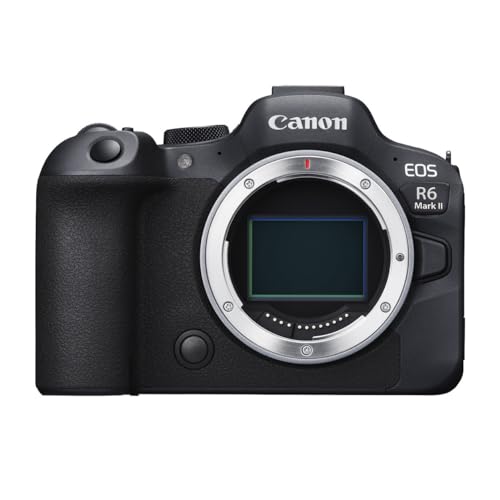
Canon EOS R6 Mark II — Best all-round Canon for video
Most experienced Canon shooters who film for a living, or aspire to, will find their working answer in this body. The R6 Mark II records 4K that is oversampled from a higher-resolution readout, and the difference is visible in the way editors mean it: edges that stay clean, fine detail that does not crawl, footage that accepts sharpening, noise reduction and a grade without coming apart. Full-width recording keeps your lenses honest — a 24mm stays a 24mm — and the frame-rate range covers broadcast work, events and respectable slow motion without mode-hopping gymnastics.
Autofocus is the feature working shooters praise after a season rather than a demo. Subject detection distinguishes people, animals and vehicles, and within people it prioritises eyes and faces with a tenacity that survives turns, occlusions and the walk-toward-camera shot that opens half the wedding films ever delivered. It is not infallible — backlight and deep clutter still argue with it — but its failure mode is a gentle drift the operator can override with a touch, rather than the panicked hunting that ruins a take outright. For solo operators, who are most of this guide’s readers most of the time, that reliability is a crew member.
Colour arrives in the two dialects productions speak. Canon’s standard profiles deliver the skin tones the brand built its video reputation on, ready for fast turnarounds; the log profile opens the file for grading, with dynamic range that handles a bright window behind an interviewee more gracefully than its price suggests. Footage cuts naturally with the cinema bodies below — a meaningful advantage for shooters building a multi-camera Canon kit over time rather than in one purchase.
Endurance and heat deserve the plain treatment this guide gives every body. High frame-rate and maximum-quality modes generate heat on long takes in warm rooms, as they do in every hybrid; event shooters manage it with the standard choreography of mode choices, airflow and a second body for the longest ceremonies. For the overwhelming majority of production patterns — interviews in segments, events in bursts, brand work in takes — the body simply works all day, and its stills performance means the same camera covers the photography the client inevitably requests.
The ecosystem around it completes the all-round case. RF lenses with quiet focus motors and minimal breathing serve video natively; adapters open the EF back-catalogue; the hot shoe carries digital audio accessories without cables; and the body’s popularity guarantees cages, rigs and rental availability everywhere. An experienced shooter is buying into a working environment as much as into a camera, and this body’s environment is the deepest in the Canon hybrid world.
Buy it as the centre of a video practice unless your work names a specialism the bodies below serve better — sustained cinema takes, maximum resolution, or crew-scale production. For weddings, brand films, documentaries, channels and events, the R6 Mark II is the recommendation this guide defends without qualification.
- Type: full-frame mirrorless hybrid, 24.2 megapixel sensor
- Recording: 4K up to 60p, oversampled, full sensor width
- Colour: 10-bit recording with Canon Log available
- Focus: subject detection with eye priority for video
Strengths
- Oversampled 4K that survives professional grading
- Tracking focus a solo operator can trust
- Cuts cleanly with Canon cinema footage
Trade-offs
- Demanding modes need heat awareness on long takes
- No internal ND or cinema timecode furniture
- Micro-HDMI class connections rather than full-size
Best for: weddings, brand work, documentaries and serious channels. Not suited for: crew productions needing cinema connections and ND built in.
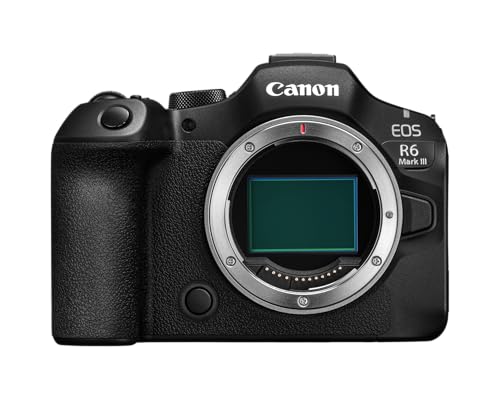
Canon EOS R6 Mark III — Best advanced hybrid
Every successful hybrid eventually meets the production that outgrows it: the client who wants a higher-end deliverable, the channel whose quality bar has become its brand, the filmmaker whose stills body keeps being asked to behave like a cinema camera. The R6 Mark III is Canon’s answer to that meeting. It carries the R6 concept into the newest generation with a recording specification aimed squarely at advanced creators — deeper formats, more post-production headroom, and the processing to sustain hybrid work at a level the Mark II gestures toward.
Judged beside its predecessor, the stills story is continuity and the video story is ambition. The full-frame sensor family, stabilisation and subject-recognition focus that made the Mark II this guide’s all-rounder continue here, refined; the recording side steps forward in the directions professionals request by name — more demanding codecs and resolutions, greater flexibility for finishing, and monitoring and workflow touches that assume the footage is going somewhere serious. Creators should audition the exact modes their productions use, because the Mark III’s premium lives in those modes rather than in a badge.
Focus for video benefits from the newest generation’s refinements in subject handling. Tracking through cluttered, real-world scenes — markets, workshops, wedding parties in motion — holds with a confidence that lets an operator compose rather than babysit, and the transition behaviour when subjects enter and leave the frame has the smoothness editors quietly judge cameras by. Paired with RF glass chosen for low breathing, the system produces the kind of footage clients describe as expensive-looking without knowing why.
Who should pay the newer body’s premium is a question this guide answers as directly as the rental guide in this batch answers its own: shooters whose deliverables are graded, cropped, re-versioned and examined. A production finishing for broadcast or brand campaigns extracts the Mark III’s headroom daily. A shooter delivering lightly edited event footage to social platforms will struggle to see their money on screen, and the Mark II above remains their intelligent purchase. Both bodies are excellent; the difference is the destination of the footage, and honesty about that destination is the whole of buying well.
Heat and media follow the ambition. Demanding modes consume fast cards and generate warmth on sustained takes; plan media budgets and a second body or a cinema sibling for the longest continuous work. None of this distinguishes the Mark III from its class — it distinguishes its class from cinema cameras, which is why the R5 C and C70 sit below it in this list for the productions that need them.
As the flagship hybrid for a creator building a multi-year practice, though, the Mark III is the body whose ceiling arrives last. Buy it when the work has begun asking questions the Mark II answers with effort, and it will feel less like an upgrade than like the removal of a recurring friction from every shoot day.
- Type: full-frame mirrorless hybrid, latest-generation R6 line
- Recording: advanced formats beyond the Mark II’s scope
- Colour: log recording with deep grading headroom
- Focus: newest subject recognition and tracking refinements
Strengths
- Highest hybrid ceiling in a stills-shaped Canon body
- Footage built for grading and re-versioning
- Refined tracking for real-world moving subjects
Trade-offs
- Premium over a Mark II many shooters still need
- Top modes demand fast media and power planning
- Still a hybrid: no internal ND or cinema audio deck
Best for: advanced creators and productions finishing to a high standard. Not suited for: light-edit social workflows that cannot use its headroom.
Canon EOS R5 C — Best cinema hybrid
Flip the R5 C into its cinema mode and the camera changes operating systems, menus, personality and profession. What remains is the shape: a stills body a photographer can hold. What changes is everything a filmmaker touches — cinema recording formats, professional monitoring tools, timecode thinking, and an active cooling system that ends the hybrid era’s defining anxiety, the take that stops because the body grew hot. For productions that live between photography and film, no other Canon body is built as honestly for both.
The cinema side’s substance is endurance plus tools. Long interviews, ceremonies, theatre performances and documentary days run continuously in a way stills-derived bodies ration, while waveforms, false colour and cinema colour options let an operator expose with a cinematographer’s precision rather than a photographer’s hope. Footage grades in the cinema ecosystem’s language and matches the C70 below and Canon’s larger cinema cameras — the property that turns a small body into a legitimate B-camera on professional sets and an A-camera on small ones.
Stills are a full profession in themselves here: the high-resolution sensor serves commercial photography without compromise, so the hybrid shooter carries one body to jobs that previously demanded two systems. Wedding filmmakers who also photograph, brand teams shooting campaign stills and film in one day, journalists filing both — the R5 C’s natural owners describe their work in exactly those compound sentences, and the body was designed by people who had heard them.
Costs of the dual citizenship are specific and manageable. The cinema side drinks batteries at cinema rates and prefers cinema media discipline; the body’s fan, quiet as it is, asks for thought when microphones sit close in silent rooms; and the two operating systems mean a learning investment measured in days for shooters fluent in only one. Productions should also budget the rigging — cage, audio, monitoring — that cinema work assumes, because the R5 C is a cinema camera’s heart expecting a cinema camera’s support.
Position in the Canon range is frequently misunderstood, so let this guide be plain: the R5 C is not an R5 with extras, nor a C70 with stills. It is the professional answer for the shooter whose income genuinely splits between the crafts. Readers whose work is ninety percent one craft should buy that craft’s specialist and rent this body for the exceptions — a pattern the rental guide in this series exists to make cheap.
- Type: full-frame hybrid with switchable stills and cinema systems
- Cooling: active fan system for sustained recording
- Stills: high-resolution sensor for commercial photography
- Video: cinema formats, monitoring tools and timecode
Strengths
- Sustained cinema recording without thermal rationing
- Matches Canon cinema colour on professional sets
- Professional stills in the same body, no compromise
Trade-offs
- Cinema side’s power and media appetites are real
- Two operating systems to learn properly
- Fan awareness needed for close-microphone work
Best for: hybrid professionals splitting income between film and stills. Not suited for: single-craft shooters better served by a specialist.
Canon EOS C70 — Best dedicated production camera
Strip away the stills entirely and a camera can devote every gram and menu to motion. The C70 is that devotion in Canon’s RF mount: a compact cinema body with a Super 35 sensor, internal neutral-density filters that slide into place at a button’s press, professional audio connections, timecode, dual slots recording relay or backup, and a shape designed to be rigged — caged, matted, shouldered, gimballed — from its first morning. Productions choose it not for any single specification but for the absence of adaptation: nothing about it is a stills camera making an effort.
Internal ND is the feature filmmakers cite when explaining why cinema bodies exist. Light changes; the cinematographer rides exposure with filtration inside the camera, holding aperture and shutter where the look demands rather than where the sun dictates. Interviews that drift from shade to glare, documentaries chasing weather, weddings moving between a dark hall and a noon courtyard — the C70 absorbs these transitions as routine operations. Hybrid shooters who have wrestled screw-on filters in the same moments understand instantly what the internal system is worth per shoot day.
The Super 35 sensor is a deliberate choice with a working cinematographer’s logic. Its image has the depth and highlight behaviour the cinema tradition is built on, its recording modes emphasise dynamic range and high frame rates for slow motion, and it pairs with the vast world of Super 35 and full-frame glass via the RF mount and adapters. Rolling shutter manners and low-light behaviour suit narrative and documentary work, and the colour science is the cinema line’s own — the footage intercuts with larger Canon cinema cameras as family, not as apology.
Audio and connections mark the border between production and prosumer more honestly than resolution ever will. Professional XLR inputs with proper controls, full-size connections that survive a set, timecode for multi-camera days, and monitoring outputs that feed a director’s screen without adapters held together by hope — the C70 carries the furniture crews ask for by name. A solo shooter may use half of it; a growing production uses all of it by the second year, which is the correct way to buy a tool meant to be outgrown slowly.
Costs are equally plain. The C70 does not take photographs worth the name, so it never travels alone to hybrid jobs. Its price buys no stills insurance. Rigging to taste adds the usual cinema tail of rails, power and support. And its operator should be, or be becoming, a filmmaker — the body’s menus and manners reward cinema fluency and offer stills shooters few familiar handholds. For the reader those sentences describe as home, the C70 is not the fourth pick in a list. It is the centre of a working life, and the hybrids above it are what its owner rents for the photography days.
- Type: dedicated cinema camera, Super 35 sensor, RF mount
- Filtration: internal neutral-density system
- Audio: professional XLR inputs and controls
- Recording: cinema formats with high frame rates and dual slots
Strengths
- Internal ND transforms changing-light work
- Crew-ready connections, timecode and audio
- Cinema colour that matches larger Canon sets
Trade-offs
- No meaningful stills capability at all
- Rigging and support add real cost
- Assumes a filmmaker’s fluency and workflow
Best for: narrative, documentary and commercial productions. Not suited for: hybrid shooters or photography-led work.
Canon EOS R5 — Best high-resolution specialist
Resolution in video is not vanity; it is post-production freedom measured in pixels. The R5 records up to 8K, including raw, and high-quality 4K derived from that abundance — which means a single locked-off frame can be punched in, re-framed, stabilised and delivered at 4K with detail to spare. Specialists build workflows on that freedom: real-estate and architecture filmmakers reframing in the edit, wildlife shooters cropping into distant behaviour, commercial teams extracting vertical and square versions from one master frame. For those workflows the R5 is not the expensive option; it is the enabling one.
The honest asterisk has followed this body since launch and belongs in any guide that respects its readers: the highest modes generate serious heat, and continuous recording in them is rationed by temperature in ways that vary with conditions. Working owners adapted years ago — the 8K and high-quality modes are used in deliberate takes, the standard 4K modes carry long-form work, and external recording extends sessions where the production justifies it. Judged as its owners actually use it, the R5 is a superb specialist; judged by a brochure’s implication that every mode runs forever, it will disappoint exactly once.
Stills excellence rides along at full strength — the same high-resolution sensor and professional body that anchor the night and rental guides in this series — making the R5 the natural A-camera for hybrid specialists whose photography is as resolution-hungry as their filming. Focus, stabilisation and colour match the family’s professional standard, and footage in its standard modes cuts with the R6 bodies without friction.
Media economics deserve a planning paragraph. Raw and high-bit-rate modes consume cards and drives at rates that turn storage into a line item, and the editing machine joins the budget conversation — 8K raw timelines ask for hardware that casual systems do not have. Productions buy the R5’s freedom with infrastructure, and the total is still usually cheaper than the second camera and second shoot day that reframing-in-post replaces. That is the correct comparison, and specialists make it instinctively.
Choose the R5 when the deliverable benefits measurably from resolution: big finishes, heavy crops, multi-format versioning, archival masters. Choose the R6 Mark II when the deliverable is a beautifully shot film at normal scales — which is most films — and spend the difference on the lens or the lighting that audiences actually see. Specialists know which of those sentences is theirs.
- Type: full-frame mirrorless, high-resolution 45 megapixel class sensor
- Recording: up to 8K including raw, plus high-quality 4K modes
- Colour: 10-bit log recording for grading
- Focus: professional subject detection for stills and video
Strengths
- Reframing and versioning freedom in post
- Archival masters at the highest resolution
- Full professional stills capability alongside
Trade-offs
- Top modes are thermally rationed on long takes
- Media and editing hardware costs are substantial
- Resolution is wasted on standard deliverables
Best for: commercial, wildlife, architecture and multi-format finishing. Not suited for: long continuous recording in maximum modes.
Canon EOS R8 — Best lightweight second camera
Every production develops a list of shots the A-camera cannot practically get: the gimbal walk-through that runs all morning, the locked-off wide angle behind the ceremony, the travel sequence filmed from a body that fits in a jacket. The R8 has become Canon shooters’ answer to that list. Its full-frame sensor delivers video quality from the same family as the R6 bodies — oversampled-looking 4K, log recording for matching, subject detection that behaves — inside the lightest, simplest body in this guide, at a price that lets it be risked, rigged and left running in ways a flagship never is.
Gimbal work is where the weight argument becomes footage. A small gimbal carrying an R8 and a compact prime balances in minutes, runs for hours without punishing the operator’s forearm, and produces the floating walk-throughs that property, travel and event films are built from. Larger bodies do this work on larger gimbals with larger crews of one very tired person. The R8’s many professional owners describe it the same way: it is the camera that makes the moving shots happen on solo productions, which is to say, on most productions.
As a second camera its matching manners matter more than its headline modes. Colour profiles align with the R6 and R5 bodies it supports, so the wide angle cuts into the ceremony coverage without a grading argument; the log profile gives the colourist the same language across angles. Battery and media appetites are modest, the body starts instantly, and its simplicity means the assistant or second shooter you briefed at breakfast is producing usable footage by the first dance.
Limits are the familiar ones from its stills life, translated honestly. No in-body stabilisation — irrelevant on gimbals and tripods, felt in handheld walking shots, where lens stabilisation and technique carry the load. A single card slot argues against entrusting it with the day’s only copy of an unrepeatable angle. Heat in the longest maximum-quality takes asks for the usual hybrid management. Productions that respect those three sentences get a second camera of remarkable value; the R8 punishes only the assumption that it is a cheap R6 rather than a distinct tool.
Travel and documentary shooters increasingly adopt it as the primary body, accepting the compromises for a kit that crosses borders in a carry-on and films all day unnoticed. For the experienced reader of this guide, though, its defining role is support: the B-camera that is always charged, always rigged small, always ready — the pick that quietly raises the production value of everything the A-camera shoots.
- Type: full-frame mirrorless, 24.2 megapixel sensor
- Recording: 4K up to 60p with log profile for matching
- Stabilisation: lens-based; designed here for gimbal and tripod
- Focus: subject detection shared with the R6 family
Strengths
- Full-frame video quality at gimbal-friendly weight
- Colour matches R6 and R5 footage cleanly
- Price allows risk, rigging and second-angle duty
Trade-offs
- No in-body stabilisation for handheld work
- Single card slot for critical angles
- Long maximum-quality takes need heat sense
Best for: B-camera angles, gimbal work and travel productions. Not suited for: sole coverage of unrepeatable events.
How do the six compare on a production?
| Camera | Production role | Signature strength | Watch out for |
|---|---|---|---|
| Canon EOS R6 Mark II | Hybrid A-camera | Oversampled 4K and trusted tracking | Heat in demanding modes |
| Canon EOS R6 Mark III | Advanced hybrid | Recording depth for graded finishes | Premium and media appetite |
| Canon EOS R5 C | Cinema hybrid | Cooling and cinema system | Power hunger, dual workflow |
| Canon EOS C70 | Dedicated production | Internal ND and crew connections | No stills capability |
| Canon EOS R5 | Resolution specialist | 8K reframing freedom | Thermal rationing, storage costs |
| Canon EOS R8 | B-camera and gimbal | Weight and matching colour | Single slot, no in-body stabilisation |
Which Canon video body fits which production?
Weddings and events reward the R6 bodies’ combination of tracking, low-light manners and stills — the day is unrepeatable, mixed and hybrid by definition, and the Mark II covers it with the least friction while the Mark III serves videographers whose wedding films are graded like cinema. Documentary divides by crew size: solo operators live on the hybrids, while produced documentary with a sound recordist and a schedule belongs on the C70, whose connections and ND turn location chaos into routine. Brand and commercial work sorts by finish — standard deliverables on the R6 line, reframed multi-format campaigns on the R5, sustained interview-led productions on the R5 C.
Channels and creators should buy for their publishing rhythm rather than their aspirations. A channel shipping twice a week needs the camera that makes Tuesday easy: fast setup, trustworthy autofocus, files the edit enjoys. That is the R6 Mark II for most, the Mark III for channels whose production values are the pitch, and the R8 where travel weight rules. Narrative filmmakers, finally, should read the C70 and R5 C reviews twice — cinema is a workflow before it is an image, and those two bodies are the ones in this guide that speak it natively.
What about lenses, audio and light — the rest of the video budget?
Experienced shooters know the camera is the down payment. RF lenses chosen for video — quiet motors, controlled breathing, stabilisation that cooperates with the body — shape footage more than the step between any two bodies in this list, and a fast standard zoom plus one fast prime remains the working pair most productions actually use. Audio decides perceived quality even more brutally: audiences forgive a soft frame and never forgive bad sound, so the microphone and its placement deserve the next money after the body, ahead of every accessory that merely looks professional.
Light completes the triangle. Canon’s log profiles and dynamic range forgive mixed practical lighting better than most, yet a single well-placed LED panel transforms an interview more completely than a camera upgrade does. The honest hierarchy for a growing production is body, lens, microphone, light — and then, only then, the next body. Guides sell cameras; professionals buy systems in that order.
What mistakes do experienced shooters still make with video bodies?
Buying for the mode they will use twice a year leads the list — the maximum specification, thermally rationed and media-hungry, purchased for a production style the diary does not contain. Second is ignoring the edit: codecs and resolutions chosen without asking the computer, the drives or the colourist who must live with them. Third is treating audio as an accessory rather than a department. Fourth is assembling a one-camera plan for unrepeatable work; the R8 exists in this guide partly so that no reader has an excuse for that. Experience does not immunise against these errors — it merely makes them more expensive, which is why they are listed here rather than in the beginner’s guide.
How should a Canon video kit grow over two years?
Year one: the all-rounder, the working lens pair, real audio. Let the productions teach their own requirements — every shoot files a report in the form of frustrations, and the wise shooter keeps the list. Year two answers the list: the B-camera if multi-angle work keeps appearing, the cinema body if sustained takes and crew work have become the diary’s centre, the resolution specialist if clients keep buying reframed versions. Grown this way, a kit never contains an orphan — every body in the bag has a named job and a history of being needed, which is the difference between a collection and a company.
Why do codec and rolling shutter matter more than resolution?
Resolution is the number on the box; the codec is the footage’s actual character. Two cameras can both claim 4K while one records a robust 10-bit file with gentle compression and the other a fragile 8-bit file compressed until skies band and shadows block. Experienced shooters read past the resolution line to the recording depth beneath it — bit depth for grading, chroma information for keys and heavy colour work, bit rates that decide whether fine detail survives motion. Canon’s log recording across this guide’s bodies exists precisely for that reader, and the step from 8-bit to 10-bit has ended more camera loyalties than any sensor comparison ever published.
Rolling shutter is the second silent specification. Electronic sensors read the frame line by line, so fast pans and vibrating mounts bend straight lines and wobble edges — the jello that marks amateur footage instantly. Sensor readout speed varies across this list: the cinema-leaning bodies and the newest hybrids read faster and behave better under the whip pans and vehicle mounts real productions use. A buyer can test it in any shop — pan briskly across vertical lines and watch the lean — and should, because no firmware update has ever repealed a slow readout. Judge a video body by its worst second of footage, not its best frame, and these two specifications will tell you more than the megapixels on the carton.
How should an experienced shooter set up a Canon body for video?
Configuration begins by deciding what the camera is for this week and saving it where a mode dial can recall it at 6 a.m. Frame rate and shutter relationship set first — the shutter near double the frame rate for natural motion, broken deliberately only for effect. White balance fixed per scene rather than trusted to auto under mixed practicals. A picture profile chosen by destination: standard colour for fast delivery, log for anything a colourist will touch, with exposure for log handled by its own discipline of protecting highlights and feeding the shadows enough light to grade from.
Focus settings reward the same deliberation. Continuous subject tracking for documentary movement, touch-to-focus with a damped transition speed for narrative work, focus limits and manual override rehearsed rather than discovered. Zebras or a waveform where the body offers them turn exposure from estimation into measurement, and audio levels — set against the actual voice at the actual distance, through headphones — close the setup. The professional’s configuration session looks slow from outside and is the reason their shoot days look fast: every decision that can be made at a desk has been, and the location is reserved for the decisions only it can offer.
What stabilisation strategy suits which kind of filming?
In-body stabilisation changed handheld video from a compromise into a style, and the R bodies in this guide steady walking shots, static handheld interviews and observational documentary with a calm that once required a rig. Its limits are physics: wide lenses exaggerate the warping at frame edges when the system works hard, and no stabilisation forgives a careless gait — the practised heel-toe walk remains a professional skill no menu replaces. Gimbals take over where movement is the shot itself: walk-throughs, chases, choreographed reveals, where the R8’s light weight becomes a production advantage measured in hours of operator endurance.
Tripods, unfashionably, still shoot most professional video. Interviews, ceremonies from a fixed angle, product work and anything destined for a locked frame belong on legs, with stabilisation often switched off to prevent the slow drift that systems introduce when they hunt for movement that is not there. The experienced shooter treats stabilisation as a shot-by-shot decision with a default per production type, saved into the same custom modes as everything else — one more example of this guide’s recurring argument that video quality is configured before it is captured.
How does the footage survive the edit? A note on workflow
Productions are finished at desks, and bodies earn their keep there too. Card formats and reader speeds decide how a shoot day ends — an hour of offloading is an hour of the crew’s evening — while codec choices decide whether the editing machine plays the timeline like a professional tool or a punishment. Proxy workflows rescue heavy formats on modest hardware, and the colourist’s opinion of a camera’s log curve, gathered over one test grade, is worth a month of forum reading. Before committing a practice to any body in this list, shoot its test the professional way: one representative scene per mode you intend to use, graded by the person who will grade the real work, on the machine that will carry the deadline. Cameras pass or fail that afternoon in ways no specification predicts.
Backup discipline closes the workflow and deserves its sentence in a buying guide because bodies influence it. Dual-slot bodies can record the day twice before it leaves the venue; single-slot bodies demand an offload ritual at every break, performed by a named human rather than assumed by the schedule. Insurance, archives and the client’s trust all stand downstream of that unglamorous decision, and experienced shooters choose bodies partly by how gracefully they let a production be careful.
When does renting a video body beat buying one?
More often than camera shops enjoy admitting. Cinema bodies and resolution specialists follow the economics this batch’s rental guide sets out for stills: a C70 needed for one documentary a year is a hire, while the same body on a monthly production slate is a purchase by the third job. New-generation hybrids make the strongest rental case of all in their first season, when a weekend’s hire answers whether the newest recording modes serve your actual clients or merely your curiosity. Experienced shooters treat rental as their research department — the A-camera they own stays constant while the specialists rotate through real productions, auditioning for a permanent place with evidence no loaner programme at a trade show can match. Buy the body your diary proves; rent the bodies your diary is still interrogating, and the kit stays as honest as the work it produces.
What separates a camera test from a camera purchase?
Evidence gathered under your own conditions. Reviewers — this guide included — can rank bodies by the criteria productions share, but the decisive variables are stubbornly personal: your lenses’ breathing, your colourist’s hands, your clients’ delivery specifications, your own tolerance for a menu at midnight. The test that settles a video purchase therefore borrows the body for one real, low-stakes production day and grades the footage where real footage is graded. Shooters who run that test buy once and work for years; shooters who buy from specifications buy twice and blame the first camera. Every body in this list will pass somebody’s test brilliantly. The professional’s skill is arranging for the test to happen before the money does — a sentence that applies to far more than cameras, and one this guide is content to end its argument on.
How long will a video body bought today stay current?
Longer than the release cycle suggests, provided the purchase was made on recording depth rather than headlines. Delivery standards move slowly — the 4K files this guide’s bodies produce will satisfy platforms and clients for years — while the qualities that date footage fastest are focus reliability, colour and dynamic range, all of which age gracefully in the bodies above. The working shooter’s replacement trigger is rarely a new model; it is a change in the work itself: a first broadcast commission, a first cinema client, a channel outgrowing its format. Buy for the productions in the diary, keep the firmware current, and let the calendar rather than the catalogue decide when the next body earns its place. A camera replaced because the work grew is an investment maturing; a camera replaced because a newer one exists is a subscription nobody remembers signing.
Final Recommendation
Start from the production, not the catalogue. Most experienced shooters should build on the R6 Mark II and step to the Mark III when finishing standards demand its headroom. Split your income between film and stills and the R5 C is the professional centre; commit to cinema as a craft and the C70 is the real tool; finish big and reframe in post and the R5 earns its infrastructure; and whatever A-camera you choose, let the R8 make its second angles possible. The beginner’s version of this decision lives in a companion guide — the reader who has arrived here needs capability, and Canon’s range, read honestly, offers exactly one body per kind of serious work.
Frequently Asked Questions
How is this guide different from the Canon beginners video guide?
Audience and criteria. The beginners guide prioritises simplicity, guidance and forgiving automation for a first camera. This guide assumes an experienced operator and ranks by recording depth, focus behaviour under production conditions, colour for grading, connections and endurance — the things that limit a working shooter rather than a learning one.
Is 8K worth it for video in practice?
For specific workflows, genuinely: reframing, stabilising and extracting multiple formats from one master, plus archival value. For standard deliverables it mostly buys storage costs and editing strain. The R5 serves the first group superbly; everyone else gets better films from the R6 bodies and a lens upgrade.
Do Canon hybrids overheat — should that decide my purchase?
Heat is a property of demanding modes in small bodies, not a defect of one model. Standard 4K production modes run long and reliably across this guide’s hybrids; maximum frame rates and resolutions are takes-based tools. Cinema bodies — the R5 C with its fan, the C70 by design — exist for productions built on sustained recording, and productions of that shape should buy them rather than fight physics.
Which Canon body is best for live streaming and long static recording?
Clean output over HDMI, reliable autofocus and cool running matter more than resolution for streaming. The R6 bodies serve most streamers well with external power; the R5 C’s cooling makes it the safest choice for very long continuous sessions. Compact digital options for desk-based streaming are covered in the companion guide to Canon digital cameras for video.
Can I mix Canon hybrid and cinema footage in one edit?
Yes — it is one of the system’s strengths. Canon’s colour science is consistent in character across the R hybrids and the cinema line, and log profiles give a colourist a common starting point. Match white balance and exposure discipline on set and the angles intercut without the audience ever knowing two families filmed the day.
What lens should a video-first Canon shooter buy first?
A fast standard zoom covering the everyday range, chosen in its video-friendly version, plus one fast prime for low light and shallow depth. That pair covers the overwhelming majority of production work in this guide; specialised glass — long telephotos, true cinema primes — is classic rental territory until a diary proves it weekly.
A last consideration belongs to sound recordists, who rarely appear in camera guides and decide the fate of more productions than any sensor. Crew sound changes the camera decision: when a recordist owns the audio, the camera needs timecode and clean monitoring feeds more than it needs microphone inputs, which quietly promotes the cinema bodies. When the camera operator is the sound department — the solo reality behind most of the work this guide addresses — the hybrids’ accessory ecosystems, from hot-shoe digital microphones to compact wireless systems, become part of the body’s real specification. Read your own call sheet before reading any ranking, including this one: the right Canon for your videos is the one that fits the crew you actually field, on the days you actually shoot, for the screens your audience actually watches.
Firmware deserves its footnote in any modern video guide, because Canon’s bodies gain real features across their lives — focus refinements, recording options, accessory support — delivered as free updates that owners who skip them never miss until a forum mentions what their camera cannot do. Register the body, note the update rhythm into the production calendar’s quiet weeks, and treat each update as a small rehearsal: settings backed up, a test shoot afterward, the crew informed. Cameras are software now, and the productions that run them like software — versioned, tested, documented — extract years more service from the same hardware.
Insurance and registration close the professional setup: bodies at this level belong on the production’s equipment policy with serial numbers recorded, not least because insurers and rental counters alike move faster for owners whose paperwork is already in order. It takes an afternoon once. It pays out on the worst day of the year.
Keep the receipts, the serial photographs and the firmware notes in one production file per body. When a camera is sold, rented out or sent for service, that file is the difference between a transaction and an argument.
And when the kit finally travels, one labelled case per body — camera, its batteries, its cards, its charger — ends the location-day rummage that has embarrassed better crews than yours. Systems, again. The camera was only ever the visible third of one.
Related Guides
Newer shooters should start with the companion roundup of the best canon cameras for beginners video, where this guide’s judgements are translated into first-camera terms. Desk-based creators weighing compact options will find the best canon digital cameras for video guide develops the point-and-shoot and hybrid argument. And productions deciding whether to own at all can price the alternative in the best canon cameras for photography for rent guide.


