reviewstook.com is reader-supported. When you buy through links on our site, we may earn an affiliate commission.
Where to buy
Follow any name in the tables below and you will land on its Amazon listing. HD-first buying is refreshingly honest shopping: the standard is mature, the differences are in light handling, autofocus and workflow rather than in badge numbers, and every pick here can be judged by a ten-minute test recording in your own room.
- Logitech Brio: check price on Amazon
- Logitech C920S HD Pro: check price on Amazon
- NexiGo N60: check price on Amazon
- OBSBOT Tiny 2: check price on Amazon
- Sony ZV-1F: check price on Amazon
- DJI Osmo Pocket 3: check price on Amazon
Here is a sentence the camera industry rarely prints: for most of the video people actually watch, HD is not the compromise, it is the destination. Lessons stream in HD, meetings run in HD, family archives are watched on phones in HD, and the platforms compress everything toward HD economics anyway. The best cameras for hd video are therefore not yesterday’s leftovers; they are the cameras that do the world’s most-watched resolution superbly, with honest colour in bad light, autofocus that minds its manners for hours, files that modest computers can edit, and storage appetites that let a normal human record a whole day without a panic.
This guide deliberately separates itself from our 4K filming coverage. There, recording depth and cinema workflow ruled. Here the virtues invert: reliability over spectacle, efficiency over headroom, and the quiet excellence of a camera that makes a teacher, a streamer, a parent or a small business look and sound competent every single day. Four of the six picks are desk cameras in the broad sense, webcams and a creator compact, because HD’s natural home is the desk and the classroom; the other two, a tracking camera and a gimbal camera, cover the HD work that moves.
Judge every pick by the same test: record ten minutes in your worst light, watch it on the screen your audience uses, and ask whether anything about the resolution felt missing. For HD done properly, the answer, almost every time, is that nothing was missing except the bill for storage you did not have to buy.
Key Takeaways
- HD remains the delivery standard for streaming, teaching and everyday viewing.
- The Brio’s oversampled HD looks better than most native HD webcams.
- Light and lens quality matter more than resolution at this level.
- HD files edit on modest computers and archive without storage drama.
- The Tiny 2’s tracking turns a desk camera into a walking teacher’s studio.
- Buy the camera whose whole chain, light, mic, mount, you can run daily.
In this guide
Quick Picks
| Camera | Badge | Why it is here |
|---|---|---|
| Logitech Brio | Best HD Webcam Overall | Downsampled, sharp HD with strong light handling for desks and studios. |
| Logitech C920S HD Pro | Best Proven HD Webcam | The long-serving 1080p standard with a privacy shutter and honest colour. |
| NexiGo N60 | Best Budget HD Webcam | Credible 1080p with cover and plug-and-play manners for any desk. |
| OBSBOT Tiny 2 | Best Tracking HD Camera | PTZ following and a large sensor for teachers who move while presenting. |
| Sony ZV-1F | Best HD Creator Compact | One-inch sensor HD with showcase focus for desk creators and lessons. |
| DJI Osmo Pocket 3 | Best Moving HD Camera | Gimbal-smooth HD for walkthroughs, events and family filming. |
How did we choose cameras for HD video?
We judged HD as a finished product rather than a spec-sheet consolation. The questions were a viewer’s questions: does the face look like the person, in the light rooms actually have? Does focus stay calm across a long call or lesson, or does it pulse and hunt until the audience watches the camera instead of the content? Does the camera keep its exposure nerve when a window opens behind the subject? Cameras that answer those well at 1080p outrank cameras that answer them badly at any resolution.
Second, we weighed the whole chain a real HD user runs: the mount that fits a monitor or a laptop lid, the cable that reaches, the software that behaves, the microphone story, and the file sizes that follow a day of recording home. HD’s promise is a sustainable practice, lessons daily, meetings hourly, archives that grow for years, so we favoured cameras whose ecosystems make the practice boring in the best sense: set up once, trusted thereafter.
Third, honesty about headroom. Some picks capture above HD and deliver HD by downsampling, which genuinely sharpens the result; others are native HD instruments whose simplicity is their virtue. Both paths are represented and labelled, because the right choice depends on whether your HD is a destination or a delivery format on the way from something bigger.
The picks in detail

Logitech Brio — Best HD Webcam Overall
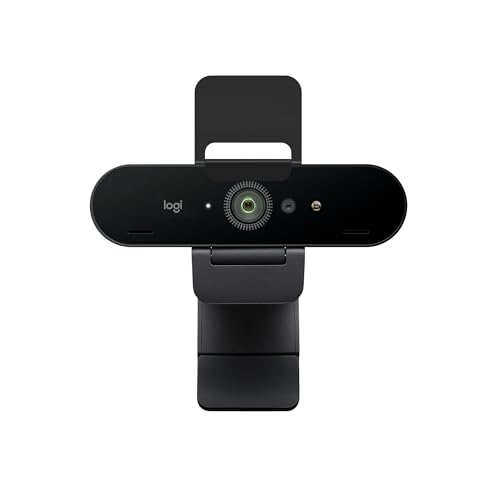
The Brio’s HD trick is arithmetic: it captures at 4K and delivers HD drawn from that richer capture, so its 1080p carries a crispness and cleanliness that native HD sensors rarely match, edges defined, noise suppressed by the downsample itself. For the professional whose video presence is a work surface, the streamer, the consultant, the teacher on a platform, that difference reads as competence before a word is spoken. Its light handling is the other half of the case: a wide dynamic range keeps a face readable against the office window that defeats lesser webcams, and its adjustable field of view lets a desk be framed tight for a call or wide for a demonstration.
Autofocus behaves like a colleague, settling and staying, and the camera’s software ecosystem gives control over zoom, pan and exposure that presenters use to build presets for each kind of session. It mounts on monitors, laptops and tripods with equal manners, and its build has the dense, serious feel of equipment bought once. For HD as a professional standard, it is the benchmark in this guide.
The caveats are a premium price among webcams and a dependence on good USB bandwidth and lighting to show its best; starve it of light and the downsample cannot invent what the room withheld. Light the desk like you mean it, and the Brio returns an HD image that makes the resolution question feel, correctly, settled.
- Form: premium USB webcam
- Capture: 4K sensor delivering downsampled HD
- Light: wide dynamic range for windowed rooms
- View: adjustable field of view and digital zoom
- Role: professional calls, streaming, teaching
Strengths
- The sharpest, cleanest HD in the webcam class.
- Faces survive backlit office windows.
- Presets make daily sessions one-click consistent.
Trade-offs
- Premium price for a webcam.
- Wants decent light to justify itself.
- Needs a healthy USB connection.
Best for: professionals whose desk image is their storefront. Not suited for: buyers wanting a camera that also leaves the desk.

Logitech C920S HD Pro — Best Proven HD Webcam
Some products become standards by surviving. The C920 line has carried a generation of calls, classes and streams at honest 1080p, and the C920S adds the privacy shutter that modern desks expect. Its virtues are the unglamorous ones that decide daily experience: colour that makes faces look like faces under ordinary bulbs, autofocus that gets there and stays there, stereo microphones that respect a voice at desk distance, and compatibility with effectively everything that has a USB port and a meeting to attend.
It is the camera IT departments issue and creators start on, and that ubiquity is itself a feature: every platform, tutorial and troubleshooting answer on earth assumes it. In HD terms it is native and unpretentious, no downsampling tricks, just a well-tuned 1080p pipeline that has been refined across years of production. For a buyer who wants the question closed rather than optimised, that closure is the product.
Newer rivals beat it in low light and dynamic range, and its field of view is fixed at a width that suits a desk rather than a demonstration. Buy it as the dependable baseline, the second camera, the household spare, or the first webcam of a career that will later justify the Brio. It will not embarrass any of those roles, which is more than most legends manage.
- Form: USB webcam with privacy shutter
- Video: native Full HD 1080p
- Audio: built-in stereo microphones
- Focus: steady autofocus for desk distances
- Role: calls, classes, streaming baseline
Strengths
- A decade-proven 1080p pipeline.
- Works with everything, everywhere.
- Privacy shutter suits modern desks.
Trade-offs
- Low light trails the premium picks.
- Fixed field of view.
- No downsampling sharpness bonus.
Best for: dependable everyday HD on any desk. Not suited for: backlit rooms or wide demonstrations.

NexiGo N60 — Best Budget HD Webcam
The N60 exists to close the gap between a laptop’s miserable built-in camera and a professional webcam, at a price that makes the decision easy for households, students and small offices equipping several desks at once. Its 1080p image is honest and bright in ordinary room light, its fixed focus removes a whole category of hunting and pulsing from calls, its privacy cover is built in rather than improvised with tape, and it plugs in and works with the ceremony of a kettle.
Fixed focus deserves its defence: at desk distances, with the depth of field a small webcam lens provides, everything from the face to the whiteboard stays acceptably sharp, and the camera never embarrasses its owner by refocusing on a bookshelf mid-sentence. For classes, family calls and team meetings, that predictability beats sophistication. The N60’s microphone is serviceable for speech, its mount grips monitors and lids securely, and its software control adds the basic adjustments a user actually touches.
Low light and backlight expose the budget, as budgets are exposed, and the image softens where the Brio stays crisp. Seat the user facing the light rather than against it, a free upgrade, and the N60 delivers HD that nobody on the call will ever criticise. It is the right camera for the majority of desks, which is precisely its design brief.
- Form: budget USB webcam, privacy cover
- Video: Full HD 1080p, fixed focus
- Setup: true plug and play
- Mount: monitor, laptop and tripod friendly
- Role: home offices, students, multi-desk rollouts
Strengths
- Real 1080p at an easy price.
- Fixed focus never hunts mid-sentence.
- Equips a whole household or office sensibly.
Trade-offs
- Backlight and darkness reveal the budget.
- Fixed framing for demonstrations.
- Microphone is speech-grade only.
Best for: everyday calls and classes on real budgets. Not suited for: professional storefront streaming.

OBSBOT Tiny 2 — Best Tracking HD Camera
A static webcam assumes a static human, and teachers, presenters and demonstrators are not static humans. The Tiny 2’s motorised head and AI tracking follow the presenter across a whiteboard, a workbench or a room, reframing smoothly while its unusually large sensor delivers HD (and 4K, when wanted) with a clarity webcams are not supposed to have. Delivered as HD on a call or stream, the result looks like a camera operator’s work, and for the online teacher whose body is half the lesson, that following frame is the difference between a lecture and a broadcast.
Voice and gesture control complete the autonomy: start tracking, zoom, or switch framing without returning to the keyboard, hands full of the thing being taught. Its low-light quality, courtesy of that sensor, keeps evening classes and winter afternoons handsome, and its presence on a desk, small, deliberate, faintly robotic, signals a professional setup to every student who joins.
It costs like the specialised instrument it is, needs its software ecosystem to shine, and remains desk-bound. For the presenter who never moves, its talents are wasted and the Brio is the wiser buy. For the teacher who moves, it is not an upgrade to a webcam; it is a different category of help, and once a class has been taught with a camera that follows, teaching without one feels like lecturing to a photograph.
- Form: PTZ tracking webcam
- Sensor: unusually large for the class
- Tracking: AI following on a gimbal head
- Control: voice and gesture commands
- Role: online teaching and presenting in motion
Strengths
- Follows a moving teacher like an operator.
- HD clarity a class above ordinary webcams.
- Hands-free control while demonstrating.
Trade-offs
- Premium, specialised pricing.
- Desk-bound by design.
- Software setup deserves an unhurried hour.
Best for: online teachers, trainers and demonstrators. Not suited for: seated-only callers or field filming.

Sony ZV-1F — Best HD Creator Compact
When HD recording leaves the call and becomes content, lessons filmed for a course, explainers for a channel, family films with a beginning and an end, the ZV-1F is the compact that treats HD as its native art. Its one-inch sensor and bright wide lens gather the light webcams starve on, its eye autofocus and product-showcase focus serve the desk creator’s two subjects, face and object, and its colour is tuned to make people look like the healthy version of themselves without a grading session. Recorded at HD, its files stay small, edit fast and archive kindly, while looking a class above any webcam’s best day.
It also leaves the desk: the same camera films the workshop, the garden lesson and the holiday, stabilised electronically and simply, which makes it the one-camera answer for creators whose HD life mixes recording and uploading rather than live calls. Its directional microphone respects the presenter’s voice outdoors better than a webcam’s array respects it indoors. Consistency across hundreds of uploads is its professional signature.
It is not a webcam without help, needing capture arrangements for live use, its lens is fixed, and its battery is sized for sessions rather than days. As the HD recording camera for creators who publish, though, it occupies the sweet spot this guide exists to identify: quality far beyond the desk cameras, complexity far below the mirrorless world.
- Form: fixed-lens compact, one-inch sensor
- Focus: eyes plus product showcase shift
- Audio: directional built-in array
- Lens: bright, wide, creator-framed
- Role: recorded lessons, explainers, channels
Strengths
- Recorded HD a class above webcams.
- Leaves the desk when the content does.
- Publishing consistency across heavy schedules.
Trade-offs
- Live use needs capture hardware.
- Fixed lens, fixed framing.
- Session-length battery.
Best for: course creators and desk-based channels. Not suited for: plug-and-play meeting attendance.

DJI Osmo Pocket 3 — Best Moving HD Camera
HD’s moving jobs, the property walkthrough, the event record, the family day out, the facility tour for a website, belong to the Pocket 3, whose three-axis gimbal makes HD footage look professionally tracked at any resolution and whose one-inch sensor keeps interiors and evenings clean. Delivered in HD, its files are light, its transfers quick, and its results indistinguishable in polish from far heavier rigs, because the polish was never in the pixel count; it was in the stability and the light, and this camera has both.
Its rotating screen and native vertical thinking serve the platforms where HD now lives, and its subject tracking lets a solo operator film a moving presentation, a guided tour, a child’s school play from the aisle, with the camera doing the camerawork. Wireless microphone companions complete a one-person production unit that fits a coat pocket and deploys in seconds, which is why it keeps appearing in this site’s guides wearing different hats: it is simply the most efficient moving camera of its generation.
Recorded at its best it exceeds HD, and owners filming for HD delivery gain downsampled richness and reframing headroom as a free bonus. Its fixed lens and pocketable build ask for a case and a little care. As the moving half of an HD kit, paired with any desk camera above, it completes a system that covers the resolution the world actually watches, end to end.
- Form: pocket gimbal camera, one-inch sensor
- Stabilisation: three-axis mechanical
- Screen: rotates for vertical delivery
- Audio: wireless microphone ecosystem
- Role: walkthroughs, events, family filming
Strengths
- Movement that looks professionally crewed.
- Interiors and evenings stay clean.
- Deploys from a pocket in seconds.
Trade-offs
- Fixed wide view only.
- Not a desk or call camera.
- Deserves a case for daily carry.
Best for: HD filming that walks, tours and celebrates. Not suited for: meetings or static lessons.
Comparison table
| Camera | Form | Best at | Standout | Choose it for |
|---|---|---|---|---|
| Logitech Brio | Webcam | Professional HD presence | Downsampled sharpness, HDR light | Streaming and consulting |
| Logitech C920S | Webcam | Dependable HD | Proven pipeline, privacy shutter | Any desk, any platform |
| NexiGo N60 | Webcam | Budget HD | Fixed focus, plug and play | Homes and classrooms |
| OBSBOT Tiny 2 | PTZ webcam | Moving presenters | AI tracking head | Online teaching |
| Sony ZV-1F | Compact | Recorded HD content | One-inch sensor, showcase focus | Courses and channels |
| DJI Osmo Pocket 3 | Gimbal camera | Moving HD | Mechanical stabilisation | Tours and events |
Why does HD refuse to die, and when is it genuinely the right choice?
Because delivery, bandwidth and human vision conspired to keep it. Most viewing happens on screens where HD and 4K are separated by viewing distance rather than by drama; most live platforms cap or compress toward HD economics; most archives are limited by storage budgets that HD respects and 4K devours. A school recording every lesson, a church streaming every service, a family filming every birthday: these are HD’s natural citizens, and their archives will be watched precisely because they were cheap enough to keep everything.
HD is genuinely the right choice when the work is live, long, frequent or archived at scale, and when the audience’s screens are phones, laptops and classroom projectors. It is the wrong choice when the work is cinema-bound, heavily cropped in the edit, or destined for very large displays at close range. The maturity of the HD ecosystem means the decision can be made on workflow rather than fear, and this guide’s picks were chosen to make the HD decision feel, as it should, like an optimisation rather than a surrender.
One more honest point: a well-lit HD image from the Brio or the ZV-1F will beat a badly lit 4K image from a flagship in every blind test that matters, because audiences judge light, stability and sound long before they count lines. The resolution race distracted a decade of buyers from that hierarchy. HD buyers, by necessity, learn it first.
How do you build a good HD setup?
Light the face, not the room
One soft light in front of the subject, slightly above eye level, transforms every camera in this guide more than any upgrade between them. HD sensors, especially the smaller webcam ones, are honest about light: give them enough and they look professional; starve them and they smear. A window by day or a modest panel by night is the whole secret, and it costs less than the difference between the N60 and the Brio.
Raise the camera to eye level
Webcams perched on laptop lids film up noses and down at foreheads, and no resolution repairs an unflattering angle. A monitor mount, a small tripod or a stack of books that puts the lens at eye level is the cheapest production value in video. The tracking Tiny 2 forgives movement, but even it frames best from a sane height.
Fix the sound before the picture
Audiences forgive soft video and abandon bad audio. Every pick here has a workable microphone story, and a modest USB or wireless microphone improves all of them more than a camera upgrade would. Test recordings on a phone speaker, in a noisy room, because that is where your audience lives.
What mistakes do HD buyers make?
Paying for resolution and starving the light
The classic error, in HD as in everything: the budget goes to the camera badge while the room stays a cave. Reverse the order. Light first, camera second, and the N60 in a lit room will embarrass a flagship in a dark one on every call that matters.
Recording everything at maximum settings
Owners of dual-capable cameras record 4K out of habit, then drown in files their laptop cannot edit and archives they cannot afford, for delivery that will be HD regardless. Set the camera to the delivery standard, enjoy the speed, and let maximum settings be a deliberate choice for deliberate projects.
Ignoring the background and the window
A window behind the subject turns every webcam into a silhouette machine, and a chaotic background taxes both the image and the audience. Turn the desk to face the light, give the camera a calm backdrop, and HD’s limited pixels stop being spent on the window’s glare and the bookshelf’s noise.
Buying a webcam for a recording job
Webcams are live instruments; recorded courses and channels deserve a recording camera. The ZV-1F’s existence in this guide is the correction: match the tool to the verb, streaming or recording, and both halves of an HD practice improve immediately.
Final Recommendation
For desk-bound HD, the Brio is the professional standard and the C920S its dependable understudy, with the N60 equipping every other desk in the building. Teachers who move should build around the Tiny 2. Creators who record should start with the ZV-1F, and anyone whose HD walks should carry the Pocket 3. Choose by verb, light the face, fix the sound, and HD will repay you with the one thing higher resolutions keep promising and workflow keeps eating: a practice that actually happens, every day, without friction.
Frequently Asked Questions
Is HD still acceptable for a professional channel?
Yes, when the light, sound and stability are professional. Audiences judge those first, platforms deliver HD economics regardless, and many successful educational and community channels publish in HD by deliberate, defensible choice. Upgrade the chain before the resolution.
Does a 4K webcam really make better HD?
Generally yes, through downsampling: the Brio’s HD is drawn from a richer capture, which sharpens edges and suppresses noise. The gain is real but conditional on light and bandwidth; in a dark room the advantage narrows to very little.
How much storage does HD recording save?
Several-fold against 4K at comparable quality, which compounds across a year of lessons or services into the difference between keeping everything and deleting history. For archives whose value is completeness, that arithmetic is the argument.
Can I edit HD on an older computer?
Comfortably, and that is one of HD’s core virtues in this guide. Timelines stay responsive, exports finish in minutes, and laptops that choke on 4K become capable production machines again. Workflow speed is a creative feature, not a compromise.
When should I skip HD and buy for 4K instead?
When the work is destined for large screens at close range, heavy reframing in the edit, or cinema-style production where recording depth matters more than throughput. Our filming-video guide covers that territory; this one exists for the larger world that HD serves better.
How do classes, services and meetings each use HD differently?
The recorded class is an archive with a syllabus: it must be legible at the whiteboard, audible at the back of the lecturer’s sentences, and cheap enough to keep for every session of every term. The Tiny 2 following the teacher and the ZV-1F recording the polished version are its two poles, and institutions that standardise on one camera per room discover the hidden dividend: every room behaves identically, so support, training and spare parts all simplify. HD’s modest files make the archive a line item rather than a capital project, which is why education, of all sectors, never really left HD.
The streamed service, church, council, community hall, is a reliability exercise: the same camera, the same framing, fifty weeks a year, operated by volunteers. There the C920S’s and N60’s plug-and-forget manners outrank every refinement, and the setup’s quality is measured in Sundays without incident. The meeting is HD’s home turf and its least forgiving critic, because the audience is close, attentive and empowered to leave; the Brio’s polish and a lit face are the whole game.
Reading those three use-cases together explains the fleet’s shape: dependability at the base, tracking for the teachers, polish for the professionals, and two recording cameras for the work that outlives the moment. HD is not one job, and this guide has refused to pretend otherwise.
What does an HD archive teach about buying cameras?
That completeness beats brilliance. The family, school or business that recorded everything in decent HD owns a past; the one that recorded highlights in glorious resolution owns a trailer. Camera buying for archives should therefore start from the sustainable day, the setup a tired person can run correctly at the hundredth repetition, and the picks above were ranked with that hundredth repetition in mind. The Brio preset, the N60’s fixed focus, the ZV-1F’s consistency: each is a small machine for making the hundredth recording as good as the first.
Archives also forgive resolution and punish absence, which reframes the budget: two dependable HD cameras covering two angles outrank one magnificent camera covering one, because the archive’s gaps are permanent and its pixels are rarely examined. Buy coverage, light and sound; let the archive grow; and in ten years, when the footage is priceless, nobody will ask what it was shot in. They will ask whether the important day is there, and the HD fleet’s whole design exists so that the answer is yes.
How does HD serve people whose work is being believed?
There is a class of video whose entire value is credibility: the consultant’s call, the tutor’s sample lesson, the clinician’s telehealth hour, the job interview, the small firm’s pitch. In that class the camera is not documenting the work; it is part of the work’s evidence, and HD’s maturity is an asset because nothing about the image distracts. The Brio’s calm exposure, the C920S’s familiarity, the Tiny 2’s operator-like following all say the same sentence in different accents: this person is set up, prepared and taking you seriously. Buyers in credibility professions should weigh that sentence above every specification in this guide, including the ones this guide itself headlines.
Credibility also has a failure mode unique to video: the almost-right setup. A camera slightly too low, a light slightly too harsh, a background slightly too revealing of the spare room’s chaos, each shaves a little trust from the hour, and the shaving compounds across a client relationship. HD equipment is cheap enough, and the setup knowledge in this guide simple enough, that almost-right is a choice rather than a fate. Raise the lens, light the face, calm the background, test on the platform the client will actually use, and the same cameras that equip a hobbyist equip a professional, because at HD the difference between them was never the sensor. It was the care.
That is the deepest reason this guide treats HD as a discipline rather than a discount. The resolution forgives; the discipline does not need to. Professionals who internalise that find their HD setups outperforming careless 4K setups in the only metric their clients keep: whether the person on the screen seemed worth listening to for the full hour.
What changes when the whole household or office goes on camera?
Equipping one desk is a purchase; equipping a household’s school corner, two home offices and a grandparent’s kitchen table is a small infrastructure project, and HD’s economics are what make it sane. The N60’s price lets a family standardise, so every call from every room looks like the same household rather than a lottery, and support becomes a family skill instead of a per-device mystery. Offices discover the same dividend at scale: a fleet of identical C920S units means one driver story, one mounting answer, one spare on the shelf, and meetings whose quality stops depending on whose laptop was newest.
Standardisation also buys dignity for the least technical user. The grandparent whose camera simply works, whose privacy cover closes with a click they can feel, whose face is lit because someone arranged the lamp once, participates as an equal rather than as the call’s apologetic blur. Buying for a household means buying for its least confident member, and the dependable end of this fleet, fixed focus, plug and play, nothing to configure wrongly, was ranked with that member in mind. The professional picks can wait for the professional desks; the family’s standard should be the camera nobody has to think about.
There is a budget honesty here too: the money saved by standardising on HD buys the lights, the headsets and the second monitor that improve calls more than resolution ever will. Infrastructure thinking beats gadget thinking at every scale this guide covers, from the single desk to the small company, and HD is where infrastructure thinking wins by the widest margin.
How long will an HD setup stay respectable?
Longer than the upgrade cycle wants you to believe. The installed base of HD displays, the platforms’ delivery economics and the archive logic above all move slowly, and a well-chosen HD chain bought today, Brio or C920S at the desk, ZV-1F for recording, Pocket 3 for movement, will still be doing respectable work when several generations of flagship marketing have passed. Respectability in video is mostly light, sound and steadiness, and none of those expire. The cameras in this guide were also chosen for physical and software longevity: standard mounts, standard connections, makers with long support habits, because an HD setup’s enemy is not obsolescence but abandonment, the proprietary dock, the orphaned app, the cable nobody sells anymore.
Plan the exit honestly anyway. Every pick here can be demoted gracefully when its owner upgrades: the Brio becomes the second angle, the C920S the household spare, the ZV-1F the family camera, the Pocket 3 nothing changes at all, since movement ages slowest. A fleet bought with demotion paths in mind never becomes e-waste on a schedule set by advertising, and the total cost of a decade of good video drops accordingly. Buy once, demote slowly, and let the archive, not the catalogue, set the replacement rhythm.
That rhythm is the mature buyer’s final advantage. While others re-litigate the camera question every product cycle, the HD practitioner in this guide’s mould spends those hours making the work the cameras exist for, and the work, accumulated, is the only specification that ever really compounded.
What do privacy and control mean at HD’s desks?
The webcam’s always-there presence created a new household object: the camera that might be watching. The fleet answers that unease in hardware where it counts, the C920S’s and N60’s physical shutters closing with a certainty no software indicator can imitate, and in behaviour everywhere else: indicator lights, per-app permissions, and the presenter’s own discipline of closing the cover when the day ends. Buyers equipping children, clients or patients should treat the physical shutter as a first-order feature, which is why two of this guide’s three desk-first picks carry one and the third, the Brio, lives in professional contexts where its software controls are actively managed.
Control runs the other way too: the same cameras give their owners command of framing, exposure and field of view that a laptop’s fixed camera denies. That command is a form of privacy in itself, the tight crop that shows the professional and not the household, the preset that frames the teacher and not the family’s evening behind them. HD’s desks are also homes, and the cameras ranked here were chosen partly for how precisely they let a person decide what the world sees. Decide deliberately, set the crop once, and the question stops recurring at every call.
Institutions should write the small policy that matches the hardware: covers closed out of hours, recordings announced, archives access-controlled. The technology in this guide supports every clause of that policy; what it cannot supply is the habit, and the habit, as in every section of this guide, is the actual product being bought.
A ten-minute test that settles any HD purchase
Before any camera in this guide is declared the answer, put it through the only audition that matters, in your room, with your light, on your platform. Record two minutes seated and talking, two minutes standing and demonstrating if your work moves, two minutes with the room’s worst condition engaged, the window open behind you, the overhead light alone at night. Watch the result on a phone and on the biggest screen you own, listening through the speaker your audience will use. Every flaw that will ever annoy you is present in those six minutes, and every virtue that will ever serve you is there too, unhidden by showroom lighting.
Then run the second audition, the workflow one: start the setup from cold, as a tired person would before an early call, and time how long competence takes to assemble. The HD practice lives or dies on that cold start. A camera that needs five minutes of coaxing will be skipped on the rushed morning, and the skipped setup is the one the client remembers. The fleet above was chosen so that the cold start is measured in seconds, presets recalled, covers opened, lights already standing where they live.
Keep the test recordings. They become the baseline against which every later adjustment, new light, new room, new platform, is judged, and they inoculate the buyer against the review cycle’s amnesia, in which last year’s perfectly good image suddenly looks inadequate beside a launch event. Your own six minutes, in your own room, outrank every launch event ever staged.
The case for teaching HD as a craft in itself
Schools, firms and families increasingly treat appearing on camera as a basic competence, like writing a clear email, and HD is the craft’s natural classroom because its constraints are honest. Within HD, a student cannot hide behind spectacle; the frame rewards exactly the transferable skills, framing, lighting, vocal presence, background judgement, that serve at every resolution above it. The cameras in this guide make unusually good teaching instruments for that reason: the N60’s fixed focus removes a variable while a learner masters the others, the Brio’s presets demonstrate what consistency looks like, the Tiny 2 shows what a camera operator actually does by doing it visibly.
There is an equity argument folded inside the craft one. HD’s prices put a respectable setup within reach of the student, the new freelancer and the village hall, which means the ability to be seen and heard clearly, increasingly a gateway to work and education, is not rationed by flagship budgets. Guides like this one exist to keep that gateway wide: the correct, sufficient, honestly priced kit, set up with care, outperforms the unaffordable ideal in the only way that matters, by existing in the room where the opportunity happens.
So the last word belongs to sufficiency, which this guide has argued is a sophisticated position rather than a timid one. Know what the work needs, buy exactly that, set it up like a professional, and spend the difference, in money and attention, on the work itself. HD, chosen deliberately and run with discipline, is what that philosophy looks like when it is applied to video, and the six cameras above are its current best instruments.
One practical coda before the related guides. Label your setup, literally: a small card taped beneath the monitor listing the preset, the light’s position and the cable’s destination saves the day the setup is disturbed by cleaning, children or a helpful colleague, and it saves the remote worker whose desk travels between home and office. HD systems are simple enough that their whole configuration fits on that card, which is another of the standard’s quiet virtues: the entire practice can be written down, handed over and rebuilt by a stranger in minutes. Complexity that cannot be written on a card will eventually fail at the worst moment; sufficiency that fits on one rarely does.
Rebuild yours from the card once, deliberately, before you need to. The ten minutes spent proving the system is recoverable are the cheapest insurance in this entire guide, and they complete the philosophy the guide has argued throughout: the best HD camera is the one embedded in a practice so simple, so lit, so sounded and so documented that the video simply happens, daily, at the standard the world actually watches.
And if, after all this, the work outgrows HD, the fleet retires upward gracefully rather than into a drawer. The desk cameras become the second angles and household spares described earlier; the ZV-1F becomes the travel and family camera; the Pocket 3 simply keeps its job, since gimbal movement at any resolution is the same job. Nothing in this guide is a dead end, which is the final property that separates a standard from a stopgap: HD bought well is a foundation, and foundations, unlike fashions, are allowed to be permanent.
What a broadcaster would recognise in your spare room
Television spent half a century perfecting HD before handing it to the public, and its habits are worth stealing wholesale. The broadcaster’s camera is never the story; the presenter’s eyeline, the controlled background, the sound checked before the segment and the framing that survives the whole hour are the story. Every pick in this guide can serve that discipline at a desk, and the discipline costs nothing but the decision to adopt it. Set the camera once as a studio would, mark the chair’s position as a studio would, keep a spare cable coiled as a studio would, and the spare room quietly becomes a facility with a door.
The other broadcast habit is rehearsal measured in seconds: the ten-second check, picture, sound, light, background, performed before every important call the way a pilot walks a checklist. HD’s forgiving nature tempts its users to skip the check, and the skipped check is where the window glare, the muted microphone and the laundry pile behind the chair all enter the record. Ten seconds, every time, is the entire difference between the amateur’s lottery and the professional’s routine, and it is available at every price in this guide, including the cheapest.
Adopt those two habits and the resolution debate loses its power over you, because the image arriving at the other end will carry the broadcaster’s signature, which was never a number of lines. It was, and remains, the calm of a setup that has been thought about once, properly, and then simply used.
None of this asks you to love limitations. It asks you to notice where the actual limits of your video life sit, in light, in bandwidth, in storage, in the attention of the person setting up at dawn, and to spend against those limits rather than against a number on a box. The six cameras above spend wisely by that accounting, each in its assigned territory, and a kit assembled from them will still be earning its desk space when the next resolution arrives to repeat the argument. By then you will know, from your own archive’s evidence, exactly how much the argument is worth.
Keep the archive’s evidence where you can see it, too: a shelf or a folder of the year’s best recordings, reviewed occasionally with fresh eyes. It will show you your own progress more honestly than any review site, the light improving, the framing calming, the sound clearing, and it will show you the precise moment the setup stopped mattering and the work took over. That moment is the purchase this guide has actually been describing, in the vocabulary of webcams and sensors, from its first paragraph to this one.
When that moment arrives, pass the knowledge on. The colleague struggling in a dark room with a laptop camera does not need a lecture on resolution; they need the lamp moved, the lens raised and the N60’s honest simplicity introduced to their desk. HD’s community of practice grows exactly that way, one corrected setup at a time, and every reader who finishes this guide equipped becomes a small broadcaster of its standards into rooms this page will never see. That is a fitting ambition for the world’s most-watched resolution, and a practical one: buy well, set up once, help the next desk do the same.
Help the next desk do the same, and notice what has happened to the original question along the way. It began as a shopping problem, which camera for HD video, and it ends as a practice, a lit face, a calm frame, a checked microphone, a file that a modest computer opens without complaint and an archive that keeps everything because keeping everything was affordable. The cameras were the easy part. They usually are, once someone has taken the trouble, as this guide has tried to take it, to say precisely what the work requires and to rank the tools by the work rather than by the noise around them.
Rank the tools by the work: keep that sentence, and the next camera decision, at whatever resolution the future insists on, will make itself in an afternoon instead of a season. The work, meanwhile, is already waiting, in the classroom, the meeting, the family’s Sunday call, for a camera that simply lets it be seen clearly. Choose from the six above, set the light, and begin.
Begin, and then do the most professional thing available to any of these cameras’ owners: forget about the camera for a month. Teach the classes, hold the meetings, film the birthdays, and let the setup’s quality be judged by the only jury that has ever mattered in video, the people who watched to the end without once thinking about how the picture was made. When the month is up, the archive will tell you whether the choice was right, and for the six cameras above, set up as this guide describes, the archive’s answer has been consistent for years: the picture was clear, the sound was honest, the person mattered more than the pixels, and the whole thing simply worked, which is all that HD ever promised anyone.
Set the light, raise the lens, close the cover when the day is done, and let the standard the world actually watches be served with uncommon care. That is the whole of the HD craft, and it is enough.
Related Guides
For the resolution above this one, read our cameras for filming video guide. Desk creators should also see our home movie camera picks, and movers should compare our hiking and camping camera roundup.


