reviewstook.com is reader-supported. When you buy through links on our site, we may earn an affiliate commission.
Where to buy
The first camera a new creator buys is not really a camera purchase. It is a wager on which frustrations they are willing to live with while they learn everything else — scripting, presenting, editing, publishing — at the same time. The best cameras for youtube videos beginners can choose are therefore not the most powerful ones in this series. They are the ones that remove the most obstacles per unit of money and attention: cameras that focus without being asked, frame without being studied, and forgive the beginner’s lighting, room and technique while the channel finds its feet.
- Sony ZV-1F: check price on Amazon
- Nikon Z50 II: check price on Amazon
- DJI Osmo Pocket 3: check price on Amazon
- Logitech Brio 4K: check price on Amazon
- GoPro HERO: check price on Amazon
- Insta360 GO 3S: check price on Amazon
Forgiveness is the quality this guide ranks first, and it deserves defining before any product appears. A forgiving camera keeps the face in focus when the beginner leans, gestures and forgets to sit still. It exposes a dim bedroom kindly instead of amplifying it into grain. It starts recording when the button is pressed, every time, without a menu’s opinion. Beginners abandon channels over accumulated small betrayals — the soft take, the ruined audio, the file that was not recording — far more often than over image quality, so the picks below are ordered by how rarely they betray.
Simplicity is forgiveness’s close cousin, but not its twin. Some simple cameras are simple because they can do little; the ones chosen here are simple because their automation is good. The distinction matters by month three, when the beginner has become an intermediate and starts wanting the control the toy camera never had. Where a pick has a ceiling, this guide names it plainly and says who will hit it, because a beginner camera bought honestly — as a first rung rather than a forever answer — is money well spent, while the same camera bought on a promise it cannot keep becomes the channel’s first resentment.
Budget honesty runs through every section that follows. A channel’s first camera shares its budget with a microphone, a light, a tripod and the unglamorous storage that keeps early footage safe, and a camera that consumes the whole fund leaves the channel worse filmed than a modest camera properly supported. The picks are therefore assessed as parts of a starter kit, not as solo trophies, and several famous flagship names are absent for exactly that reason: they are wonderful second cameras for channels that survive, and anchors for channels still deciding whether they will.
Key Takeaways
- Sony’s ZV-1F is the beginner reference: eye focus, product showcase and a wide lens that forgive almost everything.
- Nikon’s Z50 II is the first camera that is also a growth path, with real subject detection and interchangeable lenses.
- DJI’s Osmo Pocket 3 suits beginners whose videos move — walks, tours, days out — more than they sit.
- Logitech’s Brio 4K turns the computer a beginner already owns into a respectable filming and streaming desk.
- GoPro’s compact HERO is the toughest, simplest starter for outdoor and action-led channels.
- Insta360’s GO 3S is the playful second angle that makes early videos look produced beyond their budget.
In this guide
Quick Picks
| Camera | Badge | Why it is here |
|---|---|---|
| Sony ZV-1F | Best first camera for most beginners | Automation that handles focus, products and framing while the creator learns everything else. |
| Nikon Z50 II | Best beginner camera to grow into | Modern detection autofocus, friendly presets and lenses to add as the channel matures. |
| DJI Osmo Pocket 3 | Best for moving beginners | Gimbal-smooth walking footage and tracking in a device with almost nothing to set up. |
| Logitech Brio 4K | Best desk-and-stream starter | Plugs into the existing computer and lifts streams, lessons and desk videos immediately. |
| GoPro HERO | Best simple outdoor starter | Compact, waterproof and nearly impossible to operate wrongly on a day out. |
| Insta360 GO 3S | Best creative second angle | Thumb-sized shots that make a one-camera channel look like a production. |
What should a beginner actually ask a camera to do?
Less than the marketing implies. A beginner’s videos are watched — if the channel is lucky and improving — for what the creator says and shows, at phone size, by an audience deciding whether this person is worth returning to. Nobody in that transaction is auditing shadow detail. What the audience does register, instantly and permanently, is whether the face is in focus, whether the voice is clear, and whether the video feels calm to watch. A beginner camera’s job description is those three things, delivered reliably, in the creator’s actual room, tonight.
Reliability has a technical shape worth learning early. Autofocus that finds an eye and keeps it is worth more than resolution the platform will compress away. A flip screen that lets the creator frame themselves is worth more than a second dial. A record button whose state can be confirmed at a glance — a light, a screen, a beep the creator trusts — is worth more than a feature list, because the canonical beginner disaster is the brilliant take performed to a camera that was never rolling. The picks below were interrogated on exactly those unglamorous points.
The room is part of the camera choice, and beginners should measure theirs before shopping. A desk in a bedroom corner wants a wide lens and a webcam’s convenience; a creator filming in a workshop, a kitchen or the outdoors wants toughness and stabilisation; a walker wants a gimbal. The same budget buys a delighted specialist or a disappointed generalist depending on whether the room question was answered first. This guide organises its picks by those habitats deliberately, because beginner advice that ignores habitat is how good cameras end up returned.
Finally, a beginner should ask what the camera teaches. The first camera is also the first teacher: its automation shows the beginner what correct looks like, and its manual controls — where they exist without punishing — let curiosity grow into skill. Cameras that hide everything teach nothing; cameras that demand everything teach resentment. The middle path, automation with visible, optional depth, is where the two mirrorless-adjacent picks below earn their places beside the simpler devices.

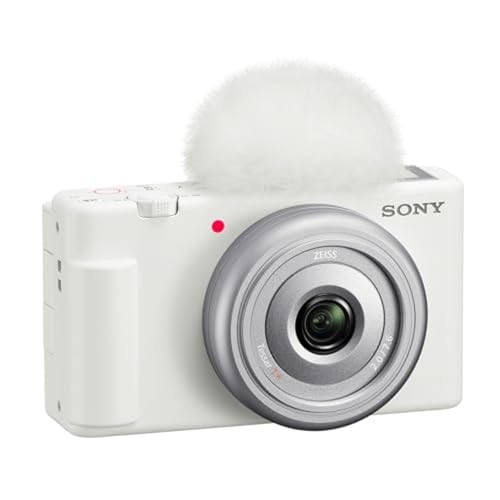
Sony ZV-1F — Best first camera for most beginners
Unbox the ZV-1F, charge it, turn it toward yourself and press record: the resulting video will be in focus, kindly coloured and framed wide enough to include your gestures, and nothing about producing it required a decision. That sentence is the entire case for this camera as the beginner standard, and it survives scrutiny because Sony designed the device by watching what first-time creators actually do — sit at a desk, talk, hold things up, lean, forget — and automating precisely those behaviours rather than the behaviours of professionals.
Product showcase mode is the emblem of that design intelligence. Beginners hold objects to the lens constantly — the book, the gadget, the ingredient, the finished craft — and ordinary cameras respond by focusing on the face behind the object or hunting between the two. The ZV-1F transfers focus to the object promptly and returns it to the eye afterward, so a first-week creator performs the signature gesture of experienced channels without knowing it was ever difficult. Tutorials, reviews, unboxings and hauls all run on that gesture.
The wide fixed lens quietly solves the beginner’s room. First channels are filmed in bedrooms, box rooms and kitchen corners where the camera sits a metre or two from the creator, and a conventional lens at that distance frames a face and nothing else — no hands, no desk, no context. The ZV-1F’s width includes the world the video is about, and its depth of field at that width forgives the focus imperfections that remain, so the beginner’s framing looks intentional from the first upload.
Its colour needs no learning curve either. Sony’s creator tuning renders skin pleasantly under the mixed bulbs of a real home, and the camera’s exposure manners avoid the two beginner plagues — the face lost against a bright window, the face amplified into noise in a dim room — as gracefully as anything at its level. The beginner’s job shrinks to content, which was always supposed to be the job.
The ceiling is real and should be stated in the same breath as the praise: the lens does not change or zoom optically, low light is competent rather than commanding, and a channel that grows toward travel, events or cinematic work will outgrow the body within a few years. Sony’s own larger cameras are the natural graduation, and the habits learned here transfer. A first camera that serves two or three good years and teaches its replacement’s language is not a compromise; it is a curriculum.
For the desk-bound beginner — the reviewer, the teacher, the commentator, the crafter — this remains the recommendation against which the rest of the list argues its special cases. If your videos happen at a table, start here and spend the savings on the microphone and light the next sections insist on.
Resale and reuse soften the ceiling further. Cameras of this class hold their value respectably, and a graduated creator often keeps the ZV-1F as the desk’s permanent second angle or streaming camera rather than selling it — its USB streaming manners make it the rare first camera that remains employed after its replacement arrives. Beginners budgeting nervously can take comfort: this is among the least stranded purchases in the guide.
- Type: compact creator camera, 1-inch sensor
- Focus star: eye autofocus with product showcase mode
- Lens: wide fixed lens for small rooms
- Streaming: works as a USB camera for live sessions
Strengths
- First video looks intentional with zero learning
- Showcase focus performs the reviewer’s key gesture
- Wide lens forgives small rooms and framing errors
Trade-offs
- Fixed lens is a real growth ceiling
- Low light merely competent
- No path to interchangeable-lens ambitions
Best for: desk-based beginners in reviews, teaching and commentary. Not suited for: channels planning travel or cinematic growth soon.

Nikon Z50 II — Best beginner camera to grow into
Some beginners know, correctly, that they will not stay beginners. For them the Z50 II offers the unusual bargain of a first camera whose automation is genuinely kind and whose ceiling is years away. Nikon’s subject-detection autofocus — the camera finding people, eyes, animals and vehicles on its own initiative — was flagship behaviour not long ago, and here it sits inside the friendliest body in Nikon’s line, paired with colour presets that make early footage handsome before the creator knows what a picture profile is.
The detection’s manners are what a beginner actually experiences. Sit down, and the camera has the face before the creator has settled. Hold up a product, and a tap or the camera’s own recognition moves attention to it. Film the household dog’s first starring role, and animal detection treats the appearance as a plan rather than an accident. None of this requires the menu expeditions that make interchangeable-lens cameras intimidating; the Z50 II’s intelligence is on by default and pointed at the right things.
Growth arrives through the lens mount, and its economics deserve a beginner’s attention. The kit lens covers the channel’s first formats honestly. When a specific frustration matures — dim rooms, a background that will not soften, a subject too far away — the answer is a lens bought for that named need, fitted to the body the creator already knows, rather than a whole new system bought in a panic. Cameras that grow by accretion respect both the budget and the learning curve, and they keep the channel’s look continuous while it improves, which audiences experience as the creator getting better rather than the equipment changing.
The flip screen and ergonomics serve the solo beginner directly: self-framing without a monitor, controls that fall under the fingers of someone holding the camera at arm’s length, and a body substantial enough to feel like an instrument without punishing a day’s carrying. Nikon’s colour presets deserve their recurring mention — for creators not ready to grade footage, a well-chosen preset is the difference between video that looks filmed and video that looks found.
Where it asks more than the ZV-1F is in the owning: a lens to choose, a battery to manage, a sensor to keep dust-aware, settings whose depth is optional but present. Beginners who want an appliance should buy the appliance above. Beginners who suspect they are starting a craft should buy this, and accept the small extra ceremony as tuition.
Its stills ability is a final, practical dividend for channel life: thumbnails, community posts and product photographs come from the same body at a quality phones approximate and audiences can somehow always tell apart. A channel is a small media company, and this is the only pick in the list that staffs its photography department too.
Student creators, whose budgets arrive in term-sized lumps, map particularly well onto this camera’s economics: the body and kit now, the fast prime when the channel earns it, the wider lens when the formats demand it. Each purchase is legible, each improvement visible, and none of the money is spent twice — the rarest property a beginner purchase can have.
- Type: APS-C mirrorless camera
- Focus star: subject detection for people, animals, vehicles
- Screen: flip screen for self-filming
- Growth: interchangeable Z-mount lenses
Strengths
- Modern detection autofocus at a beginner’s reach
- Grows by lenses instead of replacement
- Presets make early footage handsome unaided
Trade-offs
- More ceremony than a fixed-lens appliance
- Dim-room focus trails the full-frame tier
- Lens wants become a recurring budget line
Best for: beginners who intend to become practitioners. Not suited for: creators wanting a pure point-and-post appliance.

DJI Osmo Pocket 3 — Best for moving beginners
Watch a beginner’s walking video filmed on a conventional camera and the problem announces itself in three seconds: the frame bounces with every step, the face drifts out of centre as the arm tires, and the whole production feels like evidence rather than invitation. The Pocket 3 abolishes that category of failure mechanically. Its three-axis gimbal absorbs the walking, its subject tracking holds the face, and a beginner who has never heard the word stabilisation produces footage whose smoothness viewers associate with channels a hundred times its size.
That effortlessness is a genuine beginner virtue and not a shortcut around learning. The moving formats — the campus tour, the market walk, the day-out vlog, the neighbourhood guide — are where many first channels find their audience, because movement gives a new presenter something to react to instead of a blank room to fill. A camera that makes those formats available from the first week widens the beginner’s creative options at exactly the moment options are scarcest.
The rest of the package respects the beginner’s reality. The 1-inch sensor keeps faces composed in the ordinary light of shops, streets and kitchens. The screen rotates for self-framing and shows a face large enough to trust. The device wakes fast and records faster, which matters more than it sounds: beginner channels die of friction, and a camera that is filming within seconds of an idea keeps the idea alive. DJI’s wireless microphone pairing, when the budget reaches it, gives the walking beginner the clearest voice in this guide without a cable in sight.
Honesty requires the boundaries in the same paragraph as the enthusiasm. The lens is fixed and wide, so the Pocket will not teach lenscraft or reach a distant subject. Long, static, desk-bound productions belong to other picks — the Pocket can film them, perched on its little tripod, but its genius is motion and its owner should be a mover. Its battery across a long filming day wants planning and probably the car’s or a café’s socket at lunch.
Price positioning deserves a word for this audience: the Pocket 3 costs more than the simplest starters here, and a beginner should buy it because their format moves, not because it is fashionable. Bought for movement, it replaces a camera, a stabiliser and a measure of editing repair in one object, and the arithmetic becomes kind. Bought for a desk, it is an expensive way to film a wall.
For the beginner whose channel idea starts with a place rather than a chair — the city, the trail, the market, the campus — this is the first camera. It will make the early footage look like the channel the creator intends to become, and intention, visible on screen, is what early audiences subscribe to.
Travel specifically multiplies its case. A beginner’s first trip with a real channel intention — filming a city break as content rather than souvenir — needs a camera that fits the same bag as the clothes, survives being carried all day without complaint, and produces footage a cut above the phone the creator deliberately upgraded from. The Pocket is the only pick here that disappears into a jacket between shots, and disappearance, on a trip, is use.
- Type: gimbal camera with 1-inch sensor
- Stabilisation: three-axis mechanical gimbal
- Tracking: subject tracking for walking pieces
- Audio: wireless microphone ecosystem available
Strengths
- Walking footage smooth from the first week
- Almost no setup between idea and recording
- Strong sensor for ordinary, unchosen light
Trade-offs
- Fixed wide lens, no reach or growth
- Desk-bound formats are not its genius
- Long days need a power plan
Best for: beginners filming walks, tours and days out. Not suited for: static desk channels or distant subjects.

Logitech Brio 4K — Best desk-and-stream starter
The cheapest respectable camera a beginner can film with is frequently the one that plugs into the computer already on their desk. The Brio 4K is the polished form of that idea: a premium webcam with autofocus, light correction and a 4K sensor whose crop flexibility lets a creator frame tighter or wider from a fixed position. For the enormous class of first channels that are really a person at a computer — lessons, commentary, gaming, software, study content, live streams — it converts existing furniture into a studio for the price of an accessory.
Its virtues are the virtues of immediacy. There is no battery, no card, no transfer step: the recording lives where the editing lives, the stream starts when the software says so, and the camera is awake whenever the computer is. Beginner output is a volume game before it is a quality game — the channels that survive publish through their awkward phase — and a device that removes every step between sitting down and being recorded is a device that gets videos made. Friction, again, is the true enemy, and the Brio’s friction is close to zero.
Image quality within its habitat is honestly good. Autofocus holds the creator through the leans and gestures of desk presenting, light correction rescues the window-lit and lamp-lit rooms beginners actually have, and the 4K headroom lets editing crop a loose frame into a composed one. Skin and colour are a webcam’s rendering — competent, slightly eager — and audiences for desk formats accept that rendering as the native look of the genre, because it is.
The boundaries are the habitat’s boundaries. The Brio films where the computer is, full stop: no walks, no events, no second room. Its depth of field and low-light grace are a small sensor’s, and a creator whose format escapes the desk will escape the Brio in the same month. It should be bought as what it is — the desk’s camera — and for desk-led channels it may be the only camera the first year requires, which makes it, paradoxically, one of the strongest-value picks in this guide.
Pairing discipline matters more here than hardware debate. A modest USB microphone transforms the Brio’s videos more than any camera upgrade could, because desk audiences listen at length and watch at phone size. The beginner who buys the Brio and a microphone together has assembled, for a modest total, a desk setup whose results embarrass channels that spent the same money on a camera body alone and recorded its audio through the ceiling’s echo.
Live streaming is where the purchase fully ripens. A first channel often grows through lives before its uploads find traction, and the Brio is a streaming native: recognised by every platform’s software, steady across long sessions, and flattering enough under its light correction that a beginner can appear in public while still learning. Channels are communities before they are catalogues, and this little camera staffs the community hours without ceremony.
Privacy earns a closing sentence for a device that lives on a bedroom-desk monitor: a physical cover and an indicator the creator can trust are part of the product for anyone whose filming room is also their private room. The Brio’s shutter habits let the desk be a desk again when the recording ends, and beginners establishing boundaries between channel and life will feel that more than they expect.
- Type: premium 4K webcam
- Focus: autofocus with light correction
- Framing: digital crop flexibility from 4K
- Home: the existing computer desk, over USB
Strengths
- Zero-friction recording at the desk
- Streaming-native across every platform
- Strong value as a channel’s only first-year camera
Trade-offs
- Films only where the computer lives
- Small-sensor depth and low light
- No use at all away from the desk
Best for: desk, lesson, commentary and streaming beginners. Not suited for: any format that leaves the room.

GoPro HERO — Best simple outdoor starter
Some first channels are not filmed at desks or on walks but in weather: on bikes and boats, at skate parks and sidelines, in gardens, snow and surf. For those beginners the camera’s first virtue is that it cannot be babied, and GoPro’s compact HERO — the small, simple member of its line — is the pick. Waterproof, pocketable and operated through a touchscreen with very little to misconfigure, it is designed for people whose attention belongs to the activity, which is a precise description of a beginner filming their own sport.
Simplicity here is a safety feature for the footage. The wide lens means framing is approximate and still works; the deep focus means focus is a subject the beginner never has to meet; the stabilisation handles the movement the activity provides. A new creator can mount the HERO, press its button and think about the ride, the catch or the climb, and return home with usable video — an outcome that more configurable cameras, in beginner hands outdoors, reliably fail to match.
The image has the action camera’s signature energy: wide, vivid, everything sharp from the handlebars to the horizon. For outdoor and activity genres that energy is the native aesthetic audiences expect, and the compact HERO delivers it without the flagship’s price or complexity. Its small size also makes it the least self-conscious camera in this guide to carry, and self-consciousness is a real production cost for beginners filming in public places.
Limits should be faced squarely. This is not a talking-head instrument: indoor light stretches it, its audio in wind needs the usual action-camera management, and a creator whose channel migrates to a desk will need a desk camera beside it. Battery and heat across very long recordings follow the action-camera pattern of plan-and-swap. None of these are flaws in its habitat; all of them are reasons its habitat should be chosen honestly.
As a gift purchase — the way many of these cameras actually arrive in beginners’ lives — it is the safest recommendation in the list, because it forgives the recipient’s inexperience completely and suits the activities they already love. A camera matched to an existing passion gets used; a camera matched to an aspirational one gets shelved, and use is the only metric the first year recognises.
Buy it when the channel’s subject moves, gets wet or might get dropped. The HERO will come home with the footage, which is the whole of its promise and the beginning of every outdoor channel’s archive.
Mounts extend the promise cheaply, and beginners should budget a small pouch of them from the start: a handlebar or chest mount for the activity itself, a mini tripod for the parked explanations, an adhesive pad for the helmet or board where the sport’s culture permits. The camera plus three mounts is a production kit whose total still undercuts most single bodies in this guide, and the variety of angles it produces makes early outdoor videos look edited by someone with a crew.
- Type: compact waterproof action camera
- View: wide lens with deep focus throughout
- Operation: touchscreen, minimal configuration
- Build: made for weather, knocks and water
Strengths
- Nearly impossible to operate wrongly outdoors
- Toughness removes the fear of filming
- Mount pouch turns it into a small production kit
Trade-offs
- Indoor and talking-head work stretches it
- Wind audio needs management
- Not a desk camera in any disguise
Best for: outdoor, sport and activity-led first channels. Not suited for: indoor desk formats or dim rooms.

Insta360 GO 3S — Best creative second angle
Every beginner notices, usually around their tenth video, that their footage looks flat in a way they cannot name — and the name is usually angles. One camera, one position, one distance: the grammar of a security recording rather than a story. The GO 3S is the cheapest cure in this guide. A thumb-sized camera that magnet-mounts to shelves, sticks to a chest harness and perches where tripods cannot, it gives a one-camera beginner the cutaway — the hands close up, the view from the object, the room from above — that makes an edit feel directed.
Its beginner appeal is that the experimentation is free of risk and ceremony. Trying an angle costs thirty seconds and no money; if the shot fails, nothing was endangered, and if it sings, the channel has found a signature. Beginners learn visual grammar by trying shots, and no device here lowers the price of a try to zero the way this one does. Several now-established channels are recognisable by an angle a GO-series camera made habitual in their first year.
The device must be bought with its role understood, because the misunderstanding is common and disappointing: this is not a main camera. Its recordings are segment-length, its small sensor is a daylight-and-good-light instrument, and its footage is meant to be gathered into an edit built on a primary camera’s spine. A beginner who buys it as their only camera has bought a garnish for a meal they do not own. A beginner who adds it to the ZV-1F, the Brio or the HERO owns a two-angle production for less than many single mid-range bodies.
Short-form platforms are its second justification. Vertical clips from a chest mount, a pet’s-eye view, a cook’s-eye view over the pan — the GO 3S produces the daily short content that now feeds every long channel’s growth, and it produces them in the gaps of a filming session rather than as a separate production. For a beginner feeding two platforms from one afternoon, that efficiency is the difference between a sustainable rhythm and a second job.
Its case and charging arrangement keep it ready in a pocket or bag, and readiness, once more, is the beginner virtue that outranks specifications. The angle that gets filmed is the one whose camera was present, charged and unafraid — three adjectives this little device satisfies more completely than anything else in the list.
Consider it the guide’s graduation present to its own readers: buy the primary camera first, learn its manners, and when the flatness complaint arrives — it will — answer it with this, rather than with a premature replacement of a camera that was never the problem.
Creators in hands-on genres should note its particular teaching power. A craft, cooking or repair tutorial is narrated by hands, and the audience’s comprehension lives in whether they can see exactly what the fingers did. A GO 3S at the work’s own level shows that truth at a proximity no desk camera achieves, and beginners in those genres may reasonably buy it second only to the microphone — a ranking no other pick in this guide can claim.
- Type: thumb-sized wearable camera
- Mounts: magnetic and clip accessories
- Role: cutaways, close detail and short-form clips
- Recording: segments intended for an edit
Strengths
- Second angles at almost no cost or risk
- Chest and object viewpoints for hands-on genres
- Daily short-form content from filming gaps
Trade-offs
- Never a primary camera
- Small sensor, good light preferred
- Footage must be edited to matter
Best for: beginners adding production value to a working setup. Not suited for: anyone’s only camera.
What belongs in a beginner’s first kit besides the camera?
A microphone, and it is not close. Audiences abandon videos for bad sound faster than for soft pictures, and every camera in this guide records audio that a modest dedicated microphone — a wireless lavalier for the movers, a USB microphone for the desk — improves beyond recognition. Budget the microphone with the camera, rehearse with headphones once, and the channel’s perceived quality doubles before a single setting is learned.
A light comes second for indoor creators: one soft source, placed in front and slightly above, transforms a bedroom’s footage more than a camera tier does. A tripod or stable mount comes third, sized honestly for the camera it holds. Storage and a backup habit complete the kit — footage copied to a second place on filming day, because the beginner’s archive is irreplaceable in the most literal sense: the early videos’ charm cannot be re-performed once the creator improves.
What does not belong in the first kit: a second camera before the first is understood, a lens bought for a frustration not yet felt, and any accessory whose setup time exceeds the filming time it serves. The beginner’s scarcest resource is momentum, and every purchase should be interrogated for whether it protects momentum or taxes it.
How do the six compare for a first year?
| Camera | Beginner habitat | Signature strength | Watch out for |
|---|---|---|---|
| Sony ZV-1F | The desk | Automation that forgives | Fixed-lens ceiling |
| Nikon Z50 II | The growing studio | Detection plus lens growth | More to own and manage |
| DJI Osmo Pocket 3 | On foot | Gimbal smoothness instantly | Desk formats not its genius |
| Logitech Brio 4K | The computer desk | Zero-friction streaming | Never leaves the room |
| GoPro HERO | Outdoors | Tough, simple, wide | Indoor work stretches it |
| Insta360 GO 3S | Everywhere, briefly | Angles no tripod reaches | Segments, not sessions |
Should a beginner just use a phone instead?
Often, at first, yes — and this guide loses no credibility by saying so. A recent phone focuses well, exposes kindly and is already paid for; a channel’s first ten videos are a test of the creator, not the camera, and the phone is the honest instrument for that test. The upgrade moment announces itself as a named frustration the phone cannot fix: focus that will not hold a product, a room too small for its lens, a walk too shaky to watch, a stream that needs the phone free. Buy the camera that answers the named frustration — the mapping is this guide’s whole structure — and the purchase will feel like relief rather than retail.
What a beginner should not do is upgrade vaguely. A camera bought because the channel feels amateur will disappoint, because the amateur feeling lives in sound, light and editing far more than in sensors. Diagnose first, with the phone’s footage as the evidence, and let the diagnosis choose between the six very different instruments above.
What mistakes do beginners make with a new camera?
Filming the first real video without a rehearsal leads the list: ten test minutes in the actual room would have caught the window behind the chair, the echo, the focus setting inherited from stills mode. Second is recording everything at maximum settings and drowning in files too heavy to edit on a beginner’s computer. Third is judging footage on the camera’s little screen, where everything looks sharp and bright, instead of at the size the audience will use. Fourth is buying the second accessory before learning the first device. Each is a habit, each is cheap to fix, and the rehearsal fixes three of the four at once.
What does the first month with a beginner camera actually teach?
Week one teaches the ritual: where the camera lives, how the framing check goes, which light gets switched on before the record button. Beginners who build that ritual deliberately — same chair, same lamp, same ten-second check — discover that their fourth video looks startlingly more professional than their first, with no equipment change at all, because consistency of setup is the invisible half of image quality. The cameras in this guide were chosen partly for how kindly they accept a ritual: the Brio is simply there, the ZV-1F wakes in its desk position, the Pocket asks only to be charged. A camera that must be fetched, assembled and negotiated with will be skipped on tired evenings, and tired evenings are when channels are actually built or quietly abandoned.
Week two teaches sound, usually through one painful upload whose comments mention echo before they mention anything else. That lesson is why this guide keeps placing the microphone purchase beside the camera purchase rather than after it: the beginner who learns the audio lesson in week two, with the microphone already in the drawer, fixes it in an afternoon. The beginner who must research, order and wait learns it across a month of compromised videos, and some of them stop. Sequencing is pedagogy; buy the lesson’s tools before the lesson arrives.
Weeks three and four teach the format itself, which no camera can teach and every camera can obstruct. The creator discovers whether they are a desk person or a walking person, whether their audience loves the long tutorial or the short verdict, whether filming feels like a performance or a conversation. Those discoveries routinely contradict the assumptions the camera was bought under — which is precisely why this guide favours forgiving, multi-role first cameras and warns against narrow specialists as first purchases. A beginner’s second camera is bought with knowledge; the first is bought with hope, and it should be built to survive being wrong.
By the end of the month the camera has also taught its owner what their personal ceiling complaint is — the one frustration that recurs in every session. That complaint, named precisely, is the most valuable thing the first camera produces, because it converts the second purchase from a guess into an answer. Beginners should write the complaint down when it crystallises. It is, in the most literal sense, the brief for everything they buy next.
How does a beginner know the camera is no longer the problem?
The signs are practical rather than emotional. Rehearsals stop producing technical surprises: the focus holds, the sound is clean, the frame is where it was left, and the creator’s notes after a session complain about the script, the structure and their own delivery — never about the equipment. Editing time shifts from repair to choice, cutting for rhythm instead of rescuing for softness. Uploads become boring in their production and interesting only in their content, which is exactly the distribution a channel wants. When those three signs hold for a month, the camera has become furniture, and any remaining dissatisfaction with the videos is the channel’s creative frontier announcing itself — the most encouraging diagnosis a beginner can receive.
There is a corollary worth stating because beginners reliably invert it: a new frustration appearing does not automatically indict the camera. The first time a beginner films a guest, a second location or a moving subject, the old setup will creak — not because it failed, but because the format grew. The correct response is the rehearsal and the named complaint, in that order, and only then the shopping. Channels that upgrade on unnamed unease spend their first year as equipment reviewers of their own purchases; channels that name the complaint buy twice in three years and film the whole time. The six cameras in this guide were chosen to reward the second habit: each has a legible ceiling, honestly stated, so that when a beginner finally reaches it they will know precisely which rung of which ladder comes next, and why.
Keep the first camera when you upgrade, if the budget allows the sentiment. Its second life — desk resident, streaming camera, the loaner for a collaborator, the backup on the day the main camera fails before a deadline — will repay the shelf space within a year, and there is a steadiness in a channel whose early instrument remains in service that audiences never see and creators always feel.
What does a beginner’s filming space need, room by room?
The bedroom desk, where most first channels live, needs the least and forgives the most: a camera at eye level on a small tripod or monitor, a lamp moved from behind the creator to in front of them, a door that closes against the house’s noise. The ZV-1F and the Brio were both designed inside this room’s dimensions, and a beginner filming here should spend their second money on the chair-side light and the microphone rather than on any camera upgrade, because the room’s ceiling is set by those two purchases long before it is set by a sensor.
The shared or borrowed space — the kitchen table after dinner, the living room between other people’s lives — needs speed and reversibility: a setup that assembles in five minutes and vanishes in three, because a beginner whose filming requires evicting their household will film rarely and resentfully. The Pocket on its mini tripod and the GO 3S’s magnetic improvisation serve this habitat best, and the household’s goodwill should be counted as production equipment and budgeted accordingly, in thanks and in tidiness.
The workshop, studio corner or garden — the maker’s habitat — needs the camera to survive the content: sawdust, flour, soil, weather. The HERO’s toughness and the Z50 II’s distance from the action on a tripod are the two honest answers, and the beginner in this habitat should rehearse where the camera sits relative to the mess before the first real project, because the best angle in a workshop is always the one that does not need rescuing mid-glue-up.
One last encouragement, because beginners need it more than specifications
Every channel you admire began with footage its creator now finds embarrassing, filmed on equipment they have long since replaced, in a room they have long since rearranged. The embarrassment is not a detour from the path; it is the path, and it cannot be skipped by purchasing. What a good first camera buys is not the absence of that phase but a shorter, kinder version of it — fewer ruined takes, fewer evenings lost to equipment, more of the awkwardness spent where it belongs, on finding a voice. Choose from this list with that understanding, press record this week rather than next, and let the hundredth video, not the first, be the one you judge the camera by.
Final Recommendation
Choose by habitat and honesty. Desk beginners belong to the ZV-1F, or to the Brio if the desk and the stream are the whole world. Beginners becoming practitioners belong to the Z50 II. Moving beginners belong to the Pocket 3, outdoor beginners to the HERO, and every beginner, a few months in, to the GO 3S conversation. Spend what remains on the microphone before the light, the light before the lens, and rehearsal before everything.
The deepest beginner truth in this guide is the least technical: the best first camera is the one still being used in month six, because channels are built by output and output is built by a camera whose friction the creator has forgotten. Pick the pick whose daily manners fit your daily life, and the channel stands a chance of deserving the better camera you will one day buy it.
Related guides
Frequently Asked Questions
How much should a beginner spend on a first camera?
Enough to remove the frustrations your format actually has, and no more — with the microphone and light funded from the same budget. For most desk beginners that means the ZV-1F tier rather than the flagship tier; the money saved is the channel’s runway, and runway is worth more than resolution in year one.
Is 4K necessary for a new channel?
No. Platforms compress, audiences watch on phones, and a clean, well-lit, in-focus 1080p video outperforms a neglected 4K one on every measure that grows a channel. Higher resolution earns its place later as cropping headroom and archive insurance, which is a year-two conversation.
Can I stream and record with the same beginner camera?
Yes — the Brio is a streaming native, the ZV-1F doubles as a USB camera, and the Pocket 3 streams in its own right. A beginner should confirm the exact streaming path of their chosen pick in rehearsal, at session length, before announcing a live schedule to anyone.
What if I choose wrong?
Then you own a camera that suits a neighbouring format and a precise understanding of your own needs, which is more than most first purchases yield. Every pick here holds resale value or a second role — desk camera, streaming camera, second angle — so a beginner’s wrong choice is rarely a stranded one.
Do I need a tripod with a first camera?
For anything filmed sitting still, yes: a modest, stable tripod or desk mount is the difference between a frame that stays composed and one that sags mid-video. Match its size to the camera honestly; the gimbal and action picks need only their small mounts, while the Z50 II deserves a tripod with some substance.
How long will a beginner camera last me?
Realistically one to three years of channel growth, depending on the pick and the format’s ambitions — and the Z50 II considerably longer, because it grows by lenses. Plan on that horizon and the purchase is an investment; expect forever from a first camera and every purchase in this guide will eventually feel like a betrayal it never promised to avoid.
Related Guides
Beginners ready to understand the focus systems they have been trusting will find them dissected in the best cameras for youtube autofocus guide. Those whose channels move into cars should continue to the best cameras for youtube car vlogging roundup, and desk creators upgrading their streamed image should read the best cameras for work from home guide next.


