reviewstook.com is reader-supported. When you buy through links on our site, we may earn an affiliate commission.
Where to buy
Beauty filming kit is usually bought in the wrong order — camera last-minute, ring light first — and this guide assumes you want to fix that. Every pick below is sold through Amazon, and the ranking follows one test above all: how faithfully the camera renders skin, pigment and shimmer under the lights a makeup artist actually works beneath.
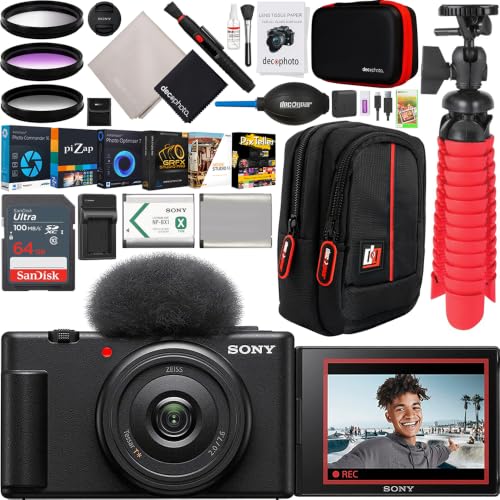
- Sony ZV-1F: check price on Amazon
- DJI Osmo Pocket 3: see the current price on Amazon
- Sony Alpha 7 IV: view this camera on Amazon
- Nikon Z50 II: check availability on Amazon
- OBSBOT Tiny 2: see it on Amazon
- Razer Kiyo Pro Ultra: look at it on Amazon
Ask a room of makeup artists what they film on and you will hear the same story told six ways: the phone was fine until the looks got serious. The best cameras for make up work earn that description in a very specific arena — a face, lit hard, at arm’s length, covered in products whose entire purpose is to interact with light. Foundation separates cameras that flatter from cameras that expose: a weak sensor turns a blended base into a patchy mask, cheap colour science shifts a carefully matched shade two tones warmer, and aggressive noise reduction smears the skin texture that proves the makeup is real. Beauty audiences zoom in. They pause. They can tell.
So this guide judges cameras the way a makeup artist’s audience does: on skin rendering, on autofocus that holds an eye while hands and brushes cross the frame, on colour that keeps a red lipstick red rather than orange, and on the practicalities of filming yourself — flip screens, remote control, and product-showcase focus that snaps to a palette held up to the lens and back to your face without a hunting wobble. Six cameras pass those tests, from a pocketable vlogging compact to a full-frame body for artists whose channel has become a business.
Key Takeaways
- Skin rendering is the whole game: judge any beauty camera by how it handles foundation edges and blush gradients, not by its spec sheet.
- Autofocus must survive brushes, hands and held-up products crossing the frame — eye focus plus a product-showcase mode is the winning pair.
- The Sony ZV-1F is the easiest starting point; the Alpha 7 IV is where serious beauty channels end up.
- Your light matters more than your lens: a camera upgrade cannot rescue a single harsh overhead bulb.
- Colour accuracy protects your credibility — if a swatch looks different on screen than in the pan, viewers stop trusting your reviews.
- Flip screens and remote start are not luxuries when you are both the artist and the camera operator.
In this guide
Quick Picks
| Camera | Badge | Why it is here |
|---|---|---|
| Sony ZV-1F | Best for most makeup creators | A fixed wide lens, product-showcase focus and flattering colour in a camera that asks almost nothing of its operator. |
| DJI Osmo Pocket 3 | Best for GRWM and on-the-go beauty content | A gimbal-stabilised one-inch camera that tracks your face while you move around the room getting ready. |
| Sony Alpha 7 IV | Best for professional beauty channels | Full-frame skin rendering, superb eye autofocus and lens choice for artists whose filming is a business. |
| Nikon Z50 II | Best value mirrorless for beauty | Ready-made colour presets, a friendly flip screen and strong video in a smaller, gentler-priced body. |
| OBSBOT Tiny 2 | Best for livestreamed makeup sessions | A PTZ webcam that pans and zooms to follow you, with a larger sensor than most webcams and gesture control. |
| Razer Kiyo Pro Ultra | Best desk-bound beauty webcam | A large-sensor webcam built for creators who film seated tutorials and streams from one perfected setup. |
How did we judge cameras for faces covered in product?
We filmed the same routine five ways: a natural base, a full glam look with contour and highlight, a colourful editorial eye, a swatch session of lip products, and a wear test checked at intervals through a day. Cameras were scored on whether foundation edges stayed invisible, whether shimmer read as shimmer instead of noise, whether autofocus returned to the eye after each product was held to the lens, and whether the colours a viewer saw matched the products in hand. That last test eliminates more cameras than any other — beauty content is a trust business, and a camera that lies about pigment is a liability.
One test deserves its own description because it decided several rankings: the eight-hour check-in. A base was applied on camera in the morning, then the same camera filmed short check-ins through a working day — after coffee, after a commute, after the afternoon shine breakthrough that every oily-skinned viewer knows intimately. Cameras that rendered that progression honestly, without the morning’s softness filter lingering into a fiction by evening, scored as trustworthy. Beauty audiences build parasocial faith on exactly these moments, and a camera that beautifies the evidence is quietly working against the creator’s reputation.
We also weighted the solo-operator reality.
Makeup filming is a one-person production: you are talent, artist, lighting crew and editor. Cameras that demand a second pair of hands, or that bury the settings a beauty shoot needs inside deep menus, lost marks no matter how lovely their files were. Everything recommended below can be run, start to finish, by the person wearing the makeup.

Sony ZV-1F — Best for most makeup creators
The ZV-1F was designed by people who clearly watched a lot of beauty content. Its fixed lens is wide enough to frame a face and shoulders at desk distance without pushing your chair into the wall behind you. Its product-showcase setting is the feature makeup creators describe with genuine affection: hold a foundation bottle or a palette toward the camera and focus snaps to it, release it and focus glides back to your face, no tapping, no hunting, no ruined take. Skin-tone rendering is the other quiet triumph — the camera’s colour is tuned to keep faces looking like faces, with a softening option for those who want it and honest texture for those who do not.
Working with it day to day is a study in removed friction. It starts fast, the screen flips to face you, a tally light confirms recording, and the microphone handles a talking tutorial respectably before you ever buy an external mic. For the classic seated tutorial — the format the entire beauty genre is built on — it covers the whole job with the least possible ceremony, which is precisely why it tops this list for most readers. Artists upgrading from a phone notice two things immediately: the background melts a little, separating you from the bedroom behind, and close-up insert shots of blending actually hold focus while the sponge moves.
There is a working style this camera teaches, too: because the lens is fixed and wide, you learn to move products toward the camera rather than zooming, and your framing becomes consistent from video to video. Regular viewers subconsciously read that consistency as professionalism. Series formats — empties, favourites, first impressions — benefit enormously from a camera that sets up identically every single time you sit down.
One more practical gift deserves mention: the camera’s background-blur switch and its straightforward menus mean a creator can hand it to a friend for behind-the-scenes clips without a tutorial first. Beauty channels run on borrowed hands more often than their polish suggests — a partner filming the final reveal, a fellow artist shooting your work at an event — and a camera that behaves itself in a stranger’s grip produces usable footage instead of a memory card of apologies.
- Format: fixed-lens vlogging compact with a one-inch class sensor
- Focus: product-showcase mode plus face and eye autofocus
- Screen: fully articulating, faces the creator
- Video: 4K recording for tutorials and close inserts
- Audio: built-in multi-capsule microphone for voice-first filming
Strengths
- Product-showcase focus feels designed by someone who films swatches
- Flattering, trustworthy skin colour straight out of camera
- Smallest learning curve of any pick here
Trade-offs
- Fixed lens means no tighter framing without moving the camera
- low-light performance is good, not class-leading
- No upgrade path — when you outgrow it, you replace it
Best for: beauty creators filming seated tutorials and reviews who want professional-looking results this week. Not suited for: artists who need interchangeable lenses or who film in dim, uncontrolled locations.

DJI Osmo Pocket 3 — Best for GRWM and on-the-go beauty content
The Pocket 3 answers a different beauty brief: the get-ready-with-me video, the hotel-room routine before an event, the travel makeup bag tour. Its gimbal keeps the frame floating steady while you walk between bathroom light and window light, and its face tracking follows you around a room in a way no fixed camera can. The one-inch sensor gives it genuine quality — this is not a toy — and the rotating screen switches between horizontal tutorials and vertical short-form without remounting anything.
Makeup artists who film while travelling describe the same liberation: the entire studio is a device that fits in the makeup bag itself. It stands on a counter, tracks you as you lean in and out of a mirror, and its colour holds up in the mixed lighting of hotel bathrooms, which is where travel beauty content goes to die on lesser cameras. For creators whose brand is a life documented rather than a desk performed at, it is the most natural camera on this page.
It also moonlights brilliantly as a second camera for desk creators: mounted overhead, it films flat-lays of palettes and the top-down view of an eye look being built, while the main camera holds the face. Two angles transform an ordinary tutorial’s editing rhythm, and this is the cheapest painless way to get the second one.
Beauty creators also discover its party trick quickly: the gimbal’s smooth pans across a vanity — brushes, palettes, the morning’s chosen products laid in a row — produce the opening B-roll that makes a video feel produced. Shot on a phone, that pan judders; shot on a tripod camera, it needs a slider; on the Pocket it is a slow walk past the table. Small production values like this are what separate channels that plateau from channels that keep being recommended.
- Format: gimbal-stabilised compact camera with one-inch sensor
- Tracking: face tracking follows the creator around a room
- Screen: rotating touchscreen for horizontal and vertical formats
- Video: 4K at high frame rates for smooth motion
- Size: fits inside a large makeup bag
Strengths
- Movement-proof footage for GRWM and travel formats
- Face tracking replaces a camera operator entirely
- Genuine image quality in a pocketable body
Trade-offs
- Small screen for judging fine makeup detail while filming
- Gimbal is a delicate mechanism around powders and sprays
- Fixed perspective — no optical zoom for tight eye inserts
Best for: creators whose beauty content moves — travel, events, daily-life formats. Not suited for: artists who film only at one desk and want maximum close-up detail.

Sony Alpha 7 IV — Best for professional beauty channels
When a beauty channel becomes a business — brand deals, a product line, a studio corner with acoustic panels — this is the camera that usually ends up on the tripod. The full-frame sensor renders skin with a gradation smaller sensors approximate: blush fades the way blush actually fades, highlight sits on the cheekbone like a sheen rather than a white patch, and foundation texture stays honest at close range. Eye autofocus is effectively telepathic, holding a lash line while both hands work, and the lens catalogue lets an artist choose exactly how tight, how creamy and how clinical the image should be.
The professional case is also about workflow. The camera records long sessions without drama, feeds a monitor so a manager or assistant can check framing, and its files grade beautifully for artists who colour their footage properly. Paired with a fast standard zoom it covers the tutorial; paired with a macro-capable lens it films a mascara wand loading with a clarity that makes product films look like adverts. That ceiling is the point: no look a beauty creator can imagine is beyond this body’s ability to render it.
It asks more of its owner, and the guide should say so plainly. Menus reward an afternoon of setup, lenses cost real money, and the whole rig is heavier on a desk arm than anything else here. The artists who thrive with it treat filming as a craft alongside the makeup itself — and their channels, measurably, look like it.
Brand work is where this body’s value stops being aesthetic and becomes financial. Cosmetics companies reviewing a creator’s media kit watch the footage before they read the rate card, and full-frame polish — the controlled background, the macro product inserts, the skin that looks expensive — quietly moves a creator into a different fee conversation. Artists who make this upgrade for business reasons consistently report that the camera paid for itself through the work it unlocked, which is the only honest justification for its price.
- Format: full-frame mirrorless, interchangeable lenses
- Autofocus: real-time eye tracking for people
- Skin rendering: full-frame gradation for base and blush
- Video: 4K recording with creator-focused colour profiles
- Workflow: monitor output and long-session reliability
Strengths
- The finest skin and pigment rendering on this page
- Autofocus that simply does not miss in tutorial conditions
- Lens choice lets you design your channel’s look
Trade-offs
- Body plus a good lens is a serious investment
- Setup complexity rewards study, punishes haste
- Overkill for creators still finding their format
Best for: established beauty creators and working makeup artists filming client-facing content. Not suited for: beginners, or anyone who wants to press record and think about nothing else.

Nikon Z50 II — Best value mirrorless for beauty
The Z50 II is the thinking creator’s compromise: a real mirrorless camera with interchangeable lenses and a proper flip screen, at a gentler cost than the full-frame tier, with colour presets that do surprising amounts of work. Those presets matter for beauty filming specifically — dial in a look that flatters your skin and your set, save it, and every video starts from the same pleasing place. For creators who film three times a week, that repeatability is worth more than a spec-sheet victory.
Nikon’s colour has a loyal following among portrait shooters for a reason: skin comes out clean and lively without the waxy smoothing that makes beauty footage look filtered. The kit lens covers the tutorial distance comfortably, and the body’s size keeps a desk setup feeling like a desk rather than a film set. Wireless transfer to a phone makes the vertical cutdowns and behind-the-scenes stills painless, which for a working creator is a daily, not occasional, benefit.
Choose it when you know you will want lenses eventually — a brighter prime for evening looks, perhaps — but want to start earning with the kit today. It is the pick that treats beauty creators as photographers-in-progress rather than as an audience for dumbed-down gear.
There is a confidence effect with this camera that reviewers understate. Creators who buy their first real system camera start treating filming as a skill to practise rather than a chore to survive: they experiment with a prime lens for evening looks, learn what depth of field does to a vanity backdrop, and begin art-directing their frames. That growth shows in the work within a month. Gear cannot manufacture talent, but the right gear at the right moment can absolutely unlock it, and the Z50 II sits exactly on that moment for many beauty creators.
- Format: APS-C mirrorless, interchangeable lenses
- Colour: built-in creative presets for repeatable looks
- Screen: flip design for self-filming
- Video: 4K recording for tutorials
- Sharing: wireless transfer for quick social cutdowns
Strengths
- Preset colour gives a channel a consistent signature
- Real lens upgrade path at a moderate entry cost
- Skin colour that beauty audiences describe as clean
Trade-offs
- Smaller sensor than the full-frame pick in dim light
- No product-showcase mode as slick as Sony’s
- Kit lens is a starting point, not the destination
Best for: creators ready for a real camera system without full-frame prices. Not suited for: anyone who wants the absolute best low-light skin rendering today.

OBSBOT Tiny 2 — Best for livestreamed makeup sessions
Live beauty is its own sport: the audience asks for a closer look at the eyeliner, someone requests the shade name mid-application, and the artist performs for two hours without a retake. The Tiny 2 was built for that room. It is a webcam on a motorised gimbal that pans, tilts and zooms to follow you, responds to hand gestures for control when your fingers are covered in pigment, and carries a sensor far larger than the webcam norm — which is why its image holds together when you lean close to show a blend.
Makeup livestreamers use its tracking in a specific way: the camera reframes as they move between the mirror, the product table and the close-up position, so a solo streamer presents like a produced show. Voice control handles the moments when even gestures are impossible — mid-mascara is a real production constraint, and this camera respects it. For artists whose income is live shopping and streamed tutorials, it solves the actual problem.
It is also, quietly, a fine recorded-tutorial camera for small desks, because the PTZ framing means the camera can live in one corner and still compose three different shots. Just remember it is a webcam at heart: it needs a computer, and its natural home is the stream rather than the cinema.
Streamers develop rituals around this camera’s framing presets: one for the full-face working shot, one punched in for eye work, one wide for the product table tour. Switching between them by gesture mid-stream gives a solo broadcast the rhythm of a multi-camera show, and audiences respond to that rhythm with watch time — the metric live beauty income is built on. Set the presets before the stream, test them with a full face of base applied, and the technology disappears into the performance, which is where it belongs.
- Format: PTZ webcam with motorised gimbal
- Sensor: larger than typical webcams for close-up clarity
- Control: gesture and voice commands for hands-busy moments
- Tracking: automatic framing follows the creator
- Video: 4K streaming and recording via computer
Strengths
- Reframes itself while your hands are covered in product
- Close-up image quality most webcams cannot approach
- Built for the live formats where beauty income increasingly lives
Trade-offs
- Requires a computer — no standalone recording
- Recorded quality trails the dedicated cameras here
- Tracking can wander if the room is visually busy
Best for: livestreamers doing makeup sessions, live shopping and interactive tutorials. Not suited for: creators who film away from a desk or without a computer.

Razer Kiyo Pro Ultra — Best desk-bound beauty webcam
The Kiyo Pro Ultra is the webcam for the artist who never moves the chair. Its unusually large sensor was specified for exactly the conditions beauty filming creates: a face close to the lens, lit by a ring or panel light, where ordinary webcams smear detail and pump noise. Here, lashes stay lashes and a cut crease stays crisp when you lean in to show it. The built-in privacy shutter and straightforward software make it a civilised desk citizen between sessions.
Its honest limitation is the flip side of its focus: it does one job, at one desk, tethered to one computer. Within that job it is superb — streamed tutorials, recorded desk content through capture software, client consultations where a makeup artist shows a look over video call. Artists who teach online one-to-one increasingly use cameras like this as their professional face, because students judge the teacher partly by whether they can actually see the technique.
Pair it with a decent microphone and the desk is complete. The camera’s light correction handles the common beauty-desk problem of a bright window behind you better than most, though no webcam fully forgives backlight — arrange the desk so the light faces you and this camera will make you look like the polished version of yourself.
Its software deserves a fair word as well: exposure and colour controls that stay where you left them between sessions sound trivial until you have used a webcam that resets its judgement every morning. For a teacher whose first student logs on at nine, a camera that wakes up already correct is a small daily mercy. Save a profile for daylight and one for evening lamp light, and the desk is ready in the time it takes the kettle to boil.
- Format: USB webcam with a large sensor
- Close-ups: detail holds when leaning in to show a look
- Light handling: automatic correction for mixed desk lighting
- Extras: physical privacy shutter
- Use: streaming and recorded desk tutorials via computer
Strengths
- Sharpest lean-in close-ups in the webcam class
- Zero-fuss daily operation at a fixed desk
- Professional presence for online teaching and consultations
Trade-offs
- Desk and computer required — no location work
- No tracking or reframing tricks
- Recorded footage depends on your capture software
Best for: desk-based artists, online makeup teachers and streamers with a fixed setup. Not suited for: creators who film in multiple rooms or on the move.
What lighting makes makeup look right on camera?
Light is the co-author of every beauty video. The goal is a large, soft, frontal source that wraps the face evenly, because makeup is judged by gradients — a blend either disappears or it does not — and hard light manufactures fake edges everywhere. A big softbox or panel placed just above the camera, angled slightly down, is the classic arrangement. Ring lights earned their beauty-desk ubiquity honestly: they flatten shadows and put a recognisable sparkle in the eyes, though they can also flatten the dimension that contour worked to create, which is why many artists now prefer a soft panel plus a gentle fill.
Height and distance are the two adjustments beginners skip. A source placed too low carves shadows upward into the face and makes careful under-eye work look like bruising; a source too far away shrinks into a hard point no matter how large the panel is. Bring the light close — just out of frame — and raise it until the catchlights sit high in the eye, and the same modest panel performs like studio equipment.
Colour quality of the light matters as much as its shape.
Cheap bulbs with poor colour rendering lie about pigment exactly the way a cheap camera does, and the two lies multiply. Choose lights with high colour-rendering ratings, set your camera’s white balance to match them rather than leaving it on automatic, and kill the mixed sources: the warm ceiling bulb plus the cool window plus the panel is a colour argument no camera can referee. One controlled source, one background you have chosen, and the camera picks in this guide will do the rest.
How do you set up a filming space when you are the whole crew?
Arrange the desk so the routine flows left to right: products in order of use, a mirror positioned where it does not block the lens, the camera at eye level or a fraction above — never below, which is the least flattering angle a face can be filmed from and the fastest way to make good makeup look tired. Mark your chair position and your product positions with tape until the choreography is muscle memory. Consistency of setup is what turns filming from a half-hour of faff into sitting down and pressing record.
Sound deserves one paragraph because beauty audiences forgive soft focus faster than echo. A small room with soft furnishings usually suffices; add a rug or curtains before buying panels. Keep the microphone — camera-mounted or separate — within arm’s length of your mouth, and record thirty seconds of room tone before each session to hear what your viewers will hear: fridge hum, traffic, a neighbour’s television. Fix the loudest one and begin.
How do you film good makeup content in a tiny or shared space?
Most beauty filming happens in a bedroom corner, a shared flat’s bathroom, or the one square metre of a student room that is not someone else’s. The cameras in this guide were partly chosen for that reality: the compacts and webcams work at distances under a metre, and the mirrorless bodies pair with lenses that keep a small room from feeling like a cupboard on screen. The tricks are spatial. Film facing the room’s best light rather than fighting it. Hang a plain curtain or sheet behind the chair and the background problem is solved for every video you will ever make in that room.
Small spaces also forgive what big studios punish: a modest light at close range is a large, soft source relative to your face, so a single affordable panel does the work of a lighting rig. Keep the camera on a small tripod that lives on the desk permanently, because in a tiny room the friction of setting up is the main reason videos do not get filmed. The creators who publish from the smallest spaces share one habit — the kit never gets packed away. It waits, charged and framed, and filming becomes sitting down rather than building a set.
Noise travels in shared homes, so film when the house is quiet, warn housemates with the courtesy of a schedule, and keep a lavalier or close microphone as your insurance: close-miked voice reads as intimacy on beauty content and hides a multitude of room sins. Your viewers will never know the square footage. They will know the light, the colour and the calm.
How should you film swatches and product close-ups?
Swatch filming is where beauty cameras earn or lose their fee. Shoot swatches in the same light as your face work so viewers can map shade to skin honestly. Draw each swatch in one confident stroke, hold it still for a full two seconds — editors and viewers both need the pause — and let the product-showcase focus or a tap on the screen set focus on the arm rather than your face behind it. Name the shade aloud as you show it; the audio becomes the index your audience scrubs by.
Film one extra swatch pass in the window light by your desk if you have it, because daylight exposes the shade disagreements that artificial light hides, and catching them before your audience does is the whole job. For products themselves, rotate slowly rather than waving: a palette turned through the light shows shift and shimmer that a static shot hides. Keep a plain dark and a plain light card nearby to place behind products, because busy backgrounds steal the eye from pigment. These are small disciplines, but swatch honesty is the currency of beauty reviewing, and the camera work is how the currency is printed.
How do different skin tones change what you should ask of a camera?
Camera colour science is not neutral, and beauty creators across the shade range learn this at different speeds. Deep skin exposes weak dynamic range cruelly: a camera that crushes shadows turns a sculpted contour into a flat mask and loses the highlight placement that gives deep complexions their dimension. Fair skin exposes overexposure and colour casts: a half-stop of carelessness blows a porcelain base to featureless white, and a warm-biased sensor makes a cool-toned foundation read as sunburn. Every camera in this guide was judged with both failures in mind, because a beauty camera that only flatters one end of the shade range is not a beauty camera.
Practical tests help more than reviews here. Film your own face wearing your most-used base, in your own light, and judge three things: whether your undertone survives, whether the transition from highlight to contour stays gradual, and whether a bold lip colour keeps its identity. Creators who review products for a diverse audience carry the duty further — swatching on multiple skin tones where possible, and saying plainly when a shade range itself is the limitation rather than the camera.
The encouraging truth is that the current generation of creator cameras has absorbed a decade of criticism on exactly this point. The picks above handle the full shade range with a competence that would have required professional cinema gear not long ago, which is one more reason the present moment is a good one to be a beauty creator with a modest budget.
How does the right camera change with the format you film?
Beauty content is not one format, and each format loads a camera differently. The seated tutorial — still the genre’s backbone — rewards focus reliability and colour above all, because the shot barely changes for twenty minutes while everything that matters happens on one face. The GRWM punishes fixed cameras and rewards tracking, because the creator moves between mirror, wardrobe and window while narrating. The transformation video, where a bare face becomes an editorial look across jump cuts, rewards consistent colour between setups more than any single frame’s beauty, since mismatched shots break the illusion the format sells.
Review and swatch content is the most technically demanding of all: the audience is explicitly judging products through your camera, so pigment honesty becomes an ethical property of the gear, not an aesthetic one. Live content swaps retakes for responsiveness — tracking, gesture control, a camera that reframes while your hands are occupied. Short-form vertical rewards speed of setup and face tracking in a tall frame. When you read the picks above, map them honestly: most creators live in two formats, not six, and the camera that serves those two brilliantly beats the camera that serves all six adequately.
There is also a career arc hidden in the formats. Beginners grow on tutorials because the format teaches while it publishes. Established artists monetise through lives and reviews, where trust converts to sales. The camera sequence in this guide — compact, then system, then live tools — mirrors that arc deliberately, so each purchase arrives when the format that needs it starts paying.
What changes when you film clients instead of yourself?
Working makeup artists film differently from influencers: the subject is a client, the chair time is billed, and the footage must serve a portfolio that books the next job. Consent and comfort come first — a client who feels surveilled applies tension to their face that no camera flatters — so a quiet, unobtrusive setup matters. The mirrorless picks earn their place here: a Z50 II or Alpha 7 IV on a small tripod at the room’s edge, filming the transformation in time-lapse or gentle real time, produces portfolio material without turning a bridal morning into a film set.
Client work also changes the colour stakes. A bride reviewing her trial footage is judging whether the makeup will photograph well at the wedding, so the camera’s honesty about the base in mixed light — window daylight plus room bulbs — is a professional tool, not a nuisance. Artists who film trials on a trustworthy camera have measurably fewer day-of surprises, because problems visible in the trial footage get fixed in the trial, not discovered in the wedding album.
Finally, client footage is an archive with obligations: store it respectfully, share only what was agreed, and remember that a camera good enough to flatter is also good enough to expose. The artists who handle that power carefully build the reputations that keep their chairs full.
Comparison Table
| Camera | Type | Standout beauty feature | Needs a computer |
|---|---|---|---|
| Sony ZV-1F | Fixed-lens compact | Product-showcase focus | No |
| DJI Osmo Pocket 3 | Gimbal camera | Face tracking while moving | No |
| Sony Alpha 7 IV | Full-frame mirrorless | Skin gradation and lens choice | No |
| Nikon Z50 II | APS-C mirrorless | Repeatable colour presets | No |
| OBSBOT Tiny 2 | PTZ webcam | Gesture control mid-application | Yes |
| Razer Kiyo Pro Ultra | Webcam | Large-sensor close-up detail | Yes |
Which accessories complete a beauty filming kit?
After the camera and the light, the accessories that earn their drawer space are few and specific. A sturdy desk tripod or arm that holds the camera at eye level without sagging mid-video. A remote control or phone app pairing so you can start, stop and refocus without leaving the chair in full base. A small grey card for setting white balance honestly in ten seconds. A second battery and a fast card reader, because beauty filming days batch several looks and nothing kills momentum like a dead camera at look three.
A macro-capable option for product inserts — a lens for the mirrorless bodies, or simply moving the compacts closer with their close-focus manners — covers the mascara-wand shots. A plain backdrop in a tone that flatters your skin and separates you from the room. And a simple external microphone when the budget allows: beauty audiences listen for the soft sounds of brushes and compacts as part of the genre’s pleasure, and a decent mic captures the experience the camera alone cannot.
Notice what is not on the list: a teleprompter, a second camera for its own sake, and any filter that screws onto a lens to soften skin. The genre’s aesthetic has moved decisively toward honesty, and the kit should follow the audience.
What mistakes make good makeup look bad on camera?
The most common is filming a wear test under different light from the application and calling the difference the product’s fault. The second is over-smoothing: camera softening filters and beauty modes erase the skin texture that proves a base is sitting well, and experienced viewers read the blur as concealment. Third is neglecting the neck and hands — a face rendered one colour by the camera and hands another destroys the illusion faster than any foundation mismatch. Fourth is the downward camera angle, which shadows the eye work you spent twenty minutes building. And fifth, quietly fatal for review channels, is auto white balance drifting mid-video, turning a lipstick from berry to brick between the application and the check-in. Lock the balance, light the face properly, and let the makeup speak.
How do you build a filming routine you can repeat three times a week?
Consistency is the unglamorous engine of beauty channels, and the camera is either its ally or its saboteur. Build a settings card — a physical note taped near the desk listing your white balance, exposure, picture profile and framing marks — and photograph your setup once, perfectly arranged, as the reference you reset to. The picks in this guide hold their settings between sessions, which sounds like nothing until you have used a camera that forgets, and spent the first ten minutes of every filming day re-deriving your own look.
Routine also means maintenance beauty gear uniquely demands. Powder and setting spray drift onto front elements and screens; a blower and a microfibre cloth live on the desk, and lenses get a wipe before every session, because a fingerprint’s soft glow is indistinguishable from bad focus at upload size. Cables get taped down before a chair with wheels meets them. Batteries charge on a rota, cards get formatted in-camera after each offload, and the whole ritual takes four minutes — the cheapest insurance in the entire production.
Finally, keep a running shot list for your recurring series. The favourites video, the empties video and the first-impressions video each have a grammar your audience already knows; filming them to a checklist frees your attention for the performance, which is the part only you can supply.
What should you do in the edit to protect the makeup?
Beauty editing has one commandment: the makeup must survive it. Resist the smoothing filters and skin-blur effects that platforms dangle in front of you; your audience’s trust is built on visible texture, and every creator who has been caught over-filtering a foundation review has paid for it in credibility. Edit for colour consistency instead — match the check-in shots to the application shots so a wear test reads honestly — and for pace: cut the pauses, keep the technique.
Captions and chapters are beauty-specific tools, not garnish. Shade names in captions serve viewers who shop with the sound off; chapter markers at each step serve the viewer who returns next month to copy the eye look. Thumbnails deserve a rule of their own: use a frame from the actual video, at its actual colour, because a thumbnail that promises a pigment the video does not contain is a small fraud that audiences remember. The cameras in this guide produce frames strong enough to be thumbnails unedited, which is one more reason the camera choice matters commercially.
Archive your raw footage of hero looks. Brands ask for re-edits, platforms change aspect ratios, and the artist with organised originals can resell the same afternoon’s work three times. Storage is the cheapest production value there is.
Can you film makeup well in natural window light alone?
Yes — and many beloved beauty videos are nothing but a chair beside a big window. Daylight is broad, soft and honest, and it flatters skin in a way audiences instinctively trust. Its demands are scheduling and consistency: the light at ten in the morning is not the light at two, a passing cloud changes exposure mid-sentence, and winter shortens the working day to a few usable hours. The cameras here handle it gracefully if you help them — lock exposure and white balance once the session starts, so the camera does not chase every cloud, and film your most colour-critical work, the swatches and reviews, in the day’s steadiest hour.
Window light also teaches a creator the single most transferable skill in beauty filming: seeing how direction shapes a face. Sit square to the window for the flat, forgiving look of a tutorial; turn forty-five degrees and the same face gains the modelling that makes a final-reveal shot dramatic. Artists who learn on daylight can walk into any lighting situation afterwards and understand it within a minute. Artists who learn only under a ring light often cannot. If your room has a good window, treat your first months of filming as an apprenticeship with it, and let the camera budget wait until the light budget — blackout curtain for control, sheer curtain for diffusion — is spent.
Final Recommendation
Most makeup creators should start with the ZV-1F: it removes every technical excuse between you and publishing twice a week, which is the actual growth strategy in beauty content. Choose the Pocket 3 if your life is your set, the Z50 II if you want a system to grow into, and the Alpha 7 IV when the channel pays for its own upgrades. Live-first artists should look hard at the Tiny 2, and desk-bound teachers at the Kiyo Pro Ultra. Whatever you pick, spend the money you saved by not over-buying on light — in beauty filming, the glow is quite literally the product.
Related guides
Frequently Asked Questions
Is a phone good enough to start a makeup channel?
Yes, for starting. Modern phones film respectable tutorials in good light, and content ideas matter more than gear at the beginning. The upgrade moment arrives when you notice focus hunting during product showcases, colours drifting between shots, or your close-ups dissolving into noise — the three failures every camera in this guide was chosen to fix.
What does product-showcase focus actually do?
It tells the camera that when an object is held up close to the lens, that object — not your face — is the subject, and to shift focus to it smoothly and back again when it leaves the frame. For foundation bottles, palettes and brushes, it removes the tap-and-pray routine that ruins takes.
Do I need 4K for makeup videos?
It helps more in beauty than in most genres, because viewers zoom into eye work and lip lines, and because 4K lets you punch in during editing for a close-up without filming one. It is not mandatory — a well-lit 1080p tutorial beats a murky 4K one — but the headroom is genuinely useful here.
How do I stop my foundation looking orange on camera?
Usually the light or the white balance is lying, not the foundation. Film under a high colour-rendering light, set white balance manually to that light, and check a grey or white card in frame. If the card reads neutral and the face still reads orange, the shade match itself needs revisiting.
How long should a makeup tutorial recording session be?
Plan for the application to take half again as long on camera as off it: you are narrating, showing products, checking framing and repeating steps for clarity. Most creators batch two or three looks in one session while the light and setup are built, then edit across the week. Every camera here handles that rhythm; the mirrorless bodies reward it most, because their files stay consistent across a long day of setups.
Which camera is best for TikTok and Shorts makeup content?
The Pocket 3, because its rotating screen and tracking were built for vertical, moving, short-form work. Desk creators can equally crop vertical from a 4K frame shot on the ZV-1F or Z50 II, which suits a YouTube-first workflow with Shorts as a by-product.
A closing thought on spending order, because beauty creators are marketed to relentlessly: camera third, light second, and the chair you sit in for six hours of filming first is a joke with a true core — comfort and routine publish more videos than megapixels do. Buy the camera on this page that matches the format you actually film, set it up once with care, and then let a year of Tuesdays and Thursdays do what no unboxing can. The artists whose work you admire are not shooting on magic. They are shooting on Tuesdays.
Related Guides
Keep building the beauty desk with our guides to the best cameras for makeup photography and stills, cameras for live streaming your routine and the best vlogging cameras for creators who film alone.


