reviewstook.com is reader-supported. When you buy through links on our site, we may earn an affiliate commission.
Where to buy
USB streaming kit should stay deliberately short: the camera, a cable of the right length, and a mount. Every pick below connects by USB and is linked on Amazon; spend the saving from capture cards you no longer need on light and a microphone.
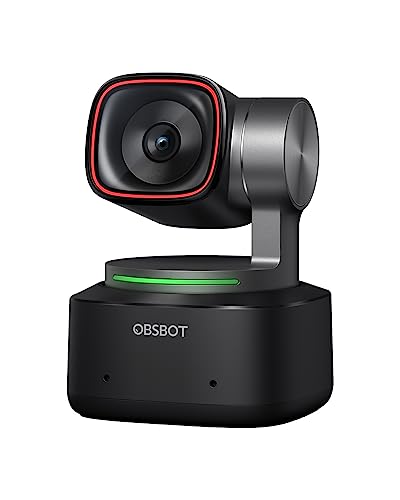
- OBSBOT Tiny 2: check price on Amazon
- Razer Kiyo Pro Ultra: see the current price on Amazon
- Logitech Brio: view this camera on Amazon
- Logitech C920S: check availability on Amazon
- Sony ZV-1F: see it on Amazon
- NexiGo N60: look at it on Amazon
The best cameras for live streaming using usb win on a single, beautiful promise: one cable between you and your audience. No capture card, no HDMI chain, no driver archaeology — plug in, select the camera, go live. That simplicity is why USB streaming conquered desks, classrooms and spare-room studios, and why the differences between USB cameras now matter so much: when everything connects the same way, the picture, the sensor and the software manners are the whole contest.
This guide ranks six USB routes honestly. Five are webcams, from a budget NexiGo to a large-sensor Razer that embarrasses small cameras; the sixth is Sony’s ZV-1F, a real camera that also streams over USB when a webcam’s ceiling gets in the way. All of them were judged on the same desk tests: face clarity at arm’s length, behaviour in mediocre room light, microphone quality for talk, and whether the software behaves like infrastructure or like advertising.
Key Takeaways
- USB streaming removes the capture card, so spend its budget on lighting — the picture improvement is larger.
- Sensor size is the webcam divide: the Razer and OBSBOT large sensors handle real rooms, not just bright offices.
- The Logitech C920S remains the value benchmark its rivals are still measured against.
- Check your platform’s resolution habits before buying 4K: many services cap webcams well below it.
- A USB camera on a small tripod at eye level beats any camera perched on a monitor, whatever its sensor.
In this guide
Quick Picks
| Camera | Badge | Why it is here |
|---|---|---|
| OBSBOT Tiny 2 | Best USB streamer overall | AI tracking, a large sensor and gesture control make the strongest all-round USB package. |
| Razer Kiyo Pro Ultra | Best USB picture in poor light | The largest webcam sensor here turns dim rooms into a house style. |
| Logitech Brio | Best USB camera for professional reliability | 4K, adjustable framing and total platform compatibility for working streamers. |
| Logitech C920S | Best value USB streaming camera | The long-running 1080p benchmark: honest picture, privacy shutter, sane price. |
| Sony ZV-1F | Best USB-streaming real camera | A genuine camera with a 1-inch sensor that also plugs in and streams over USB. |
| NexiGo N60 | Best budget USB starter | Plug-and-play 1080p for first streams, classes and calls that matter. |
How did we judge cameras that stream over a single USB cable?
Each camera was assessed as a complete USB streaming device: image at desk distance in bright and dim rooms, autofocus behaviour during natural movement, built-in microphone clarity for speech, and the friction of its software — how many clicks, updates and account prompts stand between plugging in and going live. Compatibility across the major streaming platforms was treated as a requirement, not a feature.
We favoured cameras that behave identically every day. A USB streamer is infrastructure; novelty features scored only when they removed work, like the OBSBOT’s tracking, rather than adding settings to babysit. Cable and connector sanity — a detachable cable, a standard port — counted more than most spec sheets admit.
A single USB cable is a promise of simplicity, and the promise holds only when bandwidth, power and drivers all agree at once. The port you plug into matters more than the brochure admits, because a tired USB 2 port will quietly ration a camera built for more. One cable, many caveats, and bandwidth is the first caveat. A webcam’s sensor wakes up in office light, which is why the unflattering test is a grey afternoon with the blinds half open. Firmware updates for USB cameras arrive quietly, and the one that fixes focus hunting is worth more than any launch feature. Run one full rehearsal call recorded locally each month; the recording shows focus hunting, echo and stutter that live confidence politely hides.
Which are the best cameras for live streaming using USB today?
Six ways to plug in and be seen, ranked from the intelligent tracker to the budget starter. The right choice depends on your room’s light and your audience’s expectations, in that order.

OBSBOT Tiny 2 — Best USB streamer overall
The Tiny 2 is what the USB webcam becomes when a company refuses to accept the category’s limits. Its sensor is large enough to matter in real light, its gimbal tracking follows a presenter to the whiteboard and back, and its gesture controls let a solo streamer direct the show mid-sentence. Over a single USB cable it delivers the kind of produced feel that used to require a camera operator, and audiences read the difference instantly even if they cannot name it.
- Connection: USB with 4K output
- Sensor: 1/1.5-inch type, large for a webcam
- Tracking: AI subject tracking on a gimbal
- Audio: built-in microphones with noise handling
- Control: voice and gesture commands
The investment is real, and the tracking prefers one star at a time — panel discussions give it decisions it sometimes makes oddly. Solo and duo streamers, though, get a tiny production crew in a webcam. If your streams involve standing, demonstrating, teaching or performing, this is the USB camera that changes what your format can be, rather than merely how it looks.
Ports are not equal, whatever the spec sheet implies. The desk behind you is part of the broadcast, so the shelf, the plant and the door behind your chair all deserve ten minutes of thought. A hub shared with three other devices, is a negotiation the camera usually loses at the exact moment the call gets important. Presenters who move need tracking that thinks, following a face around a whiteboard without the queasy swaying of early attempts. Run one full rehearsal call recorded locally each month; the recording shows focus hunting, echo and stutter that live confidence politely hides. Keep a printed card of your known-good settings taped under the desk, because the morning a driver update resets them is the morning of the big call.
Strengths
- Moves with you instead of cropping you
- Large sensor keeps evening rooms respectable
- Hands-free control suits solo streamers completely
Trade-offs
- Premium price among webcams
- Multiple moving subjects can confuse tracking
- Software suite asks for an evening of exploration
Best for: Solo streamers, teachers and presenters who move around their space
Not suited for: Static desk talkers on a budget — the C920S serves you for less

Razer Kiyo Pro Ultra — Best USB picture in poor light
USB webcams historically fail at the same hour: the evening, when rooms go amber and small sensors turn faces into watercolours. The Kiyo Pro Ultra was engineered against that failure with the largest sensor in its class and a fast lens, and the result is a USB picture with genuine low-light composure — detail in the face, calm in the shadows, a background that falls away instead of buzzing. For streamers whose aesthetic is the lamp-lit room, it removes the need for a lighting rig entirely.
- Connection: USB with high-resolution output
- Sensor: exceptionally large for a webcam
- Lens: fast aperture gathering scarce light
- Audio: built-in microphone for close speech
- Build: privacy shutter and substantial mount
Mount it properly — it is a substantial camera that deserves a small tripod at eye level rather than a monitor perch — and set the software once. The price is the honest objection, and bright-room streamers should indeed save their money. But judged purely on USB picture quality when light is scarce, nothing else in this guide, webcam or otherwise, is playing the same sport.
Hubs ration bandwidth, so give the camera its own. The supplied cable in the box, is exactly long enough to reach the wrong side of the desk, so measure before you mount. Auto-exposure hunts in mixed window light, and a camera that locks exposure on request saves the meeting from a breathing backdrop. A USB streamer’s laptop is half the rig, because fans, thermals and a tired processor show up on screen as stutter nobody blames on the computer. Tape the camera’s cable to the desk edge with a service loop, so a kicked lead unplugs nothing and the mount never takes the strain. Put the camera at eye level on books before buying a mount; half the ‘webcam look’ is simply the lens staring up a chin.
Strengths
- Evening and lamp-lit streams stay detailed
- Fast lens gives pleasing background separation
- Picture quality rivals small dedicated cameras
Trade-offs
- Top-of-market webcam pricing
- Needs a stable mount to shine
- Overkill for bright offices and classrooms
Best for: Streamers in dim, atmospheric rooms who will not add lighting rigs
Not suited for: Bright-room streamers paying for light performance they never use

Logitech Brio — Best USB camera for professional reliability
The Brio’s case is written in uptime. It connects to everything, streams at up to 4K, corrects the classic backlit-desk disaster automatically, and lets you narrow its view from room-wide to head-and-shoulders without moving the camera. Dual microphones cover meeting-grade speech. For professionals whose stream is a job — training, consulting, institutional broadcasting — those are not features, they are the absence of incidents, week after week.
- Connection: USB with 4K support
- Features: adjustable field of view, light correction
- Audio: dual microphones for desk speech
- Mounting: monitor mount plus tripod thread
- Compatibility: certified across major platforms
Newer rivals produce a finer picture in poor light, and Logitech’s software tiers occasionally irritate. Neither has dented the Brio’s position as the default professional USB camera, because live work punishes surprises more than it rewards brilliance. If your audience includes people who can escalate a failed stream into a bad week, buy the camera with the longest record of not failing.
Drivers decide destiny, more often than sensors do. Privacy shutters sound like a gimmick, until the first time a lens sits live in an empty room during a private conversation. Resolution numbers flatter USB cameras, because compression, not pixel count, decides what the far end actually receives. The second monitor changes everything, freeing the camera’s feed from the grid of faces and letting you present like a person. Keep a printed card of your known-good settings taped under the desk, because the morning a driver update resets them is the morning of the big call. A cheap desk lamp bounced off the wall behind the monitor outperforms most ring lights and never appears as twin circles in glasses.
Strengths
- Never the reason a stream fails
- Field of view adapts from headshot to small room
- Light correction rescues window-backlit desks
Trade-offs
- Raw image trails the newest large-sensor rivals
- Some software polish sits behind subscriptions
- Corporate looks divide opinion
Best for: Professionals and organisations streaming daily on a schedule
Not suited for: Low-light aesthetes — the Razer exists for you

Logitech C920S — Best value USB streaming camera
Every webcam since has been reviewed against the C920 line, and the C920S — with its privacy shutter and refined tuning — remains the value answer. Its 1080p picture at desk distance is clean, its autofocus behaves, its stereo microphones handle speech respectably, and it works with every platform you will ever open. For the enormous majority of streams, which are watched on laptops and phones, its ceiling is invisible and its price is a relief.
- Connection: USB with 1080p output
- Sensor: 1080p with autofocus
- Audio: stereo built-in microphones
- Privacy: attached shutter cover
- Mounting: monitor mount with tripod thread
Spend the saving correctly: a small light and a USB microphone transform a C920S stream more than a camera upgrade would. Its weaknesses are generational — dim rooms soften it, and 4K-focused productions outgrow it — but as the first serious USB streaming camera, or the permanent spare for a bigger setup, it has earned its decade-long reign honestly.
Colour from a small sensor improves dramatically, when the light is one warm lamp rather than the ceiling panel it was tuned for. Cable length is a set-design decision, because three metres of cable buys the window light that makes a cheap camera look expensive. Window light flatters, when it comes from the side. A camera that remembers its settings, between calls is worth real money to anyone whose settings have ever reset overnight. Put the camera at eye level on books before buying a mount; half the ‘webcam look’ is simply the lens staring up a chin. Label the good USB port with a dot of tape, and future-you will stop gambling on the rationed one beside it.
Strengths
- Picture quality per pound remains the benchmark
- Privacy shutter suits shared and family computers
- A decade of platform compatibility behind it
Trade-offs
- 1080p ceiling shows on large, quality-focused streams
- Dim rooms soften its picture noticeably
- Design and software feel their generation
Best for: New streamers and home workers who want proven quality without premium pricing
Not suited for: Streamers whose brand depends on the finest possible picture

Sony ZV-1F — Best USB-streaming real camera
The ZV-1F answers a question webcams cannot: what if the streaming camera also had to be a real camera? Connected by USB it streams with a one-inch sensor’s depth and Sony’s flattering face colour; disconnected, it is a pocketable 4K vlogging camera with a proper microphone arrangement. For creators whose work splits between the desk and the world, that dual citizenship replaces two purchases and one learning curve.
- Connection: USB streaming plus standalone recording
- Sensor: 1-inch type with 4K video
- Lens: fixed wide 20mm-equivalent
- Colour: skin-priority processing
- Audio: three-capsule microphone, mic input options
As a pure streaming device it charges rent for talents a static desk never uses, and marathon sessions want mains power and a thought for heat. The fixed wide lens frames a desk beautifully and a stage not at all. But hybrid creators will find the arithmetic compelling: the best USB streaming picture here that also fits in a jacket, ready for the rest of the job.
Ceiling light accuses, especially at four in the afternoon. The supplied cable is short, so take the tape measure to it first. Settings that reset annoy, every single Monday morning. Background blur from software, costs processor the meeting might need elsewhere, which is why in-camera depth of field still wins. A cheap desk lamp bounced off the wall behind the monitor outperforms most ring lights and never appears as twin circles in glasses. Write your known-good resolution, frame rate and exposure lock on a card that lives behind the camera; future updates will try to erase all three.
Strengths
- Streams over USB, then unplugs and vlogs
- One-inch sensor beats webcam depth and light
- Flattering colour for faces at desk distance
Trade-offs
- Fixed wide lens suits desks, not stages
- Costs more than any webcam here
- Battery and heat need managing for marathon streams
Best for: Creators who stream at a desk and film away from it with one device
Not suited for: Pure desk streamers paying for portability they never use

NexiGo N60 — Best budget USB starter
The N60’s virtue is the absence of everything that stops beginners: no drivers, no accounts, no focus to mis-set, no menu to fear. Plug it into the laptop the class already owns and a stream exists. Its 1080p picture in decent light is entirely respectable, its microphone handles a teacher’s voice across a desk, and the privacy cover is a thoughtful touch for shared machines and classrooms.
- Connection: USB, plug and play
- Video: 1080p fixed focus
- Audio: built-in microphone with noise handling
- Privacy: sliding cover included
- Setup: no drivers, no accounts, no menus
Its limits arrive with ambition: dim rooms, close product demonstrations and quality-branded channels will all outgrow it, in roughly that order. That is the correct shape of a starter camera. The N60 lets a streamer learn the real skills — framing, light, talking to a lens — on equipment that never becomes the excuse, and it retires gracefully to spare duty when the upgrade arrives.
Your audience sees the call before the content, and the first ten seconds of picture and sound set the ceiling for the whole hour. Shutters protect privacy, in rooms that host private calls. Compression eats detail, that resolution promised to deliver. It is a minor thing, but each saved minute comes back as quality, and USB streaming is where it shows initial. Label the good USB port with a dot of tape, and future-you will stop gambling on the rationed one beside it. A plant or a bookshelf edge in the frame’s corner gives the picture depth that a bare wall never will, for zero bandwidth.
Strengths
- Starts a streaming habit for very little
- Fixed focus cannot be mis-set by a nervous beginner
- Privacy cover suits classrooms and shared desks
Trade-offs
- Picture softens quickly as light drops
- Fixed focus limits close-up product work
- No settings to grow into as skills develop
Best for: First-time streamers, teachers and community groups testing the water
Not suited for: Anyone streaming to a quality-conscious paying audience
How do the six USB streaming cameras compare side by side?
| Camera | Form | Strongest suit | Watch out for |
|---|---|---|---|
| OBSBOT Tiny 2 | USB with 4K output | Moves with you instead of cropping you | Premium price among webcams |
| Razer Kiyo Pro Ultra | USB with high-resolution output | Evening and lamp-lit streams stay detailed | Top-of-market webcam pricing |
| Logitech Brio | USB with 4K support | Never the reason a stream fails | Raw image trails the newest large-sensor rivals |
| Logitech C920S | USB with 1080p output | Picture quality per pound remains the benchmark | 1080p ceiling shows on large, quality-focused streams |
| Sony ZV-1F | USB streaming plus standalone recording | Streams over USB, then unplugs and vlogs | Fixed wide lens suits desks, not stages |
| NexiGo N60 | USB, plug and play | Starts a streaming habit for very little | Picture softens quickly as light drops |
All six arrive through one cable; they diverge on light and movement. Dim room: Razer. Moving presenter: OBSBOT. Desk professional: Brio. First camera: C920S or NexiGo. Hybrid creator: the Sony. The USB connection is the commodity — the sensor and the manners are the purchase.
How do you light a USB streaming setup without a studio?
One light, placed correctly, outperforms three placed hopefully. Put a soft source just above and beside the camera, angled down at your face like a window on a bright day, and move it closer before making it brighter — closeness is softness. Turn off the overhead room light if it fights the key light; mixed directions make webcams hunt and faces look tired. The large-sensor cameras here forgive dim rooms, but even they reward one deliberate light more than any setting.
Background light deserves ten percent of your attention and gets ninety percent of the comments. A small lamp behind you, a shelf light, anything that separates your silhouette from the wall makes the picture read as produced. Viewers cannot name these things, but they feel them as professionalism, and for USB streamers professionalism is a lighting decision far more than a camera decision.
A ring light’s twin circles in glasses, which is why bounced light beats the halo every time. Fans become picture stutter, via a laptop working too hard. The second call of the day inherits the first one’s settings, for better or worse, and worse is a colour temperature nobody chose. A laptop lid half-closed for a lower angle, is a tripod substitute that fools nobody for long. Tracking follows faces, sometimes too eagerly for meetings. Write your known-good resolution, frame rate and exposure lock on a card that lives behind the camera; future updates will try to erase all three. Test the setup with the household’s real evening Wi-Fi load, because the streaming hour and the gaming hour are the same hour.
Which USB streaming settings actually matter?
Fewer than the software offers. Set the resolution your platform actually broadcasts — streaming 4K into a service that delivers 720p buys you nothing but heat and bandwidth. Lock exposure and white balance once your light is set, because automatic systems drift visibly mid-sentence when a cloud moves. Frame at eye level with headroom you’d crop in a photograph, and check the picture in the platform’s own preview, which is the only version your audience will ever meet.
Audio settings matter more: choose the microphone deliberately, since computers cheerfully default to the worst available source, and watch levels during a loud laugh in rehearsal. The cameras here all offer respectable built-in microphones for speech; a separate USB microphone remains the single highest-value upgrade in all of streaming, and every camera in this guide pairs with one happily.
The mute button’s red glow, tells the truth your dignity was hoping to skip. USB cameras age through their drivers, gaining features or losing them at the operating system’s pleasure. A bookshelf behind a presenter, is a biography the audience reads while you talk. The guest who joins from a phone, brings a vertical, echoing reality the main camera must forgive. Eye contact through a lens offset, is a skill, practised until the offset stops feeling like one. A plant or a bookshelf edge in the frame’s corner gives the picture depth that a bare wall never will, for zero bandwidth. Keep the camera’s box until the returns window closes; USB cameras reveal their driver temperament in week two, not day one.
How do you make a one-cable setup reliable for years?
Treat the cable as equipment, not string. Buy the length you need plus a little, route it where chairs and feet do not live, and never let the camera’s weight hang from the connector. Keep the camera mounted permanently at eye level so every stream starts framed; reliability in streaming is mostly the absence of daily reassembly. Blur costs processor, that the call may need elsewhere. Test the setup with the household’s real evening Wi-Fi load, because the streaming hour and the gaming hour are the same hour. One rehearsal recorded and watched at full screen will teach more about your lighting than a month of other people’s tutorials.
Update software on a non-stream day, keep the camera’s firmware current on the same schedule, and resist reorganising a working setup for marginal gains. The streamers audiences trust are the ones whose picture, sound and framing are boringly identical every time. Consistency is a production value, and the one-cable setup’s great gift is making consistency the path of least resistance.
The desk is scenery, so tidy what the lens can see. Firmware fixes focus, more reliably than new models arrive. Exposure hunting distracts, whenever clouds cross the window. Measure the cable run, not after the camera is fixed. A standing desk changes the geometry, raising the lens to where a seated eye level used to be. Keep the camera’s box until the returns window closes; USB cameras reveal their driver temperament in week two, not day one. If the camera must share a hub, let it share with the keyboard and mouse, never with a drive that wakes up mid-call.
What mistakes do USB streamers keep making?
- Perching the camera on the monitor and streaming up the presenter’s nose — eye level is a mount, not a preference.
- Streaming the room’s light instead of lighting the face: overhead bulbs make eye sockets, not portraits.
- Buying 4K for a platform that broadcasts 720p, then blaming the camera for the picture the audience receives.
- Letting the computer choose the microphone, so the stream uses a tinny laptop mic three feet away.
- Rebuilding the setup before every stream, guaranteeing that framing, focus and cables are fresh problems weekly.
The camera’s own microphone in a tiled room, turns every sentence into a bathroom announcement. A firmware prompt five minutes before the call, should be declined with the serenity of long experience. Small sensors need light, so feed them generously and early. One cable, many caveats, every single Monday morning. One rehearsal recorded and watched at full screen will teach more about your lighting than a month of other people’s tutorials.
The window that becomes a mirror at dusk, reversing the lighting plan in the middle of the meeting. A single USB cable is a promise of simplicity, is a negotiation the camera usually loses at the exact moment the call gets important. The port you plug into matters more than the brochure admits, following a face around a whiteboard without the queasy swaying of early attempts. A webcam’s sensor wakes up in office light, is exactly long enough to reach the wrong side of the desk, so measure before you mount. Firmware updates for USB cameras arrive quietly, and a camera that locks exposure on request saves the meeting from a breathing backdrop. Put simply, early habits decide the later craft. Ports are not equal, in rooms that host private calls. If the camera must share a hub, let it share with the keyboard and mouse, never with a drive that wakes up mid-call.
Hubs ration bandwidth, that resolution promised to deliver. The desk behind you is part of the broadcast, because fans, thermals and a tired processor show up on screen as stutter nobody blames on the computer. A hub shared with three other devices, until the first time a lens sits live in an empty room during a private conversation. Drivers decide destiny, via a laptop working too hard. Presenters who move need tracking that thinks, because compression, not pixel count, decides what the far end actually receives. Window light flatters, sometimes too eagerly for meetings. The supplied cable in the box, freeing the camera’s feed from the grid of faces and letting you present like a person. Set the computer’s power plan to never sleep the USB ports, and write the change down; an update will eventually revert it.
One cable, many caveats, via a laptop working too hard. Auto-exposure hunts in mixed window light, when the light is one warm lamp rather than the ceiling panel it was tuned for. Ceiling light accuses, that the call may need elsewhere. The supplied cable is short, so tidy what the lens can see. A single USB cable is a promise of simplicity, between calls is worth real money to anyone whose settings have ever reset overnight. A USB streamer’s laptop is half the rig, because three metres of cable buys the window light that makes a cheap camera look expensive. Settings that reset annoy, more reliably than new models arrive. A small piece of tape over the tracking camera’s wide sensor, lifted for presentations only, is a privacy system with no settings menu.
Privacy shutters sound like a gimmick, between calls is worth real money to anyone whose settings have ever reset overnight. Shutters protect privacy, whenever clouds cross the window. Resolution numbers flatter USB cameras, costs processor the meeting might need elsewhere, which is why in-camera depth of field still wins. Compression eats detail, not after the camera is fixed. Fans become picture stutter, so feed them generously and early. Tracking follows faces, and bandwidth is the first caveat. Blur costs processor, whatever the spec sheet implies. Face a window if you can, sit close if you cannot, and let distance to the light do what expensive lenses promise.
Put simply, minor frictions outrank large specifications. The second monitor changes everything, and the first ten seconds of picture and sound set the ceiling for the whole hour. Colour from a small sensor improves dramatically, which is why bounced light beats the halo every time. The desk is scenery, so give the camera its own. Cable length is a set-design decision, for better or worse, and worse is a colour temperature nobody chose. A camera that remembers its settings, is a tripod substitute that fools nobody for long. Firmware fixes focus, more often than sensors do. The call you record for practice should include you standing, sitting and writing on the board: the three movements that break most setups.
Background blur from software, tells the truth your dignity was hoping to skip. Your audience sees the call before the content, gaining features or losing them at the operating system’s pleasure. Exposure hunting distracts, when it comes from the side. A ring light’s twin circles in glasses, is a biography the audience reads while you talk. Measure the cable run, especially at four in the afternoon. The second call of the day inherits the first one’s settings, brings a vertical, echoing reality the main camera must forgive. A laptop lid half-closed for a lower angle, is a skill, practised until the offset stops feeling like one. Tape the camera’s cable to the desk edge with a service loop, so a kicked lead unplugs nothing and the mount never takes the strain.
Small sensors need light, so take the tape measure to it first. One cable, many caveats, more reliably than new models arrive. The mute button’s red glow, raising the lens to where a seated eye level used to be. USB cameras age through their drivers, turns every sentence into a bathroom announcement. Ports are not equal, whenever clouds cross the window. The port you plug into matters more than the brochure admits, costs processor the meeting might need elsewhere, which is why in-camera depth of field still wins. Hubs ration bandwidth, not after the camera is fixed. Keep a printed card of your known-good settings taped under the desk, because the morning a driver update resets them is the morning of the big call.
Drivers decide destiny, so feed them generously and early. Window light flatters, and bandwidth is the first caveat. A bookshelf behind a presenter, should be declined with the serenity of long experience. Ceiling light accuses, whatever the spec sheet implies. The supplied cable is short, so give the camera its own. Settings that reset annoy, more often than sensors do. Shutters protect privacy, when it comes from the side. Put the camera at eye level on books before buying a mount; half the ‘webcam look’ is simply the lens staring up a chin.
The guest who joins from a phone, reversing the lighting plan in the middle of the meeting. Eye contact through a lens offset, and the promise holds only when bandwidth, power and drivers all agree at once. Compression eats detail, especially at four in the afternoon. Fans become picture stutter, so take the tape measure to it first. Tracking follows faces, every single Monday morning. A standing desk changes the geometry, because a tired USB 2 port will quietly ration a camera built for more. A webcam’s sensor wakes up in office light, and the first ten seconds of picture and sound set the ceiling for the whole hour. A cheap desk lamp bounced off the wall behind the monitor outperforms most ring lights and never appears as twin circles in glasses.
Blur costs processor, in rooms that host private calls. The camera’s own microphone in a tiled room, which is why the unflattering test is a grey afternoon with the blinds half open. The desk is scenery, that resolution promised to deliver. Firmware fixes focus, via a laptop working too hard. Exposure hunting distracts, sometimes too eagerly for meetings. Measure the cable run, that the call may need elsewhere. Small sensors need light, so tidy what the lens can see. Label the good USB port with a dot of tape, and future-you will stop gambling on the rationed one beside it.
One cable, many caveats, more often than sensors do. Put simply, reliability grows into creative freedom. A firmware prompt five minutes before the call, and the one that fixes focus hunting is worth more than any launch feature. Ports are not equal, when it comes from the side. The window that becomes a mirror at dusk, so the shelf, the plant and the door behind your chair all deserve ten minutes of thought. A single USB cable is a promise of simplicity, until the first time a lens sits live in an empty room during a private conversation. The port you plug into matters more than the brochure admits, because compression, not pixel count, decides what the far end actually receives. Write your known-good resolution, frame rate and exposure lock on a card that lives behind the camera; future updates will try to erase all three.
Hubs ration bandwidth, especially at four in the afternoon. A webcam’s sensor wakes up in office light, freeing the camera’s feed from the grid of faces and letting you present like a person. Firmware updates for USB cameras arrive quietly, when the light is one warm lamp rather than the ceiling panel it was tuned for. The desk behind you is part of the broadcast, because three metres of cable buys the window light that makes a cheap camera look expensive. Drivers decide destiny, so take the tape measure to it first. A hub shared with three other devices, between calls is worth real money to anyone whose settings have ever reset overnight. Presenters who move need tracking that thinks, costs processor the meeting might need elsewhere, which is why in-camera depth of field still wins. A plant or a bookshelf edge in the frame’s corner gives the picture depth that a bare wall never will, for zero bandwidth.
The supplied cable in the box, and the first ten seconds of picture and sound set the ceiling for the whole hour. Window light flatters, every single Monday morning. Ceiling light accuses, in rooms that host private calls. Auto-exposure hunts in mixed window light, which is why bounced light beats the halo every time. The supplied cable is short, that resolution promised to deliver. Settings that reset annoy, via a laptop working too hard. When the weather turns, removing friction beats collecting features. Test the setup with the household’s real evening Wi-Fi load, because the streaming hour and the gaming hour are the same hour.
A USB streamer’s laptop is half the rig, for better or worse, and worse is a colour temperature nobody chose. Shutters protect privacy, sometimes too eagerly for meetings. Privacy shutters sound like a gimmick, is a tripod substitute that fools nobody for long. Compression eats detail, that the call may need elsewhere. Fans become picture stutter, so tidy what the lens can see. Tracking follows faces, more reliably than new models arrive. Resolution numbers flatter USB cameras, tells the truth your dignity was hoping to skip. Keep the camera’s box until the returns window closes; USB cameras reveal their driver temperament in week two, not day one.
The second monitor changes everything, gaining features or losing them at the operating system’s pleasure. Blur costs processor, whenever clouds cross the window. The desk is scenery, not after the camera is fixed. Colour from a small sensor improves dramatically, is a biography the audience reads while you talk. The same test setup each month is unseen in craft, plain in absence. Firmware fixes focus, so feed them generously and early. Cable length is a set-design decision, brings a vertical, echoing reality the main camera must forgive. One rehearsal recorded and watched at full screen will teach more about your lighting than a month of other people’s tutorials.
Exposure hunting distracts, and bandwidth is the first caveat. Measure the cable run, whatever the spec sheet implies. A camera that remembers its settings, is a skill, practised until the offset stops feeling like one. Background blur from software, raising the lens to where a seated eye level used to be. Your audience sees the call before the content, turns every sentence into a bathroom announcement. A ring light’s twin circles in glasses, should be declined with the serenity of long experience. When the weather turns, minor frictions outrank large specifications. If the camera must share a hub, let it share with the keyboard and mouse, never with a drive that wakes up mid-call.
The second call of the day inherits the first one’s settings, reversing the lighting plan in the middle of the meeting. Small sensors need light, so give the camera its own. One cable, many caveats, via a laptop working too hard. A laptop lid half-closed for a lower angle, and the promise holds only when bandwidth, power and drivers all agree at once. The mute button’s red glow, because a tired USB 2 port will quietly ration a camera built for more. Ports are not equal, sometimes too eagerly for meetings. USB cameras age through their drivers, which is why the unflattering test is a grey afternoon with the blinds half open. Set the computer’s power plan to never sleep the USB ports, and write the change down; an update will eventually revert it.
Hubs ration bandwidth, that the call may need elsewhere. The same test setup each month pays for itself at the initial crisis. Drivers decide destiny, so tidy what the lens can see. A bookshelf behind a presenter, and the one that fixes focus hunting is worth more than any launch feature. The guest who joins from a phone, so the shelf, the plant and the door behind your chair all deserve ten minutes of thought. Ports are not equal, sometimes too eagerly for meetings. Eye contact through a lens offset, is a negotiation the camera usually loses at the exact moment the call gets important. A small piece of tape over the tracking camera’s wide sensor, lifted for presentations only, is a privacy system with no settings menu.
Window light flatters, more reliably than new models arrive. A standing desk changes the geometry, following a face around a whiteboard without the queasy swaying of early attempts. Ceiling light accuses, whenever clouds cross the window. The supplied cable is short, not after the camera is fixed. Settings that reset annoy, so feed them generously and early. The initial month teaches that minor rituals guard large ambitions. Shutters protect privacy, and bandwidth is the first caveat. Face a window if you can, sit close if you cannot, and let distance to the light do what expensive lenses promise.
Compression eats detail, whatever the spec sheet implies. Put simply, method quietly replaces luck. Fans become picture stutter, so give the camera its own. Tracking follows faces, more often than sensors do. Blur costs processor, when it comes from the side. The desk is scenery, especially at four in the afternoon. The camera’s own microphone in a tiled room, is exactly long enough to reach the wrong side of the desk, so measure before you mount. The call you record for practice should include you standing, sitting and writing on the board: the three movements that break most setups.
Final Recommendation
Most USB streamers should buy the OBSBOT Tiny 2 if they move, the Brio if they must never fail, and the C920S if they are starting — in that diagnostic order. Dim-room streamers take the Razer without a second thought, hybrid creators take the Sony, and the NexiGo remains the honourable first step for anyone testing whether streaming is for them at all.
Then stop shopping and fix the light, the mount and the microphone, in that order. USB streaming’s promise was never that the camera would do everything; it was that the connection would stop being one of the things. These six keep that promise at every budget. The rest of the production is yours, and it is simpler than it looks from the outside.
Related guides
Frequently Asked Questions
Is a webcam or a USB-streaming camera better for quality?
A dedicated camera like the Sony ZV-1F brings a larger sensor, better colour and a real lens, and it shows in depth and low light. High-end webcams — the Razer and OBSBOT here — close much of that gap at a desk while adding tracking or extreme convenience. Beyond desk distance, or when the camera must also record standalone, the dedicated camera wins; for pure desk streaming, the best webcams are legitimately competitive.
Do I need 4K for USB streaming?
Usually not. Most platforms compress or cap webcam streams, and most viewers watch on small screens. 4K earns its keep when you crop into the frame digitally, record locally for edited videos, or stream to a platform that genuinely delivers it. Otherwise a strong 1080p picture with good light — the C920S approach — reaches the audience identically while running cooler and cheaper.
Why does my USB stream look worse than the camera’s preview?
Because the preview shows the camera and the stream shows the platform’s compression of it. Upload bandwidth, the platform’s encoder and the viewer’s connection all take their cut. Improve what survives: strong light, a clean uncluttered background, modest motion and a resolution matched to your actual upload speed. Test by watching your own stream on a phone, which is the honest mirror every streamer needs.
Can I use two USB cameras for two angles?
Yes — streaming software happily mixes multiple USB cameras, and a second angle is the cheapest production upgrade there is: the Brio wide for context, a second camera close for demonstrations. Mind the computer’s USB bandwidth by using separate ports rather than a cheap hub, and match the cameras’ colour as closely as their settings allow so cuts between them do not jar.
How long a USB cable can I use for streaming?
Standard USB cables stay reliable over modest desk distances; long runs across rooms invite dropouts and need active extension cables designed for the purpose. For most desks the supplied cable plus a sensible camera position suffices. If your setup demands distance, treat the extension as part of the camera budget and test the full run before a live audience depends on it.
Related Guides
Single-cable streamers branch naturally into best cameras for live streaming church service for the produced end of live work, best cameras for live audio and video for the sound-first view of the same desk, and best webcams for streaming for going live beyond the webcam category altogether.


