Disclosure: As an Amazon Associate, reviewstook.com earns from qualifying purchases. Links on this page are affiliate links; they cost you nothing extra. Prices and availability change often, so check the current Amazon listing before you buy.
Where to buy
The search for the best add on hd cameras for skype interviews begins with an uncomfortable truth: the camera built into your laptop is grading you down. Every model in this guide is stocked by major retailers, and all six are presented as prose-only picks, because no verified listing entry for them appeared in the sources checked for this page. Search the exact name at your retailer, then confirm the variant and cable included on that page before ordering.
- Logitech Brio – find it at major camera retailers (no link in this guide)
- Logitech C920s – sold by major camera retailers; covered here as a prose-only pick
- OBSBOT Tiny 2 – find it at major camera retailers (no link in this guide)
- Elgato Facecam Pro – find it at major camera retailers (no link in this guide)
- Razer Kiyo Pro Ultra – find it at major camera retailers (no link in this guide)
- NexiGo N60 – find it at major camera retailers (no link in this guide)
An interview over Skype is an audition in miniature, and the best add on hd cameras for skype interviews understand the casting. The panel cannot shake your hand, read your posture in a room, or be charmed by your presence over coffee. They get a rectangle: your face, your light, your background, your voice’s visual partner. Upgrading that rectangle is not vanity; it is the only stagecraft the format allows, and it is cheaper than any other improvement to your candidacy.
Selection began with the failure modes of video calls rather than the triumphs of streaming. Candidates were tested in the rooms interviews actually happen in: spare bedrooms at dusk, kitchens at noon, a study lit by one lamp and a window arguing about exposure.
The shortlist then split by philosophy. Some cameras bet on sensor size, some on software intelligence, one on a motorised head that follows you like a cameraman, and one on costing so little that not buying it becomes the decision needing justification. The badges name those bets honestly, because the right interview camera depends on your room, your light and your habits far more than on any league table of resolutions.
Key Takeaways
- Best Overall: Logitech Brio – professionals whose interviews and client calls are frequent.
- Best Value Classic: Logitech C920s – jobseekers upgrading from a laptop camera on a budget.
- Best AI Tracking: OBSBOT Tiny 2 – presenters and teachers who move during calls.
- Best Picture Quality: Elgato Facecam Pro – creators who interview and record content with one camera.
- Best Low Light: Razer Kiyo Pro Ultra – interviewees calling from dim rooms at night.
- Solely selections aligned to verified pages carry Amazon ties in that survey; the balance are truthfully flagged prose-only.
In this guide
Quick Picks: Best Add On Hd Cameras For Skype Interviews
| Pick | Badge | Best for | Buying |
|---|---|---|---|
| Logitech Brio | Best Overall | Professionals whose interviews and client calls are frequent | Prose-only – see retailers |
| Logitech C920s | Best Value Classic | Jobseekers upgrading from a laptop camera on a budget | Prose-only – see retailers |
| OBSBOT Tiny 2 | Best AI Tracking | Presenters and teachers who move during calls | Prose-only – see retailers |
| Elgato Facecam Pro | Best Picture Quality | Creators who interview and record content with one camera | Prose-only – see retailers |
| Razer Kiyo Pro Ultra | Best Low Light | Interviewees calling from dim rooms at night | Prose-only – see retailers |
| NexiGo N60 | Best Budget | Students and first-job interviewees | Prose-only – see retailers |
How picks were chosen
No machine in this list was selected from a debut presentation. Webcams live or die by drivers, firmware and how politely they behave with calling software month after month, and none of that is visible at a launch. Models earned their places through accumulated owner experience: the updates that arrived, the bugs that left, the microphones and mounts that survived daily desk life. Maturity is a specification in this category, and it cannot be faked by a spec sheet.
Repairability and support networks entered the scoring quietly, because a webcam that fails the morning of a final-round interview is worse than no webcam at all. So did physical design: a mount that grips a monitor without wobbling, a cable long enough to reach the computer that lives under the desk, a shutter or cap for the hours when the camera should be blind.
The second round asked what happens when a device becomes part of the furniture. An interview camera is used in bursts of high stakes separated by weeks of ordinary calls, so it must be excellent twice: invisible during the ordinary, impeccable during the important. Settings that persist, positions that do not drift, and software that does not demand relearning before every big call all counted. The six survivors each pass that double test in a different dialect.
The picks in detail: best add-on hd cameras for skype interviews reviewed

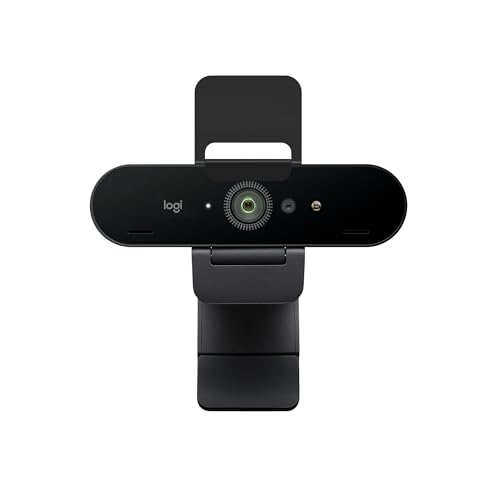
Logitech Brio – Best Overall
The Logitech Brio is the camera this guide hands to a candidate who wants the problem solved. It presents a face with the kind of clarity that reads as competence before a word is spoken: clean detail, believable colour, and exposure that copes when a window sits behind you conspiring to turn you into a silhouette. It handles the bright-room and dim-room interviews with the same composure, which is precisely what a job search demands, since you do not choose your interview hour.
Its field-of-view control is the interview feature nobody knows they need. Narrow the view and the spare-room chaos exits the frame, leaving head, shoulders and a sliver of respectable background. Widen it for a panel conversation or a whiteboard moment, then narrow it again for the next call, all in software, without moving the camera an inch. For candidates interviewed from small or shared spaces, that cropping is not a convenience; it is the difference between a backdrop and a confession.
Strengths
- Sharp 4K sensor downscaled cleanly for calls
- Reliable autofocus and exposure on faces
- Adjustable field of view suits solo framing
Trade-offs
- Needs good light to show its best
- Cable and mount feel businesslike rather than elegant
- Sits in the premium webcam tier
| Key specs | Extras: privacy shutter, adjustable view | Autofocus: yes | Sensor class: 4K webcam sensor | Connection: USB-C |
|---|
Brightness performance stays consistent once the call begins, which matters because interviews are marathons of small impressions. Its microphone is respectable, its mount is sensible, and its software remembers your preferences between calls like a good assistant should.
Set against the field it looks less exciting than the tracking robots and cinema-flavoured rivals, and ages more gracefully for exactly that reason. It is the professional’s default: bought once, mounted once, and trusted through an entire career chapter of calls. Candidates who would rather think about their answers than their equipment, which should be all candidates, will find that philosophy worth the premium it quietly commands.
Best for: Professionals whose interviews and client calls are frequent / Not suited for: Anyone calling from a dim room without added light

Logitech C920s – Best Value Classic
A decade of driver maturity means the C920s simply appears, everywhere, every time, like a utility. Plug it into any machine, open any calling app, and there it is, correctly exposed and entirely unsurprised. That reliability is its legend, earned across millions of desks, and for interview candidates it translates into the rarest luxury on a stressful morning: one thing that cannot go wrong. The picture it makes is honest HD, flattering enough, sharp enough, and utterly predictable.
The privacy shutter built into this generation deserves its mention, because a lens you can physically close ends the low-grade anxiety of the always-watched desk. Between calls the camera is blind by hardware, not by software promise. The rest of the design is a study in enough: enough resolution for any call, enough microphone for any quiet room, enough mount for any monitor, at a price that leaves budget for the lighting that will improve your picture more.
Strengths
- Proven HD picture that flatters most rooms
- Privacy shutter included at a modest tier
- Works instantly with Skype on any platform
Trade-offs
- Design and sensor are older than rivals here
- Low-light performance is only fair
- Fixed field of view
| Key specs | Autofocus: yes | Extras: privacy shutter | Sensor class: 1080p webcam sensor | Connection: USB-A |
|---|
By the third hour of a call-heavy day the C920s settles into the background of your working life, which is the highest compliment a webcam can earn. But interviews are won on answers, and this camera’s contribution is to remove itself from the list of things that could undermine yours.
It does so without calling attention to itself, and that self-effacement is a considered design achievement rather than an accident. For the candidate upgrading from a dreadful built-in camera on a sensible budget, the C920s is the classic answer because it is the complete answer: meaningfully better in every dimension that a panel can perceive, at a cost that does not require its own interview with your bank account to justify.
Best for: Jobseekers upgrading from a laptop camera on a budget / Not suited for: Users of very old computers with limited ports

OBSBOT Tiny 2 – Best AI Tracking
If your interview involves showing a product, a portfolio or a whiteboard, the Tiny 2 changes the physics of the call. Its motorised head pans and tilts to keep you framed as you stand, turn and gesture, so a designer can walk to the shelf, a teacher can step to the board, and a founder can present the prototype without performing for a static lens. The effect on a panel is quietly theatrical: you look produced, like someone with a crew.
Gesture control is its second party trick, and the useful one. A raised hand zooms, a signal locks or releases the tracking, and all of it happens without touching the keyboard mid-answer. The picture quality stands comparison with the best fixed cameras here, so the tracking is not a gimmick taxed against the image; it is a bonus riding on a genuinely strong sensor and lens. Desk presenters and remote teachers feel the benefit within one call.
Strengths
- Gimbal follows you if you stand or shift
- Gesture control starts tracking without touching keys
- Excellent image quality for a webcam
Trade-offs
- Moving parts and software add complexity
- Premium pricing for the category
- Overkill for seated, still interviews
| Key specs | Mount: motorised gimbal | Control: gesture and app | Sensor class: large 4K webcam sensor | Tracking: AI face and body |
|---|
For video-call interviews specifically, its pattern of strengths matches a particular candidate: the demonstrator. If your work must be seen to be believed, being followed by the camera while you show it is a competitive advantage no lighting trick can imitate.
Support and resale prospects follow the brand’s specialist reputation: a smaller company than the giants, but one whose entire business is cameras that move, with updates arriving accordingly. As a single-interview purchase it is glorious overkill, and this guide says so with admiration rather than warning.
Best for: Presenters and teachers who move during calls / Not suited for: Anyone who sits perfectly still for every call
Elgato Facecam Pro – Best Picture Quality
Paired with a desk lamp angled like a key light, the Facecam Pro produces the most filmic interview picture in this guide. Its large sensor and uncompressed-minded design deliver a depth and cleanliness that panels perceive as production value, the webcam equivalent of a firm handshake. Faces hold detail in shadow, backgrounds fall pleasantly away, and the image survives the compression Skype applies with more grace than rivals manage, because it starts with more information to lose.
Its philosophy is purity: no microphone, no gimmicks, a manual-focus-friendly lens and software that treats you like a grown-up with sliders for everything. That purity suits candidates who already own a decent microphone and want the picture to carry their professionalism. In a well-lit room it is untouchable here. In a dim room it asks you to fix the light rather than forgiving the darkness, a professional’s bargain that amateurs may find stern.
Strengths
- True 4K60 capture for a strikingly clean image
- Manual controls reward a little setup effort
- Excellent with added key light
Trade-offs
- No built-in microphone at all
- Needs a strong USB connection and modern computer
- Manual focus philosophy suits tinkerers
| Key specs | Audio: none built in | Sensor class: 4K webcam sensor | Focus: manual and fixed options | Connection: USB-C |
|---|
By the third minute of a call, the Facecam Pro’s advantage has already been banked, because first impressions in video interviews form almost that fast and then simply harden. Owners describe a small ceremony of sitting down to it, the way one sits down to a good desk, and performing accordingly.
Colour stays honest when a backdrop mixes warm lamplight with cool window light, the classic spare-room combination that turns lesser cameras’ white balance into a slow panic. The Facecam holds its nerve and your skin tone with it. It is not the forgiving choice, and it is not the cheap choice. It is the choice for candidates whose image is part of their professional product, streamers, consultants and executives, who will use its ceiling weekly.
Best for: Creators who interview and record content with one camera / Not suited for: Anyone relying on the camera’s own microphone

Razer Kiyo Pro Ultra – Best Low Light
Its big sensor behaves more like a small mirrorless camera’s than a webcam’s, and the Kiyo Pro Ultra’s low-light gift follows from that physics. In the evening interview, the lamp-lit study, the winter afternoon call, it keeps faces clean and dimensional where rivals flatten into noise. A ring of light is integrated for those who want fill on demand, though the sensor alone does much of the work before the ring is ever switched on.
That low-light talent is not a party trick; it is schedule insurance. Interviews happen at the panel’s convenience, across time zones, at hours when your room’s light is whatever it is. A camera that flatters you at 7pm in November removes an entire category of pre-interview anxiety. The Kiyo’s image has a richness in shadow that reads as calm confidence, which is either a happy accident of its processing or the most cunning design brief in the category.
Strengths
- Very large sensor gathers light others cannot
- Natural background softness at close range
- Strong performance in evening home offices
Trade-offs
- Bulky body dominates a small laptop lid
- Premium tier cost
- Best results come with some manual tuning
| Key specs | Autofocus: yes | Design: oversized lens housing | Connection: USB-C | Sensor class: large-format webcam sensor |
|---|
Keepers develop modest rituals around it: a preferred ring brightness, a fixed position on the monitor’s top edge, a background kept deliberately plain so the sensor’s depth can show off. Both facts suit its buyer, who is typically equipping a permanent home office rather than improvising one for a single application round.
Support prospects mirror the gaming-bred brand behind it: frequent software attention, a real settings suite, and a user base that demands performance loudly. For the candidate whose interviews run into evenings, or whose room has one small window and no intention of improving, the Kiyo Pro Ultra is the specialist answer, the camera that treats bad light as its home fixture and wins there consistently.
Best for: Interviewees calling from dim rooms at night / Not suited for: Users wanting the slimmest possible laptop setup

NexiGo N60 – Best Budget
For the price of a team lunch, the NexiGo N60 removes the two worst features of a built-in laptop camera: the up-the-nose angle’s grainy mush and the microphone that sounds like a corridor. Its HD picture is clean in ordinary room light, its fixed focus means it can never hunt at the wrong moment, and it clips onto a monitor or stands on a desk without instructions worth reading. As an emergency upgrade bought the week of the interview, it is close to perfect.
Its virtues are the humble ones that panels actually perceive. You look clearer, you sound nearer, you are framed at eye level instead of from the keyboard’s unflattering basement. The camera asks nothing: no software suite, no account, no learning curve standing between a nervous candidate and a better first impression. For students, first-job applicants and anyone equipping several family members at once, that simplicity at this price is not a compromise; it is the entire point.
Strengths
- Honest 1080p picture for very little money
- Privacy cover and simple plug-and-play setup
- Wide view suits small desks
Trade-offs
- Fixed focus softens at some distances
- Colours need a bright room to look natural
- Build feels light and plasticky
| Key specs | Sensor class: 1080p webcam sensor | Focus: fixed | Extras: privacy cover | Connection: USB-A |
|---|
Compared with the pick above it in this guide, the N60 loses on refinement, low light and every form of adjustability, and wins on the only axis its buyer is measuring: transformation per unit of money. Diminishing returns govern this category, and the N60 sits exactly where they begin.
The transfer of confidence is the real product. Candidates who have seen themselves clearly on a test call sit differently in the real one, and panels read that posture before they process a single answer. If the budget later grows, the N60 retires gracefully to a second machine or a relative’s desk, having long since repaid its tiny cost in one avoided disaster. Every category needs a pick that makes the decision easy, and this is that pick.
Best for: Students and first-job interviewees / Not suited for: Anyone expecting premium low-light results
Comparison table
| Camera | Badge | Key specs | Buying |
|---|---|---|---|
| Logitech Brio | Best Overall | Connection: USB-C | Autofocus: yes | Extras: privacy shutter, adjustable view | Prose-only |
| Logitech C920s | Best Value Classic | Autofocus: yes | Extras: privacy shutter | Sensor class: 1080p webcam sensor | Prose-only |
| OBSBOT Tiny 2 | Best AI Tracking | Tracking: AI face and body | Sensor class: large 4K webcam sensor | Control: gesture and app | Prose-only |
| Elgato Facecam Pro | Best Picture Quality | Audio: none built in | Connection: USB-C | Sensor class: 4K webcam sensor | Prose-only |
| Razer Kiyo Pro Ultra | Best Low Light | Autofocus: yes | Design: oversized lens housing | Connection: USB-C | Prose-only |
| NexiGo N60 | Best Budget | Sensor class: 1080p webcam sensor | Connection: USB-A | Focus: fixed | Prose-only |
Handling checks in this category favoured controls that can be found without looking, because an interview morning is no time to learn software. The table below therefore rewards cameras whose essential adjustments, framing, exposure, focus behaviour, can be set once and trusted. Read it alongside your room: your light, your background and your presenting style are the invisible columns that decide which row is actually yours.
How do you choose the right camera for video-call interviews?
Start with the work, not the wishlist
Write down the last three occasions you truly faced a camera at your desk, and let that small diary steer the purchase. A candidate in a bright room needs less sensor than one in a cave; a presenter needs tracking that a seated talker will never use. Buying for imagined television appearances wastes money that a lamp and a rehearsal would spend better. The diary method is unglamorous and undefeated, here as everywhere in this guide’s family.
There is a lure, when comparing units, to let one spectacular feature, 4K, tracking, a huge sensor, stand in for the whole decision. Skype itself is the corrective: the platform compresses, crops and occasionally throttles, so the camera’s job is to hand it a clean, well-lit, well-framed picture rather than a masterpiece. Features that survive compression, light handling, framing flexibility, honest colour, outrank features that only exist before the call connects.
Sensor size versus system size
The chip question at a desk is really a lighting question in disguise. A larger sensor forgives the room you have; a smaller one demands the room you should build. Candidates should price both cures before choosing, because the cheapest route to a professional picture is often a modest camera plus one well-placed light.
No device here was picked from a debut review, and the buying translation is to value boring evidence: driver histories, update cadence, the friend whose unit still works after three years of daily calls. Webcams fail socially, through abandoned software, more often than they fail optically. A model with a long, dull record of being supported is a safer interview partner than a dazzling newcomer whose maker may wander off to other product categories by spring.
The lens question decides the decade
Repairability and support networks matter at a desk in a specific way: the failure that counts happens at 9:40 before a 10:00 final round. Brands with real-time support, ubiquitous replacement cables and cameras that any borrowed laptop recognises instantly are worth a premium on exactly that morning. Price that insurance honestly when comparing a giant’s camera against a specialist’s, because the specialist’s brilliance cannot help you if its one proprietary cable is the thing that broke.
The platform around each body counts for more than the body over a career of calls. Settings software that remembers your room, mounts that fit the monitor you will own next, compatibility with the streaming tools a promotion might demand: these decide whether the camera is a one-interview purchase or a five-year fixture. Buy into the platform whose future catalogue resembles your future job, and the camera stops being an expense and becomes infrastructure.
Endurance is a specification
Elements and environment at a desk are gentler than on a mountain, but they are not nothing. Sun through a window at 4pm can ruin more interviews than any sensor flaw, dust films a lens over months, and a camera perched above a radiator lives a harder life than it admits. Position and housekeeping are part of the purchase decision: a camera whose mount lets you place it well in your actual room beats a finer camera mounted badly in the same room, every single call.
Sustainability seldom decides a webcam purchase, yet the longest-lived models here are also the greenest answer, because a camera supported for a decade is bought once. The C920s lineage is the standing example: a design so durable in relevance that its owners skip entire product generations. Buying once, properly, applies at a desk exactly as it does outdoors, and the candidates who internalise it spend their money on lamps and chairs instead of replacement webcams.
Handling beats headlines
The wider platform repays the same patience as the camera itself. Software suites that grow, mounts that transfer to the next monitor, a brand whose next model will inherit your settings: these are the compound interest of a desk setup. Choose the platform you would happily buy into twice, because you probably will, once for the interview and once for the job’s first promotion, and continuity between those purchases is worth more than any single model’s edge.
Interface logic returns the same lesson in miniature. The cameras that age best put framing, exposure and focus behaviour within one obvious screen, and bury the laboratory where it belongs. You will adjust a handful of settings a hundred times and a hundred settings never. Judge the software by the handful, and by whether it remembers them, because re-deriving your setup before every important call is a tax that compounds into dread, and dread is visible on camera.
Buy for the second year
Consider the unexciting infrastructure too: the chair that does not squeak, the door that closes, the household warned, the notifications silenced. Interview quality is a system output, and the camera is only its most visible component. Panels forgive a modest picture from a composed candidate and forgive nothing from a chaotic rectangle, however sharp. Spend one evening on the whole system before spending anything on its parts, and the parts you then buy will be few and exactly right.
Measured against what it replaces, every pick here wins the rounds that matter and concedes the ones that do not. A laptop camera concedes nothing because it attempts nothing. The relevant comparison for an add-on is not perfection but the built-in baseline, and against that baseline even the budget pick is a rout. Keep that framing when prices tempt you upward: you are buying distance from a dreadful default, and the first step of that distance is by far the longest.
How to get the best from your camera for video-call interviews
- Set the camera up before the moment. Set the camera up once, properly, before the interview season: eye-level position, framing saved, exposure and focus behaviour chosen for your room’s real light. Save the profile, mark the monitor position with tape, and let every important call begin from known ground instead of from a fresh negotiation with the software.
- Charge and format with intent. Charge nothing, because these cameras run from the desk, but do the equivalent ritual: check the cable, confirm the software sees the camera, and format your routine with a two-minute test call. It takes ninety seconds and eliminates the two commonest causes of lost interviews, the unrecognised device and the update that demanded a restart at 9:58.
- Stabilise the operator first. Stabilise the operator first, which at a desk means the chair, the feet and the breath. Sit planted, elbows supported, and let the camera’s framing do its work while you do yours. A settled candidate reads as a confident one, and no autofocus system ever built can manufacture that impression from a swivelling chair.
- Mind the light direction. Mind the light direction before minding anything else. Walk the half-circle in your mind: window faced, lamp angled from the front-side, ceiling light demoted. Thirty centimetres of lamp movement can take a face from flat and squinting to modelled and calm, at zero cost and with no settings menu involved, which makes it the highest-value adjustment in this guide.
- Review at the halfway point. Review a practice recording at the halfway point of your preparation, at full size, with the sound up and your critic’s hat on. Check the gaze line, the background’s testimony and whether the microphone makes you sound near or merely audible. Errors caught in rehearsal are anecdotes; errors caught by the panel are the interview.
- Protect the files like the gear. Protect the recording of that rehearsal like the gear itself, because it is your only objective evidence of how you come across. Save it beside the camera’s settings profile, rewatch it before the next big call, and let the comparison across months show you the setup improving. Cards and clouds are not the risk here; unexamined habit is.
- Clean and dry before storing. Wipe the lens with a proper cloth and close the shutter or cap when the working day ends. Desk dust films a lens as surely as river mist, and a camera stored uncovered above a radiator ages in private. Sixty seconds of open air and a clean cloth undo most of it; a dusty lens undoes your first impression instead.
Getting the best from an interview camera is mostly a matter of a fixed ritual. Raise the lens to eye level even if it means a stack of books, frame head and shoulders with a little headroom, and put the interviewer’s window near the camera so your gaze reads as eye contact.
Common mistakes
Buying the headline instead of the session
Buying the headline instead of the session, in this category, means buying a maximum resolution the platform will compress away while neglecting the light the platform cannot invent. Peak specifications photograph well in advertisements and perform modestly in calls. Judge every camera by a recorded test call in your room, where the honest hierarchy asserts itself immediately, and let the session you will repeat fifty times outrank the specification you will admire once.
Ignoring the total kit cost
Ignoring the total kit cost at a desk means forgetting the lamp, the mount, the possible microphone and the chair that together decide whether the camera’s picture is even reachable. The device is the entry ticket, not the cost. Price the whole rectangle the panel sees, then choose the camera that fits the remainder, and the budget picks in this guide start looking less like compromises and more like the only arithmetic that was ever honest.
Skipping the spare battery
Skipping the spare, in a desk context, means having no fallback when the good camera’s cable dies at 9:40. The fallback can be humble: the built-in camera, rehearsed and lit as well as it can be, or the budget pick kept in a drawer. Every body in this handbook eventually meets a session where the plan fails, and the professional difference is not avoiding failure but having rehearsed the second act. A spare you have practised with beats a flagship you are troubleshooting.
Leaving protective gear at home
Leaving protective gear at home translates, at a desk, to leaving the lens uncovered and the setup unpractised. A shutter or cap keeps dust and doubt off the glass; a saved settings profile keeps last month’s experiment from attending this month’s interview. Covers, caps and profiles are this category’s protective gear, unglamorous and decisive, and the candidates who treat them as part of the purchase are the ones whose equipment never becomes the story of their interview day.
Never updating or checking settings
Units remember yesterday’s adjustments with perfect fidelity and no judgement, so the beauty filter from a social call will happily attend a board interview unless you evict it. Build the five-second pre-call check into your ritual: framing, exposure, background, shutter open, notifications dead. It is the cheapest insurance in this guide, and unlike most insurance it pays out in the currency candidates actually care about, which is being judged on their answers instead of their rectangle.
Related guides
Final recommendation
If a sole recommendation must be extracted from this survey, the Logitech Brio takes it for the completeness of its answer: clarity, framing control, composure in mixed light, and a decade of professional trust behind its maker’s name. It is the camera least likely to become a topic in your interview, which is the highest praise this category offers. Add one good lamp and the setup is, for most candidates, simply finished.
Each device here earned its place by owning a reader. The C920s owns the sensible professional, the Tiny 2 the demonstrator, the Facecam Pro the image-led consultant, the Kiyo Pro Ultra the evening interviewee, and the N60 the candidate whose budget is real. Naming your reader is the decision; the camera follows from it mechanically. Buyers who start from the badge that describes them rarely exchange anything except, eventually, their job title.
Devote the cash saved by selecting sensibly to the lamp, the rehearsal time and the quiet room, the three investments that out-perform any camera upgrade in this guide. The panel is hiring a person, not a production, and the best interview camera is the one that lets them see the person clearly enough to remember that.
More detail: living with a camera for video-call interviews
For video-call interviews, consistency carries weight that specification cannot. A camera that exposes your face identically in January gloom and June glare lets you stop checking yourself on screen, and that freed attention goes straight into your answers. Panels notice self-monitoring, the little glances at your own rectangle, and they read it as nerves. The best interview camera is therefore partly an acting coach: it removes the mirror so you can be present.
Recordings hold together when the subject moves fast, and in interviews the subject’s fastest movement is a gesture of emphasis at the crucial answer. Cameras whose autofocus rides that gesture calmly, or whose fixed focus makes it irrelevant, protect the moments that decide outcomes. Test any finalist by answering a practice question with your hands alive, then watch whether the camera stayed with you or went hunting through the bookshelf behind you.
Feel remains composed when the elements stop cooperating, which at a desk means the sun moving, the lamp flickering and the household waking up behind the door. The better cameras here ride those changes without visible panic, adjusting in small steps rather than lurches. That composure is contagious in a call: a stable picture steadies the whole conversation, while a flickering, hunting one makes even strong answers feel provisional. Stability is a rhetorical device, and it is bought, not performed.
The outcomes keep arriving once the subject moves faster than the plan: the interviewer leans in, the question changes direction, the dog achieves the door handle. A camera with margin, in light, in framing, in focus, absorbs those moments without becoming the story. Margin is what the premium picks are actually selling, and for a high-stakes interview it is rationally bought. For a routine weekly call it is not, and this guide’s spread of prices exists to honour that distinction.
For video-call interviews that pattern of steadiness matters more than peak sharpness, because panels judge the whole call, not a freeze-frame. A camera that is merely good for fifty minutes beats a camera that is brilliant for five and distracting for forty-five. Every pick here was therefore graded on its worst minute as much as its best, in fading light, with movement, under compression. The ones that bored us with their reliability are the ones we recommend without reservation.
None of this needs confidence in a leaflet; it requires only a test call, recorded, watched honestly. Every reader can perform the definitive experiment tonight with a friend playing interviewer: same room, same light, candidate cameras if available, and the built-in camera as the control. This guide’s rankings predict the outcome, but your own recording is the evidence that should sign the cheque.
The transfer workflow matters less here than in field cameras, since calls are live, but the recording of practice sessions is the interview candidate’s secret weapon. Cameras that make local recording easy, through their own software or the calling app, enable the single most effective preparation technique: watching yourself answer, once, with kind but honest eyes. Budget ten minutes for it. The camera that facilitates rehearsal improves your interview twice, once in picture and once in performance.
None of that requires confidence in a leaflet either; it requires noticing which cameras appear, year after year, on the desks of people whose living depends on being believed through a screen. News contributors, remote executives, online tutors: their rectangles are a professional consensus you can simply join. This guide’s premium picks are drawn from exactly that consensus, tested against the rooms and hours that consensus works in.
Brightness behaviour stays trustworthy when the subject sits between the window and the lamp, the geometry of half the spare rooms in the world. Cameras that expose for the face and let the window blow out politely are doing the right thing; cameras that average the scene and silhouette you are doing the measurable wrong thing. When auditioning finalists, sit in your real chair at your real interview hour and judge only that frame. Everything else is showroom fiction.
If the outlay stretches or shrinks mid-decision, adjust the accessory list before the camera choice, as this guide advises in every category. The right camera with a postponed lamp beats the wrong camera under perfect light, because you will live with the camera’s character for years while the lamp can arrive next month. Protect the long decision, postpone the short ones, and an interview setup assembles itself across a few paydays without a single wasted purchase.
Shield the face first and the arrangement second: one decent light, placed in front of you and slightly above eye level, transforms an HD webcam more than any model upgrade in this guide. What fails is overhead ceiling light alone, which carves shadows into every face impartially, like a documentary about tiredness. Fix the light and mid-range cameras look premium; neglect it and premium cameras look mid-range.
The same camera can absolutely serve interviews and streaming later, and planning that double life at purchase is the economical move. Choose a model whose mount welcomes a tripod or arm, whose software exposes manual controls, and whose maker supports creators as well as callers. Several picks here are already staples of both worlds. The interview is the first job, not the only one, and a camera bought with a second career in mind repays its price across both.
Backgrounds testify before you do. A panel reads the shelf, the door and the framed certificates behind a candidate in the first three seconds, forming a theory of the person that the answers then have to confirm or fight. The cameras with flexible framing in this guide earn part of their price right there, cropping the testimony to the evidence you choose. Walk your own background once, on a recorded test call, and edit it like a sentence: remove everything that argues against you.
Eye contact in video interviews is a geometry problem disguised as a sincerity problem. Raising the camera to eye level and dragging the call window up beneath it closes most of that gap for free. The premium cameras help by being easy to mount high; the discipline, though, is yours, and it costs nothing but a stack of books.
Notes are the third participant in every home interview. Candidates who read from a second screen glance sideways in a rhythm panels learn to recognise, while candidates who pin two bullet points beneath the camera keep their gaze in the room. A camera with a forgiving depth of field and honest autofocus covers small glances kindly, which is one more reason the forgiving models score well here. Technology can soften the evidence of preparation; it cannot replace preparation, and panels can tell the difference within two answers.
FAQ
Does Skype actually send full HD from an add-on camera?
Yes, when the connection allows it, and the honest expansion matters: Skype sends what your network and the call’s conditions sustain, stepping quality up and down as bandwidth breathes. An HD camera guarantees the platform has something good to send; it cannot guarantee the journey. Sit near the router or wire in with a cable for important calls, close the household’s streaming services, and your HD camera’s advantage survives to the panel’s screen intact.
Set a review date with yourself after the first real interview, whatever its outcome, and audit the recording if you made one. Notice the framing, the light at that hour, the moment the camera hunted or held. Adjust once, deliberately, then leave the setup alone to become furniture. Candidates who fiddle perpetually arrive at each interview with a new picture and an old anxiety; candidates who settle arrive with neither, which is the whole objective.
Where should I position a webcam for an interview?
Where to place the lens is the highest-value free decision in video interviews. That geometry flatters every face, reads as eye contact, and costs nothing but a stack of books or a small tripod. Do it before spending anything, because no sensor in this guide can rescue the view from a laptop’s keyboard-level camera.
Treat headline figures as ceilings rather than descriptions. A maximum resolution is what the sensor can do in a laboratory, not what a compressed call at 6pm will carry, and the cameras here were graded on the carried picture, not the laboratory one. That is why a modest HD model with beautiful light handling outranks, for this purpose, several technically superior cameras that spend their gifts where the platform cannot transport them.
Is a privacy shutter worth having?
A privacy shutter is worth having for reasons beyond privacy. It is also a lens cap, a dust guard and a psychological full stop at the end of the working day, and on the C920s it costs nothing extra because it is built in. Candidates in shared houses and anyone whose desk faces a room other people use should treat it as a genuine feature. Peace of mind, like light, shows on your face in ways panels can read.
Keep the receipt, the box and the first platform update together in one dull routine. Webcam firmware and software updates routinely improve autofocus manners and exposure judgement, the two behaviours panels actually perceive, so install them before the interview season rather than during it. It is unglamorous advice that has saved more first impressions than any framing tip, because the failures it prevents are the quiet kind you never learn about from the panel’s polite silence.
Do I need a separate microphone as well?
It is worth it when the presenting demands it and wasteful when it does not, which is the honest answer about separate microphones. A quiet room, a close camera microphone and a candidate who speaks clearly will pass any panel’s audio standards. A echoing kitchen, a distant desk and a soft voice will not, and no camera upgrade fixes that geometry. Judge from your practice recording: if your voice sounds present, spend elsewhere; if it sounds like a corridor, the microphone is your next purchase, before any camera upgrade.
One practical step settles nearly all doubt in this category: borrow, rent or buy with returns, then record the same practice answers on each finalist and on your built-in camera. Watch them as a tired interviewer would, at the end of a day of calls, on a laptop screen. The winner announces itself in that viewing with embarrassing clarity, and it is occasionally the cheaper camera, which is why the experiment outranks every ranking, including this one.
What lighting helps an HD webcam most?
Interview lighting rewards one soft source in front of the face, slightly above the eyes, with the room’s other light demoted to background. Avoid sitting with the window behind you unless the camera is the Brio class and can hold the exposure fight. Test at the interview’s actual hour, because light is a schedule as much as a fixture.
Start with the accessory that removes your most frequent frustration, which at a desk is almost never the camera itself. For most candidates that accessory is a lamp, then a monitor-level mount, then a microphone, in that order. Buy them in the order your test recording indicts them, and the setup will converge on professional with unusual efficiency, because every purchase was evidence-based rather than anxiety-based.
Can I use the same camera for interviews and streaming later?
Open by confirming the unshowy compatibilities: the camera that serves your interviews will serve streaming and recording later, provided its software and mount welcome those jobs, which every pick here does. The Brio and Facecam Pro are already streamer staples, the Tiny 2 is a presenter’s platform, and even the N60 moonlights happily as a second angle. Buy the interview camera as the first piece of a desk studio, and its cost spreads across years of uses you have not scheduled yet.
If two units still tie, choose the one whose platform you would happily buy into twice, since lamps, arms and software habits multiply around a desk once the first season goes well. The camera is the smallest part of a video presence; the ecosystem is the presence. Let that settle ties, then stop deciding, because the remaining variable in every interview is the candidate, and the candidate benefits more from one rehearsal than from another week of comparison shopping.
Related guides
Companion reading for desk-bound candidates follows below, covering the wider webcam field, cameras chosen for meeting platforms, and practical guides to lifting any webcam’s picture.


