Disclosure: As an Amazon Associate, reviewstook.com earns from qualifying purchases. Links on this page are affiliate links; they cost you nothing extra. Prices and availability change often, so check the current Amazon listing before you buy.
This smart plug review starts from a simple observation: a smart plug is the smallest possible smart-home purchase, and also the one that teaches you the most about your home. One small relay, one radio and one app stand between a dumb appliance and an automated one, and everything the category does well — and badly — is visible in that little triangle. A fair smart plug review therefore has to judge three things at once: the hardware as an electrical device, the software as a daily companion, and the ecosystem as a long-term commitment, because owners live with all three long after the unboxing is forgotten.
What follows examines the modern category in depth: what a smart plug actually is, how the leading models are built and behave, how they perform across the jobs owners really give them, where each approach is strong, where it honestly falls short, and who should buy which. There is deliberately no single winner declared at the end. In this category the right answer is a match — between plug, load, network and household — and the purpose of this review is to make that match obvious for your situation rather than to crown a product in the abstract.
Key Takeaways
- Judge the system, not the gadget: app quality, network behaviour and recovery after outages matter more than any headline feature.
- Safety is the first specification: lamps, fans and small predictable loads are a plug’s kingdom; heating and large cooling appliances are not, unless the appliance maker explicitly allows remote operation.
- Buy the ecosystem you already use: the plug that joins your voice assistant natively will feel twice as smart as a technically better plug that fights it.
- One monitoring plug teaches more than six plain ones: energy insight is most valuable as an audit tool rotated between suspect appliances.
In this guide
Smart Plug Review: What the Modern Smart Plug Is and Where It Fits
A smart plug is an adapter that sits between a wall outlet and an appliance, switching the power to that appliance under remote control. That plain description hides a small revolution in domestic logistics. Millions of perfectly good devices — lamps with awkward switches, fans, coffee makers, aquarium lights, chargers — were built with no concept of a schedule, a remote or a voice command. The smart plug retrofits all of that in seconds, without wiring, without replacing the appliance and without asking anyone’s permission, which is why it is so often the first smart device a household buys and the one that quietly multiplies.
Owners who understand one distinction get more life and fewer surprises from their plugs: not all electrical loads behave alike. A resistive load — a lamp with a conventional bulb, a simple lamp or appliance with a steady draw — takes power in a calm, predictable way, rising to its working level and staying there. A motor load is a different personality. Fans, pumps, compressors and anything else that spins must overcome inertia at startup, and in that first moment they pull noticeably harder on the supply than they do once running. That startup surge, repeated thousands of times across a plug’s life, is what ages the relay inside a smart plug.
Design, Build and Setup
Ask owners what irritates them about a smart plug they otherwise like and the answer is rarely software — it is geometry. Early smart plugs were famously bulky, swallowing both sockets of a duplex outlet and crowding neighbouring plugs on a strip. Modern designs have largely learned manners: compact housings shaped to leave the second outlet free, side-facing sockets on some models, and dual-outlet designs that put two independently controlled sockets in one body for entertainment stacks and desks. Before buying a fleet, hold the candidate’s shape in mind against your real outlets — behind the bed, inside the media cabinet, at the crowded kitchen counter — because the best plug on paper is useless in the outlet it physically dominates.
You will interact with a smart plug’s app a hundred times for every time you touch the plug, which makes software the real product. A good plug app shares a recognisable personality: pairing that succeeds on the first attempt, a home screen that shows state at a glance, schedules you can build without a manual, and naming and grouping that match how you think about rooms rather than how databases think about devices. Firmware updates arrive quietly and improve things. The mediocre apps are equally recognisable — pairing rituals that fail behind furniture, schedules buried three menus deep, and accounts that demand attention the hardware never would.
Setting up a smart plug well is a short job done in the right order. Start at an outlet near the router for pairing, even if the plug’s final home is across the house; a calm first connection avoids most of the pairing folklore that fills support forums. Name the plug for the appliance and the room — ‘reading lamp, lounge’ ages better than ‘plug three’ — and assign it to its room in the app immediately, while the scheme is fresh. Then set the one schedule or routine you actually bought it for, test the physical button, and only then move the plug to its working outlet and confirm it reconnects there.
Performance in Real Use
Lamps and Everyday Lighting
Lighting is the plug’s home fixture, and the job it performs most flawlessly. A plug turns a lamp with a simple mechanical switch into a scheduled, voice-controlled, away-mode actor in the household’s lighting scheme, and it does so while leaving the lamp itself — its shade, its warmth, its place in the room — entirely untouched. The subtlety owners appreciate after a month is reliability of rhythm: the lamp that is simply on when you come downstairs stops registering as technology at all. The one caution is lamp choice itself; lamps with electronic touch controls or dimmers that forget their state when power is cut make poor partners, because the plug can only restore power, not persuade the lamp to remember it was on.
Fans and Air Movement
Fans are the second classic plug load, and the first where the motor personality described earlier earns respect. A fan that runs on a schedule through the warm part of the night, then rests, is a genuine comfort upgrade, and voice control from bed has ended many a household’s nightly negotiation about who gets up. Choose a plug whose maker explicitly welcomes motor loads, watch the first supervised cycles, and prefer fans with mechanical controls that resume exactly as they were left. A fan with a digital panel that wakes in standby mode will defeat any plug, however smart, because cutting and restoring power is the only language a plug speaks.
Coffee Makers and Kitchen Mornings
The scheduled coffee maker is the photograph on every smart plug box, and it works — with conditions. The machine must be a simple design that begins brewing when power arrives, it must be loaded the night before, and it must be a device its maker is comfortable seeing switched externally. Within those limits, waking to a finished pot is a small daily luxury owners refuse to surrender. The kitchen is also where discipline matters most: the same counter holds kettles, toasters and other heating appliances that belong firmly outside a plug’s authority, and the convenience of the coffee routine must never blur that line. Keep the plug’s kingdom to the one machine that qualifies, and label it if the household needs the reminder.
Entertainment Stacks and Standby Loads
The entertainment stack is where a plug stops being a convenience and starts being a strategy. Consoles, players, soundbars and their chargers sip standby power around the clock, and a plug — especially a dual-outlet model or one with energy monitoring — can cut the whole stack’s idle appetite in one scheduled stroke, then restore it before the evening’s viewing. The craft is in the exceptions: anything that records, updates or keeps a clock may deserve to stay powered, and a hard power cut is a ruder awakening than some devices enjoy daily. Owners who map the stack device by device, rather than switching the lot blindly, get the savings without the sulks.
The Leading Models, Reviewed in Detail

TP-Link Kasa Smart Plug
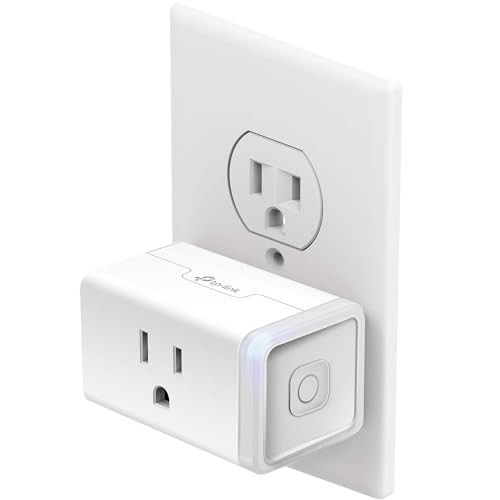
The TP-Link Kasa Smart Plug represents the polished all-rounder approach to this category: a compact Wi-Fi plug from a networking brand that treats the companion app as a first-class product. In daily use that heritage shows in the details owners mention most — setup that follows a calm, linear flow, schedules that behave predictably, and an away mode that varies lighting patterns so a home looks lived-in rather than mechanically timed. The housing is shaped with the neighbouring outlet in mind, designed to leave the second socket of a duplex outlet usable, which sounds trivial until a chunky plug has blocked one in your own home.
Kasa plugs sit in the mid tier of the market: not the cheapest way to make an outlet smart, and not priced like a luxury object either. The honest trade-offs are ecosystem-shaped. The experience is strongest inside the Kasa app and with the major voice assistants; households building around newer cross-platform standards should check the current listing carefully for the exact model variant, because the Kasa family spans several generations with different feature sets. For a lamp, a fan or a coffee maker that simply needs to obey a schedule for years, this is the plug many owners buy once and then quietly multiply around the house.
Best for: readers whose priorities match its strengths below. Not suited for: anyone whose main need is listed among its trade-offs. It sits in the mid-tier of this market — check price on Amazon for the current listing before deciding.
- Strength: Polished, dependable app with scheduling and away mode
- Strength: Compact housing designed to respect the second outlet
- Strength: Backed by an established networking brand
- Trade-off: Feature set varies between model generations — check the exact variant
- Trade-off: No substitute for checking the load guidance against your appliance
- Trade-off: Best experience lives inside its own app ecosystem

Leviton Decora Smart Plug
The Leviton Decora Smart Plug comes from a company whose day job is electrical hardware, and that perspective shapes the product: this is a plug pitched at people who are building a whole smart-lighting scheme rather than experimenting with a single outlet. Managed through the My Leviton app alongside the Decora range of smart switches and dimmers, it lets a household keep one visual language and one control system across wall switches and plug-in devices alike — an underrated virtue when a partner or guest has to live with the system too.
Positioned toward the premium end of the plug market, it asks you to pay for that coherence and for a broad set of voice-assistant partnerships rather than for novelty features. The honest limitations are the usual ones for the category: it remains a Wi-Fi device dependent on your network’s manners, and its plug-in form can never offer the permanence or the wall-plate neatness of the wired Decora switches it is designed to complement. For homes already committed to Decora on the walls, though, it is the natural way to bring lamps and small appliances into the same fold.
Best for: readers whose priorities match its strengths below. Not suited for: anyone whose main need is listed among its trade-offs. It sits in the premium-leaning tier of this market — check price on Amazon for the current listing before deciding.
- Strength: One app and design language with Decora wall switches
- Strength: Electrical-brand heritage and broad assistant support
- Strength: Premium-leaning build suited to whole-home schemes
- Trade-off: Premium positioning versus simpler rivals
- Trade-off: Still network-dependent like every Wi-Fi plug
- Trade-off: Cannot match a wired switch for permanence
Emporia Smart Plug
The Emporia Smart Plug is built around a question most plugs ignore: what is this appliance actually costing you to run? Energy monitoring is the headline talent here — the plug reports the consumption of whatever it controls, and it belongs to a wider Emporia energy ecosystem that can extend to whole-home monitoring for households that want the full picture. In practice that turns a humble plug into a diagnostic tool: the ageing fridge that cycles too often, the entertainment stack that sips power all night, the dehumidifier whose appetite explains the bill.
That focus defines both the appeal and the limits. If you will never look at an energy graph, you are paying a mid-tier price for a feature you will not use, and simpler plugs will serve you as well. The app experience is organised around data, which delights the analytical and mildly overwhelms anyone who only wanted a lamp on a timer. Used as intended — on the handful of appliances whose appetite is genuinely unknown — it earns its place in a way few plugs can, because the information it returns changes decisions long after the novelty of voice control fades.
Best for: readers whose priorities match its strengths below. Not suited for: anyone whose main need is listed among its trade-offs. It sits in the mid-tier of this market — check price on Amazon for the current listing before deciding.
- Strength: Energy monitoring that turns guesswork into data
- Strength: Part of a wider home-energy ecosystem
- Strength: Ideal for auditing hungry or ageing appliances
- Trade-off: Monitoring is wasted on loads you never analyse
- Trade-off: Data-first app may feel heavy for simple scheduling
- Trade-off: Mid-tier positioning for a specialised talent
Meross Smart Plug
The Meross Smart Plug built its reputation on breadth: broad voice-assistant and platform support, including a welcome presence in ecosystems that budget plugs often skip, at an entry-to-mid tier position that makes multi-room rollouts painless. The plugs are compact, the app covers the scheduling and grouping essentials without ceremony, and multi-packs make it easy to standardise a whole home on one model — a real operational advantage, because a single app and a single behaviour pattern is far easier to live with than four brands doing things four ways.
The compromises are the honest ones of its tier. Fit, finish and long-term app polish do not quite match the premium names, and anyone chasing advanced energy analytics should look at monitoring specialists instead. Support breadth can also vary by exact model and region, so the current listing deserves a careful read before a bulk purchase. For renters, first-time smart-home buyers and anyone outfitting several rooms at once, Meross represents the sensible volume play: capable, compatible and priced for quantity.
Best for: readers whose priorities match its strengths below. Not suited for: anyone whose main need is listed among its trade-offs. It sits in the entry-to-mid tier of this market — check price on Amazon for the current listing before deciding.
- Strength: Unusually broad platform and assistant support for the tier
- Strength: Compact plugs sold in practical multi-packs
- Strength: Easy standardisation across many rooms
- Trade-off: Finish and app polish trail the premium brands
- Trade-off: Not an energy-monitoring specialist
- Trade-off: Check the exact model for the platform support you need
Strengths and Trade-Offs of the Category Leaders
Stepping back from individual models, the category’s shared strengths and honest trade-offs look like this — and any single plug you buy will inherit most of both lists.
- Strength: Scheduling that quietly removes daily friction, year after year
- Strength: Retrofits beloved existing appliances instead of replacing them
- Strength: Energy insight on monitoring models turns guesswork into decisions
- Trade-off: Every plug is one more dependent of your Wi-Fi network
- Trade-off: A plug can only switch power — appliances with electronic controls may not resume as hoped
- Trade-off: Heating and large cooling loads are outside the safe kingdom, whatever the marketing implies
How It Compares
Set the plug against its two neighbours and its identity sharpens. Against a smart bulb, the plug wins on scope — it automates the whole appliance, not just light — and loses on finesse, since it cannot dim or tune colour. Against a smart switch, it wins on effort and reversibility, and loses on permanence and elegance. The comparison that matters most, though, is between plug philosophies: the ecosystem minimalist, the monitoring specialist and the value multi-pack will each be somebody’s perfect answer.
| Approach | Exemplified by | Choose it when | Accept that |
|---|---|---|---|
| Polished all-rounder | Kasa and Leviton plugs | You want one dependable brand across many rooms | You pay a mid-to-premium tier price for polish |
| Energy specialist | Emporia | Consumption data will change what you do | The app is built around data, not simplicity |
| Value standardisation | Meross and Wyze | Many rooms need covering on a sensible budget | Finish and advanced features trail the leaders |
Who Should Buy One — and Who Should Skip It
Buy a smart plug if your home is full of good, simple appliances whose only fault is a manual switch: the reading lamp, the bedroom fan, the aquarium light, the charger drawer. Buy one if you rent, if you are smart-home curious but wiring-averse, or if you want to audit what your appliances truly consume before committing to bigger upgrades. The first plug is also the cheapest education in the whole smart-home field — a month with one teaches you your household’s real routines better than any amount of planning.
Skip it — for now — if the load you dream of automating is a heater, a large cooling appliance or anything its maker forbids for remote operation; the correct product for those jobs is a purpose-built appliance with its own smart controls, not an adapter. Skip it if your Wi-Fi barely reaches the outlet in question and you are unwilling to improve coverage first. And skip the fleet purchase until one pilot plug has survived a month in your worst outlet; the category rewards patience and punishes bulk enthusiasm.
Safety First: What a Smart Plug Should Never Control
A smart plug is a remotely controlled electrical switch, and that sentence deserves more respect than the product’s friendly marketing gives it. Everything you plug into it is an appliance connected to mains power, now able to turn itself on at three in the morning because a schedule said so. The first safety rule is therefore about heat. Devices whose whole job is to get hot — space heaters, kettles, toasters, hair tools, irons, heated blankets and similar heating appliances — should not be run from a smart plug unless the appliance manufacturer explicitly allows remote or unattended operation, because a heater that restarts unexpectedly against curtains, bedding or a tipped-over frame is a fire scenario, not a convenience.
The same caution applies, with even less room for debate, to air conditioners and other large cooling or workshop appliances. Beyond the question of whether the plug suits the load, many of these appliances are simply not designed to be power-cycled by an external switch, and their makers say so. The honest rule that experienced owners follow is this: if an appliance would worry you when it starts unattended, it does not belong on a smart plug, whatever the plug’s packaging claims. A smart plug’s legitimate kingdom is the predictable, low-risk load — lamps, fans, chargers, entertainment gear, aquarium equipment, holiday lights — loads that are boring to start and safe to leave.
Two further habits separate careful owners from cautionary tales. First, never daisy-chain: a smart plug goes directly into a wall outlet, never into a power strip that is itself plugged into another strip, and never stacked with a second smart plug to create improvised multi-stage control. Each connection is a point of resistance and heat, and chains multiply them. Second, respect the environment the plug lives in. Indoor plugs belong indoors, dry and ventilated; outdoor control belongs to plugs explicitly rated for outdoor use, mounted so their outlets face down and stay out of standing water. A plug that feels warm, smells of hot plastic or shows discolouration is not a quirk to monitor — it is a device to unplug and retire.
Connectivity and Energy, Revisited
Strip away the branding and a smart plug is a radio with a relay attached, so the radio decision shapes everything. The mainstream choice is direct Wi-Fi: the plug joins your home network, talks to its app and your voice assistant, and needs no additional hardware. The strength is simplicity and price; the weakness is that every plug is another client your router must keep happy, and a crowded or weak network shows up as plugs that respond slowly or drop offline at the far end of the house. A plug is only ever as reliable as the Wi-Fi reaching the outlet behind the sofa.
The alternatives organise around hubs and newer standards. Some ecosystems route plugs through a hub or a mesh protocol, trading a little setup complexity for a network that stays responsive when the internet itself is down. Matter, the cross-brand standard, and Thread, the mesh radio many Matter devices use, aim to end the era of choosing a plug by logo: a Matter plug should, in principle, join whichever platform runs your home. That promise is maturing rather than complete, so the practical advice is unchanged — buy for the ecosystem you actually use today, treat standards support as future-proofing rather than present fact, and check the exact model, because families of plugs often mix generations with different radios under one familiar name.
Energy monitoring is the feature that divides this category into toys and tools. A monitoring plug measures what the attached appliance actually consumes and reports it in the app — as live draw while it runs, and as accumulated usage across days and weeks. The first week with one is genuinely educational. You learn which devices earn their keep and which ones charge you rent: the entertainment stack idling all night, the old spare fridge cycling far more than it should, the dehumidifier whose appetite explains a bill that had seemed mysterious.
The mature use of monitoring is not surveillance of every lamp — it is auditing. Put the monitoring plug on one suspect appliance at a time, let it gather a week of honest data, then act: replace, repair, reschedule or simply accept the cost with open eyes. After the audit, the plug can move to the next suspect or settle into permanent duty on the one load whose consumption you truly manage, such as a workshop tool or a pump where running time itself is information. Owners who buy monitoring for every outlet usually stop reading the graphs within a month; owners who buy one or two monitoring plugs and rotate them deliberately extract value for years.
Final Verdict
The smart plug earns its place as the smart home’s most democratic device: inexpensive, reversible, honest about what it does. The models reviewed here divide not into good and bad but into philosophies — polish, data, value and ecosystem simplicity — and the right choice is the philosophy that matches the job in your home. Buy one, place it on a safe and predictable load, live with it for a month, and let your own routines, rather than anyone’s ranking, write the shopping list that follows.
Going Deeper: Living With Smart Plugs Long-Term
There is a quieter virtue to standardising on smart plugs that rarely appears in buying advice: the system becomes legible to the whole household. When every automated outlet behaves the same way — same app, same button feel, same recovery after an outage — guests, partners and older children absorb the pattern without instruction. Mixed fleets break that legibility. Each brand’s plug has its own pairing ritual, its own idea of what a schedule is and its own failure personality, and the household’s knowledge fragments accordingly. The plug is a small product, but it multiplies, and everything about it multiplies too.
Placement strategy deserves a paragraph of its own. The outlets that benefit most from automation are rarely the convenient ones at waist height in the hallway; they are the awkward ones — behind the aquarium cabinet, under the desk, beside the bed frame — where reaching a switch is a daily minor annoyance. Automating an annoyance is the highest-value use of a plug, because the benefit is collected every single day. Automating an outlet you could reach without thinking buys novelty instead, and novelty depreciates quickly. Walk the house with that lens before ordering, and the shopping list writes itself in the right order.
Finally, think about the exit. Every smart plug ecosystem is a small commitment, and the honest buyer considers, before the fleet grows, what leaving would cost: re-pairing a handful of plugs is an evening; re-pairing a houseful is a project. That is not an argument against buying — it is an argument for choosing the ecosystem deliberately at the start, when the choice is free, rather than discovering at plug twelve that the household has drifted into a platform nobody would have picked on purpose. Standards like Matter are slowly lowering those exit costs, which is one more reason to favour plugs that speak them.
Holiday lighting is the seasonal showcase that converts more sceptics than any other plug job. Trees, window candles and outdoor displays share three traits: they are pure, predictable resistive loads; they run on a strict daily rhythm for a few weeks; and their switches are inevitably in the least reachable places in the house. A plug — outdoor-rated for anything outside — removes the nightly crawl behind the tree entirely, follows sunset as the evenings draw in, and shuts the whole performance down at a civilised hour. It is also the perfect pilot job: high frequency, low risk, and a benefit the whole household can see from the street.
Aquariums and terrariums are a connoisseur’s plug job, because their inhabitants live by light cycles and gentle water movement rather than by human convenience. A plug gives the lights a day that starts and ends at the same minute all year, immune to forgotten evenings and holiday absences, and grouping the lights separately from filtration lets the life-support equipment run untouched while the lighting performs its theatre. The discipline here is conservative: automate the predictable, supervise any change for a full cycle, and keep the manual override where a hand can reach it without moving furniture.
The home office hides one of the best plug audits in the house. Monitors, docks, printers, speakers and chargers gather around a desk and sip standby power through every night and weekend, individually trivial and collectively constant. A plug on the non-essential cluster — never on the machine that might be mid-update or holding unsaved work — cuts the sip on a work-hours schedule, and a monitoring model can price the habit precisely before you commit. Owners who run this audit once tend to repeat it room by room, which is how one plug becomes a household energy policy.
Helping an older relative’s home is a use case owners describe with real warmth. A plug on a parent’s reading lamp, set to a gentle evening routine, removes a daily reach behind furniture; remote visibility lets family confirm the lamp came on as usual; and none of it requires the relative to learn anything new, because the lamp’s own switch still works when the plug is on. The same conservatism applies double here: safe loads only, nothing involving heat, and automations chosen for reassurance rather than cleverness.
Time-of-use electricity tariffs give scheduling a sharper edge. Where energy costs more at peak hours, a plug can shift the flexible loads — charging, the dehumidifier’s working hours within its maker’s guidance, the entertainment stack’s standby window — toward cheaper times automatically. The savings per device are modest, but the behaviour is free once set, and monitoring plugs close the loop by showing whether the shift actually happened. It is the plug working as a tiny, tireless tariff clerk rather than as a remote control.
Naming and grouping sound like housekeeping and behave like infrastructure. The fleet that stays usable for years follows a ruthless convention — room first, appliance second, spoken exactly as a guest would say it — because voice control, routines and troubleshooting all navigate by those names. Groups mirror rooms, not technologies, so ‘downstairs’ can be quieted in one command when the house sleeps. Owners who skip this discipline own plugs named like network printers and a household that routes around the system; owners who keep it describe their setup in one breath.
Scenes and routines are where plugs stop being switches and start being stagehands. A single ‘evening’ routine can bring two lamps up, wake the entertainment stack and start the fan, each on its own plug, in one breath of a command or at one minute of the clock. The craft is restraint: scenes built around real transitions — arriving, dining, watching, sleeping — get used daily, while scenes built to impress visitors get used twice. Build for the transitions your household actually makes, name them in the household’s own words, and let the exotic ideas wait until a real evening asks for them.
Privacy deserves a clear-eyed paragraph. A plug knows when its load runs, and its app therefore holds a small diary of the household’s rhythms — when the lamps lit, when the coffee brewed, when the house woke. Reputable ecosystems guard that data as account data, and owners should treat it with the same ordinary care: strong passwords, account security features switched on, firmware kept current and old devices removed when retired. None of this is cause for alarm; all of it is cause for choosing established platforms over anonymous ones when the fleet grows.
Second-hand and hand-me-down plugs deserve a caution of their own. A used plug arrives with a previous life: an unknown load history, firmware that may be generations old and a pairing to someone else’s account. None of that is disqualifying — the category is durable — but the sensible ritual is fixed: factory-reset the device, update its firmware before trusting it with a routine, watch its first supervised cycles on a gentle load, and retire without sentiment any unit that runs warm, smells of hot plastic or shows a discoloured body. A bargain plug is only a bargain while it behaves like a new one.
Moving house is the plug fleet’s finest hour and a small test of its record-keeping. Because nothing is installed, the whole system travels in a box and redeploys in an afternoon — provided the names still make sense in the new rooms and the account survived the move. Owners who kept a simple inventory card find the new house automated by the first weekend; owners who relied on memory spend that weekend re-pairing mysteries. The same card serves when a router is replaced, which is the other occasion when a fleet’s discipline pays out all at once.
Seasonal review is the maintenance habit that separates systems from accumulations. Twice a year — when the clocks change is the classic cue — walk the fleet in the app: delete schedules the household no longer lives by, rename plugs whose appliances have moved, retire the routine built for a summer that ended, and confirm each plug still answers from its real position. Ten minutes, twice a year, prevents the slow drift by which automations start firing for households that no longer exist, and it is when most owners notice the one plug that has quietly stopped reporting.
Certification and build trust are the unglamorous end of choosing, and worth a deliberate look. Reputable plugs carry the safety certification marks of the market they are sold in, come from makers who publish support channels and firmware updates, and state their load guidance in plain language rather than hiding behind a single heroic number. Anonymous plugs with miraculous claims and no accountable maker are the category’s false economy: the saving is small, the device sits on mains power in your wall for years, and the downside is not a metaphor. Buy the accountable plug.
Guests and housesitters reveal whether a smart home is a system or a performance. A plug-based room passes the guest test when the visitor can get light without instruction: the lamp’s switch behaves because the plug is on, the schedule is forgiving, and nothing requires an app the guest does not have. Design routines for the household’s least technical night, not its most technical one — automations that need explaining are automations that will be unplugged, literally, by someone trying to charge a phone at midnight.
The router-reboot plug is a folk remedy worth examining honestly. Owners of remote cabins and rentals sometimes place a plug on the network equipment itself, so a frozen router can be power-cycled from afar — with the obvious paradox that a dead router cannot receive the command, which is why the trick only works through plugs with independent connectivity or scheduled self-resets. Treated as a curiosity it is harmless; treated as infrastructure it disappoints. The episode teaches the category’s central lesson in miniature: a plug’s cleverness is bounded by the path its commands travel.
Workshop and utility loads sit at the careful edge of the plug’s kingdom. Dust extraction, battery-charger benches and utility fans are motor or electronic loads with personalities, and the owners who automate them successfully share a pattern: the plug’s maker explicitly welcomes the load type, the first cycles are supervised, the appliance’s own safety features remain fully in charge, and nothing that cuts, heats or spins unattended is ever left to a schedule. The plug may fetch and carry power in a workshop; it must never be the thing standing between a tool and its operator’s judgement.
Finally, there is the question of enough. A household’s plug fleet has a natural size — roughly, the number of genuine daily routines plus a monitoring instrument or two — and fleets that grow past it begin to generate their own maintenance weather. The owners who report the deepest satisfaction are not the ones with the most plugs; they are the ones who can still list theirs from memory, each earning its outlet. Let the routines ask for plugs, one honest job at a time, and the fleet will stay a servant rather than becoming a second household to manage.
Whichever radio you choose, placement is destiny. A plug tucked behind a metal appliance in a basement corner lives at the edge of coverage, and no app update fixes physics. Before standardising on a model, test one unit in the worst outlet you intend to automate; if it holds a connection there for a week of ordinary use, the rest of the house will be easy. Owners who skip that pilot buy sometimes own a box of plugs and a grudge; owners who run it own a system.
Scheduling is the least glamorous feature of a smart plug and the one owners rely on longest. Voice control delights for a fortnight; a lamp that simply comes on before you get home delights for years. The schedules that survive are the ones matched to real rhythms: lights that follow sunset rather than a fixed clock, a coffee maker warmed and ready on weekday mornings only, a fan that runs through the first hours of the night and then rests. Every credible plug app handles these basics, and the differences that matter are subtleties — whether schedules are stored on the device or in the cloud, whether they survive an internet outage, and how gracefully the plug behaves when power returns after a cut.
The Long-Term Checks That Separate a Good Smart plug From a Tiring One
A review that stops at the first week tells you how a smart plug arrives, not how it lives. The checks below are the ones that separate a product that stays satisfying from one that slowly becomes a chore, and they are the checks worth repeating with any model you shortlist. Treat this as a verification routine: run it during the return window, while changing your mind is still free.
Judge a smart plug as an electrical device first: the loads it is rated to switch, its size on your outlet and whether it blocks the neighbouring socket, then by its software, scheduling, energy reporting and how it recovers after an outage. The plug’s job list in your home should be written before the plug is bought. Walk the outlets you plan to automate and check the appliance at each one: does it resume correctly when power returns, does it have a mechanical switch that stays on, and is it a load a plug should switch at all. Confirm the network reaches the furthest outlet, especially in garages and utility rooms.
On a lamp with an awkward switch, a plug plus a schedule quietly removes a daily annoyance for very little money. Rotated between suspect appliances for a week each, one energy-reporting plug builds the picture of what your home actually uses. For seasonal items such as fans, decorations or a dehumidifier in a damp corner, a plug adds timing control without replacing a working appliance. Score each check honestly rather than generously. A smart plug that passes nine and fails one has told you exactly what living with it will be like, and you can decide with open eyes whether that one failure touches your routine.
Apply all of this to the listings in front of you. When a listing such as the TP-Link Kasa Smart Plug, Leviton Decora Smart Plug and Emporia Smart Plug catches your eye, resist judging it by its headline claim and instead run the checks above against it: does its stated role match the room you measured, does its control path suit your household, and does the maker’s own guidance support the job you have in mind. A model that answers those questions cleanly on paper usually answers them cleanly in the home, and one that dodges them in the listing will dodge them on your wall, shelf or desk as well.
Heating and large cooling appliances are the danger zone: many makers forbid remote switching, and a plug is the wrong tool where a load can restart unattended into an unsafe state. Appliances with electronic controls often wake in standby when power returns, so the plug switches the supply but the appliance still waits for a button press. If a plug drops offline, test it in an outlet nearer the router; corners, metal appliances and thick walls eat signal. If schedules drift or miss, check whether the plug lost its network and time source after an outage.
- Run the placement check in the room where the product will actually live for your smart plug.
- Test the failure mode: network down, power cut, battery flat for your smart plug.
- Note the chore the product creates and time how long it really takes for your smart plug.
- Repeat the key test at the hour of day you will use it most for your smart plug.
- Write down the one behaviour you would change if you could for your smart plug.
- Decide before the return window closes, not after it.
If a plug feels warm or clicks repeatedly under load, remove it from service; that load is beyond what it should be switching. Keep plugs dust-free and firmly seated, review schedules when the clocks change, update firmware through the maker’s app, and keep a written note of which plug serves which appliance so replacements are painless.
If a model passes these checks in your home, keep the notes you made. They become your baseline for judging its replacement years from now, and they are worth more than any fresh round of research done from memory.
Frequently Asked Questions
What is the first job most owners give a smart plug?
A lamp, and for good reason: lighting is predictable, safe to switch and used every day, so the benefit of scheduling and voice control is collected daily. A reading lamp or entry lamp on a sunset schedule is the classic first assignment, and it teaches you the app, the naming scheme and your network’s manners before you automate anything more ambitious.
Can a smart plug run a space heater or air conditioner?
Not unless the appliance manufacturer explicitly allows remote or unattended operation — and most do not. Heating appliances that restart unexpectedly are a recognised fire risk, and large cooling appliances are generally not designed to be power-cycled by an external switch. The safe kingdom for a plug is lamps, fans, chargers and similarly predictable loads.
Do smart plugs work when the internet is down?
The good ones mostly do: schedules stored on the device keep running and the physical button always works, while app and voice control pause until the connection returns. Designs that keep their timers in the cloud are noticeably less graceful. If outage behaviour matters to you, it is a question worth asking of the exact model before buying.
Is energy monitoring worth paying for?
On one or two plugs, emphatically yes — as an audit tool. Rotated between suspect appliances, a monitoring plug reveals which devices waste power idling or cycle far more than they should, and that knowledge changes decisions. On every outlet, the graphs usually go unread within a month, and the premium is wasted.
How many smart plugs should a household buy first?
One. Place it in the worst outlet you genuinely intend to automate, on a safe load, and live with it for a few weeks. That pilot tests your network, your ecosystem fit and your real routines at the lowest possible cost — and it makes every later purchase a standardisation decision instead of a guess.
Will a smart plug work with my voice assistant?
Very likely, but check the exact model rather than the brand family, because generations differ. A plug that joins your assistant’s platform natively will group and respond more smoothly than one added through a workaround, and that difference is felt every single day, so it deserves weight in the decision.
Related Guides
how to choose a smart plug, step by step
whether a smart plug is worth it for your home
the complete smart plug buying guide
smart plug pros and cons, weighed honestly
how to read smart plug reviews like an owner
smart plug vs smart switch, compared directly
the best Wi-Fi smart plugs we have tested
our guide to the best smart light switches