Disclosure: As an Amazon Associate, reviewstook.com earns from qualifying purchases. Links on this page are affiliate links; they cost you nothing extra. Prices and availability change often, so check the current Amazon listing before you buy.
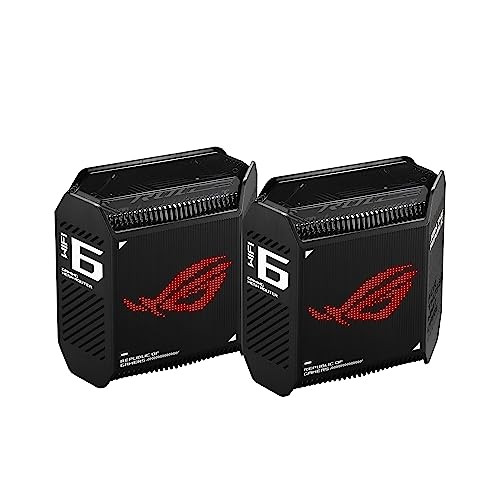
The rog rapture gt6 is ASUS ROG’s answer to a household problem that gaming routers created and could not solve alone: one powerful router, however theatrical its antennas, still obeys physics, and the bedroom at the end of the house still gets the worst of it. The GT6 is a mesh system — two or more sculptural nodes working as one network — built on tri-band WiFi 6 with a combined AX10000 class rating, a dedicated wireless backhaul, and the gaming acceleration and security features the Rapture name carries. This guide examines what that actually delivers to a gaming household: where mesh beats a single flagship router, where it does not, how the two-pack and one-pack listings differ, and when the WiFi 7 flagship alternative in these pages is the more honest purchase. A router is infrastructure, and infrastructure deserves a plainer review than a peripheral — so this one is plain.
The short answer: for a home large or awkward enough that a single router leaves dead or degraded rooms, the GT6 two-pack is the correct shape of solution — one network name, devices handed between nodes as you move, gaming traffic prioritised, and coverage the listing puts at up to 5,800 square feet for the pair. For a flat or a small house, the same money buys more router than the building can use, and the one-pack — or an ordinary good router — is the honest buy. For a household already rewiring its life around WiFi 7 devices and multi-gig internet, the GT-BE98 Pro alternative is the future-facing flagship, at a flagship’s price and a flagship’s appetite for space. The sections below make each of those judgements concrete.
Key takeaways
- The ROG Rapture GT6 is a tri-band WiFi 6 gaming mesh system, sold as a two-pack for whole-home coverage and a one-pack for smaller spaces.
- Mesh solves the geography problem a single router cannot: nodes cooperate as one network, with a dedicated band carrying traffic between them.
- Gaming features include triple-level game acceleration and a 2.5 Gbps port for a wired priority device, per the listing.
- Lifetime internet security is included in the listing, a genuine ownership saving over subscription-guarded rivals.
- WiFi 6, not WiFi 7: the GT6 is the mature, better-value standard; the GT-BE98 Pro alternative is the WiFi 7 flagship step-up.
- Buy the two-pack for houses with dead zones; buy the one-pack for flats; consider WiFi 7 only if your devices and internet plan can feed it.
What is a gaming mesh system, and why does it exist?
A conventional gaming router is a single loud voice in one room. Everything it promises — speed, low latency, clever prioritisation — is delivered at full strength near the router and decays with every wall, floor, and metre between it and the device asking. Mesh networking replaces the single voice with a small choir: two or more nodes, placed around the home, broadcasting the same network and passing your devices between them as you move, with one of the system’s bands reserved in the GT6’s tri-band design for the nodes’ own conversation — the backhaul — so your devices are not competing with the infrastructure’s chatter for the same air. The result, done well, is not merely coverage but consistency: the gaming laptop in the spare room behaves like the one beside the router, and the household stops organising its furniture around a signal map.
The gaming layer is the Rapture family’s contribution to the idea. Triple-level game acceleration, in ASUS’s framing, prioritises gaming traffic at the device, the game-data, and the route levels; adaptive quality-of-service keeps a housemate’s video call from stepping on a ranked match; and the 2.5 Gbps port gives one machine — the main rig — a wired lane faster than gigabit. None of this manufactures bandwidth your internet plan does not provide, and this guide will repeat that honesty where it matters. What it does is allocate the bandwidth you have with unusual intelligence, and remove the coverage lottery that made allocation moot in the far rooms.
How the picks in this guide were chosen
The subject picks are the ROG Rapture GT6 in its two verified forms: the two-pack, covering up to 5,800 square feet per its listing, and the one-pack, covering up to 2,900 square feet — the same system at two household sizes, so the guide treats them as one product with a coverage decision inside it. The alternative is the ROG Rapture GT-BE98 Pro, the WiFi 7 flagship, included so a reader deciding between standards can see the step-up’s actual shape: quad-band WiFi 7, dual 10G ports among its wired riches, and a price and physical presence to match. Every linked product was confirmed against catalogue data and appears under its exact listing name.
In this guide
Quick picks at a glance
| System | Standard | Coverage (per listing) | Choose it if |
|---|---|---|---|
| ROG Rapture GT6 two-pack | Tri-band WiFi 6 mesh | Up to 5,800 sq ft | Your house has rooms your current router cannot reach properly |
| ROG Rapture GT6 one-pack | Tri-band WiFi 6 | Up to 2,900 sq ft | Your flat or small house needs one strong gaming router, mesh-expandable later |
| ROG Rapture GT-BE98 Pro | Quad-band WiFi 7 | Up to 3,500 sq ft as a single unit | You are building around WiFi 7 and multi-gig internet today |
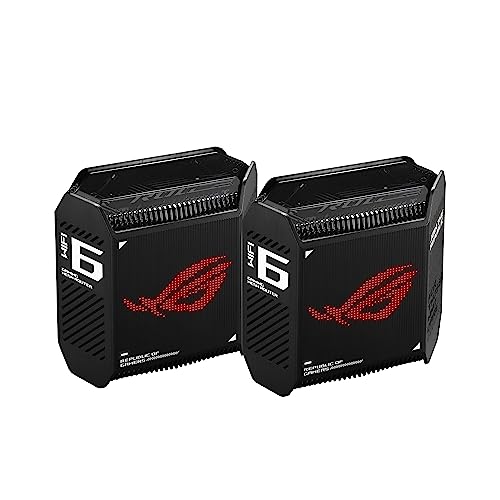
ROG Rapture GT6 two-pack — the subject: whole-home gaming mesh
Badge: The house-wide answer. Two GT6 nodes, placed with the care the setup section describes, turn a house’s signal map from a gradient into a floor: the same network, the same prioritisation, in the study and the spare room alike. The tri-band design’s dedicated backhaul is the engineering that makes the promise credible, because the nodes’ own traffic does not tax the bands your devices use. The gaming acceleration, the 2.5 Gbps port for the main rig, the UNII-4 spectrum support that widens the 5GHz playground, and lifetime security without a subscription complete a package aimed squarely at the household whose gaming happens in more than one room — which, in the era of laptops, handhelds, and consoles under televisions, is most gaming households that live in houses.
- Class: AX10000 tri-band WiFi 6 mesh, per the listing
- Coverage: Up to 5,800 sq ft for the two-pack, per the listing
- Ports: 2.5 Gbps port among the wired connections, per the listing
- Features: Triple-level game acceleration, UNII-4 support, lifetime internet security, per the listing
- Finish of verified listing: Black
Strengths
- Real whole-home consistency: gaming-grade networking in the rooms a single router abandons.
- Dedicated backhaul keeps node-to-node traffic off your devices’ bands.
- Lifetime security included, where much of the mesh market rents its protection by the year.
Trade-offs
- WiFi 6 in a WiFi 7 moment — the mature standard, not the newest one.
- Two sculptural nodes need two sensible homes with power, which small or minimalist spaces must plan for.
- Mesh cannot create bandwidth: a slow internet plan stays slow, merely better distributed.
Best for: Houses with dead zones, multi-room gaming households, and anyone whose current router’s map is a apology tour. / Not suited for: Small flats, or buyers whose bottleneck is the internet plan itself.

ROG Rapture GT6 one-pack — the same system, one node
Badge: The starter node. A single GT6 is a strong tri-band gaming router in its own right, covering up to 2,900 square feet per its listing, with the same acceleration, security, and port story as the pair. Its strategic virtue is the door it leaves open: as an AiMesh-capable system member, it can grow — add a node when the house grows, the family scatters across more rooms, or a garden office appears. For a flat-dweller whose next home is a house, the one-pack is the rare router purchase that does not expire at the moving van. Judged purely as a single router it is priced against strong competition, so the growth path is a real part of its case; buyers certain their world stays one room should weigh ordinary single routers in the same breath.
- Class: Tri-band WiFi 6, per the listing
- Coverage: Up to 2,900 sq ft, per the listing
- Ports: 2.5 Gbps port, per the listing
- Features: Triple-level game acceleration, UNII-4, lifetime internet security, per the listing
Strengths
- Full GT6 capability for smaller homes, with nothing rationed but the node count.
- Mesh-expandable later, so the purchase survives a house move.
- The same gaming prioritisation and included security as the flagship pair.
Trade-offs
- One node cannot perform the mesh trick; coverage is a single router’s honest radius.
- Priced as a system member, so pure single-router rivals may undercut it for stay-small buyers.
- Its design presence is a lot of sculpture for a small flat’s shelf.
Best for: Flats and small houses, and renters whose next home will be bigger. / Not suited for: Houses with known dead zones — that is the two-pack’s entire job.

ROG Rapture GT-BE98 Pro — the WiFi 7 flagship alternative
Badge: The next standard, at full price. The BE98 Pro is included so the WiFi 7 question gets a concrete answer rather than a slogan. Per its listing it is a quad-band WiFi 7 router in the 30 Gbps class, with two 10G ports and four 2.5G ports, mesh capability, and game-boost features — a single-unit flagship for homes building around WiFi 7 clients and multi-gigabit internet today. The honest framing is that it is a different purchase from the GT6, not a better one in the abstract: it spends its money on the new standard’s ceiling and a wired backplane for a serious home network, while the GT6 spends its money on coverage of the home you already have, in the standard your current devices actually speak. Roadmaps differ; households should buy the one that matches their present tense with an eye on the future, not the reverse.
- Class: Quad-band WiFi 7, 30 Gbps class, per the listing
- Ports: Two 10G and four 2.5G, per the listing
- Coverage: Up to 3,500 sq ft as a single unit, per the listing
- Features: Game boost, mesh capability, VPN support, per the listing
Strengths
- WiFi 7’s ceiling and multi-link future, ready for the devices arriving over the next upgrade cycle.
- A wired backplane — dual 10G — that treats the home network as serious infrastructure.
- Single-unit coverage and power that can anchor a demanding home without a mesh at all.
Trade-offs
- Flagship pricing, size, and appetite, for capabilities many households cannot yet feed.
- One unit still obeys physics: a large or awkward house may still need mesh thinking.
- WiFi 7 clients remain the minority in most homes, so much of the ceiling waits for company.
Best for: Multi-gig internet households, WiFi 7 early adopters, and serious home-network builders. / Not suited for: Buyers whose problem is coverage, or whose devices and plan are firmly WiFi 6 era.
How do you place mesh nodes so the system actually works?
Placement is the whole craft, and it obeys one principle: a node can only share the signal it receives, so each satellite belongs where the main node’s signal is still strong — typically halfway between the router and the dead zone, not inside the dead zone itself, where a node becomes a megaphone for a whisper. Keep nodes in the open rather than in cupboards, off the floor, away from large metal objects and aquariums and the microwave’s noisy neighbourhood, and think in terms of the home’s skeleton: brick, concrete, and foil-backed insulation tax a signal far more than timber and plasterboard. The GT6’s app-guided setup will score your placements; treat its feedback as a floor rather than a verdict, and be willing to move a node a room closer and re-test, because mesh performance is empirical in a way few products are — the house itself is the specification sheet. After placement, walk the home with a laptop or phone and a speed test at the places people actually sit, and let the map, not the marketing figure, tell you the system is done.
What will the GT6 not fix?
Three honest limits protect buyers from the category’s favourite disappointments. First, the internet plan: mesh distributes your bandwidth beautifully and creates none of it, so a household whose plan is saturated by evening streaming needs a plan conversation before a hardware one. Second, the device at the far end: an old laptop with a tired WiFi adapter will be the slowest citizen of the finest network, and upgrading the client is sometimes the real fix wearing a router’s clothes. Third, the neighbours: in dense apartment buildings the air itself is contested, and while the GT6’s tri-band design and UNII-4 support give it more room to work in than lesser systems, no router repeals a crowded spectrum. None of these limits is a criticism of the GT6. They are the physics of the category, and a guide that names them is a guide whose other claims you can trust.
How do you set up the gaming features so they earn their keep?
Wire the main rig if the house allows it — the 2.5 Gbps port exists for the machine whose matches matter most, and a cable remains the only zero-negotiation connection in networking. Then enable the adaptive prioritisation and let it learn the household for a week before judging it, because quality-of-service systems are statisticians, not magicians. Put gaming devices on the 5GHz band where range allows, since its speed and lower congestion serve latency better than the longer-reaching 2.4GHz band, which remains the right home for smart bulbs and other undemanding citizens. Give the network one name and let the mesh steer, rather than manually pinning devices to nodes, because the system’s whole intelligence is in the steering. And change the default administrator credentials and enable automatic updates on day one; a gaming router is a powerful computer attached to the internet, and its security features — generously, lifetime-included here — only protect a household whose owner performs those two minutes of hygiene.
What should you check before buying any mesh system?
Measure the problem first: walk your current network with a phone and note where it degrades, because a mesh bought for a coverage problem you do not have is sculpture. Check your internet plan’s real speed at the modem, so the system’s job is distribution rather than a miracle. Count your wired needs — the main rig, a NAS, a console that deserves a cable — against the nodes’ port counts, remembering that satellites usually offer fewer ports than the main unit and a small switch is the cheap remedy. Decide your standard honestly: WiFi 6 serves the devices most homes own today, while WiFi 7 is a bet on the next cycle that pays only if your clients and plan arrive to meet it. And read the security model, because a system whose protection is a subscription is a system with rent; the GT6’s lifetime inclusion is a genuine differentiator this guide weighs accordingly.
What are the common mistakes mesh buyers make?
Placing the satellite inside the dead zone is the classic, and it converts an expensive system into an expensive repeater of a bad signal. Buying coverage by the box’s square-foot figure — a best-case number measured in friendly buildings — rather than by your home’s materials and shape is the second. The third is expecting mesh to fix a saturated internet plan. The fourth is splitting the network into per-node names and defeating the steering that justifies the system. The fifth is forgetting the wired citizens: the rig, the NAS, and the television that would rather have a cable, planned after the nodes are placed instead of before. And the sixth, quietest mistake is leaving default credentials on a device that guards the whole house’s traffic — a two-minute fix that this guide will keep prescribing until the category stops needing it.
How does the GT6 age as a household platform?
Infrastructure ages by becoming invisible, and mesh systems are good at it: once placed and steering, the GT6’s daily presence is a network that simply behaves in every room, with the app surfacing for the occasional new device or guest. ASUS’s AiMesh ecosystem gives the system a growth path — nodes can be added, and other AiMesh routers can join — which protects the purchase against the house move and the garden office. The WiFi 6 standard will age as standards do, gracefully: it will serve the enormous installed base of WiFi 6 clients for years, and the household that eventually adopts WiFi 7 widely can demote the GT6 nodes to coverage duty in a mixed network rather than to a cupboard. Security updates are the one ageing factor to stay awake for; the lifetime security inclusion helps, and the owner’s two-minute hygiene habits from the setup section remain the foundation everything else stands on.
Final recommendation
The ROG Rapture GT6 two-pack is the right purchase for the household whose gaming has outgrown one room and one router: it replaces a signal gradient with a signal floor, prioritises play intelligently, and includes its security without rent. The one-pack is the same idea correctly sized for smaller homes and future house moves. The GT-BE98 Pro is the flagship for households whose devices and internet plan have already arrived in the WiFi 7 era. Diagnose your home honestly — coverage, plan, clients — and the GT6 family contains your answer at one of its three sizes.
GT6 two-pack, GT6 one-pack, or BE98 Pro — criterion by criterion
Coverage. The two-pack is the only pick here designed to make a whole house uniform, and in a house with dead zones it wins the comparison before any other row is read. The one-pack covers a flat with authority. The BE98 Pro, for all its power, is one voice in one room, and physics still grades it. Verdict: two-pack for houses, one-pack for flats, BE98 Pro for single-room strongholds.
Raw ceiling. The WiFi 7 flagship’s class rating dwarfs the GT6’s, and for WiFi 7 clients on a multi-gig plan the gap is usable rather than theoretical. For the WiFi 6 devices most homes own, the GT6’s ceiling is already above the clients’ own. Verdict: BE98 Pro on paper and for the equipped; GT6 for the installed base.
Wired infrastructure. The BE98 Pro’s dual 10G and quad 2.5G ports make it a small network’s core switch as well as a router — a different league for NAS-heavy, workstation homes. The GT6 pair offers the 2.5 Gbps priority lane and ordinary satellite ports, sufficient for the gaming household it targets. Verdict: BE98 Pro for infrastructure builders, GT6 for gamers.
Value and running cost. The GT6 system includes its security for life and prices its standard at maturity; the flagship charges the early-adopter premium for its standard and its silicon. Over five years the running-cost gap widens the purchase gap. Verdict: GT6, for any household not specifically shopping the future.
Simplicity. The GT6’s app-led mesh setup is the most approachable networking in this comparison; the flagship rewards owners who enjoy a router’s admin depths. Verdict: GT6 for households, BE98 Pro for hobbyists.
Three homes, three networks
The Victorian terrace: brick internal walls, three floors, a router cupboard by the door chosen by a builder who never gamed. A single flagship here is a loud voice in a stone house, and the top floor’s handheld console lives on retries. The GT6 two-pack — main node at the modem, satellite on the middle landing where the signal is still honest — turns the house’s map flat, and the gaming laptop stops migrating to the stairs for ranked matches. The three-bed new-build: timber and plasterboard, open downstairs, a garden office added last spring. One GT6 node nearly does it; the second, placed for the office’s line of sight, finishes it, and the household’s working and gaming finally stop competing for the good chair near the router. The city flat: sixty square metres, forty neighbouring networks, one gamer. Here the two-pack is sculpture in search of a problem, and the one-pack — or honestly, any good single router — is the correct spend, with the GT6’s gaming prioritisation earning its keep against the building’s crowded air rather than against distance. Three homes, one product family, three different right answers; the guide’s insistence on diagnosing first is not pedantry, it is the whole discipline of networking.
Wired backhaul, guest networks, and the features households actually use
Beyond the headline features, three capabilities decide how a mesh system ages in a real household, and the GT6’s platform handles all three in the manner a family needs. If your home has Ethernet in the walls — or one run you can make along a skirting board — a wired backhaul between nodes is the single largest upgrade available to any mesh, converting the nodes’ conversation from shared air to private cable and freeing the wireless bands entirely for devices; a system that supports it, as ASUS’s mesh platform does, should be wired wherever the house allows. A guest network is the second: visitors, and the parade of smart devices with their own ideas about security, belong on a network that can see the internet and not your NAS, and setting it up is a five-minute act of household hygiene. The third is parental and scheduling controls, unglamorous and decisive in homes with children, where the router is the one chokepoint every device must pass. None of these features photographs like the GT6’s sculpted nodes. All of them will be used more often than the gaming acceleration by most households that own the system, and a guide that ranked features by use rather than by box copy would put them first.
Troubleshooting a mesh that underwhelms
The far room is still slow. Move the satellite closer to the main node, not closer to the problem — the halfway rule — and re-measure; then check whether the slow device is steering to the distant node out of habit, which a restart of the device usually cures. Speeds are fine near the router and poor everywhere. Suspect the plan or the modem before the mesh: test wired at the main node, and let that number divide the problem into the internet’s half and the house’s half. Devices cling to a weak node. Mesh steering is a negotiation with clients, some of whom are stubborn; the remedies are patience, a device restart, and in the app, any steering or binding options your platform offers for fixed devices like televisions. The network stumbles when the microwave runs. You have met 2.4GHz physics; steer the affected devices to 5GHz where range allows and accept the kitchen’s thirty seconds of weather. Everything worked until the update. Restart the nodes in order, main first, and give the system ten unhurried minutes to re-form before changing a single setting; mesh networks are societies, and societies need a moment to reconvene.
Gaming scenarios: what the GT6 changes, match by match
The ranked shooter in the spare room is the scenario the system was born for. Before mesh, that room’s connection was the house’s worst — playable on good evenings, treacherous on bad ones, with a latency graph that wandered whenever the router’s signal negotiated the hallway. With a node placed by the halfway rule, the same room behaves like the router’s own: the connection’s variance, which is what players actually feel as unfairness, collapses toward the wired baseline, and the prioritisation keeps a housemate’s streaming evening from entering the match at all. The living-room console tells the second story: a television’s worth of downloads and updates, once an all-evening occupation of the household’s bandwidth, now proceed under the quality-of-service rules without evicting anyone’s game, and the console itself sits in a node’s strong field rather than at the old router’s frontier. The handheld in bed — the device class that exposed more home networks than any other — simply stops being a compromise, because the bedroom is now inside the map. None of these scenarios involves a headline speed. All of them are the actual texture of gaming in a house, which is why this guide measures the GT6 in rooms rather than in gigabits.
Managing the system: the app, the admin page, and the two kinds of owner
ASUS offers the GT6’s life through both an app and a traditional web admin, and the pair maps neatly onto the two kinds of router owner. The app owner wants the network as a utility: setup by guidance, a map of nodes and clients, a notification when something joins, and the gaming and security toggles within thumb’s reach. The admin owner wants the network as an instrument: port forwarding written by hand, VPN configurations, traffic statistics, and the deep menus where a Rapture has always kept its second personality. The GT6 serves both without forcing either to visit the other’s world, which matters more than it sounds, because a household’s network is often bought by one kind of owner and inherited by the other. Whichever you are, two settings deserve your first session regardless: the administrator credentials, changed from default before anything else, and automatic firmware updates, enabled so the system’s security story stays current while you think about other things. Everything after that is taste, and the system is unusually willing to let taste be.
Who should skip the GT6?
Skip the two-pack if your home is small enough that one router already covers it with strength to spare; mesh in a flat is money spent duplicating a solved problem. Skip the whole family if your bottleneck is a slow internet plan, because no distribution system manufactures bandwidth, and the honest purchase order is plan first, hardware second. Skip it if your household’s networking joy is a single maximal router and a forest of wired runs — the BE98 Pro’s backplane speaks your language better. Skip it if you rent short-term and move yearly with a single bag of electronics; infrastructure rewards staying. And skip it if nobody in the house games and nobody works from the far rooms, because a simpler, cheaper mesh — or the router your provider included — will serve a streaming-and-browsing household without the gaming layer you would never switch on. The GT6’s buyer is specific: a gaming household, in a real house, whose rooms have been voting against its router for years. That buyer will find this system less like a purchase and more like a repair.
What should you verify at checkout?
Confirm the pack count in the listing title before anything else — the two-pack and one-pack are the same product at different household sizes, and the price difference between them is exactly the kind that speed-clicking regrets. Confirm the finish, black in the verified listings. Then confirm the two household facts the product cannot fix: your internet plan’s speed at the modem, and the placement options for a satellite node with power at the halfway point of your home’s signal map. If the plan is the bottleneck, spend there first. If the halfway point has no socket, plan the node’s home before the box arrives. A mesh system is the rare purchase whose success is decided by the buyer’s homework, and this guide has tried to make the homework short enough to actually do.
Frequently asked questions
Will a mesh system lower your ping?
It can, indirectly and honestly: a device gaming over a weak, distant signal suffers retries and instability that feel like lag, and a nearby node with a dedicated backhaul removes that tax. What mesh cannot do is shorten the road between your home and the game server, so a healthy wired ping at the router stays the ceiling. The GT6’s contribution is making the far rooms perform like the near ones, plus prioritisation that protects a match from the household’s other traffic — which, in a busy home, is where most felt lag actually lives.
Is WiFi 6 already outdated next to WiFi 7?
No. WiFi 6 is the standard the overwhelming majority of current devices speak, and a tri-band WiFi 6 mesh will serve them at full capability for years. WiFi 7 raises the ceiling for WiFi 7 clients — phones, laptops, and adapters of the newest cycle — and for multi-gigabit plans. If your household’s devices are WiFi 6 era, the GT6 is not a compromise but a match; if you are buying WiFi 7 clients this year and your plan feeds them, the BE98 Pro in this guide is the deliberate step up.
How many nodes does a house actually need?
Fewer than the marketing fears suggest, placed better than the marketing assumes. The two-pack’s listing figure of up to 5,800 square feet assumes friendly construction; dense masonry, multiple floors, and awkward shapes tax it, while open-plan timber homes flatter it. Start with the two-pack for a typical house, place the satellite at the halfway point of strength rather than in the dead zone, and measure the rooms that matter. Add a node only when a measured room, not an anxious imagination, asks for one.
Can the GT6 work with an existing ASUS router?
The GT6 belongs to ASUS’s AiMesh ecosystem, which is designed for ASUS routers to cooperate as one network, so an existing AiMesh-capable ASUS router can often join or anchor the system rather than retire. Exact pairings depend on models and firmware, so check your current router’s AiMesh support before planning around it. The strategic point stands: the one-pack purchase is not a dead end, and a household already invested in the ecosystem has more options than a first-time buyer.
What does lifetime internet security actually spare you?
The subscription. Much of the mesh market includes its network security — malicious-site blocking, intrusion prevention, infected-device quarantine — for a trial period and then rents it annually, which over a system’s life can rival a node’s cost. The GT6’s listing includes its protection for the life of the product. It does not replace device-level hygiene or the day-one credential changes this guide prescribes, but as an ownership proposition it is a genuine, bankable difference, and one of the strongest non-gaming reasons this system earns its recommendation.
Should the main gaming PC use WiFi or the 2.5 Gbps port?
The port, whenever the house allows the cable. A wired connection removes the last variables — airtime contention, roaming decisions, the neighbour’s network — from the machine whose matches matter most, and the 2.5 Gbps lane future-proofs the run for faster plans and local traffic to a NAS. Mesh WiFi is the right answer for every device that moves or cannot be cabled; the desk-bound rig is neither. The GT6’s design assumes exactly this division of labour, and honouring it is the cheapest performance upgrade in this entire guide.
The nodes as furniture: living with two small towers
Mesh nodes are the rare network equipment designed to be seen, and the GT6’s sculptural towers — ROG’s gaming dialect rendered as household objects — will be seen, on the landing shelf and the study desk, every day of their service. That visibility is a design position worth a paragraph, because placement advice and interior reality negotiate in every home: the technically perfect satellite position is worthless if the household exiles the node to a cupboard for looking wrong, where it will perform like a cupboarded node. The GT6’s styling is ASUS’s wager that a gaming household would rather display its network than hide it, and in gaming households the wager usually wins. For shared and minimalist spaces, plan the nodes’ homes as furniture decisions — a shelf with power, a hallway console — at the same time as their signal decisions, and let the two plans compromise in the open rather than in a cupboard. A mesh system’s real-world performance is the average of its radio map and its domestic acceptability, and the second term is entirely within the buyer’s control at checkout time.
Your first week with the GT6: a running order
Day one: place the main node at the modem, run the guided setup, change the administrator credentials, enable automatic updates, and resist placing the satellite anywhere until the main node’s own map is known. Day two: the signal walk — phone in hand, every room noted — followed by the satellite’s placement at the halfway point of strength and a second walk to confirm the far rooms have changed their character. Day three: wire the main rig to the priority port, put the gaming devices on the fast band, and set up the guest network while the app is still familiar. The rest of the week is for living: a ranked session from the spare room, a download-heavy evening, a handheld in bed — the three scenarios this guide used as its measures — observed rather than tested, because a network’s success is the absence of occasions to think about it. By the weekend, the system should have begun its long career of being forgotten, which for infrastructure is the only five-star review that matters. If it has not — if a room still misbehaves — the troubleshooting section’s order of operations, placement before settings and the plan before both, will find the reason faster than any forum.
WiFi 6 versus WiFi 7, settled for this household rather than in general
The standards question deserves one section of plain arithmetic, because it decides between two of this guide’s three picks. A network’s experienced speed is the minimum of three numbers: the plan coming into the house, the standard the router speaks, and the standard the client device speaks. Most households auditing those three numbers find the client column is the binding one — phones, laptops, consoles, and handhelds of the WiFi 6 generation, which a WiFi 7 router serves at WiFi 6 speeds with WiFi 7 manners. In that household the GT6 is not the budget choice; it is the matched choice, and the flagship’s premium buys headroom that nothing in the house can currently spend. The arithmetic flips for the household mid-refresh — new WiFi 7 phones and laptops arriving this year, a multi-gig plan available at the street — where the flagship’s headroom becomes next year’s working space and the GT6 becomes the purchase that expires early. Neither household is more sensible. They are at different points of the same cycle, and the honest guide’s job is to make you locate your point before the marketing locates it for you. Run the three numbers. The standard chooses itself.
What remains, after the arithmetic, is the GT6’s quietest virtue: it is a finished answer. Its standard is mature, its platform is understood, its security is included, and its behaviour in a real house can be described — as this guide has described it — without a single conditional about future firmware or arriving clients. Infrastructure bought on those terms tends to serve the longest, because nothing about it is waiting to become true.
A note on the household’s other citizens: work, school, and the smart home
A gaming mesh earns its place in a house full of non-gamers too, and the GT6’s manners with the household’s other citizens complete its case. The work-from-home laptop in the far bedroom is the system’s secret second beneficiary: video calls stop freezing at the moment a point is being made, because the far room’s connection stopped being the house’s weakest. School devices inherit the same steadiness, plus the scheduling controls that let a household govern the network’s hours without governing each device. The smart home’s dozens of small citizens — bulbs, plugs, speakers, cameras — live contentedly on the long-reaching band, separated from the family’s computers by the guest and isolation options a considered owner configures once. None of this appears in a gaming router’s advertising, and all of it appears in its second year, when the household realises the network stopped being a topic. That realisation, arriving quietly some evening when nobody can remember the last connection complaint, is the GT6’s actual product. The gaming acceleration got the household’s attention. The silence is what it bought.
One last scenario, because it decides more purchases than any specification: the house with a gamer and a remote worker under one roof, whose evenings and weekdays peak at the same hours and on the same connection. That household does not need the fastest network in this guide; it needs the fairest one — coverage that reaches both desks, prioritisation that can tell a ranked match from a video call and honour both, and enough order in its air that neither citizen’s work becomes the other’s weather. The GT6 was, whether its designers framed it so or not, built for exactly that negotiation, and households living it should read this guide’s recommendation at double strength. Buy the two-pack, place it by the halfway rule, wire both desks if the walls allow, and let the house’s two peak citizens stop competing for a signal that was never the real scarcity. The real scarcity was fairness, and fairness, unlike bandwidth, a good mesh can manufacture.
Finally, a word about the moment every infrastructure owner recognises, usually about a month in: a guest asks for the WiFi password, joins from the garden or the top floor without comment, and the network simply works where the old one would have prompted the household’s apologetic tour of its dead zones. Nobody applauds a router. But that small, unremarked success — repeated across visitors, new devices, and rearranged rooms — is the compound interest of a mesh bought for the right reasons and placed by the right rule. The GT6’s promise was never a number. It was the end of the apology tour, and on the evidence of its design and its owners’ households, it keeps that promise in the houses it was built for.
There is also the question of the system as a gift or a household executive decision — the one member who understands networks buying for everyone. The GT6 is unusually giftable as infrastructure goes: its setup is guided, its app speaks plainly, and its benefits arrive in rooms the buyer may never game in, which makes it that rare enthusiast purchase the whole household thanks the buyer for. If you are that member, buy the two-pack for any house-shaped problem, resist the flagship unless the household’s devices argue for it in chorus, and schedule the placement walk as part of the gift. Infrastructure given well is invisible within a month and appreciated for years, which is more than can be said for most presents with a ROG badge.
Keep the nodes’ firmware on automatic updates and glance at the client list once a season; a network, like a house, rewards the owner who walks its rooms occasionally. Unknown devices get identified while they are still curiosities, the satellite’s placement gets reconsidered when furniture moves, and the system that results stays the one this guide described — not the one entropy was planning. Five minutes a season is the entire maintenance budget of a well-bought mesh, and it is the last, smallest reason the GT6 suits households rather than hobbyists: it asks almost nothing, and gives the whole house back.
If the household grows — a child promoted to their own gaming desk, a partner’s studio in the spare room, a garden office with a line of sight to the house — the system’s growth path is the purchase’s insurance: add a node, place it by the same halfway rule, and the map extends without a new network, a new password, or a new education for the household. Infrastructure that can grow at the speed of a family’s life, rather than at the speed of its replacement cycles, is infrastructure bought once. That, more than any acceleration feature, is the GT6’s claim on a decade of the house’s life — and the reason this guide recommends it in the tone usually reserved for roofs and boilers: buy the right shape, place it properly, and then forget it exists while it quietly holds up the house’s digital life.
Document the final placement when the system settles — which node lives where, which port the rig uses, where the credentials are recorded — in whatever the household uses for such things. Networks outlast memories, and the next person to move a node, replace a modem, or welcome a new housemate into the map will bless the paragraph you left them. Infrastructure is a letter to the future written in hardware; a short note in plain language is its proper envelope.
And when the system has run for its first season without incident, do the smallest and most human of maintenance acts: tell the household where the nodes are and what the lights mean, so the network belongs to everyone who depends on it rather than to the one person who installed it. Shared knowledge is the final layer of home infrastructure, and it costs one conversation.
Related reading
gaming routers at the value end mesh WiFi systems at the value end WiFi 7 routers compared the 1440p gaming PC buying guide how to set up a 1440p gaming PC the ROG Strix 5K monitor examined