Disclosure: As an Amazon Associate, reviewstook.com earns from qualifying purchases. Links on this page are affiliate links; they cost you nothing extra. Prices and availability change often, so check the current Amazon listing before you buy.
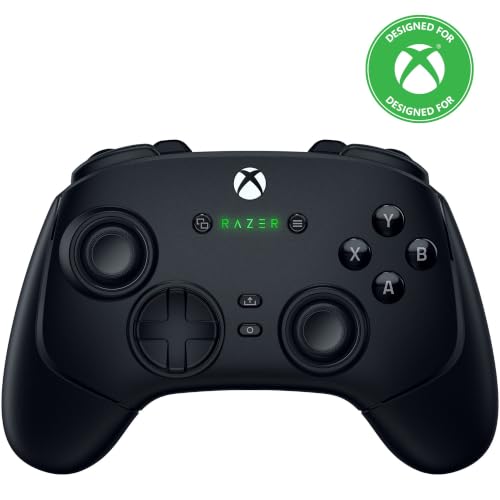
The razer wolverine v3 pro is Razer’s flagship wireless pro controller for Xbox and PC: officially licensed for Xbox Series X|S, Xbox One, and Windows, carrying six remappable buttons, fast triggers, and customisable thumbsticks, with a wired tournament mode for the moments when a cable is a competitive choice rather than a compromise. This review takes the V3 Pro as its main subject, then sets its two natural rivals in their labelled places: the Wolverine V3 Tournament Edition, its wired sibling built for the same competitive brief at a simpler specification, and Microsoft’s own Xbox Elite Series 2 Core, the first-party pro alternative in its Core edition. By the end you should know whether a pro controller earns its place in your hands at all — and if it does, which of these three expressions of the idea fits your games, your platform, and your habits.
First, what a pro controller actually is, because the category’s marketing prefers fog. A standard controller gives every player the same four face buttons, two sticks, two bumpers, and two triggers. A pro controller adds inputs where your fingers already rest — paddles or extra buttons on the back and shoulders that your otherwise idle fingers can own — plus trigger stops that shorten the trigger’s travel for faster shots, remapping so those inputs serve your games, and customisation of sticks and sensitivity so the controller can be tuned like an instrument. None of that makes a player better by purchase; all of it removes small frictions between intention and input that, at a competitive level, are the game. The Wolverine V3 Pro is Razer’s most complete statement of that philosophy, and this review will hold it to the standard its flagship position claims.
Key takeaways
- The Wolverine V3 Pro is the subject pick: wireless, licensed for Xbox Series X|S, Xbox One, and Windows PC, with six remappable buttons, fast triggers, customisable thumbsticks, and a wired tournament mode, per its listing.
- The Wolverine V3 Tournament Edition is the wired sibling alternative: the same competitive brief — six remappable buttons, fast triggers, wired tournament mode — without the wireless freedom, for players who compete tethered anyway.
- The Xbox Elite Series 2 Core is the first-party alternative: adjustable thumbsticks, trigger locks, and connection across console, PC, and cloud devices, in the Core edition that keeps the controller’s essentials.
- Six remappable buttons is this family’s headline: two extra shoulder buttons and four back buttons mean thumbs never need to leave the sticks for jumps, slides, reloads, or abilities.
- A pro controller pays off in proportion to how much your games reward simultaneous aim and action; for casual, single-player-first libraries, a standard controller remains the honest recommendation.
In this guide
Quick picks: three pro controllers, three briefs
- The subject: Razer Wolverine V3 Pro — wireless flagship, six remappable buttons, fast triggers, tournament mode. Check price on Amazon
- The wired sibling: Razer Wolverine V3 Tournament Edition — the same brief, wired, for the tethered competitor. Check price on Amazon
- The first-party alternative: Xbox Elite Series 2 Core — adjustable sticks, trigger locks, cross-device play. Check price on Amazon
How these picks were chosen: each controller passed this site’s Creators API verification, its exact listing title matched to its official product image, before earning a link. Other pro controllers are discussed in the buying guide as prose context only. Note the shortlist’s logic: one flagship and its sibling from Razer, and the platform owner’s own pro design — the three controllers an Xbox or PC player will genuinely deliberate among.

Razer Wolverine V3 Pro: does the flagship earn its name?
Badge: The subject pick — the wireless pro flagship.
Mini spec box — Platform: Xbox Series X|S, Xbox One, Windows PC (licensed) · Connection: wireless, plus wired tournament mode · Extra inputs: 6 remappable buttons · Triggers: fast triggers per listing · Thumbsticks: customisable · Colour in listing: Black
Start with the six buttons, because they are the product. A standard controller strands your middle and ring fingers on the grips, unemployed, while your thumbs commute between sticks and face buttons — leaving the right stick, and your aim, every time you jump, slide, reload, or throw. The V3 Pro employs those idle fingers: four remappable buttons on the back and two extra at the shoulders put the face buttons’ jobs under fingers that never had any, and after an adaptation week, the right thumb simply stops travelling. In a shooter, that means jumping while tracking, sliding while aiming, reviving while covering — the simultaneous verbs that separate competitive play from competent play. In other genres the same hardware serves as quality of life: a souls-like sprint that no longer demands a claw grip, a racer’s gear changes under fingers that were doing nothing.
The fast triggers are the second half of the input story. Trigger stops shorten the analogue triggers’ travel so a shot registers at a click’s distance rather than a pull’s, and for semi-automatic weapons and rapid single shots the difference is not theoretical — it is the rate of fire your finger can actually sustain. The honest boundary: games that use the trigger’s full analogue range, racers above all, want the stops disengaged, and a good pro controller makes that a physical, instant choice rather than a menu. The Wolverine’s brief understands this, as does its tournament mode: a wired connection option for the venues and the players who treat wireless as a variable to eliminate, included in a wireless flagship because its maker knows its audience owns both kinds of day.
Customisable thumbsticks complete the tuning story — the ability to shape stick height, tension behaviour through software curves, and deadzones to your games — and the official Xbox licence underwriting it all matters more than it reads: guaranteed compatibility, the platform’s own button language, and no dongle diplomacy on console. On PC, the controller joins the modern ecosystem of remapping and profiles, where the six buttons can be assigned per game and the instrument becomes genuinely personal. Build and grip follow the flagship brief: a controller meant to be held for ranked sessions, with the texture and weight of a tool rather than a toy.
Strengths
- Six remappable buttons transform simultaneous aim-and-action play — the core pro-controller advantage, fully delivered.
- Fast triggers and a wired tournament mode cover both the wireless living room and the tethered competition desk.
- Official Xbox licensing plus PC support makes it one controller for the whole Microsoft-shaped gaming life.
Trade-offs
- It is a flagship-tier purchase whose advantages only fully appear in games that reward them.
- The back buttons demand an adaptation week; accidental presses are the tuition every pro-controller owner pays.
- Wireless flagship ownership includes battery habits a wired controller never asks about.
Best for: competitive Xbox and PC players in shooters and action titles who will use the extra inputs daily. / Not suited for: casual or narrative-first players, or anyone whose library rarely asks two thumbs to do three jobs. Check price on Amazon

Razer Wolverine V3 Tournament Edition: the wired sibling
Badge: The wired alternative — the same brief, tethered.
Mini spec box — Platform: Xbox Series X and S, Windows PC (licensed) · Connection: wired, USB-C cable · Extra inputs: 6 remappable buttons · Triggers: fast triggers per listing · Mode named in listing: wired tournament mode · Colour in listing: Black
The Tournament Edition is the V3 Pro’s argument with the wireless chapter removed, and for a defined class of player that removal is not a downgrade but a preference. Its listing promises the same competitive skeleton — six remappable buttons, fast triggers, the tournament mode as its native state — delivered over a USB-C cable, with the consequences a cable brings: zero battery management, zero wireless variables, a controller that is simply always ready and always connected at the wire’s own latency. Competitive venues have preferred wired controllers for exactly those boring virtues for as long as pro controllers have existed, and a home player whose desk or couch keeps them within cable reach inherits the same virtues free of charge.
Who should choose it over the Pro? The desk-based PC competitor, whose controller never travels further than a drawer. The tournament aspirant, whose venues will ask for the wire anyway. The value-minded pro-controller buyer, for whom the wired sibling concentrates the budget on the inputs — the buttons and triggers that are the category’s entire point — rather than on the radio. Who should not: the living-room player whose couch sits across the room from the console, for whom wireless is not a luxury but the geography of their gaming life.
Strengths
- The full six-button, fast-trigger competitive brief without battery or wireless considerations.
- Wired consistency suits tournament play and desk setups perfectly.
- The budget concentrates on inputs rather than radios — the category’s essence at a simpler tier.
Trade-offs
- The cable is a permanent geography: couch distance and tidy-desk ambitions must accommodate it.
- No wireless freedom to move between console and PC setups around the house.
- It shares the family’s adaptation week — back buttons are tuition every owner pays.
Best for: desk competitors, tournament players, and value-led buyers of the pro brief. / Not suited for: across-the-room couch play. Check price on Amazon

Xbox Elite Series 2 Core: the first-party alternative
Badge: The platform owner’s pro design, in Core form.
Mini spec box — Platform: Xbox, PC, and cloud devices per listing · Thumbsticks: adjustable · Triggers: trigger locks · Connection: Xbox Wireless, Bluetooth, USB-C · Edition: Elite Series 2 Core · Colour in listing: Soft Melon
Microsoft’s Elite line is the reason the pro-controller category exists in its modern form, and the Series 2 Core is that design’s essentials edition: adjustable-tension thumbsticks, trigger locks with multiple stop depths, wraparound grip, and connection by Xbox Wireless, Bluetooth, or USB-C across console, PC, and cloud devices. The Core proposition strips the full Elite package’s case-and-accessories ceremony and sells the controller itself — with its customisation continued in software, and its famous paddles available through the ecosystem the Core edition plugs into. Buyers should read the edition’s contents with the care this article applies to every listing, because Core means the instrument, not the orchestra.
Against the Wolverine, the Elite’s argument is first-party depth: the platform’s own ergonomics, an enormous software customisation culture, adjustable stick tension as a physical feature, and a design language that matches the console it serves. The Wolverine’s counter-argument is its six-button layout and its tournament-bred focus. In the verified listing, the Elite arrives in Soft Melon — a finish with genuine charm and a reminder that the Core line speaks to personal players as much as to competitors. Neither controller embarrasses the other; they are the category’s two establishments, and the decision sections below treat them with the respect of near-equals.
Strengths
- Adjustable thumbstick tension and multi-depth trigger locks are physical customisation of a high order.
- First-party integration across Xbox, PC, and cloud with three connection modes.
- The Core edition concentrates the purchase on the controller itself.
Trade-offs
- The Core edition’s completeness depends on what the specific listing includes; paddle-style play may involve the wider accessory ecosystem.
- Its button philosophy differs from Razer’s six-button layout — know which map your fingers want.
- The Soft Melon finish of this listing is a personality choice as much as a colour.
Best for: players invested in the Xbox ecosystem who value first-party tuning and cross-device play. / Not suited for: players who want Razer’s six-button layout and tournament brief specifically. Check price on Amazon
How do the three controllers compare where it matters?
Extra inputs: the two Razers lead with six remappable buttons in their listings; the Elite’s system is built around its own paddle tradition and software depth, with the Core edition’s exact contents to be read on its listing. Triggers: all three offer shortened-travel solutions — fast triggers on the Razers, multi-depth locks on the Elite — with the Elite’s adjustability the connoisseur’s choice and the Razers’ immediacy the competitor’s. Connection: the V3 Pro and the Elite are wireless citizens with wired modes; the Tournament Edition is the wire’s purist. Platform: all three serve Xbox and PC, with the Elite adding its cloud and Bluetooth breadth. Philosophy: Razer sells a tournament instrument; Microsoft sells a personal instrument. The wider method for choosing lives in this article’s next sections, and players comparing input devices generally will find the same shape-first discipline in pulsar x2h and razer deathadder v3 hyperspeed applied to mice.
How do you choose a pro controller without wasting the premium?
Audit your games first, with a pencil. List the titles you play weekly and mark every moment a thumb leaves a stick to press a face button while aiming mattered: jumps in shooters, slides and reloads under fire, weapon swaps in action games, sprint-and-camera gymnastics in souls-likes. If your list is dense with those moments, a pro controller’s back buttons will pay you back daily, and the only remaining questions are layout and connection. If your list is mostly menus, turn-based battles, narrative adventures, and racers — genres where the standard controller’s inputs are never the bottleneck — a pro controller is a luxury object, and this article’s honest advice is to enjoy your standard pad and spend the difference on games.
Second, decide your connection geography. Measure the distance between your seat and your console or PC, and count the rooms your controller must serve. Wireless earns its tier across a living room and between machines; a wire is invisible at a desk and unbeatable at a tournament station. Third, your platform loyalty: the Xbox-and-PC household is served by all three finalists, while the Elite’s Bluetooth breadth flatters a household that also games on other screens. Fourth, your hands: pro controllers are full-size instruments with additional hardware under the fingers, and smaller hands should audition grip comfort as carefully as button placement — the return window is, once again, the laboratory. The general discipline of matching an input device to a hand and a habit is the same one this site applies to mice in how to choose a gaming mouse, and it transfers intact.
How do you set up a Wolverine V3 Pro for your games?
Setup begins with restraint: map only two of the back buttons in the first days — jump and slide, or your game’s two most thumbed actions — and let your ring fingers learn their employment gradually, because six new inputs at once is a recipe for a week of accidental everything. Play casual modes while the map is young; ranked queues are where new muscle memory goes to be punished. As each mapping becomes reflex, promote the next: reload, weapon swap, ability, ping — until the face buttons’ only remaining jobs are the ones menus demand.
Triggers next: engage the fast stops for your shooter profile, leave full travel for racers and drivers, and make the profile switch a habit tied to the game you launch rather than a setting you discover mid-race. Stick tuning is the patient work: adjust deadzones downward until drift threatens, then back off a step; shape the sensitivity curve so fine aim lives in the stick’s first travel and fast turns at its edge; and save per-game profiles with names your future self will understand. Finally, the tournament mode and cable live where they belong — in the bag or the drawer by the desk — so the wired option is a decision, not a search. A pro controller set up this way stops being equipment within a fortnight and becomes, like every good instrument in this cluster, transparent.
What mistakes do pro-controller buyers make?
The first is buying inputs their games never use — the premium paid for buttons that a library of turn-based epics will never press. The second is mapping everything on day one and concluding, after a weekend of accidental grenades, that back buttons are a gimmick; they are a skill, and skills have tuition. The third is ignoring the wired option’s legitimacy: wireless is the modern default, but the Tournament Edition exists because a cable, at a desk or a venue, is a feature — and buyers who dismiss it pay for radios they never use. The fourth is the reverse snobbery of assuming first-party is automatically superior, when the Wolverine’s six-button layout is a genuine design position that the Elite answers rather than refutes. The fifth is skipping the listing literacy this article practises everywhere: editions — Pro, Tournament, Core — are different products with different boxes, and the cheapest disappointment in gaming is opening the wrong one.
Our final recommendation
The Wolverine V3 Pro is the recommendation for the competitive Xbox and PC player it was built for: six buttons that employ your idle fingers, triggers that fire at a click’s distance, wireless freedom with a tournament wire in reserve, and the platform’s licence over it all. Choose the Tournament Edition instead if your play is desk-bound or venue-bound and you would rather spend on inputs than radios. Choose the Elite Series 2 Core if first-party depth — adjustable stick tension, trigger locks, cross-device breadth — matches your ecosystem and your hands. And if your library audit came back sparse, let this article talk you out of the whole category with thanks: the standard controller is a masterpiece of its kind, and the pro tier is a tool for specific, nameable frictions — which, if you have them, these three controllers remove beautifully.
How does the Wolverine V3 Pro play across genres?
Shooters are the home genre and the design’s proof: the back buttons absorb jump, slide, crouch, and reload while the thumbs govern movement and aim, and the fast triggers convert semi-automatic fire into a finger exercise rather than a travel exercise. Battle royales add the endurance dimension — long matches, constant looting verbs, vehicle switches — where remapping moves the whole verb set under resting fingers and the wireless freedom suits the living-room scale those games are played at. Fighting games are a more specialised conversation: the standard six-button face layout purists love is not this controller’s story, but back buttons as macro-free single inputs and the d-pad’s supporting role serve many players well, while dedicated fight sticks remain the genre’s priesthood.
Souls-likes and action adventures may be the surprise beneficiaries. The genre’s notorious claw grip — index finger curled to the face buttons so the thumb never leaves the camera stick — exists because standard controllers strand the sprint button; a back button ends the claw’s reign, and with it a small epidemic of hand strain. Racing games invert the brief, as the FAQ notes: full trigger travel restored, the controller becomes a competent wheel substitute whose customisable sticks serve steering nuance on the left thumb. Sports titles, platformers, and indie games take the controller as a comfortable, premium standard pad with options in reserve. The pattern is the category’s pattern: the pro features are decisive in the genres that tax simultaneous input, and politely invisible everywhere else — which is exactly how a good tool should behave outside its speciality.
What is the honest case against pro controllers, and how does the V3 Pro answer it?
The sceptic’s case deserves its strongest form. A standard controller is a superb, standardised instrument; every game is designed around it; the skill gaps that decide matches are overwhelmingly positioning, decision-making, and practice rather than input hardware; and a pro controller’s premium could buy several of the games it will be used to play. All true — and all compatible with the pro controller’s actual claim, which was never that it replaces skill. Its claim is narrower: that specific, nameable frictions — the thumb’s commute, the trigger’s travel, the claw grip’s contortion — are real costs paid hundreds of times per session by players whose games tax them, and that removing a real cost is a legitimate purchase even when it is not a magical one.
The V3 Pro answers the sceptic by being specific. It does not promise transformation; it promises six buttons where your fingers rest, triggers that stop where you tell them, sticks tuned to your curves, and a wire for the days a wire is wisdom. Players who feel those frictions will recognise the promise as a shopping list written from their own sessions. Players who do not feel them should keep their money, and this review — unusually for a flagship’s coverage, but consistently with this site’s practice across mice, keyboards, and projectors alike — regards talking the second group out of the purchase as part of the review’s job, not a failure of it. The desk-setup context for players building a full competitive station is covered in best gaming keyboards and best gaming mouse for fps, because a pro controller is one instrument in an orchestra that should be tuned together.
How durable is a pro controller, and how do you look after one?
Pro controllers live harder lives than standard pads: more inputs, more travel, more ranked intensity per hour. Their ownership disciplines are correspondingly deliberate. Thumbsticks are the wear frontier — keep the controller cased or docked rather than loose in a bag where sticks take the knocks, and treat any developing drift as a settings conversation first, since deadzone adjustments exist precisely to absorb a stick’s middle age gracefully. The back buttons and trigger stops are mechanical features that reward a firm, ordinary touch rather than competitive fury; the player who breaks a trigger stop has usually been negotiating with it. Battery care on the wireless flagship follows the usual lithium courtesies: charge before long storage, avoid leaving it flat for months, and let the wired mode carry the marathon sessions if you prefer to spare the cycles.
Keep the box, the cable, and any included accessories together — a pro controller’s completeness is its resale and its warranty story — and keep firmware current, because input behaviour and compatibility are exactly what updates maintain. None of this is burdensome; it is the five-minutes-a-month admin of a flagship tool, and it is the difference between a controller that serves a console generation and one that fades inside it.
How does the controller feel in the hands over long sessions?
A pro controller is held for the longest sessions in gaming, so its ergonomics deserve the scrutiny this cluster usually reserves for mice. The Wolverine’s shape follows the modern Xbox-school geometry that a generation of hands has voted for: grips that fill the palms without forcing them, a face that places sticks and buttons under natural thumb arcs, and a weight that reads as substance in the first minute and as neutrality by the third hour. The additional hardware — back buttons, shoulder extras — is placed where resting fingers land, which is the whole ergonomic thesis: the new inputs should cost the grip nothing, and a player should be able to hold the controller for an evening without their hands filing a single complaint the standard pad would not also have filed.
Smaller hands get an honest paragraph, as they do in every review here: pro controllers are full-size instruments, and the reach to the back buttons is part of their fit. A smaller-handed player should use the return window to test not the buttons’ existence but their comfort across a full session, because a pro controller whose extras strain the grip is a standard controller with expensive decorations. Larger hands, conversely, often find the pro class the first controllers that feel made for them. Fit is the foundation under every feature in this article, and no remapping profile can compensate for a shell the hands are arguing with.
What should competitive players know about profiles and fairness?
Pro controllers live under tournament rules, and a competitive buyer should know the landscape. Remappable single-input buttons — one button performing one standard input — are the accepted currency of legitimate competition, which is precisely the Wolverine’s design: six additional places to put the controller’s existing verbs, not macros that perform sequences. Players entering organised competition should still read their event’s controller rules as carefully as this article reads listings, because venues differ on wireless play — another reason the wired tournament mode exists and the Tournament Edition is named as it is.
Profiles are the domestic version of the same discipline: one per game, named clearly, with trigger and stick behaviour tied to the title rather than rediscovered nightly. The players who benefit most from pro hardware are, without exception, the players who set it up once with intent and then defend the configuration’s stability — because a controller, like a mouse’s sensitivity or a keyboard’s layers, becomes an instrument only when the hands can stop thinking about it. Everything in this article, from the six buttons to the trigger stops, is in service of that single disappearance.
Decision guide: which controller for which player?
Operational answers, as this cluster’s readers have come to expect. The ranked shooter player on console: the V3 Pro — wireless for the couch, six buttons for the verbs, the wire in the drawer for tournament day. The PC desk competitor: the Tournament Edition, unless the same controller must also serve a console across the room, in which case the Pro earns its radio. The ecosystem loyalist who games across console, PC, and cloud screens: the Elite Series 2 Core, with its three connection modes and first-party tuning culture. The souls-like and action player exhausted by the claw grip: any of the three, chosen by platform and budget — the back buttons are the point, and all three philosophies deliver an escape from the claw. The casual adventurer: none of them, with this article’s genuine blessing — bank the difference toward the games themselves.
Underneath the profiles, the same lesson as every comparison in this set: match the instrument to the friction you actually feel. A pro controller is a friction-removal device, priced like a flagship because its engineering is flagship-grade. Buy it for named frictions and it will feel cheap within a season; buy it for a vague sense of seriousness and it will feel expensive forever.
What does the first month with a pro controller look like?
Week one is tuition, as established: two buttons mapped, casual modes, accidental presses declining by the day. Week two is the expansion — the remaining buttons promoted one at a time, trigger profiles per game, the first moment in a real match where a jump-shot lands that the old controller would have fumbled, which is the moment the purchase justifies itself in the owner’s own highlight reel. Weeks three and four are consolidation: profiles stabilise, the standard controller in the drawer starts to feel like a guest instrument when a friend uses it, and the owner’s hands complete their quiet renegotiation of what a controller is.
By the month’s end the verdict writes itself in behaviour, as it does for every product in this cluster: either the pro controller is simply the controller now — the standard pad relegated to player two — or it is a beautiful object whose extras your library never needed, returned or resold with the self-knowledge the experiment bought. Both outcomes are the method working. The only failure mode is the unexamined purchase, kept out of politeness, its buttons unmapped and its premium unexamined — and a reader who has followed this review to its final sections is constitutionally incapable of that one.
A short history of the pro controller, and where the Wolverine sits in it
The category began as modification culture: players and small workshops adding paddles to standard controllers because tournament play had discovered, empirically, that thumbs were the bottleneck. Microsoft’s original Elite industrialised the idea with first-party legitimacy; a generation of rivals — Razer’s Wolverine line prominent among them — then argued about the details: paddles versus buttons, mechanical versus membrane extras, wired versus wireless, ecosystem versus tournament purity. The V3 Pro is the current state of Razer’s side of that argument: buttons rather than paddles, six of them, a wireless flagship with a tournament wire in its pocket, and an official licence over the whole enterprise.
Knowing the history helps a buyer read the present catalogue calmly. Every pro controller is an answer to the same discovered friction, refined by its maker’s philosophy; none is the final word, because hands and games keep evolving. The Wolverine V3 Pro’s word is a strong one — competitive, complete, and honest about its brief — and it is best judged, as this review has judged it, not against an imaginary perfect controller but against the standard pad it replaces and the two real rivals that share its shelf.
What should you check on the listing before you buy?
The edition discipline, one final time, because this family tree is genuinely confusable. The Wolverine V3 Pro is the wireless flagship; the Wolverine V3 Tournament Edition is the wired sibling; the Xbox Elite Series 2 Core is Microsoft’s essentials edition of its own flagship — three distinct products whose names all contain their tier if read slowly. Confirm the model in the listing’s own title, the platform licence that matches your console, the colour, and the seller; check the box contents against the listing’s description, particularly cables and any included accessories; and keep the packaging through the adaptation month, since a pro controller’s verdict — as this article has insisted — is a month’s evidence, not an evening’s impression.
Register and update the controller in a calm moment, set up the first two back buttons before the first serious session, and let the instrument begin its tuition. Bought that way — verified, edition-certain, and set up with intent — a flagship controller is one of the few gaming purchases whose value compounds with the owner’s skill, because every hour of practice is practised on a better interface. That compounding, finally, is the Wolverine V3 Pro’s whole case, and on the evidence assembled here, it makes it well.
One last encouragement, addressed to the player still weighing whether their skill level justifies a pro controller: the question inverts the truth. Pro controllers are not a reward for having become good; they are one of the tools players use while becoming good, because they remove the frictions that practice keeps colliding with. You do not need permission from your rank to buy a better interface — you need a library that taxes the standard one, a hand the shell fits, and the patience for one honest week of tuition. Bring those three, and the Wolverine V3 Pro will meet you more than halfway.
The bottom line, for every kind of reader
For the competitor: this is your instrument — six buttons, fast triggers, both connections, the platform’s blessing — bought once and tuned forever. For the enthusiast: it is the category’s most complete current statement from its most tournament-minded maker, with a wired sibling and a first-party rival keeping it honest. For the sceptic: your standard controller remains excellent, and this article’s audit will tell you within one library review whether you are leaving real frictions unaddressed or none at all. For the gift-buyer: a pro controller is the rare gaming gift that improves every session it touches, provided the recipient’s library matches the brief — check their shelf before you check out. Four readers, four verdicts, one controller at the centre of them all, and a review that has tried throughout to deserve the trust each verdict requires.
Choose by friction, set up by stages, judge by the month — and whichever of the three finalists lands in your hands, let it disappear into the games, which is the only review a controller ultimately cares about receiving.
How does the V3 Pro fit a full gaming setup?
No controller is bought into a vacuum, and the Wolverine’s place in a complete station is worth a closing survey. At a console station it is the natural flagship: licensed, wireless, and ready for the couch’s geography, with the cable extending its reach to the desk when the same player migrates to PC. At a PC station it joins the tuned peripherals this cluster reviews — a mouse matched to the hand, a keyboard matched to the desk — and it should be set up with the same philosophy: one stable configuration, per-game profiles where they earn their complexity, and a charging or cabling ritual that makes readiness automatic. For households with both stations, a single pro controller serving both is not merely economical; it is ergonomic continuity, the same instrument under the hands in every room, which competitive players value more the longer they play.
That continuity is, in the end, the flagship’s deepest selling point — deeper than any single button or trigger. A player’s controller is the interface through which thousands of hours of intention become action, and an instrument that follows the player across platforms, genres, and years, tuned once and trusted daily, is worth what flagships cost in a way that a spec sheet can only gesture at. The Wolverine V3 Pro makes that gesture into a product. The rest — the audit, the audition, the month — is yours.
And with the setup surveyed, the history told, the sceptic answered, and the editions labelled, the review can rest on its recommendation: for the player whose games tax the standard controller’s limits, the Wolverine V3 Pro removes those limits with a completeness that justifies its flagship name — and for every other player, its wired sibling, its first-party rival, and the honourable standard pad all remain exactly where this article placed them, ready for the audit to point where it points.
A final word on hands, habits, and honest hardware
Every article in this cluster has ended, in its own way, at the same place: the hand. A mouse is judged by the grip it serves, a keyboard by the keystrokes it carries, a projector by the room it fills — and a controller by the fingers it employs. The Wolverine V3 Pro’s contribution to that philosophy is to employ more of the hand than the standard instrument does, and to tune what it employs until the tuning disappears. If your games have been asking your thumbs to be in two places at once, this controller is the answer the market built for you, in its most complete current Razer form. Buy it verified, set it up in stages, and give it its month. The hands will file the final review, and they are the only critics whose verdict a controller has ever really cared about.
May your thumbs never have to leave the sticks again — or, if your library never asked them to, may your standard pad serve you happily for years, with this review’s respect for having talked you out of a flagship you did not need. Either outcome is a win, and both are what honest reviewing is for.
The shortest honest summary we can give
For the reader who scrolled: the Wolverine V3 Pro is the wireless flagship for Xbox and PC players whose games reward simultaneous aim and action — six remappable buttons, fast triggers, tunable sticks, a tournament wire in reserve, and the platform’s licence over all of it. Its wired Tournament Edition sibling serves the desk and the venue; Microsoft’s Elite Series 2 Core serves the first-party faithful. Everyone else is well served by the standard controller, and this review says so without a blush. That is the whole argument, and everything above it is the evidence.
Trust the evidence, run the audit, and let your next month of play — on whichever controller it selects — be the proof.
That proof — a month of sessions in which the controller stopped being a purchase and became simply how your games feel — is the only verdict this category has ever really recognised, and the V3 Pro has been engineered, button by button, to earn it.
Buy it for the frictions you can name, and it will repay you in the currency competitive players actually spend: actions that happen when you think them, at the speed you thought them, for as many seasons as your thumbs keep asking.
That is the promise, the evidence, and the recommendation — the rest is practice, which was always going to be the deciding factor anyway.
One more practical thought for households where the controller will be shared: a pro controller’s profiles are personal, and the kindest setup for a shared household is a clearly named default profile that returns the instrument to standard behaviour for the next player, with your tuned profiles one deliberate switch away. It takes two minutes to create, it prevents a season of small confusions, and it is the domestic version of the same lesson the whole article teaches — a flagship tool serves best when its configuration is intentional, documented, and easy to restore. Set it once, and the Wolverine becomes a good citizen of the shared couch as well as a weapon of the ranked queue.
Frequently asked questions
What do the six remappable buttons on the Wolverine V3 Pro actually do?
They give your idle fingers — the middle and ring fingers resting on the grips — jobs that normally belong to your thumbs. Mapped to jump, slide, reload, or abilities, they let you perform those actions while both thumbs stay on the sticks, so aiming never pauses for a button press. Two extra shoulder buttons and four back buttons make up the six, and they can be assigned per game through profiles.
Is the Wolverine V3 Pro good for PC as well as Xbox?
Yes — it is licensed for Xbox Series X|S and Xbox One and designed for Windows PC as well, which is the combination most of its buyers actually live: console in the living room, PC at the desk, one controller fluent in both. Its wired tournament mode serves PC competition setups, and its remapping profiles carry your per-game assignments with the controller.
What is the difference between the V3 Pro and the V3 Tournament Edition?
Connection and brief. The V3 Pro is the wireless flagship with a wired tournament mode available; the Tournament Edition is wired-only by design, built around a USB-C cable for desk and venue play. Both carry six remappable buttons and fast triggers per their listings. Choose wireless if your seat is across the room or your controller travels between machines; choose the Tournament Edition if you play tethered and prefer to spend on inputs rather than radios.
Wolverine V3 Pro or Xbox Elite Series 2 Core?
Both are legitimate flagships with different philosophies. The Wolverine leads with its six-button layout, fast triggers, and tournament brief. The Elite Core counters with adjustable thumbstick tension, multi-depth trigger locks, first-party software depth, and connection across console, PC, and cloud devices. Read the Core listing’s contents carefully — it is the essentials edition — and decide by which customisation language your hands and your ecosystem prefer.
Are fast triggers bad for racing games?
They are wrong for them when engaged, because racing games use the trigger’s full analogue travel to meter throttle and braking, and a shortened stop removes that nuance. That is why trigger stops on pro controllers are switchable: engage them for shooters, release them for racers, and tie the habit to your per-game profiles. A pro controller that could not make that adjustment would be a specialist tool; these are designed to be both.
How long does it take to get used to back buttons?
Most players need about a week of regular play: a few days of accidental presses while the new finger assignments are conscious, then a rapid settling as the mappings become reflex. The method in this article — map two buttons first, add the rest as each becomes automatic, and practise in casual modes — shortens the tuition considerably. By the second week, going back to a standard controller feels like the limitation it quietly always was.