Disclosure: As an Amazon Associate, reviewstook.com earns from qualifying purchases. Links on this page are affiliate links; they cost you nothing extra. Prices and availability change often, so check the current Amazon listing before you buy.
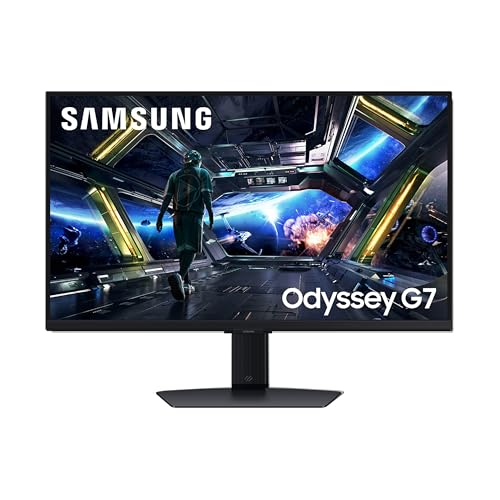
The odyssey g70d s32dg70 is Samsung’s attempt to answer a deceptively simple question: what if a 4K gaming monitor were also the screen your whole desk life runs on? The 32-inch Odyssey G7 in its G70D form pairs a 4K UHD IPS panel with a 144Hz refresh rate and 1ms grey-to-grey response, adds G-Sync compatibility and AMD FreeSync Premium, and then — the part that separates it from a pure gaming panel — builds in Samsung’s smart TV platform, so the monitor can stream, browse and entertain with the PC switched off. This review examines whether that dual identity is a genuine advantage or a compromise wearing a costume, and it places the G70D against its G70B predecessor and Samsung’s own Odyssey OLED G8 for readers deciding which flavour of premium 32-inch 4K belongs on their desk.
The short version, argued at length below, is that the G70D is the pragmatic flagship: the monitor for buyers who want 4K clarity, high-refresh gaming and a screen that earns its space all day, without OLED’s price tier or its long-term considerations. But pragmatic is a word that hides a hundred small decisions, and each of them — panel behaviour, smart features, stand, connectivity — gets its own examination here.
Key takeaways
- The G70D’s 4K IPS panel at 144Hz is the balanced specification for mixed gaming and desktop work at 32 inches.
- Its built-in smart platform makes it a self-contained entertainment screen, which matters more in small rooms and shared spaces than spec sheets suggest.
- The G70B is the predecessor alternative; the Odyssey OLED G8 is the step-up for buyers who prioritise contrast and response above all.
- IPS means no burn-in anxiety for static desktop work, at the cost of the perfect blacks only OLED in this comparison can produce.
- Driving 4K at high refresh rates demands a serious graphics card; the monitor should be bought as part of a system, not in isolation.
In this guide
Quick picks: the three 32-inch Samsung monitors in this review
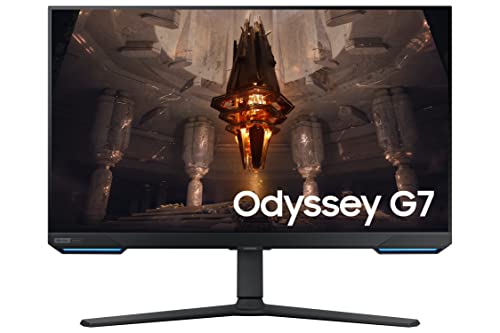
- Samsung Odyssey G7 G70D (S32DG70) — the subject: 32-inch 4K UHD IPS, 144Hz, 1ms GtG, smart gaming monitor, G-Sync compatible, FreeSync Premium, adjustable stand.
- Samsung Odyssey G70B — the predecessor: 32-inch 4K UHD IPS, 144Hz, HDR 400, G-Sync and FreeSync Premium Pro compatible.
- Samsung Odyssey QD-OLED G8 (G81SF) — the OLED alternative: 32-inch 4K QD-OLED, 240Hz, DisplayHDR True Black 400, FreeSync Premium Pro, G-Sync compatible.
Readers comparing across the wider market will find the same three-way tension everywhere — value IPS, premium IPS with extras, and OLED — and the framework built in this review transfers to those comparisons even where the badges differ best 144Hz gaming monitors.
How were these picks chosen?
The subject monitor was verified exactly as listed, down to its model code LS32DG702ENXZA, because Samsung’s Odyssey naming is a hall of mirrors in which G7, G70B, G70D and G8 can all describe 32-inch 4K screens with different panels and different prices. The two alternatives were chosen from inside Samsung’s own line to isolate the two decisions a G70D shopper actually faces: save money by stepping back a generation, or spend more by stepping up to OLED. Cross-brand rivals exist in abundance, but these two comparisons answer the questions readers of this keyword are asking, and they answer them cleanly because the shared design language holds everything except panel and generation constant.
No measurements are invented in what follows. Panel behaviour is discussed in terms of what IPS and QD-OLED technologies are established to do, the listed specifications anchor every factual claim, and the judgements are framed by use case — the only honest currency for a product whose right buyer depends so heavily on what fills their screen all day.

Samsung Odyssey G70D S32DG70: what does the smart 4K formula feel like?
Badge: Review subject — the pragmatic 4K flagship
- Size and resolution: 32-inch 4K UHD (3840 by 2160)
- Panel: IPS
- Refresh and response: 144Hz, 1ms GtG as listed
- Sync: G-Sync compatible, AMD FreeSync Premium
- Platform: Samsung smart TV features built in
- Extras: Black Equalizer, adjustable stand
- Model code on verified listing: LS32DG702ENXZA
Begin with the panel, because at 32 inches the 4K IPS combination has a character all its own. The pixel density at this size makes text genuinely crisp — the kind of crispness that lets a writer or coder drop system scaling and reclaim desktop space — while games gain the fine detail that 1440p at this size visibly lacks in distant foliage, signage and faces. IPS contributes its traditional virtues: colours stay honest when you lean, slump or share the screen with someone beside you, and the image has an even, daylight quality that suits a monitor which will spend half its life showing documents and browsers rather than games.
The 144Hz refresh rate is the specification that will divide readers, so let it be judged plainly. For competitive players coming from 240Hz at lower resolutions, 144Hz at 4K is a deliberate trade of frames for pixels, and this monitor is not aimed at them. For the far larger population playing story games, strategy, simulation and the multiplayer titles where 4K’s clarity reads as beauty rather than burden, 144 frames is a fluid, modern ceiling that a strong graphics card can actually feed at this resolution. The 1ms grey-to-grey figure, as with all such figures, describes best-case pixel transitions rather than a universal constant; the honest translation is that motion clarity sits comfortably in the modern gaming class, with none of the smearing that defined older large panels.
Adaptive sync from both camps — G-Sync compatibility for NVIDIA cards, FreeSync Premium for AMD — removes tearing from the equation whichever GPU you own, and at 4K that matters more than at lower resolutions, because frame rates at 4K fluctuate with scene complexity and a sync technology that irons those fluctuations into smoothness is doing daily work. Samsung’s Black Equalizer, a long-running Odyssey feature, lifts shadow detail for spotting opponents in dark scenes; used gently it is a genuine aid in gloomy games, used aggressively it washes the image into grey soup, and the reviewer’s advice is to treat it like salt.
Then there is the smart platform, the feature that makes this a G70D rather than merely another G7. With the PC off, the monitor streams films and series, runs apps and can serve as the room’s screen for casual viewing. In a bedroom, a dorm, a studio flat or a shared house where the desk monitor is also the household’s second television, this is not a garnish — it removes a whole device from the room. In a dedicated gaming den with a television already mounted, it is closer to a pleasant redundancy. Judge it by your room, not by the brochure, and note the pleasant side effect: firmware and features arrive through a platform Samsung maintains for its televisions, which historically means these smart monitors keep receiving attention longer than dumb panels do.
The adjustable stand completes the working-day case. Height adjustment at 32 inches is not a luxury; a screen this size placed too low forces a downward gaze that necks resent by evening, and too high is worse. Ergonomic adjustment plus standard mounting compatibility means the G70D can sit correctly on its own stand today and on an arm tomorrow, which is the flexibility a multi-year fixture owes its owner.
Strengths
- 4K IPS at 32 inches delivers text clarity and viewing angles that serve work as faithfully as games.
- Built-in smart platform turns the monitor into a self-contained entertainment screen with the PC off.
- Dual adaptive-sync support and 144Hz make it a fluent gaming panel for the resolutions its buyers actually play.
Trade-offs
- IPS contrast cannot produce OLED’s true blacks, so dark-room film viewing shows the technology’s ceiling.
- 144Hz will not satisfy competitive players who have built their game around 240Hz-class panels.
- Feeding 4K at high refresh rates requires a powerful graphics card, raising the system’s total cost.
Best for: mixed-use desks, small rooms needing one screen for everything, and 4K story-game players. / Not suited for: esports-first players, dark-room film purists, or systems with modest graphics cards.
Samsung Odyssey G70B: does the predecessor still earn its place?
Badge: Predecessor alternative — the previous 4K G7
- Size and resolution: 32-inch 4K UHD
- Panel: IPS, HDR 400 as listed
- Refresh: 144Hz, 1ms
- Sync: G-Sync and FreeSync Premium Pro compatible
- Extras: Ultrawide Game View as listed
The G70B is the monitor the G70D replaced, and its continued presence in listings creates the classic predecessor dilemma. On paper the kinship is obvious: same size, same resolution class, same refresh rate, same IPS family. A buyer comparing the two is really asking what a generation of refinement is worth — in platform features, in panel tuning, in the small ergonomic and firmware details that accumulate between model years — against whatever gap the listings present on the day of purchase.
The honest answer is that the G70B remains a capable 4K gaming monitor whose fundamentals have not expired. Its HDR 400 designation describes modest high-dynamic-range capability — enough to give HDR content some additional punch over standard dynamic range, not enough to reproduce the dramatic highlights of high-end HDR displays — and that same modesty applies across this whole IPS class, its successor included. Where the older model most plausibly concedes ground is the smart experience and the accumulated polish, the things a spec sheet lists in footnotes. For a buyer whose desk already has its entertainment handled and whose priority is the panel itself, the predecessor at a favourable tier is a rational, even shrewd, purchase. For a buyer who wants the monitor to be the room’s screen, the successor’s platform is the point of the exercise.
Strengths
- The same fundamental 4K IPS 144Hz formula that defines the class, from the line that popularised it.
- Predecessor status often means a friendlier price tier as the newer model takes the spotlight.
- Dual sync support keeps it compatible with both major graphics card families.
Trade-offs
- An older platform experience, with refinements of the newer generation absent.
- Availability will narrow as stock ages, and with it the choice of sellers and warranty paths.
- Buyers who want the monitor to double as the room’s smart screen should take the newer model.
Best for: panel-first buyers who already own their entertainment elsewhere and shop the tier gap carefully. / Not suited for: buyers who want the latest platform, or who dislike purchasing outgoing generations.

Samsung Odyssey OLED G8 G81SF: when does OLED justify the leap?
Badge: OLED alternative — the contrast flagship
- Size and resolution: 32-inch 4K
- Panel: QD-OLED
- Refresh: 240Hz as listed
- HDR: DisplayHDR True Black 400
- Sync: FreeSync Premium Pro, G-Sync compatible
- Listing note: 2025 model with a multi-year warranty as listed
The OLED G8 exists to make the G70D’s one structural compromise impossible to ignore. Where the IPS panel’s blacks are a very dark grey — its backlight is always on, leaking a little light through every pixel — the QD-OLED’s pixels switch off entirely, and the difference in a dark game scene or a night-time film is not incremental but categorical: shadows have depth, stars sit in actual darkness, and highlights placed beside those blacks appear brighter by contrast than any measurement of their luminance suggests. Add a 240Hz refresh rate with OLED’s near-instant pixel response, and this is simultaneously the contrast flagship and the motion flagship of the three.
The leap’s costs are equally categorical. The price tier is a different neighbourhood. OLED panels ask their owners for a degree of care with static content — the desktop taskbar parked in one place for a working year, the strategy game’s fixed interface across a thousand hours — because uneven pixel wear is a real phenomenon the technology manages rather than abolishes, with panel-care features, pixel refresh cycles and warranties that now commonly address it. And in bright rooms, a glossy OLED’s absolute brightness can feel less commanding than a good IPS’s daylight punch, even as its blacks remain unbeatable after sunset.
The decision, then, is about your room and your habits. Dark room, film and atmospheric games at the centre of your life, a willingness to let the panel run its care routines: the G8 rewards you every single evening. Bright room, a desktop full of static windows for eight working hours, games as one pleasure among several: the G70D’s IPS virtues stop looking like compromises and start looking like the correct engineering for your actual day OLED ultrawide gaming monitors compared.
Strengths
- True blacks and per-pixel light control produce contrast no backlit panel in this comparison can approach.
- 240Hz with OLED response makes it the motion-performance leader of the three as well.
- It is the definitive dark-room film and atmospheric-gaming screen of the group.
Trade-offs
- A substantially higher price tier than the IPS models.
- Static-content habits need managing, with panel-care routines becoming part of ownership.
- Bright rooms blunt its advantages while flattering the IPS alternatives.
Best for: dark-room enthusiasts, film lovers and performance seekers with the budget to match. / Not suited for: bright offices, static-desktop-heavy workdays, or buyers who want to never think about their panel.
How do the three monitors compare as systems?
Strip the badges away and the three screens are three answers to the question of what a premium 32-inch 4K monitor is for. The G70B says it is for the panel fundamentals at yesterday’s tier. The G70D says it is for the whole room — gaming, working and streaming from one screen, with the platform to prove it. The OLED G8 says it is for the image itself, pursued to the current limit of the technology, with the rest of life arranged around that priority. None of the answers is wrong; each is wrong for somebody, and this review’s structure — subject first, then the save-money step and the spend-more step — mirrors the order in which real buyers actually deliberate.
Two system considerations apply equally to all three and deserve emphasis because they are so often discovered after purchase. The first is graphics power: 4K gaming at high refresh rates is the most demanding mainstream workload in PC gaming, and a monitor bought ahead of the GPU that can feed it will spend its first year downscaled or under-fed. Sequence the upgrades honestly. The second is desk depth: a 32-inch screen wants viewing distance, roughly an arm’s length and a little more, and shallow desks that pin a big panel close to the face turn its size from immersion into strain. Measure the desk before the diagonal seduces you 1080p vs 1440p vs 4K gaming explained.
What should you check before buying a 32-inch 4K gaming monitor?
Can your graphics card actually feed it?
Run the arithmetic of your library, not of a benchmark headline. Modern upscaling technologies have made 4K gaming attainable on cards that could not render it natively, and they are legitimate tools — but they work best as a bridge for demanding scenes, not as a permanent substitute for resolution your card cannot approach. If your card is two or more generations from the top, consider honestly whether a 1440p monitor at higher refresh would serve your games better this cycle, and let the 4K screen be the next upgrade rather than the current bottleneck.
How bright is your room, really?
Room light decides the IPS-versus-OLED question more reliably than any specification. South-facing glass, overhead office lighting and daytime play all flatter IPS and tax OLED’s comparative restraint in full-screen brightness. Curtained rooms, evening play and film nights do the reverse. Spend one day noticing your actual light before spending anything on a panel; the answer is usually obvious once the question is asked seriously.
Will the smart platform replace anything in your room?
List the screens and streaming devices you own. If the G70D’s platform retires a streaming stick, a second television or a games console’s media duties, its value rises by everything it replaces. If it duplicates a wall-mounted TV three metres away, its value is the convenience of the desk alone. This is the correct way to price a feature: by what it removes from your life, not by its presence on a box.
What will you connect, today and next year?
Count your devices — PC, console, work laptop, perhaps a second console — and check the monitor’s input selection against that count, including whether your laptop’s single-cable ambitions are supported. A premium monitor will outlive at least one of the machines feeding it; buying the inputs for the setup you are growing into, rather than the one you have, is the cheapest future-proofing in the category best 240Hz gaming monitors.
How do you set up the G70D for gaming and work?
Setup begins with position: centre the screen at arm’s length or a touch beyond, with the top third of the panel around eye level, and let the adjustable stand do its work before reaching for books or boxes. Then divide the configuration into its two lives. For gaming, enable your card’s adaptive sync in its control panel and confirm the monitor is actually running at its full refresh rate in the operating system’s display settings — a remarkable number of high-refresh monitors spend their lives accidentally set to a lower rate by a default. Choose the response-time setting one notch below its most aggressive; the fastest modes on many panels trade motion clarity for inverse ghosting, and the middle setting is usually the honest optimum.
For colour, begin from the panel’s most accurate preset rather than its most vivid, live with it for two days, and only then adjust to taste. Vivid modes are calibrated to win the first five minutes in a showroom and to fatigue eyes across a working month. Set Black Equalizer conservatively for the same reason: a small lift that rescues shadow detail in your main game, not a global brightening. For work, enable the operating system’s text scaling that keeps interface elements comfortable at this density — the goal of 4K at 32 inches is clarity, not microscopic type — and if your work involves long static sessions, a taskbar that auto-hides and a screensaver habit are courtesies any panel appreciates, IPS included.
Finally, explore the smart platform deliberately rather than accidentally: sign in once, arrange the apps you will actually use, and set the monitor’s power behaviour so the PC and the platform are not fighting over which of them owns the screen when both are awake. Ten minutes of intention here converts the smart features from a novelty into the second device the G70D promises to be.
What mistakes do buyers make with premium 4K monitors?
The first is buying the panel before the graphics card, covered above because it manufactures more disappointment than any other error in this category. The second is judging a monitor in the first hour under showroom habits — maximum brightness, vivid colour — and concluding that accurate settings look dull, when what has actually happened is that their eyes are calibrated to a shop floor. The third is ignoring viewing distance and then blaming the monitor for eye strain that geometry caused. The fourth is neglecting cables: high-refresh 4K needs the right cable standard in the box or on order, and a drawer full of elderly leads is a common reason a new monitor mysteriously refuses its headline refresh rate.
The fifth mistake is forgetting that a monitor is a decade-scale purchase in a way a graphics card is not. Cards cycle every few years; a good screen watches three of them come and go. That longevity argues for buying the panel that fits your room and your habits over the one that fits this quarter’s game, and for treating stand quality, inputs and platform support — the unglamorous lines of the specification — as first-order concerns rather than footnotes.
Final recommendation
The G70D is the recommendation for the majority of readers who arrived by this keyword: a 4K IPS gaming monitor with the refresh rate modern play expects, the clarity modern work deserves, and a smart platform that lets one screen carry a whole room. Step back to the G70B if the panel is all you need and its tier undercuts the newer model meaningfully on the day you buy. Step up to the OLED G8 if your room is dark, your taste runs to contrast, and your budget accepts the technology’s terms. All three are Samsung arguing with itself about priorities, and the G70D is the argument most desks will find persuasive Roku Pro Series OLED TVs compared.
Frequently asked questions
Is 144Hz enough at 4K, or should you hold out for 240Hz?
For most genres, 144Hz at 4K is a fluid and satisfying ceiling, and it is the rate a strong graphics card can plausibly sustain at this resolution. Competitive players in fast shooters are the exception: they benefit from 240Hz-class panels, which at 4K currently means OLED money. Decide by the games you play weekly, not by the largest number on a box.
Does the G70D work with both NVIDIA and AMD graphics cards?
Yes. The listing includes G-Sync compatibility for NVIDIA cards and AMD FreeSync Premium, so tearing-free variable refresh is available whichever camp your card belongs to. Enable it in your card’s control panel after connecting, and confirm the refresh rate in your system settings at the same time.
What does the smart platform actually add?
It lets the monitor function as a streaming screen in its own right — films, series and apps with the PC switched off — which effectively gives small rooms and shared spaces a second television built into the desk. If your room already has a television you use happily, the feature is a convenience; if it does not, it can be the deciding one.
Is IPS or OLED better for a bright office?
IPS, generally. Its full-screen brightness and matte-friendly presentation hold up under daylight and overhead lighting, and it asks nothing of you regarding static desktop content. OLED’s advantages — true blacks, instant response — are at their most visible in controlled, darker rooms, which is why this review frames the choice around your room before your budget.
How far should you sit from a 32-inch monitor?
Roughly an arm’s length and a little beyond — close enough that the screen fills your view for games, far enough that your eyes are not constantly sweeping to its corners for work. If your desk cannot provide that distance, a smaller panel will serve you better than a large one endured at close range.
Should G70B owners upgrade to the G70D?
Only if the newer platform features answer a real gap in your setup — most plausibly the desire for the monitor to serve as the room’s smart screen. The panel fundamentals are close enough that an upgrade bought for image quality alone will feel incremental. Owners are usually better served putting the same money toward the graphics card that feeds whichever panel they keep.
Understanding HDR on a monitor in this class
High dynamic range is the most oversold phrase in display marketing, and a buyer of any monitor in this comparison deserves a plain translation. HDR is not one capability but a chain: the panel must reach high peak brightness in small areas, control its light locally so bright and dark elements can coexist in one frame, and accept a wide colour signal. Where a link in that chain is modest, the HDR experience is modest, whatever the badge says. On IPS monitors of this class, the honest expectation is a tasteful enhancement — highlights with a little more sparkle, colour with a little more depth than standard content — rather than the cinematic HDR of a high-end television with thousands of dimming zones or an OLED’s per-pixel control.
That calibration of expectations protects the G70D from an unfair judgement. Its HDR should be switched on for supported games and films and appreciated for what it adds; it should not be the reason for purchase, and it is not the reason this review recommends the monitor. The reasons are resolution, refresh, clarity and platform. Readers for whom HDR is the headline should be looking at the OLED in this very comparison, where DisplayHDR True Black certification describes the real thing: highlights against genuine darkness. Everyone else can treat HDR here as a bonus that modern content increasingly uses, and lose no sleep over its ceiling.
Console play on a 4K 144Hz monitor
Current consoles have quietly made monitors like this more relevant, because they target 4K output and, in supported titles, frame rates above the old 60-frame ceiling. A 32-inch 4K panel is a natural partner: close viewing distance suits a desk, the resolution matches the consoles’ ambitions, and variable refresh support smooths the modes that trade resolution for performance. Players splitting time between a desk PC and a console should check the input count against their devices and confirm the monitor handles their console’s high-refresh modes over the connection they intend to use, since those capabilities live in the details of ports and standards rather than in headline specifications.
There is also a living-room argument hiding here. In a small flat, a smart 4K monitor plus a console is a complete entertainment station that never required a television, a stand or a wall mount. The G70D’s platform covers the streaming half of that station natively. For students, first flats and spare-room setups, that consolidation is the monitor’s least advertised and possibly strongest case.
The working day on 4K IPS: an underrated pleasure
Gaming monitors are reviewed at night, but they are used all day, and the G70D’s daytime character deserves its own testimony. Four-K resolution at 32 inches lets a spreadsheet show its columns without horizontal pleading, lets a code editor hold a file and its reference side by side at readable sizes, and renders text with a smoothness that reduces the low-grade eye fatigue of slightly soft letterforms across an eight-hour day. IPS viewing angles mean the screen can be shared across a desk during a call or a pair-working session without the colour shifting that older panel types imposed on anyone not sitting dead centre.
There is a subtler benefit to buying a gaming-grade panel for work: motion. Scrolling long documents, dragging windows and scrubbing timelines all look and feel more precise at 144Hz than at the office-standard rate, because the cursor and the content track your hand with less visible stepping. People who make the jump rarely describe it as dramatic; they describe going back, on a laptop or a hot-desk monitor, as faintly broken. If your desk is where you both earn and play, that all-day fluency is not a luxury feature of this monitor. It is the feature you will use most.
Care, longevity and the decade view
A monitor in this class should be bought as a long fixture, and its care is mostly a matter of small habits. Clean the panel with a dry or barely damp microfibre cloth, never with household glass sprays. Let the screen sleep when you do rather than displaying a static desktop overnight, a courtesy that costs nothing. Keep firmware updated through the platform, since panel makers do ship meaningful refinements and compatibility fixes that way. And when you eventually upgrade, remember that a 4K IPS panel with these specifications becomes an outstanding second monitor or a hand-me-down screen for another room — the G70D’s smart platform makes it unusually suited to a second life as a standalone streaming display long after its gaming front-line service ends. Few peripherals offer so graceful a retirement, and it belongs in the value calculation from the start.
What about 1440p, ultrawide and the other forks in the road?
No 32-inch 4K review is complete until it answers the reader who is wondering whether they are shopping in the wrong aisle entirely. The 1440p alternative trades pixel density for frames and money: at 27 inches it remains the value sweet spot of PC gaming, feeding high refresh rates from mid-range cards and asking less of everything downstream. A reader whose library is competitive multiplayer should take that aisle seriously and without embarrassment — this review’s subject is not built for them, and pretending otherwise would serve nobody.
The ultrawide fork trades the 16:9 frame for panoramic width, glorious in simulation and racing, awkward in titles that never learned to use it, and demanding a desk of genuine breadth. The 4K television fork — a 42-inch-class OLED TV pressed into monitor service — tempts with size and contrast and asks for deep desks and tolerance of television manners on a desktop. Against all of these, the 32-inch 4K monitor’s case is balance: one screen, standard shape, desktop density, gaming refresh, no exotic demands. Most desks, most libraries and most working days are balanced things, which is why this unglamorous format keeps winning the decade even as the forks win the headlines.
A short guide to reading monitor specifications without being misled
Since Odyssey naming brought many readers here confused, a compact decoder is a fitting place to approach the end. Resolution and size together determine sharpness — the same 4K in a smaller screen is denser, in a larger one more cinematic — so never compare resolution without the diagonal attached. Refresh rate is a ceiling, not a promise: your games will run at whatever your graphics card sustains, and the monitor’s job is not to be the limit. Response-time figures are measured under each maker’s chosen conditions and are useful for ranking within a brand’s line, treacherous across brands. HDR badges certify minimums, and the distance between the minimum and the magnificent is where prices live. And model codes, those long strings like the one on this monitor’s listing, are not bureaucracy — they are the only completely unambiguous name a product has, and quoting them when you compare sellers is the surest defence against the wrong-variant disappointments this series has warned about in category after category.
Multi-monitor futures and the second-screen question
Premium monitor purchases often end a story, but they just as often begin one: the old screen moves sideways, and a dual-monitor desk is born. Plan for that possibility when you place the G70D, because a 32-inch 4K main panel pairs most happily with a modest secondary in portrait for documents, chat and reference material — a role your current monitor is probably perfectly sized to retire into. Check that your graphics card’s outputs cover the combined resolution ambitions of the pair, and resist the urge to match sizes for symmetry’s sake; mixed setups serve mixed work better than matched ones serve vanity. If a monitor arm enters the plan, confirm its weight rating against a 32-inch panel before ordering, since arms are specified in kilograms rather than diagonals and a premium screen deserves a mount that never sags.
There is also a household dimension worth one paragraph. A smart monitor at the centre of a desk tends to become shared infrastructure — a partner’s streaming screen, a child’s supervised homework display, the room’s photo slideshow during a gathering. The G70D’s platform makes that sharing graceful, because none of it requires your PC to be awake, logged in or surrendered. Buyers in shared spaces should count that social utility honestly in the monitor’s favour; it is the kind of value that never appears in a specification table and dominates actual satisfaction by the second year of ownership.
The first evening: a sensible calibration walkthrough
New owners tend to calibrate in the wrong order — colour first, at midnight, by eye, against a game they have never seen on any other screen. A calmer sequence gives better results. First, geometry: distance, height, tilt, and the refresh-rate confirmation described earlier. Second, brightness matched to the room: a useful rule is that a white document on screen should look like a sheet of paper under the room’s light, neither glowing nor grey. Third, the accurate picture preset, lived with for two full days while your eyes unlearn the old screen. Only then, small adjustments: a touch of colour temperature if faces look wrong in a familiar film, a notch of Black Equalizer if your main game hides its enemies, a response setting tested in one fast sequence rather than assumed.
Write down what you changed. Monitors accumulate settings the way desks accumulate cables, and a short note — preset, brightness for day and night, sync on, equalizer level — turns a future factory reset or firmware surprise from an evening of re-tuning into two minutes of restoration. It is the least exciting advice in this entire review and, across a decade of ownership, possibly the most valuable.
Close the case for the subject monitor with the image of its intended desk. It is morning: the screen wakes into documents rendered like print, a calendar legible at a glance, code or accounts laid out in genuine space. It is evening: the same panel, without a cable changed or a device woken, is running a game at a smooth high refresh with sync ironing its frame pacing, and after the session it becomes the room’s film screen while the PC sleeps. That continuity — one surface, three lives, no friction between them — is what the G70D’s specification sheet is actually describing, and it is a more durable kind of premium than any single headline number. Buyers whose days look like that paragraph do not need persuading about which of these three monitors belongs to them. Buyers whose days do not have this review’s alternatives, honestly labelled, waiting in the sections above.
Sound, or the monitor’s silent assumption
One assumption hides inside nearly every gaming monitor purchase, this one included: the screen is not your sound system, and your budget and desk should plan accordingly. Monitors in this class may carry basic speakers adequate for calls, system sounds and casual video, and the smart platform makes those speakers more useful than usual for a quick stream. But games and films deserve better, and the monitor’s price tier implies an owner who will pair it with a soundbar, desktop speakers or a good headset. Count that pairing in the system’s true cost from the beginning, route the console and PC audio through it once, properly, and the screen’s silence on the subject stops being a gap and becomes what it was designed to be: a division of labour between a panel that does pictures superbly and audio equipment that does sound the same way.
There remains the question of timing, which monitor buyers ask in every generation: buy now, or wait for the next panel technology to trickle down? The honest answer this review can give is that the current 4K landscape is unusually settled — IPS refined to maturity, OLED established at the premium end, prices for both finding their levels — and a settled landscape is historically the kindest moment to buy, because the product you choose is understood rather than speculative. A G70D bought into that landscape is not a placeholder for a future screen. It is a finished answer to a well-understood set of needs, and its owner’s next upgrade decision can safely be measured in years, which is the most relaxing sentence a technology purchase can earn.
For upgraders: what you will notice, in order
Readers replacing an older 1080p or 1440p screen deserve a preview of the adjustment, because the first week with 4K at this size has a predictable emotional arc. Day one is the sharpness: text, interfaces and distant game detail all snap into a focus that makes the old panel look like a photograph of itself. Day two is the space: windows multiply, timelines lengthen, and the desktop stops feeling like a tray and starts feeling like a desk. Day three is the reckoning with performance, as a favourite game reveals what your graphics card honestly thinks of 4K, and the settings menu becomes a negotiation between beauty and frames that upscaling usually settles honourably. By the end of the week the new size has become the size screens simply are, and the old monitor, glimpsed in another room, looks like a toy. That arc is the surest sign the upgrade was sized correctly; buyers who still feel overwhelmed by the diagonal after a full week have a desk-depth problem, not an eyesight one, and the setup sections above are their remedy.
One practical footnote for that first week: revisit your in-game field-of-view and interface scale settings after the move. Games configured for a smaller, softer screen often carry interface sizes and camera settings that feel wrong at 32 inches of 4K, and ten minutes of re-tuning per title — smaller interface, slightly wider view where the game allows — completes the upgrade in a way new owners frequently forget, then misattribute to the panel. The monitor changed; let the software admit it, and the whole system comes into focus together.
Warranty, pixels and buying with your eyes open
Large panels carry a category of aftercare that smaller peripherals escape, and a premium purchase should be made with it in view. Read the seller’s and maker’s policies on pixel defects before ordering, because every manufacturer defines acceptable thresholds in fine print and the time to learn yours is before the box is opened, not after a bright dot has introduced itself in a dark scene. Inspect the panel in its first days deliberately: full-screen fields of black, white and the primary colours, viewed in a dim room, reveal the uniformity story of your specific unit while exchanges are still simple. Keep the packaging until that inspection is done and the return window’s midpoint has passed; monitor boxes are awkward, and that awkwardness is precisely why they are worth storing briefly. None of this anticipates trouble — the great majority of units are flawless — but a considered buyer treats a decade-scale fixture with decade-scale diligence, and the ten minutes described here are the cheapest insurance in the whole purchase.
With that diligence done, the monitor can take its place and disappear into the role the best screens occupy: the window you forget you are looking through. Everything in this review — the panel arguments, the platform, the comparisons with its predecessor and its OLED sibling — reduces to helping you choose the window whose properties match your room, your machine and your habits closely enough to be forgotten for years at a time. For the balanced desk that most readers are building, the G70D is the window that asks the fewest apologies, and that is the highest praise a pragmatic flagship can earn.
So the deliberation ends where it began, with the room. Measure your desk’s depth, notice your light, count your devices, and be honest about your graphics card’s appetite for 4K. Those four facts choose among the three monitors in this review more reliably than any verdict could, and a buyer who arrives with them answered will find the G70D, the G70B or the OLED G8 waiting as a conclusion rather than a gamble. That is the most useful thing a long review can do: turn a confusing model range into a short set of questions whose answers you already know.
Eye comfort across a long day on a big bright panel
A 32-inch screen at close range asks something of your eyes that a smaller one does not, and the habits that answer it are worth stating once, plainly. Match the panel’s brightness to the room rather than to the showroom: a screen that glows against its surroundings forces your eyes to renegotiate with every glance away, and that renegotiation, repeated for eight hours, is most of what people call eye strain. Keep text at a size your eyes read without leaning — 4K’s gift is clarity, and scaling exists to spend that clarity on comfort rather than on cramming. Rest your gaze at distance on the natural breaks the day already contains. None of this is medical advice, and persistent symptoms deserve a professional’s attention rather than a monitor setting. It is simply the ergonomics of a large, bright, beautiful object used at arm’s length — the same care this review applied to stands and distances, extended to the organ the whole apparatus exists to serve. A monitor bought for a decade should be set up for the eyes that must last the same decade, and the G70D’s adjustability gives those eyes every chance to be consulted.