Disclosure: As an Amazon Associate, reviewstook.com earns from qualifying purchases. Links on this page are affiliate links; they cost you nothing extra. Prices and availability change often, so check the current Amazon listing before you buy.
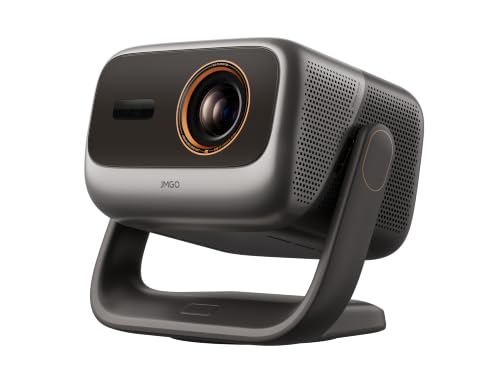
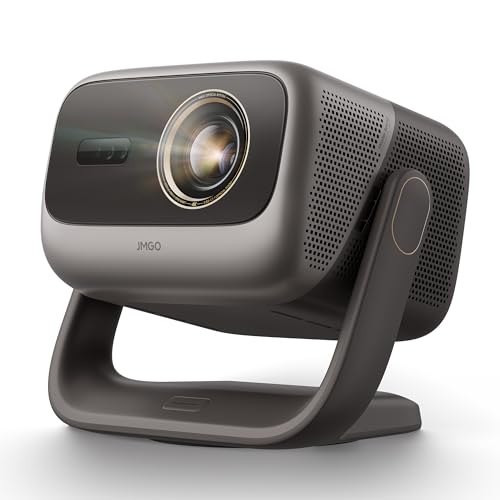
The n3 ultimate is JMGO’s flagship swing at a difficult idea: a triple-laser 4K projector that behaves less like a piece of cinema equipment you install and more like an appliance you aim. Its listing leads with serious numbers — 5800 ISO lumens, a 3-in-1 lens system with shift and optical zoom, an AI gimbal stand, and gaming credentials that include low-latency and variable refresh language — and wraps them in the pitch that has defined JMGO’s rise: put it down, let it align itself, watch something enormous. This review takes that pitch seriously and skeptically in equal measure, explains where a projector like this genuinely beats a television and where it cannot, and places two JMGO siblings beside it — the earlier N1S Ultimate and the IRIS Ultra — so you can see what the flagship premium actually buys.
First, the framing every projector review owes its readers. A projector is a system, not a screen: the image depends on the room’s darkness, the wall or screen it lands on, the distance it throws across, and the sound that accompanies it. Manufacturers’ brightness figures are measured under their own stated standards — this listing expresses its figure in ISO lumens, a defined measurement method — and your room will have opinions of its own. None of that makes the N3 Ultimate less impressive; it makes the buyer’s homework more important than the headline, and this guide is organised to do that homework with you.
Key takeaways
- The verified listing confirms the flagship shape: 4K triple-laser light source, 5800 ISO lumens, lens shift with optical zoom in a 3-in-1 lens, AI gimbal, Dolby Vision support, and gaming features including 1ms low-latency positioning with VRR and ALLM.
- Triple laser means wide, saturated colour and a long-lived light source with no lamps to replace — the defining technology of this projector class.
- The gimbal-and-auto-alignment design targets real rooms: coffee tables, shelves, and ceilings rather than dedicated theatre installs.
- The N1S Ultimate offers the same idea a generation earlier at 3300 ISO lumens with Google TV; the IRIS Ultra counters with its own dual-iris design, 4500 ISO lumens, and Google TV with Netflix.
- Room darkness and screen choice will influence your picture more than the difference between these three models — budget and plan for both.
In this guide
Quick verdict and the picks
- The flagship: JMGO N3 Ultimate — triple laser, the brightest listing here, lens shift and optical zoom, AI gimbal. Check price on Amazon
- The proven predecessor: JMGO N1S Ultimate — 3300 ISO lumens, Google TV built in, the same point-and-watch philosophy. Check price on Amazon
- The alternative flagship idea: JMGO IRIS Ultra — dual-iris optics, 4500 ISO lumens, wide zoom range, Google TV with Netflix. Check price on Amazon
How these were chosen: all three listings were verified through this site’s Creators API, titles and official images confirmed, and the trio represents the genuine decision a JMGO shopper faces — newest flagship, established predecessor, or the brand’s alternative optical philosophy. Specifications below are drawn from those listings; where we describe projector behaviour generally, we say so.
N3 Ultimate in context: the projector as an appliance
Traditional home theatre projectors assumed commitment: a ceiling mount, a darkened room, a screen fixed to a wall, an afternoon with a spirit level. The new school, which JMGO helped define, assumes a life: the projector lives on a shelf or a side table, comes out for film nights and match days, aligns itself to whatever wall is available, and goes back to being furniture. The N3 Ultimate pushes that school’s ambitions upward — flagship light output and lens flexibility in a body designed to be aimed rather than installed. The AI gimbal is the emblem of the philosophy: instead of the owner crawling around adjusting feet and keystone, the projector sits on a stand that can angle it, with automatic alignment correcting the geometry the angle creates. Lens shift and optical zoom, the listing’s other headline features, are the grown-up versions of that convenience — they let the image be positioned and sized by moving glass rather than by digitally cropping the picture, which preserves the resolution you paid for.
Whether that philosophy suits you depends on your room’s biography. A dedicated theatre with a fixed screen extracts less from auto-alignment — it aligns once — and more from raw installation flexibility. A living room that becomes a cinema on Friday nights extracts everything the N3 offers, because the setup friction it removes is the friction that decides whether the projector gets used weekly or monthly. Owners consistently underestimate that variable; a slightly lesser projector that sets up in one minute gets watched three times as often as a greater one that takes twenty. The flagship’s bet is that you no longer have to choose between the two, and the rest of this review examines that bet from every side.

JMGO N3 Ultimate
Badge: The flagship — brightest, most flexible, most automatic
- Light source: 4K triple laser, per the listing
- Brightness in the listing: 5800 ISO lumens
- Lens: 3-in-1 design with lens shift and optical zoom, per the listing
- Stand and alignment: AI gimbal with automatic setup features
- Contrast positioning in the listing: 20000:1 with AI dynamic black level
- Gaming in the listing: 1ms low-latency positioning, VRR and ALLM
- HDR in the listing: Dolby Vision
The experience this specification set describes is a projector that wants to be used casually at an immodest scale. Brightness headroom is the enabler: with output to spare, the image survives a room that is dim rather than cave-dark, and screen sizes that would starve a lesser light source stay punchy. The triple-laser engine brings the colour story — laser primaries produce a gamut that lamp and LED designs chase — and Dolby Vision support means the projector speaks the same HDR language as the better streaming libraries. The gaming language in the listing matters more than sceptics expect: projectors historically added noticeable delay, and a flagship that courts players with low-latency and variable-refresh features is acknowledging that its screen will host consoles as often as cinemas.
Strengths
- Class-leading brightness claim gives real freedom in room darkness and image size.
- Lens shift and optical zoom position the image with glass, preserving resolution that digital keystone would spend.
- Gimbal auto-alignment removes the setup friction that decides whether projectors get used.
Trade-offs
- Flagship positioning means flagship commitment; the room and screen must be worthy of it.
- Triple-laser images can show speckle on some screen materials — screen choice matters, as the guide below explains.
- Its brightness invites big images, and big images demand throw distance smaller rooms may not have.
Best for: living-room cinema builders and gamers who want flagship scale with appliance manners. / Not suited for: small bright rooms, or buyers whose viewing is mostly daytime television, where a large TV is the calmer tool.

JMGO N1S Ultimate
Badge: The established predecessor with Google TV
- Light source: triple laser 4K, per the listing
- Brightness in the listing: 3300 ISO lumens
- System: Google TV built in
- Setup in the listing: real-time auto screen fit
- Image size in the listing: up to 300 inches
- Extras in the listing: HDR10, Blu-ray 3D support, 20W Dolby Digital+ audio
The N1S Ultimate is the model that proved the concept for many households: the same gimbal-borne, auto-fitting philosophy, a triple-laser engine, and a full Google TV system so the projector is its own streaming source. Its brightness figure sits a clear step below the flagship’s, which in practice divides rooms rather than experiences — in a properly dim room the N1S makes a large, rich image that satisfies completely, while in a merely shaded room the N3’s headroom earns its premium. Buyers choosing between them should interrogate their curtains before their wallets.
Strengths
- Complete, proven package: laser image, auto fit, and Google TV in one body.
- Built-in audio with real wattage behind it covers casual viewing without extra boxes.
- The sensible price-of-entry to this design philosophy within the brand.
Trade-offs
- Less brightness headroom for bright rooms and the largest screen sizes.
- Lacks the flagship’s lens shift and zoom flexibility for tricky placements.
- A generation older in its gaming feature set.
Best for: dim-room film lovers who want the JMGO experience whole, at the predecessor’s tier. / Not suited for: bright living rooms or very large screens that need the flagship’s output.

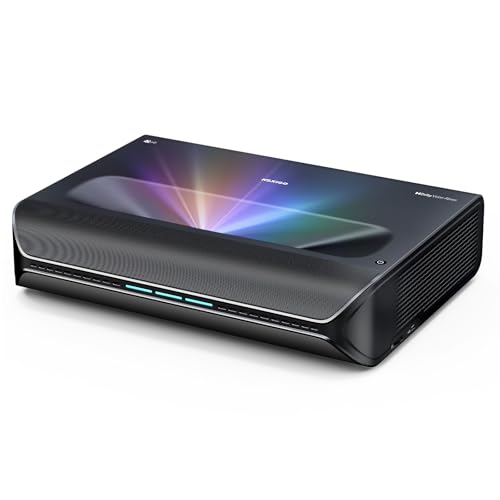
JMGO IRIS Ultra
Badge: The alternative flagship — iris optics and a wide zoom
- Light source: triple laser 4K at 120Hz positioning, per the listing
- Brightness in the listing: 4500 ISO lumens
- Optics in the listing: dual-iris design, 0.88–1.7:1 optical zoom with lens shift
- Contrast in the listing: 7,000:1 native
- System: Google TV with Netflix
- Image quality notes in the listing: anti-RBE and speckle reduction
The IRIS Ultra is JMGO arguing with itself, productively. Its dual-iris optics chase contrast and black-level control by mechanical means, its zoom range is the widest here — a genuine placement tool for rooms whose throw distance is awkward — and its listing explicitly addresses speckle reduction, the laser-on-screen texture that picky viewers notice. Between the N3’s brightness-first flagship pitch and the IRIS’s optics-first one, the brand covers two different definitions of “best picture,” and the buyer’s room decides which definition is right: brightness for ambient light, iris control for the dedicated dark.
Strengths
- Wide optical zoom range solves placement problems the others cannot.
- Dual-iris design prioritises contrast and black depth in dark rooms.
- Speckle reduction named in the listing — a thoughtful touch for laser projection.
Trade-offs
- Brightness below the N3 flagship, so bright-room freedom is narrower.
- Its optical sophistication rewards a more deliberate, fixed installation.
- Two flagships in one brand means the choice itself needs the room audit below.
Best for: dedicated dark rooms and awkward throw distances, where optics beat raw output. / Not suited for: casual bright-room use, where the N3’s brightness is the relevant virtue.
The three JMGO models compared
| Model | Brightness (listing, ISO lumens) | Defining idea | Choose it when… |
|---|---|---|---|
| N3 Ultimate | 5800 | Flagship output plus lens shift, zoom, AI gimbal | Your room is bright-ish, your screen is big, your use is mixed |
| N1S Ultimate | 3300 | The proven gimbal concept with Google TV | Your room dims properly and film is the main event |
| IRIS Ultra | 4500 | Dual-iris optics, widest zoom, speckle reduction | Your room is dedicated and dark, or your throw distance is awkward |
Brightness figures compare within a brand’s own measurement language more safely than across the industry, and even here the honest reading is about headroom, not arithmetic worship. What the table really shows is three philosophies wearing one badge: maximum flexibility, proven completeness, and optical sophistication. Your room — its darkness, its depth, its furniture — is the judge among them.
Buying guide: the room decides, then the projector
Audit light first. Stand in the room at your usual viewing hour and be honest: can it be made properly dim, or merely shaded? Properly dim rooms unlock the whole class and make the N1S a complete answer; shaded rooms argue for the N3’s headroom; rooms that cannot dim at all argue for a television, and a good guide should say so plainly. Second, measure the throw: the distance from the projector’s likely home to the wall, and the image size that distance implies with each model’s zoom. The IRIS’s wide zoom exists for rooms where this measurement comes out awkward. Third, choose the surface. A smooth, light wall serves casual use; a proper screen — including the ambient-light-rejecting designs — transforms contrast and tames laser speckle, and at flagship level the screen is not an accessory but the other half of the product. Fourth, plan sound: built-in audio covers casual viewing on the N1S especially, but a room-filling image deserves sound with some authority, whether that is a soundbar or a fuller system. Fifth, count the sources: streaming built into the projector simplifies everything, while consoles and players need cable runs planned before the furniture is arranged around them.
Finally, think about the household’s real calendar. A projector earns its price in evenings used, and the auto-aligning designs in this article exist precisely to multiply those evenings by removing friction. If your film nights are monthly rituals with time to set up, installation flexibility matters less; if they are spontaneous Tuesdays, it matters more than any specification in this review. Buy the friction level your life will actually overcome.
How to set up the N3 Ultimate for its first film
Step 1: Choose the wall and kill the light
Pick the wall with the fewest windows opposite it, draw every curtain, and turn off the lights that fall directly on the surface. This ten-minute ritual decides more about picture quality than any menu setting that follows.
Step 2: Place, power, and let the gimbal work
Set the projector on a stable surface at the measured distance, power it, and let the automatic alignment fit the image to the wall before touching anything manually. Auto systems judge best from a sensible starting position — centred, roughly level, unobstructed.
Step 3: Refine with the lens, not the keystone
Use optical zoom to size the image and lens shift to position it, reserving digital correction for the last small remainder. Every degree of keystone you avoid is resolution and sharpness you keep.
Step 4: Set picture mode for the content
Choose the cinema-leaning mode for films, confirm HDR is recognised on a Dolby Vision title if you stream one, and set brightness for the room’s actual darkness rather than its daytime state. Game mode — with its latency features — belongs to console sessions, not film nights.
Step 5: Sound-check with a scene you know
Play a familiar scene with dialogue and a wide sound moment. Set the level for the dialogue; the spectacle will take care of itself. If the image dwarfs the sound, that is the honest signal to plan the soundbar the buying guide mentioned.
Common mistakes in flagship projector buying
The first is buying brightness for a room that needed curtains — light control is cheaper than lumens and improves every projector. The second is projecting onto a textured or coloured wall and judging the projector by the wall’s performance. The third is digital-keystone dependence: placing the projector at a careless angle and letting software crop the image into softness, when the lens shift on a model like the N3 exists to prevent exactly that. The fourth is ignoring throw distance until delivery day. The fifth is forgetting that a 150-inch image with television-speaker sound feels like a silent film with excellent subtitles — the audio plan is part of the cinema, not an afterthought.
Final recommendation
The N3 Ultimate is the right flagship for the way most people actually live with projectors: bright enough for real rooms, flexible enough for real furniture, automatic enough for spontaneous evenings. Choose it when your space is a living room first and a cinema second. Choose the IRIS Ultra instead when the room is a cinema first — dark, dedicated, or geometrically awkward — and choose the N1S Ultimate when your room dims properly and you want the whole philosophy at the predecessor’s tier. In every case, buy the screen and the curtains with the same seriousness as the projector; the image you fall in love with will be the system’s, not the box’s.
Frequently asked questions
How bright is 5800 ISO lumens in a real room?
It is flagship headroom: enough to hold a large image in a dimmed living room and to stay watchable in a shaded one. No projector defeats direct daylight on the wall, and the figure is best read as freedom — bigger screens, less demanding darkness — rather than as a licence to skip the curtains.
What does triple laser actually improve?
Colour and longevity. Separate laser primaries produce a wide, saturated gamut, and the light source is long-lived with no lamp replacements in the ownership story. On some screen materials laser light can show a speckle texture, which is why screen pairing and features like the IRIS model’s speckle reduction exist.
Is the N3 Ultimate suitable for gaming?
Its listing courts gamers directly, with low-latency positioning plus VRR and ALLM language — the features that keep a console’s image responsive and synchronised. As with any projector, use the dedicated game mode for play and the cinema modes for film, since the processing priorities differ.
Do I need a screen, or is a wall enough?
A smooth, pale wall is enough to start and to learn the format. A dedicated screen is the single largest picture upgrade available afterwards, improving contrast, colour neutrality, and speckle behaviour. At this flagship level, most owners eventually buy one — plan the wall space for it from the beginning.
Lens shift versus keystone: why does the distinction matter?
Lens shift moves the image by moving glass, keeping every pixel the projector renders. Digital keystone corrects geometry by resampling the image, spending resolution and sharpness. A projector that offers shift and zoom, as the N3 does, lets placement be flexible without taxing the picture.
Which model suits a small flat?
Paradoxically, the auto-aligning designs suit small spaces best, because they appear and disappear without installation. Between them, the N1S’s completeness or the N3’s brightness for a multi-use room are the sensible poles; measure the throw first, since small rooms limit image size more than any specification does.
Related guides
the best home theatre projectors at the accessible end
projectors chosen for gaming response
a 4K television alternative for bright rooms
a laptop that feeds a big screen
the Lumix S5 IIX for filming your own cinema
Projector versus television at the sizes that matter
The comparison every flagship projector buyer is really making is against a large television, and it deserves a fair hearing rather than a tribal one. The television wins on convenience arithmetic: it is bright in any room, instant to use, silent about its setup, and at moderate sizes it is the cheaper route to a fine picture. The projector wins on scale and on atmosphere: at the sizes where a television becomes a piece of architecture with a price to match, a projector is still a small box and a blank wall, and the image it makes has a quality of occasion — the room darkens, the wall lights, the evening changes gear — that a television, for all its virtues, does not stage. There is also a domestic diplomacy argument: a projector’s screen disappears when it is off, returning the wall to the room, where a very large television presides over the room permanently, on or off. Households split predictably along those lines, and both camps are right about their own evenings. The N3 Ultimate’s contribution to the argument is that it removes the projector’s traditional counter-arguments — dim image, fiddly setup — one by one, leaving the choice where it belongs: on the kind of evenings you want to have.
Gaming on a wall: what the latency language promises and what to verify
Projector gaming was once a compromise you made for size and apologised for in competitive titles. The modern flagship language in this listing — low-latency positioning, variable refresh, automatic low-latency mode switching — describes a category that has closed most of that gap for the way most people play: story games, sports titles, cooperative evenings, and big-screen racing all thrive at this scale, where immersion is the point and the last milliseconds are not. The verification habit still applies: use the game mode, feed the projector the console’s best output, and confirm the settings took, because a projector left in a cinema processing mode will add the very delay its game mode exists to remove. Players whose entire identity is competitive frame-perfection will keep a fast monitor at the desk for that purpose — several appear elsewhere in this cluster — and use the wall for everything else, which is not a failure of the projector but a sensible division of labour between two displays that each do one thing superbly.
The screen question, answered in layers
Because the screen is half the system, it deserves its own buying logic. Layer one is any smooth, pale, matte wall: free, immediate, and good enough to fall for the format. Layer two is a fixed or pull-down screen with a proper projection surface, which buys contrast, colour neutrality, and a defined border that makes the image look intentional rather than projected — the single most theatrical upgrade in the whole setup. Layer three is the ambient-light-rejecting screen, engineered to throw room light away while accepting the projector’s, for households whose evenings cannot be darkened; it pairs naturally with the N3’s brightness headroom. Layer four, for the dedicated room, is the acoustically transparent screen with speakers behind it, the cinema purist’s arrangement. Most owners climb one layer at a time across years, and the projector bought today serves every layer without complaint — one more argument for buying the light source at flagship level and letting the room grow around it.
Ownership: living with a laser light source
Laser projection changes the ownership rhythm that lamp owners remember. There is no lamp dimming toward a replacement deadline, no warm-up theatre before the picture settles, and no cool-down vigil after it. The projector behaves like the appliance it aspires to be: on, aligned, bright, off. The care it asks for is humble — keep its vents breathing, dust its home occasionally, let its automatic routines run, and update its software when it offers, because smart projectors improve their alignment and streaming behaviour over their lives. Fan noise is the honest remaining consideration in any bright projector: more light means more cooling, and in quiet film scenes a nearby projector is audible in a way a television never is. Placement is the mitigation — distance, a shelf that does not resonate, and the simple physics of not sitting beside the exhaust. Owners who plan for that one trait in the room layout rarely mention it again; owners who discover it in the first quiet scene of a favourite film mention it for years, usually while explaining why they moved the projector the following weekend.
For renters and the installation-averse
The gimbal school of projectors is, quietly, a renter’s revolution. No ceiling mount, no drilled screen, no landlord negotiations: a shelf, a wall, and an appliance that aligns itself. The N3 Ultimate is the flagship of that revolution, which makes it a rare flagship whose premium features serve impermanence rather than installation. When the household moves, the cinema packs into a box and reopens in the next living room the same evening, aligned to a new wall before the old one’s paint has been touched up. Compare the dedicated theatre, whose value is partly embedded in a room you may leave, and the appliance philosophy gains a financial logic as well as a lifestyle one. For owners in settled homes the same features read as convenience; for everyone else they read as freedom, and it is worth knowing which reader you are before deciding how much of the flagship’s premium is aimed at you.
Sports, gatherings, and the social life of a big image
Film nights get the projector literature, but gatherings write the owner testimonials. A major match on a wall-sized image rearranges a room’s social physics: everyone can see, nobody crowds a television, and the event acquires the communal scale that sport on a big screen has had in public venues for decades. The flagship’s brightness matters here in a way cinema purists underrate, because gatherings resist full darkness — people move, talk, fetch drinks — and an image that survives sociable light is the difference between a centrepiece and a screensaver. Children’s film afternoons make the same point from another angle: a huge, soft, projected image at moderate brightness is a gentler spectacle than a blazing panel at close range, and the projector’s ability to vanish afterwards returns the room to its daytime self. When you audit your own calendar in the buying guide’s spirit, count these gatherings honestly; for many households they outnumber the solitary cinema evenings, and they argue for exactly the N3’s combination of output and instant setup.
What to check during the first week
New owners should spend the return window deliberately. Verify the image on your actual wall at your actual viewing hour, not at midnight in a blacked-out room you will never recreate. Run the auto-alignment from the projector’s real home position, several times, and confirm it lands consistently. Check focus uniformity into the corners at your chosen size, since a wall that is not flat will confess itself there first. Stream one HDR title and one ordinary broadcast and set your picture expectations by both, because a flagship should flatter the ordinary as gracefully as the spectacular. Play one gaming session in game mode to confirm the responsiveness promise in your own hands. And sit in every seat your household uses — the wide image has a geography, and the seat at the far edge deserves a vote before the arrangement becomes permanent. A projector that passes that week in your room, with your light and your furniture, is not a specification any more. It is a member of the household, and it will be treated — and used — like one.
The economics of scale, stated without prices
Our rules keep figures out of this guide, but the shape of projector economics can still be described honestly, because it is unlike television economics in a way buyers should understand. With televisions, each step up in size costs disproportionately more than the last; the panel is the product, and bigger panels are rarer and dearer. With projectors, the image size is mostly a decision — distance and zoom — made after purchase, and the cost lives in the light source and the lens rather than in the diagonal. That inversion is the category’s founding bargain: flagship money buys brightness and optics once, and the wall provides the acreage for free. It is also why the screen, when owners do buy one, feels like such a satisfying purchase — it is the first time the system’s size acquires a price at all, and by then the household already knows its preferred diagonal from months of wall projection. Buyers who grasp that inversion stop asking which projector is “big enough” and start asking which is bright and flexible enough, which is the question the N3 Ultimate’s specification sheet was written to answer.
Ceilings, shelves, and coffee tables: placement as a creative decision
Where a gimbal projector lives changes what it is. On a coffee table it is at its most spontaneous and its most vulnerable — feet, drinks, and wandering pets share its altitude, and the image’s lower edge must clear the table’s clutter. On a shelf behind the seating it becomes infrastructure, aligned once and forgotten, with the throw distance usually landing in the lens’s comfortable middle. Aimed upward from a low side table toward a high wall or a ceiling — a configuration this design school quietly enables — it becomes a bedroom cinema of unreasonable charm, provided the household accepts the neck angles involved. Each placement re-weights the models in this review: the table favours auto-alignment above all, the shelf favours zoom and shift, the ceiling favours brightness, since the image is large and the surface rarely a screen. There is no correct answer, only the answer your furniture gives, and the flagship’s value is that it has a credible response to all three — which is, in the end, what “ultimate” is claiming in the product’s name: not the best picture in a laboratory, but the fewest rooms in which it has to apologise.
Daylight honesty: the section projector marketing would skip
Every projector review should contain one paragraph that sales material never will, and here it is. In a bright room at midday, with sunlight in the space and a pale wall, no projector in this article — not the flagship, not any rival at any price a household would pay — produces the punchy, black-rich image its evening self produces. Physics is not negotiable: a projector cannot project black, only the absence of light, and a sunlit wall is already lit. What brightness buys is a wider margin of the day in which the image stays enjoyable — the shaded afternoon, the lamp-lit evening, the winter dusk that arrives before dinner. Households whose viewing is overwhelmingly bright-daytime should buy the television and enjoy it without a flicker of regret. Households whose viewing gathers at the day’s edges — which is most households, most of the year — are the ones this class serves, and the flagship serves them with the widest margin of all. A guide that tells you when not to buy its subject is a guide whose recommendations, when they come, can be trusted; ours, for the evening household, stands as written in the verdict above.
The second projector question: what happens to the television
Households adding a flagship projector rarely discard the television, and the division of labour that emerges is worth anticipating. News, daytime viewing, and casual background gravitate to the panel, which asks nothing of the room. Evenings, events, and anything described as “watching properly” migrate to the wall. Over a year, the television’s hours fall and the projector’s rise, and owners report a subtle shift in the room’s centre of gravity — seating turns toward the projection wall, the television becomes the smaller screen in a house that once organised itself around it. Planning for that shift at purchase time — seating, speaker placement, where the remote lives — is the difference between a household that adapts gracefully and one that spends a season with furniture at cross purposes. None of it is difficult. All of it is easier imagined now, with this article open, than discovered later with a sofa half-turned.
Children, grandparents, and the accessibility of a one-button cinema
A word for the households where technology must serve more than its purchaser. The auto-aligning projector is, among its other identities, an accessibility device: the setup knowledge that once gated the big-screen experience — mounts, levels, keystone geometry — is absorbed by the machine, leaving a power button and a remote as the whole interface. A grandparent can host a film afternoon for grandchildren without a visiting technician. A child old enough to be trusted with the remote can be trusted with the cinema. Voice-driven smart systems, where fitted, lower the barrier further. Flagship marketing rarely mentions this constituency, because flagships are sold on spectacle; but the owners’ letters in this category mention it constantly, because the moment a whole household can operate the big screen is the moment it stops being one person’s hobby and becomes the family’s room. If that transition is the one your household needs, it argues for the automatic flagship over the optically purist one more eloquently than any specification in this review.
Garden cinema and the projector’s summer second life
When the weather turns, projectors of this portable school acquire a second address: the garden, the terrace, the borrowed wall of a neighbour’s house at a street gathering. The requirements are simple and worth rehearsing indoors first — a surface, a power source, darkness that arrives on summer’s schedule rather than yours, and sound that respects the neighbours it will inevitably reach. The flagship’s brightness is a genuine asset outdoors, where true darkness is rare and the image competes with the sky’s long twilight; its auto-alignment earns its keep again on uneven ground where no surface is level and no wall is square. Owners who plan one outdoor night a summer often cite it, a year later, as the evening the purchase justified itself to the whole street. Take the cables seriously, keep the unit off damp grass, and let it cool and dry before it sleeps in its case, and the projector will treat the garden as simply another room — the largest one it knows.
Reading brightness claims across the industry without being misled
Close the analysis with the number that started it, because brightness is the most gamed figure in the category. Different standards — and some manufacturers’ creative interpretations of them — mean a figure is only meaningful with its method attached, which is why this article has quoted the listings’ ISO-lumen figures with the standard named each time. ISO lumens follow a defined measurement; figures without a stated method, or in units coined by a marketing department, deserve a discount applied by the reader. Even honest figures describe the light leaving the projector, not the image your eye receives, which the screen’s gain, the image’s size, and the room’s darkness then negotiate. The practical translation for shoppers is simple: compare like with like where you can, treat unmatched figures as advertising rather than data, and weight the room audit in this guide above any single number — because two owners with the same projector and different curtains own, in every way that matters, different projectors.
The remote, the app, and the small interfaces of a nightly appliance
Flagship attention goes to lenses and lasers, but nightly life is lived through a remote control and a home screen, and both deserve a buyer’s minute. A remote that can be operated by feel in a dark room — few buttons, clear geography, a backlight if fortune smiles — will be loved a thousand times; a sleek slab that must be looked at will be cursed the same number. The smart system’s home screen decides how many clicks stand between the household and the film, and whether the projector resumes where the evening left off or insists on advertising at you first. None of these qualities appears in a specification table, and all of them compound. When you audition any projector in this class during its first week, spend one evening navigating it exactly as your least technical household member would, in the dark, without your help. The projector that passes that test is the one that gets used when you are not home — and a cinema the whole household can run is worth more than a laboratory advantage only you can summon.
A short glossary for the projector aisle
Throw ratio describes how far the projector must sit to make a given image width — the number that turns your room measurement into a screen size. Gain describes a screen’s reflectivity: higher gain brightens the image from the projector’s axis and narrows the angles from which it looks its best, which is why seating geography and screen choice are one decision. Keystone is the trapezoid an angled projector makes, and the correction — digital, costly to resolution, or optical, free — that squares it. Speckle is the faint grain some viewers perceive when laser light meets certain screen surfaces, a texture rather than a defect, managed by screen selection and by designs that explicitly reduce it. And the gimbal, this article’s recurring character, is simply a stand that aims the projector and lets its alignment systems finish the job — the mechanical half of the appliance philosophy. Five terms, and the aisle is yours: every sales conversation in this category is built from them, and a buyer who holds the definitions holds the conversation.
Winter evenings: the season this category was born for
It is not an accident that projector enthusiasm peaks when the nights draw in. The early darkness that makes other technology feel besieged makes a projector feel destined: by the time dinner ends, the room is already a cinema waiting for its light. Households contemplating this purchase in the darker half of the year should trust the instinct — it is the season in which the device will be used most, judged most kindly, and integrated most quickly into the family’s rituals. The counterweight arrives in summer, when the same purchase must earn its evenings against the garden and the long light; the auto-aligning flagship, portable to a terrace and bright enough for twilight, is precisely the design that survives that seasonal audit. Buy in either season with the other in mind, and the projector stops being a winter toy or a summer novelty and becomes what the best household technology always is: a year-round habit with a favourite season.
One final image, then, for the reader still weighing it. Picture the room you have, on the evening you actually get, with the people who actually share it — and a small, bright machine on the shelf that turns the wall into the largest, kindest screen the house has ever had, in the time it takes the kettle to boil. That is the entire proposition of the N3 Ultimate, stripped of its specification armour. If the picture appeals, the flagship has made its case; the curtains, the screen, and the first film are merely the pleasant paperwork.
How we would choose, given three real rooms
Advice crystallises when it is forced through examples, so here are the three rooms we meet most often, with our honest pick for each. The young family’s living room — shaded rather than dark, film nights spontaneous, a console in weekly use — gets the N3 Ultimate, because its brightness margin and instant alignment are the features that room will thank weekly. The film society flat — blackout curtains, a wall kept bare for the purpose, a shelf at the perfect distance — gets the IRIS Ultra, whose iris optics and zoom serve a room that has already solved light and placement. The first projector in a dim spare room, bought by a reader testing whether the format belongs in their life at all, gets the N1S Ultimate: complete, proven, and honest, with the flagship conversation postponed until the room has earned it. Three rooms, three answers, one brand — which is exactly what a healthy product line is for, and exactly why this review refused to crown a winner without asking about your curtains first.
Whichever room is yours, the sequence stays the same: measure it, darken it, choose the model whose strengths answer its weaknesses, and spend the first week verifying the marriage in your own light. Do that, and the projector you bought on a specification sheet becomes the projector your household tells its friends about — the one that made the wall disappear.
A note on buying for someone else
Projectors are gifted more often than their complexity suggests — a parent equipping a student’s first flat, a family pooling for a film-loving grandparent — and the gimbal flagship is the rare high-end gift that does not require the giver to also provide installation labour. If you are buying for another household, gift the ecosystem’s forgiving end: the auto-aligning model, a note with the two or three setup steps from this guide written in your own hand, and the offer of one visit to help choose the wall. The recipient gets a cinema; you get to be the person who gave evenings rather than an object, which is the best exchange rate in all of consumer electronics.
And if the gift is for yourself — the most common kind, honestly admitted — apply the same generosity: buy the model your room deserves, write yourself the setup notes, and schedule the first film before the box arrives, so the flagship’s first evening is an occasion rather than an unboxing.
The last word on “ultimate”
Product names promise absolutes that engineering cannot sign, and “ultimate” is the boldest of them — so it is worth stating plainly what this one can and cannot mean. It cannot mean the best projector for every room, because rooms differ more than projectors do. It can mean, and in this case does mean, the fullest expression of a particular philosophy: maximum light, maximum placement freedom, maximum automation, in a body that asks the least of its owner. Judged against that philosophy, the N3 Ultimate is coherent in a way flagships often are not — every headline feature serves the same evening, the spontaneous one, in the real room, with the lights merely low and the wall merely a wall. Coherence, in the end, is what flagship money should buy. The rest — the films, the matches, the garden nights, the grandparents running the cinema unaided — is what the coherence is for.
Dim the lights, then, and let the wall do what walls in this category have quietly learned to do. The flagship will handle the geometry. You handle the guest list.
That division of labour — machine on geometry, humans on company — is the oldest bargain in home entertainment, and it has never been offered on better terms than a bright, self-aligning laser projector offers it tonight.
Take the terms. Your future film nights will thank you on the first evening the alignment finishes before the opening credits do.
And when the credits roll and the wall goes dark again, the room returns to itself — which is the projector’s final trick, and the one no television in the house can perform.
Enjoy the disappearing act.