Disclosure: As an Amazon Associate, reviewstook.com earns from qualifying purchases. Links on this page are affiliate links; they cost you nothing extra. Prices and availability change often, so check the current Amazon listing before you buy.
This keychron k2 v2 review covers the 84-key board that introduced a generation of laptop owners to mechanical keyboards, and it does so with the version 2 hardware you can still actually buy. The K2 v2 remains the reference point for compact wireless typing: Bluetooth for three devices, a proper function row, Mac and Windows keycaps in the box, and a footprint that leaves most of a desk empty. Below you will find what it does well, where its age shows, and how it compares with the newer K2 Ultra that now sits beside it.
Few keyboards have been recommended as often, for as long, as this one, and longevity cuts both ways. The design is proven and its quirks are fully documented, yet the wireless hardware and stock keycaps belong to an earlier phase of the market. A fair review has to hold both truths at once, which is what the following sections try to do, section by section, without nostalgia doing the scoring.
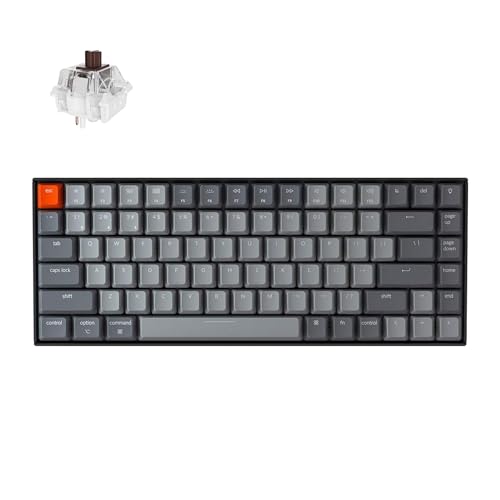
Key takeaways
- The K2 v2 is a 75 percent, 84-key wireless mechanical keyboard with Bluetooth pairing for three devices, USB-C wired mode, and switch options for different typing sounds and feels.
- Its front edge is tall for a compact board, so many owners pair it with a wrist rest; budget for that possibility from the start.
- The 4,000 mAh battery is a genuine strength, lasting weeks of office use with the backlight kept modest.
- There is no 2.4 GHz receiver mode, so competitive gamers should look elsewhere or plan to play wired.
- The newer K2 Ultra answers most of the v2’s age-related criticisms at a higher tier, which makes the v2 the value pick and the Ultra the upgrade pick.
In this guide
How the picks were chosen
The main pick is the long-running Keychron K2 Version 2 listing itself, verified against current catalogue data for this review, in its tactile brown switch configuration with RGB backlighting. It is the configuration we would hand to the widest range of buyers: quiet enough for shared rooms, tactile enough to teach clean typing habits. The second pick, the Keychron K2 Ultra, is included as an alternative only, and the text labels it that way wherever it appears, because it is a newer and different model rather than a revision of the v2. Nothing else is linked, and every other board mentioned is discussed in prose so the comparison stays honest.

Keychron K2 v2: the main review
Best for compact desks that still want a function row
- Layout: 75 percent, 84 keys with function row and arrow keys
- Connection: Bluetooth 5.1 for up to three devices, plus USB-C wired
- Switches: tactile brown configuration reviewed; other switch options exist
- Frame: plastic standard build, with an aluminium-frame variant in the range
- Battery: 4,000 mAh rechargeable cell
- Compatibility: Mac and Windows keycaps included, layout toggle on the board
The K2 v2’s defining decision is density. Keychron packed a function row, a navigation column’s worth of keys, and dedicated arrows into a case barely wider than a 65 percent board, and then stacked that case tall. Sit it beside a slimmer rival and the K2 looks almost old-fashioned, a small tower of a keyboard. Sit it on your own desk for a week and the logic emerges: the height buys a big battery, a rigid feel, and keys that travel the full mechanical distance, while the footprint buys back your mouse room.
Typing on the brown-switch configuration is a friendly, middle-of-the-road experience in the best sense. The tactile bump is present without being demanding, the stock stabilisers on this version behave themselves on the space bar, and the board’s weight keeps it planted when you type with enthusiasm. It is not a quiet keyboard in the way a damped premium board is quiet; it is an honest mechanical clack, moderated by the case’s mass. In a home office that is a pleasure. In a silent shared office it is a negotiation.
The stock keycaps are the v2’s most dated component. They are serviceable, legible, and clearly built to a price, with a texture that shows polish after a year of heavy use. The good news is that the board uses standard switch stems, so the enormous keycap aftermarket is open to it, and a cap swap is the single most satisfying upgrade a v2 owner can make. Our roundup of PBT keycap sets is the natural next read if you plan one.
Strengths
- Genuinely compact footprint that still includes a function row and real arrow keys
- Long battery life that makes wireless use feel carefree rather than managed
- Three-device Bluetooth with a physical Mac and Windows layout switch, plus both keycap sets in the box
Trade-offs
- Tall front edge encourages a wrist rest for many typists, adding cost and desk depth
- Bluetooth-only wireless, with no low-latency receiver option for gaming
- Stock keycaps feel ordinary and show wear sooner than the rest of the board
Best for: writers, students, and dual-system households who want one proven compact board for typing first and everything else second. Not suited for: competitive gamers, or buyers who want modern remapping and metal construction at this size without paying Ultra-tier money.

Keychron K2 Ultra: the newer alternative
Best for buyers who like the K2 idea but want current hardware
- Layout: 75 percent wireless layout in the K2 family tradition
- Connection: Bluetooth, 2.4 GHz, and wired modes
- Frame: aluminium construction with PBT keycaps
- Switches: hot-swappable tactile configuration in the verified listing
- Polling: high-rate wireless polling aimed at gaming as well as typing
The K2 Ultra reads like a point-by-point reply to a decade of K2 v2 feedback. The case is aluminium rather than plastic, the keycaps are PBT rather than the v2’s more basic set, the wireless system adds the 2.4 GHz mode the v2 always lacked, and the battery endurance figure in its listing belongs to a different era of power management. It keeps the family layout idea, the compact 75 percent block with a function row, so a v2 owner upgrading will feel oriented within minutes.
What the Ultra does not do is make the v2 pointless. It sits in a higher tier, and its extra hardware only matters if you will use it: the receiver mode for gaming, the metal case for feel, the endurance for travel. A typist who pairs over Bluetooth at one desk and charges monthly will extract little from the upgrade beyond satisfaction. Satisfaction is a legitimate reason to buy things, but a review should separate it from need, and the need case here is specific rather than general.
Strengths
- Tri-mode wireless finally covers gaming and typing with one board
- Aluminium frame and PBT caps remove the v2’s two most common complaints
- Very long battery endurance in its class, per the verified listing details
Trade-offs
- Higher tier pricing than the v2 it spiritually replaces
- Heavier, which matters if the board travels daily
- More features than a pure typist will ever touch
Best for: K2 fans upgrading, and new buyers who want the modern spec sheet in this exact layout. Not suited for: bargain hunters, for whom the v2 remains the rational K2.
Keychron K2 V2 Review: v2 and Ultra, side by side
The comparison that matters is not a spec race but a division of labour. Choose the v2 when your work is typing, your desk is fixed, your budget has opinions, and you value a board whose behaviour thousands of owners have already mapped. Its Bluetooth is stable, its battery is long, its layout is complete, and its weaknesses, the tall front, the plain caps, the missing receiver, are all known quantities you can plan around on day one.
Choose the Ultra when any one of three conditions holds: you game enough that wireless latency is a real variable in your evenings; you travel with your keyboard and want endurance that forgives forgotten cables; or you simply want the metal-and-PBT version of a layout you already love. Outside those conditions the Ultra is a nicer object rather than a better tool, and the price gap buys a wrist rest, a good keycap set, and a desk mat for the v2 with change left over.
Against the wider market, the v2’s position has narrowed but not vanished. Newer rivals undercut it on features per unit of money, yet few match its particular combination of a true function row, three-device Bluetooth, dual-system keycaps, and a battery that measures its life in weeks. Buyers comparing broadly should browse our survey of 75 percent mechanical keyboards before deciding, because the 75 percent class is where the K2’s grandchildren now compete.
Buying guide: configuring a K2 v2 correctly
Switch choice is the first decision and the one buyers most often rush. The tactile brown configuration suits the widest audience and is the one linked above. Linear switches are quieter and smoother, and suit gamers and feather-touch typists, at the cost of more accidental presses while you adapt. Clicky switches are for solitary rooms only. There is no wrong answer here, but there is a wrong way to choose, which is by sound videos alone; a switch’s feel under your own fingers at your own desk is the only test that counts, so buy from a seller whose returns policy lets your hands vote.
Frame choice comes second. The standard build keeps the board light and affordable. The aluminium-frame variant adds rigidity and a more settled sound, and it is the version long-term owners tend to praise, because the K2’s tall case benefits from the extra stiffness. If the board will live on one desk for years, the frame upgrade is easier to justify than if it will ride in a backpack, where the standard build’s lighter weight is its own feature.
Third, plan the wrist rest question before the board arrives. Measure your desk depth and your chair height, and be honest about your typing posture. The K2’s front edge is high enough that many owners type more comfortably with support, and discovering that on day three, with a week of wrist ache as the tuition, is the classic K2 rite of passage you are allowed to skip. A simple rest that matches the board’s width keeps the setup tidy.
Fourth, think about which computers the board must serve. The K2 v2’s three Bluetooth slots and layout toggle make it a natural hub for a Mac and Windows household, and the included keycaps mean both systems get correct legends. If your setup includes a console or a locked-down work machine that forbids Bluetooth pairing, remember the wired mode exists and keep the cable accessible rather than buried in the box.
How to set up and maintain a K2 v2
Setup begins with the two switches on the board’s side: one selects between Mac and Windows behaviour, the other between Bluetooth and wired operation. Set the layout switch to match your main computer before pairing, because pairing first and toggling later is the source of the classic complaint that the modifier keys are swapped. They are not swapped; the board is simply still in the other system’s mode, and the toggle is the whole fix.
Pairing works best done methodically. Put the board in Bluetooth mode, hold the pairing combination for the slot you intend to use, and select the keyboard on your computer when it appears. Repeat for a second and third device, then practise the slot-switching shortcut until your fingers know it, because in daily life the K2 is a small switchboard and fluency with its slots is the difference between a seamless desk and a puzzling one. If a slot ever misbehaves, deleting the pairing on both sides and starting that slot again resolves nearly everything.
Keycap and switch care follow the standard mechanical routine with one K2-specific note. The board’s tall case makes it a crumb collector, so a fortnightly shake-out over a bin and a pass with a soft brush keeps debris away from the switches. Caps pull straight up with a wire puller; work around the space bar slowly, supporting the stabiliser area with a fingertip, because large keys are where beginners apply the force that bends things. Readers fitting new stabilisers or replacing worn ones can follow the stabiliser installation walkthrough for the large-key hardware in detail.
Battery care is mostly a matter of rhythm. The 4,000 mAh cell is happiest with occasional full charges rather than constant topping up, and the backlight is the lever that decides how occasional occasional is. Run the light at the lowest useful brightness, or off if you touch type, and the board will go weeks between cables. Leave it at full brightness because it looks good in a dark room and you will meet the cable far more often; neither choice is wrong, but only one of them is a surprise.
Common mistakes with the K2 v2
Judging the board in its first hour is the most common mistake. The tall front and full-travel switches ask your hands to sit differently from a laptop keyboard, and an hour is not enough data. Give it the better part of a working week, ideally with the wrist rest question settled, before deciding it is not for you. Most negative first impressions of this board are posture problems wearing a keyboard costume.
Buying the clicky variant for a shared space is the second classic error, and it is unforced. The click bar in these switches cannot be quietened by typing gently, and no desk mat will save your colleagues. If there is any chance the board will be heard by other people, tactile or linear is the choice, and your future self will thank you every working day.
The third mistake is expecting receiver-grade gaming from a Bluetooth board. The v2 is a fine wired gaming keyboard and a perfectly good casual wireless one, but its Bluetooth link was designed for typing reliability, not for shaving milliseconds. Players who care should either plug in, choose the Ultra, or look at our roundup of wireless mechanical keyboards where low-latency models are the point.
Fourth, owners sometimes blame the board for modifier confusion that belongs to the layout toggle, or for wake-up lag that belongs to a computer’s aggressive Bluetooth power saving. Both are five-minute fixes in settings once identified. The K2’s long ownership history means nearly every symptom you can name has a documented cause, and searching by symptom before concluding the hardware is faulty will save you a needless return.
Sound, feel, and the enthusiast question
Enthusiasts sometimes dismiss the K2 v2 as a beginner’s board, and the description is accurate without being an insult. It was designed to be bought, used, and understood without a hobbyist’s toolkit: no firmware adventures required, no switch science prerequisite, no assembly weekend. Its sound is a straightforward mechanical clack, its feel is a straightforward tactile or linear stroke, and its pleasures are the uncomplicated ones of a tool that works every morning.
That said, the board tolerates curiosity gracefully. Keycaps swap freely, the case opens for those who want to add damping material, and the community’s decade of small modifications is documented everywhere. Many owners started with a stock v2 and ended up, a year later, with a personalised board and a new hobby they never intended to acquire. If that path appeals, the slimmer sibling in our Keychron K3 review of the ultra-slim wireless model shows the opposite design philosophy, and reading both reviews back to back is a quick education in what profile height does to a typing life.
What the v2 will not become, however much you modify it, is a modern tri-mode board or a gasket-mounted showpiece. Its bones are its era’s bones. Accepting that is the key to enjoying it: judged as a proven, affordable, compact typing instrument, it remains easy to recommend; judged as a 2026 flagship, it was never entered in that contest.
The 75 percent layout, examined closely
The K2’s layout earns its keep in the details. The function row is full width and normally spaced, which matters more than it sounds: boards that compress the F-keys into a narrow strip punish the developers, spreadsheet users, and gamers who actually use them. Here they are real keys, and the media shortcuts ride along through the fn layer without displacing anything a typist needs hourly. Delete sits at the end of the row where a lifetime of laptop use says it should, and the arrow cluster in the corner is slightly separated, so your fingers find it by touch rather than by hunting.
Compromises exist, and honesty requires listing them. Home, end, page up, and page down live on the fn layer, which writers who navigate long documents by keyboard will feel daily until the combinations become automatic. The right shift key is full size, a kindness not every compact board offers, but the key beside the arrows crowds the cluster enough that fast typists occasionally clip the wrong key during their first week. These are the ordinary taxes of the 75 percent format, and the K2 collects them about as gently as the format allows.
Compared with its slimmer sibling the K1, whose story is told in our Keychron K1 v4 review, the K2 trades travel convenience for typing substance: more key travel, more cap choice, more battery, more height. Compared with a full-size board it trades the number pad for a desk you can see. Most buyers choosing between those poles already know which loss they mind less, and the K2 rewards the ones who mind desk space least and key travel most.
Travelling with a K2 v2
The board was not designed as a travel keyboard, its height and weight say so, yet thousands of them travel anyway, because the layout is the one their hands know. If yours will, treat it as you would a camera: a padded sleeve, the cable coiled separately so its connector cannot press into the keys, and the board riding flat rather than wedged. A keyboard that arrives with a bent space bar wire has usually been packed by optimism rather than by method.
On the road the three Bluetooth slots become the feature. Laptop on one slot, tablet on the second, phone on the third turns a hotel desk into a small command centre, and the wired mode covers the conference-room machine that forbids pairing. Battery endurance stops being a statistic and becomes the reason the charger can stay in the bag. This is the scenario where the v2’s age matters least and its fundamentals matter most.
For genuinely frequent flyers, though, the honest pointer is toward the low-profile end of the family or the wider field in our low-profile mechanical keyboards roundup. A board half the K2’s height disappears into a laptop bag in a way the K2 simply cannot, and pretending otherwise would be the kind of review-writing that gives reviews a bad name.
Long-term ownership: what wears and what lasts
Years of owner reports draw a consistent map of this board’s ageing. The battery is the marathon runner: even well-used v2 units commonly hold a charge that keeps the board in weekly-or-better charging territory, because the cell was generously sized to begin with. The keycaps are the sprinters that fade early, polishing under the fingers and asking for a replacement set that most owners end up enjoying as a refresh rather than resenting as a repair.
The switches age gracefully in tactile and linear form, with failures rare enough to be notable. The Bluetooth radio either works or, very occasionally, a unit develops pairing stubbornness that a firmware refresh and a clean re-pair resolves. The case’s tall walls protect the board in bags and drops better than slim boards fare, and the aluminium variant shrugs off the corner dings that mark plastic units. Nothing about the v2’s ageing pattern should frighten a buyer who has read this far; it is a board whose old age is documented, predictable, and mostly cosmetic.
Support is the one dimension where age genuinely costs you. Keychron’s attention lives with its current models, so v2 owners lean on community knowledge for the unusual questions. Fortunately the community is enormous and the questions have all been asked. A buyer who values a manufacturer’s live attention over a design’s proven record should weigh the Ultra accordingly.
Who should buy which K2
The student with a laptop, a small desk, and essays to write should buy the v2 without a second thought: it is affordable, complete, forgiving of beginners, and tough enough to survive being shoved into a bag between lectures even if it was not born for the job. The home worker splitting a desk between a Mac laptop and a Windows desktop should also buy the v2, and should specifically value the layout toggle and dual keycaps that make that split feel designed rather than improvised.
The player who types all day and games all evening is the Ultra’s natural customer, because the receiver mode and high polling are features that only reveal their worth across hundreds of evenings. The traveller who works from a different city each month should look at the Ultra’s endurance or at a low-profile board, depending on whether their hands prefer full travel or their bag prefers thinness. And the enthusiast who wants a modding platform should buy neither as a first choice, starting instead from our look at hot-swappable mechanical keyboards, while knowing the v2 has launched more hobbyists than most purpose-built kits.
Everyone else, the large middle of people who simply need a good keyboard, should let price and switch preference decide between the two K2s and stop deliberating. Both boards type well, both carry the family layout, and the difference between a good decision made today and a perfect decision made next month is a month of typing on whatever came with the laptop.
Ergonomics: living with the tall front edge
The K2’s height deserves a section of its own because it decides more ownership outcomes than any specification on the box. A tall keyboard on a standard desk asks the wrists to extend upward unless the whole workstation compensates: chair raised so forearms float level, feet supported, board pulled close enough that elbows stay near the body. Set up that way, the K2’s height is a non-issue and its full-travel keys feel luxurious. Set up carelessly, on a high desk from a low chair, the same board produces the wrist ache that fills its negative reviews.
The wrist rest question follows from the geometry. A rest is for resting, in the pauses between sentences, not a platform to type from; planting your wrists and reaching for keys from a fixed point strains exactly the structures a rest is meant to protect. Owners who learn that distinction usually find the K2 comfortable for full working days. Owners who type from a planted position often blame the board for a habit, which is understandable and also fixable without spending anything.
Keychron built a gentle incline into the case rather than offering adjustable feet, so the typing angle is a take-it-or-leave-it proposition. Most hands accept it within days. If your current board sits perfectly flat and you love it that way, borrow or trial the K2 before committing, because angle preference is one of the most personal variables in typing and no review can settle it for your wrists.
The K2 v2 in Mac and Windows households
Dual-system support sounds like a bullet point until you live in a house where it matters. The K2’s approach, a hardware toggle plus a full set of keycaps for each system, means a Mac user gets a command key where their thumb expects it and a Windows user gets a properly labelled alt and Windows key, on the same physical board, in the same afternoon. Households sharing one desk between a work Mac and a gaming PC extract more value from this than from any switch technology.
The function row honours the toggle as well, behaving as media keys or F-keys according to the system and a simple shortcut, which removes the small daily friction of a board that is almost compatible. It is the kind of detail that never headlines a product page and quietly decides whether a keyboard gets recommended at dinner parties. The v2 built its reputation substantially on such details, and they have not expired.
Value, judged against 2026 shelves
The v2’s modern role is the known quantity at a fair tier. Newer boards beat it in feature lists; few beat it in the confidence that comes from a design whose every behaviour has been witnessed by an enormous owner base. For a first mechanical keyboard, that confidence is worth real money, because the beginner’s actual risk is not buying a board that is five percent less optimal but buying one whose quirks they cannot diagnose. With the v2, every quirk has a name, a cause, and a forum thread.
Second-hand, the same logic applies with the usual cautions from our K1 coverage: verify the version, test the space bar, ask about the battery. A used v2 in good order is one of the safest entries into mechanical typing that exists, and the board’s toughness in bags and drawers means good used examples are common rather than rare.
A week with the board: the diary version
Day one with a K2 v2 is mostly about hands learning geography. The layout is complete enough that nothing essential goes missing, yet compact enough that the right hand’s landmarks have moved. Delete is where it should be, the arrows are a short drop away, and the function row sits closer than on a full-size board. Most typists report the small strangeness of reaching for a number pad that is not there, a ghost habit from their previous keyboard rather than a flaw in this one.
By day three the board’s personality asserts itself. The tactile switches have taught your fingers their actuation point, so keystrokes get shorter and quieter without any conscious effort. The Bluetooth swap between a laptop and a tablet stops feeling like a feature and starts feeling like plumbing, invisible and essential. This is also the day the wrist question usually gets answered, one way or the other, and the day a rest gets ordered by the owners who need one.
By day seven the K2 has typically disappeared into the work, which is the highest praise a tool can earn. What remains noticeable is what the board removed: the desk space a full-size keyboard used to occupy, the cable that used to cross it, and the small daily negotiation with a laptop keyboard’s shallow keys. Owners who reach this point rarely return the board. Owners who do not reach it almost always cite the height or the sound, both of which this review has flagged from the first page, because a review’s job is to make day seven predictable on day one.
Sound check: what the neighbours hear
A mechanical keyboard is a musical instrument whether it wants to be or not, and the K2 v2’s voice is a bright, businesslike clack with the space bar as its bass note. On a bare desk the sound carries; on a mat it shortens and softens noticeably, which is why a mat is the first accessory we suggest to owners in shared rooms. The tactile and linear configurations sit at the polite end of mechanical noise. The clicky configuration does not, and no accessory diplomacy changes that.
Microphone behaviour matters to anyone who works on calls. The K2’s noise is high-frequency and brief, the kind that noise suppression handles well and that colleagues describe as typing rather than as disruption. Compare that with the hollow boom of a cheap full-size board and the v2 comes off as the considerate option. If your work is recorded, podcasts or narration, record a test paragraph before a session rather than discovering the board’s voice in an edit; that advice applies to every mechanical keyboard and the K2 is no exception.
What we would change, if Keychron asked
A fair review names its wishes. Ours for the v2 are modest because the design is settled: PBT keycaps as standard, a shallower front lip or optional feet to soften the height question, and a battery indicator more informative than a hopeful blink. The Ultra answered several of these in its own way, which suggests the company kept its own list. What we would not change is the layout, the toggle, or the battery size, the three decisions that made the board’s reputation and still carry it.
There is a temptation, in reviewing a long-lived product, to score it against the future it helped create. Resist it. The K2 v2 should be scored against the desk in front of you and the work you do at it. On that test, in 2026, with its price where it sits and its behaviour this well documented, it passes in the way that matters: owners type on it for years and replace it, when they do, mostly out of curiosity rather than complaint.
Choosing between the K2 v2 and the rest of the family
Buyers inside the Keychron family face a pleasant maze, so here is the short map. The K1 line, low and flat, serves laptop natives who want minimal change to their hand posture. The K3 line pushes that slimness further into a 75 percent shape. The K2 stands for full travel in a compact block. The K6 and K8 and their relatives vary the footprint and the extras. The v2 specifically is the K2 in its most proven, most affordable form, which is why it anchors this review and why its listing is the one linked at the top of the page.
The practical way through the maze is to decide two things in order: how tall a keyboard your wrists and desk want, and how much wireless modernity your evenings require. Height first, because it shapes every hour; wireless second, because it shapes some hours greatly and others not at all. Answer those and the family sorts itself, with the v2 waiting at the sensible end of the full-travel branch.
One more consideration belongs to households rather than individuals: standardising on one board model across two desks simplifies everything from spare keycaps to troubleshooting, and the v2’s dual-system support makes it the family member best suited to being standardised on. There are worse reasons to choose a keyboard than the fact that everyone in the house already knows where its delete key lives.
The three switch personalities, compared honestly
Because the v2’s switch choice cannot be undone with a setting, it deserves direct comparison. The linear configuration is the smooth ramp: no bump, no click, a clean press from top to bottom. It rewards a light touch and punishes a heavy resting hand with stray characters until your fingers learn their manners. Gamers and fast, feather-light typists tend to settle here, and it is the quietest of the three in ordinary use.
The tactile configuration is the teacher. Its bump tells your finger the key has fired before the bottom arrives, which trains the economical typing style that makes mechanical boards faster than membrane ones over a long day. It is slightly louder than the linear, still civilised, and it is the configuration linked at the top of this review because it serves the broadest range of hands without asking them to change first.
The clicky configuration is the performer, with a deliberate snap and a sound designed to be heard. In a solitary room it is genuinely joyful, the typewriter fantasy in a compact case. Everywhere else it is a liability that no amount of typing skill can soften. Choose it only if the room is yours, and know that its resale audience is the smallest of the three if your circumstances change.
Whichever you choose, give it a fortnight before judging. Switch preference is partly physiology and partly habit, and habit needs time to form an opinion worth trusting. The v2’s popularity means switch testers and generous return windows are easy to find; use them rather than guessing from videos, because your fingers are the only reviewers whose verdict you will live with.
Desk setups the K2 flatters
The board flatters the small desk most of all. Its footprint returns the right side of the desk to the mouse and the notebook, and its wireless link removes the cable that used to bisect the workspace. Add a monitor or a laptop stand and the result is the canonical tidy setup that product photos promise and this board, unusually, delivers without accessories beyond the rest some owners want.
It also flatters the shared desk, where two people with two systems trade places. The toggle and the dual keycaps turn a handover into a ten-second ritual instead of a settings expedition, and the three Bluetooth slots mean each person’s machine keeps its own pairing. Households that share hardware will find this the v2’s most valuable talent, ahead of anything to do with switches.
The desk it flatters least is the competitive gaming station, where its Bluetooth and its era’s electronics sit beside monitors and mice built for speed. Even there, wired, it holds its own for all but the most demanding play. A keyboard does not have to win every desk to deserve its reputation; it has to win the desks it was built for, and by that measure the v2’s record is long and consistent.
Reliability, returns, and the sensible way to buy
A final practical word. The v2 has been sold through many channels over many years, and listings vary in switch, frame, and backlight configuration under similar names. Before ordering, read the listing’s configuration line the way you would read a train ticket: switch type, frame, backlight, and layout, confirmed one by one. Most disappointed K2 buyers in the world were not sold a bad keyboard; they were sold a different configuration than the one they pictured, and the difference was printed on the page they skimmed.
When the board arrives, run a ten-minute acceptance routine: every key on a test page, the space bar at both ends, each Bluetooth slot paired and swapped, the layout toggle in both positions, and a charge cycle started. Faults on a new board declare themselves in that routine or not at all, and finding them inside the return window is the difference between an exchange and an argument. Keep the box until the routine is done. It is unglamorous advice, and it is the advice that separates owners who love this board from owners with a story.
It is worth closing the analysis where the board itself lives: in the ordinary weekday. The K2 v2 does not ask to be admired, upgraded on a schedule, or discussed at length, though it tolerates all three. It asks to be charged occasionally, wiped down now and then, and otherwise left to make typing feel deliberate. Keyboards that understand their job this clearly are rarer than keyboards with longer feature lists, and the v2’s decade of service suggests its understanding was correct. That is the context in which its remaining limitations should be weighed: not as failures to be the newest thing, but as the settled choices of a design that picked its priorities early and kept them.
One more audience deserves a direct word: the buyer replacing a broken keyboard tonight, under deadline, who has no time for a hobby. For that buyer the v2 is close to a perfect answer. It pairs in minutes, its layout needs no learning layer for ordinary work, its battery arrives with enough charge to start, and its behaviour is predictable from the first hour. Enthusiasts can afford to optimise; the rest of the world needs a board that simply works, and the v2’s entire career has been built on being that board.
And a word for the gift buyer, since this board is given often: choose the tactile configuration, include a simple wrist rest in the box, and let the recipient discover the rest. It is one of the few tech gifts that improves a daily ritual without demanding a new one in return, which is why it keeps being given, year after year, by people who received one themselves.
Students heading into a new term make up another large share of this board’s owners, and the fit is easy to explain. Dorm desks are small, library sessions reward a keyboard that pairs to a laptop and a tablet in turn, and a board that survives being carried in a backpack all semester without complaint earns loyalty that lasts into first jobs and home offices. The v2 has been carried through more degrees than most textbooks, and its used market is replenished every graduation by owners upgrading rather than replacing a failure.
Finally, a note on colour and finish, because the K2’s grey-and-accent livery is part of its identity. The two-tone keycap scheme with its coloured escape key has become so associated with this board that owners recognise it across a room. Finishes vary slightly between production runs and configurations, so a buyer set on an exact look should confirm from the listing photographs rather than from memory of a friend’s board. It is a small thing, and small things are what a keyboard you see all day is made of.
There is also the simple matter of desk tidiness as a working advantage. A compact wireless board removes the visual noise of a full-size keyboard and its cable, and many owners report that the cleared space changes how the desk feels to sit at: more like a writing desk, less like a control panel. Productivity claims for tidiness are easy to overstate, but the preference is real and widely shared, and the K2’s tidy footprint is one of the reasons it photographs so well in the setups of people who work at home.
If you are upgrading from the K2’s first version, the v2 differences you will actually feel are the steadier large keys, the more consistent switch batches, and small refinements to the case and legends rather than any change in character. It is the same board with its homework done, which is precisely what a version two should be, and why the v2, rather than the original, became the default recommendation that this review set out to examine.
Final recommendation
The Keychron K2 v2 is not the newest compact keyboard you can buy, and this review has not pretended otherwise. It is something arguably more useful: the most thoroughly understood one. Its layout is complete, its battery is generous, its dual-system manners are impeccable, and its flaws are the documented, plannable kind. At its tier it remains the K2 we hand to typists first. Buy the Ultra instead when gaming latency, metal construction, or maximum endurance is a genuine requirement rather than a preference, and buy the v2 with confidence when the requirement is simply a keyboard that will make your working days quieter, quicker, and tidier for years.
Frequently asked questions
Is the Keychron K2 v2 good for typing all day?
Yes, with the wrist rest caveat. The full-travel switches and complete layout suit long writing and coding sessions, and the tactile configuration helps pace your keystrokes. Because the front edge is tall, many typists are more comfortable with a rest for support between bursts of typing; settle that question early and the board is an all-day instrument.
Can the K2 v2 connect to three devices?
It can. The board pairs over Bluetooth with up to three devices and swaps between them with a key combination, and it also runs wired over USB-C. A physical toggle switches its modifier behaviour between Mac and Windows layouts, and both systems’ keycaps are included in the box.
Does the K2 v2 work for gaming?
Wired, it is a perfectly capable gaming keyboard with full key rollover for ordinary play. Over Bluetooth it suits casual gaming but not latency-sensitive competition, because this version has no 2.4 GHz receiver mode. Players who need fast wireless should choose the K2 Ultra or a gaming-focused board.
What is the difference between the K2 v2 and the K2 Ultra?
The Ultra is a newer, higher-tier model in the same family: aluminium construction, PBT keycaps, tri-mode wireless including a 2.4 GHz receiver, high-rate polling, and much longer rated battery endurance. The v2 is the simpler, more affordable original formula. They share a layout philosophy, not a parts list.
Are the K2 v2 keycaps replaceable?
Yes. The board uses standard mechanical switch stems, so the large aftermarket of keycap sets fits, and replacing the stock caps is the most popular upgrade owners make. The space bar uses standard stabiliser spacing for its class; when removing large keys, support the key and pull evenly to protect the stabilisers.
How long does the K2 v2 battery last?
The 4,000 mAh battery is one of the board’s strengths. With the backlight low or off, ordinary office use stretches to weeks between charges; bright backlighting shortens that considerably. Charging rhythm depends mostly on how you run the light, so set brightness deliberately rather than leaving it at maximum by default. Readers building overall typing speed alongside new hardware may also enjoy how to type faster.


