Disclosure: As an Amazon Associate, reviewstook.com earns from qualifying purchases. Links on this page are affiliate links; they cost you nothing extra. Prices and availability change often, so check the current Amazon listing before you buy.
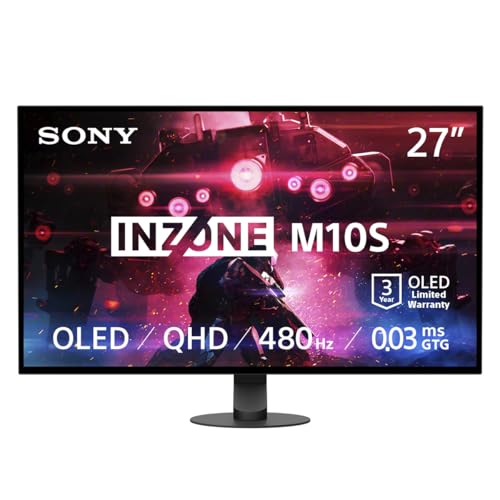
The inzone m10s is Sony’s esports monitor in its purest form, and its verified listing reads like a tournament specification: a 27-inch 1440p OLED panel running at 480Hz, a 0.03ms grey-to-grey response time, a dual screen-size mode that shrinks the image to a 24.5-inch competitive format, a low-profile stand, G-SYNC compatibility, anti-glare treatment, a custom heatsink for the panel, and a three-year OLED limited warranty. Every item in that list answers a specific demand of competitive play, and none of them is there for the brochure. This guide examines what 480Hz OLED actually delivers to a player, who can use it — because the graphics card question is inseparable from the monitor question — how the dual-size mode and the stand design serve tournament habits, what OLED ownership honestly involves over years, and how the M10S compares with Sony’s own 4K M9, the very different INZONE monitor covered here as the alternative.
Context helps, because the M10S sits at the meeting point of two monitor revolutions that arrived together. The first is refresh rate: the climb from 60Hz through 144Hz and 240Hz to the 480Hz class, each step shrinking the time between frames and the delay between your input and its visible result. The second is OLED’s arrival in gaming monitors, replacing the liquid-crystal panel’s smeared transitions with pixel response so fast that motion clarity stops being a specification and becomes a sensation. Either revolution alone produced excellent monitors. Together they produce something players describe in a particular way: not that the image looks better, but that it feels connected — the crosshair and the hand in unusual agreement. The M10S is Sony’s entry in that combined class, designed with tournament players rather than living-room gamers, and this guide judges it on competitive terms first, while keeping an honest account of what its specialisation costs everyone else.
A warning belongs at the front, because this monitor’s headline number is also its biggest misunderstanding. A 480Hz panel displays 480 frames per second only when the game and the graphics card deliver them; at 120 frames per second it is, in effect, a very good 120Hz experience with excellent response. The monitor does not manufacture frames, and buying it for a system that cannot feed it is the most expensive mistake in this category. The buying guide therefore treats your graphics card and your games as part of the product, and the guide’s recommendation splits cleanly: for the competitive player whose system and titles can feed it, the M10S is close to a final answer; for everyone else, it is a beautiful solution to a problem they do not have, and the M9’s 4K clarity or a humbler 240Hz panel will serve them better for less.
Key takeaways
- 480Hz at 1440p on OLED is a competitive instrument: motion clarity and response are its entire argument
- Your graphics card must feed it — audit your real frame rates in your real games before buying
- The 24.5-inch dual-size mode replicates the tournament format on a 27-inch panel
- The low-profile stand is a competitive feature, freeing desk depth for keyboard and mouse placement
- OLED ownership includes care habits and a burn-in conversation, softened here by a heatsink design and a three-year OLED warranty
Where to buy the Inzone M10s
The linked listings in this guide go to Amazon, and each product section carries a plain link so you can check price on Amazon and confirm the listing before ordering. For the M10S, confirm the listing names the M10S with its 480Hz 1440p OLED specification — Sony’s INZONE monitor range includes the 4K M9 in this guide and other models whose listings borrow similar language, and a refresh-rate digit dropped in a marketplace title is a different product arriving in the box. Confirm the stand type and the warranty terms as described, since the three-year OLED limited warranty is part of this purchase’s value. If the M10S is unavailable in your region, the M9 section explains the 4K alternative’s genuinely different proposition so that a substitution is understood as a change of philosophy, not a downgrade by default.
In this guide
Quick picks at a glance
| Product | Panel | Best for |
|---|---|---|
| Sony INZONE M10S | 27-inch 1440p OLED, 480Hz | The subject of this guide: competitive players with the GPU to feed it |
| Sony INZONE M9 | 27-inch 4K IPS, 144Hz, full-array local dimming | Visual-first players, console owners, and mixed work-and-play desks |
How these picks were chosen
Both monitors were verified against Amazon’s catalogue data before this guide was drafted: each listing title had to name the exact model, state the panel and refresh specification the guide discusses, and carry an official product image. The pairing stages the real decision an INZONE shopper faces, which is not brand versus brand but speed versus resolution inside one design family. Other esports monitors exist in the market and are discussed in prose where they clarify the class, but they are not linked here, because they could not be verified to the standard this guide requires and because the Sony pair frames the fork completely: the same desk, the same brand language, two opposite answers to what a gaming monitor is for.
What 480Hz and 0.03ms actually feel like
Numbers first, translated. At 60Hz a frame lasts about sixteen milliseconds; at 480Hz it lasts about two. Input lag, motion blur, and the sense of connection between hand and screen all live inside those milliseconds, and competitive players — whose opponents are other humans exploiting the same physics — feel differences that a specification sheet makes look trivial. The OLED half of the equation matters as much as the refresh half. A liquid-crystal pixel takes milliseconds to change state, so even a very fast LCD smears moving detail; an OLED pixel changes in the 0.03ms class the listing quotes, so a 480Hz OLED frame is not merely frequent but clean. The combined experience, in a fast shooter, is tracking that stays readable during violent mouse movement: targets remain shapes rather than streaks, and the micro-corrections a good player makes mid-flick land on information that is still true. Players upgrading from 144Hz LCD describe the jump in the language of connection rather than of beauty, and that vocabulary is the most reliable review this class of monitor has.
Honesty requires the diminishing-returns paragraph, and here it is. The leap from 60Hz to 144Hz transforms play for almost everyone; from 144Hz to 240Hz it rewards most competitive players; from 240Hz to 480Hz it rewards the fast, the young-eyed, the highly ranked, and the players of genuinely high-frame-rate titles — and it is wasted entirely on games capped at lower rates and systems that cannot reach them. There is no shame in being served fully by 240Hz, and there is no virtue in buying 480Hz as a status object. The M10S is a professional instrument with a professional’s narrowness, and this guide’s respect for it is exactly proportional to its refusal to pretend otherwise. Judge your own play — your titles, your frame rates, your rank, your eyes — against that paragraph before the rest of the guide persuades you of anything.

Sony INZONE M10S 27-inch 1440p 480Hz OLED Gaming Monitor
Badge: The main pick — the tournament instrument
- Panel per the verified listing: 27-inch 1440p OLED at 480Hz
- Response: 0.03ms GtG
- Modes: 24.5-inch dual screen size for competitive format play
- Sync: G-SYNC Compatible; finish: anti-glare
- Panel care: custom heatsink; three-year OLED limited warranty
- Stand: low-profile design
The dual screen-size mode is the feature that reveals who designed this monitor and for whom. Professional FPS play converged years ago on the 24-to-25-inch class at close viewing distances, because a smaller image keeps the whole scene — minimap, corners, crosshair — inside the useful field of view without head movement. A 27-inch panel is better for everything else in a player’s life, so the M10S offers both: full 27-inch immersion for general play and media, and a 24.5-inch windowed format that replicates the tournament geometry on the same desk, at the same seating position, with the same muscle memory. Players who compete online in the small format and relax in the large one no longer choose between two monitors or accept a compromise size. It is a small feature in a listing and a large one in a season, and it signals that the design team asked actual tournament players what their desks look like.
The stand makes the same point in furniture form. A low-profile stand is not an aesthetic preference in this class; competitive players pull the monitor close, angle their keyboards, and use desk depth as a performance resource, and a deep, splayed stand taxes all three habits. The M10S’s stand keeps its footprint tight to the panel, letting the screen sit where the player’s posture wants it and leaving the desk’s front half to the keyboard and the mouse’s wide arcs. Combined with the anti-glare finish — chosen because tournament and bedroom lighting alike are uncontrolled — the physical design consistently serves the seated competitor rather than the showroom photograph. None of this will appear in a frame-rate chart, and all of it will be felt in the first week by the player the monitor was built for.
The heatsink and the warranty belong in the main review rather than a footnote, because they are Sony’s answer to the OLED question every informed buyer asks. OLED panels manage their own longevity through pixel care, and sustained brightness generates heat that a custom heatsink is designed to move away from the panel — an engineering investment in the panel’s long, even life. The three-year OLED limited warranty then puts a contractual floor under that engineering. Neither eliminates the burn-in conversation, which the ownership section below conducts honestly, but together they move the M10S from the fragile-early-adopter category into the warranted-professional-tool category, which is where a monitor at this level must live. Buyers comparing across the 480Hz class should weigh panel-care engineering and warranty terms with the same seriousness as refresh rates, because at these prices the monitor is a multi-year commitment.
Strengths
- 480Hz OLED motion clarity and response are the current ceiling of competitive display technology
- Dual-size mode and low-profile stand are designed from real tournament desk habits
- Heatsink engineering and a three-year OLED warranty treat longevity as a first-class feature
Trade-offs
- Demands a high-end graphics card and high-frame-rate games to justify itself at all
- 1440p at 27 inches is a competitive choice, not a sharpness showcase, for media and work
- OLED care habits and static-content caution join your routine permanently
Best for: ranked competitive players in fast titles, with systems that sustain very high frame rates. Not suited for: cinematic gamers, console-first players, and anyone whose GPU lives below the high end.

Sony INZONE M9 27-inch 4K 144Hz Gaming Monitor
Badge: The resolution-first alternative
- Panel per the verified listing: 27-inch 4K HDR, 144Hz
- Backlight: full-array local dimming
- Connectivity: HDMI 2.1, for full-bandwidth console and PC play
- Sync: NVIDIA G-SYNC compatible
The M9 is not the M10S’s lesser sibling; it is the answer to the opposite question. Where the M10S spends everything on speed at 1440p, the M9 spends its budget on resolution and image quality: a 4K panel whose sharpness transforms strategy games, cinematic titles, and desktop work, full-array local dimming for HDR contrast that a basic edge-lit panel cannot approach, and HDMI 2.1 so a current console’s 4K high-refresh output arrives intact. Its 144Hz refresh is, by the standards of the monitor it shares this guide with, modest — and by the standards of human play in most genres, entirely ample. The buyer choosing between these two Sonys is really choosing a primary sense: the M10S serves the hand, the M9 serves the eye. Mixed desks — work by day, games by night, a console beside the PC — belong to the M9 almost by definition, and its owners will never once envy the M10S during a spreadsheet, a photograph edit, or a slow beautiful game. That is not a consolation prize; for most desks it is the correct monitor, and this guide says so without hedging.
Strengths
- 4K sharpness transforms work, media, and visually rich games
- Full-array local dimming gives HDR real contrast to work with
- HDMI 2.1 makes it the natural console partner of the two
Trade-offs
- 144Hz cannot follow the M10S into the highest competitive tiers
- 4K gaming demands serious GPU power of its own, at the opposite end of the frame budget
- No OLED-class pixel response or dual-size tournament mode
Best for: visual-first players, console owners, and work-and-play desks. Not suited for: ranked FPS specialists chasing every millisecond.
Speed versus resolution: the fork, stated plainly
| Monitor | Resolution | Refresh | Panel | Primary sense served |
|---|---|---|---|---|
| INZONE M10S | 1440p | 480Hz | OLED | The hand — response and clarity in motion |
| INZONE M9 | 4K | 144Hz | IPS with full-array dimming | The eye — sharpness and HDR image quality |
Every gaming monitor purchase is this fork wearing different clothes, because a graphics card’s frame budget can be spent on more frames or on more pixels but not, at the frontier, on both. The M10S and M9 simply make the fork impossible to dodge by putting both answers in one brand’s line at one size. The discipline this guide recommends is to decide the fork from your five most-played games and your actual working day, not from the game you might buy or the rank you might reach. A monitor lives on a desk for years and serves every hour on it; the honest census of those hours, not the highlight reel, is the buying instrument. Players who split their hours evenly and can afford only one panel should notice that the M9’s compromises are gentler for the mixed life, while the M10S’s compromises are gentler for the competitive life — and then count their hours again, carefully. Those building a full competitive station may also want the best gaming monitors across brands for the wider field.
Buying guide: the graphics card audit comes first
Before any monitor research, open your five most-played competitive titles, set them to the settings you actually compete at, and record the frame rates your system sustains in real matches — not in menus, not in benchmarks of other people’s systems. That single honest table decides this purchase. If your titles and card sustain frame rates in the high hundreds, the M10S has something to show you that no other class of monitor can. If they live between 144 and 240, a 240Hz-class panel captures nearly everything your system offers and the M10S’s ceiling goes unused every single day. If they live below that, the monitor money is better spent on the graphics card first and the display second, in that order, however unglamorous the sequence feels. Esports titles are famously kind to hardware — their engines are built to run fast on modest cards at competitive settings — so do not assume your mid-range card disqualifies you; measure it, at your settings, in your games.
Second, decide the size question with your desk rather than with your ambitions. The M10S’s dual mode means the 27-inch format no longer forces the old 24-versus-27 dilemma, but the panel still needs a desk deep enough to sit at your playing distance and a posture that puts your eyes at its centre. Third, plan the whole signal chain: a cable and port standard that carries 1440p at 480Hz without compromise, a desk layout that honours the low-profile stand’s gift of space, and — for OLED — a usage pattern you are willing to keep, with static desktop elements treated kindly as the ownership section describes. Finally, weigh the warranty as a priced feature. At this level, the difference between a one-year and a three-year OLED warranty is a difference in the product itself, and it belongs in the comparison table in your head alongside the refresh rate.
How to set up the Inzone M10s for competitive play
Step 1: Connect with the right cable and port
Use the highest-bandwidth connection your graphics card and the monitor share, with a cable rated for it, and then verify in your operating system’s display settings that the panel is actually running at its full refresh rate — the single most common esports-monitor disappointment is a 480Hz panel left at a default lower rate for an entire season. Set the resolution to the panel’s native 1440p and confirm the game agrees.
Step 2: Choose your screen size per game
Configure the 24.5-inch mode for the titles you compete in and the full 27 inches for everything else, then play a week before judging either. The smaller format’s discipline — everything inside your central vision — takes a few sessions to feel like an advantage rather than a reduction, and it deserves those sessions before a verdict.
Step 3: Dial response and sync settings deliberately
Enable G-SYNC where your setup supports it, cap frame rates a few frames below the panel’s maximum in competitive titles for the smoothest delivery, and test the monitor’s response and black-frame options if offered — in short sessions, in your main game, one change at a time. Settings folklore copied from a forum is no substitute for your own A/B in the title you actually play.
Step 4: Set brightness for the room and the panel’s sake
Set brightness for comfortable play in your room’s real lighting rather than at the panel’s maximum, which serves your eyes across long sessions and your OLED across long years simultaneously. Enable the panel’s care features — pixel refresh cycles, logo and static-element protections — and let them run on the schedule the manufacturer intends rather than disabling them for convenience.
Step 5: Position the desk around the stand’s gift
Place the monitor at your measured playing distance, keyboard angled as you compete, mouse space cleared to the full width of your lowest sensitivity habit. The low-profile stand has given you the desk’s front half; spend it on posture and mouse room, the two physical variables that actually move competitive performance. Players completing a station build can continue with competitive gaming keyboards and gaming headsets with surround sound.
Common mistakes with high-refresh OLED monitors
The first and most expensive mistake is buying the refresh rate your system cannot feed, which the audit in the buying guide exists to prevent. The second is leaving the panel at a default refresh rate in the operating system and competing for months at a fraction of the purchase — check the setting on day one and after every driver upheaval. Third, treating an OLED like an LCD at the desktop: static toolbars, fixed HUD-like desktop widgets, and maximum brightness held for years are the habits panel care exists to soften, and ignoring them is a choice with a visible invoice. Fourth, judging the monitor on a cinematic game in the first evening and returning a competitive instrument for failing a test it never entered. Fifth, neglecting the cable: an elderly or under-rated cable that negotiates the connection down silently is the stealthiest performance thief in the whole setup, and it costs the least to eliminate.
OLED ownership, conducted honestly
Burn-in is the word every OLED buyer must make peace with, so let this guide make the peace accurately. OLED pixels age with use, and static content displayed at high brightness for very long cumulative hours can age unevenly into visible retention. The modern mitigations are real: panels run their own refresh and shifting routines, this monitor adds heatsink engineering for thermal headroom, and a three-year OLED warranty stands behind the result. The owner’s share of the bargain is behavioural and light: vary your content, let the panel’s care cycles run, use a screensaver or display sleep at the desktop, keep brightness at the level your room needs rather than at maximum, and do not leave a static news channel or a fixed game HUD burning unattended for days. Gamers, whose content is naturally varied and full-screen, are among the kindest OLED owners by accident. The heavy-desktop user — one static application, all day, every day — is the profile that should think hardest, and for that profile the M9’s LCD panel in this guide is the lower-maintenance professional choice. Stated that plainly, OLED ownership is a set of habits, not a hazard, and the M10S’s engineering and warranty make it the most defensible version of the bargain in its class.
The physics of motion clarity, without the folklore
Motion clarity on a display is governed by how long each frame is shown and how cleanly pixels change between frames, and the M10S attacks both variables at once, which is why its effect exceeds what either number suggests alone. A sample-and-hold display shows each frame continuously until the next arrives, and your eye, tracking a moving target smoothly, smears that held frame across your retina — the faster the refresh, the shorter the hold and the smaller the smear. Pixel response adds its own trail when transitions are slow. At 480Hz with OLED-class response, the hold time shrinks to about two milliseconds and the transition trail effectively vanishes, so a strafing target carries legible detail — a skin, a weapon, a direction of lean — that lower combinations blur into a silhouette. This is not an aesthetic improvement; it is an information improvement, and information is the currency competitive players trade in. It is also why the benefit is title-dependent: a slow strategy game has almost no fast full-screen motion to clarify, while a flick-heavy shooter is made of nothing else. The monitor is a lens for a specific kind of information, and it should be bought by the players whose games are rich in it.
Desk ergonomics for the competitive posture
Tournament posture is a studied thing, and the M10S’s design assumes it: screen close, often closer than office ergonomics would advise, because the 24.5-inch format and the player’s field of view demand it; keyboard angled, sometimes dramatically, to give the mouse arm its full range; mouse space measured in tens of centimetres at low sensitivity. A monitor for this posture must be stable at close range, must not wobble when the desk takes a excited knock, and must keep its stand out of the keyboard’s and mousepad’s territory — the low-profile brief again, now legible as ergonomics rather than styling. Players replicating the posture at home should also mind the unglamorous variables: chair height that puts the eyes at the panel’s upper third, a desk depth that supports forearms rather than wrists, and lighting behind the monitor that reduces the contrast your eyes must bridge between a bright panel and a dark room. The monitor is the centrepiece of a physical system, and the system, not the panel alone, is what a season of ranked play is actually played on.
Colour and HDR: the OLED dividend outside competition
It would be a mistake to leave the impression that the M10S’s OLED panel only serves speed. Per-pixel light control gives the panel perfect black levels — a dark scene is dark at the level of the individual pixel, with no backlight glow and no dimming zones to halo around bright objects — and that contrast transforms night scenes, space games, and horror in ways an LCD at this size cannot imitate. HDR highlights arrive with a precision that makes muzzle flashes, headlights, and spell effects genuinely startling against true black. The competitive player who relaxes with cinematic games in the evening gets this dividend free, on the same panel, and it softens the guide’s speed-versus-beauty fork considerably: the M10S is not a dull tool that happens to be fast, but a beautiful display whose beauty is of the contrast kind rather than the resolution kind. Buyers whose cinematic taste runs to dark, contrasty material may find the fork easier than the specifications suggest; buyers whose taste runs to bright, sharp, textural detail remain M9 people.
The upgrade path: where the M10S sits in a player’s career
Few players should buy this monitor first, and the sequencing matters enough to spell out. The rational competitive upgrade order runs from the peripherals of information outward: a mouse that fits and tracks truly, a keyboard that never misses, then refresh — 144Hz, then 240Hz as the system and the player’s level justify — and only at the end of that road, when the graphics card sustains frontier frame rates and the player’s rank is limited by genuinely small margins, does the 480Hz OLED become the correct purchase rather than the aspirational one. Bought at its proper point in the sequence, it feels like the last veil lifting. Bought first, on a modest system by a developing player, it is a beautiful panel waiting for a career to catch up with it, and its resale market — strong for warranted OLEDs in this class — is the consolation. Streamers and content-focused competitors can justify it earlier on a second ground: their audience watches through their eyes, and the clarity that helps the player also flatters the broadcast’s motion. Everyone else should let their frame-rate audit and their current monitor’s age write the timetable, and should treat the wanting of it, in the meantime, as a savings goal rather than a deficiency.
Two-monitor desks and the M10S as a specialist panel
A configuration this guide endorses for serious players with mixed lives is the deliberate two-monitor desk: the M10S as the play panel, centred and close, and a larger or sharper generalist panel beside it for work, media, chat, and the stream’s second screen. The arrangement sounds extravagant until it is priced against the compromises of forcing one panel to be both a tournament instrument and an office display — compromises this guide has spent its length enumerating from both directions. The M10S’s low-profile stand and 27-inch footprint make it an unusually cooperative specialist in such a pair, and its dual-size mode means the play panel itself covers both competitive formats without a third screen. Players who work from the same desk they compete at should cost this configuration honestly before defaulting to a single do-everything panel; for the genuinely two-life desk, specialisation is not indulgence but fit.
Settings folklore, tested: what to leave alone
High-refresh communities accumulate settings rituals, and a new owner benefits from knowing which are load-bearing. The refresh-rate verification and the frame cap near the panel maximum are load-bearing: they decide what the panel actually delivers. Overdrive and response options on an OLED are largely vestigial — the pixels are already faster than the signal — and chasing them wastes the testing sessions better spent on size mode and brightness. Sharpening and contrast enhancers borrowed from television habits should stay off for competitive play, since they add processing between the game and your eyes and falsify edges you are trying to read. Colour settings, by contrast, are legitimate personal territory: a slightly raised saturation that helps you distinguish targets in your main title is a competitive choice, not a calibration sin, provided it is set in the game or the panel deliberately rather than inherited from a showroom mode. The discipline underneath all of this is the one the setup section prescribed — one change at a time, in your main game, judged across days — because a monitor at this level rewards an owner who treats settings as experiments rather than as incantations.
One more piece of folklore deserves a direct answer: the claim that the human eye cannot see beyond some tidy number of frames per second. The claim confuses flicker perception with motion information. Players do not perceive 480Hz as a smoother flicker; they perceive it as reduced blur, reduced latency, and targets that stay legible in motion — differences demonstrated every time a high-refresh player is seated, blind, at a lower rate and identifies it within seconds. The honest scientific position is diminishing returns, not a wall, and diminishing returns are a pricing question rather than a perception question — which is exactly how this guide has treated them from its first page.
Team houses and academy setups form a niche but telling constituency for this monitor: when several players train on identical panels, settings knowledge transfers, complaints become diagnosable, and the equipment disappears as a variable in coaching. A warranted, heatsink-cooled panel with a tournament format built in is close to a standard-issue instrument for such rooms, and its price, divided across a roster and a season, reads very differently from the same price on a bedroom desk. Individual buyers are not buying the same product as an academy, even when the box is identical — context is part of value.
Parents funding a serious young player’s setup often ask where the money visibly goes, and this monitor gives an unusually answerable account: the frame rates are measurable, the response advantage is demonstrable in a single session at a lower rate for comparison, and the warranty converts a fragile-seeming technology into a three-year certainty. Few esports purchases can be audited that cleanly, which is worth something in a category full of faith-based spending.
For the player who rents, moves, or rebuilds their desk often, one more practical virtue deserves recording: a 27-inch panel with a compact stand is at the upper edge of what one person can move, box, and re-site without help or dread, and the original packaging — which this guide advises keeping for any OLED — turns a house move from a panel-risking event into a routine one. Frontier performance that survives a change of address is worth more than frontier performance that does not.
And a word for the sceptic who suspects the entire high-refresh enterprise is an arms race sold to the insecure: the scepticism is healthy at 240Hz and above for most players, and this guide shares it for most desks. The M10S survives the scepticism not by denying it but by being aimed, with unusual precision, at the minority for whom the margins are real — ranked ladders where a percent is a division, prize pools where a percent is rent. Instruments for minorities are allowed to be extreme. The error is never the instrument; it is buying it for a life that does not contain its use case.
Eye comfort across long sessions deserves a final mention, because competitive players log monitor hours that office ergonomics never imagined. The combination at work here — high refresh reducing the eye’s tracking labour, anti-glare taming the room’s reflections, brightness set for the room rather than the showroom — makes the M10S a kinder long-session panel than its aggressive specification suggests. It remains the player’s responsibility to take the breaks that no panel can take for them, but the equipment, for once, is helping rather than taxing.
Coaches and analysts reviewing recorded gameplay get an unbilled benefit from the same clarity: motion that stays legible at full speed is motion that can be studied at full speed, and the micro-positioning errors that decide rounds are visible on this panel in review rather than only in slow motion. Teaching from the same display the player competes on removes one more translation between the lesson and the match.
The resale and hand-down story completes the economics as it has throughout this cluster: a warranted OLED at the frontier of its class holds value because its specification remains the specification, and a younger sibling or a second desk inheriting it in three years inherits a panel still at the competitive standard. Frontier purchases that age this gracefully are rarer than frontier purchases, and the distinction belongs in the buying decision.
Finally, the simplest test of all, which any buyer can run in a shop or a friend’s setup in ninety seconds: play one round of your main title at your current refresh rate, then one on a panel of this class, and watch not the score but your own tracking on the fastest target you can find. If the difference is information you can use, you have your answer. If it is merely pleasant, you have a different, equally valid answer — and the M9 will spend your money where your eyes will thank it daily.
That test, honestly run, is the review in miniature — because at this level of equipment there is no universal verdict left to give, only a match or a mismatch between an instrument and the hands it was built for.
Buyers who run the test and feel the match should not then talk themselves out of it with spreadsheet logic about cost per hertz. Competitive equipment is bought for the rounds it changes, and a panel that changes rounds weekly for three years is cheap at prices that look extreme divided any other way.
Conversely, buyers who run the test and feel only pleasantness should trust that result completely and buy the M9 without a trace of consolation-prize thinking. The most expensive monitor mistake is not under-buying; it is buying the wrong excellence and spending years politely ignoring the mismatch.
Either way, decide with your own frames, your own games, and your own eyes in the loop — the three authorities this guide has deferred to from its first page, and the only three whose verdicts you will still trust in year three.
The desk you build around the decision — posture, space, light, and the panel at its centre — will do more for your next season than any single specification in this guide, which is why the setup steps were written as carefully as the verdict.
Treat the panel’s care routine with the same professionalism as its settings, and the instrument will still be at its frontier when the next graphics card arrives to feed it harder.
That longevity — a monitor bought once, at the ceiling, and kept while everything around it upgrades — is the final economic shape of the purchase, and for the right player it is the most persuasive number in this entire guide.
Players at the start of the upgrade path described earlier should bookmark the audit rather than the product: measure your frames now, and again after each system upgrade, and let the table — not the calendar, not a sale, not a rival’s new panel — tell you when this monitor’s moment has arrived for you.
When it does arrive, the first evening’s correct procedure is the one in this guide: verify the refresh rate, set the size per game, cap the frames, warm the room’s light — and then play the map you know best, and feel the hand and the crosshair agree.
That agreement, once felt, is difficult to un-feel — which is the most honest summary of both this monitor’s power and its price that a review can offer.
Proceed accordingly: audit first, eyes second, wallet third — in that order, this purchase cannot really go wrong.
And keep the box, the cable it came with, and the warranty paperwork together in one place — the three artefacts of a frontier purchase, each earning its storage space exactly once, on the day it is needed most.
Everything else about owning this monitor is play.
Serious, measurable, tournament-grade play — the only kind this panel was ever interested in serving.
Match it to the player who lives for exactly that, and it will not disappoint either of you.
Final recommendation
The INZONE M10S is a final-answer monitor for a narrow and serious audience: competitive players in fast titles, on systems that sustain very high frame rates, who will feel 480Hz OLED in their results and who accept OLED’s care habits as the price of the panel’s gifts. For that audience it combines the class’s defining speed with tournament-literate design — the dual size, the stand, the heatsink, the warranty — in a way that makes rival shopping mostly a matter of taste. For everyone else, this guide’s advice is equally firm: the M9’s 4K clarity serves the mixed desk better, and a 240Hz panel serves the mid-range system better, and neither buyer should let a headline refresh rate talk them out of the monitor their hours actually need. Buy the instrument for the player you measurably are, and the M10S will either be the last monitor you think about for years, or correctly someone else’s.
Frequently asked questions
Can my graphics card actually feed 480Hz at 1440p?
Only your own measurements can answer, which is why the buying guide insists on the audit. In competitive esports titles at competitive settings, current high-end cards sustain the several-hundred frame rates this panel can use, and even mid-range cards surprise owners in the lightest titles. In graphically heavy games at high settings, no current card feeds 480Hz consistently — and in those games the panel simply runs at whatever rate the system delivers, beautifully, while its ceiling waits for the titles that can use it. Buy it for the titles that can, or do not buy it yet.
Is 1440p sharp enough at 27 inches?
For competitive play, it is the professional consensus — the resolution the tournament world standardised on because it balances clarity against frame rate. For desktop text and media, 1440p at 27 inches is perfectly respectable and visibly less crisp than 4K at the same size; heavy readers, photo editors, and spreadsheet natives will feel the difference daily, which is why the M9 exists in this guide. Judge by your hour census: play-dominant desks forgive it entirely, work-dominant desks should not.
What is the 24.5-inch mode actually for?
It reproduces the display size competitive FPS play converged on, inside the 27-inch panel: the image is shown in a smaller window at the centre of the screen so the whole scene fits the player’s central vision at close distance, exactly as a native 24.5-inch tournament monitor would present it. Players use it for ranked titles and the full panel for everything else. It is a geometry feature, not a quality mode — nothing is lost in the image itself, and the habit it serves is one of the most specific in all of gaming hardware.
Will burn-in ruin the monitor?
For a gaming-led usage pattern with the panel’s care features enabled and ordinary brightness discipline, the realistic expectation is years of clean service, with the heatsink design and three-year OLED warranty standing behind that expectation contractually. The usage pattern that should hesitate is the static one — the same application, the same bright fixed elements, all day every day for years — and that user is better served by the M9’s LCD panel. The full ownership section above gives the habits that keep an OLED young; they amount to minutes of attention per month.
Is G-SYNC worth using at 480Hz?
Variable refresh remains valuable even at very high rates, because games do not deliver perfectly even frame pacing, and sync removes the tearing and stutter that uneven delivery causes. The standard competitive configuration — sync enabled, frame rate capped slightly below the panel maximum — gives the cleanest motion the system can produce. Players should verify with their own titles, since a few games’ engines interact oddly with any sync, but the default answer at this level is yes, use it.
M10S or M9 for a PS5 desk?
The M9, and it is not close. A console’s output ceiling and its 4K-first game design meet the M9’s panel, local dimming, and HDMI 2.1 exactly, while the M10S’s 480Hz ceiling would sit permanently beyond the console’s reach. The M10S is a PC competitive instrument; the M9 is the console and mixed-desk monitor. Sony built both because the two desks are genuinely different, and matching the monitor to the machine is the whole of the law here — see also the best gaming monitors roundup.
How long will a monitor like this stay relevant?
Longer than almost any other component in a gaming PC, which is the quiet economic case for buying at the frontier when your play justifies it. Graphics cards age in two-year strides; a panel that sits at the current ceiling of refresh and response has nowhere to be displaced from quickly, and its 1440p resolution is the competitive standard rather than a fashion. Owners should expect the M10S to outlast at least one full GPU generation in their system — the monitor waiting, at full readiness, for the card that feeds it even better — and that inversion of the usual upgrade anxiety is worth real money in the total cost of a setup.
Does it suit fighting games and rhythm games?
Both genres worship at the altar of input timing, and both benefit — with a caveat about ceilings. Fighting games are typically capped at 60 frames per second by design, so the panel’s refresh ceiling is not the gift there; its near-instant pixel response and low processing delay still are, since they shrink the total chain between your input and its visible result. Rhythm games that run uncapped or at high rates use more of the panel. In both cases the benefit is real but partial, and players of only these genres should weigh a cheaper fast panel with the same honesty this guide applies everywhere.
Related guides
Continue with the best gaming monitors across brands, Sony’s FPS in-ear monitor in this cluster, and the open-back H6 Air headset in this cluster.