Disclosure: As an Amazon Associate, reviewstook.com earns from qualifying purchases. Links on this page are affiliate links; they cost you nothing extra. Prices and availability change often, so check the current Amazon listing before you buy.
Learning how to calibrate racing wheel for pc gaming is the cheapest lap time you will ever find. A racing wheel is three instruments wearing one product name — a steering axis that must report centre and rotation honestly, a set of pedals whose travel must map to braking force the way your foot expects, and a force-feedback system whose strength must be staged so the car can speak to you without shouting over itself — and each of the three is calibrated separately, in a specific order, with its own test. Get them right and the same hardware feels transformed: the car stops wandering on straights, the brakes stop locking at a whisper, and the wheel’s chatter over kerbs becomes information instead of noise. This guide works the full chain — centre and rotation, pedal calibration, force-feedback gain staging, per-game profiles — and teaches you to read the symptoms that mean calibration has done all it can and the hardware, the mount or the driver has become the problem.
Key takeaways
- Calibrate in order: the wheel’s centre and rotation in its own software first, the pedals second, force feedback last. Feedback tuning on an uncalibrated axis is decoration on a fault.
- Match the wheel’s rotation to the car’s. A road car wants most of the wheel’s travel; a formula car wants a fraction of it, and the game and the wheel software must agree on which is in force.
- Stage force feedback like audio: the game’s output and the wheel’s gain multiply together, and if their product clips, the detail in the middle — the tyre’s story — is crushed out.
- Brake calibration is where lap time hides. The brake axis must reach full pressure at a force your leg can repeat identically, lap after lap.
- Save a profile per game and back the set up. A tuned wheel is hours of accumulated evidence about your hands and feet, and it is data like any other.
In this guide
The three calibrations, and why their order matters
Steering calibration defines the axis itself: where centre is, how many degrees of rotation the wheel offers, and that the reported angle matches the physical one across the whole sweep. Pedal calibration defines the other axes: that a resting foot reads zero, that full travel reads full value, and — the subtle part — how the middle of the brake’s travel maps to braking force. Force-feedback calibration defines what the wheel does with the game’s output: the overall strength, the filtering, and the effects that translate physics into feel. The order is dictated by dependency. The game’s steering behaviour is built on the axis you define first; the feedback you tune last is judged through hands that trust the axis and feet that trust the pedals. Drivers who tune feedback first end up using strength to mask a wandering centre, and damping to mask a badly mapped brake, and then cannot understand why the wheel feels different in every car — it is faithfully amplifying three separate faults in different proportions per title.
Keep one reference car and one reference track for the whole process, chosen for familiarity rather than glamour: a moderate road or GT car on a circuit you know corner by corner. Every adjustment below is judged on that pairing, because a calibration session needs a constant against which change can be measured, and your memory of how a corner should feel is that constant. When the reference pairing feels transparent — when you stop noticing the wheel — the setup is done, and other cars inherit it with small adaptations.
Step one: centre, rotation and the steering axis
Start in the wheel maker’s software, with the game closed. Most wheels run a centre calibration — an automatic routine on power-up for many models, which is why the wheel should be untouched and roughly centred when it initialises, and why a wheel that boots while leaning against a desk leg starts the day lying to you. If your wheel offers a manual centre calibration, run it with the wheel held at its true mechanical centre, then verify in the software’s test view: the reported angle should read zero, track your hands symmetrically in both directions, and reach its stated maximum at both locks.
Rotation is the decision that shapes everything else. Your wheel offers a hardware maximum — the full sweep its mechanism allows — and both the wheel software and each game can limit the working rotation inside it. The governing principle is agreement: the game’s idea of the car’s steering lock and the wheel’s working rotation should coincide, so that your hands and the virtual driver’s hands move together and full lock arrives at the same moment in both. Road cars use large locks, GT cars less, single-seaters least of all. Modern titles increasingly read the car’s lock and set the wheel automatically when the wheel software’s rotation is left at its maximum — the soft-lock arrangement — and where that works it is the correct configuration: maximum in the driver, per-car behaviour from the game. Where a title does not manage it, set the rotation per car class in a profile, using the game’s own steering settings screen as the reference. The mismatch symptoms are unmistakable once named: a car that steers like a truck in a title where it should be darty has too much rotation in force; a car that slams to full lock in a quarter-turn has too little. The deeper question of how much rotation hardware should offer in the first place is its own comparison, covered in 900-degree versus 1080-degree racing wheels.
Verify the pedals’ sibling — the steering’s centre stability — on a long straight in the reference car: at speed, hands resting lightly, the car should track straight with the wheel centred, needing only the small corrections the road’s camber asks for. A car that consistently pulls is usually reporting a centre that is a degree or two off, a fault invisible in menus and obvious at 200 km/h. Correct it at the wheel software’s centre calibration, never by holding the wheel crooked, and never with a game’s steering deadzone stretched to hide it.
Step two: the pedals — where the lap time lives
Pedals calibrate in the wheel software or the game, depending on the set, and the procedure has three parts. First, the rest position: with your feet off the pedals entirely, every axis must read a true zero. A throttle or brake resting at two or three percent — from a tired return spring or a potentiometer’s wear — drags the brakes through every straight and confuses every traction system in the game; a small deadzone at the bottom of each pedal’s travel is the legitimate, surgical fix, sized to swallow the resting error and nothing more. Second, the full position: press each pedal through its complete travel and confirm the axis reaches its maximum before the pedal reaches its mechanical stop, with a small margin — an axis that only reaches 97 percent at a crushing full press is a brake that can never quite be fully used, and a throttle that leaves power permanently unclaimed.
Third, and most consequential, is the brake’s mapping. On the potentiometer pedal sets bundled with entry wheels, braking is judged by travel: the game reads how far the pedal moved. On load-cell sets, it is judged by pressure: how hard you pressed. Either way, calibration must place full braking at a point your leg can find identically under stress, because braking consistency — the same pressure at the same marker, lap after lap — is the physical foundation of lap time. Set the brake’s maximum so that a firm, deliberate press you can repeat reaches it, rather than the absolute hardest stamp you can produce once; a maximum set at your absolute limit produces braking that fades as your leg tires across a stint. Many pedal sets and games expose a brake gamma or curve: a gentle curve that softens the first portion of travel helps travel-based pedals imitate the progressive feel of pressure, and is the single most valuable pedal adjustment on an entry set. Test on the reference track’s biggest braking zone, from full speed, ten times: the car should stop in the same place, with the same pedal feel, without a lock-up lottery at turn-in. When it does, the pedals are calibrated, and the time you find there will exceed anything the force-feedback tuning below can offer.
The hardware spectrum: what you are calibrating
The four verified wheels below span the force-feedback technologies, and the technology decides how calibration ages: gear and belt systems have mechanical character that settings must respect, while direct drive gives the software nearly total authority. They are presented in ascending order of that authority.
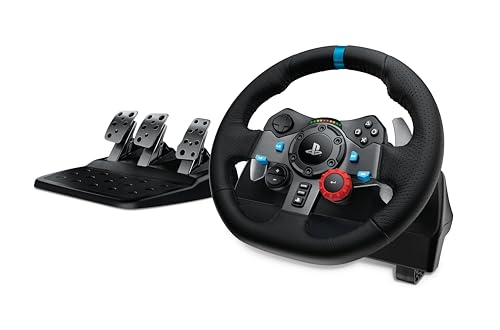
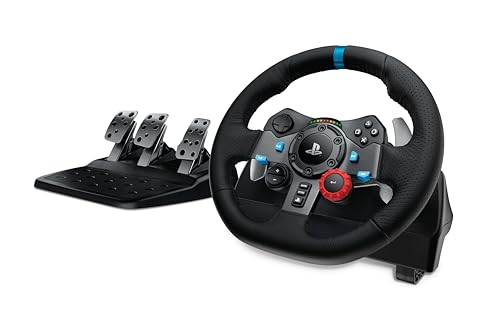
Logitech G29 Driving Force — the gear-driven standard
Badge: The wheel most PC racers start on
- Feedback: real force feedback, gear-driven, per the verified listing title
- Details: stainless steel paddle shifters, leather wheel cover, per the listing title
- Included: floor pedal unit, per the listing title
- Platforms: PC and Mac, and PlayStation consoles, per the listing title
The G29 is the calibration classroom’s most common desk. Its gear drive delivers honest force feedback with a mechanical grain — a slight notchiness around centre and a whir under load — that no setting removes entirely and that its owners learn to read through, the way a guitarist hears past fret buzz. Its calibration manners are exemplary in the ways that matter: it self-centres on power-up, holds its centre for years, and its potentiometer pedals are the textbook case for the brake-curve advice in this guide. A G29 set up by this guide’s method — centre verified, rotation agreed with the game, brake gamma gentle, feedback staged below clipping — is a genuinely competitive instrument, and the enormous community around it means every title’s sensible starting settings are a search away.
Strengths
- Proven, durable mechanism with a vast knowledge base behind it.
- Complete package: wheel and pedals that calibrate well together.
- Holds its centre calibration across years of use.
Trade-offs
- Gear drive has inherent grain and noise that settings cannot erase.
- Travel-based pedals ask for the brake curve’s help to feel progressive.
- Force ceiling is modest beside belt and direct-drive wheels.
Best for: first-wheel racers and league drivers on a sensible budget. Not suited for: silence-seekers or maximum-force devotees. Current listing: Check price on Amazon

Logitech G923 TRUEFORCE — the G29’s refined successor
Badge: Gear drive plus a high-frequency feedback channel
- Feedback: TRUEFORCE up to 1000 Hz force feedback, per the verified listing title
- Pedals: responsive pedal unit, dual-clutch launch control, per the listing title
- Wheel: genuine leather cover, per the listing title
- Platforms: PlayStation and PC, per the listing title
The G923 keeps the family’s gear-driven heart and adds TRUEFORCE, a second feedback channel that streams the game’s physics and audio-derived vibration at high frequency, giving the wheel a texture layer — engine note, surface grain — on top of the conventional forces. For calibration, the addition matters as one more gain to stage: TRUEFORCE has its own intensity in supporting titles, and it obeys the same clipping discipline as the main channel, because a texture layer driven into distortion becomes buzz. In titles without TRUEFORCE support it behaves as its sibling does, and every procedure in this guide applies unchanged. Racers choosing between the two Logitechs are choosing whether that extra channel, in the titles that use it, is worth the step — a content question about their library more than a quality question about the wheel.
Strengths
- Additional high-frequency feedback channel in supporting titles.
- Same proven calibration behaviour and durability as the family standard.
- Dual-clutch launch control is a real competitive feature at race starts.
Trade-offs
- TRUEFORCE’s value depends entirely on your titles supporting it.
- Gear-drive grain remains, as it must in this mechanism class.
- An extra gain stage for the new channel joins the setup checklist.
Best for: racers whose main titles support TRUEFORCE. Not suited for: buyers whose library ignores the feature — the G29 serves them identically. Current listing: Check price on Amazon
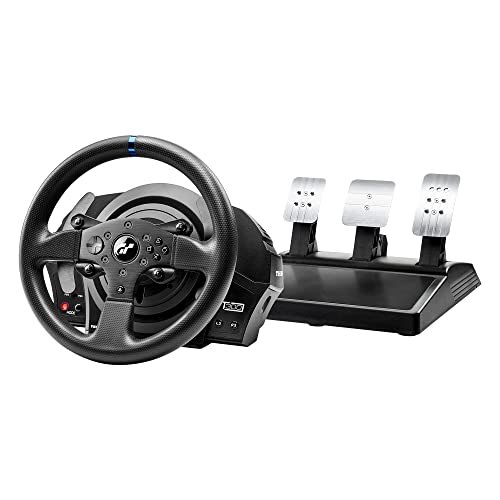
Thrustmaster T300RS GT — the belt-driven middle
Badge: Smooth belt feedback and a three-pedal set
- Feedback: belt-driven force feedback motor, per the verified listing title
- Included: wheel and 3-pedal set, per the listing title
- Licensing: officially licensed Gran Turismo wheel, per the listing title
- Platforms: PS5 and PC, per the listing title
The T300RS GT is the belt-driven answer to the gear wheels’ grain: a belt between motor and wheel smooths the delivery, quietens the mechanism and removes the notchiness around centre, at the price of a faint elasticity that gear and direct-drive owners can sometimes feel at the extremes. Its calibration character follows from the mechanism — centre behaviour is clean, forces are smooth enough that feedback detail survives at lower gains, and the three-pedal set gives the clutch a real axis for manual-gearbox cars. Thrustmaster’s ecosystem of interchangeable wheel rims also means the calibration conversation extends across rims of different diameters, which change the leverage your hands apply and therefore the gain that feels right — a per-rim note in your settings log earns its keep. The gear-versus-belt question underneath this wheel is examined head-on in gear driven versus belt driven racing wheels.
Strengths
- Smooth, quiet belt delivery preserves feedback detail.
- Three pedals included, with a proper clutch axis.
- Interchangeable rims let one base serve several car classes.
Trade-offs
- Belt elasticity is a feel some drivers never fully stop noticing.
- Belts are wear items on a longer horizon than gears.
- Different rims want slightly different gain settings.
Best for: racers who value smoothness and a clutch pedal. Not suited for: drivers who want the last word in sharpness — that is direct drive’s claim. Current listing: Check price on Amazon

MOZA R5 Bundle — direct drive, and calibration with the gloves off
Badge: The direct-drive step where software gains full authority
- Drive: direct drive base, 5.5 Nm peak torque, per the verified listing title
- Package: base, wheel and pedals as a complete ready-to-race kit, per the listing title
- Details: real quick-release, per the listing title
- Platform: PC
Direct drive bolts the wheel to the motor’s shaft, and calibration changes character when the mechanism disappears: there is no gear grain or belt stretch between the game’s forces and your hands, so every setting — gain, filters, damping, inertia — writes itself directly onto your arms. The R5’s 5.5 Nm is the sensible end of direct drive, strong enough to convey everything a car says without the fatigue and desk abuse of the monster bases, and its bundle completeness makes it the calibration student’s full-course meal: wheel, base and pedals from one maker, one software home, one profile system. Direct drive also raises the safety and sanity stakes of gain staging — an unfiltered, full-gain direct-drive wheel in a crash can genuinely wrench — so this guide’s staging discipline, moderate gains and per-game profiles are not optional garnish on this class of hardware.
Strengths
- Nothing between the motor and your hands: maximum detail and immediacy.
- Complete bundle under one software roof simplifies profiling.
- Torque level is strong without being desk-threatening.
Trade-offs
- Every setting is exposed; a careless profile is felt immediately and physically.
- Demands a rigid mount — desk clamping a direct-drive base invites flex that calibration cannot fix.
- A clear price tier above the gear and belt wheels.
Best for: committed sim racers ready for direct drive’s fidelity. Not suited for: casual desks or first-wheel buyers. Current listing: Check price on Amazon. The full market is compared in the best racing wheels for PC driving.
Step three: force feedback, staged like audio
Force feedback has two gain controls in series — the wheel software’s overall strength and each game’s own force setting — and their product is what your hands receive. The failure mode is clipping: when the product asks the wheel for more than its maximum through a whole corner, the wheel saturates, and every force above the ceiling arrives as the same maximum, erasing the differences between a tyre loading up, a kerb arriving and a slide beginning — precisely the differences feedback exists to report. The staging method is therefore borrowed from audio engineering. Set the wheel software’s gain to a healthy, fixed level — full or near it on the gear and belt wheels, a considered level on direct drive — and then set the game’s gain so that the strongest sustained cornering in the reference car uses most of the wheel’s range without camping at its ceiling, leaving the peaks for kerbs and incidents. Many titles offer a feedback meter or telemetry overlay; where one exists, use it, and where none does, judge by the oldest instrument: through the longest fast corner, you should feel the force build, breathe and vary, never lock into a single unchanging weight.
Around the master gain sit the shaping controls, each with a job and a failure mode when abused. Damping adds resistance that steadies the wheel, and too much of it makes the car feel as if it steers through porridge, delaying every signal. Friction and inertia settings simulate weight in the mechanism itself — valuable on direct drive, where the bare motor feels unnaturally frictionless, and redundant on gear wheels that have friction to spare. Spring and centre effects belong mostly to menus and older titles; in modern simulations the forces should come from the physics, and artificial centring springs fight the calibration you built in step one. Effects like kerb and road texture sliders are seasoning: set them after the master gain, in small amounts, and remember that every effect added is drawn from the same ceiling that clipping guards. Finally, per-game profiles are not indulgence — title engines scale their output differently, and the profile is where each title’s correct staging lives. Build the reference title completely, then adapt, exactly as the flight-stick method prescribes for aircraft.
The mount is part of the calibration
No axis survives a moving base. A wheel clamped to a desk that flexes, or bolted to a stand that rocks under braking, injects mechanical noise into every signal this guide has tuned: the centre effectively wanders as the base shifts, pedal forces vary as the pedal set slides, and feedback energy that should reach your hands is spent shaking furniture. Before any calibration session, do the physical audit — clamps tight, pedal set unable to creep (a mat, a wall, or the chair’s castors locked or replaced for the session), the seat at a distance where the brake can be pressed by leg extension rather than ankle desperation. Drivers regularly discover that the inconsistent braking they were about to calibrate away was a pedal set migrating a centimetre a lap. The rig does not need to be expensive; it needs to be still. A calibrated wheel on a rigid stand outperforms a superior wheel on a wobbling desk, in the same way a tuned flight stick needs the desk discipline its own guide describes.
When calibration is not the answer
The wheel software’s test view is the court of appeal, as the test page was for flight sticks. A steering axis that reports jitter at rest, a centre that migrates between sessions, or a pedal axis that flickers at a fixed position is the hardware confessing. Potentiometer pedals wear exactly like potentiometer sticks — most at the position where they live, which for a brake is the worst possible place — and their flicker under a steady foot is a cleaning or replacement conversation, not a deadzone one. A wheel that loses centre after hard lock-to-lock work may have a slipping encoder or belt; a direct-drive base that develops a notch it did not have is a service case. Force feedback that weakens across a long session and recovers after a rest is thermal behaviour, common on compact bases driven at maximum gain — another argument for the staging headroom this guide recommends, since a wheel run at eighty percent of its ceiling rarely meets its thermal limit. And firmware deserves its sentence: wheel makers do fix centre and pedal behaviour in updates, so the software layer is checked before any hardware verdict, in the same order as everything else in this guide — evidence, layer by layer, purchase last. Whatever you conclude, export the profiles first; the replacement wheel inherits your work through how to back up gaming data properly, and the hours in those files are the most portable part of the whole rig.
Common mistakes in racing-wheel calibration
Setting the wheel’s rotation in the driver and again, differently, in the game is the classic — two authorities, one axis, and a car whose steering matches neither. Cranking both gains to maximum in search of strength is the second, and it manufactures the clipping that erases the detail the driver was seeking. Calibrating the brake to a maximum only a fresh leg can reach is the third, paid for in the final stint of every long race. Stretching a steering deadzone to hide a wandering centre is the fourth — the deadzone tax is paid in every corner’s entry, forever, to hide a fault that a centre recalibration or a repair would have settled once. Tuning feedback before the axes is the fifth, and skipping the reference-car discipline is the sixth: drivers who adjust by feel across five cars in an evening end with five half-answers and no baseline to return to. The method is the same as it was in the air — one layer, one test, one note — because the hands and feet learning the instrument cannot tell the difference between a changed car and a changed wheel unless you hold one of them still.
Load-cell brakes: calibrating pressure instead of travel
Owners who upgrade to a load-cell brake — the pedal found in the ecosystem around these wheels’ pedal sets and in standalone sets — trade the travel question for a pressure question, and calibration changes its centre of gravity. The axis now reads force, so the maximum is set in kilograms of leg pressure rather than millimetres of travel, and the setting exercise becomes physical in a new way: choose a maximum you can reach at the end of a long stint, in your actual seating position, with your actual footwear, because a load cell measures the leg you bring to it and that leg changes across an evening. The curve’s job also changes: travel pedals use gamma to manufacture progression, while a load cell’s progression is inherent in muscle behaviour, and most drivers run it near-linear with only the rest deadzone tuned. The reward for the change is the thing travel pedals imitate — braking that lives in pressure memory, which the leg learns far more repeatably than position, so the ten-identical-stops test from this guide’s pedal section becomes dramatically easier to pass. If your calibration sessions keep identifying the brake as the inconsistent instrument, the load cell is the upgrade the evidence is pointing at, and it is a pedal upgrade, not a wheel one — the base you own keeps every hour of its tuning.
Clutch, shifter and handbrake: the supporting axes
The clutch pedal calibrates like the brake’s quieter sibling — true zero at rest, full value before the stop — with one addition: its bite point, where engagement begins, is a software position on a pedal that has no physical detent, and drivers of manual cars in simulation do well to set the axis so the bite arrives at a consistent, learnable point in the travel rather than in the first twitch. A separate H-pattern shifter needs no axis calibration, but its gates should be verified in the wheel software’s test view after any reassembly, because a shifter that reports third as first under a fast hand is a gearbox’s worth of damage in a hardcore-mode race. The handbrake, analogue where fitted, is calibrated as a full axis and then usually given a curve that keeps its first travel gentle, since rally stages ask for doses, not dollops. Each of these is a five-minute verification inside the main procedure; together they are the difference between a rig whose every control has been read once by its owner and a rig with strangers bolted to it.
A worked gain-staging session, start to finish
To make the force-feedback method concrete, here is the session as it runs on the reference pairing. The wheel software is set first: gain at its full, honest level for a gear or belt wheel — or a moderate, documented level on direct drive — with damping low, friction and inertia at their defaults, and artificial spring effects off. In the game, force gain starts deliberately low, and the reference car is driven out for three laps while the gain rises in small steps between runs. The target sensation is specific: the wheel should load up through the fast corners with a weight that varies as the tyres’ story changes, kerbs should arrive as events rather than as a constant texture, and the wheel should never feel as if it has hit a wall of uniform resistance and stayed there. The moment the long corner’s force stops varying, the previous step was the ceiling — return to it. Then the shaping: a breath of damping if the wheel oscillates on straights, texture effects raised until they are felt and backed off one notch, because seasoning is judged at the point just below obvious. The numbers go in the log with the title and car named. Total elapsed time, about forty minutes — and the profile that results will be adapted, not rebuilt, for every other title the wheel ever meets.
Simulations, arcade titles and the honesty of expectations
Not every game is asking the wheel the same questions. The serious simulations expose the full stack this guide describes and reward every layer of it; the arcade and open-world titles simplify deliberately — compressed rotation, assisted forces, feedback as flavour — and the correct calibration there is a shorter one: rotation matched so the steering is neither darty nor dull, gain set for pleasure rather than telemetry, and no grief spent chasing fidelity the title never modelled. The mistake is cross-contamination in both directions: arcade settings carried into a simulation feel like faults, and simulation expectations carried into an arcade title feel like disappointments. Profiles solve it, as they solve everything in this discipline — one per title, built on the reference method, labelled honestly with the title’s name, and judged against what that title is trying to be. A wheel, properly kept, is a library of such agreements between your hands and your games, and calibration is the act of negotiating each one deliberately instead of by accident.
Reading the wheel: what calibrated feedback is for
Calibration earns its keep in a language the driver learns to read, and naming its vocabulary closes the loop between setup and driving. A wheel that lightens progressively as a corner deepens is reporting the front tyres approaching their limit — the aligning torque falls as the tyre saturates, and that lightening, arriving through your palms a fraction before the car visibly washes wide, is the single most valuable sentence force feedback speaks. It is audible, so to speak, only on a setup staged below clipping: a clipped wheel shouts maximum through the whole corner and the lightening is crushed out of existence. A sharp, brief unloading followed by weight returning is a kerb or a crest; a rhythmic shudder at speed that was not there on the straight’s beginning is a flat-spotted tyre or a damaged car, faithfully reported; a wheel that goes light and stays light at the rear’s step-out is the slide announcing itself, and catching it there — rather than by eye — is the skill that separates drivers who save slides from drivers who watch them. None of this vocabulary is available to a wheel whose gains were set by enthusiasm. It is the dividend on the staging discipline, paid every lap, and it is why experienced drivers describe a well-calibrated wheel not as strong or smooth but as talkative — the highest praise in the discipline, and the standard your reference-car sessions are ultimately calibrating toward.
A short glossary of the settings you will meet
The vocabulary varies by brand, but the concepts recur, and translating them once prevents a season of menu archaeology. Gain or strength is the master volume of the feedback, staged by this guide’s method. Sensitivity or linearity on the steering axis reshapes how rotation maps to the car’s wheels — the steering equivalent of the flight stick’s curves — and is normally left linear in simulations that model the car’s own rack. Damping is resistance to movement, friction is resistance that exists even at rest, and inertia simulates the mechanism’s mass; the three together counterfeit the physicality that direct-drive bases lack and that gear bases have for free. Spring strength governs the artificial centring force used by menus and older titles. Drift mode and its brand cousins reduce the wheel’s internal damping for wheels that must spin freely, a setting for a specific style of driving rather than a general improvement. Natural or road effects sliders govern the texture layer — kerbs, surface grain, engine vibration where supported — and are staged last and least. Every one of these has a default chosen by the maker to be safe across all titles; your profiles exist to move the few that matter for your title, your car and your hands, and to leave the rest documented at their defaults so that a reset is a return to a known place rather than a fall into fog.
One wheel, two homes: console and PC calibration
Three of the four wheels in this guide serve consoles as well as PCs, and their dual citizenship has a calibration consequence worth stating: the settings do not all live in the same place. On a console, the wheel’s own onboard behaviour and the game’s settings are the whole system — there is no driver layer to hold a profile. On the PC, the wheel software adds the layer this guide has used as its foundation. A driver who races on both should therefore treat the PC profiles and the console settings as two editions of the same agreement, kept in step by the log rather than by memory: when a brake maximum or a gain proves itself on one platform, the corresponding figure is written into the other’s settings at the next session, translated by feel on the reference car rather than copied as raw numbers, because the two platforms’ scaling rarely matches digit for digit. The habit sounds fussy and is in fact the opposite — it is what keeps a dual-platform wheel feeling like one instrument instead of two strangers sharing a rim, and it takes ninety seconds at the start of a session on the less-used platform.
One more variable: the car itself fights back
A final calibration subtlety, learned the first time a driver tunes for one car and races another: cars differ in how much of the wheel they use, in ways no profile fully abstracts. A car with a fast steering rack compresses its lock into fewer degrees, so the rotation agreement this guide demands must be re-verified per car even inside one title, and a driver who carries a road car’s rotation into a single-seater has manufactured the laziness they will then try to tune out with gain. Cars also differ in the weight they present — a heavy GT car legitimately loads the wheel more than a featherweight formula car — and the temptation to normalise that difference away with per-car gain should be resisted past a small correction, because the weight difference is information about the car, and erasing it makes every car feel like the reference car and the driver slower in all of them. The profile system’s proper use is to hold the wheel constant and let the cars differ; per-car adjustments belong to the narrow band where a title’s scaling, not the car’s character, is what needs correcting. Knowing which of those two you are touching is the last skill in this guide, and it is acquired the same way as the rest: one change, one test, one note.
Frequently asked questions
How many degrees of rotation should I use?
Match the car. Leave the wheel software at its maximum and let modern titles apply each car’s lock automatically where they support it. Where a title does not, set rotation per class: full travel for road cars, substantially less for GT machinery, and the least for single-seaters. The test is visual and immediate — your hands and the on-screen driver’s hands should reach full lock together. A mismatch in either direction is a setting, not a skill issue, and it is costing you precision in every corner until it is fixed. Too much rotation makes the car feel lazy and forces your hands to travel farther than the corner asks; too little makes it nervous, compressing all of steering into a twitchy arc where small hand movements become large direction changes. Drivers moving between a road-car title and a formula title in the same evening feel the difference most sharply, which is why the per-title profile — rotation included — is switched as a unit rather than renegotiated control by control.
Why does my car pull to one side on straights?
Almost always a centre that is a degree or two off, established when the wheel initialised off-centre or drifted in its software. Re-run the centre calibration with the wheel held truly centred, and verify in the test view before returning to the game. Rule out the impostors in order: a game’s steering deadzone set asymmetrically, a road crown or camber in the simulation doing its honest work, and — the physical one — a wheelbase or rim mounted slightly rotated on a quick-release. Never cure a pull by holding the wheel crooked; that bakes the error into your hands.
How strong should force feedback be?
Strong enough that the longest fast corner in your reference car uses most of the wheel’s range with variation still audible in your hands — and no stronger. If the force feels like a single unchanging weight through corners of different speeds, you are clipping: reduce the game’s gain first. If the wheel feels vague and the car wanders in your grip, raise it gradually. On direct drive, also weigh fatigue and control: the correct strength is the one you can hold precisely in the final lap, not the one that impresses in the first corner.
Why do my brakes lock up so easily?
Three suspects, in order. The brake axis’s mapping: on travel-based pedals, add a gentle brake curve so the first travel produces less braking, giving your foot a finer instrument at the threshold. The maximum: if full braking is set at a pressure your leg overshoots casually, every braking zone starts with a lock — set the maximum at a firm, repeatable press. And the deadzone at rest: if the brake rests above zero, the car is braking before you are, confusing both you and the simulation’s systems. Test all three on the same big braking zone until the car stops in the same place ten times running. If lock-ups persist on a fully proven setup, look last at the car itself — cold tyres, a brake bias the setup has moved too far forward, or a downhill zone that unloads the rear — because a calibrated rig’s remaining faults are usually the simulation telling the truth about the car rather than the wheel telling lies about your foot.
Do I need different settings for every game?
Yes, stored as profiles — because each title scales its steering and feedback output through its own engine, the same wheel numbers produce different cars in different games. The work is front-loaded: build the first title completely by this guide’s method, then adapt it per title, changing mainly the game-side gain and the rotation behaviour, and keep the wheel-side settings as the constant. Save and back up the profile set; it is the rig’s memory, and rebuilding it from scratch after a PC change is the chore the backup habit exists to prevent.
When should I repair or replace a wheel instead of recalibrating?
When the test view convicts it: jitter at rest that a port change and a driver refresh do not cure, a centre that migrates between sessions, pedal flicker under a steady foot, feedback that fades thermally at sensible gains, or new mechanical play and noise in the mechanism. Those are wear signatures. Clean and update first, by the book; then accept the verdict the evidence gives, export your profiles, and let the next wheel inherit everything except the fault. The flight-side version of the same judgement lives in how to calibrate a flight stick for PC gaming, and the two crafts share one toolbox and one philosophy.
Sharing a rig: profiles for more than one driver
A household rig with two drivers is a calibration problem with a human face, because the two drivers’ legs and hands genuinely differ — the brake maximum one driver finds repeatable is the other’s unreachable wall, and force strength that reads as information to one reads as fatigue to the other. The answer is the profile system used at full strength: a complete profile per driver per title, named for its owner, switched as deliberately as the seat position. Resist the household compromise of a single averaged setup, which calibrates the wheel for a driver who does not exist and dissatisfies both who do. The same logic serves the guest session: a visitor profile with gentler gains and a more forgiving brake curve is both hospitality and equipment protection, since a novice fighting a full-strength direct-drive wheel in a crash is hard on the novice and the rig alike. Profiles are cheap; the discipline of naming and switching them is the entire cost, and it is repaid the first time a rig returns to its owner’s hands feeling exactly as it was left.
Seasonal maintenance for a calibrated rig
Calibration is not a permanent state; it is a condition maintained by small attentions. Once a season, run the test view and read every axis the way you did on the first day — centre honest, ranges complete, pedals silent at rest — because potentiometers and belts announce their ageing there long before a race does. Check the mount’s fasteners and the pedal set’s position marks, since rig hardware migrates under load in ways too slow to notice weekly. Blow the dust out of the pedal mechanisms and the base’s vents, because the thermal behaviour described earlier begins with housekeeping. Re-run the biggest braking zone test after any driver or firmware update, and write the date in the log. None of this takes an hour across a whole season, and it is the difference between a rig that is calibrated as a fact and one that was calibrated as a memory. The racers who seem to have permanently trustworthy equipment are not lucky; they are the ones whose maintenance rhythm is shorter than their hardware’s decay.
Keep the reference pairing’s numbers visible while you adapt other titles — a sticky note on the monitor bezel with the reference gain, rotation and brake figures is the oldest tool in the discipline, and it prevents the slow drift of a profile edited from memory across a month of evenings. When a title feels wrong, the note tells you instantly whether you are looking at the title’s difference or at your own accumulated edits, and that distinction is worth more than any single setting in the profile.
The bottom line
Centre and rotation first, in the wheel’s own software, agreed with the game. Pedals second — silent at rest, complete at full travel, and a brake maximum your tired leg can still reach. Force feedback last, staged below clipping, shaped sparingly, profiled per title. Mount it all on something that does not move, write the numbers down, and back the profiles up like the hours they represent. Followed in that order, the method in this guide turns any of the wheels it covers — gear, belt or direct drive — from a peripheral you operate into an instrument you trust, and trust, at the braking marker with the race on the line, is the entire product being bought.
Revisit the reference pairing after any long break from driving, before judging either yourself or the wheel. Hands and feet forget at their own pace, and a profile that feels wrong after a month away is usually a driver being re-educated by an honest instrument — give it three sessions before a single number moves.
Related guides
A calibrated wheel sits inside a wider rig conversation — the mechanisms compared, the rotation question examined, and the market mapped — and the guides below are its natural companions on this site.