Disclosure: As an Amazon Associate, reviewstook.com earns from qualifying purchases. Links on this page are affiliate links; they cost you nothing extra. Prices and availability change often, so check the current Amazon listing before you buy.
If you are asking how much ram do you need for gaming, here is the direct answer before the detail: 16 GB is the working minimum for a gaming PC today, 32 GB is the amount to buy for a new build or a meaningful upgrade, and 64 GB is a specialist purchase for simulation, heavy modding, content creation and people who keep a hundred browser tabs open beside their game. Below 16 GB, modern titles stutter in ways that look like a weak graphics card. Above 32 GB, games themselves gain almost nothing — the extra memory serves the things around the game. Everything else in this guide exists to help you place your own games, resolution and habits on that scale, to explain why capacity is only half the question (speed, latency and channel configuration are the other half), and to show you how to measure your current usage so the decision comes from evidence rather than from a forum argument.
Key takeaways
- Buy 32 GB for any new gaming build in this generation of hardware. The price difference over 16 GB is the smallest it has ever been relative to the life it buys the machine.
- Capacity first, then configuration: two sticks in dual channel, running at their rated speed with XMP or EXPO enabled, matters more than exotic timings.
- RAM that is not running at its rated speed is the most common silent performance loss in home builds — check it in the BIOS before blaming anything else.
- Measure before upgrading. If your games never push total system usage near your installed capacity, more RAM will change nothing you can feel.
- Match the kit to the platform: DDR4 and DDR5 are physically incompatible, and Intel XMP and AMD EXPO profiles are tuned for their own ecosystems.
In this guide
The answer by capacity: what each amount actually does
8 GB — below the line for a gaming PC
Eight gigabytes was the standard gaming specification a decade ago and is now the territory of office machines and very old builds. A modern operating system, a launcher, voice chat and a browser idle through a large share of it before any game starts, and current titles treat the remainder as a floor rather than a target. The result is not merely lower frame rates but a particular kind of stutter: the system swaps data to the drive mid-game, and those hitches arrive at the worst moments. If your machine has 8 GB, the upgrade to 16 GB is the single most transformative change available to it, ahead of any other component. Laptops with soldered 8 GB configurations are the sad exception — the memory cannot be changed, which is why this guide will keep repeating that capacity decisions are made at purchase time.
16 GB — the working minimum
Sixteen gigabytes runs the current game catalogue properly, provided the rest of the system is not fighting it. Esports titles, indie games and the great majority of releases from the last several years sit comfortably inside 16 GB alongside a voice app. The pressure points are the newest large open-world and simulation releases, heavy mod lists, and the modern habit of keeping a browser with dozens of tabs, a streaming app and two launchers alive beside the game. On a 16 GB system those habits must be managed — close the browser, let the launchers exit — and with that discipline the experience remains good. A 16 GB machine is not obsolete; it is a machine whose owner tidies up before playing the biggest titles. If you are upgrading an existing DDR4 system cheaply, 16 GB is also the sensible ceiling for money spent on an older platform.
32 GB — the sweet spot, and the recommendation
Thirty-two gigabytes is where the question closes for most players. The largest current games, with the operating system, voice, browser and launchers all alive, fit with headroom to spare; shader compilation, level streaming and alt-tabbing all get smoother because the system stops managing scarcity. It is also the amount that protects the machine’s future: game requirements creep upward across a PC’s life, and memory is the requirement that has doubled roughly once a decade. Every kit recommended later in this guide is a 32 GB kit, in the standard two-stick configuration, because that is the purchase this page would defend for any new build. The headroom also serves the second monitor lifestyle — guides, maps, streams and chat beside the game — which is how a large share of players actually play now.
64 GB and beyond — specialist territory
Sixty-four gigabytes serves players whose games are also platforms: flight and space simulators with enormous scenery, city builders at extreme scale, mod lists counted in the hundreds, and anyone capturing, editing or streaming from the same machine. It also serves developers testing builds and players who run virtual machines or local AI tools alongside their library. For games alone, the honest statement is that 64 GB sits idle — current titles do not scale into it — so the purchase should be justified by the workload around the game, not by the game itself. There is no harm in it beyond the money, and on DDR5 a two-stick 64 GB kit keeps the easy dual-channel configuration; four-stick high-capacity setups on some platforms run at reduced speeds, which is a real trade to check before ordering.
Capacity is half the question: speed, latency and channels
Two 32 GB systems can perform measurably differently because memory has three other properties. The first is channel configuration. Memory talks to the processor through channels, and a single stick uses one while a matched pair uses two, roughly doubling the bandwidth available. A single 16 GB stick is therefore not equivalent to two 8 GB sticks, and a single 32 GB stick leaves performance unclaimed that a 2×16 GB kit delivers. Always buy and install gaming memory as a matched pair in the motherboard’s specified slots — usually the second and fourth slots from the CPU, per the manual — because slot choice decides whether dual channel engages at all.
The second property is speed, expressed as the transfer rate: DDR5-6000 moves more data per second than DDR5-5200. Games respond to memory speed unevenly — some engines gain noticeably, particularly at high frame rates and on processors with smaller caches, while others barely move — but the direction is consistent and the price steps between speed grades are usually small. The third property is latency, expressed in the CAS latency figure and its companions: lower is tighter, and the real-world delay combines speed and latency together. The practical guidance for buyers is unglamorous: on current AMD platforms, DDR5-6000 with tight timings is the well-known sweet spot where the memory and the processor’s internal fabric run in the friendliest ratio; on Intel, higher speeds scale a little further. Chasing extreme kits beyond those points buys benchmark decimals, not game feel, and can buy instability along with them.
The property that dwarfs all three in real home builds is whether the kit is running at its rated specification at all. Memory defaults to a conservative base speed until its profile is enabled — XMP on Intel platforms, EXPO on AMD — in the BIOS. A remarkable share of gaming PCs are running expensive kits at base speed because the profile was never switched on, leaving performance the owner paid for sitting in a menu. The how-to section of this guide walks that check, and it should be performed before any other upgrade is contemplated: enabling a profile is free, instant and reversible.
The three verified 32 GB kits worth buying
The kits below are the ones this guide recommends, each confirmed against the site’s own Amazon catalogue data with its exact listing recorded in this article’s sources. All three are 32 GB, two-stick, DDR5-6000 kits — the configuration the preceding sections argue for — and they differ in platform tuning and lighting, which is exactly the level at which a buyer should be choosing between competent kits.

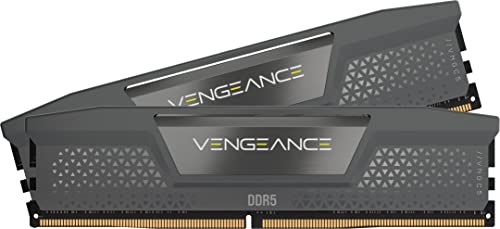
Corsair Vengeance DDR5 32GB (2×16GB) 6000MHz — the safe default
Badge: The default recommendation for most builds
- Capacity and layout: 32 GB as two 16 GB sticks, per the verified listing title
- Speed: up to 6000 MHz, per the listing title
- Profiles: both AMD EXPO and Intel XMP 3.0 compatible, per the listing title
- Latency: CL30, per the listing title
- Colour: grey, per the listing title
The Vengeance kit is the recommendation for builders who want one decision made well. Its specification lands exactly on the sweet spot this guide describes — 6000 speed with CL30 latency — and its dual-profile support means the same kit serves an AMD or an Intel build, which matters for households that rebuild across platforms or buy before the rest of the parts are finalised. The low, clean heat-spreader design also avoids the clearance arguments that tall, sculpted modules start with large air coolers, an unglamorous virtue that anyone who has reseated a cooler over a memory slot will appreciate. Corsair’s memory utility integrates with the lighting ecosystems many builders already run, though this grey kit’s appeal is that it does not need to perform visually at all.
Strengths
- Textbook specification: 32 GB, DDR5-6000, CL30, in the ideal two-stick layout.
- Carries both EXPO and XMP profiles, so it suits either processor platform.
- Low-profile spreaders avoid clearance problems under large CPU air coolers.
Trade-offs
- No RGB lighting, which builders of showcase systems may count as a lack.
- Its very popularity means stock and pricing move around; check the listing rather than assuming.
- Like all DDR5, it cannot be carried into a DDR4 motherboard — platform-locked by the standard itself.
Best for: any new AMD or Intel gaming build that wants the settled specification. Not suited for: DDR4 systems, or showcase builds that want lit modules. Current listing: Check price on Amazon

G.Skill Trident Z5 RGB 32GB (2×16GB) 6000 — the showcase option
Badge: The pick for a windowed build that wants its memory lit
- Capacity and layout: 32 GB as two 16 GB sticks, per the verified listing title
- Speed: up to 6000 MT/s, per the listing title
- Timings: CL36-36-36-96 at 1.35V, per the listing title
- Profiles: Intel XMP 3.0 and AMD EXPO, per the listing title
- Finish: matte black with RGB light bar, per the listing title
The Trident Z5 RGB is the same capacity-and-speed proposition as the Corsair kit, dressed for a windowed case. Its timings are a step looser than the CL30 kit above — a difference that benchmarking can detect and gameplay essentially cannot — and in exchange you get G.Skill’s light bar design, which is one of the cleaner RGB implementations on a memory module, diffused rather than dotted. G.Skill’s Trident line has a long history on enthusiast builds, and the kit’s dual-profile support keeps it platform-flexible. Choose it when the build is meant to be looked at; choose the Corsair when it is not, and let that be the whole of the deliberation, because in games the two are effectively the same purchase.
Strengths
- Full 32 GB DDR5-6000 specification with dual-platform profile support.
- Diffused RGB light bar suits showcase builds better than exposed-diode designs.
- Trident line’s long enthusiast track record behind the specific kit.
Trade-offs
- CL36 timings are a step behind the tightest kits at this speed, on paper.
- Taller, styled spreaders deserve a clearance check under oversized air coolers.
- You pay something for the lighting whether or not the case has a window.
Best for: windowed Intel or AMD builds that want lit memory at the sweet-spot speed. Not suited for: closed cases, or buyers counting every unit of currency toward the graphics card. Current listing: Check price on Amazon

G.Skill Trident Z5 Neo RGB 32GB (2×16GB) 6000 — the AMD-tuned option
Badge: The pick tuned specifically for AMD EXPO builds
- Capacity and layout: 32 GB as two 16 GB sticks, per the verified listing title
- Speed: up to 6000 MT/s, per the listing title
- Timings: CL30-38-38-96 at 1.35V, per the listing title
- Profile: AMD EXPO, per the listing title
- Finish: matte black with RGB, per the listing title
The Neo variant exists for one reason: it is tuned and validated for AMD’s EXPO ecosystem, with the CL30 headline latency that marks the sweet-spot kits, in the same Trident Z5 RGB clothing as its sibling above. AMD builders who want the set-and-forget experience — enable EXPO, watch the kit run at its rated specification, never think about memory again — are this kit’s audience. The distinction between the two G.Skill kits in this guide is a good example of memory buying at the sensible level: same capacity, same speed, a timings step and a platform-tuning difference, and the correct choice is made by the motherboard and processor already on your desk, not by brand loyalty.
Strengths
- CL30 at DDR5-6000 — the exact specification AMD gaming builds aim for.
- EXPO-tuned and validated for the platform it will actually run on.
- Shares the Trident Z5 RGB design language for a lit, matched build.
Trade-offs
- AMD-focused tuning makes it the wrong default for an Intel build.
- RGB and styled spreaders carry the same cost and clearance caveats as its sibling.
- EXPO still has to be enabled in the BIOS — no kit configures itself.
Best for: AMD gaming builds that want the CL30 sweet spot with lighting. Not suited for: Intel builds, which should take the dual-profile kits above. Current listing: Check price on Amazon
Measure your own usage before spending anything
The upgrade decision should start with your own numbers, and collecting them takes one gaming session. Play your most demanding game the way you normally play it — browser, voice and launchers as usual — and alt-tab to the Task Manager’s Performance tab at a busy moment: a city, a battle, a streamed-in new area. Note the committed memory and the in-use figure. If total usage sits comfortably below your installed capacity with room to spare, your games are not memory-limited and an upgrade will not change your experience; spend the money where your measurements point instead. If usage rides at the ceiling — within a gigabyte or so of the total — the system is already managing scarcity, and the stutters you may have blamed on the graphics card are partly memory behaviour.
Two refinements make the measurement trustworthy. Check during the worst moment, not the average: memory pressure is a peak phenomenon, and a game that peaks into swapping for ten seconds per hour will hitch in those ten seconds. And check the specific game you care about rather than your library in general, because the spread between an esports title and a flagship open-world release is the whole subject of this guide. Players who find the ceiling close should also read the companion question for the graphics side of the machine — how much VRAM you need for gaming — because system RAM and video memory solve different problems and are confused constantly. For the head-to-head version of the capacity question itself, 16GB versus 32GB of RAM for gaming puts the two amounts directly against each other.
How to enable XMP or EXPO, and verify it worked
This is the highest-value ten minutes in PC ownership. Restart the machine and enter the BIOS with the key your motherboard names on the boot screen — usually Delete or F2. The memory profile setting lives on the main or overclocking page of every modern BIOS and is labelled XMP, EXPO, or occasionally DOCP on older AMD boards. Select the kit’s profile — most kits expose one primary profile — save, and exit. The machine may restart once or twice as it trains the memory; that is normal behaviour, not a fault.
Verify the result in Windows rather than trusting the menu. The Task Manager’s Performance tab reports memory speed directly: it should now read the kit’s rated figure, 6000 in the case of every kit in this guide, rather than the base speed it showed before. If the machine fails to boot after enabling the profile — rare with a matched kit on a current BIOS, possible on early platform firmware — it will typically recover after a few attempts and return you to the BIOS with the profile off; updating the motherboard BIOS is the standard remedy, because memory compatibility is the thing BIOS updates most often improve. If instability appears days later as game crashes with no error pattern, memory is a suspect worth testing by disabling the profile for a session and seeing whether the crashes follow it. A kit that cannot hold its rated profile on an updated BIOS is a warranty conversation, not a tuning problem.
Upgrading an existing machine: the decision sequence
Start by identifying what you have. Your motherboard’s support page states its memory standard — DDR4 or DDR5, which are keyed differently and cannot be interchanged — its slot count and its maximum capacity. Then decide between adding and replacing. Adding a second pair to reach 32 GB from 16 GB works best when the new sticks match the old in speed and timings; mismatched kits force the whole set to the slowest common behaviour and occasionally refuse to train together at all, which is why the clean upgrade is usually a fresh two-stick kit with the old set sold or retired to a second machine. On DDR5 platforms in particular, two sticks are strongly preferred over four: many boards run four modules at reduced speeds, so a 2×16 GB kit is not just simpler than 4×8 GB, it is often faster in practice.
Laptops follow a sterner version of the same logic. Some gaming laptops have two SODIMM slots and upgrade exactly like a desktop, in miniature. Many thin machines solder one or both modules, and a growing number solder everything — in which case the RAM decision was made at the original purchase and this guide’s role is to inform the next one: for a gaming laptop you intend to keep, buy the 32 GB configuration or confirm the slots exist. The graphics memory question, which laptop buyers also face in fixed form, is covered in the VRAM companion linked earlier; the two together decide how long a gaming laptop stays current.
Common mistakes in RAM buying
The first is buying capacity without configuration — a single large stick, or four sticks where two belong — and leaving the dual-channel bandwidth that games use unclaimed. The second is mixing kits bought months apart and expecting rated speeds; memory is sold as matched kits because the matching is the product. The third is never enabling the profile, covered above, which remains the most widespread waste in the whole category. The fourth is overspending at the extremes: extreme-speed kits with showcase pricing deliver their advantage to benchmark tables, while the same money moved to the graphics card or to a larger SSD changes games visibly. The fifth is the inverse — carrying an old platform’s memory decision into a new build by buying the minimum again, and meeting the same ceiling in two years. The settled specification exists so that none of these decisions has to be re-litigated per build: 32 GB, two sticks, sweet-spot speed, tight-enough timings, profile enabled. Builders assembling a whole machine around that rule will find the surrounding choices in how to choose a gaming PC build, and the broader kit shortlist in the best DDR5 RAM kits compared.
How games actually use system RAM
Understanding what the memory holds explains why the ceiling behaves as it does. A running game keeps its current world in RAM: the level geometry around you, the textures not currently on the graphics card, the audio banks, the physics state, the scripts and the simulation. As you move, the engine streams new areas in and discards old ones, and the smoothness of that streaming is a memory story as much as a drive story — data passes through RAM on its way to the graphics card, and a system short of RAM must stream in smaller, more frequent pieces, which is one mechanism behind the hitching that players feel in open-world games on 8 GB and crowded 16 GB systems.
Alongside the game sit three other tenants. The operating system itself takes a working set that has grown with every generation of Windows. The platform layer — launchers, overlays, voice applications, recording buffers — takes a share that surprises players who add it up for the first time; several launchers idling together can account for gigabytes. And the browser is the heavyweight tenant, because a modern browser with many tabs is effectively a second operating system running a dozen applications. This is why identical games behave differently on identical 16 GB machines owned by different people: the game is the same, the tenancy is not. It is also why 32 GB feels transformative to players whose habits are heavy and negligible to minimalists — the upgrade buys out the tenancy problem, and only people who had it notice its absence.
One more behaviour deserves demystifying: Windows reports a large share of memory as cached or standby, and players sometimes read this as waste. It is the opposite — the system keeps recently used data in otherwise-idle RAM so it can be recalled instantly, and surrenders that space the moment a game asks for it. Cached memory is not a problem to fix, and the memory-cleaner utilities that promise to free it achieve their impressive numbers by evicting the cache, which makes the system slower, not faster. Judge memory health by the committed figure against the total, and by whether the machine swaps during play, never by how full the bar looks at idle.
The requirement by genre and resolution
Genre predicts memory appetite better than release year does. Competitive shooters and MOBAs are deliberately light — their developers target the widest possible hardware base, their maps are small and their assets recycled — and they are the titles most comfortable at 16 GB, often at far less. Racing and sports titles sit in the same light band. Strategy games split: real-time titles are modest, while grand strategy and city builders accumulate simulation state across a session until they become some of the heaviest memory users in a library, a profile that also makes them the genre where 32 GB quietly earns its money over a long campaign.
Open-world action games and RPGs are the mainstream heavyweights — large streamed worlds, dense asset variety, and minimum specifications that have climbed accordingly — and they define the modern 16 GB floor and the case for 32. Simulation is the extreme: flight simulators with high-resolution scenery and space games with seamless planetary surfaces are the titles that appear in 64 GB conversations, because their streaming ambitions are effectively unbounded and they will use what the machine offers. Modding multiplies any genre’s appetite, since mods add assets the original memory budget never accounted for, and a heavily modded game should be specced a tier above its vanilla self.
Resolution, by contrast, is mostly not a system-RAM variable — it is a VRAM variable, belonging to the graphics card’s own memory, which is why this guide keeps pointing at its companion. Raising resolution from 1080p to 4K swells texture and framebuffer memory on the card while the system RAM footprint grows only modestly. Players conflating the two buy system RAM to fix texture stutter that lives on the card. Keep the diagnoses separate: system RAM governs the world streaming and the tenancy around the game; VRAM governs the resolution and texture quality the card can hold. A balanced machine answers both questions at once, which is precisely the pairing of this guide with how much VRAM you need for gaming.
DDR4 owners: the upgrade calculus on an older platform
A large share of readers are not building new machines at all — they own a DDR4 system with a processor that still plays well, and they are deciding whether memory money belongs there or should wait for a platform change. The arithmetic favours upgrading in place for most. DDR4 kits are inexpensive in the mature way of end-of-line technology, a move from 8 or 16 GB to 32 GB of DDR4 transforms exactly the same tenancy and streaming problems described throughout this guide, and the processor generations that use DDR4 — several strong Intel and AMD lines — remain capable gaming chips whose owners are better served by memory and a graphics upgrade than by a platform replacement bought for its own sake.
The discipline is to cap the investment. Buy the one matched 32 GB kit the machine needs, at the fastest speed its platform commonly supports — DDR4-3200 and DDR4-3600 are the usual sweet spots — and stop there. Do not buy premium DDR4 with exotic timings at collector prices; the platform’s remaining life does not repay it. And hold the decision rule for the platform itself separately: when the processor genuinely becomes the limit in your games, that is the moment the whole platform — board, processor and DDR5 together — is replaced, and the DDR4 kit retires with honour into a second machine, a home server or the second-hand market, where mature memory keeps reasonable value precisely because so many machines still use it.
One caution is specific to ageing DDR4 boards: verify the kit against the motherboard’s memory support list, or at least against reports from owners of the same board, because older boards paired with the newest high-density modules occasionally disagree. A current BIOS, again, is the cheapest compatibility insurance in the whole transaction. With that check done, the DDR4 upgrade is the highest value-per-currency move available to its owners — the rare upgrade that is simultaneously the cheapest and the most felt.
Memory in context: the bottleneck order of a gaming PC
RAM questions are often asked by players whose real limit lives elsewhere, so the order of suspicion matters. A gaming PC’s frame rate is set primarily by the graphics card at most settings, then by the processor, with memory third — but memory failures disguise themselves as failures of the other two, because swapping and streaming hitches look like a struggling card. The measurement sequence in this guide exists to keep the order honest: check the memory ceiling is not being hit, check the profile is enabled, and only then conclude the card or the chip is the limit. Players who skip the memory checks sometimes buy a graphics card to cure stutter that a profile toggle would have fixed, and the new card inherits the same hitch because the cause never left.
The reverse error exists too. A machine with abundant, fast memory and a genuinely ageing graphics card will not be saved by more RAM, and this guide’s capacity recommendations should not be read as a promise that memory fixes frame rates. What 32 GB of correctly configured memory guarantees is narrower and more valuable: that memory stops being the question. Every subsequent diagnosis gets cleaner, every game’s behaviour becomes attributable to the components that actually render it, and the machine’s remaining limits are the honest kind that upgrades can address. That is the real product being bought with the sweet-spot kit — the removal of a variable.
How the standard moved: a short history for buyers
The gaming memory standard has doubled roughly once a decade, and the pattern explains the present moment. Eight gigabytes was the comfortable specification through the early 2010s, when games were built for consoles with modest memory and PC ports inherited the budget. The 16 GB era arrived with the large open-world generation, when streamed worlds outgrew the old ceiling and 8 GB machines began to hitch in flagship titles — the same signature, in the same genres, that 16 GB machines now show at the margins. The current transition follows the same script a tier up: flagship games and heavier operating systems press on 16 GB, memory prices at 32 GB have fallen to the point where the larger kit is a minor line in a build budget, and the recommendation moves.
Two lessons hide in that history. The first is that the doubling, when it comes, comes through the biggest games first and the general catalogue later — which is why a player whose library is esports and indies can honestly stay a tier behind the recommendation while a flagship-game player cannot. The second is that memory bought ahead of the curve is never wasted the way an overbought processor or card can be: unused RAM becomes cache, headroom and machine longevity, and the 32 GB kits bought early in the DDR5 era will still be the correct specification deep into the platform’s life. Buy for the transition you are in, not the one you have left — that sentence, applied at each generation, would have produced the right answer every time.
Three machines, three decisions
Abstract tiers become clearer attached to machines. The first is a five-year-old DDR4 desktop with 16 GB, a still-capable processor and a mid-range graphics card, whose owner plays a mix of esports and one big open-world release a year and has started noticing hitches in the big release. The measurement shows committed memory riding the ceiling during the open-world game, with the browser open. The correct spend is the matched 32 GB DDR4 kit — the platform’s last memory purchase — and the hitches’ memory component disappears; if a hitch remains, it is now honestly attributable to the card, and the owner can judge a graphics upgrade against clean evidence.
The second machine is a new build on a current platform with a generous total budget and an owner torn between 32 GB of sweet-spot memory plus a stronger graphics card, or 64 GB plus a weaker card. This guide’s answer is unambiguous: take the 32 GB and the card. Games will not use the second 32 GB, the card renders every frame, and the memory can be revisited in five years if the standard moves — while a weaker card is a compromise paid in every session from day one. Budget allocation is the skill that separates well-built machines from expensive ones, and memory is where over-allocation hides most easily because the numbers look impressive in a specification list.
The third machine is a gaming laptop bought with 16 GB soldered — no slots, no path. Its owner plays the same library as the first machine and meets the same ceiling with no upgrade available. The lesson is prospective rather than remedial: the laptop will serve well in the lighter two-thirds of its library for years, the heavy titles will ask for closed browsers and lowered expectations, and the replacement machine — whenever it comes — gets bought at 32 GB or with confirmed slots, because the owner has now personally met the ceiling that this guide describes. Laptop buyers reading before purchase should treat that paragraph as the most valuable one in the article: the time to answer the RAM question for a soldered machine is in the configurator, not in a guide read two years later.
Handhelds, mini PCs and other fixed-memory machines
The same logic governs the newer form factors. Gaming handhelds ship with fixed memory — commonly 16 GB shared between the system and the graphics — and their efficiency comes from games and operating systems tuned to that budget; they demonstrate, incidentally, how far optimisation can stretch 16 GB when a platform holder controls the whole stack, and why the same amount feels tighter on an open Windows desktop with its heavier tenancy. Mini PCs split by design: the socketed ones upgrade like laptops, the soldered ones like phones. For any fixed-memory device, the buying rule compresses to one line — purchase the memory tier for the machine’s whole intended life, because there is no later. That rule, followed, is worth more than any single specification in this guide.
When memory is the problem: instability and how to prove it
Memory that is failing, or configured beyond what it can hold, produces a distinctive misery: crashes that move between games, errors that never repeat the same way twice, occasional file corruption, and blue screens whose codes point everywhere and nowhere. Because the symptoms imitate software faults, owners reinstall games and drivers for weeks. The proof procedure is methodical. First, return the memory to base settings — profile off — and play; if the chaos stops, the memory subsystem at speed is the suspect, and the steps are a BIOS update, then reseating the sticks, then testing the kit’s second profile if it has one, then a warranty claim if a matched kit will not hold its rating on a current BIOS.
If crashes persist at base settings, test the sticks individually. Run the machine on one stick in the primary slot for a session, then the other; a fault that follows one stick has named itself. Dedicated memory-testing utilities, run from a bootable drive for several full passes — ideally overnight, since marginal errors surface slowly — give the definitive answer, and a stick that produces even a single confirmed error in testing is a stick to replace, because memory errors do not heal and their corruption accumulates in saved games and files. This is also the moment the backup habit earns its keep: a machine with marginal memory can corrupt the data it touches, and the owner who has current backups treats a memory failure as an inconvenience rather than a loss. The routine for that protection lives in how to back up your gaming data properly.
Note what instability is not. A single game crashing on launch day is a game problem. A crash that names a graphics driver is usually a graphics problem. Memory earns its suspicion when the pattern is random, migratory and indifferent to which software is running — chaos with no loyalty to any program. Keep a short log of crash times and codes when you are in that territory; patterns that are invisible session to session become obvious across a fortnight of notes, and the log is what turns a support conversation from folklore into engineering.
Reading a memory listing like an engineer
Memory listings compress the whole specification into a string, and decoding it prevents most buying errors. Take the pattern of the kits in this guide: the capacity and layout come first — 32 GB as 2×16 GB tells you both the total and the channel-friendly configuration in one breath. The standard and speed follow: DDR5-6000 states the generation, which must match your motherboard, and the transfer rate. Then the timings, where the first number — the CAS latency, CL30 or CL36 in this guide’s kits — is the headline, and the full string refines it. The profile names tell you the platform tuning: XMP for Intel, EXPO for AMD, dual-profile kits serving both. Voltage is the last figure worth a glance; the 1.35V in these listings is the standard operating point for performance DDR5 and needs no action from the buyer.
Three listing traps deserve names. The first is speed written as MHz when the figure is really the transfer rate — universal in this industry, harmless once known, confusing only to buyers comparing against old DDR4 numbers. The second is a kit photographed with lighting its title does not promise, or described with a speed the specific variant in the basket does not carry; multi-variant listings are where wrong kits get ordered, so confirm the capacity, speed and timings on the exact variant selected before checkout. The third is the laptop trap in reverse: SODIMM and desktop DIMM modules are different physical formats sharing the same marketing language, and a listing’s small print carries the distinction. Thirty seconds with the decoded string, matched against the motherboard’s specification page, is the entire quality-assurance process — and it catches every error class that actually ships to people’s homes.
Frequently asked questions
Is 16 GB RAM enough for gaming in 2026?
For most of the catalogue, yes — with tidy habits. Esports titles, indie games and the majority of releases run well in 16 GB when the browser and spare launchers are closed. The newest flagship titles and heavy modding push against it, and a system at 16 GB will increasingly ask its owner to manage what runs beside the game. It is a workable minimum, no longer a comfortable recommendation for a new build.
Will 32 GB make my games faster than 16 GB?
It will make them smoother where 16 GB was the constraint — fewer hitches from swapping, better level streaming, painless alt-tabbing — and it will change nothing where the constraint was the graphics card or processor. Average frame rates in games that already fit in 16 GB barely move. The honest framing is that 32 GB removes a ceiling and buys future headroom; it is not a frame-rate upgrade for a machine that was not hitting the ceiling.
Is DDR5 worth it over DDR4?
The question only arises when choosing a platform, since the standards are not interchangeable. Current processors and motherboards are DDR5 designs, and a new build should follow the platform. An existing DDR4 machine with a capable processor should be upgraded within DDR4 — to 32 GB if it games heavily — rather than replaced for memory’s sake; the DDR4-to-DDR5 difference alone does not justify a new motherboard and processor.
Does RAM speed matter for gaming?
Yes, within limits. Moving from base speeds to the platform sweet spot — DDR5-6000 with tight timings on current systems — produces real gains in some engines, especially at high frame rates, and costs little. Beyond the sweet spot, gains shrink toward benchmark noise while prices and instability risk grow. The largest speed-related gain available to most owners is not a purchase at all: it is enabling the XMP or EXPO profile so the kit they already own runs at the speed on its box.
Can I mix RAM sticks of different sizes or brands?
You can often make it work and should not plan on it. Mixed kits run at the slowest stick’s behaviour, may not train at rated speeds, and turn troubleshooting into guesswork because no vendor validated the combination. The reliable configurations are matched kits in matched slots. If budget forces a staged upgrade, buy one stick of a kit now only if you are certain the identical kit remains available to complete the pair soon after — and accept single-channel performance in the interval.
How much RAM do I need for streaming and gaming on one PC?
Thirty-two gigabytes, comfortably. The game, the streaming software, the browser dashboard, chat and voice together exceed what 16 GB holds gracefully, and the encoder’s appetite depends on whether it runs on the graphics card or the processor. Players who also edit video from the same machine, or run the simulation and modding workloads described earlier, are the ones with a genuine case for 64 GB. Streamers should also protect the setup around the memory: a second drive for recordings and a backup routine for the channel’s assets matter more to a working streamer than the step from 32 to 64 GB ever will.
The bottom line
Sixteen gigabytes is the floor, thirty-two is the answer, and sixty-four is a workload decision — that is the whole guide in one sentence, and everything above it exists to make the sentence trustworthy for your specific machine. Measure your current usage at its worst moment. Buy a matched two-stick kit at your platform’s sweet-spot speed, sized a tier above the ceiling you measured. Enable its profile the day it arrives and verify the speed where Windows reports it. Then stop thinking about memory for the life of the machine, which is the correct relationship to have with the component whose entire job is to be forgotten. The games will ask more of it eventually — they always do — and a machine bought a tier ahead of its moment meets that future quietly, in the middle of a session, without a guide like this one needing to be opened again.
If you take only one action from this page, make it the free one: check whether your current kit is running at its rated speed, and enable its profile if it is not. That single menu setting has delivered more real gaming improvement, to more players, than any memory purchase in this guide — and it costs nothing but the ten minutes it takes to do carefully.
Memory, in the end, is the component that decides how a machine feels when it is doing several things at once — which is to say, how it feels almost all of the time. Buy it once, buy it a tier ahead, and let it be forgotten.
Related guides
Memory is one of three capacity questions in a gaming PC, and the other two have their own guides on this site — the graphics card’s memory, and the drive whose health decides whether any of it loads at all.